20 Understanding Atlas and MongoDB security features
Cybersecurity underpins trust, compliance, and resilience, and MongoDB Atlas approaches it with secure-by-default controls that protect data across its lifecycle. The platform aligns with major standards and certifications (such as HIPAA, GDPR, ISO, PCI, and FedRAMP Moderate) and operates under a shared responsibility model: cloud providers secure the physical infrastructure, MongoDB secures and operates the managed service, and customers govern identities, data access, configuration, and policy choices. Understanding this split is key to preparing for audits, meeting regulatory obligations, and hardening environments from ingestion to archival.
Identity and access are anchored by robust authentication and fine-grained authorization. Atlas supports MFA and federated SSO for the UI, and multiple database authentication methods—SCRAM (default), x.509, OIDC, and passwordless AWS IAM (with LDAP deprecated in MongoDB 8.0). Organizations can integrate HashiCorp Vault to issue short‑lived, just‑in‑time credentials. Authorization relies on RBAC at both Atlas (organization/project) and database levels, with least privilege reinforced via scoped built‑in roles and custom roles tailored to specific databases or collections. Visibility is provided by control plane auditing for UI actions and database auditing for runtime activity (e.g., authenticate and authCheck events), with targeted filters to reduce noise and guidance to avoid performance impacts from logging every successful operation; note that auditing is not available on M0 and Flex tiers.
Data protection spans multiple layers: TLS is always on for encryption in transit, backed by rigorous key management practices, while encryption at rest is standard with the option to bring customer‑managed keys via cloud KMS for stricter control and revocation. For in‑use protection, Client‑Side Field Level Encryption keeps sensitive fields opaque to the server, and Queryable Encryption enables searching on encrypted data without decrypting it. Network security is enforced through IP access lists, private connectivity via VPC peering, and private endpoints (including transitive patterns for hybrid environments). A defense‑in‑depth posture ties these capabilities together—network isolation, strong auth and RBAC, encryption, auditing, secure configuration and patching, automated backups, monitoring, and data locality—so that even if one control is bypassed, multiple subsequent layers continue to protect the system.
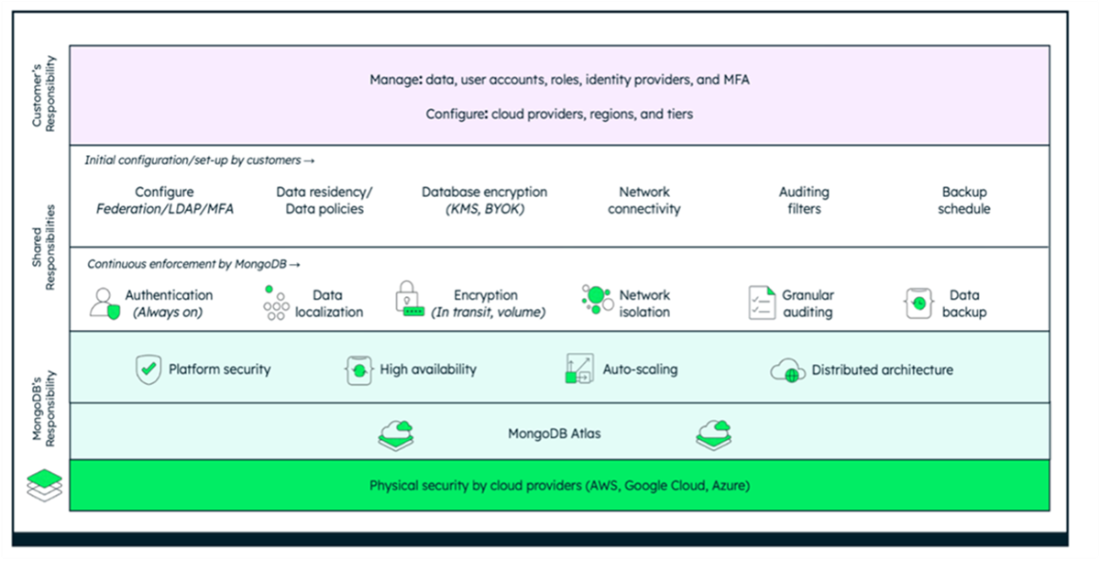
The shared responsibility model in MongoDB Atlas divides the security and operational tasks between customers, MongoDB, and the underlying cloud providers (AWS, Google Cloud, and Azure).
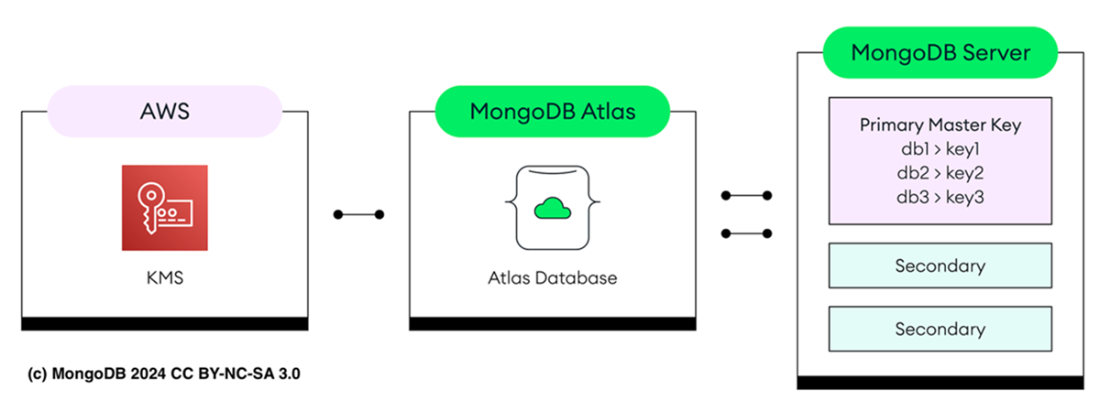
The MongoDB Atlas's encryption architecture shows the interaction between MongoDB Server, AWS KMS, and Atlas’s internal security layers.
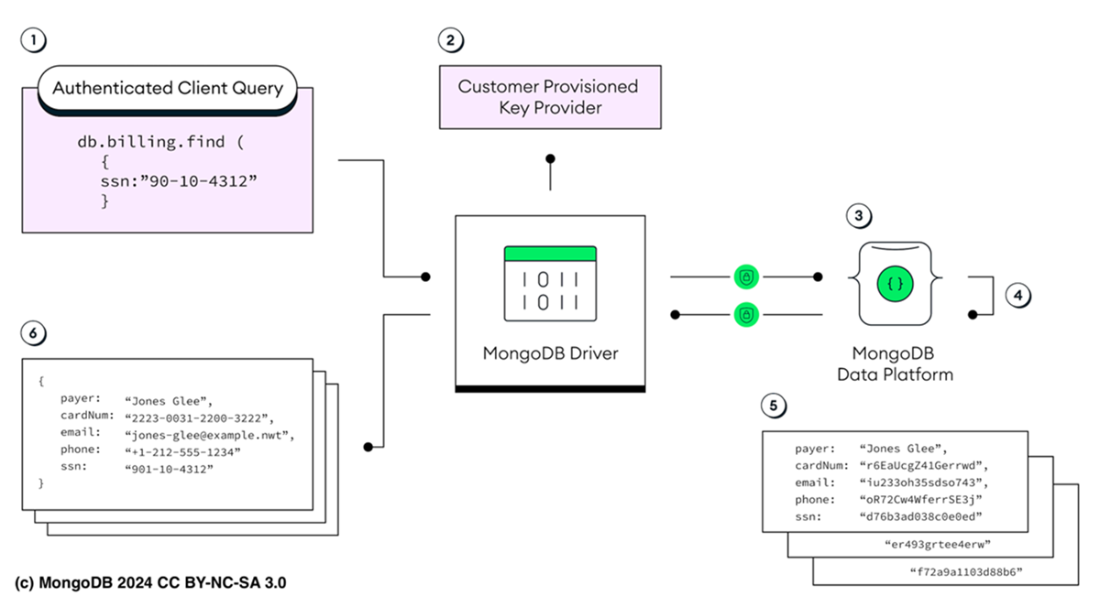
An authenticated client (1) submits a query containing sensitive information, such as a Social Security Number (SSN). The MongoDB driver (2) analyzes the query and identifies that it targets an encrypted field, prompting a request for encryption keys from a customer-provisioned key provider. Using these keys (3), the driver encrypts the query and sends it to the MongoDB server (4), where it is processed without any decryption, ensuring that sensitive data remains secure and hidden. The server then returns encrypted results (5) to the driver, which decrypts them and provides the plaintext data to the client (6), maintaining end-to-end security throughout the process.
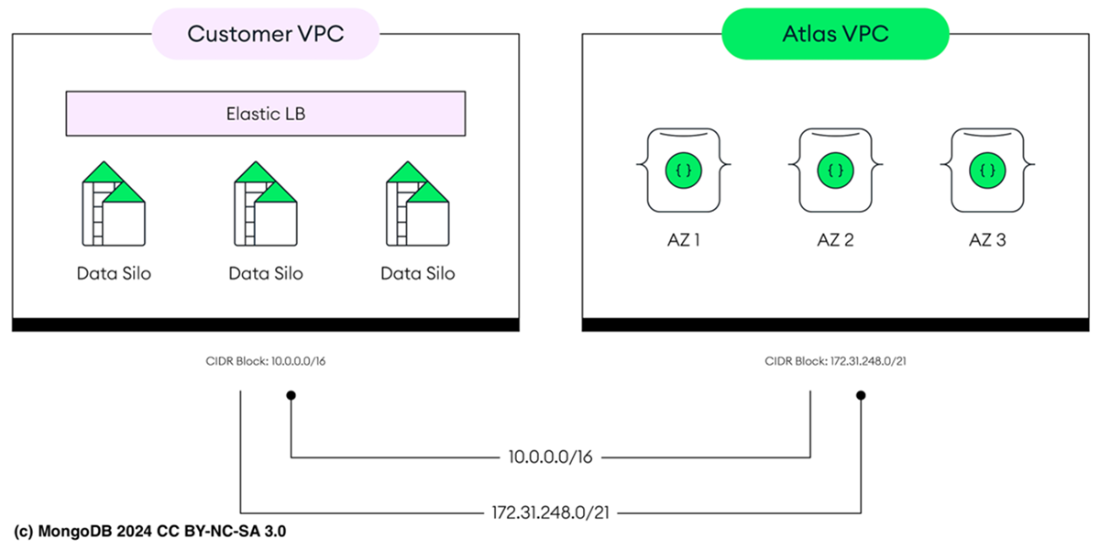
MongoDB Atlas VPC peered to an AWS VPC.
Summary
- MongoDB Atlas, as a software as a service (SaaS) platform, relies on cloud providers for physical security and infrastructure, while MongoDB ensures platform security and database management. Customers manage data access, identity, and certain security settings. This follows the shared responsibility model.
- MongoDB Atlas has two primary authentication areas: the Atlas UI and Atlas database clusters. The Atlas UI is used for managing clusters, user permissions, and configurations. Atlas database clusters handle data security by assigning roles to users or applications, controlling what actions they can perform, such as reading or modifying data.
- MongoDB Federated Authentication in Atlas UI uses the Federated Identity Management (FIM) approach for user authentication. In this setup, MongoDB Atlas relies on your Identity Provider (IdP) to authenticate users. With this system, your organization controls user credentials via the IdP, allowing for seamless authentication across various online platforms.
- MongoDB database cluster supports multiple authentication methods for database access, including SCRAM, x.509 certificates, LDAP, OIDC, and AWS IAM for passwordless login.
- MongoDB Atlas integrates with HashiCorp Vault to securely generate time-limited database credentials on-demand, reducing security risks from long-lived credentials. This is part of Vault's database secrets engine, using predefined roles in Vault.
- Atlas uses Role-Based Access Control (RBAC) to govern access to its cloud resources and MongoDB deployments by assigning roles to users, which specify their access rights within an Atlas Organization or Project. Similarly, MongoDB databases utilize RBAC to regulate specific actions on databases and collections.
- The principle of least privilege (PoLP) advises granting users, applications, or systems only the access they need to complete their tasks. By limiting permissions to the bare minimum, it reduces the risk of misuse, enhances security, and minimizes potential damage from breaches or errors.
- MongoDB controls access to its system using Role-Based Access Control (RBAC), where users are granted specific roles that define what they can do within the database. If a user isn’t assigned any role, they have no permissions to access or interact with the system.
- MongoDB custom roles enable precise access control, enhancing security by granting only the necessary permissions, unlike default roles that may overexpose sensitive data or functions.
- To minimize security risks and streamline management, avoid shared accounts by setting up dedicated users or service accounts (SA) for each application. This approach ensures finer access control, simplifies tracking of actions, and enables enforcing the principle of least privilege, keeping permissions well-defined and isolated.
- Database auditing allows administrators to monitor system activity in deployments with multiple users. In Atlas, administrators can choose specific actions, database users, and roles they wish to audit.
- MongoDB Atlas secures all connections with clusters using TLS (Transport Layer Security), which encrypts data during transmission to maintain confidentiality and integrity. All network traffic, including data sent to MongoDB Atlas and between cluster nodes, is safeguarded by TLS, enabled by default and cannot be disabled.
- When you create a MongoDB Atlas Cluster, customer data is encrypted at rest using AES-256, securing all disk-stored data through the provider’s transparent disk encryption. You can also use database-level encryption with the WiredTiger Encrypted Storage Engine, allowing you to bring your own encryption key via AWS KMS, Google Cloud KMS, or Azure Key Vault for secure key management.
- Client-Side Field Level Encryption (CSFLE) allows sensitive fields to be encrypted on the client side, ensuring they are protected before reaching MongoDB. For example, if an application stores a social security number, CSFLE encrypts it within the application so only encrypted data is sent to the database.
- Queryable Encryption in MongoDB allows secure searches on encrypted fields without decryption. It’s ideal for protecting sensitive data like social security numbers or credit card info while still enabling queries like equality matches.
- MongoDB Atlas clusters are protected from internet access by default, residing in a VPC with inbound traffic blocked. Users can create IP Access Lists to allow only specific IP addresses to connect, ensuring access is limited to approved sources.
- In MongoDB Atlas, network peering enables you to link your VPCs directly to an Atlas VPC, allowing traffic to flow privately without being exposed to the public internet. This feature is supported for dedicated clusters on AWS, Google Cloud, and Azure, as well as for multi-cloud sharded clusters.
- Private endpoints in Atlas enable a secure, private link from your VPC directly to an Atlas VPC, isolating all data traffic from the public internet. This configuration ensures that while your VPC can reach Atlas, Atlas cannot initiate connections back to your network, preserving a strict network boundary and bolstering security.
- Defense in depth is a security approach that uses multiple layers of protective measures to safeguard data and systems. With this method, each security layer is intended to deter or obstruct an attacker, ensuring that even if one control fails, additional defenses remain in place to prevent unauthorized access.
FAQ
What is the Atlas shared responsibility model and who is responsible for what?
MongoDB Atlas follows a shared responsibility model among you (the customer), MongoDB, and the cloud provider (AWS, Google Cloud, Azure). You handle data, identities, access control, network choices (regions, tiers), and initial security configuration (e.g., KMS/BYOK, IP access lists, private endpoints, auditing filters). MongoDB continuously enforces security controls (always-on auth, encryption in transit/at rest, network isolation, auditing, backups) and manages platform operations (high availability, scaling, patching). Cloud providers ensure physical security and underlying infrastructure.How do I authenticate to the Atlas UI versus Atlas database clusters?
- Atlas UI: Sign in with username/password or federated identity (e.g., Okta, Google, Azure AD) and enforce MFA (SMS, voice, authenticator apps, hardware keys).- Atlas database clusters: Authentication is enabled by default. Use roles to scope app/user access and optionally create time-bound users that expire automatically.
Which database authentication mechanisms does Atlas support, and what changed in MongoDB 8.0?
Supported mechanisms include SCRAM, x.509 certificates, OIDC, and passwordless authentication with AWS IAM. LDAP is still supported in MongoDB 8.0 but is deprecated as of 8.0 and will be removed in a future major release, so plan to migrate off LDAP.Which authentication method should I choose: SCRAM, x.509, OIDC, AWS IAM, or LDAP?
- SCRAM: General-purpose, password-based, easy to configure and widely supported.- x.509: High-trust, mutual authentication for regulated environments (finance/healthcare/government).
- OIDC/OAuth 2.0: Best for SSO with enterprise IdPs (Okta, Azure AD, Google) and MFA; centralizes identity management.
- AWS IAM: For AWS-hosted workloads; avoids static credentials and leverages role-based, short-lived auth.
- LDAP: Legacy enterprise directories; still supported in 8.0 but deprecated—plan a migration.
How does HashiCorp Vault integrate with Atlas to manage database credentials?
Vault’s database secrets engine can dynamically create MongoDB users with short TTLs mapped to predefined roles (e.g., read, readAnyDatabase, atlasAdmin). Credentials are auto-expired and users removed when TTL ends, reducing risk from long-lived secrets and enabling just-in-time, least-privilege access.How does authorization work in Atlas and MongoDB, and what is the principle of least privilege?
Atlas uses RBAC at Organization and Project levels (e.g., Organization Owner, Billing Admin, Project Owner, Data Access roles). MongoDB databases also use RBAC with built-in roles (e.g., atlasAdmin, readWriteAnyDatabase, readAnyDatabase, clusterMonitor, read) and custom roles. Apply least privilege by granting only the minimal permissions required for each user/app and avoiding shared accounts.How do I create custom database roles and where should I define them?
Create custom roles via Atlas UI/CLI (e.g., atlas customDbRoles create) by specifying privileges (actions like find, insert, update) and optional inheritance from existing roles. Define roles in the admin database for cross-database use, or in a specific database to limit scope to that database. Roles outside admin can only include privileges and inheritance within their own database.How does auditing work in Atlas, and what should I watch out for?
- Control plane auditing: Tracks Atlas UI actions at Organization/Project level (available via UI or API).- Database auditing: Captures events like authenticate and authCheck (failed by default; can log successes with auditAuthorizationSuccess). Use JSON audit filters to target specific users, commands, and namespaces. Note: Auditing isn’t available for M0 and Flex tiers, and enabling success logging on busy clusters can impact performance.
How is data encrypted in Atlas: in transit, at rest, and in use?
- In transit: TLS is always on for client and intra-cluster traffic; you can set the minimum TLS version (TLS 1.2 recommended).- At rest: Disk encryption is always on via cloud provider. Optionally enable database-level encryption (WiredTiger Encrypted Storage Engine) with Customer Managed Keys (AWS KMS, Google Cloud KMS, Azure Key Vault). Atlas uses your CMK to protect per-deployment Data Encryption Keys (DEKs).
- In use: Client-Side Field Level Encryption (CSFLE) encrypts sensitive fields in the application; supports equality on deterministically encrypted fields. Queryable Encryption enables equality and encrypted range queries without exposing plaintext to the server.
What network security options does Atlas offer and when should I use each?
- IP access list: Allowlist specific IPs/CIDRs; keep ranges tight (e.g., /32) and use temporary entries for short-term needs.- VPC peering: Private, low-latency routing between your VPC and Atlas VPC; keeps traffic off the public internet. Not available for M0 or Flex.
- Private endpoints: One-way, private connectivity from your VPC to Atlas without public exposure; supports transitive access from peered VPCs and hybrid setups (e.g., DirectConnect). Ideal for sensitive, compliance-heavy workloads.

 MongoDB 8.0 in Action, Third Edition ebook for free
