2 Getting started with Atlas and MongoDB data
This chapter introduces a hands-on path to getting productive with MongoDB Atlas and the MongoDB Shell by guiding you through provisioning a cloud cluster, securing access, and loading data for exploration. It emphasizes using the Atlas Command Line Interface to quickly create and manage resources, then pivoting to mongosh for querying and data inspection. Along the way, it frames Atlas’s core capabilities and UI organization, setting the stage for both practical exercises and a broader understanding of how MongoDB stores and manages data.
You begin by installing and authenticating with the Atlas CLI, creating an organization and project, and saving common settings in a profile for convenience. The chapter then walks through deploying a free M0 cluster, verifying its status, and loading the built-in sample datasets. To enable secure connectivity, you add your current IP to the project’s access list and create a database user (with a reminder to follow least-privilege practices). Finally, you retrieve the connection string, connect with mongosh, and validate the imported databases, noting useful CLI and shell commands and the option to automate these steps later after understanding them manually.
The chapter concludes with foundational MongoDB data concepts: how databases contain collections, which hold BSON documents, and what that means for flexible schema design. It balances the benefits of a dynamic schema with best practices for consistency, validation, and performance, and details naming rules and how collections can be created and inspected. You also learn about special collection types—capped collections for high-throughput, FIFO-style use cases and time series collections optimized for timestamped data—plus views and on-demand materialized views for shaping or precomputing results. Key document constraints, including the 16 MB document size limit and the semantics of the _id field, round out the essentials needed to begin modeling and managing data effectively.
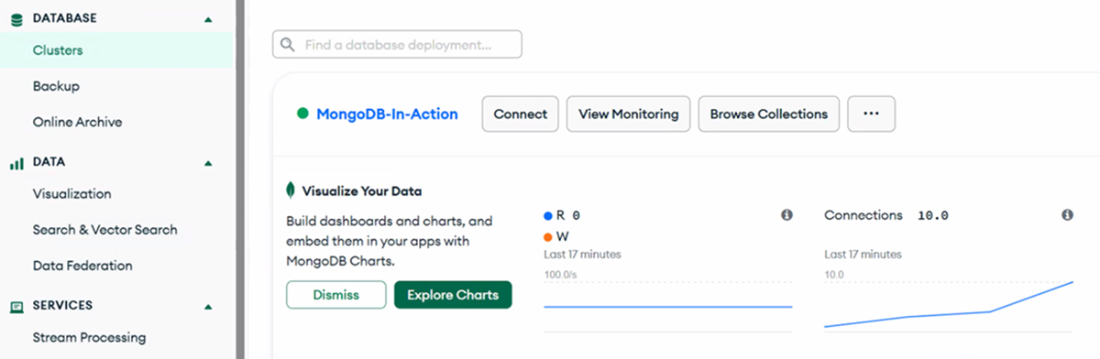
This MongoDB Atlas interface displays the active database deployment named "MongoDB-in-Action", with direct access to options such as Connect, View Monitoring, and Browse Collections. The left-hand sidebar shows an expanded navigation menu, highlighting key sections: DATABASE (Clusters, Backup, Online Archive), DATA (Visualization, Search & Vector Search, Data Federation), and SERVICES (Stream Processing). The interface also includes a “Visualize Your Data” prompt to explore MongoDB Charts, which allows users to build dashboards using their application data. Real-time cluster metrics, such as read/write operations and active connections, are displayed in the monitoring panel to the right.
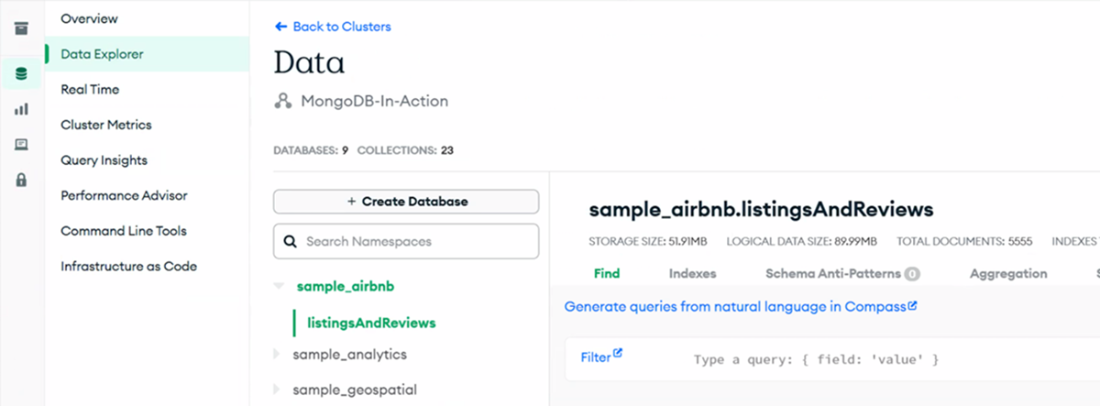
This MongoDB Atlas UI displays the 'sample_airbnb.listingsAndReviews' collection within the 'sample_airbnb' database, following the loading of the sample dataset. The right-hand panel shows key details such as storage size, logical data size, total documents, and index count. On the left, the navigation panel is expanded, showing options including Overview, Data Explorer, Real Time, Cluster Metrics, Query Insights, and more - enabling you to explore, monitor, and manage their cluster in depth.
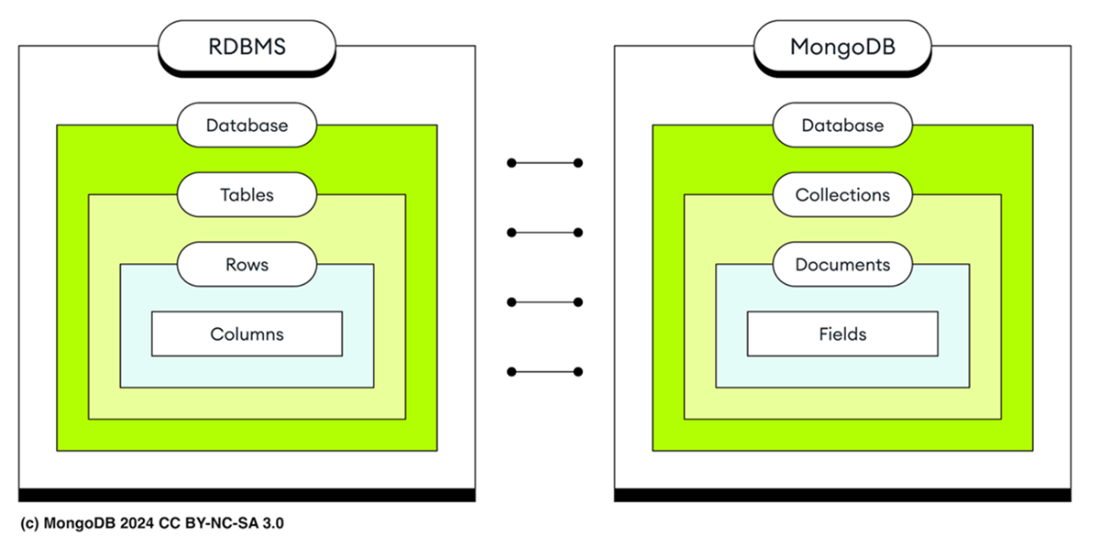
The terminology differences between relational databases and MongoDB.
Summary
- The Atlas CLI is an essential tool for setting up and managing MongoDB Atlas, streamlining the process of creating organizations, projects, and clusters. It offers a comprehensive range of commands for seamless database deployment, users management, security configuration, and maintenance tasks.
- To enhance security, assign users in MongoDB specific roles that grant only the permissions necessary for their tasks, applying the principle of least privilege. This strategy minimizes security risks and prevents unauthorized actions.
- Sample data loading is streamlined via the Atlas CLI, enabling preparation for practical exercises within the Atlas ecosystem.
- An Atlas organization acts as a top-level container that manages multiple projects under one umbrella, serving as the primary account level. Each project within the organization can contain individual deployments—instances of your database environment including servers, storage, and configuration settings.
- The MongoDB shell (mongosh) is a powerful interface for direct database interactions, offering a range of functionalities from basic commands to scripting.
- MongoDB organizes data into a three-level hierarchy: databases contain collections, which in turn hold documents featuring various data types, including nested documents. In contrast, relational databases structure data into databases, tables, rows, and columns.
- MongoDB's dynamic schema approach allows document structures within collections to evolve over time, unlike traditional relational databases that need predefined schemas. This flexibility supports rapid development by accommodating changes without restructuring existing data, making it ideal for handling diverse and rapidly evolving data sets.
- MongoDB's capped collections are fixed-size and operate like circular buffers. They ensure high-throughput insertion and retrieval by overwriting the oldest documents once the size limit is reached.
- MongoDB offers time series collections for efficiently storing time series data. These collections enhance query performance and reduce disk space usage by structuring writes to store data points from the same time period closely together.
- A MongoDB view is a read-only entity that is queryable and defined by an aggregation pipeline applied to collections or other views. Unlike stored data, the contents of a view are dynamically generated from underlying data only when queried by a client, and are not stored on disk.
- An on-demand materialized view in MongoDB is a pre-calculated aggregation pipeline result stored on disk. It improves read performance by allowing data retrieval from disk rather than calculating it during each query, unlike standard views.
- MongoDB stores records as documents in BSON format, an extension of JSON that supports additional data types. These documents are grouped into collections, with each document having a maximum size limit of 16 megabytes.

 MongoDB 8.0 in Action, Third Edition ebook for free
