19 Creating Atlas charts, database triggers, and functions
This chapter introduces how MongoDB Atlas helps you turn operational data into insight and automation. It starts with Atlas Charts, a no‑code visualization layer tightly integrated with MongoDB that lets you explore trends, spot anomalies, and communicate results through shareable dashboards. It then broadens to Atlas Application Services, showing how database triggers and serverless functions let you react to data changes in real time, orchestrate workflows, and connect to external systems without managing infrastructure.
Atlas Charts supports direct connections to collections, views, and purpose-built charts views, handling nested documents and arrays while leveraging aggregation for rich analysis. You can build many chart types, embed them in apps, and even generate visuals from plain‑English prompts, which Atlas converts into aggregation pipelines. Natural Language charts may send your prompt, schema metadata, and sampled values to a managed AI service to improve recommendations, but credentials are never transmitted and original prompts may be retained for service quality purposes. The chapter also shows how to track cloud costs with customizable billing dashboards, and explains pricing for Charts based on data transferred to browsers, including a monthly free allowance and per‑GB overage. Charts works across Atlas cluster configurations, including dedicated, Flex, Online Archive, and Data Federation sources.
On the automation side, Atlas Application Services provides three trigger types—database, scheduled, and authentication—each wired to an Atlas Function that executes your server-side JavaScript. Database triggers are powered by change streams and can be scoped from collection to deployment, filtered with match/project expressions, and configured to process events in order or at high concurrency; the chapter outlines capacity, throughput considerations, and optimization tactics. It walks through creating a trigger, capturing full documents or preimages, and common patterns like auditing, data synchronization, enforcing business rules, calling external APIs, or enriching documents (for example, storing embeddings). Atlas Functions run in a managed, scalable environment with context about the caller, access to MongoDB data, HTTP utilities, and Node.js modules, making them a lightweight way to implement validation, transformation, notifications, and other short‑running tasks.
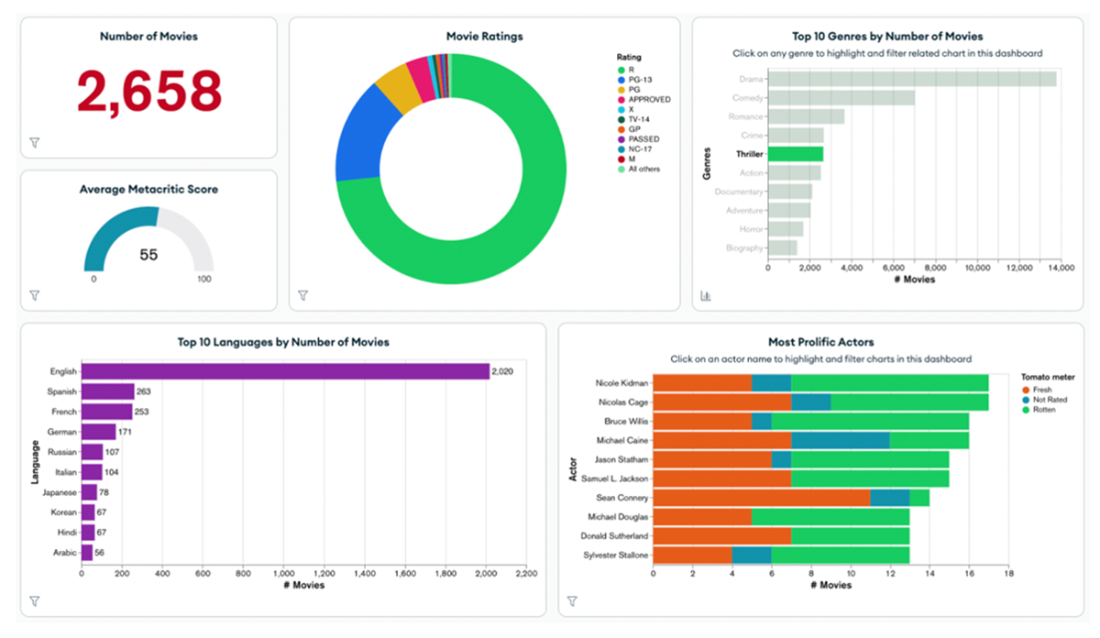
This example of Atlas Chart includes the total number of movies (2,658) and their average Metacritic score (55). The 'Movie Ratings' pie chart breaks down films by rating categories. The 'Top 10 Genres' bar chart highlights the most popular genres, with drama leading. The 'Top 10 Languages' chart shows that English dominates, while the 'Most Prolific Actors' chart identifies actors with the most appearances, categorized by critic ratings (Fresh, All-Rated, Rotten)
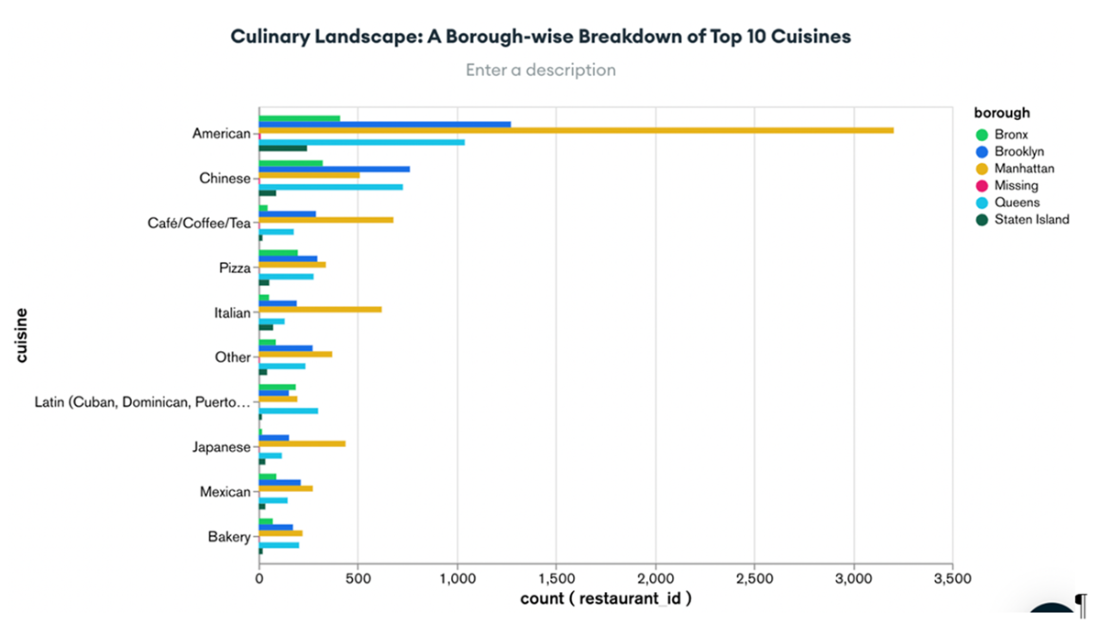
The chart generated using MongoDB Atlas's Natural Language Mode based on a plain English query. The chart displays a borough-wise breakdown of the top 10 cuisines by the number of restaurants. The y-axis lists the cuisines, while the x-axis shows the count of restaurants (restaurant_id). Each borough is represented by different colors (along with restaurants that are missing a designation). The chart highlights that American cuisine has the highest presence, particularly in Manhattan.
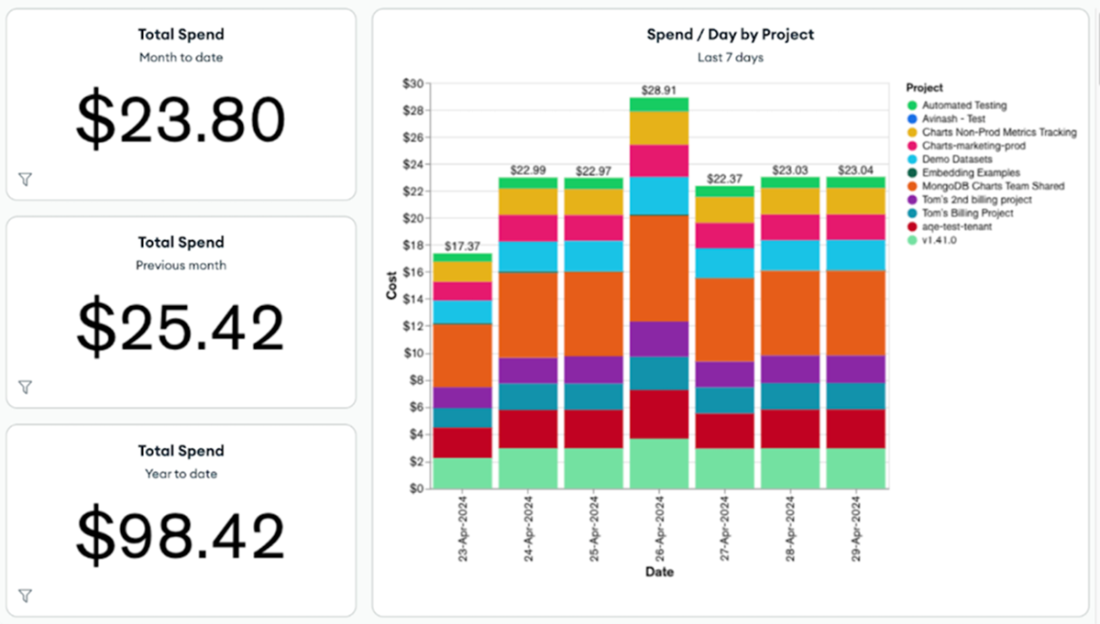
The Atlas billing dashboard with three main financial metrics on the left: total spend for the month to date is $23.80, total spend for the previous month is $25.42, and total spend for the year to date is $98.42. The central chart visualizes daily spending across various projects over the past week, with each project contributing to the total spend on each day, represented by different colored segments in the bars. Filters on the right side allow for further customization of the data displayed.
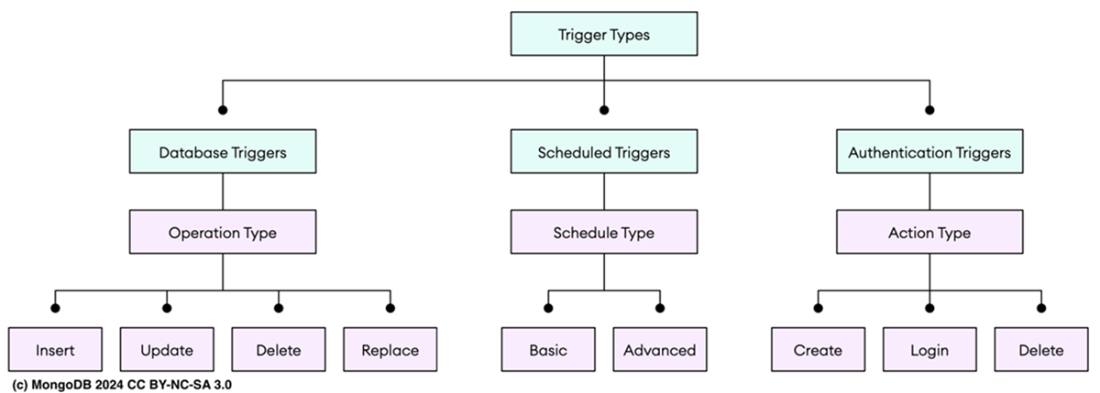
The trigger types in Atlas: Database Triggers (Insert, Update, Delete, Replace), Scheduled Triggers (Basic, Advanced), and Authentication Triggers (Create, Login, Delete).
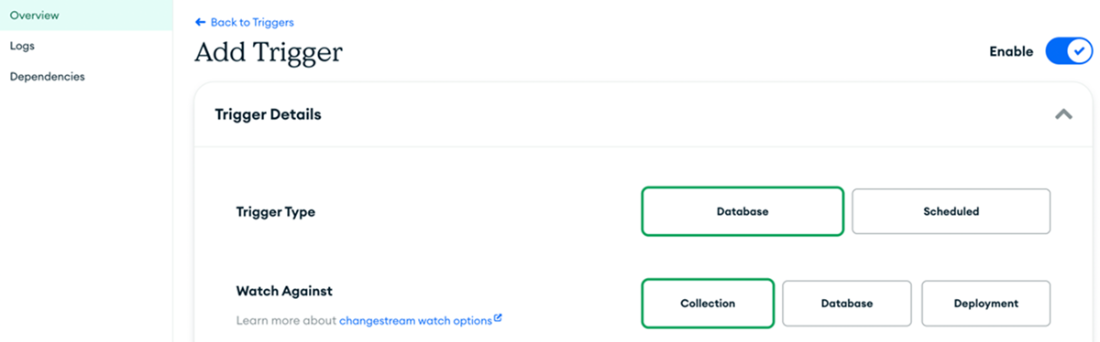
The Add Trigger interface in MongoDB Atlas. At the top, you can choose the trigger type: Database or Scheduled. In the Trigger Details section, you can set the trigger's name, enable or disable it, choose to skip events when re-enabled, and control event ordering.
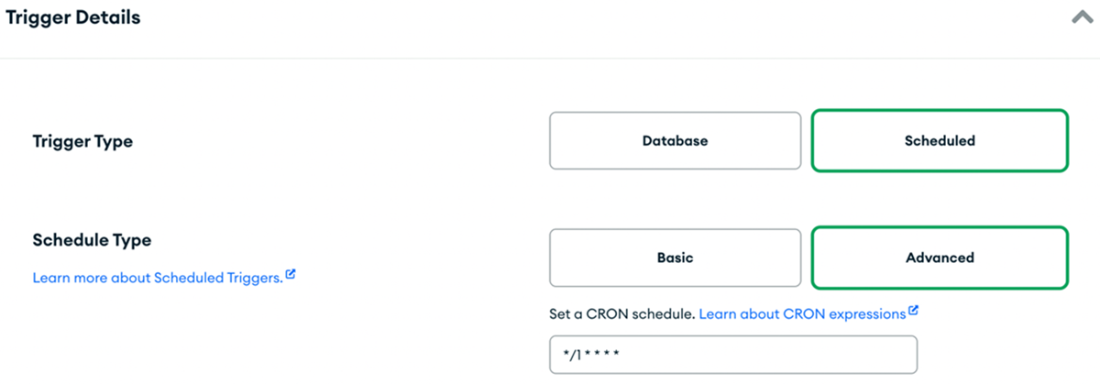
The MongoDB Atlas interface for setting up a scheduled trigger. The "Trigger Type" is set to "Scheduled," indicating that this trigger will execute at regular intervals. The name of the trigger is specified in the "Name" field. The "Schedule Type" is set to "Advanced," which allows for complex scheduling using CRON expressions. CRON expressions provide flexibility by allowing you to define exactly when the trigger should run.
Summary
- Atlas Charts is a MongoDB Atlas tool for creating and sharing visualizations like bar charts and line graphs directly from your MongoDB data. It offers a no-code interface, real-time data updates, and seamless integration with MongoDB, allowing you to embed charts into applications or dashboards for easy data analysis. It offers Natural Language, Column and Bar ChartsLine and Area, Combo Heatmaps, Scatter, Donut, Gauge, Tables, Number, Word, Top Item, Geospatial.
- Natural Language Charts uses Azure OpenAI, but this may change. MongoDB sends your query, schema, and sample data to its backend and the AI provider, without sharing credentials or data with third parties. Queries are stored for up to a year to improve service and support.
- With Atlas Charts, you can easily create a billing dashboard to visualize your billing data. These dashboards include ready-made charts that help you monitor your usage. After loading your billing data, you can customize the dashboard to meet your requirements.
- Atlas Application Services are managed backend services and APIs that simplify building cloud apps. They let you respond to MongoDB Atlas data changes, integrate with other systems, and scale easily, without server or infrastructure management.
- There are three types of Atlas triggers: Database for changes in a MongoDB collection, Scheduled for recurring tasks, and Authentication for user interactions with authentication providers. Each trigger is connected to a specific Atlas Function. When the trigger detects an event that meets your defined criteria, it "fires." It then passes the event object as an argument to the associated function.
- Database triggers are highly effective mechanisms for automating processes and enforcing rules without requiring manual input. They react to data changes and ensure that the stored information adheres to established standards and complies with specific business rules.
- Database triggers utilize MongoDB change streams to track real-time changes in a collection. A change stream is made up of a series of events, each describing an action taken on a document within the collection.
- Scheduled triggers enable you to execute server-side logic at predefined intervals. They are ideal for tasks that need regular execution, such as updating a document every hour, generating a daily performance report, or processing routine data analysis.
- Authentication triggers are triggered by events related to user authentication, such as login, account registration, or account deletion. For example, when a user registers a new account, an authentication trigger can be used to send a welcome email or automatically subscribe the user to a mailing list.
- An Atlas function is server-side JavaScript code that controls your app's behavior. It can be run directly from the client app or triggered automatically. These functions can call other functions, access MongoDB Atlas data, and use built-in tools.
- Atlas functions can call other functions, access data in MongoDB Atlas clusters using a built-in client, and support global utilities, Node.js modules, and external npm packages.
FAQ
What is MongoDB Atlas Charts and why would I use it?
Atlas Charts is a no‑code visualization tool built into MongoDB Atlas. It lets you explore, analyze, and share insights from your Atlas data with real‑time updates and built‑in aggregation. Use it to communicate trends, detect anomalies, and embed charts or dashboards in apps—without moving data or writing pipelines by hand.What are the main building blocks of Atlas Charts?
- Data sources: connect a MongoDB Collection or Database View, or create a Charts View tailored for visualization- Chart: a single visualization built from a chosen data source (e.g., bar, line, number)
- Dashboard: a collection of charts you can share, filter, and embed
Which chart types does Atlas Charts support?
Highlights include: Natural Language (AI‑assisted), Column/Bar, Line/Area, Combo, Heatmaps, Scatter, Donut, Gauge, Tables, Number, Word, Top Item, and Geospatial. Choose based on the question you’re answering (comparison, trend, distribution, proportion, location, etc.).How does Natural Language Mode work, and can I inspect the aggregation it generates?
Type a plain‑English prompt (e.g., “top 10 cuisines by restaurants per borough”). Charts uses AI to infer fields, build an aggregation, and return a suitable visualization. You can open the chart menu (three dots) to view the full generated aggregation pipeline for transparency and further tuning.What data does Natural Language Mode share, and how is it handled?
- Sent to MongoDB’s backend and/or the AI provider (currently Azure OpenAI Service): your query text, collection schema (names/types), and sample field values to improve accuracy- Not sent: database connection strings or credentials
- Retention: MongoDB may retain your original query text for up to one year to improve the service; data is not shared with external third parties, and AI providers don’t retain it
How do I build and customize an Atlas billing dashboard?
- Import your Atlas billing data, then add the billing dashboard with prebuilt charts- Metrics include: total spend (month‑to‑date, previous month, year‑to‑date), top spenders, spend by instance size/project/cluster/category/SKU
- Customize with filters and your own charts (including tag‑based views); dashboards show the most recent 12 months
How is Atlas Charts priced and what affects usage?
- Pricing is based on data transferred from the Charts web server to browsers- Each instance includes 1 GB free per month (roughly up to ~500k simple renders; complex charts cost more data)
- Beyond free: $1.00 per GB plus any applicable Atlas data transfer fees (fees calculated from AWS us‑east‑1 hosting region)
What trigger types are available in Atlas App Services, and when should I use them?
- Database triggers: react to insert/update/delete/replace events via change streams (e.g., sync inventory, log changes, enrich documents)- Scheduled triggers: run on intervals/CRON (e.g., nightly cleanup, weekly sync, monthly reports)
- Authentication triggers: fire on user create/login/delete (e.g., welcome flows, access revocation, audit)
How do I create and configure a database trigger effectively?
- Scope (Watch Against): Collection, Database, or Deployment (deployment scope requires dedicated tiers)- Operations: choose insert/update/delete/replace; enable Full Document and/or Preimage as needed
- Filtering and payload: use $match to limit events; use $project to shrink event size
- Execution: link the trigger to an Atlas Function; optionally send events to external services via AWS EventBridge
- Controls: enable/disable, skip events on re‑enable, ordered vs unordered processing
- Limits: number of triggers is constrained by cluster change stream limits; Data Federation instances don’t support change streams, so database triggers can’t target them
How do triggers process events, and how can I improve throughput?
- Ordered: processes one event at a time in sequence- Unordered: processes events concurrently (default up to 10,000; can exceed on M10+ clusters)
- Throughput tips: optimize function code (minimize network calls), apply $project to keep events small (ideally ≤2 KB), and use $match to reduce event volume

 MongoDB 8.0 in Action, Third Edition ebook for free
