18 Querying MongoDB Atlas using SQL
MongoDB Atlas exposes a read-only SQL interface through Atlas Data Federation so you can run familiar SQL-92 style queries against live Atlas data without building ETL pipelines. Using the MongoSQL dialect, the interface maps virtual databases and collections to underlying data sources and connects through standard BI tooling (ODBC/JDBC and named connectors), enabling analysis, dashboards, and reporting in tools like Tableau or Power BI while preserving the document model. Atlas Data Federation also infers JSON-based schemas from sample documents to aid compilation and type inference, and the interface can federate queries across multiple sources. Because it is read-only and operates over a federated database, it helps maintain data integrity and often improves query performance; note that data transfer charges apply when querying the federated instance.
Getting started is straightforward with Atlas SQL Quick Start, which provisions a federated database and activates the interface. You can then connect using the provided connection string via recommended drivers or directly from mongosh. Within mongosh, Atlas SQL can be invoked in two ways: as an aggregation pipeline using the $sql stage (which must be the first stage and accepts a statement plus optional flags), or via the concise db.sql() helper that submits a query string directly. Typical usage mirrors relational patterns like SELECT with WHERE filters, while the system’s schema management tracks renamed collections and supports wildcard discovery in the namespace catalog.
To handle document-centric structures, Atlas SQL adds functions that normalize semi-structured data into tabular results. UNWIND expands array fields into one row per element, simplifying analysis of multi-valued attributes, and FLATTEN converts nested objects into top-level columns with configurable depth and separators—useful for quickly shaping JSON-like fields. Keep in mind the current limitations of the SQL-92-based dialect: UNION ALL is supported but UNION is not, the date type is unavailable (use timestamp), SELECT DISTINCT and interval arithmetic are not supported, and Atlas Search and Atlas Vector Search are outside the scope of the interface. Overall, you gain familiar SQL access to Atlas data for analytics while operating within a strictly read-only, federated environment.
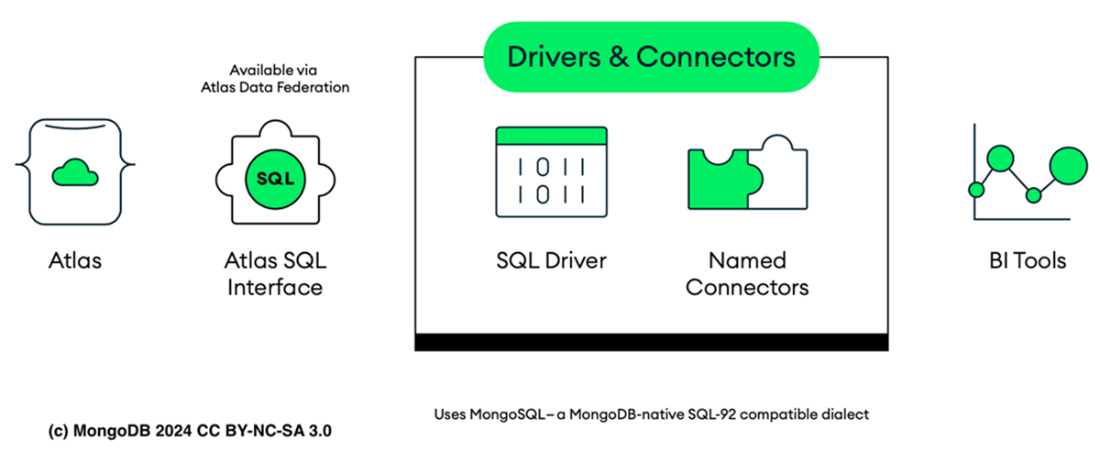
Atlas SQL Interface architecture.
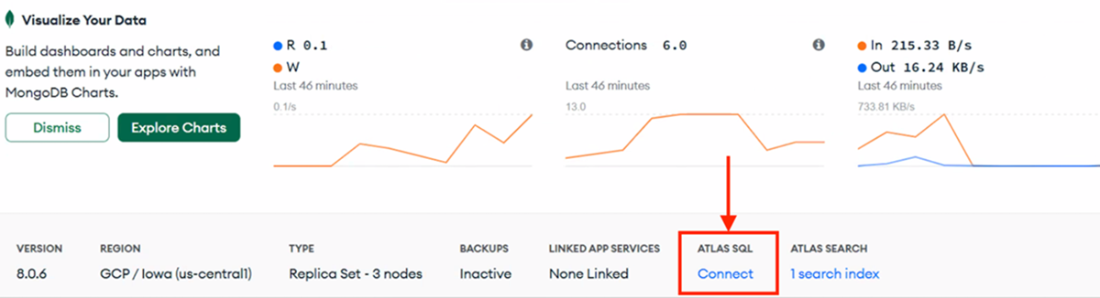
The Connect button connects to Atlas User Interface in the M0 cluster.
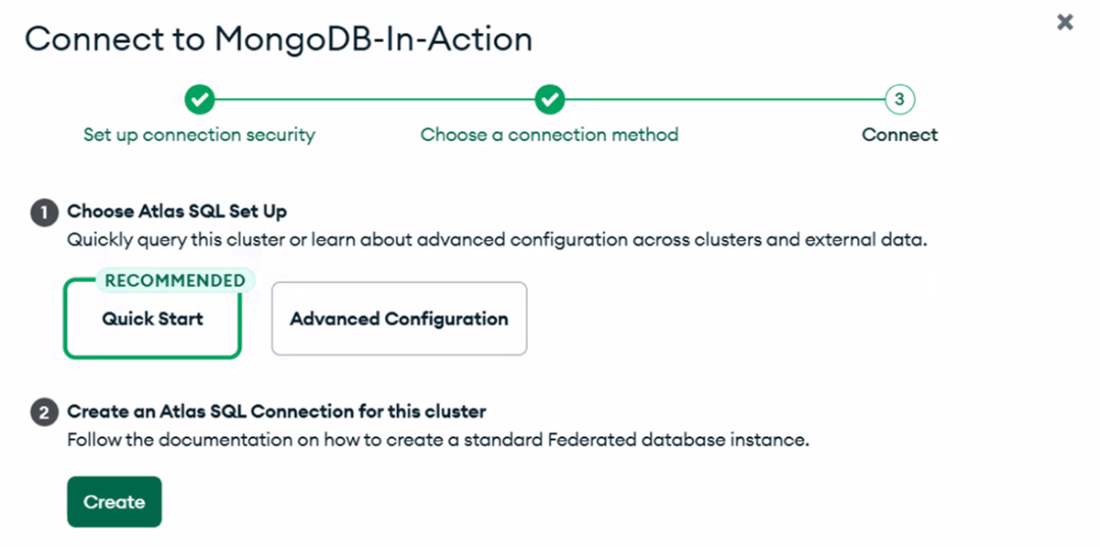
Atlas SQL Quick Start.
Summary
- MongoDB Atlas enables SQL querying through its Data Federation feature, allowing you to run SQL queries, such as SELECT and WHERE statements, directly on your MongoDB collections.
- The Atlas SQL Interface is designed solely for read operations and lacks the capability to perform write operations back to your Atlas cluster. This is attributed to its reliance on the Atlas Data Federation for its backend query engine, which consolidates data from multiple sources exclusively for the purpose of querying.
- Atlas Data Federation automatically generates JSON schemas for collections to aid in SQL query compilation and type inference. These schemas capture the unique characteristics of MongoDB data, including its polymorphism, sparseness, and complex nested structures.
- To use the Atlas SQL interface, you must first activate it by either using the Atlas SQL Quick Start or setting up your own federated database instance, which will automatically enable Atlas SQL.
- The $sql aggregation pipeline stage enables the formulation of Atlas SQL queries through the execution of an SQL query on the dataset within a collection.
- You can use the streamlined db.sql method to directly input an Atlas SQL statement. Be aware that this short-form syntax is currently unstable and may be subject to changes in the future.
- Atlas SQL allows you to use the UNWIND and FLATTEN functions to efficiently handle complex data structures in your documents. These functions enable effective manipulation and analysis of nested arrays and semi-structured data within a SQL-like environment.
FAQ
What is the MongoDB Atlas SQL Interface and how does it work?
The Atlas SQL Interface lets you run SQL-92 style queries against your Atlas data via Atlas Data Federation. It uses the MongoDB-native SQL dialect called mongosql and exposes virtual databases/collections that map to your underlying data sources, enabling read-only, federated queries across multiple sources without ETL.Is the Atlas SQL Interface read-only? Can I write data with SQL?
No. The Atlas SQL Interface is strictly read-only. Because it’s backed by Atlas Data Federation, which aggregates data from multiple sources for querying, write operations are not supported. This design preserves data integrity and simplifies synchronization across sources.How are schemas created for SQL querying in Atlas?
Atlas Data Federation automatically infers JSON-based schemas by sampling documents. Atlas SQL understands fields like bsonType, items, properties, additionalProperties, and required. If you rename a collection or view, its schema is renamed accordingly, and wildcard (*) collections get schemas upon discovery.How do I enable the Atlas SQL Interface using Quick Start?
- In the Atlas UI, open your cluster and click Connect.- Choose Atlas SQL, then select Quick Start.
- Click Create to provision a federated database and activate the SQL Interface (free to enable).
- You’ll see recommended drivers/connectors (Power BI, Tableau, JDBC, ODBC).
How do I connect to the Atlas SQL Interface with mongosh?
- Copy the provided Atlas SQL connection string from the UI.- Connect with mongosh using the string and your --username (TLS enabled).
- Once connected to the AtlasDataFederation context, you can run SQL via the aggregation $sql stage or the db.sql() short form.
What is the $sql aggregation pipeline stage and when should I use it?
The $sql stage lets you run a SQL statement inside an aggregation pipeline. Notes:- $sql must be the first stage.
- It accepts SELECT and set-union style statements (see UNION support below).
- Syntax includes statement and optional excludeNamespaces.
- You can specify dialect (mongosql) and format (for drivers).
What is the db.sql() short-form syntax?
db.sql() allows you to submit a SQL statement directly in mongosh without wrapping it in an aggregation pipeline. It’s a concise way to issue SELECT queries against collections in your federated database.How do UNWIND and FLATTEN help with nested data?
- UNWIND: Expands an array field so each array element becomes its own row, making arrays easier to analyze in SQL.- FLATTEN: Converts nested document fields into top-level columns. Options include DEPTH and SEPARATOR to control how deep and how columns are named.
Which SQL features and services are not supported?
- UNION (use UNION ALL instead).- SELECT DISTINCT is not supported.
- DATE type isn’t supported; use TIMESTAMP.
- Interval and date interval arithmetic aren’t supported.
- Atlas SQL does not support Atlas Search or Atlas Vector Search.

 MongoDB 8.0 in Action, Third Edition ebook for free
