17 Archiving online with Atlas Online Archive
Atlas Online Archive integrates with MongoDB Atlas to move infrequently accessed data from your live cluster to lower-cost cloud object storage while keeping it queryable. You define archiving rules driven by usage and retention: date- or custom query–based rules for standard collections and time-based rules for time series collections. Archived data is exposed through a read-only Federated Database Instance that can unify live and archived sources or target the archive only. The feature supports long-term storage, compliance, and historical analysis, but archived queries typically perform slower than queries against live data. It is read-only and not a replacement for a comprehensive backup strategy.
Archiving runs as recurring jobs on the cluster: by default every five minutes, with intervals extended when less than 2 GB is ready; each job writes up to 2 GB and can process up to 10,000 partitions. Proper indexing of rule fields (for example, date fields or custom query expressions) is required, and Atlas warns about insufficient index selectivity; the process consumes cluster resources and IOPS, so ensure capacity headroom. Constraints include availability on M10+ clusters only, no direct writes to the archive, no archiving from capped collections, and skipping tiny datasets that remain under 5 MiB after seven days; archived data is encrypted at rest and can be placed in select cloud regions. During migration, documents can briefly exist in both locations; afterward they are removed from the cluster, remain read-only, and you can configure a deletion age limit for lifecycle management.
You can initialize and manage archives via the Atlas CLI or UI by specifying the namespace, archiving rule, and partition fields, then query through connection strings that target combined, cluster-only, or archive-only endpoints; optional data processing limits and query termination control costs. Query behavior depends on the operation: blocking stages (such as sorts) are constrained by archive speed, while streaming finds return cluster results sooner. Cost is driven by data scan, data access (per partition), data seek, and data transfer. If needed, you can restore by pausing the archive and using a $merge aggregation from the archive’s federated endpoint back into a target cluster, safeguarded by duplicate-preventing indexes and adequate capacity; this method is not recommended for very large, highly partitioned datasets.
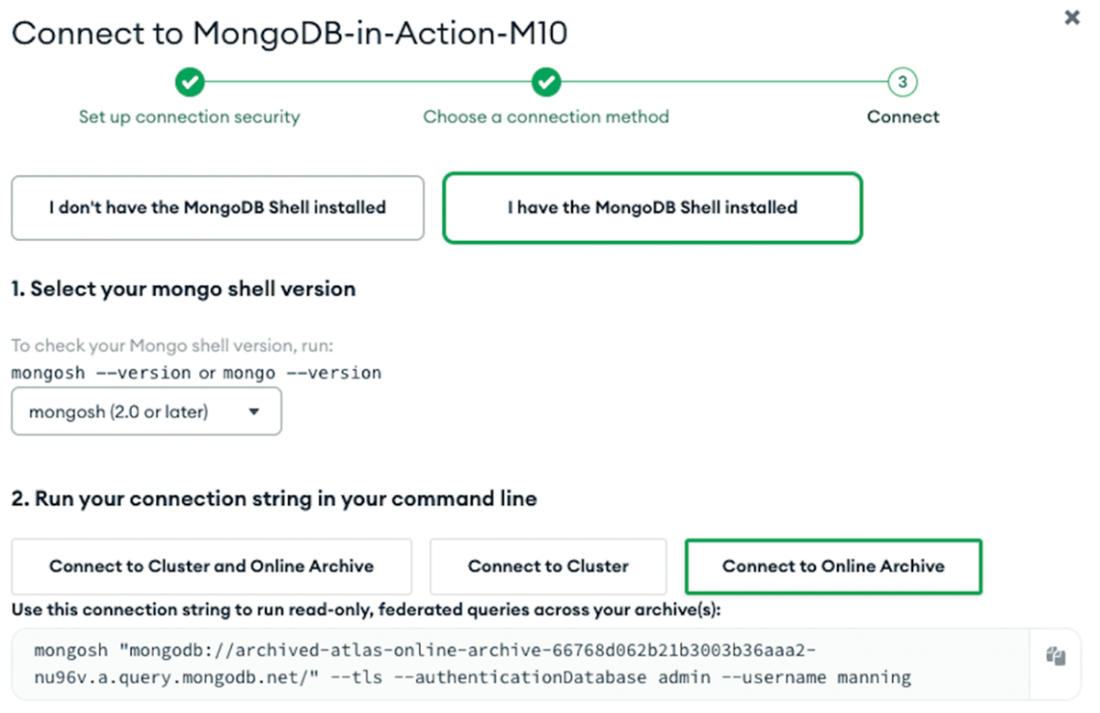
Atlas Federated Database connection strings.
Summary
- Atlas Online Archive reduces storage costs by moving rarely accessed data to cheaper storage, integrating smoothly with MongoDB Atlas. Custom archiving rules can be set based on data usage and retention needs.
- The Online Archive is only available for clusters that are M10 and higher.
- Atlas moves rarely used data from your primary Atlas cluster to a read-only Federated Database Instance, hosted on cloud object storage and managed by MongoDB. After archiving, you can access both your active Atlas data and the archived data through a single, read-only federated database instance.
- Atlas executes a specific query within the archive's designated namespace to select documents for archiving, referred to as a job. This job is automatically set to run every five minutes.
- During data archiving, Atlas first moves data to cloud storage and then deletes it from your cluster. This may briefly cause duplicates in both locations, but once the archival completes, these documents are only in the Online Archive.
- You can get access to both the MongoDB Atlas cluster and the Online Archive, allowing you to execute read-only, federated queries across both live and archived data. You can also connect solely to the archived data.
- You can configure data processing limits for queries on archived data to control costs related to your Online Archive. When the amount of processed data reaches a specified limit, Atlas will stop executing new queries and send an error message to the client application, indicating that the limit has been exceeded.
- Costs for federated and archive-only queries in Atlas accrue from data scans, access, and transfers. These expenses are driven by the amount of data processed, the number of archive partitions accessed, and the volume of data transferred within the federated infrastructure.
- You can restore archived data back into your Atlas cluster. The Atlas Data Federation provides a different syntax for the $merge pipeline stage, enabling the transfer of data to the same or another Atlas cluster, database, or collection within the same project.
FAQ
What is Atlas Online Archive and when should I use it?
Atlas Online Archive moves infrequently accessed data from your Atlas cluster to lower-cost cloud object storage while keeping it queryable. It integrates with Atlas, lets you define rules based on access patterns and retention, and exposes a read-only Federated Database Instance so you can query live and archived data together. Use it for long-term storage, compliance, and historical analysis to reduce cluster storage costs, understanding that some performance will be slower than the live cluster.Is Online Archive a backup replacement?
No. Online Archive is not a primary backup solution. It is designed for cost-effective storage of cold data, not disaster recovery. Maintain separate backups. Also note: once data is archived, it is no longer included in the live cluster’s backup configuration (the archived data relies on object storage redundancy).What archiving rules can I define for different collection types?
- Standard collections: date-based archiving (date field + days to retain) or a custom query that selects documents to archive.- Time series collections: time-based archiving (time field + days/hours/minutes to retain).
- The Online Archive feature is available on clusters M10 and higher.
- Ensure the date/time fields and any expressions used in custom queries are properly indexed.
How and how often does Atlas move data to the archive?
Atlas runs an archival job every 5 minutes by default within the archive’s namespace. If the ready-to-archive data is under 2 GB, Atlas increases the wait by 5-minute increments up to 4 hours, then resumes 5-minute intervals once the threshold is met or the max interval is reached. Each job writes up to 2 GB and can process up to 10,000 partitions. Atlas groups data (especially by date) to reduce partition count. If the ratio of documents scanned to returned is 10 or more, Atlas issues an Index Sufficiency Warning.What cluster resources does Online Archive consume and what should I check before enabling it?
Online Archive runs within your Atlas cluster and uses the same resources (including IOPS). There is a default cap of 2 GB per archival job to limit impact, but if your cluster is near capacity, enabling the archive could exceed limits. Ensure your cluster has headroom. You can choose from several regions for archived data and Atlas encrypts it using Amazon SSE-S3.What are the current limitations of Online Archive?
- You cannot write directly to the archive; data must be archived from the primary store via rules.- Archiving from capped collections is not supported.
- Data that remains smaller than 5 MiB after 7 days will not be archived.
- Feature availability starts at M10 clusters.
How do I set up an Online Archive for a collection?
1) Define a rule: choose the namespace (database.collection) and either a date field with an age limit or a custom query; index the relevant field(s).2) Choose partition fields frequently used in queries to optimize performance.
3) Create and start the archive using the Atlas CLI (for example,
atlas clusters onlineArchive create) or the Atlas UI. You can list status with atlas clusters onlineArchive list and manually start a job with atlas clusters onlineArchive start <archiveId>.How do I query live and archived data?
Use the Federated Database connection strings shown in the Online Archive section of your cluster. You get:- A combined, read-only string to query both live and archived data by the same database and collection names.
- A cluster-only string.
- An archive-only string. All access is read-only through the Federated Database Instance.
What performance and cost should I expect when querying archived data?
Performance: Blocking operations (for example, sorts) are gated by the slower archive storage, while streaming operations (for example, find) return faster from the live cluster and slower from the archive.Costs: You are billed for Data Scan, Data Access (per partition read), Data Seek (partition lookups), and Data Transfer. You can set data processing limits and optionally enable query termination to stop queries that exceed limits.
How are archived documents removed and can archived data be auto-deleted?
During archiving, data is first copied to object storage and then deleted from the Atlas cluster (temporary duplicates may appear). The deletion operation connects to the primary for removals. You can set a Deletion Age Limit to automatically delete archived data after a specified period. The archive is read-only, and Atlas does not sync archived data with the live cluster after archiving.How can I restore archived data back to my live cluster?
Pause the archive (atlas clusters onlineArchive pause), ensure the target collection has a unique index on the merge keys (e.g., saleDate, customer), connect to the archive, and run an aggregation with $merge targeting your Atlas cluster, database, and collection. Verify your cluster has enough capacity. This approach is not recommended for very large datasets (about 1 TB) with many partitions.
 MongoDB 8.0 in Action, Third Edition ebook for free
