16 Optimizing data processing with Atlas Data Federation
This chapter introduces Atlas Data Federation as a distributed query engine that unifies access to data across MongoDB Atlas clusters and external sources such as AWS S3, Azure Blob Storage, online archives, and HTTP/HTTPS endpoints. By defining virtual databases and collections that map to these stores, you can run complex analytical queries over both historical and live datasets using the MongoDB Query Language or SQL, all without moving or duplicating data. The approach streamlines data management, reduces ETL overhead, and supports a consistent, comprehensive view that enables faster, better-informed decisions.
The chapter details how storage configuration uses JSON mappings to bind virtual databases and collections to underlying sources, and explains the four-part architecture. Applications and services (drivers, data tools, Compass) provide user entry points; the Control Plane orchestrates requests and assembles results; an elastic Compute Plane close to data minimizes latency and movement; and the Data Plane governs secure access with role-based controls across Atlas clusters, S3, Azure Blob, and more. Beyond ad hoc queries, Federation supports copying and exporting to S3/Blob in formats like Parquet and CSV, combining data from multiple clusters and online archives, materializing aggregations across clusters and S3, and importing from S3 into Atlas.
Deployment involves creating a federated database instance in Atlas, naming it, selecting sources (entire clusters or specific collections, plus external stores), authorizing access (for example, IAM for S3), and optionally scheduling recurring exports to formats such as Parquet, CSV, BSON, or JSON. The chapter outlines limitations: supported authentication is restricted (SCRAM, X.509, OIDC, AWS IAM), there’s no monitoring for federated instances, S3 use is limited to a single AWS account, documents over 16 MB are unsupported, document order isn’t guaranteed without explicit operators, connections are capped at 60 per region with up to 30 concurrent queries, indexes cannot be created, and cursors may be terminated if they do not progress. Pricing is based on bytes processed and returned (with a 10 MB minimum per query and about $5 per TB processed), including inter-node transfers and $out/$merge writes; partitioning data and colocating Federation with S3 or Blob in the same cloud/region help manage latency and cost, and S3 can be queried only from AWS-based instances while Azure Blob requires Azure-based instances.
The Unified Query API allows to query workload from AWS S3 and Azure Blob Store.
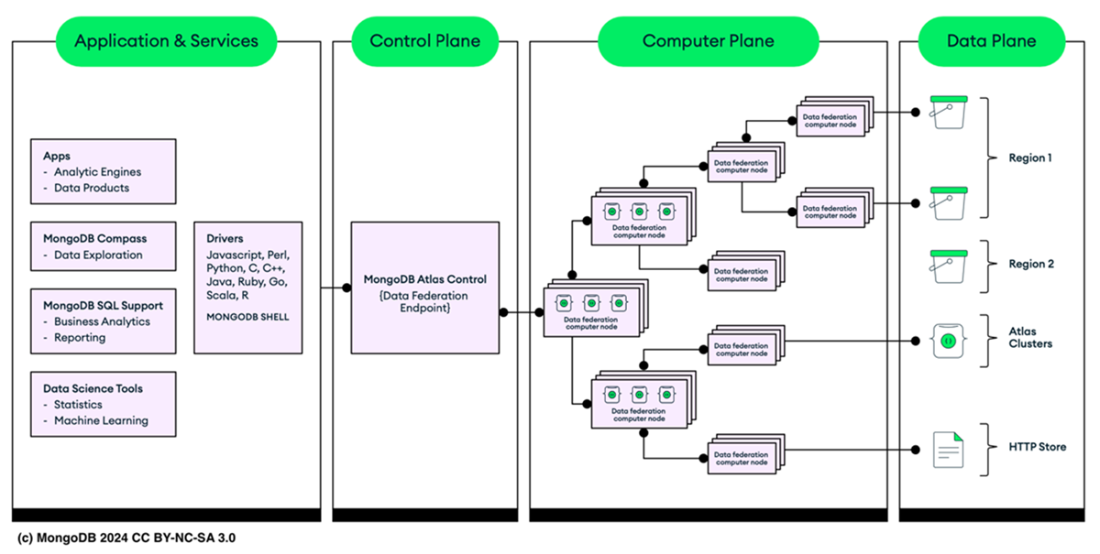
The architecture of Atlas Data Federation.
Summary
- Atlas Data Federation, a distributed query engine, enables seamless querying, transforming, and transferring of data across various MongoDB Atlas sources. It deploys federated database instances, which include virtual databases and collections mapped to your existing data stores.
- Atlas Data Federation merges data from your MongoDB Atlas clusters, HTTP and HTTPS endpoints, Atlas Online Archive, and cloud storage (like AWS S3 or Azure Blob Storage) into virtual databases and collections. The data remains in its original location and format.
- You can build and manage Atlas Federated Database from the Atlas UI as well as using the Atlas CLI.
- Atlas Data Federation charges are incurred for data processed and returned by federated database instances. These costs are based on the volume of data handled and delivered by the system during operations.
- The Atlas SQL Interface comes enabled by default upon creating a federated database instance. This allows you to start querying your data immediately without any additional configuration.
FAQ
What is MongoDB Atlas Data Federation and why would I use it?
It’s a distributed query engine in MongoDB Atlas that lets you query, transform, and analyze data across multiple sources without moving or duplicating it. You can combine MongoDB clusters, Atlas Online Archive, AWS S3, Azure Blob Storage, and even HTTP/HTTPS endpoints into a single, consistent view for analytics and decision-making.Which data sources are supported and how do virtual databases/collections work?
Atlas Data Federation can read from Atlas clusters and online archives, AWS S3, Azure Blob Storage, and HTTP/HTTPS endpoints. You create virtual databases and collections that map to these sources via a JSON storage configuration, so you can access and query external data as if it were native.What is the MongoDB Unified Query API and how do I query external storage?
The Unified Query API lets you use MongoDB’s Query Language (and optionally SQL via the Atlas SQL Interface) to run the same queries across Atlas clusters and external stores like S3 or Azure Blob. You can combine results from multiple sources into one result set.How is Atlas Data Federation architected?
It consists of four components: Application & Services (tools, drivers, data science interfaces), Control Plane (orchestrates requests and aggregates results), Compute Plane (elastic compute nodes placed close to data to reduce latency and transfer), and Data Plane (where data resides, with secure, role-based access to sources like S3 and Azure Blob).How do I deploy a Federated Database Instance?
In Atlas, go to Data Federation and click Create New Federated Database. Name the instance, add sources (Atlas clusters or external stores like S3), authorize access (for example, AWS IAM for S3), choose collections or buckets, configure when/how queries or exports run (and formats such as Parquet, CSV, BSON, JSON), review, and create. See the step-by-step guide: https://www.mongodb.com/docs/atlas/data-federation/tutorial/deploy/What can I do beyond ad-hoc querying?
You can copy data from Atlas clusters to S3 or Azure Blob in Parquet/CSV/BSON/JSON, query multiple clusters and online archives for a consolidated view, materialize aggregation results across clusters and S3, and read/import data from S3 into an Atlas cluster.Are there region or cloud constraints I should be aware of?
Yes. You can query AWS S3 only with federated database instances created in AWS, and Azure Blob Storage only with instances created in Azure. To avoid high data transfer costs and latency, deploy the federated instance in the same cloud provider and region as your storage.What are the key limitations of Data Federation?
- Authentication: supports SCRAM, X.509, OIDC, and AWS IAM only.
- No Atlas monitoring for federated instances.
- AWS S3 sources must be within a single AWS account.
- Documents over 16 MB are not supported in queries.
- Document order isn’t guaranteed unless you use specific ordering operators.
- Up to 60 simultaneous connections per region.
- Up to 30 simultaneous queries per instance.
- You cannot create indexes in federated instances.

 MongoDB 8.0 in Action, Third Edition ebook for free
