14 Building retrieval-augmented generation AI chatbots
This chapter introduces the problem of large language model hallucinations and presents retrieval-augmented generation as a practical remedy. RAG improves answer accuracy by coupling generation with real-time retrieval from an external knowledge base: documents are chunked, embedded, stored in a vector database, and relevant chunks are fetched via semantic search to ground the model’s output. MongoDB Atlas Vector Search plays a central role in this pipeline by indexing and serving embeddings so the model can reference authoritative, up-to-date context. The pattern is framed for broad use—chatbots, customer support, technical assistance, research, and content creation—where trustworthy, source-grounded responses are essential.
The chapter then focuses on tooling, centering on LangChain (with a brief nod to LlamaIndex) as the orchestration framework that connects LLMs, embedding models, and vector stores. It explains how LangChain’s ecosystem—core abstractions, community integrations, partner packages like langchain-openai and langchain-mongodb, LangGraph for stateful workflows, LangServe for API deployment, and LangSmith for evaluation—streamlines everything from embedding generation to retrieval and prompting. Through its integration with Atlas Vector Search, LangChain manages storage and semantic search over embeddings, enabling efficient, contextual retrieval that slots seamlessly into RAG chains.
A hands-on walkthrough demonstrates building a MongoDB-focused GenAI chatbot with the mongo-rag template and LangChain CLI: scaffolding a LangServe app, wiring the chain, ingesting a vetted PDF, splitting text, creating embeddings, and storing them in MongoDB. After creating a Vector Search index, the chatbot is tested in the LangServe playground and programmatically via HTTP, revealing the end-to-end flow: query embedding, retrieval, prompt construction, model generation, and output parsing. Practical guidance—such as tuning the number of retrieved chunks to respect context limits—shows how to produce grounded, concise answers. The result is a reusable, production-ready pattern for domain-specific chatbots that trade speculation for verifiable, document-backed responses.
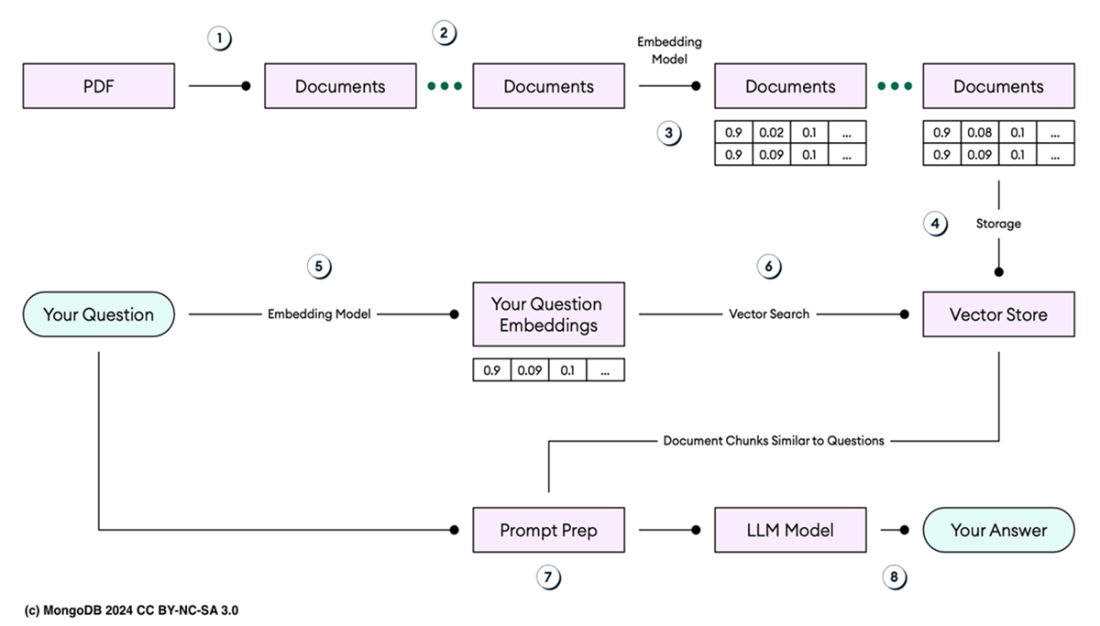
Retrieval-augmented generation (RAG) paradigm step by step.
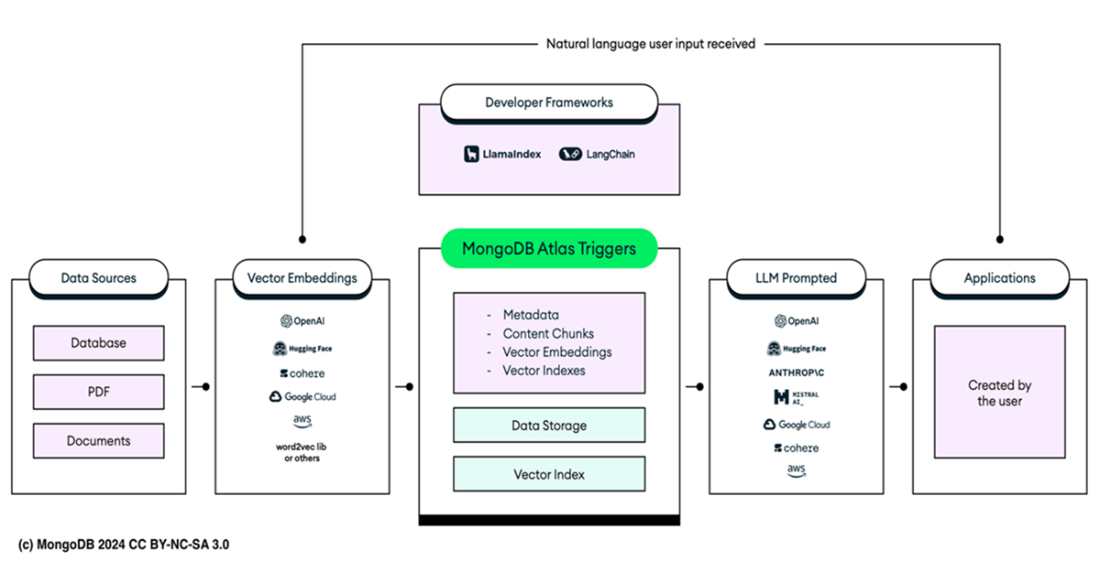
Embedding LangChain in the RAG pattern. Data from sources like databases, PDFs, and JSON files is converted into vector embeddings using tools like OpenAI, Cohere, and Hugging Face. These embeddings are stored and indexed in a database. Developer frameworks like LlamaIndex and LangChain manage the processing, storing, and indexing of these embeddings in databases, like MongoDB Atlas, along with metadata and context chunks. When a natural language input is received, the system retrieves relevant data from the vector index, prompts the LLMs, and the generated output is delivered to the application. Also visible are Atlas Triggers, which react to the addition of new documents to the database by automatically using tools like OpenAI to convert them into embeddings and store them in the vector database.
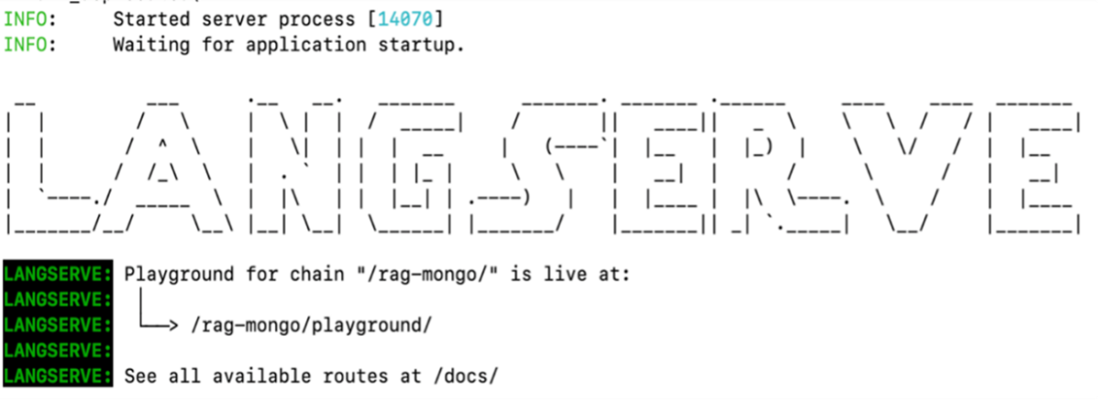
The server LangServe process has started, and the application is waiting for further commands. The message indicates that the playground for the chain /rag-mongo/ is now live and accessible at /rag-mongo/playground/. Additionally, it provides a link to view all available routes at /docs/, where you can explore the API documentation and test the chatbot's functionality.
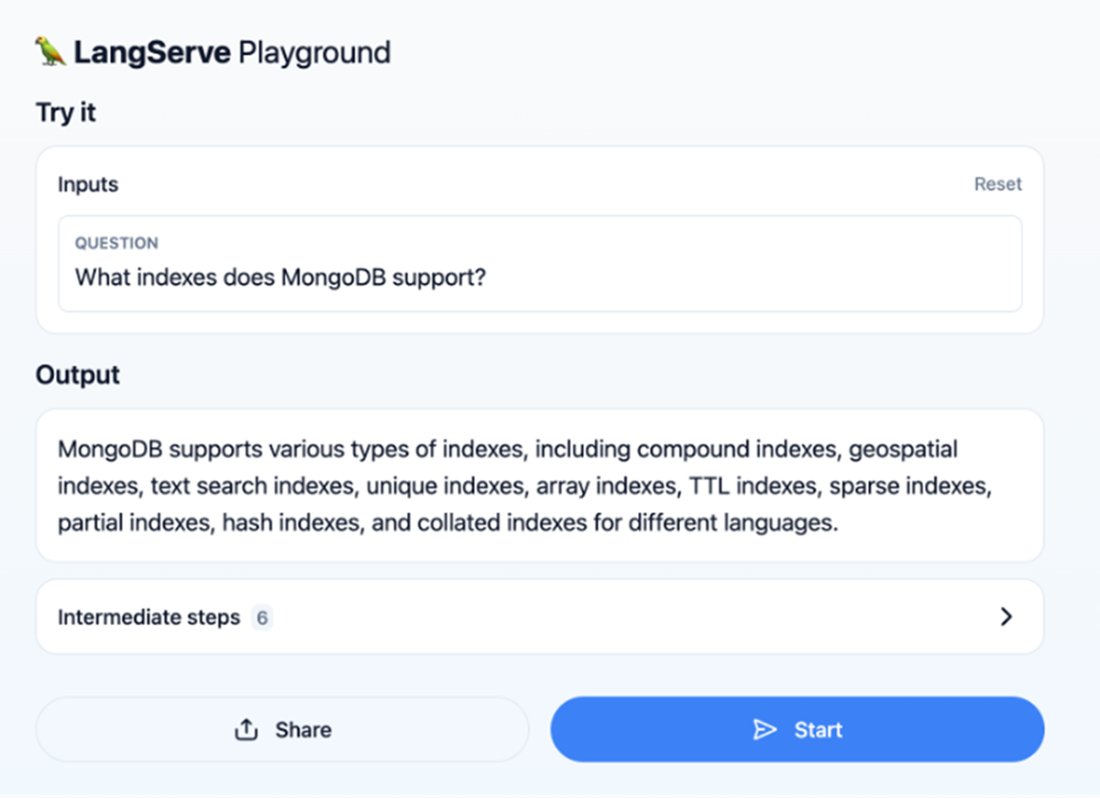
The LangServe Playground interface where a user asks, "What indexes does MongoDB support?". The output lists various types of indexes supported by MongoDB, including compound, geospatial, text search, unique, and others. Below the output, it shows that six intermediate steps are visible, highlighting the process taken to generate the response. The interface also includes a Start button to initiate the process and a Share button for sharing results.
Summary
- LLM hallucinations occur when the model generates information not based on facts or input data, leading to fabricated or incorrect details. This happens because models like GPT-4 rely on patterns learned during training rather than fact-checking. To reduce these errors, strategies include improving training data, adding real-time fact-checking, enhancing verification systems, and using Retrieval-Augmented Generation (RAG) to combine text generation with real-time data retrieval.
- Retrieval-Augmented Generation (RAG) enhances language model accuracy by combining text generation with information retrieval. This approach allows the model to access external data in real-time, reducing the risk of generating incorrect or fabricated content. RAG utilizes a vector database to store and retrieve text embeddings, enabling the model to efficiently find and use relevant information during generation, thereby minimizing hallucinations.
- Building a Gen AI application using the RAG paradigm is challenging without the right tools because it requires seamless integration between LLMs, embedding models, and vector databases like MongoDB Atlas Vector Search. Without proper tools, you'd have to manually manage complex interactions, including embedding generation, storage, and real-time querying, which demands deep technical expertise and understanding of system architecture.
- LangChain is one of the top frameworks for addressing RAG challenges. It streamlines AI application development by seamlessly integrating LLMs with external data sources and computational tools.
- LangChain connects LLMs with external data sources and tools, managing the process from receiving natural language input to generating and indexing vector embeddings. It handles data from various sources, like chatbots, databases, and documents, enabling efficient retrieval and processing, so LLMs can effectively use relevant information in AI applications.
- MongoDB and LangChain have created a RAG template using MongoDB Atlas Vector Search and OpenAI. This template streamlines the development and deployment of chatbot applications on proprietary data. LangChain Templates offer a reference architecture that can be easily deployed as a REST API with LangServe, simplifying integration.
- LangServe deploys LangChain models as REST APIs with FastAPI and pydantic for data validation. It supports invoking, batching, and streaming endpoints for real-time AI apps, and uses uvloop and asyncio for concurrency. It also includes a playground for testing and tweaking parameters in real-time.
- The LangChain CLI is a tool that lets you interact with the LangChain framework directly from the command line. It offers commands for tasks like creating projects, running tests, and managing configurations. The CLI simplifies development by enabling quick, efficient operations, making it easier to automate tasks and streamline the workflow for building and deploying LLM-powered applications.
- The mongo-rag template orchestrates the chatbot process, starting with RunnableParallel to convert the question and context into embeddings. The Retriever fetches relevant documents, which RunnablePassthrough forwards to ChatPromptTemplate to create a structured prompt. ChatOpenAI generates a response, and StrOutputParser extracts the final output.
- You can communicate with the chatbot without a GUI by using tools like curl, enabling direct command-line HTTP requests. This method is ideal for automation, scripting, and testing, allowing efficient, programmatic interaction with the server. Similar communication can also be achieved using various programming languages.
FAQ
What are LLM hallucinations and how can RAG reduce them?
LLM hallucinations are confident but incorrect outputs produced because models generate text from learned patterns rather than verifying facts. Retrieval-augmented generation (RAG) mitigates this by fetching verified, up-to-date context from external sources at inference time and grounding the model’s answer in that evidence. MongoDB Atlas Vector Search stores embeddings for fast, relevant retrieval that the LLM uses to craft accurate responses.What is retrieval-augmented generation (RAG) and how does it work step by step?
RAG pairs generation with retrieval: (1–2) Parse source documents and split into coherent chunks. (3) Embed each chunk into vectors. (4) Store vectors in a vector database. (5) Embed the user query. (6) Vector-search for the most similar chunks. (7) Build a context-rich prompt from retrieved chunks. (8) Have the LLM generate an answer grounded in that context.Why use a vector database like MongoDB Atlas Vector Search in a RAG system?
Vector databases efficiently store and search high-dimensional embeddings. Atlas Vector Search enables fast semantic retrieval (e.g., cosine similarity) of the most relevant chunks for a query. This ensures the LLM receives precise, contextually relevant evidence, improving accuracy, reliability, and latency of RAG pipelines.How does LangChain fit into the RAG ecosystem, and why is it used here instead of LlamaIndex?
LangChain orchestrates LLMs, embedding models, and vector stores end to end. It handles loading data, splitting text, creating embeddings, storing/retrieving vectors, building prompts, and invoking models. While LlamaIndex is also capable, this chapter focuses on LangChain for its breadth of integrations (e.g., langchain-mongodb, langchain-openai), composable runnables, deployment via LangServe, and tooling like LangSmith.What is the mongo-rag template and how does LangServe help deploy it?
The mongo-rag LangChain template pairs OpenAI with MongoDB Atlas Vector Search to build a RAG chatbot on your own data. LangServe exposes the chain as a REST API (FastAPI + Pydantic), supports invoking/batching/streaming, provides built-in tracing, and includes a playground UI at/rag-mongo/playground/ for rapid testing and parameter tuning.How do I scaffold a new RAG app with the LangChain CLI and what key files matter?
Runlangchain app new mongodb-in-action --package rag-mongo. Then in app/server.py, add from rag_mongo import chain as rag_mongo_chain and add_routes(app, rag_mongo_chain, path="/rag-mongo"). Key files: packages/rag-mongo/ingest.py (load/split/embed/insert), packages/rag-mongo/rag_mongo/chain.py (retriever + prompt + LLM chain), and app/server.py (API routes).How do I ingest a PDF into MongoDB Atlas as embeddings?
Set environment variablesOPENAI_API_KEY and MONGO_URI. In packages/rag-mongo/ingest.py, set DB_NAME, COLLECTION_NAME, ATLAS_VECTOR_SEARCH_INDEX_NAME, and the PDF URL (e.g., Atlas best practices). Run python3 ingest.py. LangChain loads the PDF, splits it (e.g., 500 chars), creates embeddings with OpenAI, and stores documents containing fields like text, embedding, source, and page.How do I create and verify an Atlas Vector Search index for those embeddings?
Create a JSON definition specifying name (e.g.,default), database/collection, path: "embedding", numDimensions: 1536, and similarity: "cosine". Then run atlas deployments search indexes create --file vector-search.json --type LOCAL. Verify in mongosh with db.<collection>.getSearchIndexes(); ensure the index is READY and queryable.How does the LangServe playground pipeline answer a question end to end?
The chain performs: (1)RunnableParallel to prepare query and context, (2) retriever to fetch top-k relevant chunks from Atlas Vector Search, (3) RunnablePassthrough to forward inputs, (4) ChatPromptTemplate to build a grounded prompt, (5) ChatOpenAI to generate an answer, and (6) StrOutputParser to return the final text. Tip: set retriever k=1 to avoid exceeding model context limits.How can I call the chatbot programmatically without the UI?
Use HTTP against the LangServe routes. Example with curl:curl -X POST "http://127.0.0.1:8000/rag-mongo/invoke" -H "Content-Type: application/json" -d '{"input":"Explain how MongoDB Atlas uses encryption."}'. The service returns a JSON payload with the grounded answer. You can also explore /docs/ for interactive API docs and /rag-mongo/playground/ for the UI.
 MongoDB 8.0 in Action, Third Edition ebook for free
