13 Developing AI applications locally with Atlas CLI
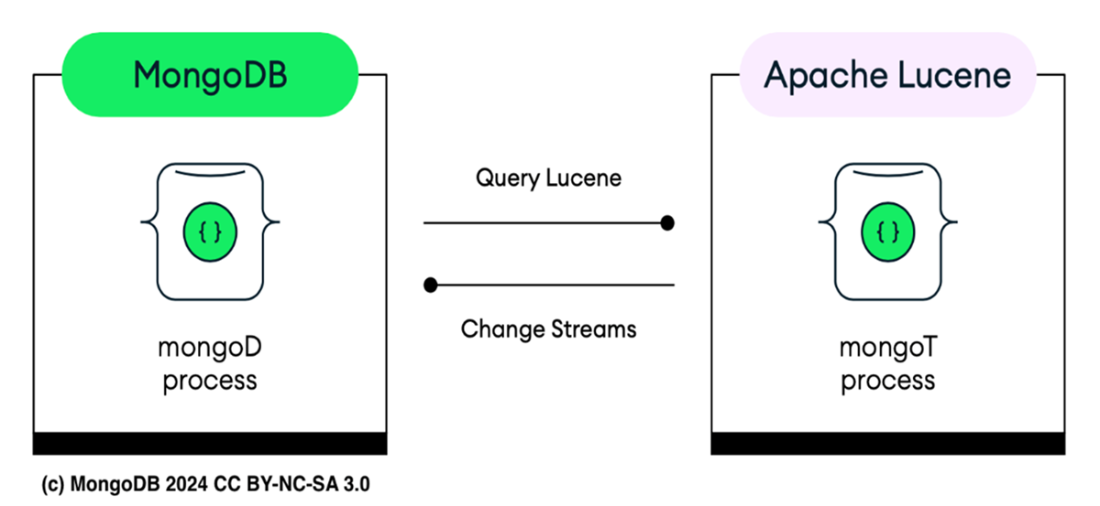
This chapter shows how to develop AI-capable applications locally using the Atlas CLI. It explains how the CLI streamlines a consistent workflow across environments by provisioning a local Atlas-like deployment that mirrors cloud behavior. The local stack runs a single-node replica set mongod alongside mongot, a Lucene-backed component that maintains full-text and vector indexes in near real time via Change Streams, enabling Atlas Search and Vector Search on your laptop with the same APIs you use in production.
You learn the end-to-end workflow: prerequisites (Docker and supported OS), creating a local deployment with sensible defaults, connecting with the shell, and managing the lifecycle with list, pause, start, connect, logs, and delete commands. The chapter shows how to inspect and troubleshoot the environment with docker ps, docker inspect, docker top, and docker exec, highlighting the runner process, mongod configuration, mongot service, volumes, ports, and health checks. Because sample dataset loading isn’t yet built into local deployments, it walks through downloading an archive and restoring it with mongorestore, then verifying the imported databases before continuing.
With data in place, the chapter demonstrates creating and managing search indexes using the db.collection.createSearchIndex() wrapper, validating them with getSearchIndexes, and running local Atlas Search queries. It illustrates a full-text pipeline with fuzzy matching, filtering, scoring, sorting, and projection, then adds Vector Search by defining a knnVector field (1536 dimensions, Euclidean similarity) for semantic retrieval. Together, these steps equip you to prototype and test AI search patterns—full-text and vector—locally, using the same commands and behaviors you will rely on in Atlas cloud.
MongoD process alongside with MongoT for local deployments running on Docker.
Summary
- You can now use the Atlas CLI to develop locally with MongoDB Atlas deployments, including Atlas Search and Vector Search. This enables the creation of full-text search or AI-powered applications in your preferred development environment. The Atlas CLI handles setup, connections, and management tasks from development to production. For full-text search, the Atlas CLI allows you to create and manage Atlas Search indexes, both locally and in the cloud.
- Running a local Atlas cluster requires Docker to be installed as a prerequisite. Docker is an open-source platform that automates the deployment, scaling, and management of applications using containerization. Containers package an application and its dependencies into a single, lightweight unit that can run consistently across different environments.
- Using Docker with Atlas locally ensures consistent application performance across various environments and isolates the MongoDB environment, preventing conflicts with other applications. Docker also simplifies scaling the local Atlas cluster for testing and development, streamlines the setup process with pre-configured containers, and enables easy movement and replication of the local setup across different systems.
- To create your local Atlas cluster, you can use the command atlas deployments setup --type local. This command will guide you through the setup process, prompting you for deployment settings and providing default values.
- Using the Atlas CLI, specifically atlas deployments, you can manage your local cluster. You can stop, start, connect to the database, delete, and view logs of your cluster.
- If you want to load a sample dataset for exercises, note that the Atlas CLI currently does not support this for local clusters. Instead, you can download the sample dataset and import it into the cluster using mongorestore.
- mongot runs as a distinct process alongside mongod, focusing on search functionality. When configured, mongot is responsible for processing search queries and managing indexes, allowing mongod to handle the core database operations efficiently. This separation of concerns helps optimize performance and scalability for applications using MongoDB with advanced search capabilities.
- You can use the db.collection.createSearchIndex() wrapper around the createSearchIndex database command, to create a full-text search index in the local Atlas cluster. To verify the existence of the index, you can use the getSearchIndexes() method.
- To drop an index, you can use the db.collection.dropSearchIndex(<name>) monogsh wrapper around the dropSearchIndex database command.
- You can also manage Atlas Search and Vector Search indexes using the atlas deployments search indexes create command, both locally and in the cloud.
FAQ
What is an Atlas local deployment and what does the Atlas CLI set up for me?
It creates a local environment that mimics a MongoDB Atlas cluster using Docker. The Atlas CLI downloads a MongoDB Atlas Local image and starts a single-node replica set (mongod) alongside the mongot process for Atlas Search and Vector Search. By default, MongoDB listens on port 27017 (or a mapped host port), and you get a connection string you can use with mongosh or applications.What are the supported operating systems and minimum requirements?
Local deployments are for testing and development only. Supported OS: macOS 13.2+ (x86-64/ARM), RHEL/CentOS 8–9 (x86-64/ARM), Ubuntu 22.04/24.04 (x86-64/ARM), Debian 11/12 (x86-64/ARM), Amazon Linux 2023 (x86-64/ARM), Windows 10/11 (x86). Minimum: 2 CPU cores and 2 GB free RAM.Do I need Docker, and which versions are supported?
Yes. Docker is required to run the local Atlas container. Install Docker Desktop v4.31+ on macOS/Windows or Docker Engine v27.0+ on Linux. Ensure Docker can pull images from the network and verify it’s running withdocker info. Podman is supported only on Linux RHEL; the book focuses on Docker.How do I create and connect to a local Atlas cluster?
- Create:atlas deployments setup --type local and accept defaults. The CLI prepares the environment, downloads the image, and starts the deployment.- Connect: Choose
mongosh when prompted or run atlas deployments connect --type LOCAL. The CLI shows a connection string like mongodb://localhost:27017/?directConnection=true (use whatever the CLI returns).How do I list, pause, start, view logs, and delete my local cluster?
- List:atlas deployments list --type LOCAL- Pause:
atlas deployments pause <name> --type LOCAL- Start:
atlas deployments start <name> --type LOCAL- Connect:
atlas deployments connect --type LOCAL- Logs:
atlas deployments logs --deploymentName <name> --type LOCAL- Delete:
atlas deployments delete <name> --type LOCALWhat is mongot and how does it integrate with mongod locally?
mongot is a Java wrapper around Apache Lucene that runs alongside mongod. It uses Change Streams to keep Lucene indexes in sync and exposes Atlas Search (full-text) and Vector Search. In the local container, mongod and mongot communicate securely (keyfile) and typically use localhost:27017 for MongoDB and localhost:27027 for search services.How do I load the Atlas sample dataset into my local cluster?
The Atlas CLI can’t load samples locally, but you can restore a prebuilt archive:1) Download:
curl https://atlas-education.s3.amazonaws.com/sampledata.archive -o sampledata.archive2) Install MongoDB Database Tools (for
mongorestore).3) Get the connection string:
atlas deployments connect --connectWith connectionString <name>.4) Restore:
mongorestore --archive=sampledata.archive --uri "mongodb://localhost:<port>/?directConnection=true".How can I inspect and troubleshoot the local Atlas container?
- See running container:docker ps- Inspect image/config:
docker inspect mongodb/mongodb-atlas-local:8.0- View processes:
docker top <container_name> (you’ll see the runner, mongod, and mongot)- Exec into shell:
docker exec -it <container_id> /bin/bashThese commands help you validate ports, health checks, volumes, and running processes.
How do I create, verify, use, and drop a full-text search index locally?
- Create (dynamic mapping):db.collection.createSearchIndex("LocalSearchIndex", { mappings: { dynamic: true } })- Verify:
db.collection.getSearchIndexes() (status should be READY)- Query: Use an aggregation with
$search and specify index, text query, path, and options like fuzzy- Drop:
db.collection.dropSearchIndex("LocalSearchIndex")How do I create and verify a Vector Search index locally?
On a collection with embeddings, e.g.,sample_mflix.embedded_movies:db.embedded_movies.createSearchIndex({ name: "vectorSearchIndex", mappings: { dynamic: true, fields: { plot_embedding: { type: "knnVector", dimensions: 1536, similarity: "euclidean" }}}})Verify with
db.embedded_movies.getSearchIndexes(). You’ll use this index for k-NN vector queries (query methods are covered in the next chapter).Is this local setup suitable for production, and which port should I use to connect?
No—local Atlas deployments (and the includedmongot) are for development/testing only. Default MongoDB port is 27017, but Docker may map it to a different host port if 27017 is occupied. Always use the connection string returned by atlas deployments connect for the correct host/port.
 MongoDB 8.0 in Action, Third Edition ebook for free
