12 Learning semantic techniques and Atlas Vector Search
This chapter introduces semantic search in MongoDB through Atlas Vector Search, contrasting it with traditional full-text search. Instead of matching exact terms, vector search compares dense embeddings in high-dimensional space to retrieve semantically similar results across text, images, audio, and more. The chapter highlights embeddings as the foundation for meaning-aware retrieval and shows how they enable applications like recommendations and RAG pipelines, where vector lookups ground large language models in factual context to reduce hallucinations and improve answer quality.
Readers learn the essentials of embeddings (text, sentence, document, image, audio, user, product), how vectors represent content numerically, and how similarity is computed with cosine, Euclidean distance, or dot product. Atlas Vector Search is built on Apache Lucene and supports both approximate nearest neighbor (HNSW) and exact nearest neighbor search. The workflow covers generating embeddings externally, storing them alongside documents, and creating a Vector Search index that specifies the vector path, numDimensions (up to 4096), and similarity metric, plus optional filterable fields. The $vectorSearch aggregation stage is explained with its key parameters (index, path, queryVector, numCandidates, limit, exact), guidance to embed queries with the same model used for the data, and pre-filtering using supported match expressions to narrow the candidate set before similarity computation.
Implementation guidance spans building indexes with the Atlas CLI, running queries in mongosh and via drivers (JavaScript, Python, Ruby), and automating embedding generation with Atlas Triggers that call external models when documents are inserted or updated. The chapter closes with operational considerations: isolating workloads with dedicated Search Nodes for parallelism and lower latency, and performance best practices such as preferring ANN over ENN when possible, choosing smaller embedding dimensions where acceptable, avoiding reindexing during queries, projecting out large vector fields from results, ensuring adequate memory, and warming filesystem caches for consistent, fast responses.
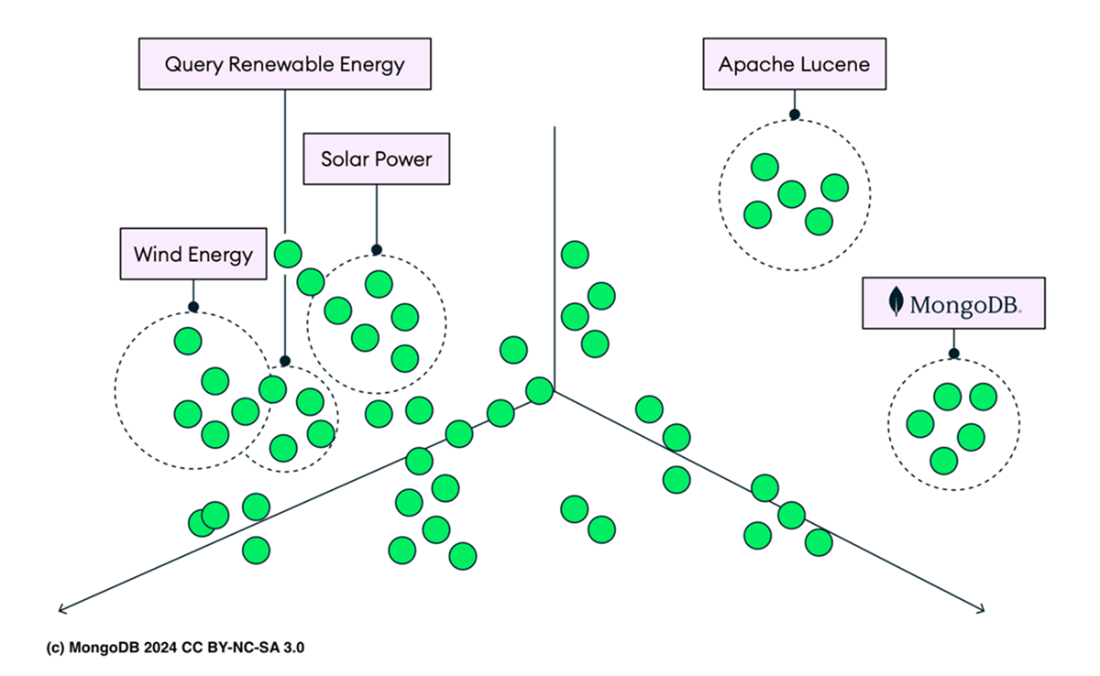
A visual representation of vector embeddings shows clusters for 'Query', 'Renewable Energy', 'Wind Energy', and 'Solar Power', indicating similarity.
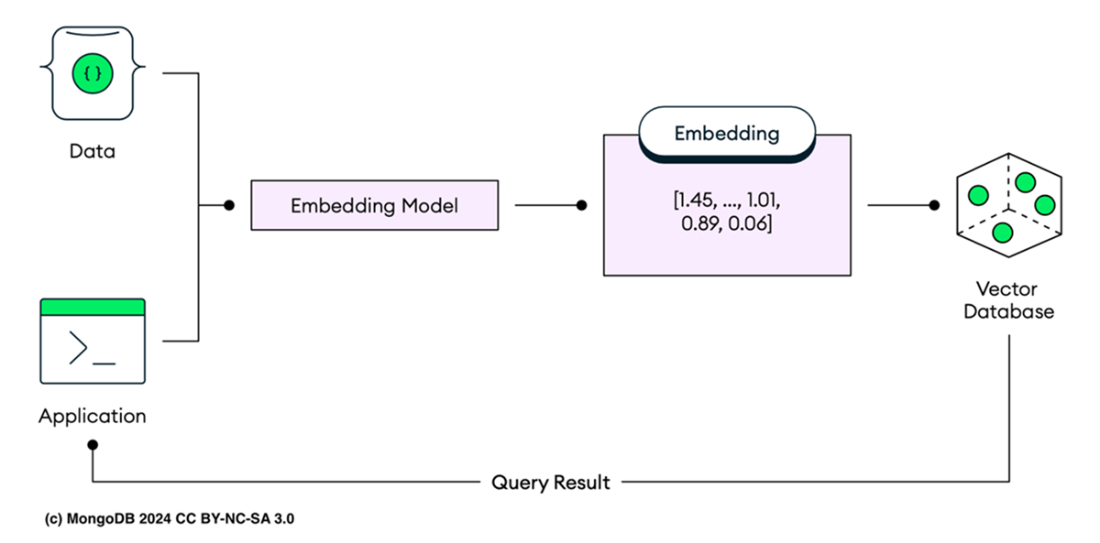
Vector database operations illustrate the process of vector database operations. Data is processed by an embedding model, transforming it into vector embeddings such as [1.45, ..., 1.01, 0.89, 0.06]. These embeddings are stored in a vector database. Queries from the application are also transformed into embeddings before searching the database. The most relevant results based on these query embeddings are then retrieved and returned as query results.
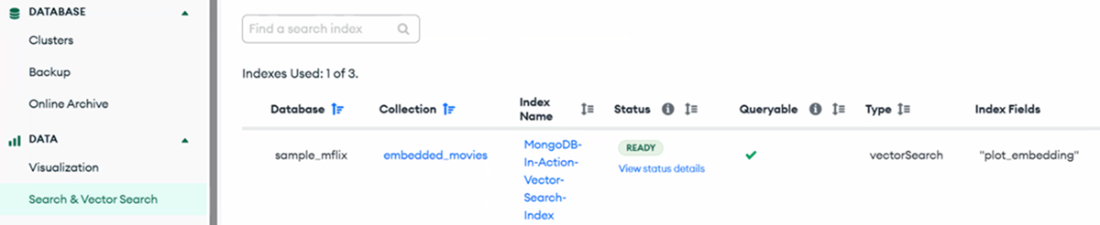
Atlas Vector Search Index panel. On the left side of the screen, there is a collapsible navigation menu. To view vector search indexes, the Search & Vector Search option under the DATA section must be clicked. The main panel then displays existing search index configurations. In this case, the sample_mflix database and the embedded_movies collection are shown with an active vector search index named MongoDB-In-Action-Vector-Search-Index. The index is marked as READY and is fully queryable, as indicated by the green checkmark. The Type is listed as vectorSearch, and the Index Fields include "plot_embedding", which indicates the field being used for vector similarity searches.
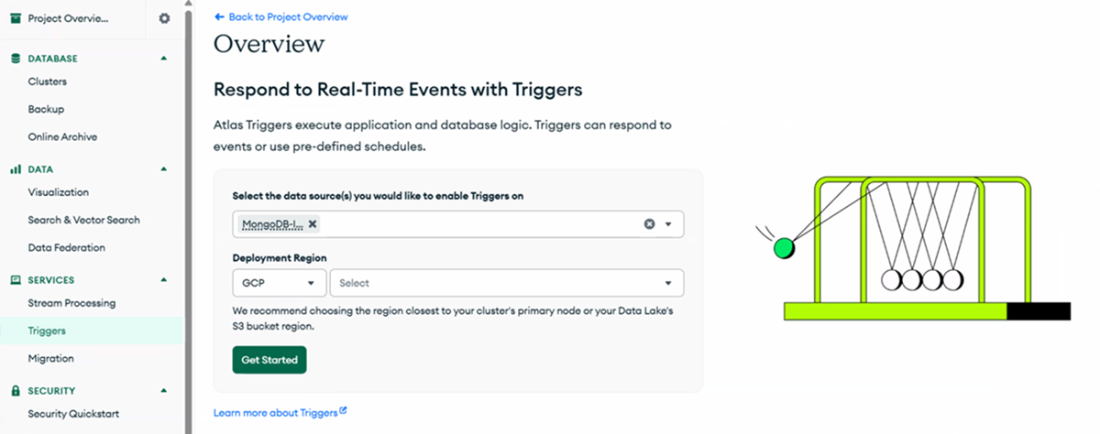
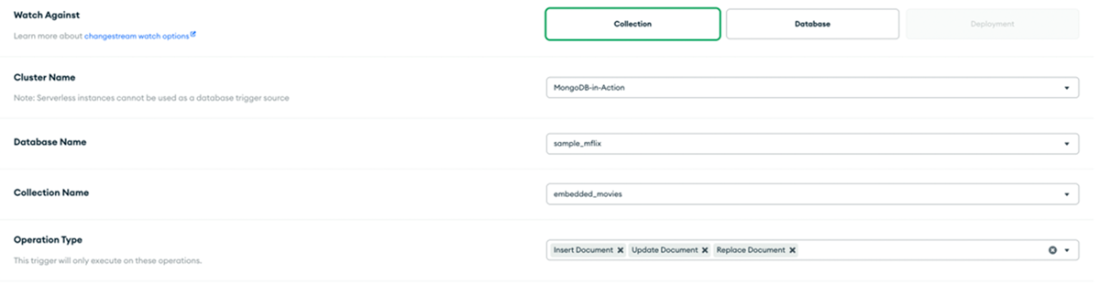
Creating an Atlas Developer Data Platform Trigger.
The configuration screen for setting up an Atlas Trigger in the MongoDB Atlas UI. The Watch Against section allows you to specify whether the trigger will monitor collections, databases, or deployments, with "Collection" selected in this example. The "Cluster Name" field is set to "MongoDB-in-Action," indicating the cluster where the trigger will be applied. The "Database Name" field is set to "sample_mflix," specifying the database that the trigger will monitor. The "Collection Name" field is set to "embedded_movies," indicating the collection within the database to watch for changes. Under "Operation Type," the trigger is configured to activate on Insert, Update, and Replace document operations. The Full Document option is enabled, meaning that the entire document will be retrieved when a change event occurs.
Summary
- Vector embeddings transform different data types such as words and sentences into numerical values, representing them as points in a multidimensional space. Similar items are positioned closer together, helping machines to understand and process the data more effectively.
- A vector database, or vector similarity search engine, stores, retrieves, and searches data organized as points in a multidimensional space, each represented by vectors such as [0.3, 0.8, -0.8, 0.6, 0.4, 0.1, -0.5, 0.2, ...], unlike traditional databases that use rows and columns.
- To use a vector database, content is first processed by an embedding model (like OpenAI’s GPT-4, or Hugging Face’s Transformers), which converts the data into numerical. These vectors are then stored in the database for efficient similarity-based retrieval.
- A vector index is a specialized data structure designed to store and manage vector embeddings from large datasets. It enables efficient similarity searches by organizing vectors for quick retrieval using algorithms like approximate nearest neighbor (ANN). ANN algorithms, such as HNSW (Hierarchical Navigable Small World) or FAISS (Facebook AI Similarity Search), ensure fast and scalable searches. This structure is essential for applications like recommendation systems, semantic search, and machine learning.
- Atlas Vector Search, similar to Atlas Search, uses the mongot process to replicate and sync data from the target MongoDB collection to an Apache Lucene index, optimized for vector search. Recent versions of Apache Lucene support vector search using algorithms like Hierarchical Navigable Small Worlds (HNSW) for approximate nearest neighbor (ANN) searches and Exact Nearest Neighbor (ENN) search.
- To perform vector search in Atlas, create an Atlas Vector Search index. These indexes, separate from other database indexes, efficiently retrieve documents with vector embeddings. Atlas Vector Search supports embeddings up to 4096 dimensions.
- The $vectorSearch stage in MongoDB's aggregation pipeline is designed for performing vector-based search operations on your data. It leverages vector embeddings to find and retrieve documents that are semantically similar to a given query vector. To use the $vectorSearch stage, you need to have a vector search index created on the relevant fields in your collection.
- You must embed your query with the same model used for your data. For instance, if you used OpenAI's GPT-4o to embed your dataset, you should also use GPT-40 to embed your query. This ensures compatibility and accurate vector search results.
- As of the time of writing, MongoDB Atlas does not provide models for converting text to embeddings. Therefore, you will need to use external systems like OpenAI, Hugging Face, Google's TensorFlow, or LamLaa for this purpose.
- To use Exact Nearest Neighbor (ENN), change "exact": false to "exact": true in the $vectorSearch stage definition. ENN ensures the most precise matches for the query vector by exhaustively comparing it against all stored vectors. While this method guarantees the highest accuracy, it is more computationally intensive and slower than Approximate Nearest Neighbor (ANN), which speeds up the search using heuristics but sacrifices some accuracy.
- Pre-filtering enables you to add specific criteria to your search, which helps to narrow down the dataset prior to conducting the vector similarity search. This approach can greatly reduce the search space and enhance the performance of your queries.
- You can enhance query performance by using dedicated Search Nodes for vector search processing. High-CPU systems may offer even greater performance benefits. When Atlas Vector Search operates on these nodes, it parallelizes query execution across different data segments, resulting in more efficient processing.
- Mongosh is not the only way to perform vector searches. You can also use various programming languages like Python, JavaScript, and Java, as their MongoDB drivers support the $vectorSearch filter option.
- Atlas Triggers is a feature in MongoDB Atlas that enables you to execute server-side logic in response to database events or on a schedule. These triggers help automate workflows, enforce business logic, and respond to data changes in real-time without needing a separate application server. For example, you can use Atlas Triggers to automatically create embeddings with an external model like the OpenAI Embeddings API for newly added documents in a MongoDB collection.
FAQ
How is Atlas Vector Search different from traditional full-text search?
Atlas Vector Search finds semantically similar documents by comparing vector embeddings in high-dimensional space, not just matching exact words. It is built on Apache Lucene (like Atlas Search) but uses vector-capable indexing and algorithms to retrieve results that capture meaning and context (for example, “renewable energy” can surface “solar,” “wind,” and “sustainability”).
What are embeddings, and how do they relate to vectors?
Embeddings are numerical arrays (vectors) that encode the meaning and relationships of data such as text, images, or audio. While “vector” describes the numeric format, “embedding” emphasizes that the vector encodes semantic information. Common types include text, sentence, document, image, audio, user, and product embeddings.
How do I create embeddings for my data and queries?
MongoDB Atlas doesn’t generate embeddings; use external models and services such as OpenAI, Sentence-BERT, Google’s Universal Sentence Encoder (TensorFlow Hub), Hugging Face models, or locally run LLaMA variants. Use the same model for your stored data and for your query text to ensure compatibility. OpenAI’s text-embedding-3-small (1536 dimensions) and text-embedding-3-large (3072 dimensions) are cited as accurate and cost-effective options.
How does a vector database work and which similarity metrics can I use?
A vector database stores embeddings as points in high-dimensional space and retrieves the nearest points to a query vector. Atlas Vector Search supports similarity metrics chosen in the index definition, typically:
- Cosine similarity: angle/alignment between vectors (common for text).
- Euclidean distance: straight-line distance (often used in image/clustering tasks).
- Dot product: useful for recommendation-style similarity.
How do I build an Atlas Vector Search index and what must I specify?
Create a vectorSearch index over the field that stores your embeddings. Specify database, collection, the path to the embedding field, numDimensions (up to 4096), and similarity metric (for example, cosine). You can also add fields of type filter (for example, genres, languages, year) to enable pre-filtering. You can create the index using the Atlas UI or Atlas CLI by supplying a JSON definition file.
How do I run a vector query with $vectorSearch and what do its parameters mean?
Use an aggregation pipeline with a $vectorSearch stage. Key options:
- index: name of your vectorSearch index.
- path: field containing embeddings (for example, plot_embedding).
- queryVector: the query’s embedding array (must be generated externally and match the data model).
- numCandidates: how many candidate vectors to consider (affects speed/accuracy).
- limit: number of results to return.
- exact: false for ANN (faster), true for ENN (exact, slower).
Use {$project: { score: { $meta: "vectorSearchScore" } }} to include the similarity score in results.
Can I pre-filter results, and what are the limitations?
Yes. Include filter in the $vectorSearch stage to narrow the candidate set before similarity search. Notes:
- Supported value types: boolean, date, objectId, string, numeric.
- Supported match expressions generally include $gt, $lt, $gte, $lte, $eq, $ne, $in, $nin, $nor, $and, $or (aggregation pipelines support $and and $or in the filter field).
- For objectId fields, $gt, $lt, $gte, $lte aren’t supported.
- $vectorSearch can’t be used in views, $lookup sub-pipelines, $unionWith sub-pipelines, or within $facet.
- Fields used in filter must be declared as type: "filter" in the index definition.
What’s the difference between ANN (HNSW) and ENN, and when should I use each?
ANN (Approximate Nearest Neighbor) uses Lucene’s HNSW graph to find near neighbors quickly with high (but not perfect) accuracy—ideal for real-time apps and large datasets. ENN (Exact Nearest Neighbor) compares against all vectors for perfect accuracy but is slower and more resource-intensive. Toggle with exact: false (ANN) or exact: true (ENN). Prefer ANN unless exactness is critical.
How can Atlas Vector Search support RAG (retrieval-augmented generation)?
RAG pipelines embed your corpus and user queries, use vector search to retrieve the most relevant passages, and pass those to an LLM to ground responses in real data, reducing hallucinations. Atlas Vector Search provides the fast, semantic retrieval layer needed to fetch high-signal context for prompts.
How can I automate embedding generation with Atlas Triggers?
Use an Atlas Trigger on insert/update/replace to call an external embedding API (for example, OpenAI) and write the returned vector back into the document (for example, plot_embedding). Triggers run in the Atlas platform (not in the core server), so you don’t need a separate app server. Store secrets securely and handle errors and rate limits in your trigger function.
How do I optimize performance and when should I use dedicated Search Nodes?
Recommendations include:
- Prefer ANN over ENN for speed; tune numCandidates and limit.
- Use the smallest embedding dimensionality that preserves recall.
- Avoid reindexing vectors while querying; create a new index if changing models.
- Exclude large vector fields from $project to reduce payload size.
- Ensure ample RAM so vectors and indexes stay memory-resident; consider dedicated Search Nodes (M10+) for workload isolation and intra-query parallelism.
- Warm the filesystem cache (for example, targeted scans) to cut first-query latency.

 MongoDB 8.0 in Action, Third Edition ebook for free
