11 Carrying out full-text search using Atlas Search
Full-text search is critical for applications ranging from e-commerce and customer support to research and log analytics because it goes beyond exact-word matching to rank relevance, handle phrases, proximity, fuzziness, and wildcards. The chapter explains how Apache Lucene powers these capabilities through inverted indexes and relevance scoring, and it outlines the drawbacks of pairing a database with a separate search engine—namely integration complexity, synchronization risk, operational overhead, and cost. Atlas Search, built on Lucene and integrated directly into MongoDB Atlas, addresses these issues by providing a single query API, automatic synchronization via change streams, and unified management without maintaining a separate search stack.
Architecturally, Atlas Search runs a mongot process alongside mongod on each node (or on dedicated Search Nodes for workload isolation), keeping indexes eventually consistent with data changes. You define search indexes per collection using dynamic or, preferably, static mappings; configure analyzers (standard, simple, whitespace, language, keyword) or custom analyzers; and optionally add synonyms and storedSource. Reindexing occurs when index definitions change or certain system events require it, and it demands extra storage headroom. The chapter walks through creating an index via the Atlas CLI with static mappings, explains that Atlas Search stores Lucene indexes rather than duplicating documents, and clarifies that searches use the index to find matching IDs and then fetch the latest documents from the collection.
Querying is done with aggregation stages $search and $searchMeta (both must start the pipeline), combining Lucene-powered operators and MongoDB stages. Supported operators include text, phrase (with slop for proximity), wildcard, fuzzy, regex, range, near, equals, in, autocomplete, moreLikeThis, compound, embeddedDocument, and geo operators, plus collectors like facet for result grouping. The chapter demonstrates practical patterns: compound queries with relevance scores, typo tolerance with fuzzy, proximity searches with phrase, pattern matching with wildcard, faceting for drill-downs, and retrieving counts and diagnostics via $$SEARCH_META and $searchMeta. It also covers index management commands in mongosh, cluster tier considerations and limits, performance and storage tips (e.g., static mappings, reindex planning, disk overhead), and how to experiment safely in the Atlas Search Playground along with its constraints.
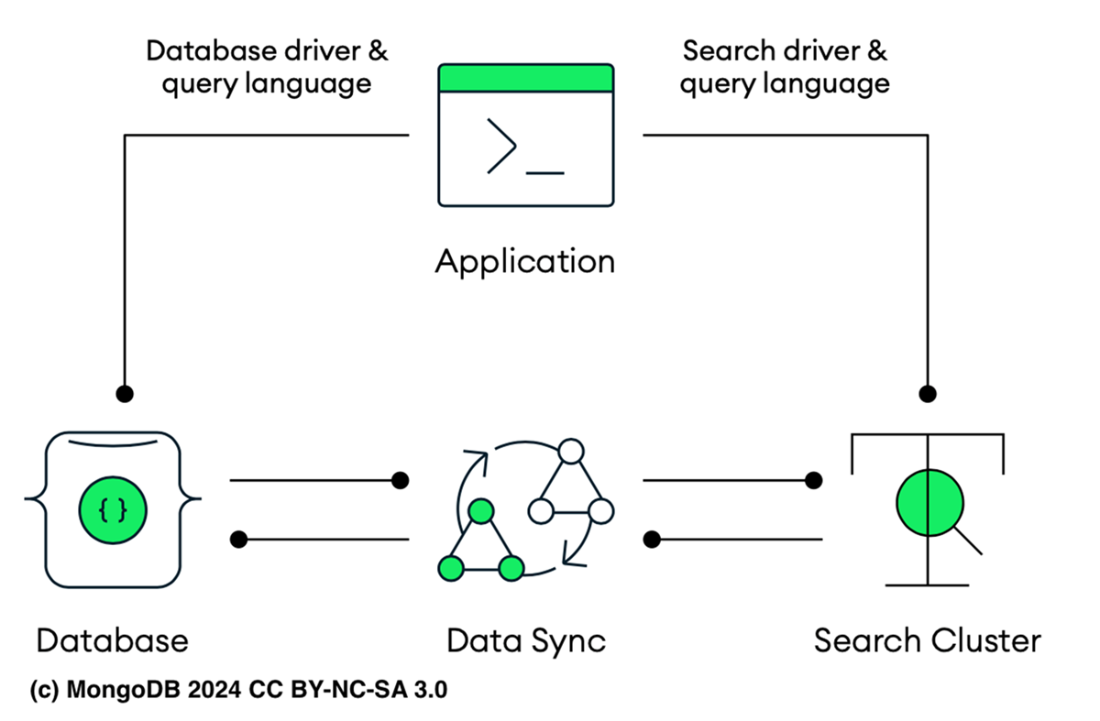
High-level data synchronization architecture. The application uses a database driver and query language to interact with the database cluster, and a search driver and query language to interact with the search cluster. Data synchronization occurs between the database cluster and the search cluster. This setup can lead to increased management complexity, potential synchronization issues, and higher resource consumption due to the need to maintain both the database and search clusters.
Atlas Search high level overview. An application using MongoDB Atlas, where the application interacts with both Atlas Database and Atlas Search through a unified driver and query API. Within the MongoDB Atlas environment, the application can seamlessly access both the database and search functionalities without needing separate integrations or synchronization processes. This unified approach simplifies the architecture by allowing the application to use the same API for both data storage and search operations.

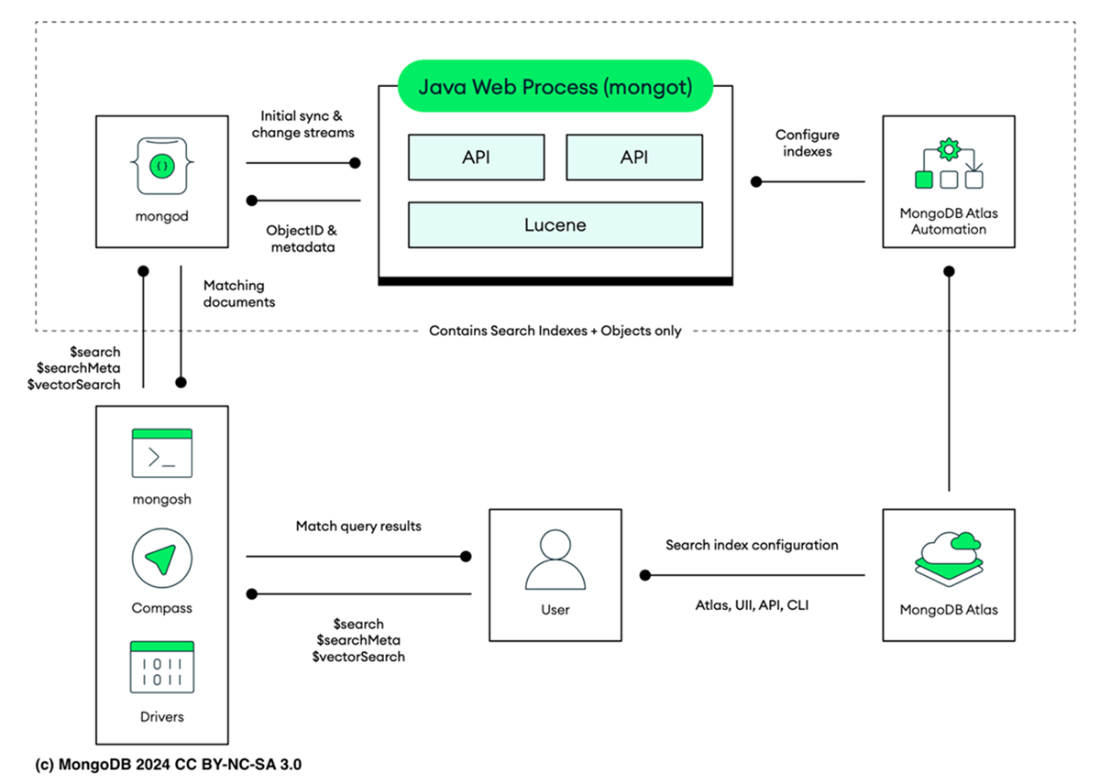
The Atlas Search architecture integrates MongoDB with the Lucene Search Index managed by the mongot process. MongoDB (mongod) serves as the primary database, sending object IDs and metadata to mongot via change streams for synchronization and monitoring. Mongot uses APIs for index configuration and search operations. The Lucene component handles search indexes and ObjectIDs, enabling efficient query processing. Index configuration is managed through MongoDB Atlas Automation, interfacing with the Atlas UI, API, and CLI. Search queries initiated via mongosh, Compass, or drivers are processed by the Atlas Search cluster.
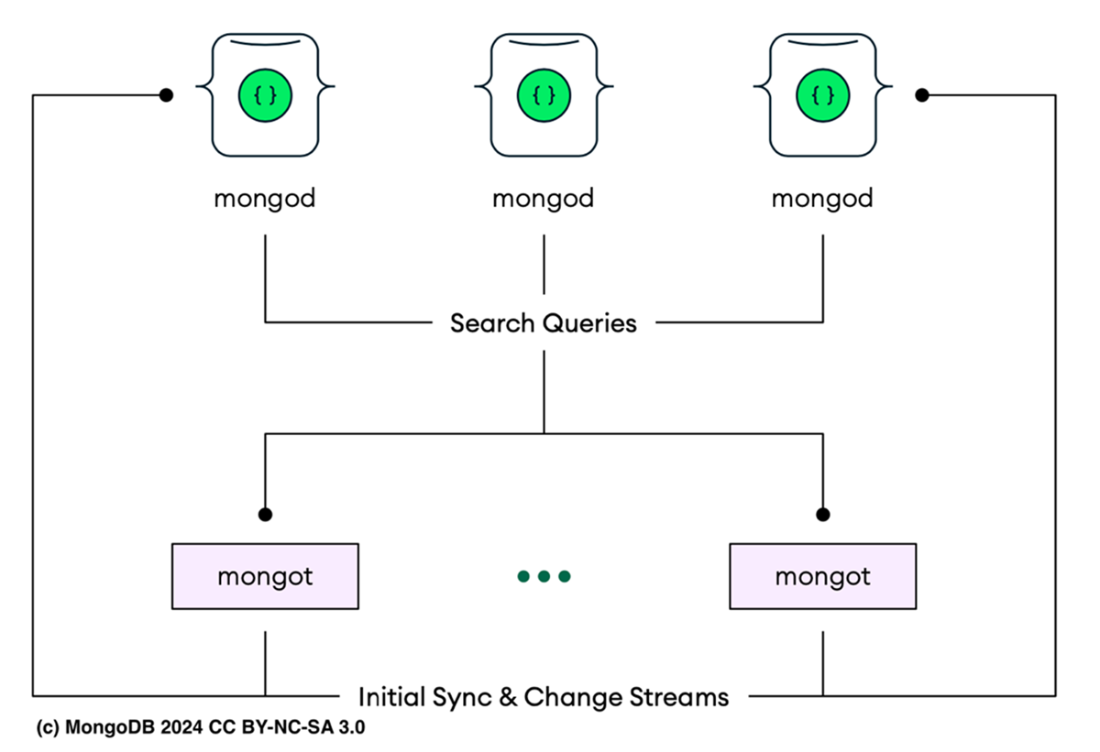
Within the Atlas Search Nodes Architecture, multiple MongoDB (mongod) instances manage data storage and execute search queries, forwarding them to mongot processes. These processes handle initial synchronization and continuous updates via change streams, ensuring search indexes are consistently updated with the latest data changes across all nodes.
Atlas Search Index. On the left side of the screen, there is a collapsible navigation menu. To access the Search Index view, the Search & Vector Search option under the DATA section must be clicked. Once selected, the main panel displays details of the search indexes. In this example, the sample_training database and its inspections collection are shown with an active search index named MongoDB-In-Action. The index is marked as READY and is fully queryable, indicated by the green checkmark.

The Atlas Search Playground, where users can configure and test search queries in MongoDB Atlas. It includes sections for writing queries, configuring the search index, viewing the data source, and displaying results. This interface allows users to experiment with search features and see how their queries perform on sample data before applying them in a live environment.
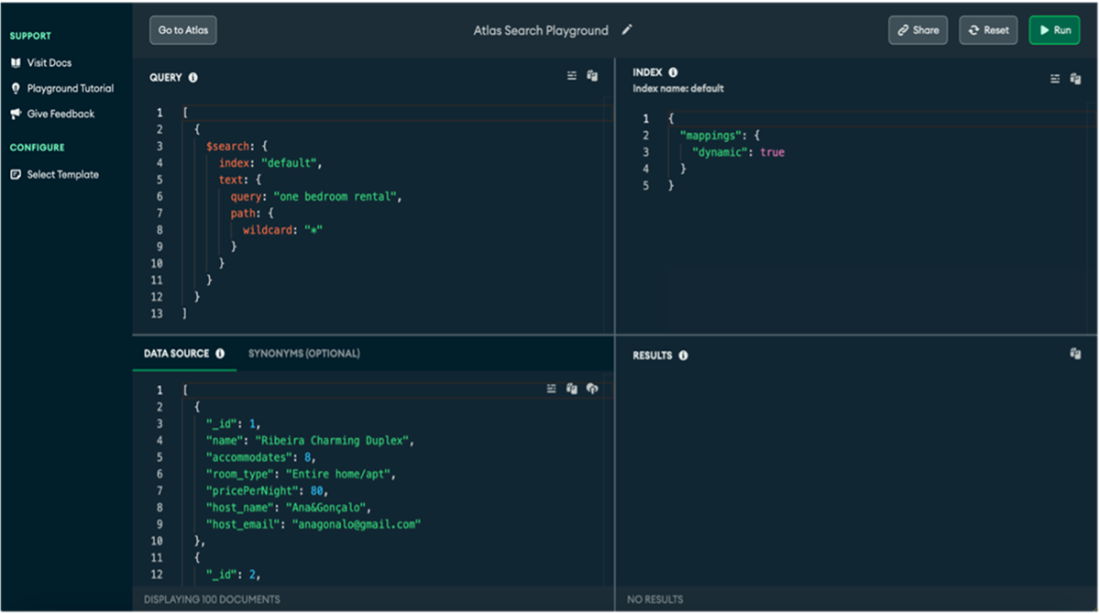
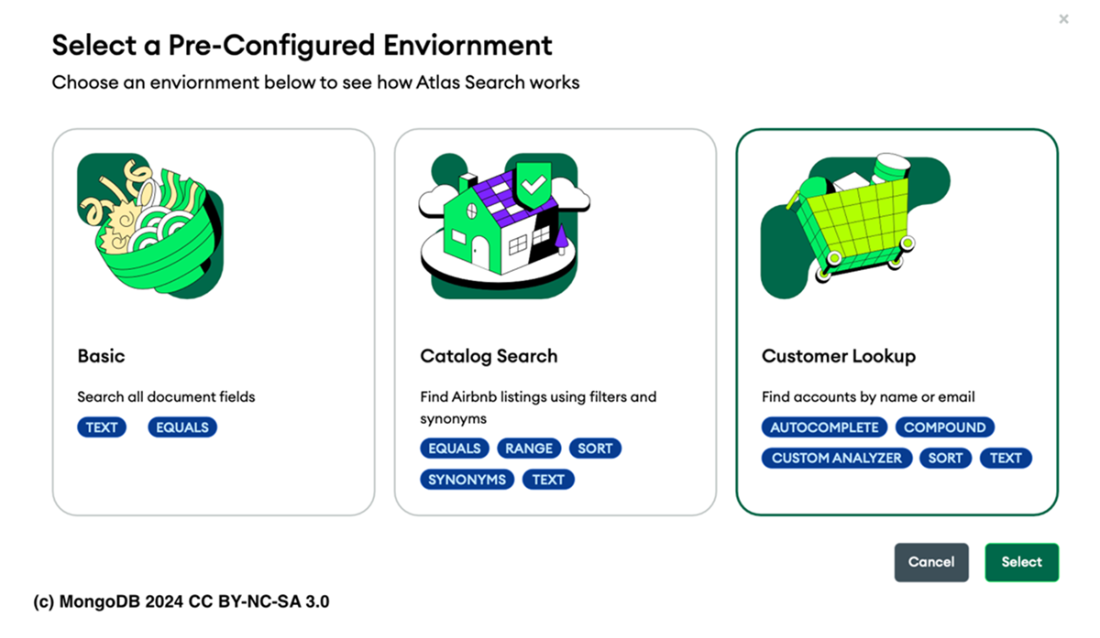
Atlas Search Playground Pre-Configured Environments.
Summary
- Full-text search surpasses traditional methods by analyzing document content for relevance, phrases, citations, and attributes. It supports various types like simple keyword, Boolean, fuzzy, wildcard, phrase, proximity, range, and faceted searches. This versatility makes it ideal for applications ranging from quick queries to complex filtering tasks.
- Using separate solutions for database management and full-text search introduces complexity in data synchronization and query handling. This setup requires extra maintenance and monitoring, leading to potential consistency issues, increased costs, and additional operational overhead for DevOps teams.
- Apache Lucene is a high-performance Java library that offers advanced search features including indexing, spellchecking, and text analysis. It's part of an open-source project that also includes PyLucene, providing Python bindings to extend Lucene Core's capabilities.
- Lucene uses inverted indexing to map terms to document locations, significantly speeding up search queries and enhancing performance.
- Atlas Search, embedded in MongoDB Atlas, delivers a scalable full-text search feature using Apache Lucene, allowing for seamless integration of search capabilities without an additional system.
- The mongot process is crucial for creating, managing, and updating Atlas Search indexes using Apache Lucene technology, ensuring they stay synchronized with MongoDB’s current state by monitoring change streams and applying updates promptly. It also handles Atlas Search queries directly, providing accurate and real-time search results.
- Atlas Search Nodes in MongoDB Atlas are specialized, separated nodes focused solely on search functions via the mongot process. They provide workload isolation in dedicated (M10 or higher) sharded and unsharded clusters across various cloud providers.
- An Atlas Search index can be on either a single field or multiple fields, preferably those used for sorting or filtering to speed up queries. Use dynamic mappings to automatically index all supported fields, though it may impact performance, or static mappings to selectively index specified fields, ignoring mismatched data types.
- Atlas Search index limits vary by cluster tier. M0 clusters allow up to three indexes. For M10 and higher clusters, there are no restrictions on the number of indexes you can create.
- There are no additional fees or charges when you enable Atlas Search on your Atlas cluster. However, you might observe an increase in resource utilization on the cluster depending on factors such as the size of the indexed collections or index definitions.
- Atlas Search queries are formatted as stages within an aggregation pipeline. They incorporate the $search and $searchMeta stages, which are required to be the first stage in any query pipeline. These stages can also be integrated with other aggregation pipeline stages to enhance your query pipeline.
- You can use the text operator together with the fuzzy operator. The fuzzy operator allows for searches that can match similar terms, accounting for possible typographical errors or variations in spelling. This enhances the search functionality by accommodating minor mistakes in the search query.
- In systems like Apache Lucene, which supports Atlas Search, scores are dynamically calculated based on document relevance, with no upper limit. Higher scores indicate a closer match to the search criteria, effectively helping users quickly find the most relevant information.
- The facet operator in Atlas Search structures search results into distinct categories based on criteria like price ranges, categories, or tags, facilitating easier navigation and organization of data.
- You can explore Atlas Search using the MongoDB Atlas Search Playground. This user-friendly platform demonstrates the powerful features of Atlas Search without requiring a MongoDB Atlas account, cluster, or data collection. It lets you create search indexes and run queries in a simplified environment.

 MongoDB 8.0 in Action, Third Edition ebook for free
