10 Delving into database as a service
This chapter presents MongoDB Atlas as a fully managed database-as-a-service that offloads deployment, scaling, upgrades, backups, and much of the day-to-day operations, letting teams focus on building applications. It outlines how cluster tiers map to CPU, memory, storage, and IOPS, and explains that Atlas adds platform services such as Atlas Search, Vector Search, the SQL Interface, Stream Processing, Data Federation, and Online Archive. The narrative frames Atlas as a developer data platform that provides real-time analytics, monitoring, and performance optimization while enforcing security and reliability best practices.
The chapter contrasts shared M0 and Flex clusters—designed for learning, development, and low-throughput use—with dedicated M10+ clusters intended for production. Shared clusters operate on pooled hardware with constrained resources and features, limited metrics and alerts, strict operational limits, and reduced or no backup options, making them unsuitable for sensitive or mission-critical workloads. Dedicated clusters unlock full features such as VPC peering, comprehensive monitoring, backups (including more advanced options), and sharding from M30 upward; M10–M20 fit low-traffic and dev scenarios, while M30+ targets high-traffic production. Auto-scaling can adjust cluster tiers and storage within defined ranges, with storage growth triggered near capacity and differing by cloud provider; Atlas never auto-scales storage down, and it coordinates tier changes when storage needs exceed tier limits. The chapter also covers storage classes (General, Low CPU, and Local NVMe SSD), oplog sizing behavior with and without storage auto-scaling, and cloud-specific details for changing storage capacity and IOPS, including AWS provisioned IOPS for predictable latency.
For global distribution, Atlas supports Global Clusters (sharded, M30+) to place data close to users and satisfy data locality via zones, with configurable Highest Priority, Electable, Read-only, and Analytics regions. It details multi-region and multi-cloud deployments across AWS, GCP, and Azure, emphasizes trade-offs such as election latency over long distances, and explains workload isolation using read-only and analytics nodes. Predefined replica set tags (for node type, region, provider, availability zone, workload type, and more) let applications steer reads to the right nodes and geographies, enabling consistent local-read behavior and separation of analytics from operational workloads. Finally, Atlas custom write concerns (such as twoRegions, threeRegions, and twoProviders) ensure cross-region and cross-provider durability by requiring acknowledgments from multiple regions or providers before writes are considered successful.
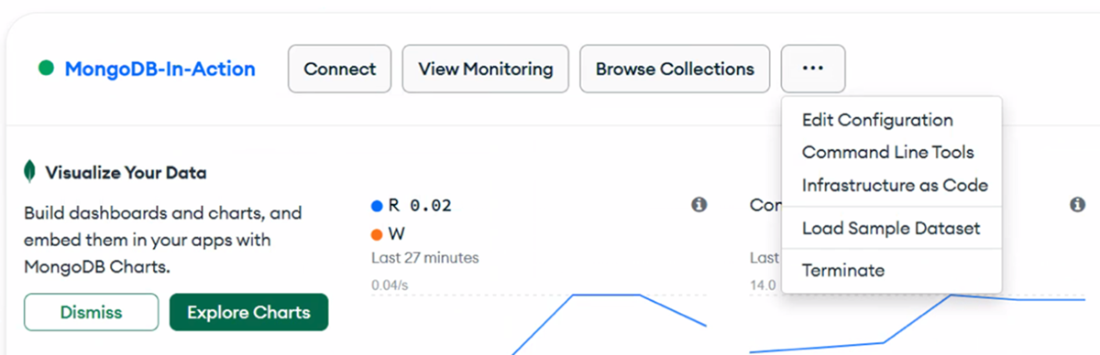
Edit the configuration in the Atlas UI.
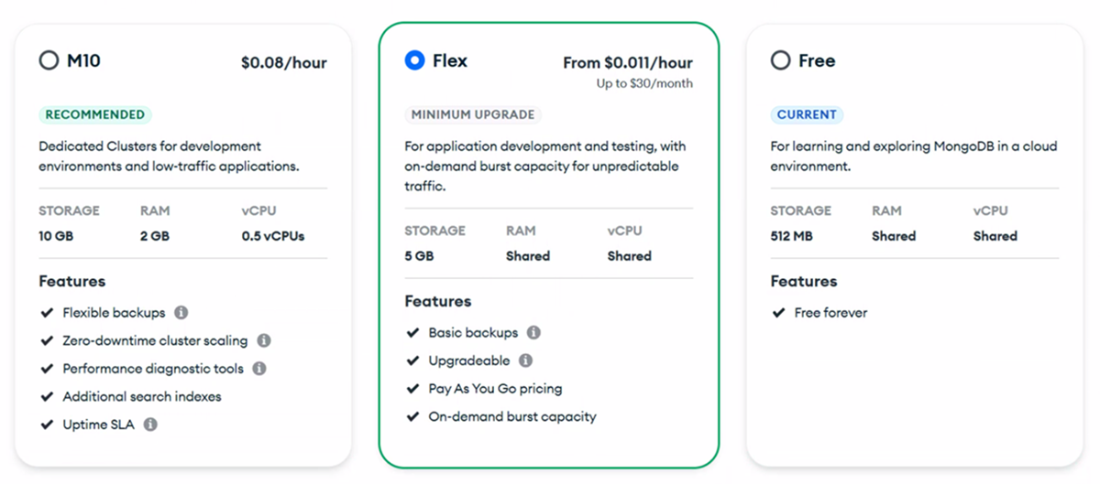
Cluster Tier section in Atlas UI with available M0, Flex and M10 clusters.
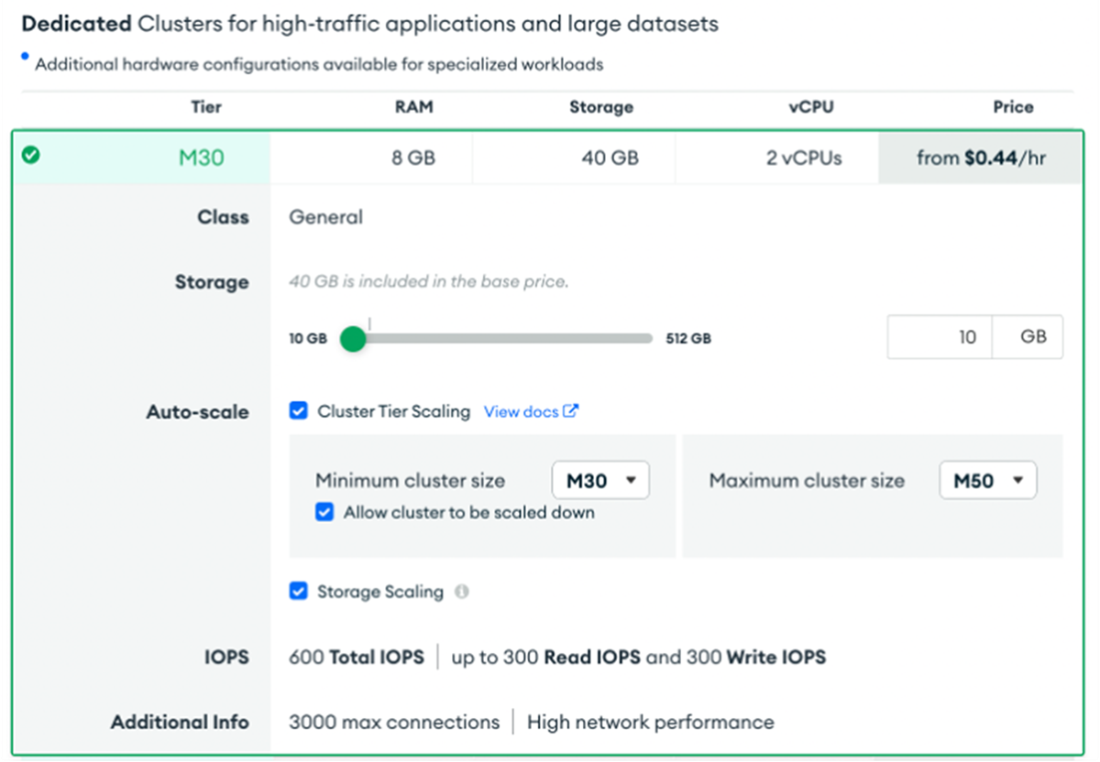
The Atlas UI's Cluster Tier section, where you can configure cluster and storage auto scaling.
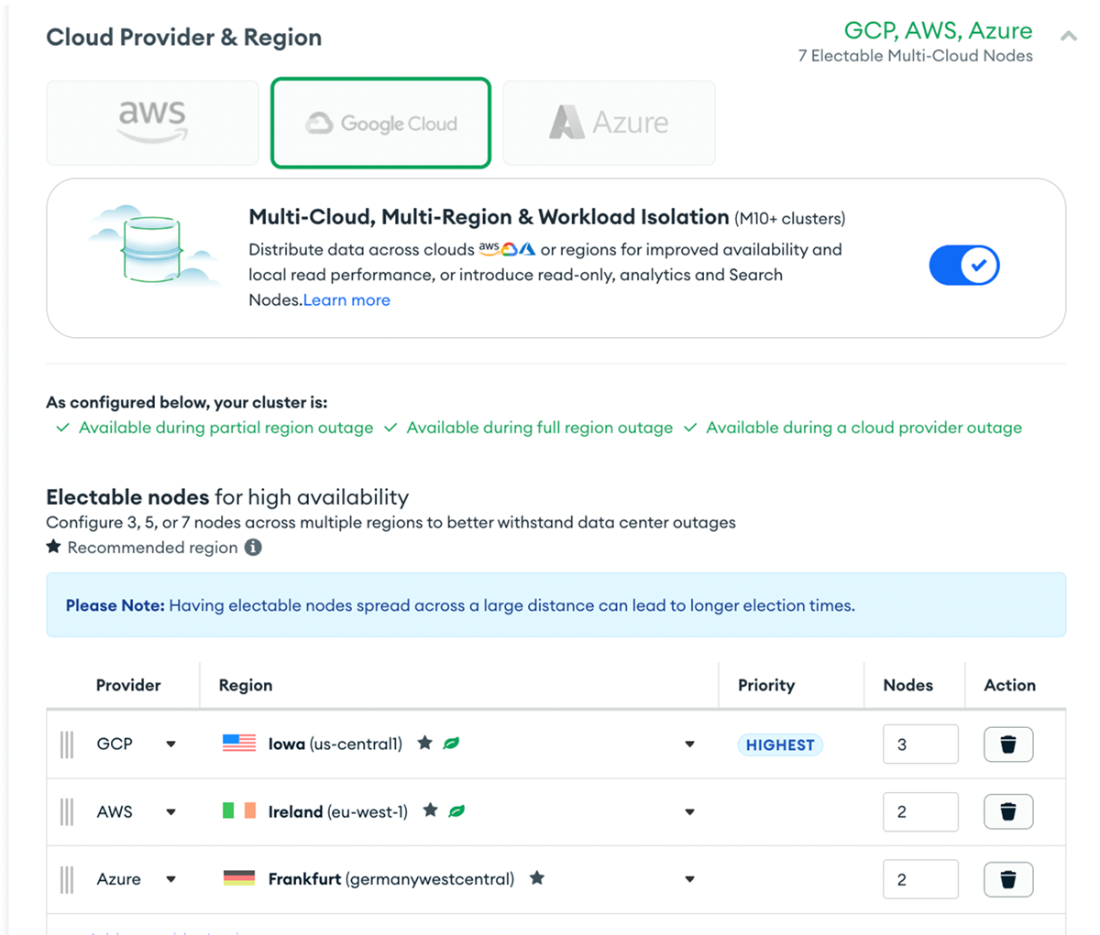
The Atlas UI's Cloud Provider & Region section, where you can configure multi-cloud clusters.
Summary
- Atlas automates deployment, backups, and scaling, simplifying database administration and ensuring optimal performance and security. It includes features like real-time analytics, comprehensive monitoring, automated performance optimization, Atlas SQL Interface, Atlas Stream Processing, Atlas Data Federation, and Atlas Online Archive.
- Atlas M0 (Free Cluster) and Flex clusters are affordable options for beginners and low-throughput applications, running in a shared environment with limited Atlas features. Each project can have one M0 cluster, which can be upgraded to Flex and an M10+ cluster anytime.
- Dedicated M10 and M20 clusters are ideal for development and low-traffic applications, supporting replica set deployments with full Atlas features. They operate on burstable performance infrastructure, handling occasional traffic spikes but optimized for steady workloads.
- Dedicated M30 and higher clusters are ideal for production, supporting replica set and sharded deployments with full Atlas features. Variants, marked by ❯, display key characteristics when selected.
- Atlas allows automatic adjustment of cluster tier and storage capacity based on usage, eliminating the need for custom scripts. Auto-scaling operates without downtime and lets you set maximum and minimum ranges to control costs.
- Atlas Global Clusters distribute data across multiple geographic regions, optimizing for low latency and high availability. Supported for M30 and above tiers.
- In Atlas, you can deploy multi-cloud MongoDB clusters using any combination of AWS, Azure, and Google Cloud. This setup allows you to configure nodes across different providers and regions, optimizing availability and workload balancing.
- Available on M10+ clusters, analytics nodes are specialized read-only nodes that isolate queries from your operational workload. They are especially useful for handling analytic data, such as reporting queries executed by BI tools.
- Atlas clusters include built-in replica set tags for different member types. These tags route queries to specific node types, regions, or availability zones, optimizing read preferences and enhancing cluster performance and reliability.
- Atlas includes built-in custom write concerns tailored for multi-region clusters. Write concern specifies the level of acknowledgment MongoDB requires for write operations in a cluster.
FAQ
What does MongoDB Atlas (DBaaS) manage for me, and why use it?
Atlas is a fully managed database-as-a-service that automates deployment, scaling, upgrades, backups, and security hardening. It provides monitoring, performance optimization, and real-time analytics, so teams can focus on application development. Beyond core MongoDB, Atlas adds platform services like Atlas Search, Vector Search, SQL Interface, Stream Processing, Data Federation, and Online Archive.How do M0 (Free) and Flex clusters differ, and what are their key limits?
- Use cases: M0 is best for learning and tiny dev workloads; Flex suits small apps/dev/test with predictable cost caps.- Top specs: M0 has ~0.5 GB storage and ~100 ops/sec; Flex starts at 5 GB and ~500 ops/sec (throttling applies if exceeded).
- Deployment: Both are replica sets in a shared environment (one M0 per project).
- Backups: M0 has no Atlas backups (use mongodump/mongorestore). Flex offers daily snapshots but no point-in-time restore.
- Features: No sharding, limited metrics/alerts, no VPC peering/private endpoints, no customer-managed keys, no auditing, no log downloads.
- Config: Memory/storage not configurable; replication factor fixed at 3; limited API support.
- Ops: Scaling M0/Flex (and M10) up/down causes ~7–10 minutes downtime. Idle M0 can be paused automatically.
When should I choose M10/M20 vs. M30+ dedicated clusters?
- M10/M20: Ideal for dev and low-traffic apps, replica set only, full Atlas feature access, burstable performance, automated backups and monitoring, easy tier upgrades (e.g., via Atlas CLI).- M30+: Production-grade for higher traffic; supports replica set and sharded clusters, VPC peering, advanced monitoring/alerts, and broader regional options.
How does automatic cluster tier scaling work, and what are the constraints?
Atlas evaluates CPU and memory utilization to scale within a min/max tier range you define. Constraints:- Stays within your tier range and the same cluster class (General ↔ General, Low-CPU ↔ Low-CPU).
- Won’t scale if the target tier can’t satisfy memory needs.
- For replica sets, Atlas won’t add nodes or convert to sharded; for sharded clusters, it won’t add shards.
- Rolling changes avoid downtime. In the UI, tier auto-scaling is enabled by default; when created via API/CLI, it’s disabled by default.
How does storage auto-scaling behave, and how does it vary by cloud?
- Trigger: Enabled by default; increases when any node hits ~90% disk usage. Plan manual scale-ups ahead of bulk/high-speed writes.- Provider behavior: AWS and GCP grow storage to target ~70% utilization; Azure doubles current storage size.
- Direction: Atlas scales storage up automatically, never down (you can reduce manually).
- Parallel scaling: If new storage exceeds the current tier’s limits, Atlas will also raise the cluster tier (and your max tier if needed) to avoid downtime; if a scale-down target can’t support current disk/IOPS, Atlas prevents scale-down and adjusts min/max accordingly.
What storage customization and cluster classes are available on dedicated tiers?
From M40+, you can choose cluster classes to align cost and performance:- Low CPU: Fewer vCPUs (about half vs. General) for memory-heavy, CPU-light workloads at lower cost.
- General: Balanced, recommended for most production workloads.
- Local NVMe SSD: Low-latency, high-throughput storage (available on AWS and Azure; not supported on GCP). Choosing a different class affects price and performance.
What are Atlas Global Clusters, and which region roles can I configure?
Global Clusters are sharded deployments that distribute data across regions for low latency and data residency. Supported on M30+ tiers, they offer:- Global data distribution and geo-partitioning (control where data lives).
- Read/write anywhere configurations for regional performance and resilience.
- Up to nine zones; each zone has a Highest Priority region (primary), plus Electable and/or Read-only regions to balance locality and fault tolerance.
How do multi-region/multi-cloud deployments and workload isolation work in Atlas?
- High availability: Add electable nodes across regions/clouds; Atlas prioritizes the first row as the Highest Priority region for primaries.- Local reads: Add read-only nodes per region to serve nearby read traffic (they don’t participate in elections).
- Workload isolation: Add analytics nodes (M10+) to run reporting/ETL without impacting operational traffic.
- Considerations: More regions/longer distances can increase election time and replication lag. Atlas places config servers across electable regions. Node limits apply (e.g., project-level and multi-region cluster totals).
How do I route reads using predefined replica set tags?
Use readPreference, readPreferenceTags, and readConcernLevel in the connection string to target nodes by role or geography. Common patterns:- Analytics-only reads: readPreference=secondary with readPreferenceTags=nodeType:ANALYTICS.
- Keep operational reads off analytics nodes: readPreference=secondary with readPreferenceTags=workloadType:OPERATIONAL.
- Geographic routing: Combine tags like provider:GCP and region:us-east1 with readPreference=nearest, ordered by preference; finish with an empty tag as a fallback.
Notes: Tags aren’t available on M0/Flex. mongosh doesn’t accept these in the URI—use cursor.readPref() or Mongo.setReadPref().
What custom write concerns does Atlas provide for multi-region clusters?
Atlas adds named write concerns that require acknowledgments across regions/providers before success:- twoRegions: { region: 2 }
- threeRegions: { region: 3 }
- twoProviders: { provider: 2 } (acks must come from regions on distinct cloud providers)
Use them via writeConcern, for example: { writeConcern: { w: "threeRegions" } } to confirm propagation to three regions.

 MongoDB 8.0 in Action, Third Edition ebook for free
