9 Optimizing Storage
This chapter moves beyond the storage fundamentals to show how to use Azure Storage more efficiently and securely. It focuses on low-maintenance hosting, streamlined data movement, scoped access control, protection against accidental loss, cross-region resilience, and automated cost optimization. The guidance emphasizes doing everything within the storage account—largely via the Azure CLI—to reduce operational overhead while improving governance, reliability, and spend.
The first part demonstrates publishing a simple static website directly from Azure Storage. You prepare HTML/CSS/JavaScript files, authenticate transfers with time-limited SAS tokens, and use AzCopy to create and populate the special $web container. After enabling the static website feature and specifying the index and error documents, you can browse the site at the provided endpoint, and optionally map a custom domain through a CNAME record for a friendlier address, with notes on HTTPS behavior.
The chapter then strengthens data protection and cost control. It enables blob versioning for easy recovery, applies resource locks to prevent accidental deletion or modification, and turns on soft delete with a retention window. For resilience and reach, it configures asynchronous object replication between storage accounts (and regions), leveraging change feed and versioning to maintain consistency while reducing latency for distributed users. Finally, it introduces lifecycle management policies—defined as JSON—to automatically tier data between Hot, Cool, and Archive, remove stale data, and prune older blob versions, yielding lower costs, better compliance, and improved business continuity.
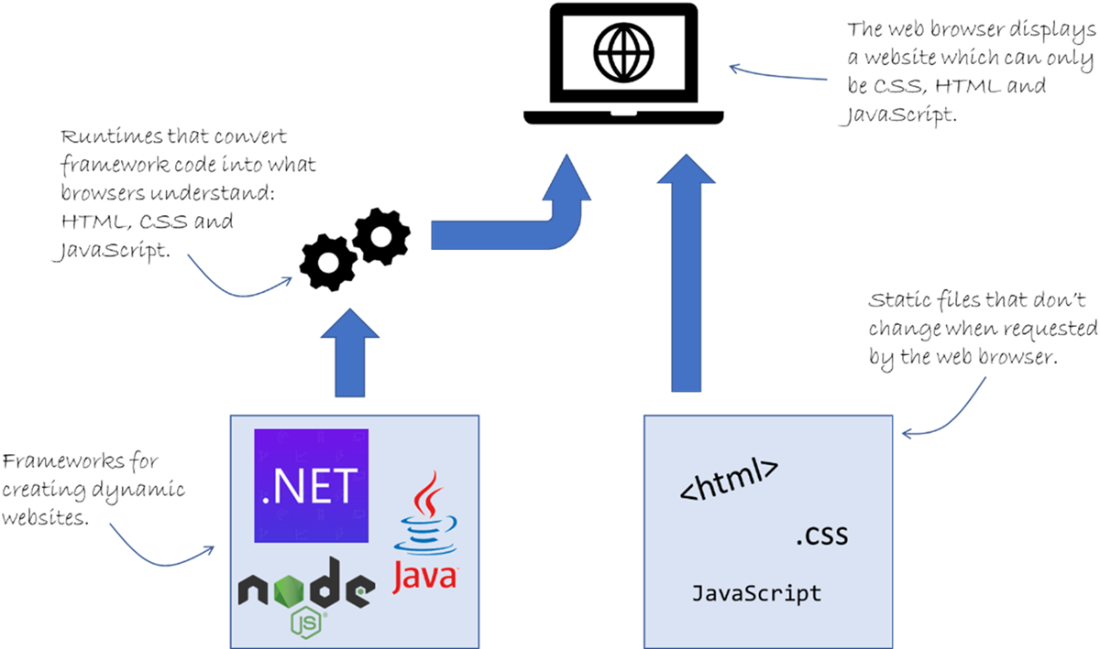
A dynamic website being served versus a static website.
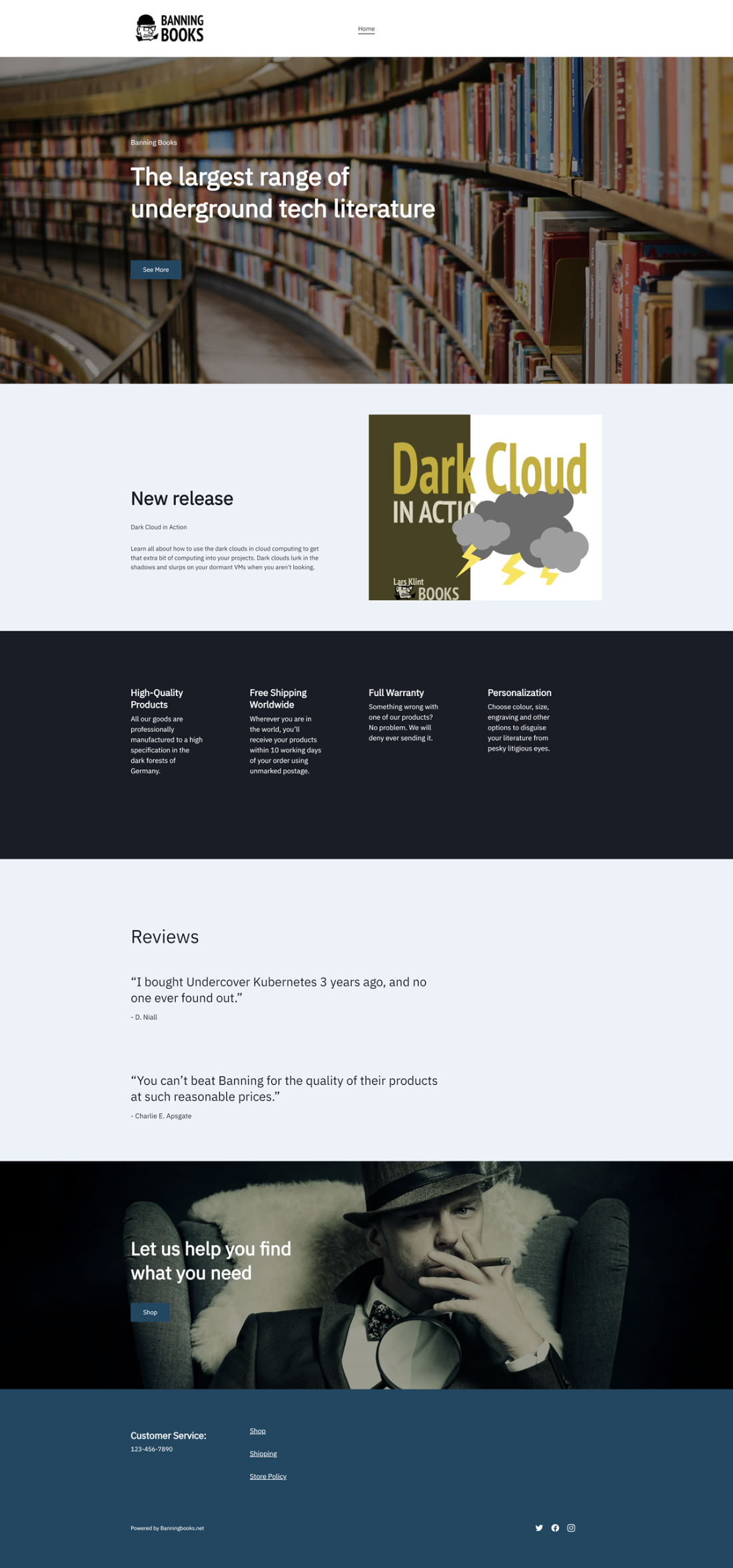
The Banning Books website.
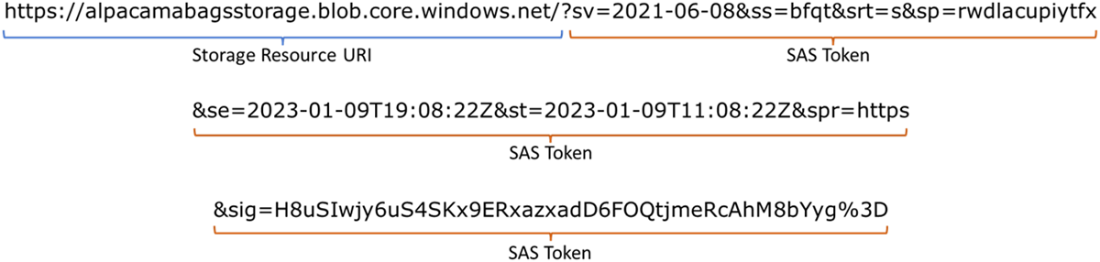
The SAS URI consists of the resource URI and then the SAS token as a query parameter.
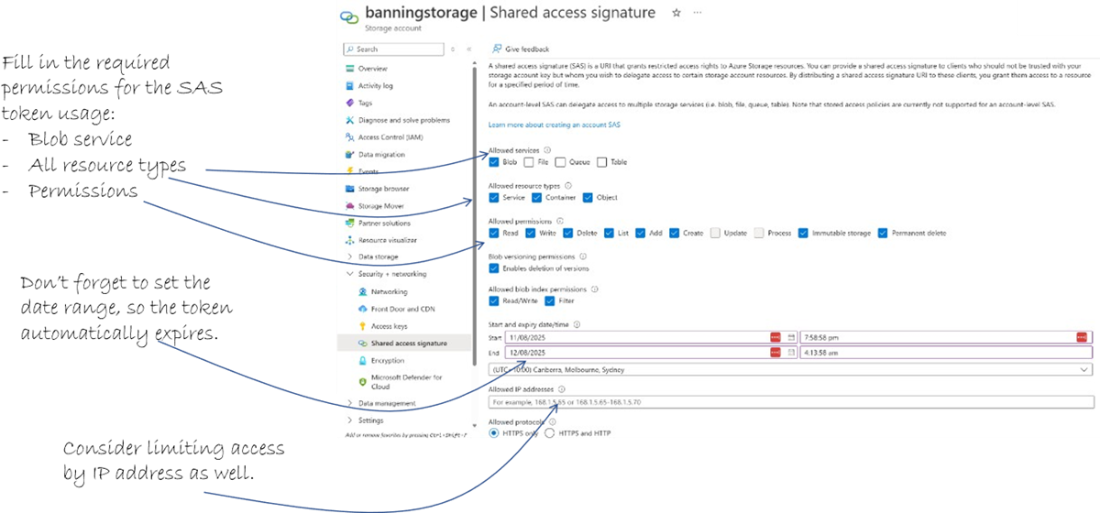
Creating a new SAS token for the storage account using the Azure Portal
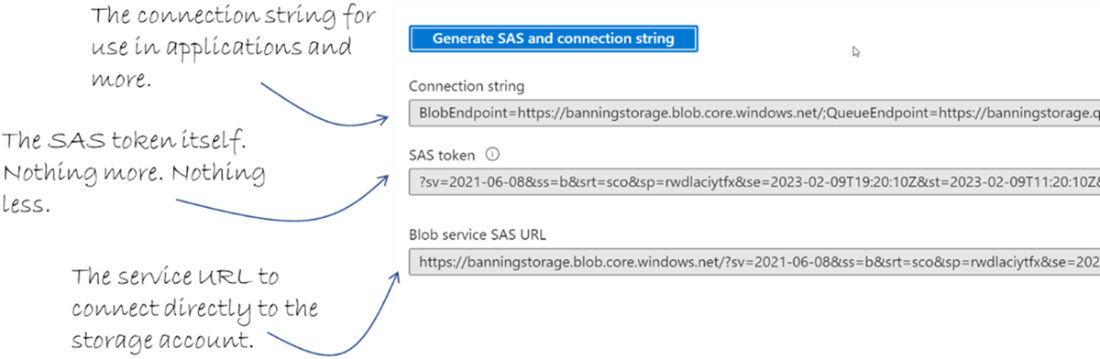
The three outputs for a SAS token.
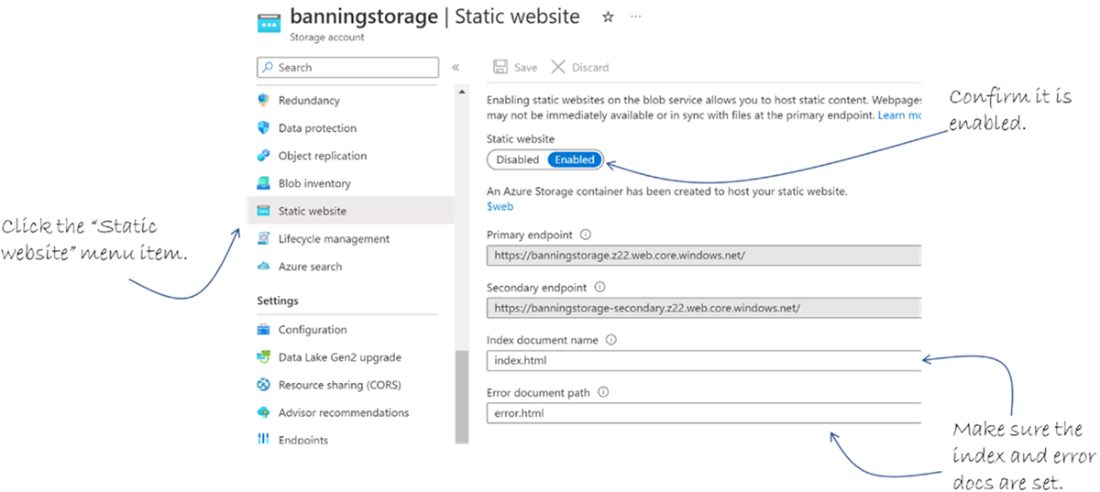
Confirm the static website and documents have been configured correctly.
This pen is too long. Shorten that URL!

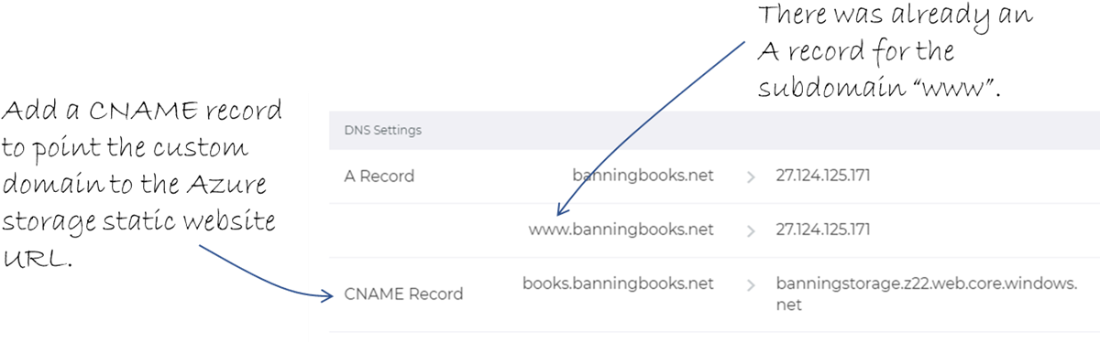
The CNAME record for the domain books.banningbooks.net
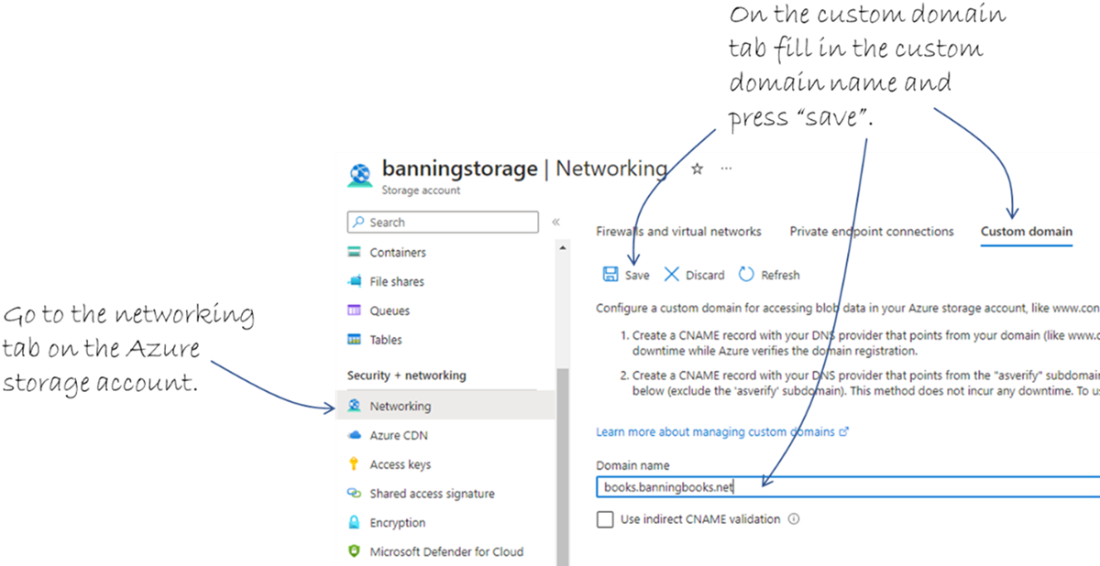
Setting up a custom domain for the storage account.
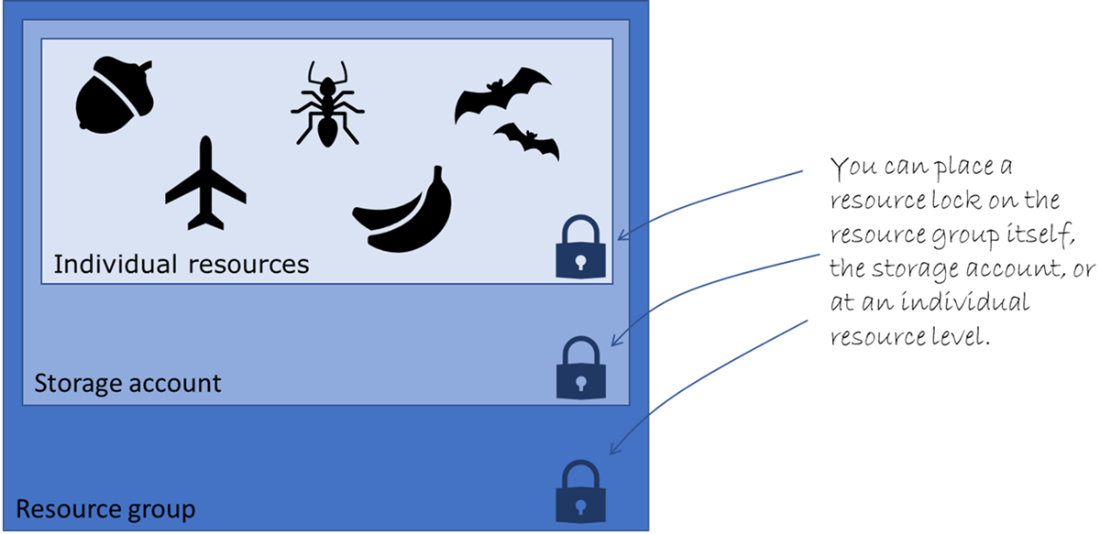
Resource locks can be placed on the resource group, storage account or individual objects.
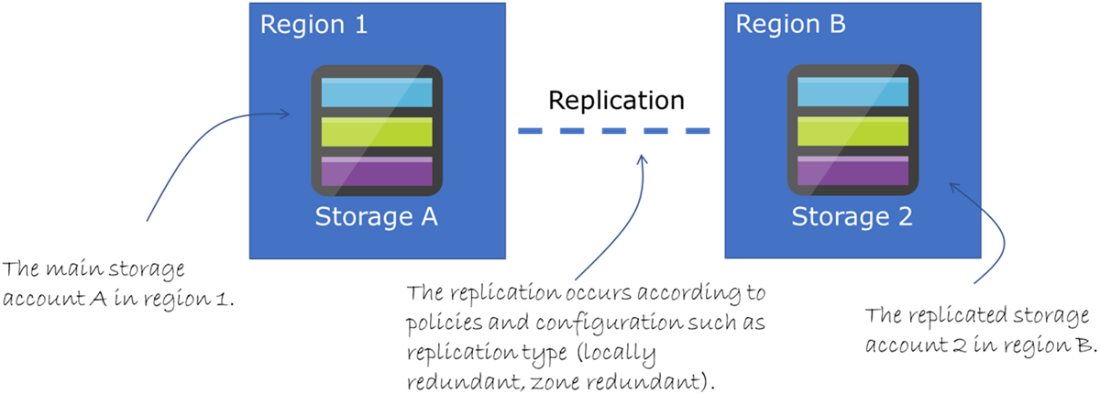
Azure storage object replication between two storage accounts in different regions.
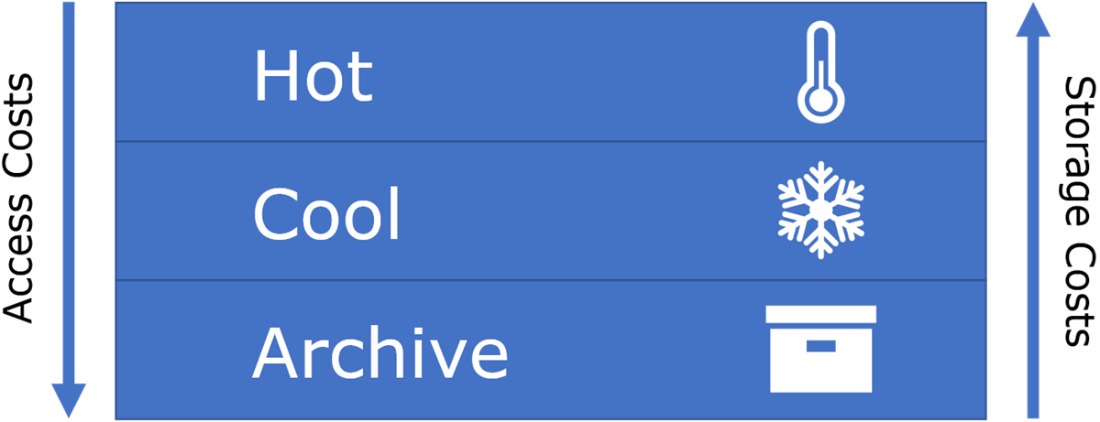
The trade-off -The access costs go up for cold and archive tiers, where the storage costs go up for cold and hot tiers.
Summary
- You can host a simple static website using Azure storage by uploading CSS, HTML and JavaScript files to the $web folder.
- AzCopy is a commonly used tool for moving files from on-premises to Azure storage accounts, or between Azure storage accounts.
- You can authenticate AzCopy commands with either Azure Active Directory or using a Shared Access Signature (SAS) token.
- A SAS token is a type of secure token that is used to grant access to specific Azure resources. It can be used as an alternative to using a username and password to authenticate requests to Azure resources, and provides a way to grant granular, time-limited access to specific resources or resource groups.
- A SAS token can be configured and generated using the SAS token menu for the storage account in the Azure portal.
- Files for a static website on Azure storage must reside in the $web folder.
- Protecting data isn’t just to keep out unwanted people and processes, but also to increase customer trust, protect intellectual property and ensure business continuity.
- With Blob version tracking enabled, each time a blob is modified or deleted, Azure blob Storage automatically creates and maintains a new version of the blob.
- Azure locks can be applied to an entire resource group, a storage account, or an individual object, such as a blob.
- There are two types of ARM locks: 'CanNotDelete' and 'ReadOnly.' The 'CanNotDelete' lock ensures that the locked resource cannot be deleted but allows for modifications. The 'ReadOnly' lock prevents both deletion and modification of the locked resource.
- Versioning of the storage account has to be enabled to use object replication.
- Data transitions automatically between hot, cold and archive tiers according to your storage policies.
- Use lifecycle management policies to ensure data is moved to the appropriate tier or deleted to save costs and optimize the storage.
- Policies are defined in JSON format, which also allows the Azure CLI to implement them using plain text files.
- Lifecycle management policies are your best friend when it comes to managing versioning, data retention, object replication, and sanity.
FAQ
What is a static website in Azure Storage and when should I use it?
A static website in Azure Storage serves HTML, CSS, JavaScript, and other static assets directly from a special container named$web. It’s ideal for simple, low-maintenance sites that don’t require server-side code. You pay only for storage and egress; there’s no web server to manage.What is the $web container and do my files have to be in it?
$web is a reserved container that Azure Storage uses to serve static website content. Yes—your site files must live in $web. If it doesn’t exist, enabling the static website feature will create it, or you can create it yourself (for example, with AzCopy).How do I upload my site to Azure Storage with AzCopy using a SAS token?
- Generate a SAS token for the storage account with the minimal required permissions and an expiry.- Create (or ensure) the
$web container: azcopy make "https://<account>.blob.core.windows.net/$web?<SAS>"- Copy your files recursively:
azcopy copy "C:\path\to\site" "https://<account>.blob.core.windows.net/$web?<SAS>" --recursive=trueWhat is a SAS token and how do I keep it secure?
A Shared Access Signature grants time-limited, permission-scoped access by appending a signed query string to a resource URI. Best practices:- Scope narrowly: choose only the services, resource types, and permissions required.
- Set start/expiry times and rotate frequently.
- Restrict by IP if possible.
- Store securely and never commit SAS tokens to source control.
How do I enable the static website feature and find the site URL via CLI?
- Enable:az storage blob service-properties update --account-name <account> --static-website --404-document error.html --index-document index.html- Get the endpoint:
az storage account show -n <account> -g <rg> --query "primaryEndpoints.web" -o tsvHow do I use a custom domain for my static website (and what about HTTPS)?
- Buy a domain with your registrar.- Create a CNAME (e.g.,
www) pointing to your storage web endpoint (e.g., <account>.z22.web.core.windows.net).- In the storage account’s Custom domain settings, map the domain.
- For HTTPS, use a certificate via a fronting service like Azure CDN/Front Door; storage static websites don’t natively provide managed certs for custom domains.
How does blob versioning help and how do I use it?
Blob versioning preserves previous blob states so you can recover from accidental overwrites or deletions.- Enable:
az storage account blob-service-properties update --account-name <account> --resource-group <rg> --enable-versioning true- List versions:
az storage blob version list --account-name <account> --container-name <container> --name <blob> -o tableWhat are Azure Resource Manager locks and when should I use CanNotDelete vs ReadOnly?
ARM locks prevent accidental changes:-
CanNotDelete: resource can be modified but not deleted (good safeguard for critical storage accounts).-
ReadOnly: no deletes or updates (strongest protection; restricts operations).Create:
az lock create --name <lockName> --resource-group <rg> --resource-name <account> --resource-type Microsoft.Storage/storageAccounts --lock-type CanNotDeleteWhat is Soft Delete and how is it different from versioning?
Soft Delete keeps deleted blobs/versions for a retention period so you can undelete them. Versioning maintains prior states on updates/deletes. Use both for layered protection.- Enable:
az storage account blob-service-properties update --account-name <account> --resource-group <rg> --enable-delete-retention true --delete-retention-days 7- Undelete:
az storage blob undelete --account-name <account> --container-name <container> --name <blob>How do I set up Object Replication and what are the prerequisites?
Object Replication asynchronously copies blobs from a source container to a destination container (optionally in another region/account). Prereqs: enable versioning and change feed on source; enable versioning on destination.- Enable props (source):
az storage account blob-service-properties update --account-name <src> --resource-group <rg> --enable-versioning --enable-change-feed- Enable props (dest):
az storage account blob-service-properties update --account-name <dest> --resource-group <rg> --enable-versioning- Create policy (on destination):
az storage account or-policy create --account-name <dest> --resource-group <rg> --source-account <src> --destination-account <dest> --source-container <srcContainer> --destination-container <destContainer>How can Lifecycle Management reduce costs, and can I combine multiple rules?
Lifecycle policies transition data between Hot/Cool/Archive based on last modification, and can delete stale blobs or old versions to save costs. Define rules in one JSON policy and apply it to the account.- Apply:
az storage account management-policy create --account-name <account> --resource-group <rg> --policy @policies.jsonNote: You can include multiple rules (e.g., tiering and version cleanup) in the same policy file; creating a new policy replaces the existing one, so combine rules before applying.

 Microsoft Azure in Action ebook for free
