7 Azure AI
This chapter introduces Microsoft Azure’s end-to-end approach to building AI solutions, showing how natural language processing, speech, vision, and content moderation services can be combined to automate workflows and enhance user experiences. It frames these capabilities through a practical “Banning Books” scenario and highlights Azure AI Foundry as the hub for orchestrating data, models, deployments, and governance across the AI lifecycle. Throughout, the chapter emphasizes Responsible AI principles—fairness, transparency, and privacy—so teams can innovate confidently while protecting users and complying with organizational policies.
Concretely, Azure OpenAI powers text-centric scenarios such as recommendations, summarization, and sentiment analysis, with guidance on matching model size to use case, managing context limits via chunking and retrieval, and balancing quality, latency, and cost. Speech Services cover the full audio spectrum: Speech to Text for searchable interview archives; Text to Speech for on-demand previews and long-form audio; and Speech Translation for live captions or dubbed tracks in multiple languages. Vision Services automate image understanding and custom classification for book covers, offer face detection to personalize experiences, and employ Content Moderator to keep user submissions appropriate—all accessible via CLI/REST or Studio-based workflows and designed to slot into real production pipelines.
Azure AI Foundry unifies the build-operate-govern cycle: teams create a project, connect storage with managed identities and role-based access, select models from the catalog, and fine-tune with JSONL training data. Deployment pipelines promote models through staging to production with approvals, canary or blue/green strategies, and continuous monitoring for latency, errors, drift, and policy compliance. Responsible AI is operationalized with fairness checks and dashboards, transparent decision logging and provenance, and strong privacy controls (encryption, access governance, and confidential compute). The result is a repeatable, auditable path to deliver high-quality AI features—from recommendations to multilingual audio and visual tagging—at scale.
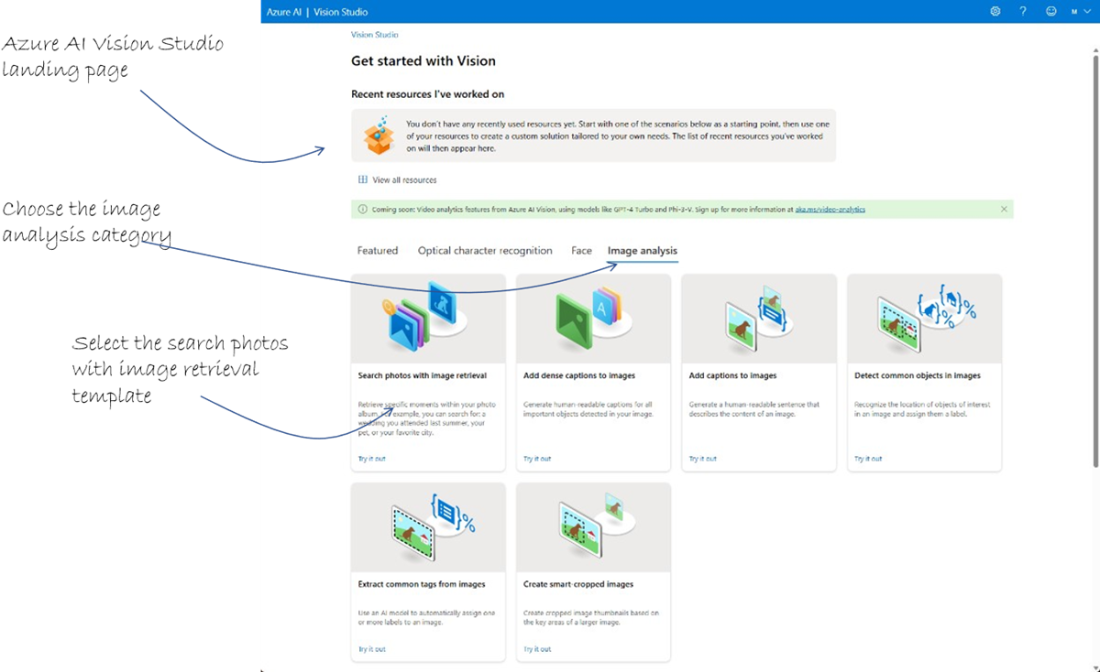
Use the Azure AI Vision Studio templates to analyze images.
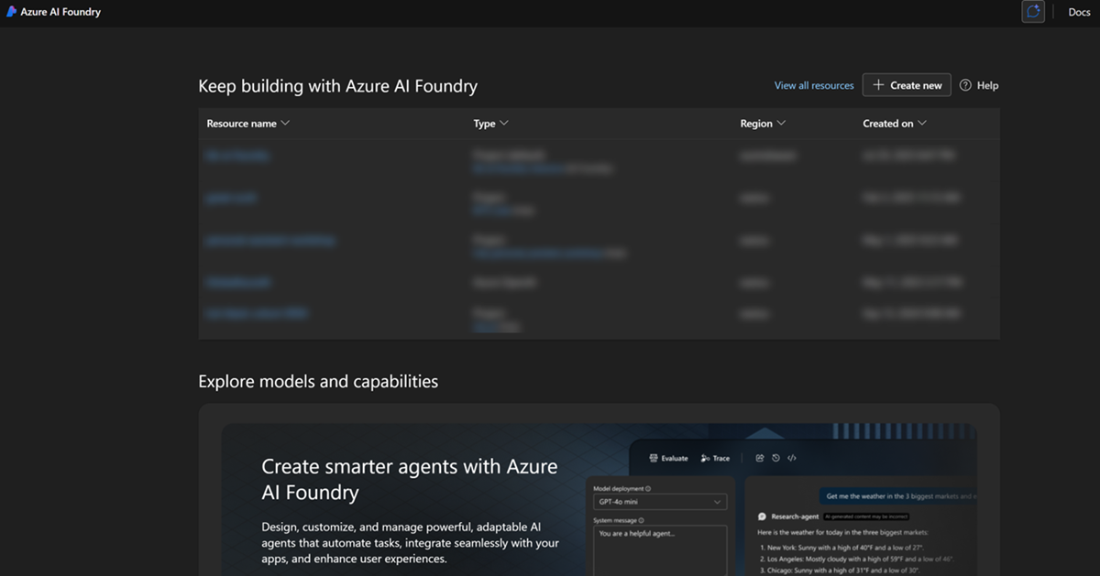
Azure AI Foundry landing page
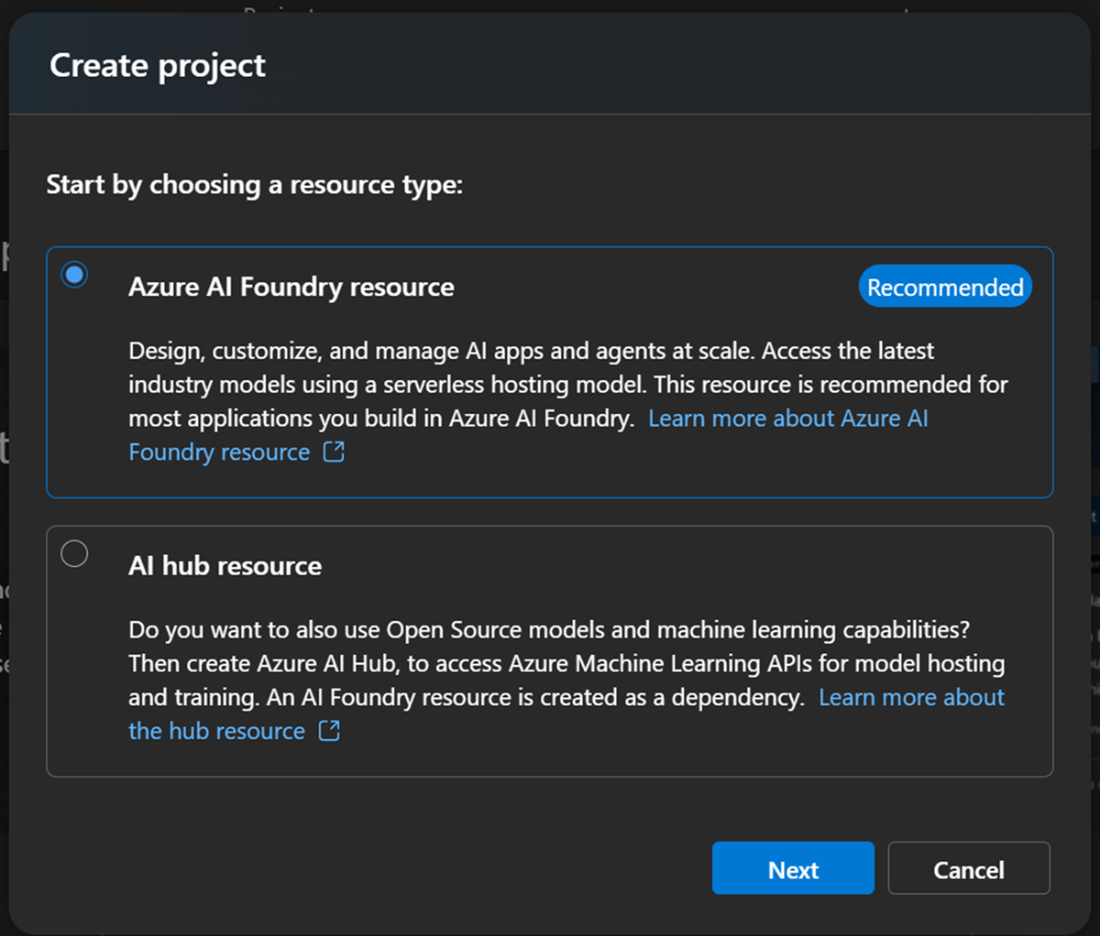
Choose resource type of the Foundry project
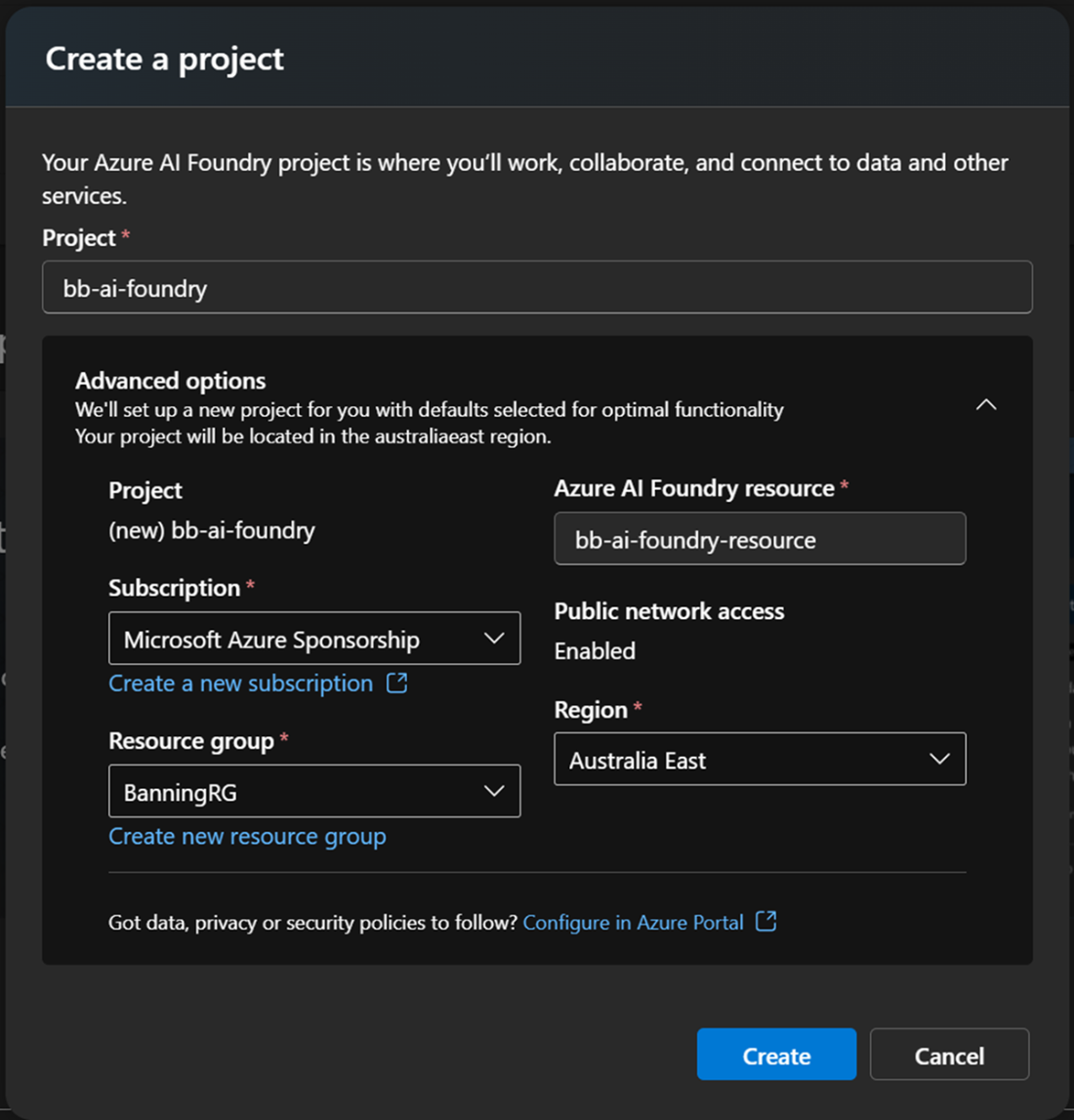
Configuration of the Foundry project
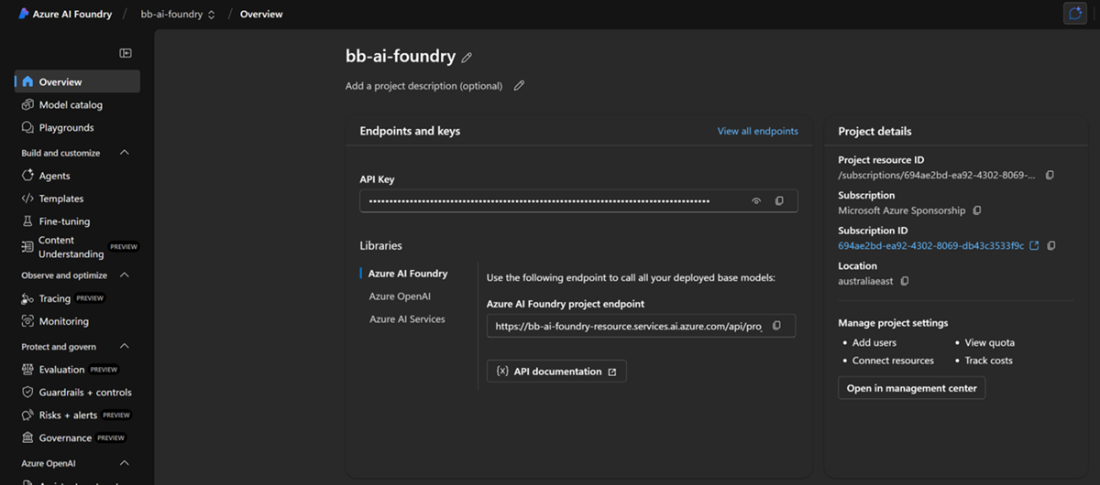
The overview of the AI Foundry resource for Banning Books
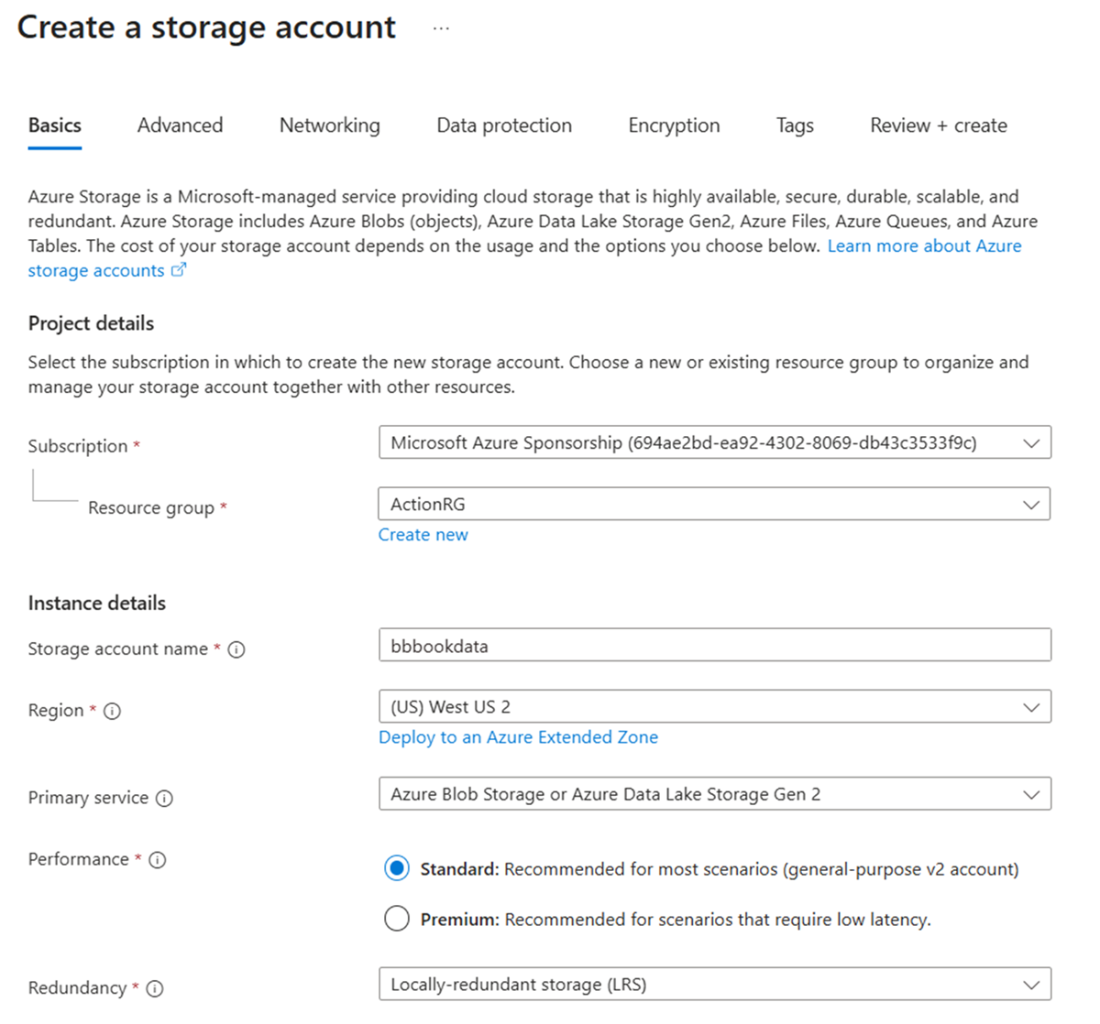
Create a storage account called bbbookdata
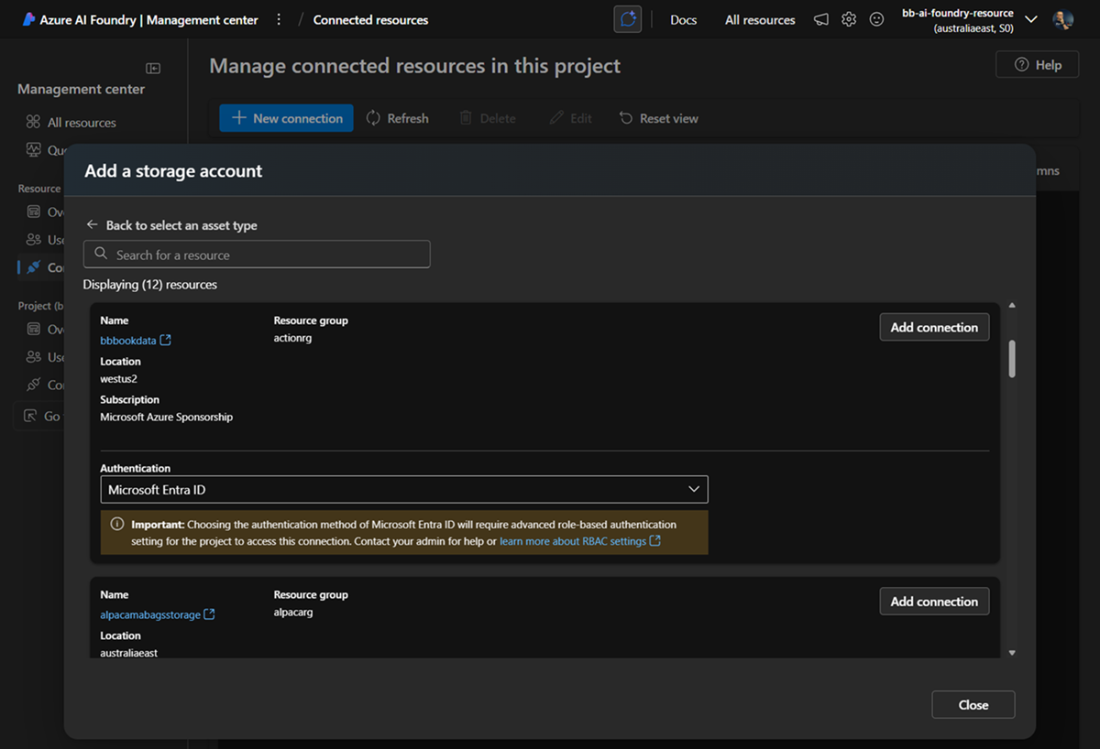
Add a storage account as data connection in AI Foundry
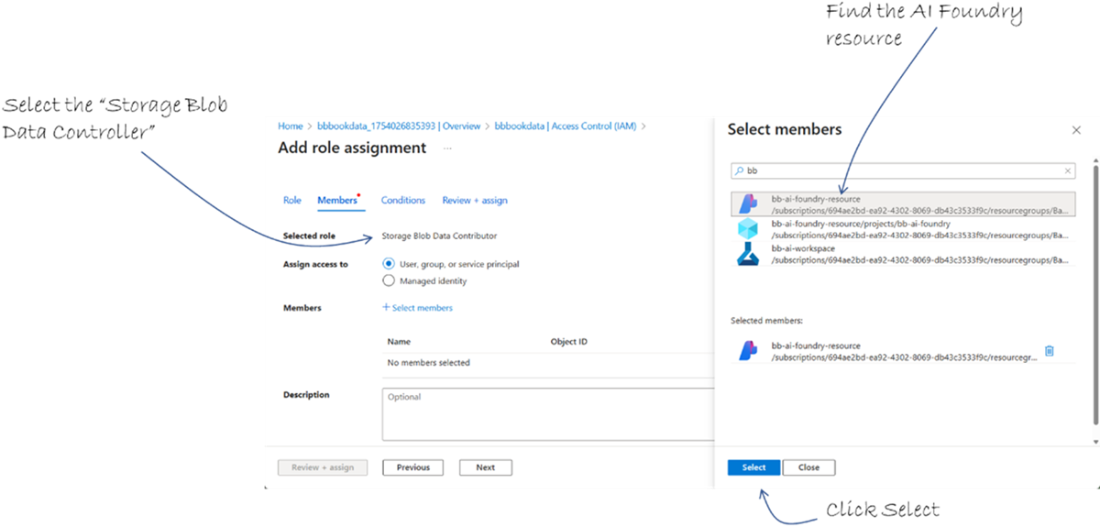
Add the AI Foundry resource as Storage Blob Data Contributor
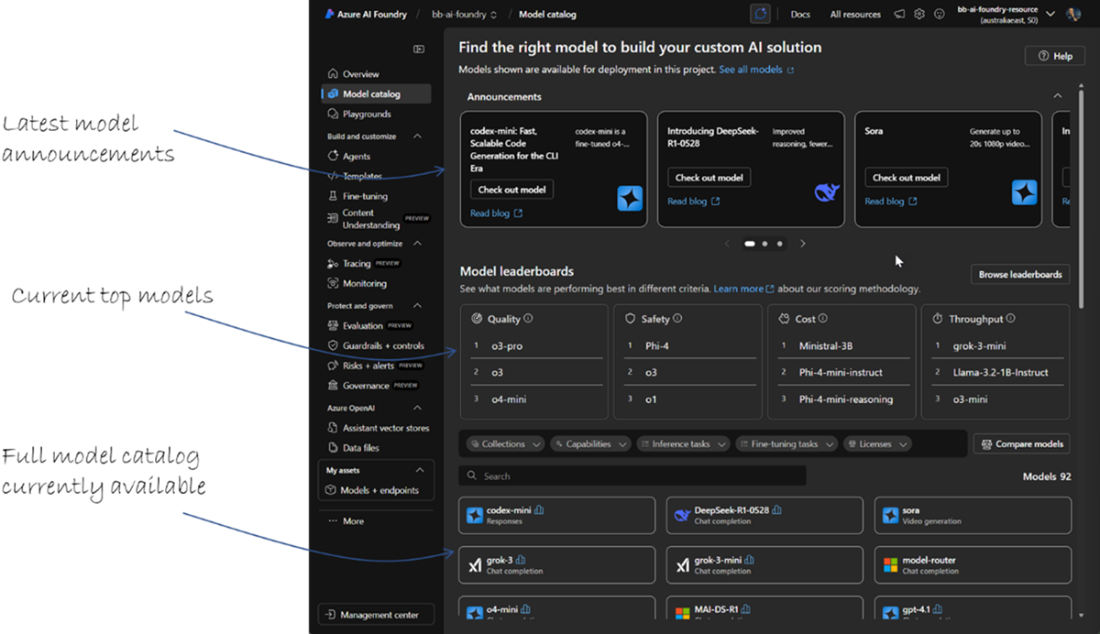
AI Foundry model catalog
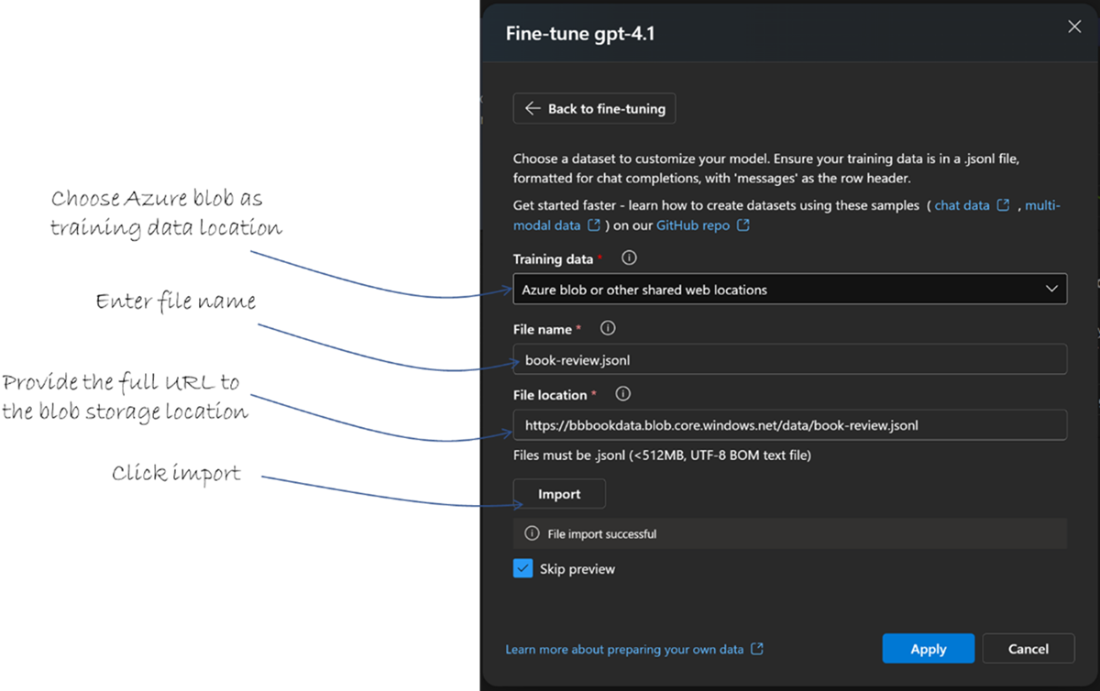
Import training data in a .jsonl file
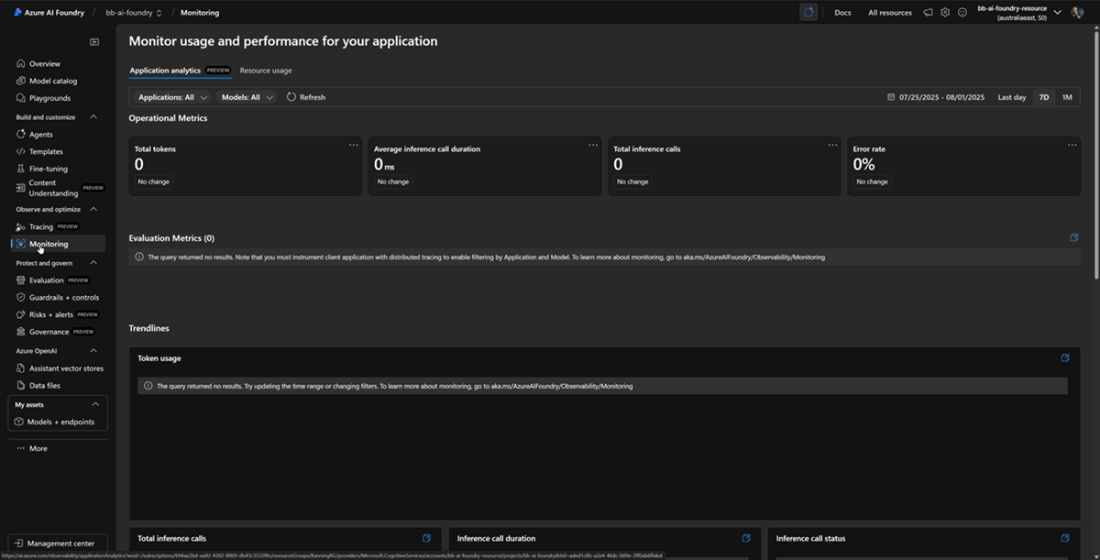
The monitoring dashboard in AI Foundry when your model is first created
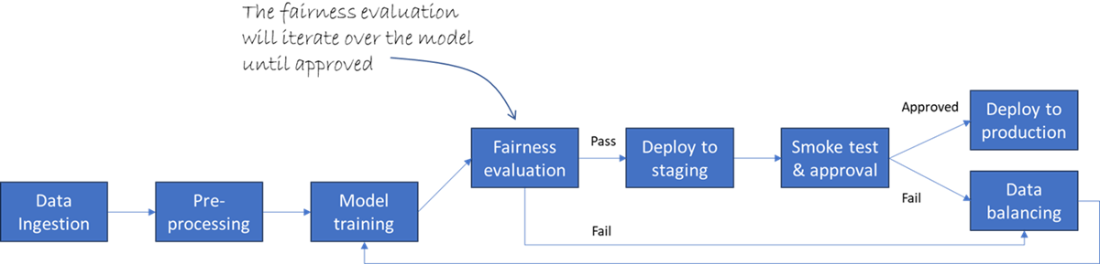
An example data pipeline that incorporates a fairness evaluation step
Summary
- Azure OpenAI Service lets you spin up powerful language models in minutes using the Azure CLI, forming the core of Banning Books’ recommendation and summarization engines.
- Deploying a model (e.g., GPT-4o) to your OpenAI resource activates an endpoint that applications can invoke for human-like text generation, content summaries, and conversational agents.
- Crafting clear prompts and invoking the completions API via az rest enables customized book-recommendation queries directly from the CLI or automated scripts.
- Speech Services (Speech to Text, Text to Speech, Speech Translation, Speaker Recognition) all live under one SpeechServices resource, streamlining voice-driven workflows for transcription, audiobooks, multilingual events, and secure caller verification.
- Speech to Text transcribes author interviews into searchable text, building an accessible archive and powering quote-extraction and topic-alert applications.
- Text to Speech converts banned-tech manuscripts into natural audio, expanding Banning Books’ offerings to commuters and visually impaired readers without extra narration costs.
- Speech Translation delivers real-time captions or dubbed audio for live webinars, removing language barriers and broadening Banning Books’ global reach.
- Speaker Recognition locks down premium support lines by verifying caller voices, enabling personalized greetings and fraud-resistant access to sensitive services.
- Computer Vision analyzes book-cover images via the REST API, extracting tags and descriptions that automate catalog metadata and fuel visual similarity recommendations.
- Custom Vision lets Banning Books train bespoke classifiers in Vision Studio—tagging niche cover styles like “RetroFuturism” or “CircuitBoard” and running inference through a REST endpoint.
- Face detection with the Computer Vision account identifies customer age, gender, and emotion in both online profiles and in-store kiosks, enabling mood-aware greetings and age-appropriate content gating.
- Content Moderator screens user-generated text and images for profanity, adult content, or sensitive data, helping maintain a respectful, on-brand community environment.
- Azure AI Foundry workspaces centralize all AI assets—data connections, compute targets, projects, and endpoints—under a single managed resource group.
- Projects in AI Foundry act as logical containers for specific use cases (e.g., “Book Recommendation Engine”), grouping datasets, labeling tasks, training runs, and deployments.
- Data ingestion in AI Foundry links to Blob storage via the Management Center and Connected Resources, with role-based access granted to the workspace’s managed identity.
- Model selection balances performance, cost, latency, and domain fit—prototyping on GPT-3.5-Turbo before fine-tuning to Banning Books’ jargon or upgrading to GPT-4o if needed.
- Training a model in Foundry uses a wizard that accepts JSONL datasets, lets you configure compute tiers and hyperparameters, and provides real-time metrics (loss, perplexity) in the portal.
- Deployment pipelines in AI Foundry publish models to staging and production with one click or via CI/CD, complete with approval gates, smoke tests, and canary or blue/green rollouts.
- Built-in monitoring and governance dashboards track endpoint latency, error rates, data drift, bias/fairness metrics, and content-moderation accuracy, all secured by role-based access and audit logs.
FAQ
What Azure AI capabilities does this chapter cover and how can they help my app?
Azure AI offers NLP (Azure OpenAI), Speech (Speech to Text, Text to Speech, Speech Translation), Vision (Computer Vision, Custom Vision, face detection), and Content Moderation. Together they automate tasks like recommending books, summarizing content, transcribing interviews, tagging images, translating live events, generating audio previews, and screening user content. Azure AI Foundry unifies data ingestion, model training/fine-tuning, deployment, monitoring, and Responsible AI governance in one place.How do I create an Azure OpenAI resource and deploy a model?
Use the Azure CLI to provision the resource and deploy a model:
C:/> az cognitiveservices account create --name banningBooksOpenAI --resource-group BanningRG --kind OpenAI --sku S0 --location westus --yes

C:/> az cognitiveservices account deployment create \
  --resource-group BanningRG \
  --name banningBooksOpenAI \
  --deployment-name book-recommender \
  --model-name gpt-4o \
  --model-version 2024-08-06 \
  --model-format OpenAI \
  --sku-name Standard --sku-capacity 1
This creates an Azure OpenAI account and deploys a GPT-4o model as the “book-recommender” endpoint.
How do I send a prompt to my deployed Azure OpenAI model from the CLI?
Set variables and call the completions endpoint with az rest:
C:/> ENDPOINT="https://banningbooksopenai.openai.azure.com/"; \
DEPLOYMENT_NAME="book-recommender"; API_VERSION="2024-08-06"; API_KEY="<your-api-key>"

C:/> PROMPT="Customer Review: \"I absolutely loved '1984' ...\"
Based on this review, recommend three books that the customer might enjoy, along with a brief description of each."

C:/> az rest --method post \
  --url "${ENDPOINT}openai/deployments/${DEPLOYMENT_NAME}/completions?api-version=${API_VERSION}" \
  --headers "api-key=${API_KEY}" "Content-Type=application/json" \
  --body "{\"prompt\":\"${PROMPT}\",\"max_tokens\":150,\"temperature\":0.7,\"n\":1}"
The service returns JSON containing the model’s recommendations.
How do I choose the right LLM and handle context window limits?
- Model sizing: Smaller models are cheaper/faster (great for quick suggestions). Larger models yield higher quality (use for long summaries or complex tasks).
- Context limit: Treat it like a fixed-size suitcase. Use summarization, chunking, or retrieval to fit only relevant text.
- Evaluate before prod: Test speed, cost, and quality with your real prompts and data.
How can I transcribe interviews at scale with Speech to Text?
Provision Speech Services, get a key, then submit a batch job with a container SAS URL:
C:/> az cognitiveservices account create --name banningBooksSpeech --resource-group BanningRG --kind SpeechServices --sku S0 --location westus --yes

C:/> az cognitiveservices account keys list --name banningBooksSpeech --resource-group BanningRG --query "key1" -o tsv

C:/> az rest --method post \
  --url "https://banningbooksspeech.cognitiveservices.azure.com/speechtotext/transcriptions:submit?api-version=2024-11-15" \
  --headers "Ocp-Apim-Subscription-Key=<your-key>" "Content-Type=application/json" \
  --body '{"contentContainerUrl":"https://<storage>.blob.core.windows.net/<container>?<SAS>","locale":"en-US","displayName":"BanningBooksInterviewTranscription","properties":{"timeToLiveHours":48,"wordLevelTimestampsEnabled":true}}'
Poll status:
C:/> az rest --method get --url "https://banningbooksspeech.cognitiveservices.azure.com/speechtotext/transcriptions/<job-id>?api-version=2024-11-15" --headers "Ocp-Apim-Subscription-Key=<your-key>"
Results include transcripts (with optional word timestamps) for indexing and reuse.
What are best practices for Text to Speech (TTS) previews and long-form audio?
- Use on-demand synthesis for short previews; batch-generate chapters to avoid re-synthesizing the same audio.
- Leverage SSML for pronunciation, pacing, emphasis; pick voices in Speech Studio.
- Choose formats wisely (MP3 vs WAV) and sample rates based on delivery (mobile stream vs download).
- Cache outputs, secure keys/identities (Microsoft Entra ID), and get explicit consent for any custom voice that resembles a real person.
How does Speech Translation support live events and recorded content?
- Live/streaming mode: Low-latency captions and optional synthesized dubbing; ideal for Q&A or real-time sessions.
- Batch mode: Translate recorded audio and optionally pre-render dubbed tracks; ideal when you want editing or human review.
- Tips: Capture clean audio, set the correct source locale, and choose streaming for immediacy vs batch for polish.
What’s the difference between Computer Vision and Custom Vision and how do I call them?
- Computer Vision: Prebuilt tagging/description, OCR, objects. Example analyze call:
C:/> az rest --method post \
  --url "https://banningBooksCompVision.cognitiveservices.azure.com/vision/v4.0/analyze?visualFeatures=Tags,Description" \
  --headers "Ocp-Apim-Subscription-Key=<your-key>" "Content-Type=application/json" \
--body '{"url":"https://myblob.blob.core.windows.net/covers/cover.jpg"}'- Custom Vision: Train your own classifier on your labeled images; then predict:
C:/> az rest --method post \
  --url "https://banningBooksCustomVision.cognitiveservices.azure.com/customvision/v3.0/Prediction/<project-id>/classify/iterations/Iteration1/url" \
  --headers "Prediction-Key:<prediction-key>" "Content-Type=application/json" \
  --body "{\"url\":\"https://myblob.blob.core.windows.net/covers/newcover.jpg\"}"
How do I moderate user text and images before publishing?
Provision Content Moderator and screen text/images via REST.
Screen text for profanity/sensitive terms:
C:/> az rest --method post \
  --url "https://banningBooksContentMod.cognitiveservices.azure.com/contentmoderator/moderate/v1.0/ProcessText/Screen?language=eng" \
  --headers "Ocp-Apim-Subscription-Key=<your-key>" "Content-Type=application/json" \
  --body '{"DataRepresentation":"Text","Value":"This book sucks and the author is an idiot."}'
Evaluate images for adult/racy content:
C:/> az rest --method post \
  --url "https://banningBooksContentMod.cognitiveservices.azure.com/contentmoderator/moderate/v1.0/ProcessImage/Evaluate" \
  --headers "Ocp-Apim-Subscription-Key=<your-key>" "Content-Type=application/json" \
  --body '{"DataRepresentation":"URL","Value":"https://myblob.blob.core.windows.net/user-art/graphic.jpg"}'
Act on flags by auto-hiding, queueing for review, or warning users.
How do I set up an Azure AI Foundry project and connect data securely?
- Create an AI Foundry workspace/project (e.g., bb-ai-foundry) in your subscription/region.
- Connect your Storage account (e.g., bbbookdata) via Management Center → Connected Resources; use Microsoft Entra ID authentication.
- Grant the Foundry workspace managed identity Storage Blob Data Contributor on the storage account so pipelines can read/write data.
- All assets (datasets, runs, endpoints) are tracked centrally with RBAC and audit logs.
How do I select, fine-tune, deploy, and govern models in AI Foundry responsibly?
- Select: Compare models in the catalog (e.g., GPT‑3.5‑Turbo vs GPT‑4o) for performance, cost, and latency; prototype first.
- Fine-tune: Prepare JSONL input-output pairs, run the fine-tuning wizard, then deploy a custom endpoint (e.g., book-recommender).
- Deploy/Operate: Use pipelines with approval gates, canary/blue‑green strategies, and CI/CD (GitHub Actions/Azure DevOps).
- Monitor: Track latency, errors, drift; enable bias/fairness dashboards and content moderation metrics.
- Responsible AI: Embed fairness (representative data, disparity checks), transparency (decision rationales, logs), and privacy (encryption, RBAC, Private Link, confidential compute) across the lifecycle.

 Microsoft Azure in Action ebook for free
