6 Security
Security in Azure is presented as a continuum, not a switch, and relies on a layered defense-in-depth model spanning physical, identity, perimeter, network, compute, application, and data protections. The chapter explains how Azure embeds security from its datacenters to its services, while clarifying the shared responsibility model across on-premises, IaaS, PaaS, and SaaS: Microsoft handles platform and physical layers, while customers retain responsibilities like configurations, identities, data classification, and compliance. Adopting a zero-trust mindset—deny by default, verify explicitly, and grant least privilege—anchors the overall approach to building resilient cloud architectures.
Identity sits at the center of secure design using Microsoft Entra ID (formerly Azure AD). The chapter walks through creating identities, enforcing multi-factor authentication with Conditional Access, and enabling passwordless authentication (e.g., Authenticator, FIDO2, Windows Hello). For non-human access, service principals provide app-level identities (often used by external tooling), while managed identities remove secrets entirely for Azure-hosted workloads. Access is governed with role-based access control (RBAC), combining a security principal, role definition, and scope to precisely grant least-privilege permissions across management groups, subscriptions, resource groups, and resources.
Operationally, Microsoft Defender for Cloud offers continuous posture management and threat detection through security recommendations, a secure score to prioritize remediation impact, and alerts for active risks—often linking directly to one-click or guided fixes. The chapter demonstrates using these capabilities to harden resources and shows how Azure Key Vault centralizes and protects secrets, keys, and certificates, integrating cleanly with managed identities and RBAC. Together, these practices—zero trust, strong identity and access controls, posture-driven hardening with Defender, and proper secret management—provide a practical blueprint for strengthening security on Azure.
The security continuum.

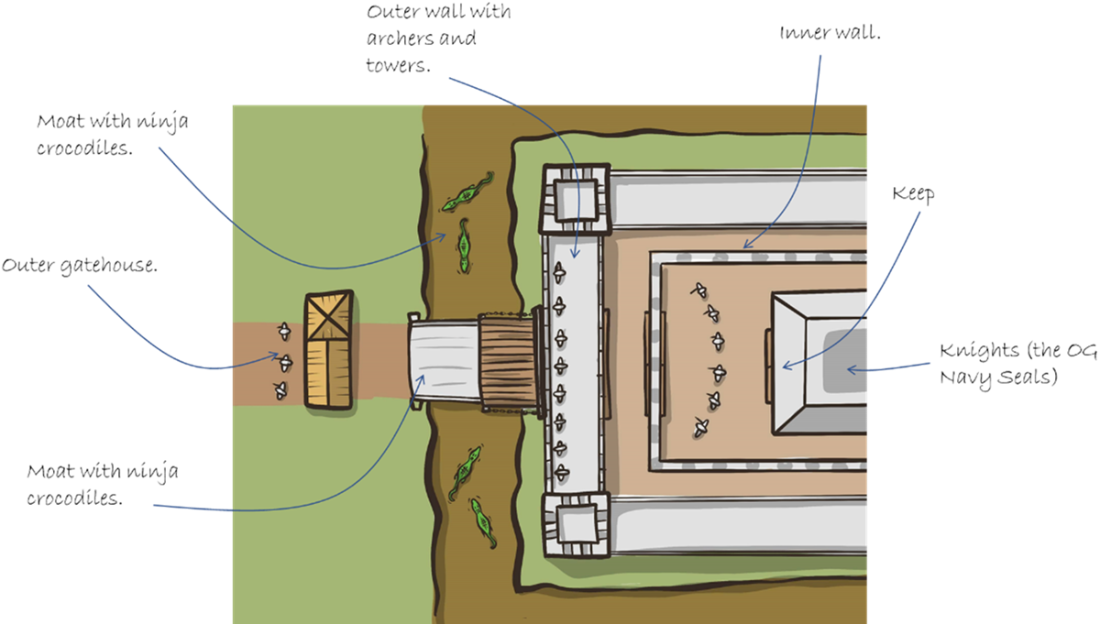
The seven layers of castle defense.
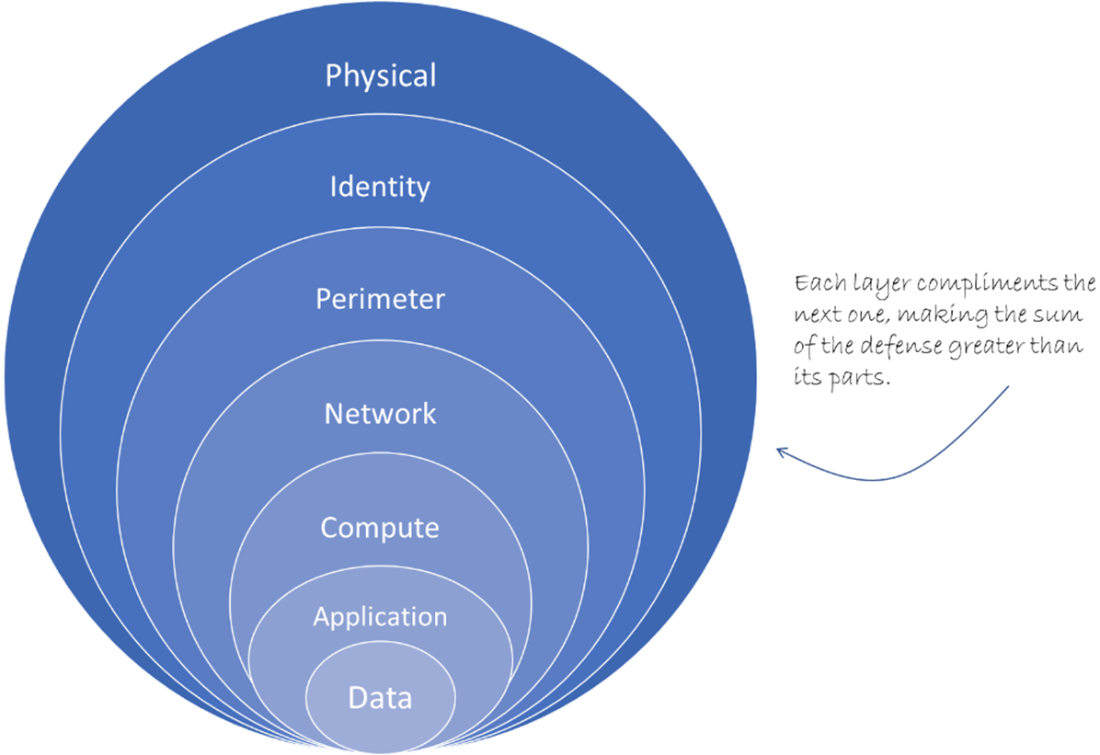
Azure layers of defense in depth.
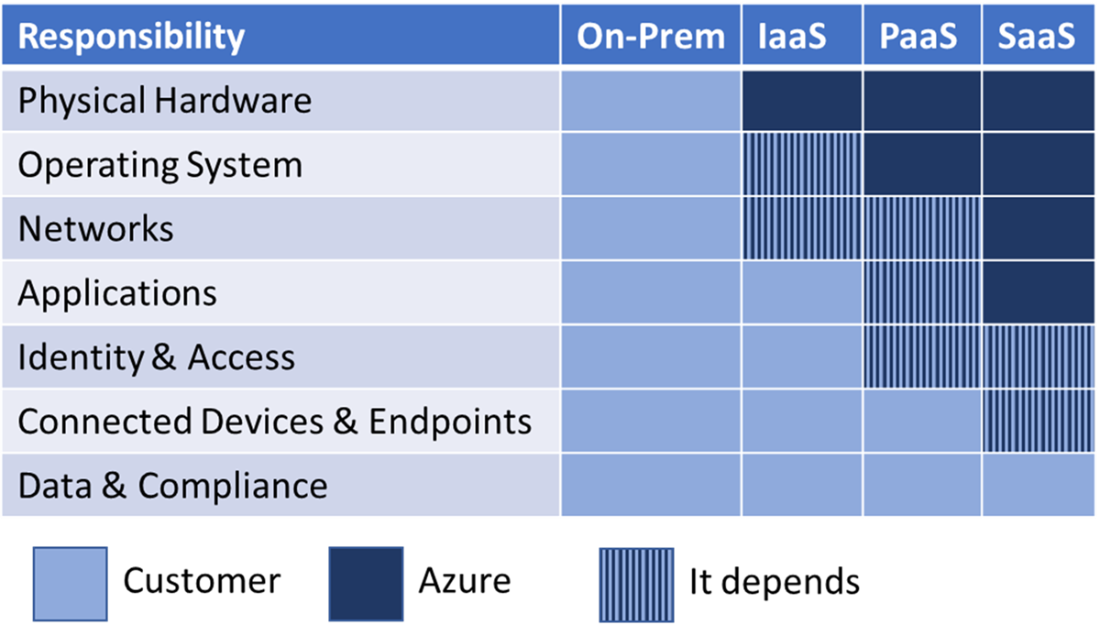
The shared responsibility for security and integrity, between Azure and the customer.
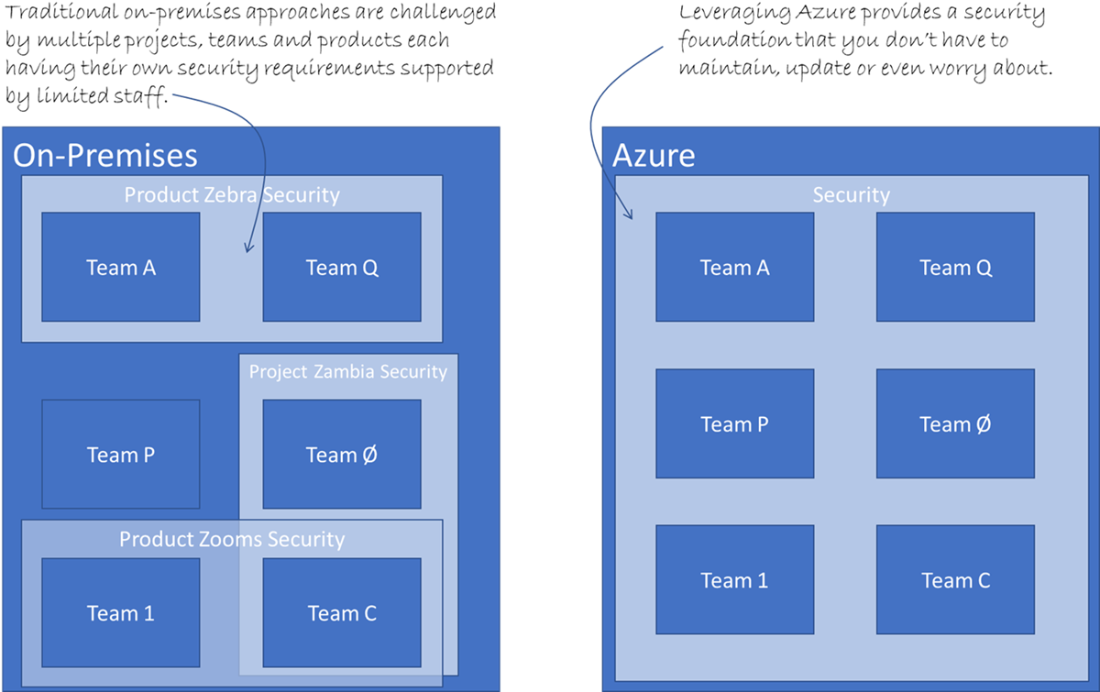
Security on-premises can be challenging and under-resourced compared to leveraging the Azure platform.
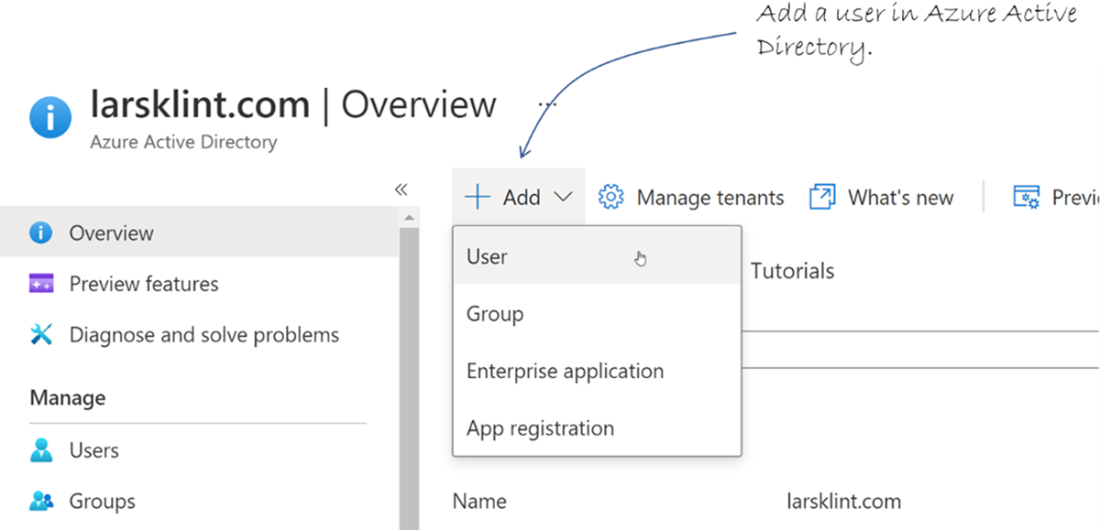
Create a new user in AAD.
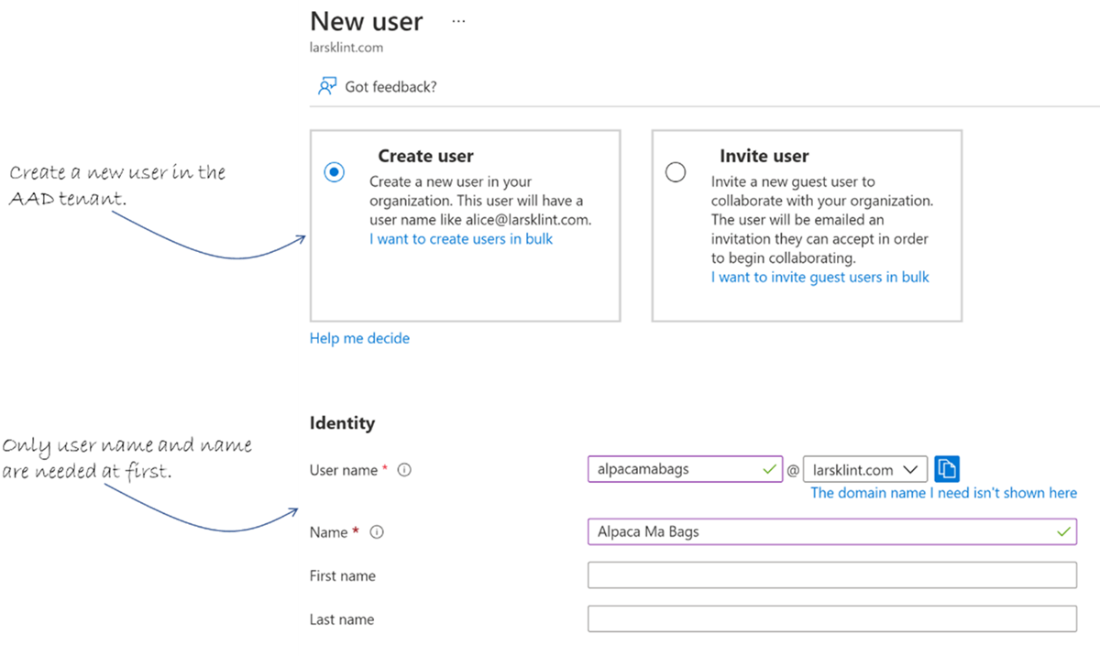
Creating a new user only needs a user name and name to start off with.
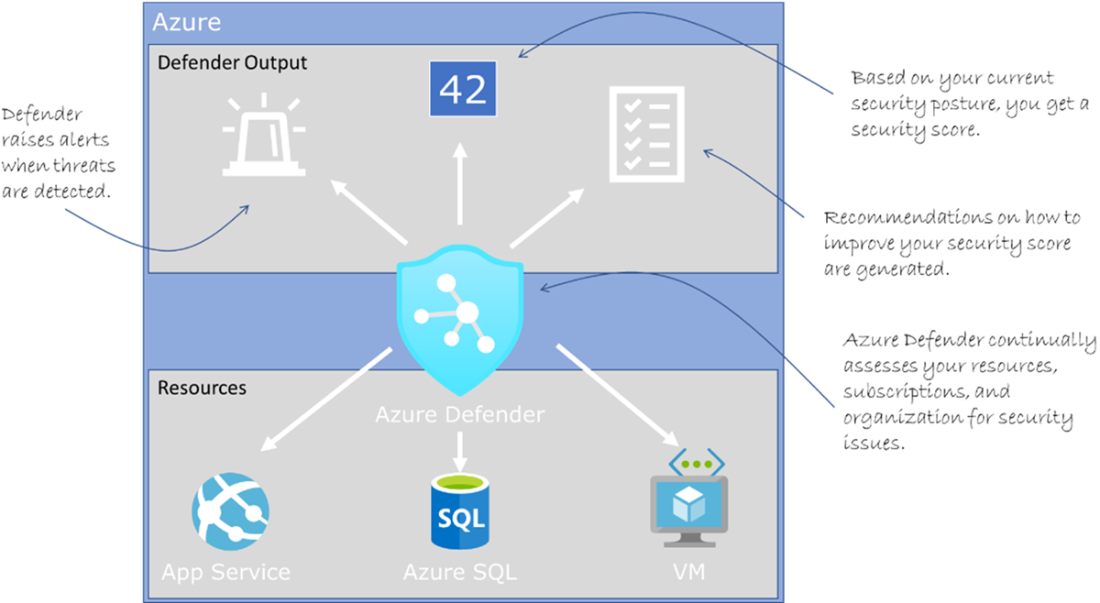
Microsoft Defender for Cloud gets data from resources and provides security alerts and recommendations.
Use the Azure Portal search bar to find Microsoft Defender for Cloud.

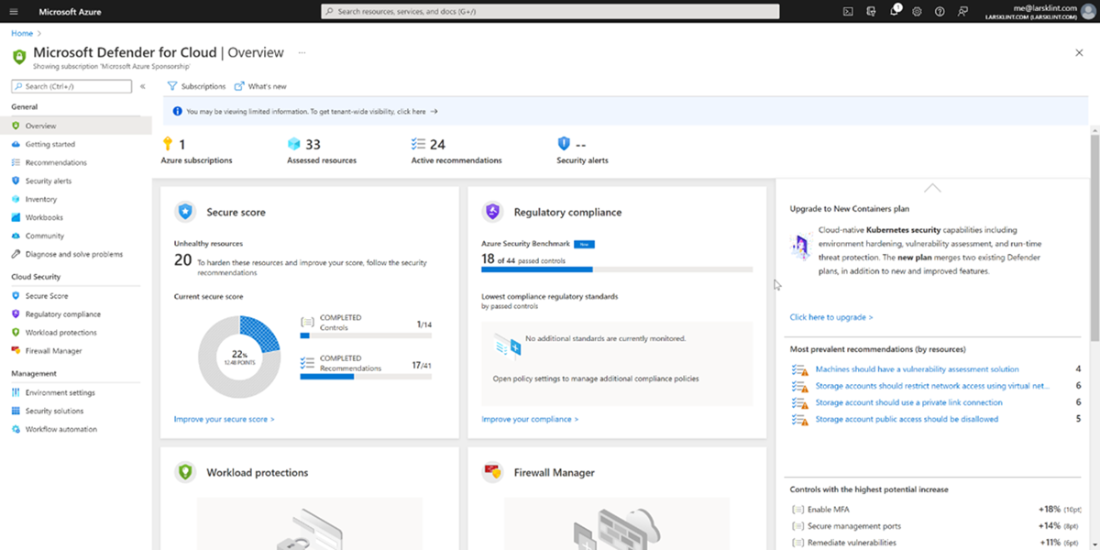
Defender overview blade in the Azure Portal.
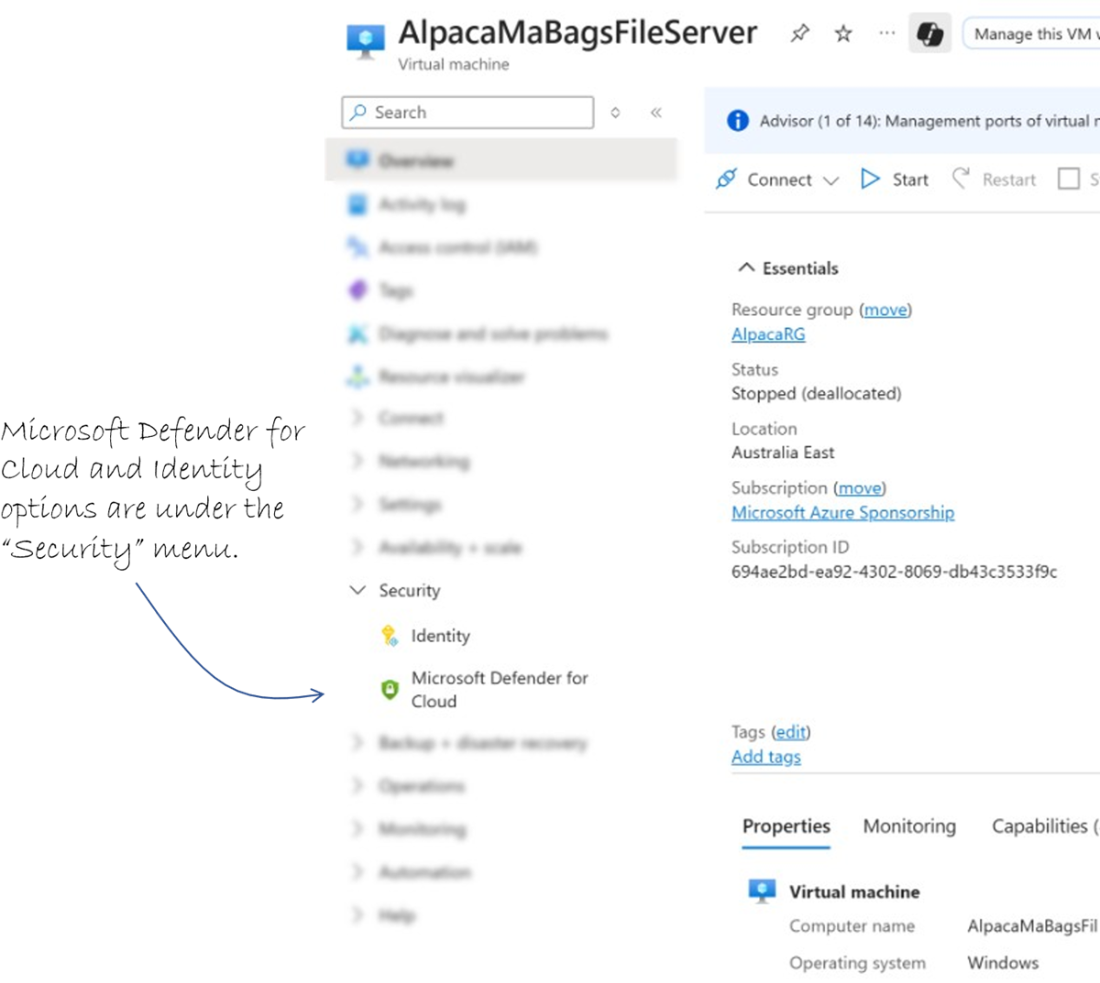
The security menu is where Defender lives for a VM.
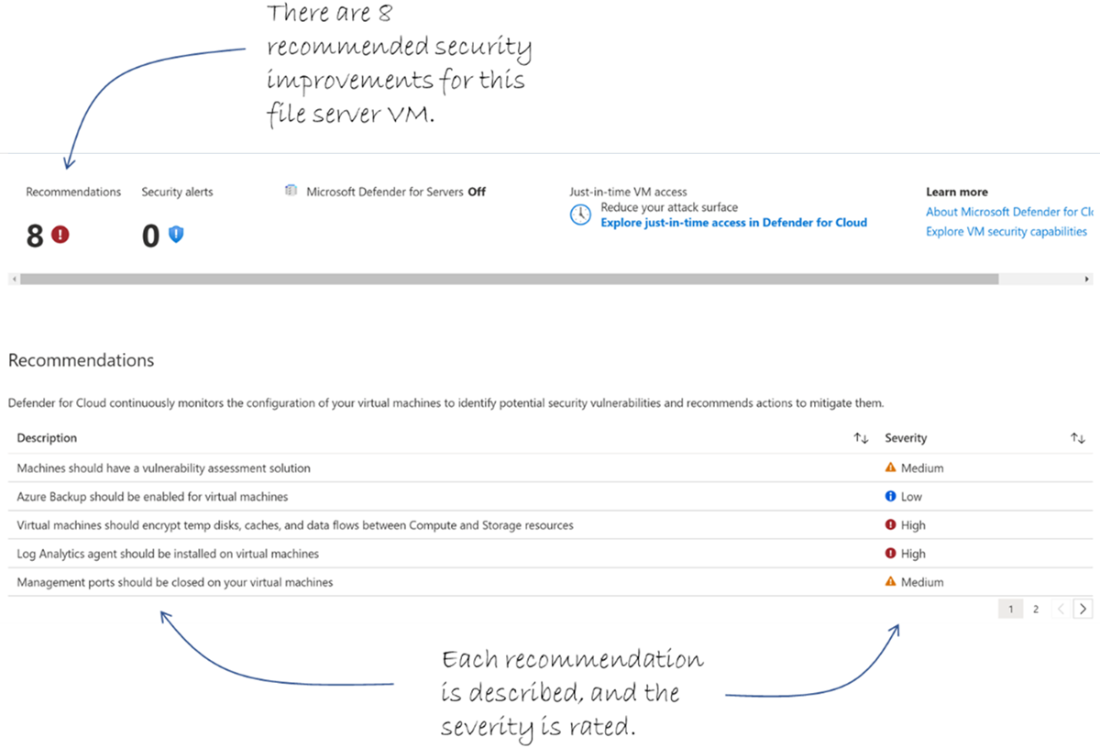
Each of the recommended security fixes are described and rated for severity.
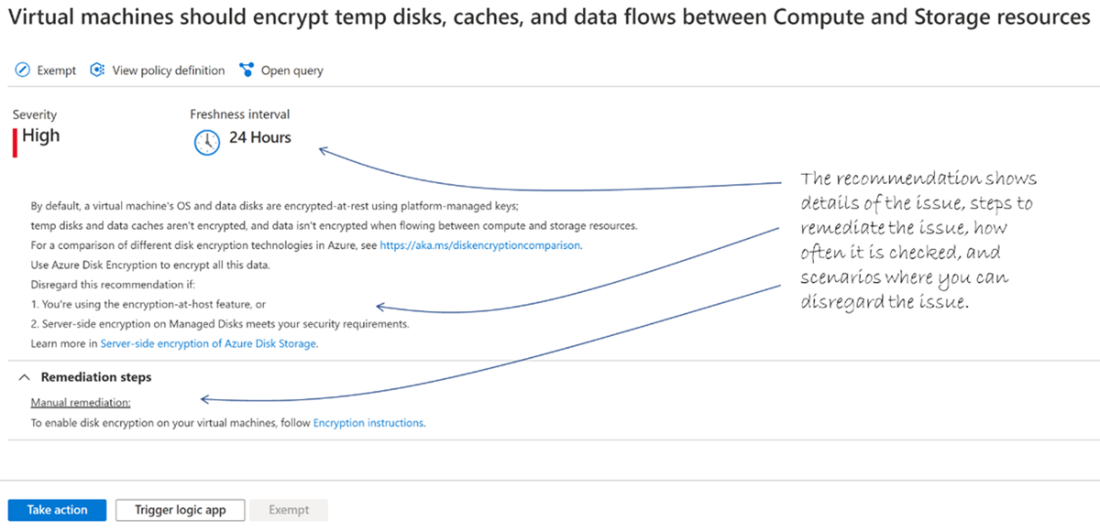
The details of a specific security issue raised by Microsoft Defender.
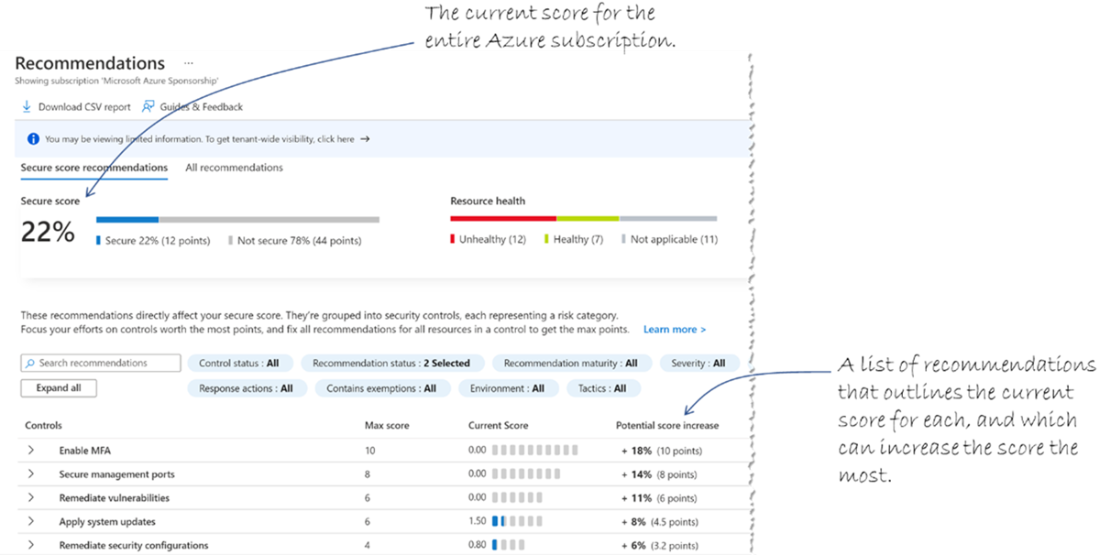
The secure score recommendations, including possible improvements.
Create sample security alerts to learn before pay.
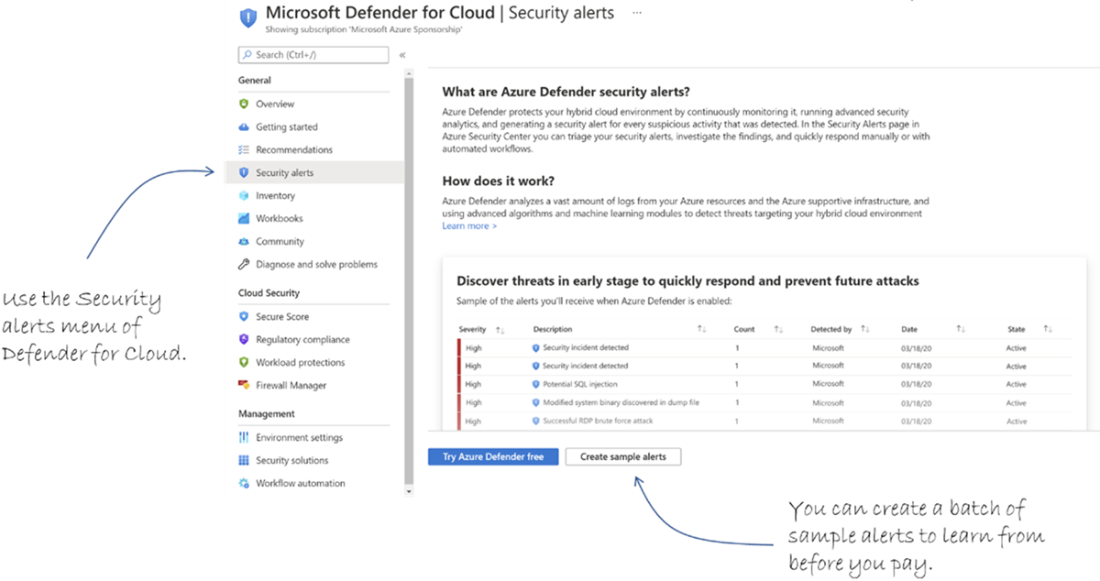
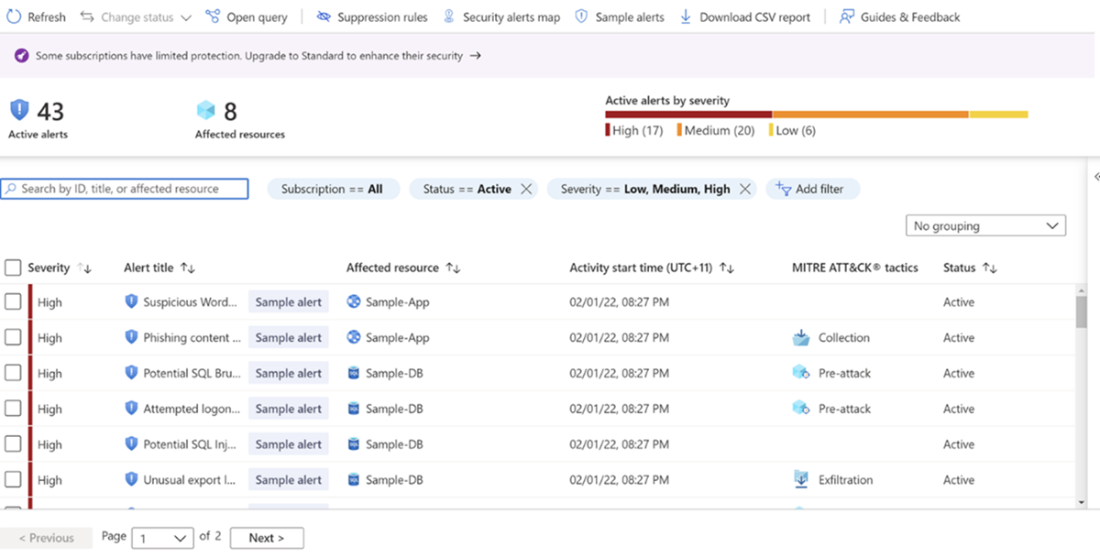
A list of sample security alerts generated by Azure.
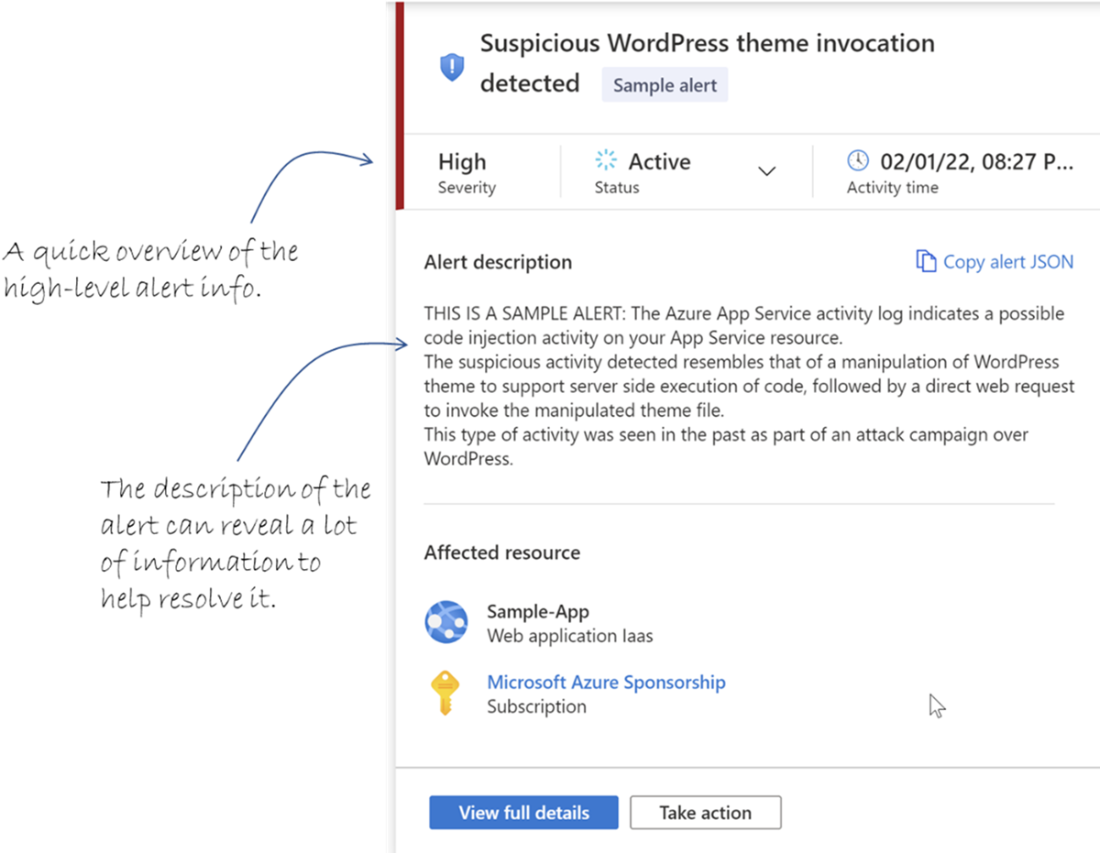
Security alert detail pane.
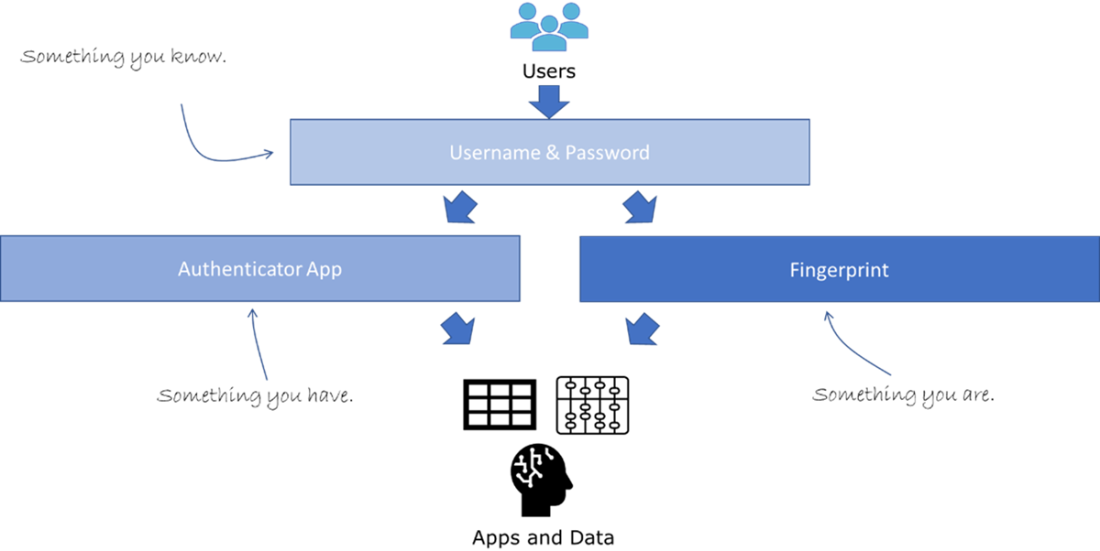
You need at least two of the three types of authentication to satisfy the MFA flow.
Access the MFA settings in the security part of AAD.
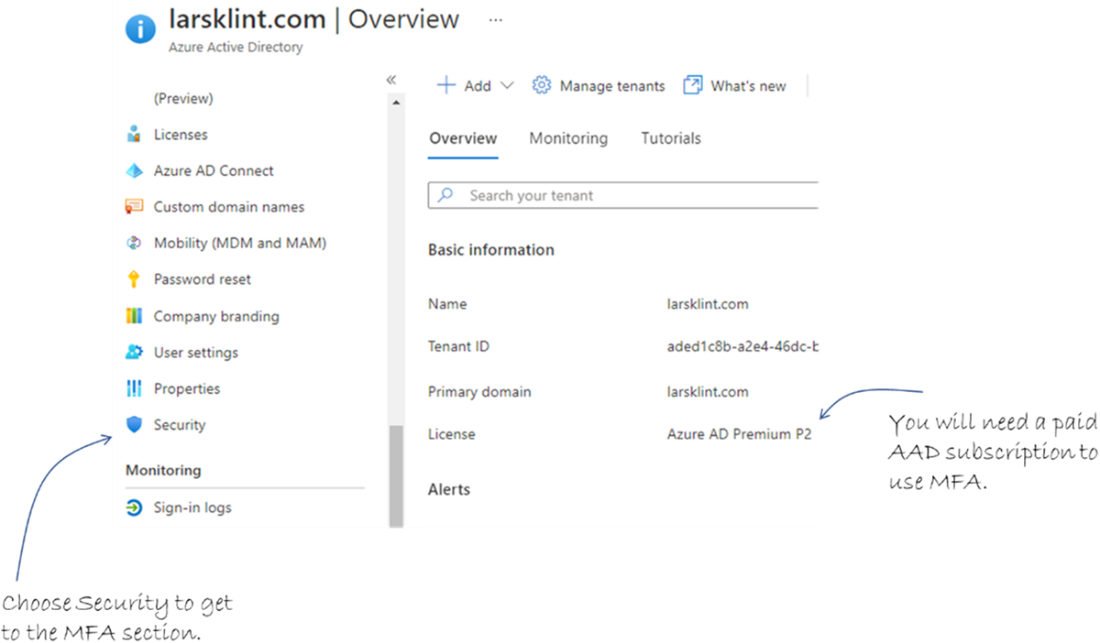
The security blade in AAD, where you can create a new MFA policy.
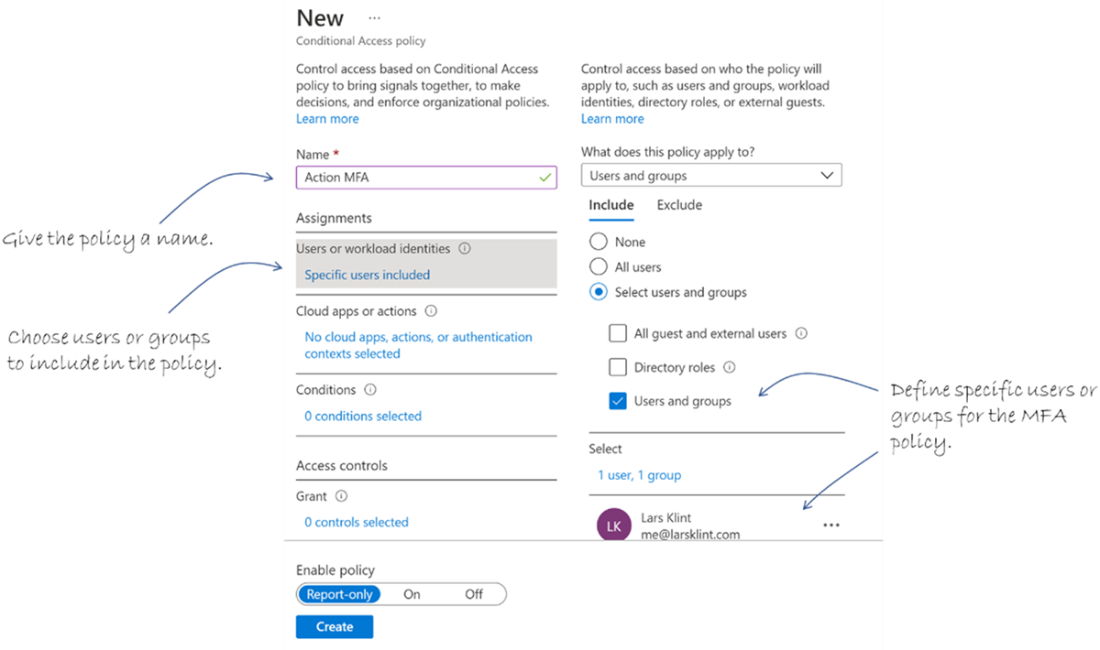
Defining users and groups for a conditional access policy.
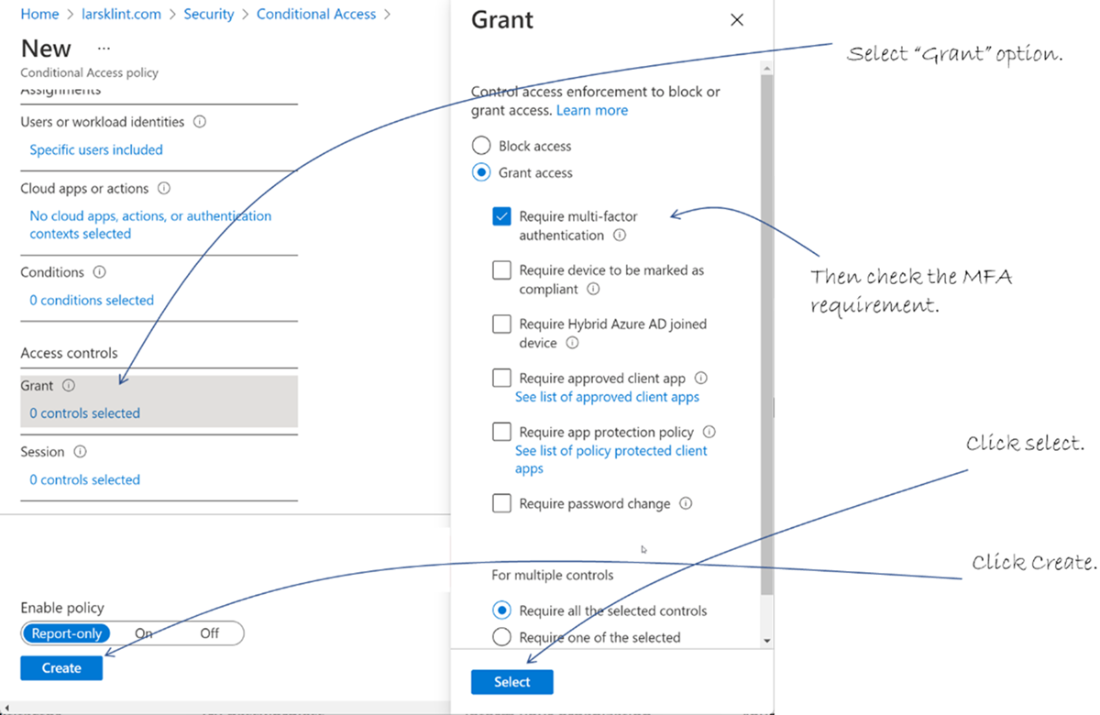
Add at least one grant or session, which in this case is to only grant access to MFA authenticated users.
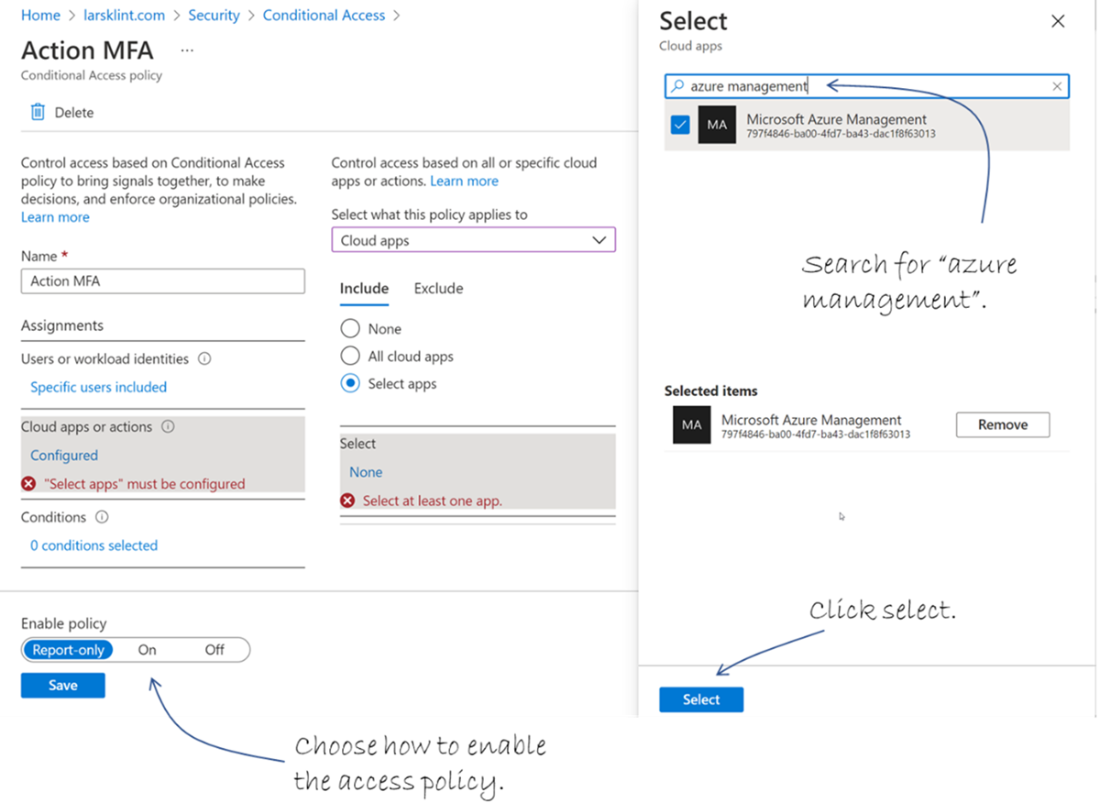
Adding a target application to the MFA policy.
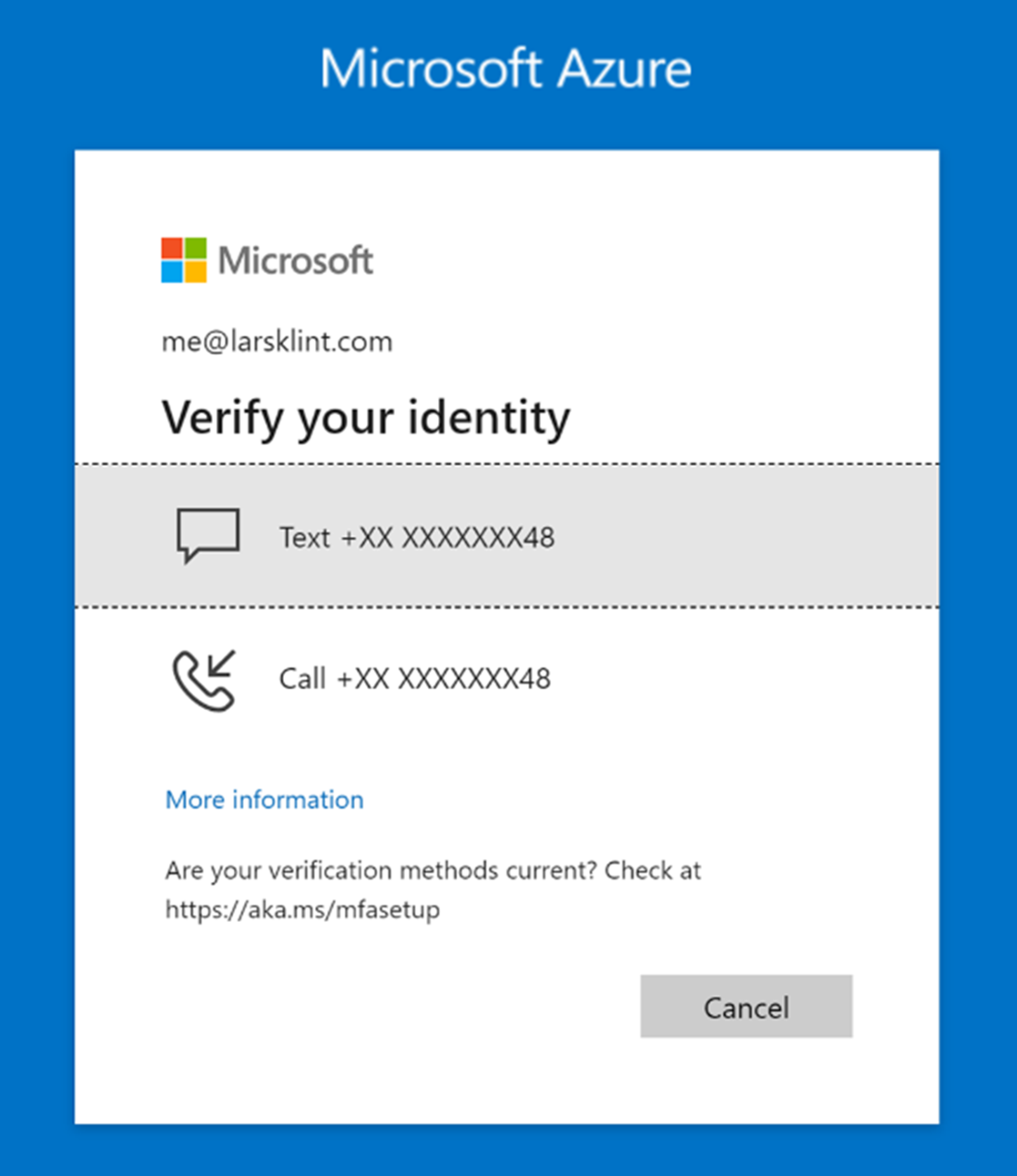
The MFA check for my account asking for a text message or phone call confirmation.
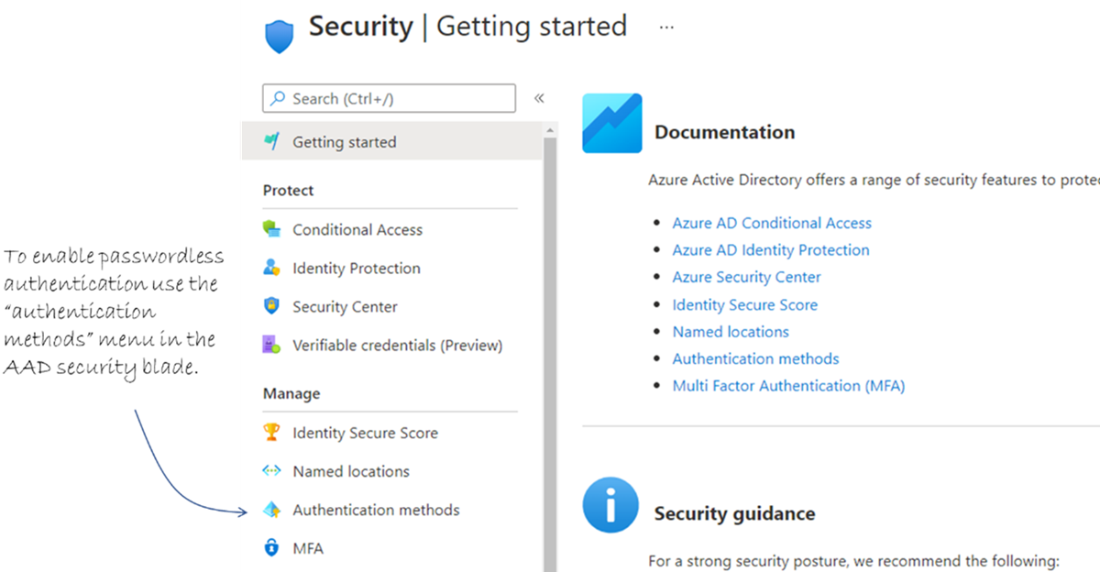
To set up passwordless authentication, use the authentication methods menu option in AAD Security.
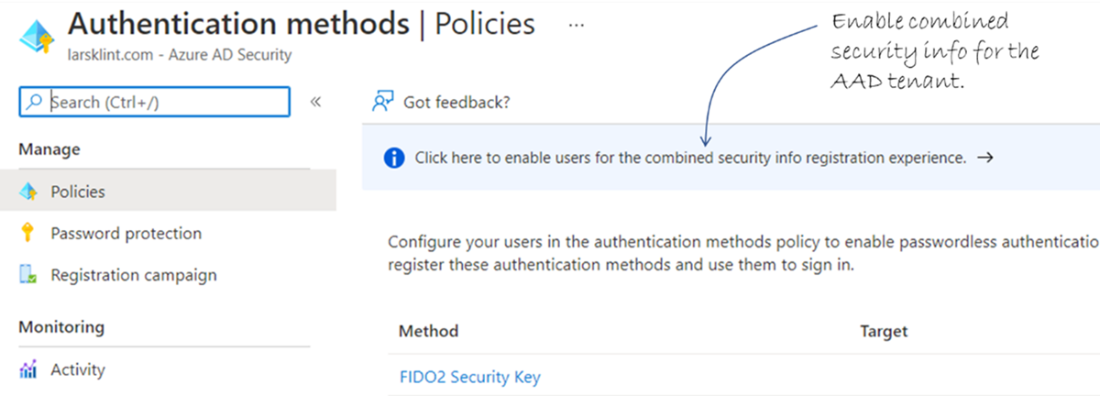
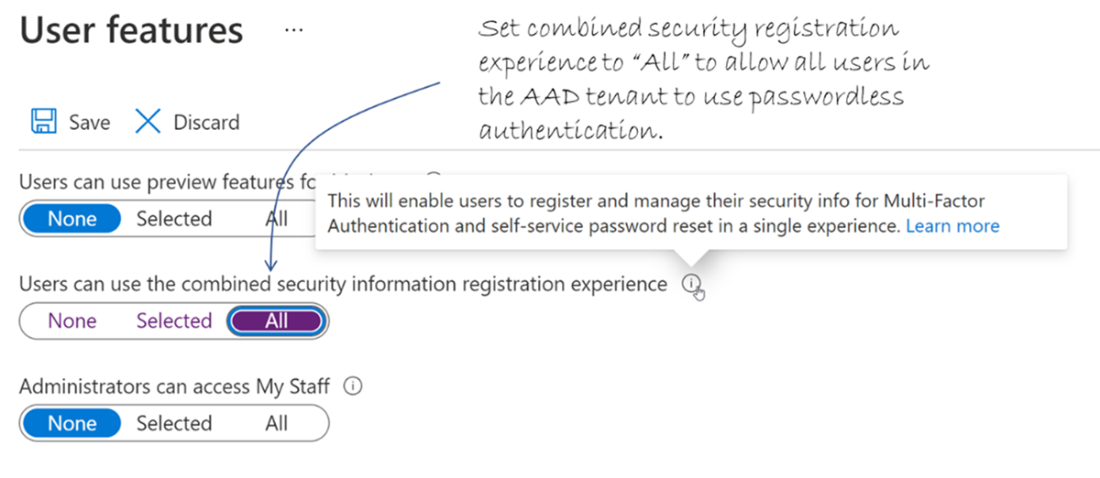
To enable users to use passwordless, enable the combined security info.
Choose “Selected” or “All” for combined security information registration.
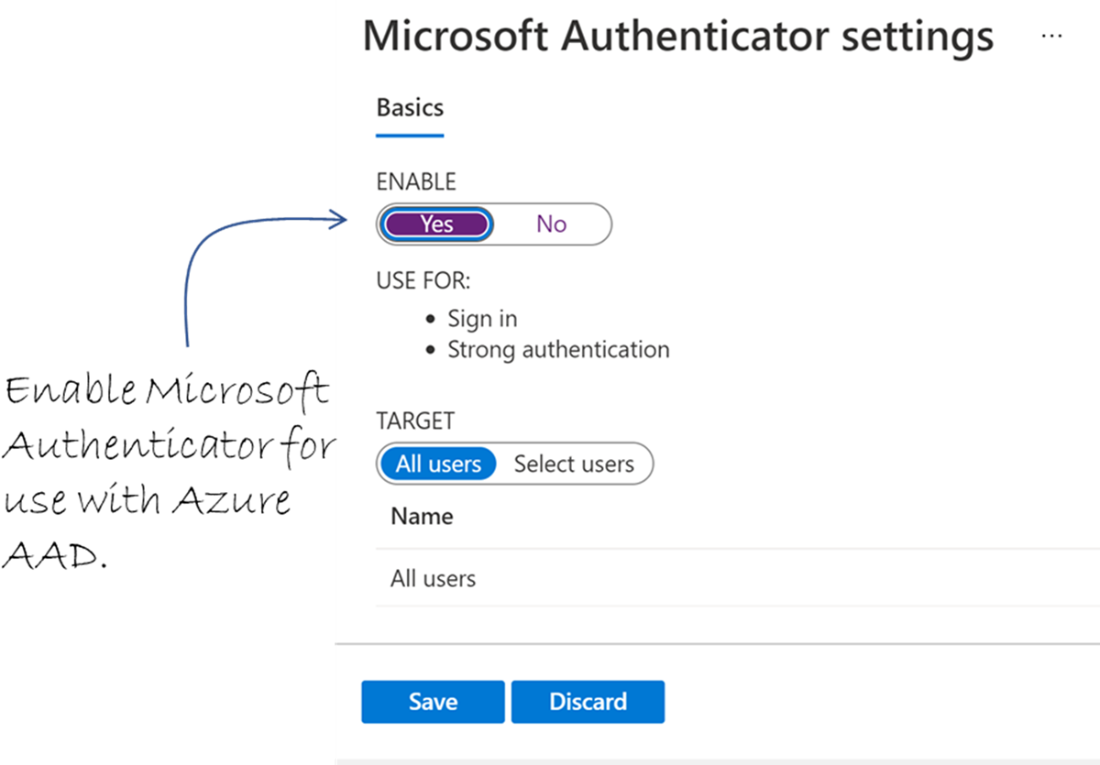
Enable Microsoft Authenticator for use with Azure AAD authentication.
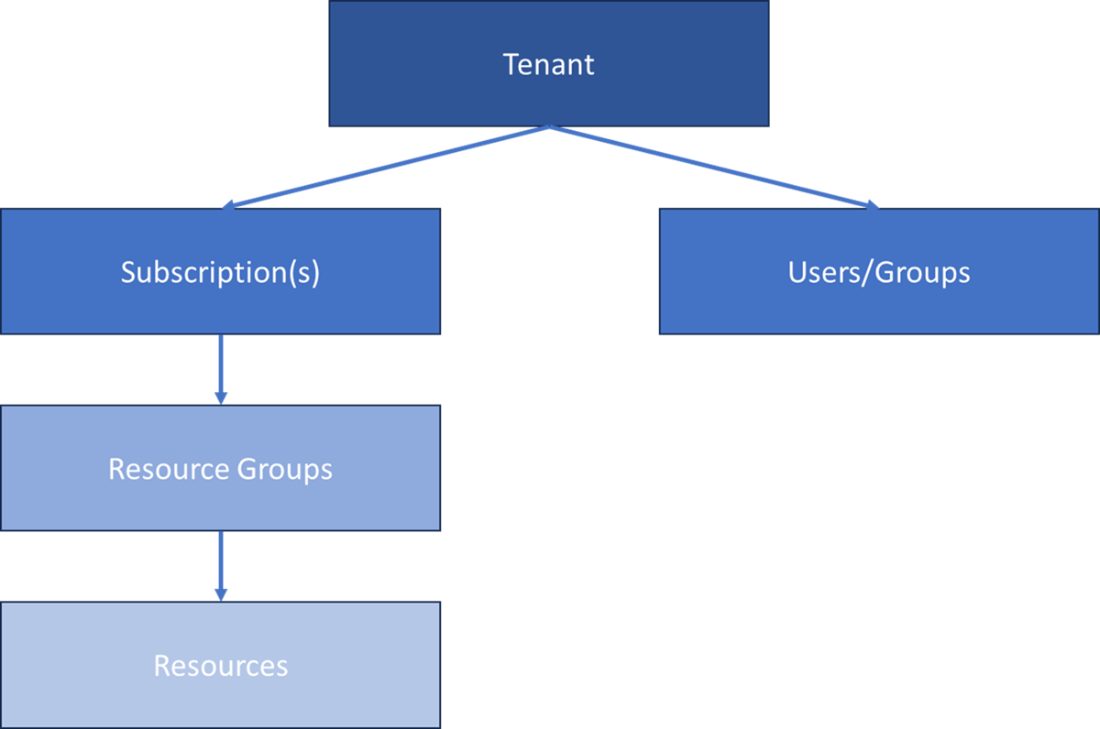
Relationship between an Entra ID tenant, users, subscriptions, and resources. Users and groups belong to the tenant. Subscriptions exist within the tenant, and each subscription contains resource groups, which in turn contain Azure resources.
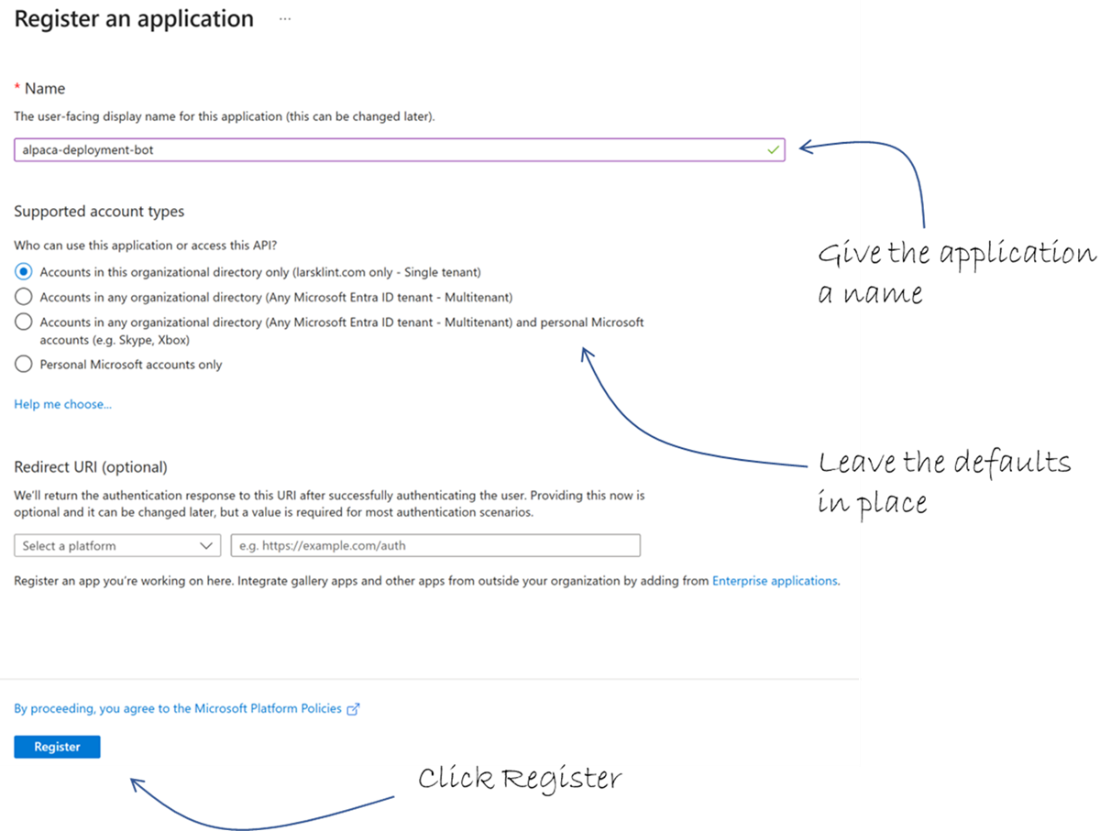
Register an application with Entra ID
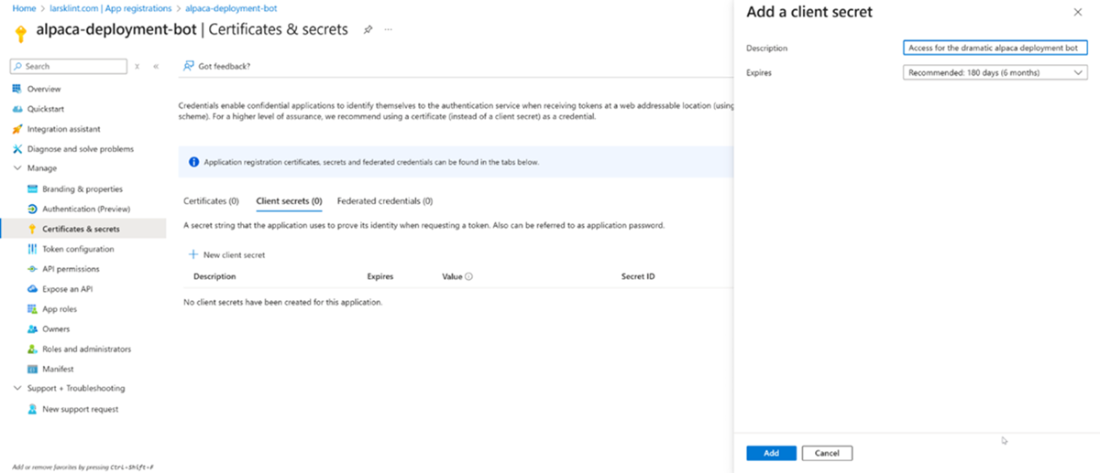
Create a client secret for the application, which is how it authenticates
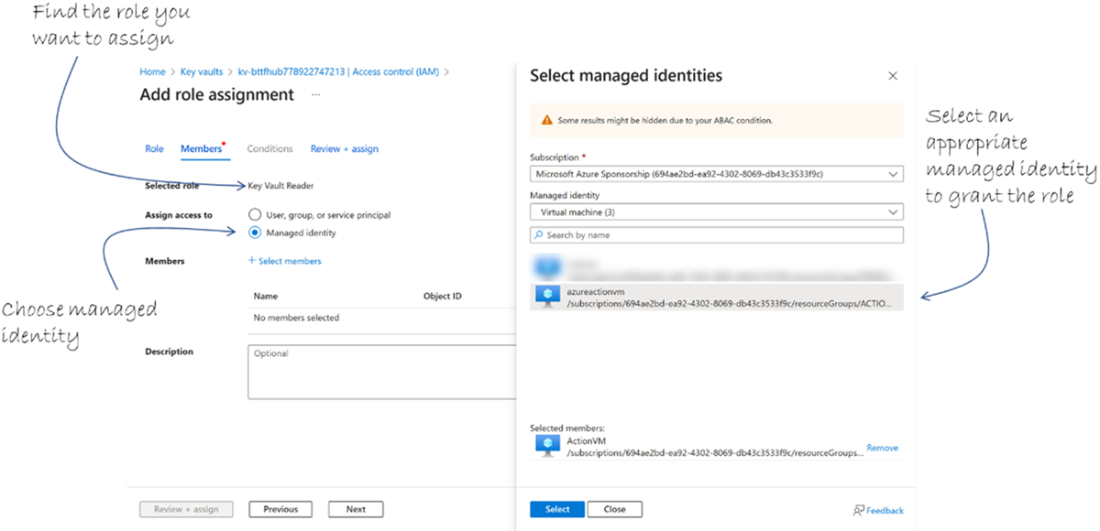
Create access to a resource using managed identity
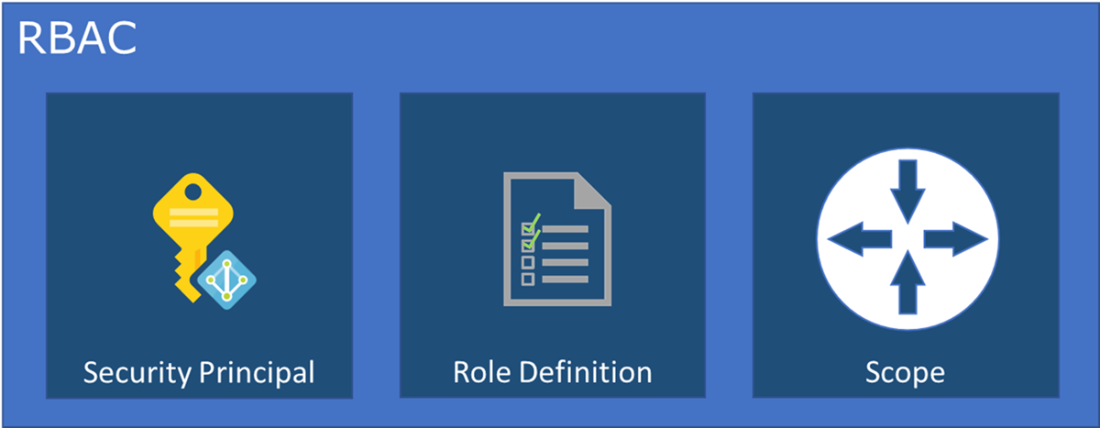
RBAC components.
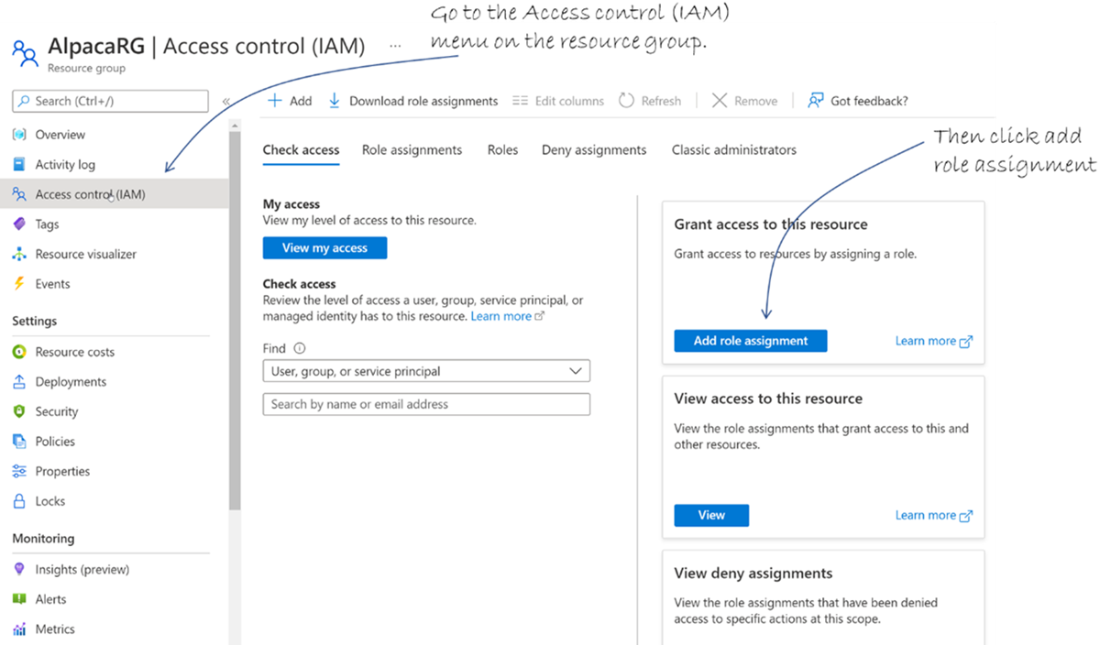
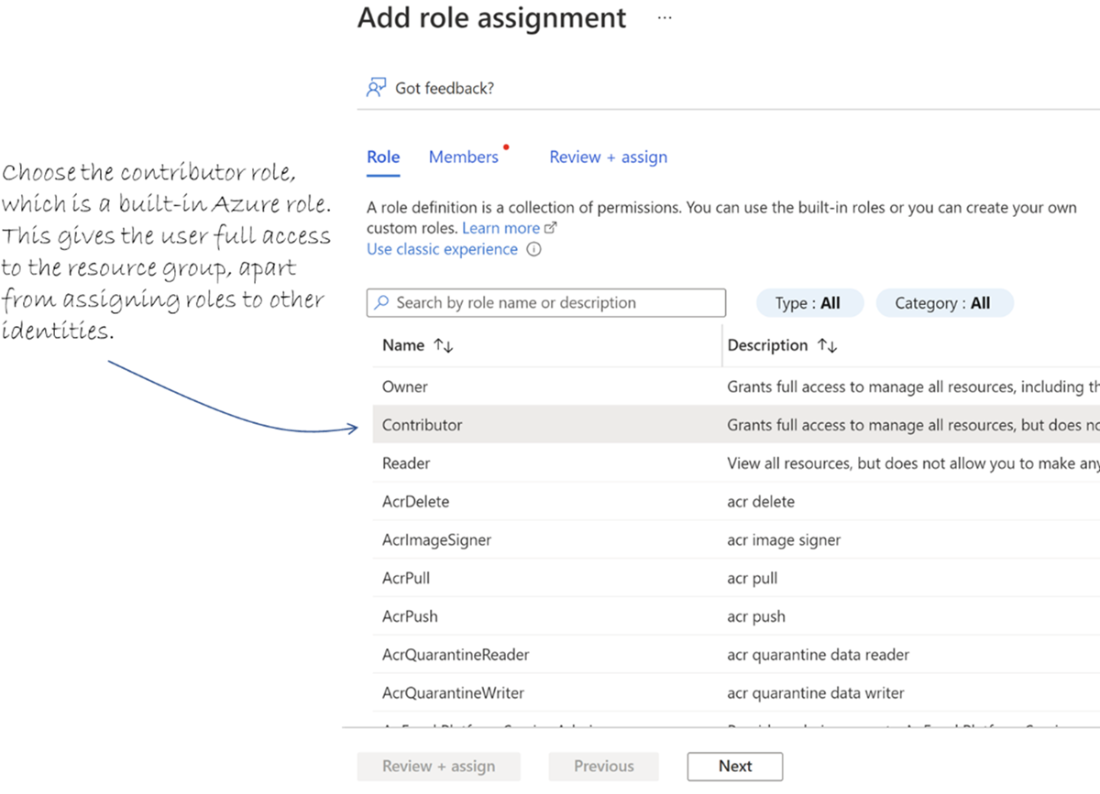
Add a role assignment to the AlpacaRG resource group.
Choosing a built-in role, if possible, is the best choice for RBAC.
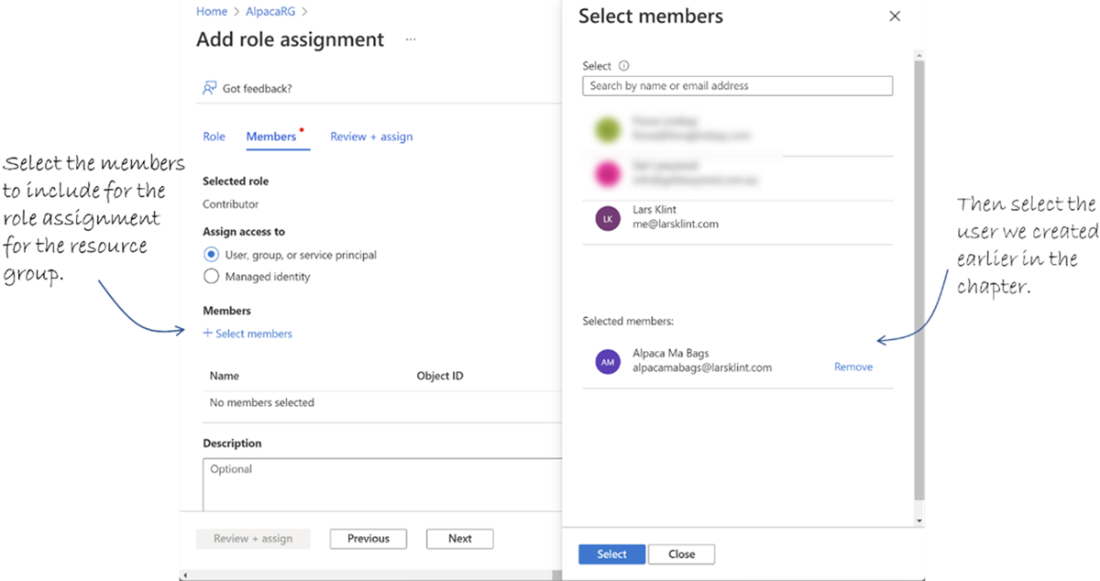
Select the members of the role you are assigning.
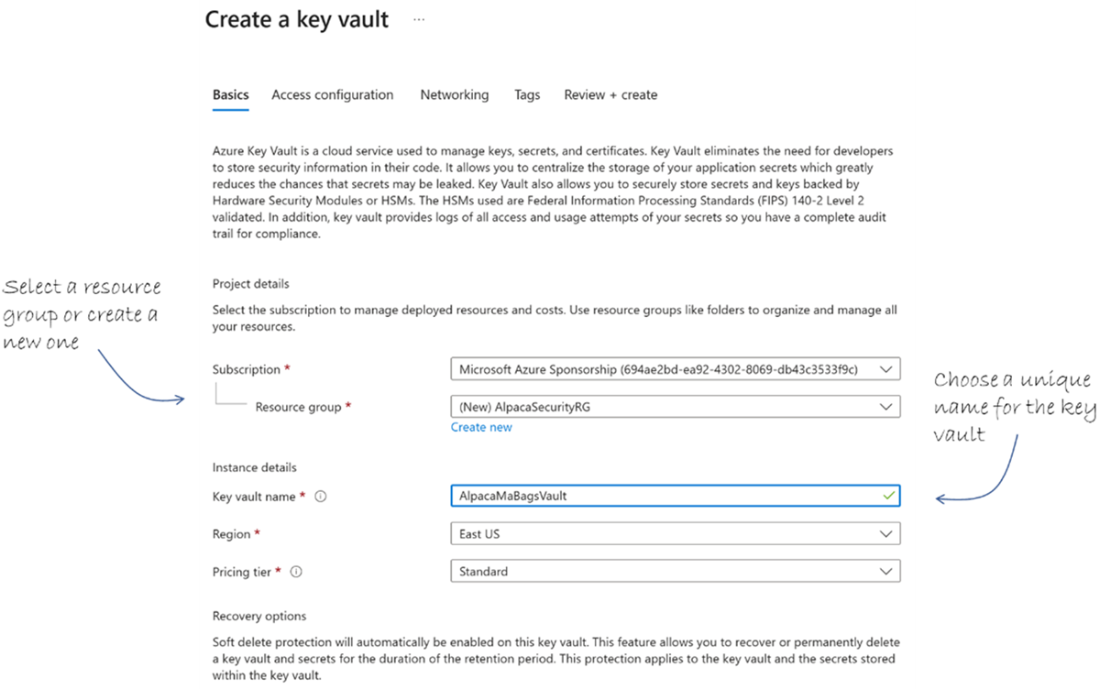
Create a new key vault
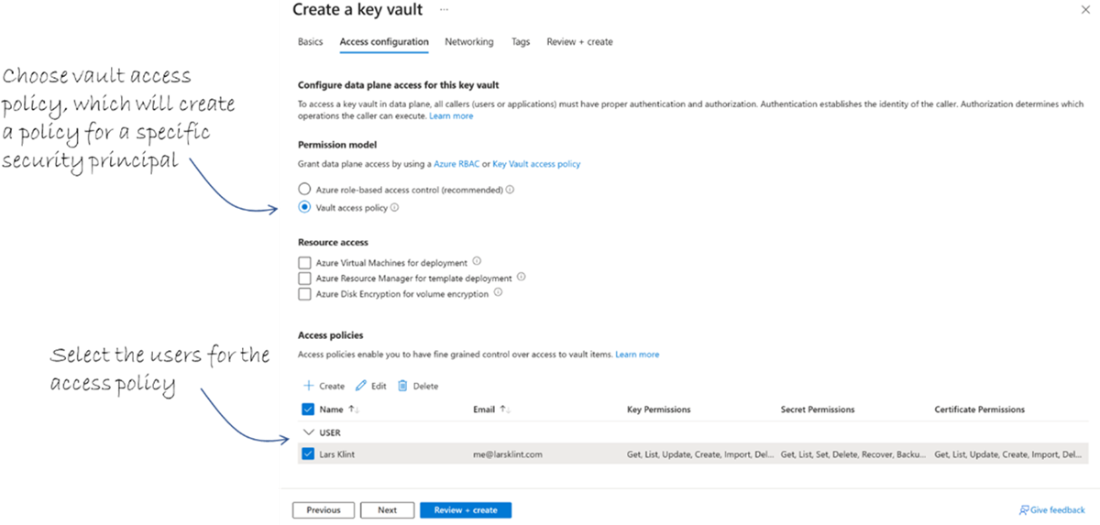
Select the vault access policy and service principal to assign to that policy
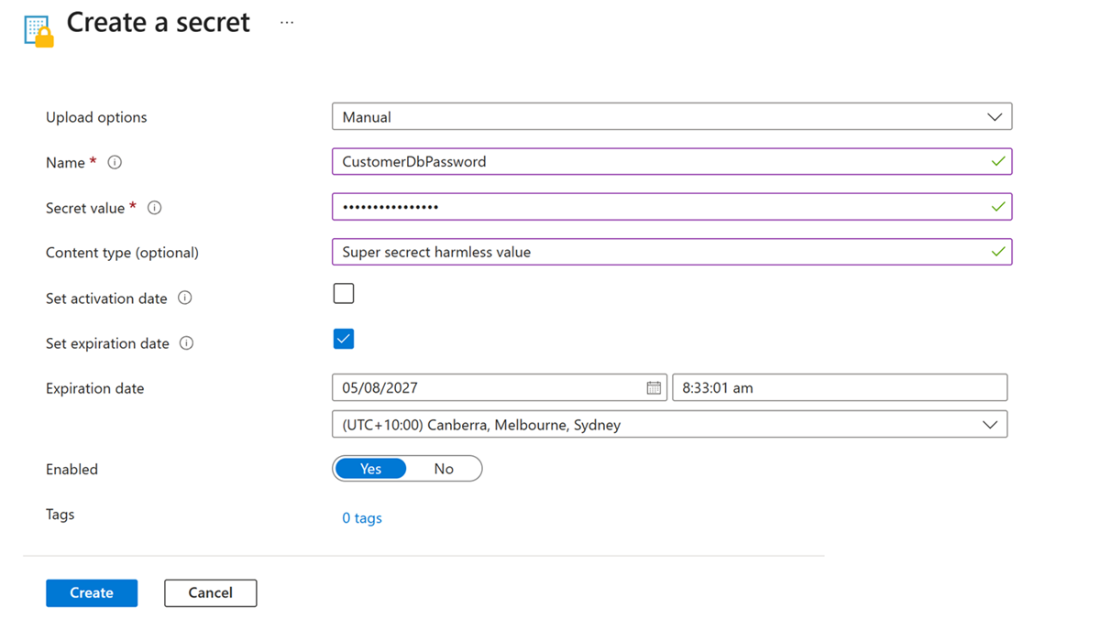
Create a new secret in the key vault

Summary
- Azure uses 7 layers of defense to provide defense in depth. They are physical, identity, perimeter, network, compute, application, and data.
- Azure Active Directory (now Microsoft Entra ID) is where you manage all your users’ authentication and authorization by using MFA and RBAC.
- Use the shared responsibility model to understand when and where you need to take responsibility for your security on Azure.
- A zero-trust approach is the best way to ensure only needed access is granted to Azure identities. Assume from the start, no one needs access to anything until proven otherwise.
- Leveraging the security foundation in Azure means you can focus on adding business value and do the fun stuff, as thousands of security engineers work on improving your security posture every day.
- All hardware used by Azure complies with the ISO/IEC 27001 standard for legal, physical, and technical controls involved in an organization’s information risk management processes. This is a very stringent standard that ensures Azure complies with numerous regulatory and legal requirements that relate to information security.
- Microsoft Defender for Cloud security recommendations are a to-do list of the security improvements you can (and should) make for a particular service.
- The Microsoft Defender for Cloud secure score directs you to the security improvements that will add the most value to your Azure infrastructure.
- Security alerts are raised when Defender detects a threat to one or more of your cloud resources.
- Multi-factor authentication is enabled through Azure Active Directory and then assigned to groups and identities.
- Passwordless authentication is a special type of MFA that increases the security posture by removing passwords the user has to remember and instead relying on hardware keys or biometrics for authentication.
- RBAC defines identity authorization by using a combination of a security principal, a role definition and a scope.
- Microsoft Entra ID tenants contain subscriptions, which in turn hold all resources. Users and applications are identities within a tenant that can be granted access to subscriptions and resources.
- Service principals are application identities used to securely access Azure resources without tying credentials to a human account.
- Managed identities allow Azure services to access other Azure resources without the need to store credentials, simplifying security and reducing risk.
- Azure Key Vault is a secure, centralized store for secrets, keys, and certificates, and integrates with Azure services to control access.
- Creating a Key Vault in the Azure Portal involves selecting a subscription, resource group, and access configuration, then letting Azure handle the provisioning.
- Secrets, such as passwords and connection strings, can be securely stored in Key Vault and retrieved through the Portal or programmatically by authorized applications.
If you have been wondering, since the start of the chapter, what a ninja crocodile looks like, I have good news. I managed to get a closeup of one.
You’re welcome.
FAQ
Is the cloud “secure” in Azure?
Security isn’t a binary on/off. Azure follows a security continuum—your posture moves from less secure to more secure as you apply controls. Azure provides strong, built-in protections, but you must configure and operate your environment responsibly to reach a high level of security.What are Azure’s seven layers of defense in depth?
- Physical: Secure datacenters and hardware access controls- Identity: Entra ID (formerly Azure AD), MFA, auditing
- Perimeter: Platform protections like DDoS mitigation and firewalls
- Network: Segmentation, restricted/monitored traffic, private links
- Compute: Hardened hosts, secure VM access (e.g., Bastion), patching
- Application: Gateways/WAF, app-level controls
- Data: Encryption, secure storage, access policies
What does the shared responsibility model mean for IaaS, PaaS, and SaaS?
- On‑premises: You handle everything.- IaaS: Azure secures physical/network/storage/hosts; you secure OS, apps, identities, data, and network access on your VMs.
- PaaS: Azure manages OS/platform; you configure app, data, identities, and any required network access.
- SaaS: Azure handles most layers; you still manage identities and endpoints. Compliance and data classification are always your responsibility.
What is Zero Trust in Azure and how does Entra ID help?
Zero Trust means “never trust, always verify.” Deny by default, then grant least‑privilege access based on identity, device, and context. Entra ID enables this with strong identity management, conditional access, MFA/passwordless options, auditing, and integration with RBAC.What is Microsoft Defender for Cloud and why use it?
It’s an Azure‑native security posture management and threat protection service that continuously evaluates resources, provides security recommendations, calculates a secure score, and raises security alerts. It helps you harden configurations, detect threats, and prioritize fixes.What is Secure Score and how should I use it?
Secure Score is a single indicator of your environment’s security posture. Use it to: 1) see where you stand, 2) review recommendations with their potential score impact, and 3) prioritize remediations that most improve your overall security.How do I enable Multi‑Factor Authentication (MFA) with Conditional Access?
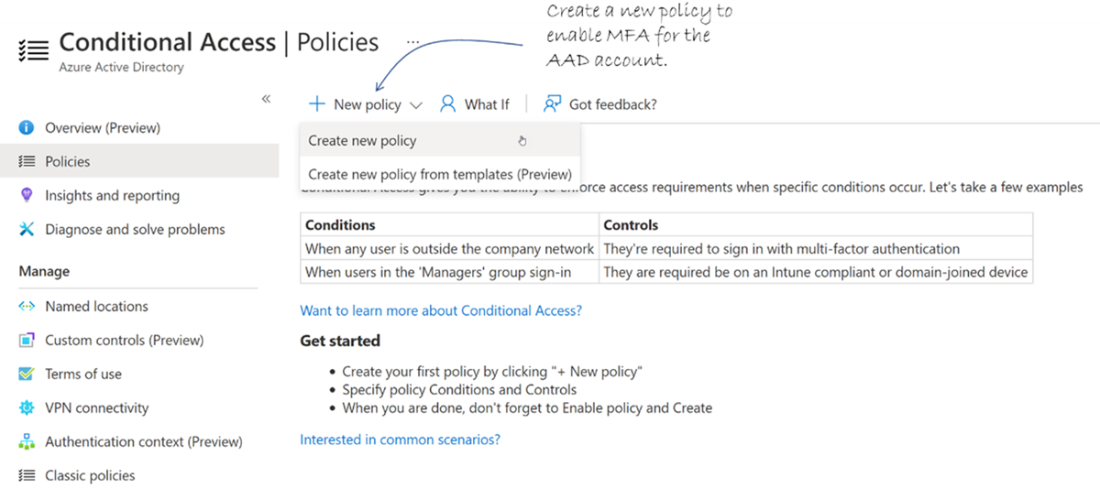
- In Entra ID, go to Security > Conditional Access- Create a policy, target users/groups, and target apps (e.g., “Microsoft Azure Management”)
- Under Grant, select “Require multi‑factor authentication”
- Set the policy to On (or Report‑only to test)
Note: Requires Entra ID Premium P1 (or equivalent).
What is RBAC and how do role assignments work?
RBAC controls who can do what, and where. A role assignment combines:- Security principal (who): user, group, service principal, or managed identity
- Role definition (what): built‑in or custom permissions (e.g., Reader, Contributor)
- Scope (where): management group, subscription, resource group, or resource
When should I use a service principal vs. a managed identity?
- Service principal: For apps/tools running outside Azure (e.g., GitHub Actions, Terraform), or when you need explicit client credentials (ID/secret/cert).- Managed identity: For Azure‑hosted resources (App Service, Functions, VM). No secrets to manage; Azure handles identity lifecycle and auth to other Azure services.

 Microsoft Azure in Action ebook for free
