4 Networking in Azure
Networking is a core building block of Azure solutions, enabling secure, reliable communication between resources, the internet, and on‑premises environments. The chapter explains how to create and manage virtual networks (VNets) and subnets—often via PowerShell—while emphasizing careful IP planning with private address spaces and CIDR. Well‑planned subnetting supports scale, security, and operational clarity, and Azure reserves a few IPs per subnet for platform operations. The narrative highlights that choosing the right tool (such as PowerShell) and a consistent naming strategy helps streamline provisioning and governance.
Subnets provide logical separation for workloads, enable service delegation to certain PaaS offerings, and benefit from Azure’s built‑in system routes; custom routes can steer traffic through required appliances (for example, a firewall). Network Security Groups (NSGs) enforce inbound/outbound filtering at either the subnet or NIC level using priority‑based rules across protocol, ports, and sources/destinations (with service tags to avoid brittle IP lists). Best practices include applying NSGs at the subnet when possible, keeping rules simple and intentional, incrementing priorities in predictable steps, and avoiding overlapping policies that are hard to reason about.
For interconnectivity, the chapter contrasts three options: VNet peering for private, low‑latency VNet‑to‑VNet connectivity within Azure; VPN Gateway for encrypted tunnels between Azure and other networks (site‑to‑site or VNet‑to‑VNet); and ExpressRoute for private, dedicated circuits that bypass the public internet, with enterprise‑grade reliability and redundancy patterns. To handle external demand, Azure Load Balancer distributes traffic across a backend pool (often a VM scale set) using a public frontend IP, health probes to remove unhealthy instances, and load‑balancing rules to map frontend to backend. Together, these capabilities help secure, connect, and scale applications efficiently on Azure.
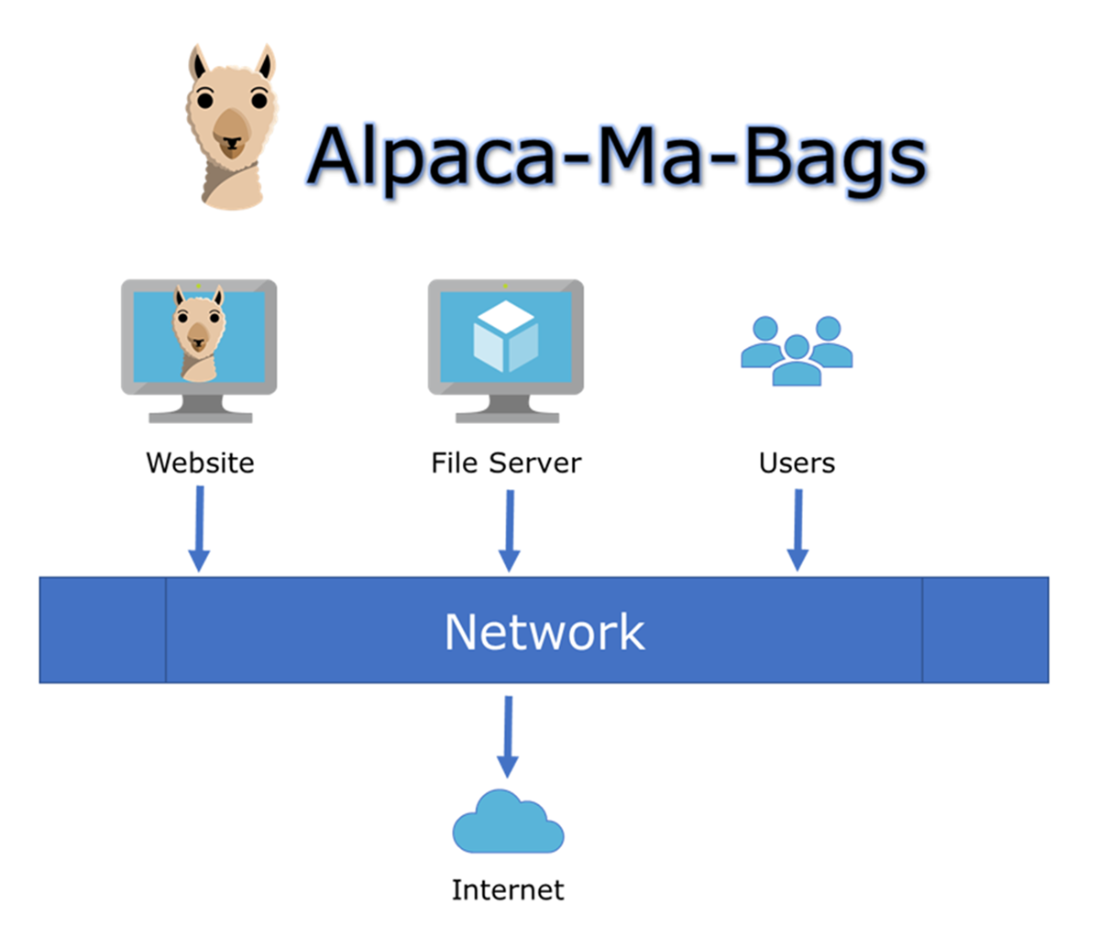
Alpaca-Ma-Bags network overview.
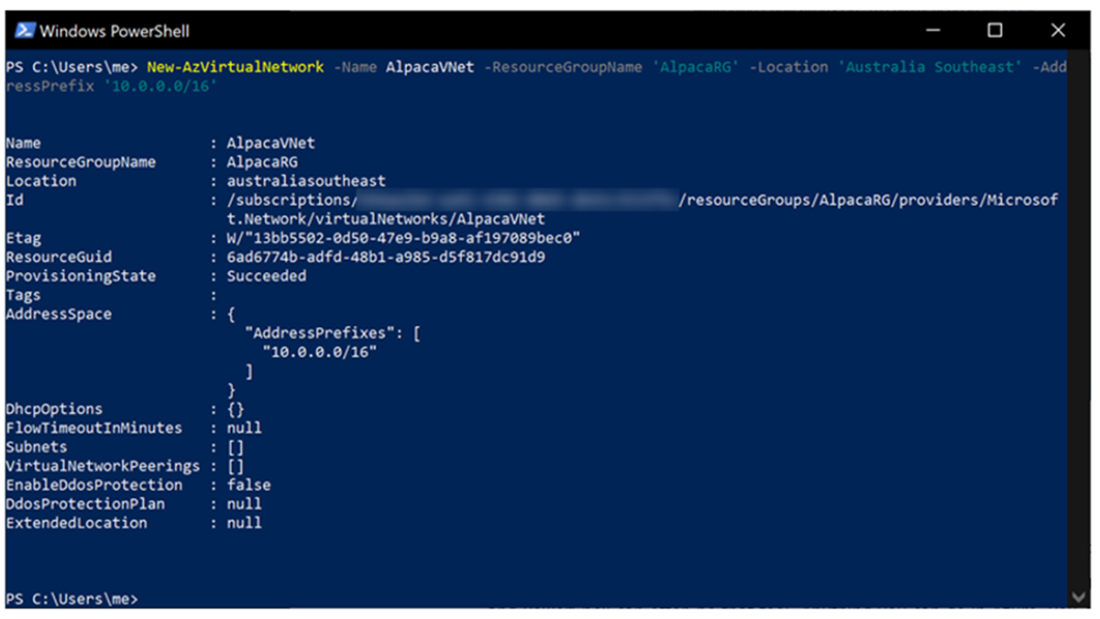
Creating a virtual network with PowerShell.
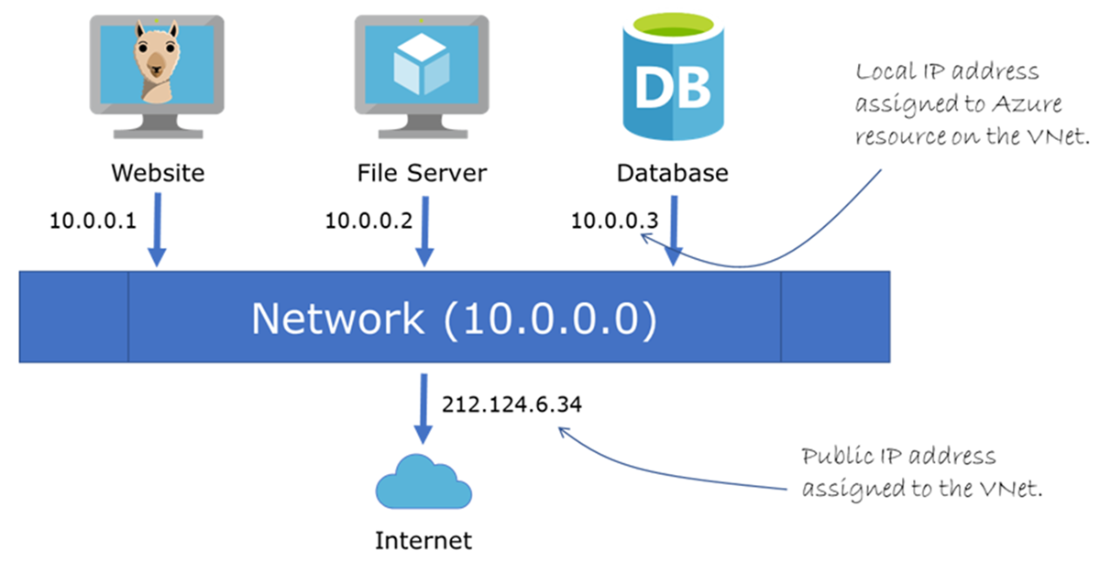
Devices on a VNet get local addresses, and traffic to the public internet get a public IP address.
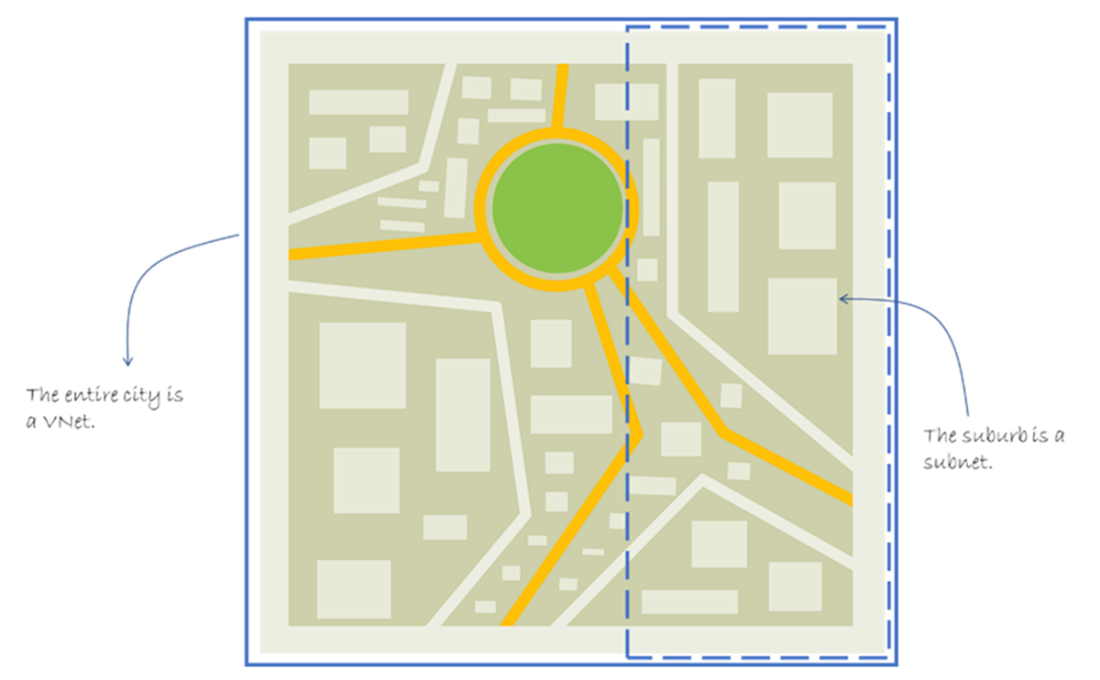
Comparing a VNet and a subnet to a city and suburb.
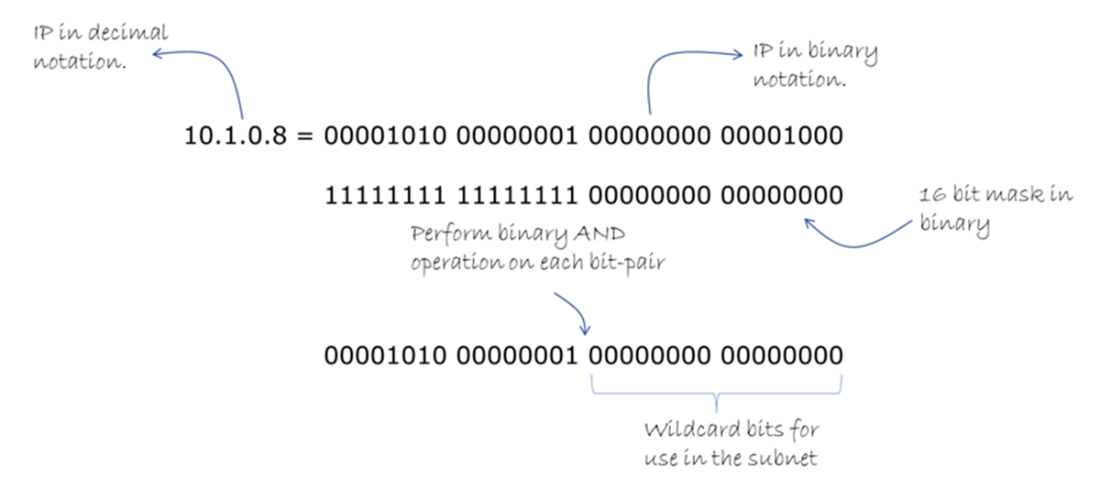
Applying the mask defined in the CIDR notation.
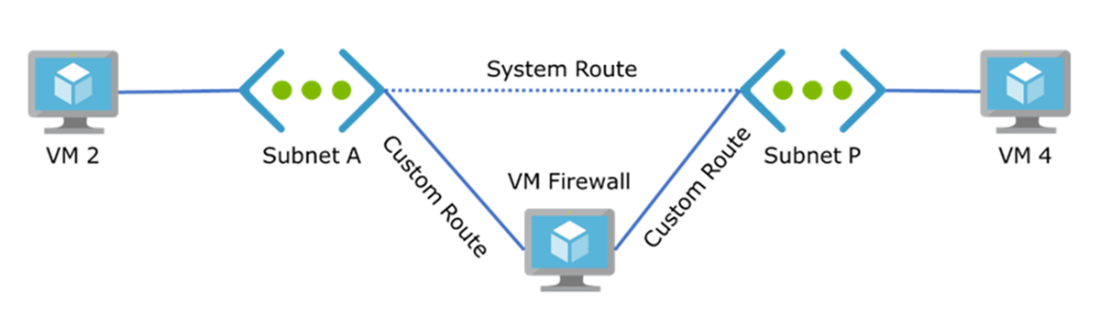
System route connecting Subnet A and Subnet P.

Custom route make sure the traffic goes through the Firewall VM.
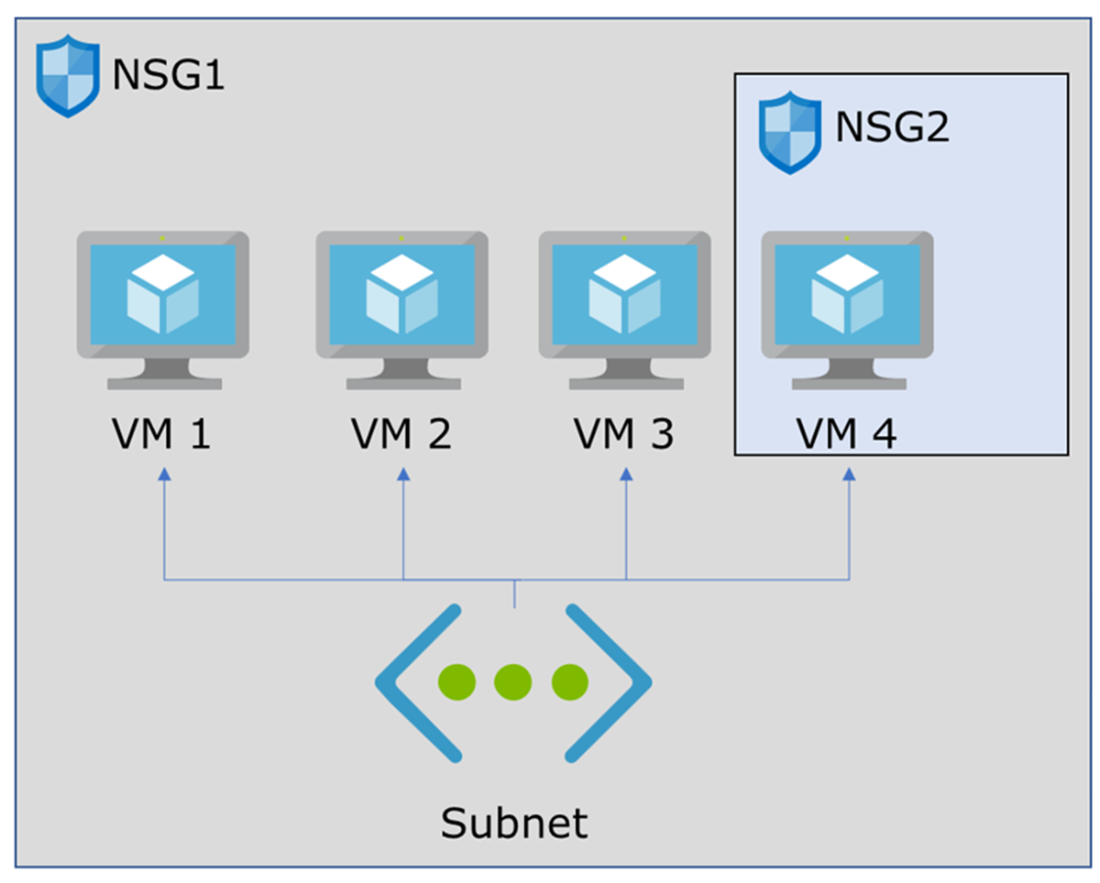
NSG1 applies to all VMs in the subnet, but NSG2 only applies to VM4.
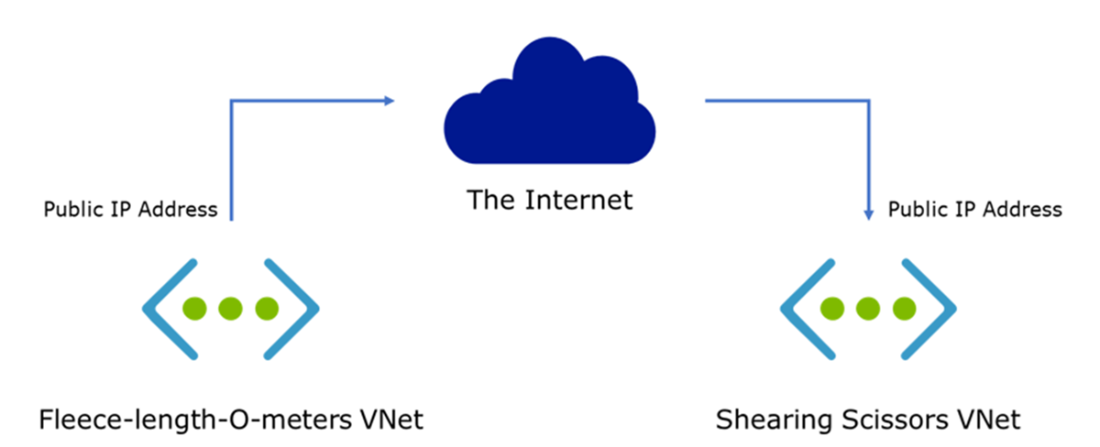
Two VNets connecting via the public Internet.
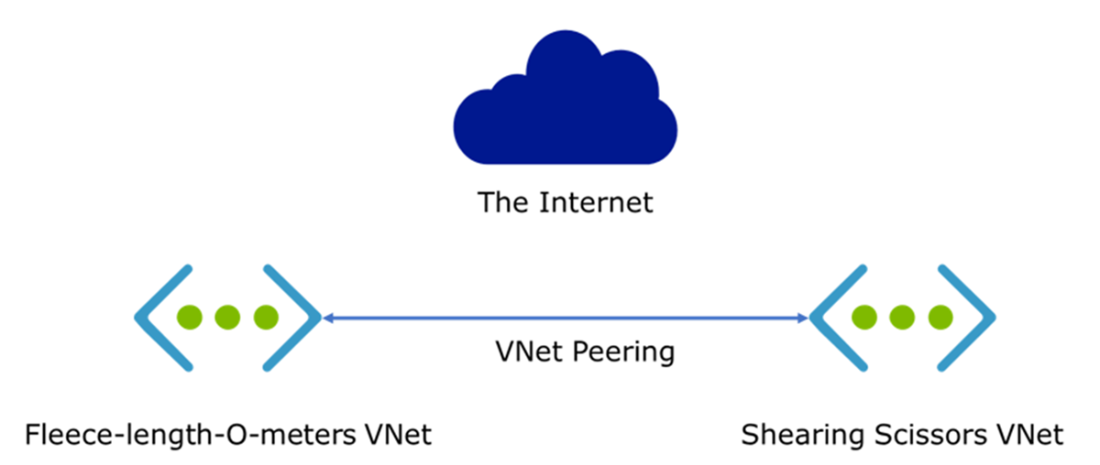
Peering two VNets to get lower latency and higher throughput.
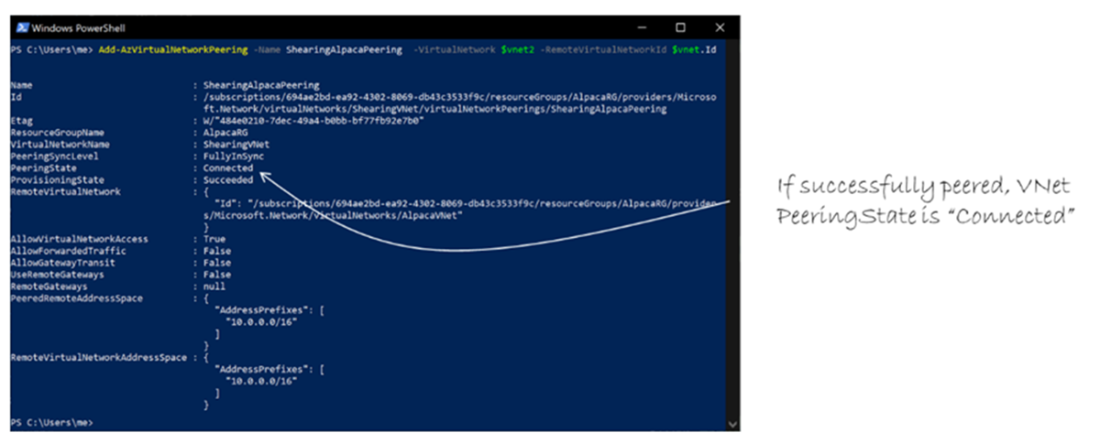
PeeringState property is “Connected” when successfully peered.
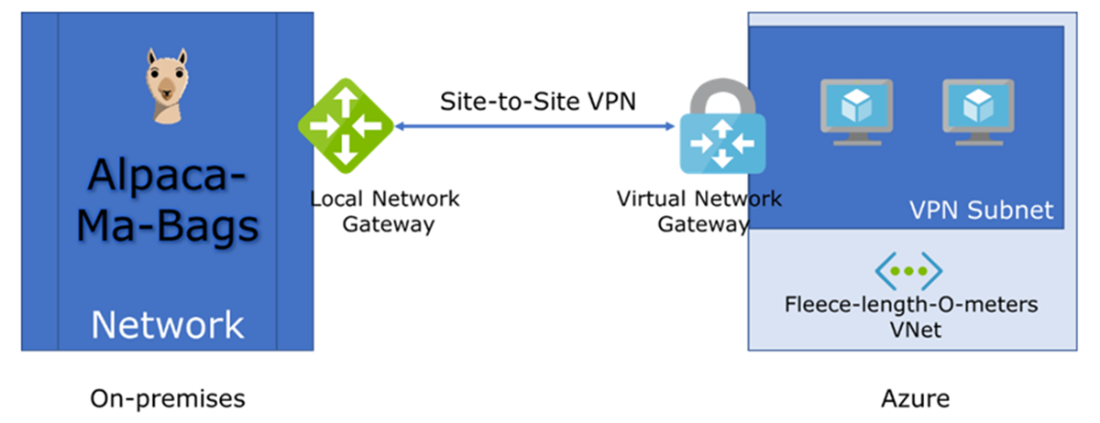
A site-to-site VPN connection using a Virtual Network Gateway.
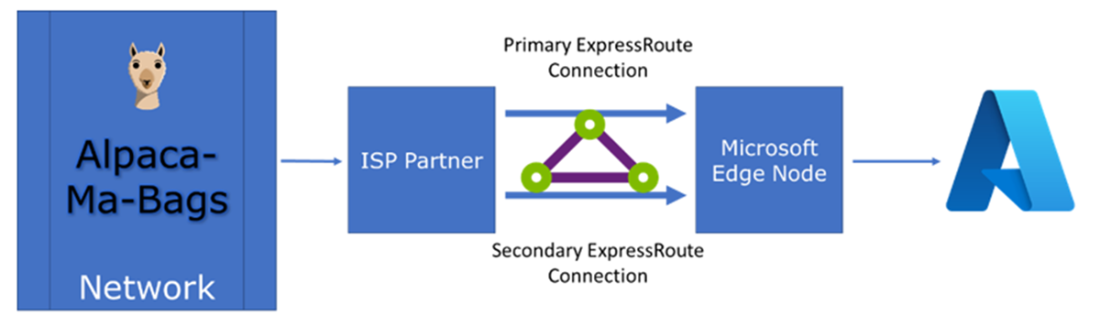
ExpressRoute network diagram. Traffic never enters the public internet and flows directly into Azure.
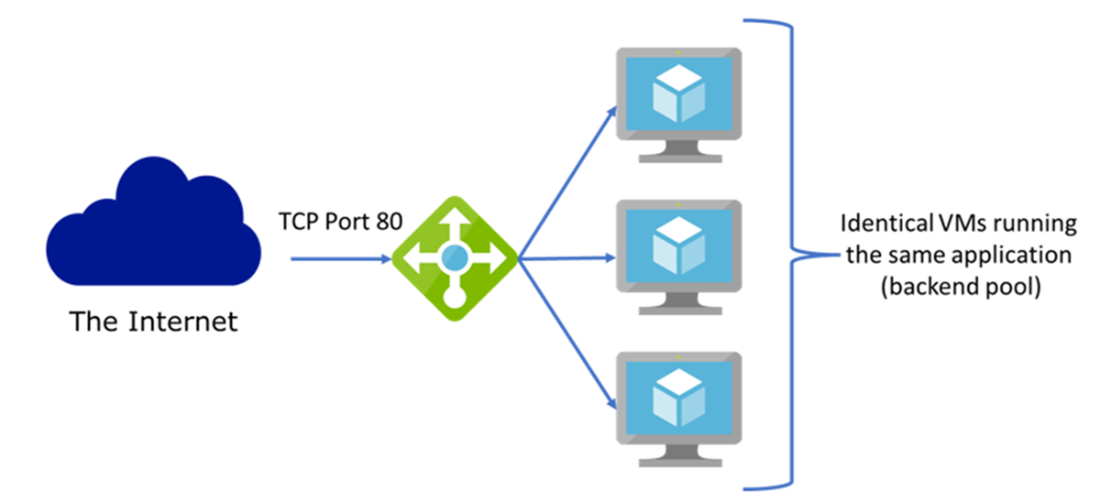
A load balancer distributing traffic from the Internet to three VMs.
Summary
- Create a virtual network (VNet) in Azure to connect other Azure service to, such as a VM. A VNet has a local range of IP addresses that it can assign to device that connects to it.
- Subnets are logical separations of a VNet that get a portion of the available IP addresses in the VNet.
- You use subnets to logically separate resources and apply specific network security rules to them.
- Classless Inter-Domain Routing (CIDR) notation is used to accurately and efficiently describe and IP address range for a network.
- A Network security group (NSG) defines a set of rules that are applied to the resource it is attached to, such as a VM or subnet.
- The rules in a NSG are evaluated according to priority and evaluation stops once a rule is hit. Rules determine if certain types of network traffic is allowed or denied.
- You can connect VNets on Azure with each other using peering, or with on-premises networks using VPN gateways and ExpressRoute.
- When a single VM can’t manage the traffic to it, you can use a load balancer to distribute the traffic to more VMs that are identical and live in a backend pool.
- Azure Virtual Networks (VNets) are the foundation for securely connecting and isolating Azure resources.
- VNets can be segmented into subnets to improve security, manageability, and network performance.
- Network Security Groups (NSGs) control inbound and outbound traffic to resources at the subnet or NIC level.
- Azure Bastion provides secure, browser-based RDP and SSH access to virtual machines without exposing public IP addresses.
- A VPN Gateway provides secure site-to-site or point-to-site connectivity between on-premises networks and Azure VNets over the internet.
- ExpressRoute enables private, dedicated connections to Azure with consistent latency and higher reliability than internet-based VPNs.
- VNet peering connects VNets within the same or different regions, allowing resources to communicate privately without gateways.
- Service endpoints extend VNet private address space to Azure services over the Microsoft backbone network.
- Private endpoints provide private IP addresses from a VNet to connect securely to Azure PaaS services.
- Azure Firewall is a managed, cloud-based network security service that protects Azure VNets with stateful packet filtering and threat intelligence.
FAQ
What is an Azure Virtual Network (VNet) and when do I need one?
A VNet is the private, isolated network boundary for your Azure resources. You use a VNet whenever Azure resources must communicate securely with each other, access the public Internet, or connect to an on‑premises network. VNets support core cloud principles like reliability and scalability.How do I create a VNet with PowerShell, and what do the key parameters mean?
Example:
New-AzVirtualNetwork -Name AlpacaVNet -ResourceGroupName AlpacaRG -Location "Australia Southeast" -AddressPrefix "10.0.0.0/16"
- Name: VNet name (unique within a subscription).
- ResourceGroupName: Resource group to contain the VNet.
- Location: Azure region for the VNet (can differ from the resource group’s region).
- AddressPrefix: CIDR range available to the VNet (for example, 10.0.0.0/16).
What is a subnet and why should I segment my VNet?
A subnet is a non‑overlapping IP range inside a VNet. Subnetting helps with:
- Logical separation (projects, environments, departments).
- Security boundaries (attach NSGs at subnet scope).
- Service delegation (e.g., Microsoft.Sql/managedInstances).
- Routing optimization (Azure adds system routes per subnet).
Which private IP ranges can I use in Azure VNets?
- Class A: 10.0.0.0 – 10.255.255.255 (/8)
- Class B: 172.16.0.0 – 172.31.255.255 (/12)
- Class C: 192.168.0.0 – 192.168.255.255 (/16)
Plan ahead for the number of networks and devices to avoid re-addressing later.
What is CIDR notation and how does it affect Azure subnets?
CIDR (for example, 10.1.0.0/16) defines the network size with a mask after the slash. It determines how many hosts fit in the subnet. Azure reserves IPs in each subnet for internal use: 5 IPs for subnets sized /25 and larger, and 4 IPs for smaller subnets.
How does Azure routing work between subnets, and how can I force traffic through a firewall?
Azure automatically creates system routes for each subnet; you can’t remove them. To change paths, use custom routes (user-defined routes) and associate them with subnet route tables—for example, to force traffic through a firewall/NVA before reaching the Internet.
What is a Network Security Group (NSG), where can I attach it, and how are rules processed?
An NSG filters inbound/outbound traffic with rules. Attach NSGs to subnets (affects all NICs in that subnet) or to individual NICs (single VM). Rules are evaluated by priority (100–4096), lowest number first; once a match occurs, evaluation stops. Default rules (65000–65002) allow VNet and Azure Load Balancer traffic and then deny all.
What are best practices for designing NSG rules?
- Prefer subnet‑level NSGs; use NIC‑level only when necessary.
- Keep rules simple and purposeful; group workloads needing different rules into separate subnets.
- Use service tags instead of IPs where possible.
- Increment priorities by 100 (100, 200, 300…) to leave room for future inserts.
- Be cautious when mixing subnet and NIC NSGs; evaluation order differs for inbound vs outbound.
How do I choose between VNet peering, VPN Gateway, and ExpressRoute?
- VNet peering: Azure‑to‑Azure, private over Microsoft’s backbone (no public Internet), low latency/high throughput; billed for egress/ingress at both ends.
- VPN Gateway: Encrypted tunnel over the public Internet; connects Azure-to-on‑prem or VNet‑to‑VNet; requires a dedicated GatewaySubnet and public IP; one gateway per VNet; provisioning can take up to ~45 minutes.
- ExpressRoute: Private, dedicated connection (no public Internet); consistent performance and enterprise features; higher cost; typically delivered via a service provider.
How does Azure Load Balancer distribute traffic and what components are required?
Load Balancer takes traffic on a public IP (frontend), checks backend VM health, and forwards requests to a backend pool using rules.
- Frontend: Public IP configuration receiving client traffic.
- Backend pool: Group of VMs (often in a VM Scale Set for elasticity).
- Health probe: Detects unhealthy VMs (protocol, port, interval, probe count).
- Rule: Maps frontend to backend (protocol/ports), associates the probe, and controls distribution.

 Microsoft Azure in Action ebook for free
