11 Cosmos DB
Azure Cosmos DB is presented as a globally distributed, multi-model NoSQL database designed for cloud-native scale, low latency, and high availability. The chapter frames its strengths—flexible data models, rich developer tooling, and predictable performance through request units—as a great match for dynamic, global e-commerce scenarios like Alpaca-Ma-Bags. It emphasizes “speed at any scale” via autoscale throughput and multi-region replication, showing how to place data close to users while maintaining responsive reads and resilient failover.
Readers are walked through creating an account, database, and container, then tuning throughput and choosing the right APIs and SDKs to fit existing skills and workloads (including NoSQL, MongoDB, Cassandra, Gremlin, Table, and PostgreSQL; and SDKs for .NET, Java, Node.js, Python, Go, and PHP). A substantial portion focuses on modeling and partitioning: embracing schema-less design, strategic denormalization, and handling document variability; selecting high-cardinality, immutable partition keys aligned to access patterns; and mitigating hot partitions using composite and time-based keys. Cosmos DB’s automatic management of logical and physical partitions underpins elastic scale without downtime.
Operational trade-offs complete the picture: five consistency levels balance freshness and performance; availability is enhanced with multi-region reads/writes, automatic failover, and optional zone redundancy; and optimistic concurrency with ETags protects data integrity under heavy parallel updates. The chapter also shows how to extend value with near real-time analytics and event-driven workflows using Azure Synapse Analytics, Azure Functions, and Azure Stream Analytics. Cost and performance guidance spans provisioned throughput versus autoscale, proactive monitoring and alerts, indexing and query optimization, and when vCore-based pricing can outperform RU/s for CPU-bound, predictable workloads. The outcome is a playbook for aligning Cosmos DB’s configuration to workload patterns to achieve speed, resilience, and cost efficiency.
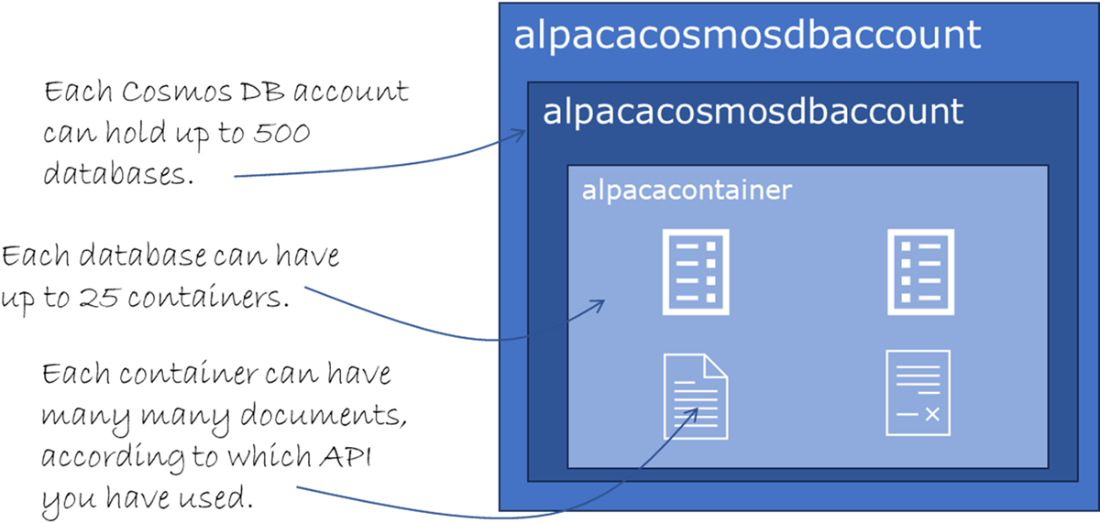
A Cosmos DB Account holds databases, which in turn has containers, which then have documents.
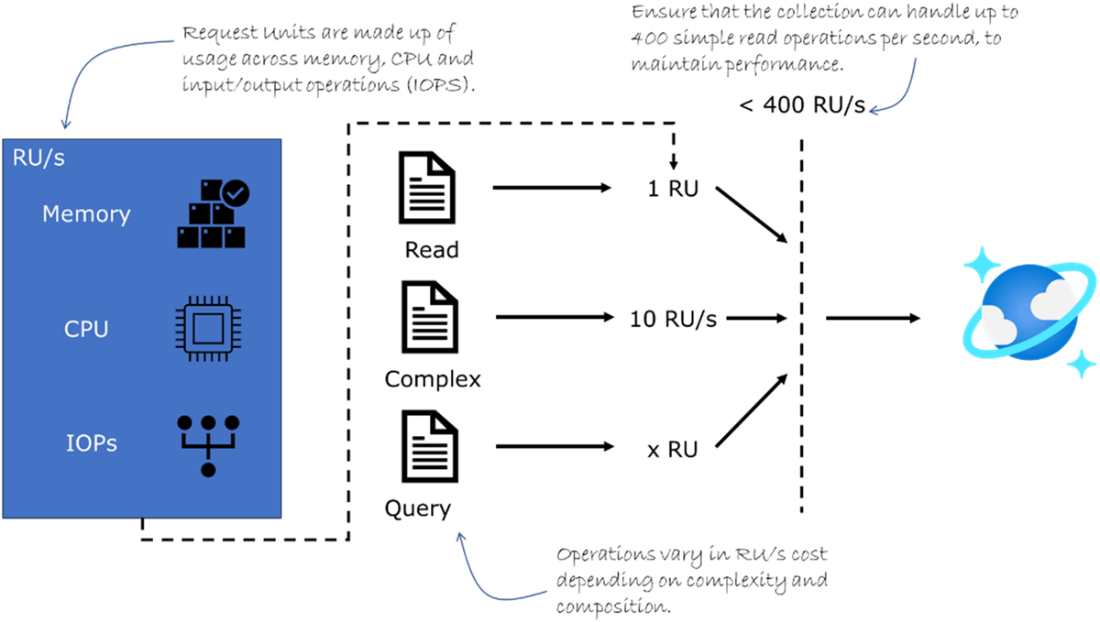
Request Units is one way to ensure throughput and performance from Cosmos DB
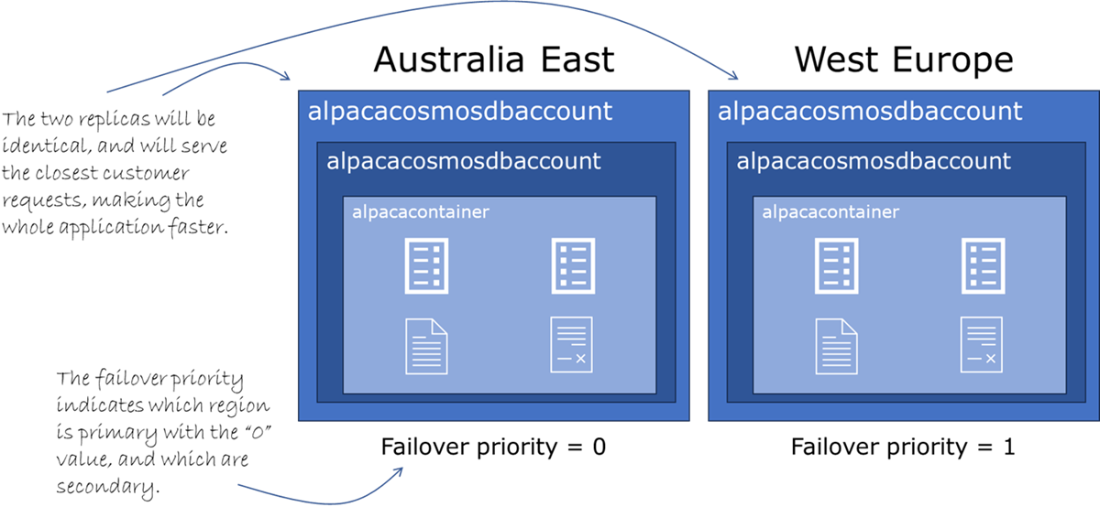
Multi-region replication with Cosmos DB creates two identical instances in different regions, and with failover priority.
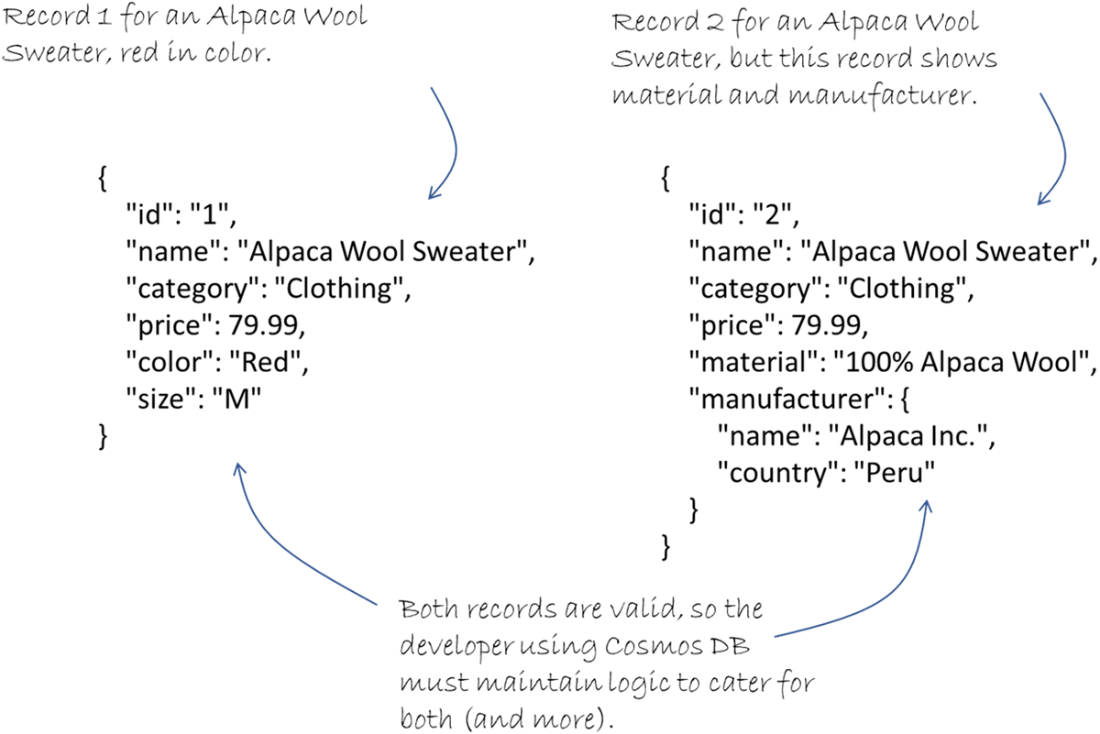
Two records for the same product can be inconsistent in the fields used, when using a schema-less approach.
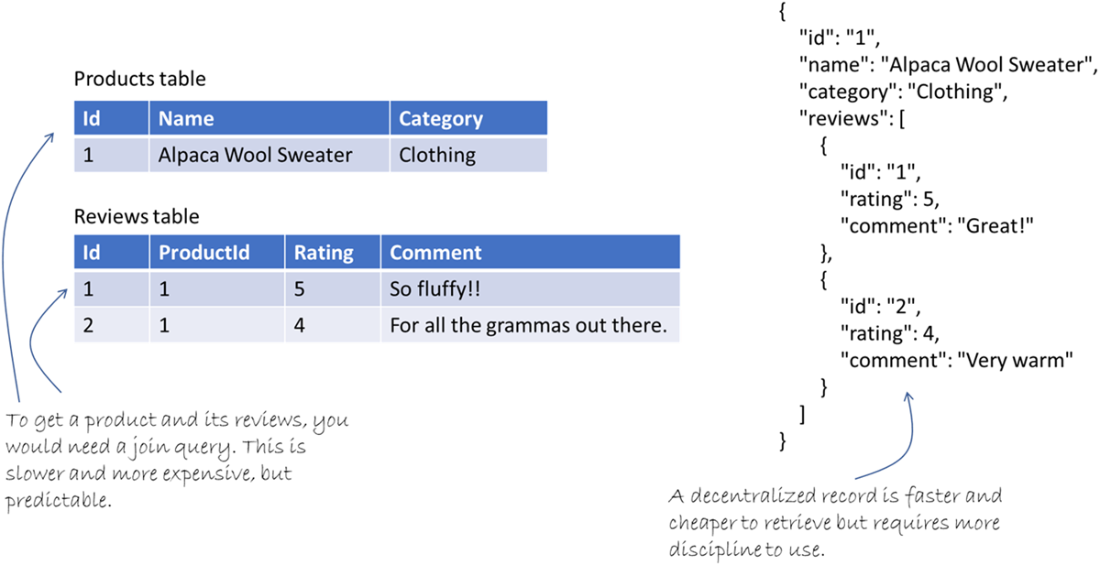
Denormalized data is faster and cheaper to read and retrieve than normalized data.
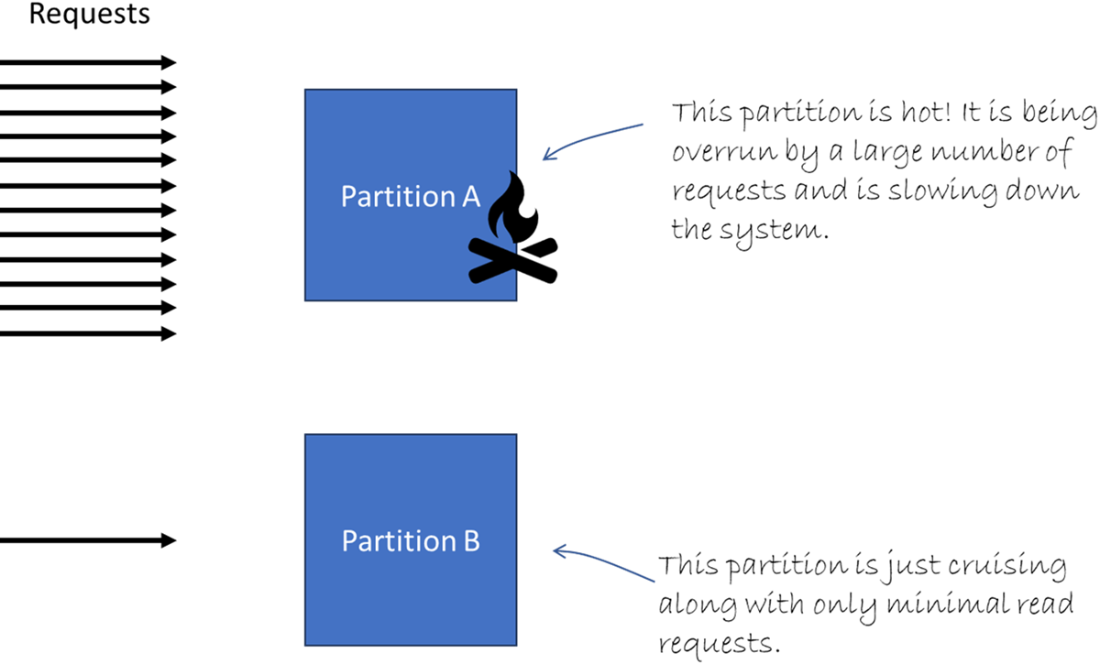
Hot partitions can become a serious performance bottleneck.
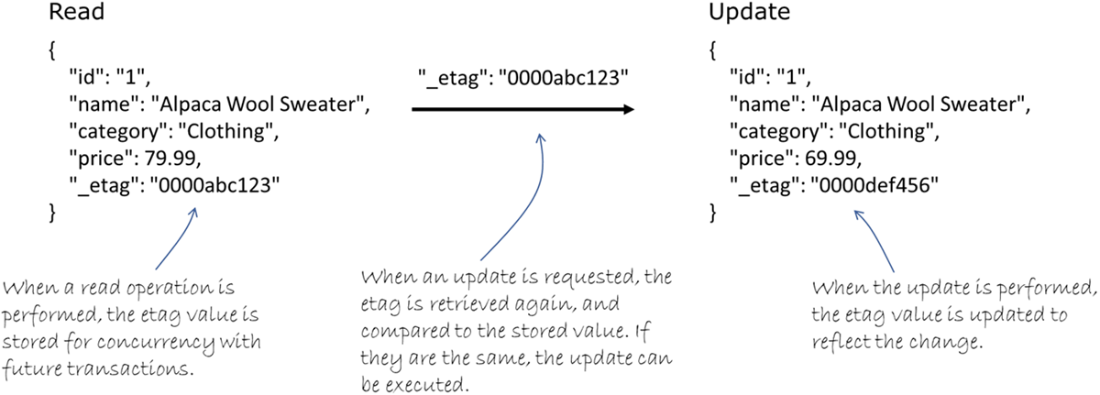
A read operation stores the Etag value for concurrency in future updates.
Summary
- Using Azure CLI to create a Cosmos DB instance ensures a scalable, high-performance database setup tailored for handling traffic spikes efficiently.
- APIs and SDKs in Cosmos DB simplify the development of applications, enabling seamless integration and interaction with the database.
- Effective data modeling and partitioning in Cosmos DB optimize performance and data distribution, reducing latency and improving query efficiency.
- Implementing different consistency models in Cosmos DB helps maintain data reliability and integrity, tailored to specific application needs.
- Near real-time analytics integration with Cosmos DB provides immediate insights through Azure Synapse Analytics, Azure Functions, and Azure Stream Analytics
- Comparing provisioned throughput and autoscale models helps in managing costs and scaling resources effectively in Cosmos DB.
- Setting up alerts and action groups in Azure Monitor ensures proactive management by automating responses to high RU consumption and other critical metrics.
- Understanding the pitfalls of autoscaling and multi-region configurations in Cosmos DB helps in avoiding common issues and maintaining optimal performance.
- Leveraging Cosmos DB's partitioning strategies ensures even data distribution and avoids hot partitions, enhancing query performance and scalability.
- Using ETags for concurrency control in Cosmos DB ensures that data modifications are conflict-free, maintaining data integrity during high-traffic operations.
- Denormalizing data in Cosmos DB can improve read performance by reducing the need for multiple queries or joins, especially in high-traffic applications.
- Integrating Cosmos DB with Azure Synapse Analytics enables complex data queries and real-time business insights for Alpaca-Ma-Bags.
- Azure Functions integration with Cosmos DB allows for serverless computing, automating tasks in response to data changes in real-time.
- Azure Stream Analytics integration with Cosmos DB enables real-time monitoring and analysis of data streams, providing immediate insights.
- Optimizing query performance in Cosmos DB involves using efficient indexing and parameterized queries to reduce RU consumption.
- Monitoring Cosmos DB usage with Azure Monitor helps in tracking key metrics like RU consumption and latency, enabling proactive optimizations.
- Implementing cost management strategies in Cosmos DB ensures efficient resource usage, balancing performance with budget constraints.
- Choosing the right partition key is critical for performance, as it impacts data distribution and query efficiency in Cosmos DB.
- Using Azure Monitor to set up alerts for high RU consumption helps in managing resource usage and preventing performance issues.
- Developing applications with Cosmos DB SDKs involves handling schema-less data modeling, accommodating different data structures efficiently.
FAQ
How do I create a Cosmos DB account, database, and MongoDB collection with Azure CLI?
Run these three commands:
C:/> az cosmosdb create --name alpacacosmosdbaccount --resource-group AlpacaRG --kind MongoDB --locations regionName=australiacentral failoverPriority=0 isZoneRedundant=False --default-consistency-level "Session" --capabilities EnableMongo

C:/> az cosmosdb mongodb database create --account-name alpacacosmosdbaccount --name alpacacosmosdb --resource-group AlpacaRG

C:/> az cosmosdb mongodb collection create --account-name alpacacosmosdbaccount --database-name alpacacosmosdb --name alpacacontainer --resource-group AlpacaRG --shard "/alpacakey" --throughput 400
The collection command sets the partition (shard) key and the initial throughput in RU/s.
What are Request Units (RUs) and how do they affect performance and cost?
RUs are the performance currency in Cosmos DB. Every operation (reads, writes, queries) consumes RUs based on its size and complexity. Throughput is provisioned as RU/s per container or database.
- Performance: Higher RU/s allows more operations/sec and lower latency under load.
- Cost: You’re billed by provisioned or autoscaled RU/s and by regions; complex queries and multi-region replication increase RU consumption.
- Rule of thumb: A simple 1 KB read ≈ 1 RU; complex queries cost more.
How do I enable autoscale and cap its maximum RU/s?
Enable autoscale at the account or collection layer:
- Account-level capability:
C:/> az cosmosdb update --name alpacacosmosdbaccount --resource-group AlpacaRG --capabilities EnableAutoScale --max-throughput 10000
- Collection-level autoscale:
C:/> az cosmosdb mongodb collection update --account-name alpacacosmosdbaccount --database-name alpacacosmosdb --name alpacacontainer --resource-group AlpacaRG --throughput-type autoscale --max-throughput 10000
max-throughput sets the ceiling autoscale can reach during spikes, helping control costs.
How do I configure multi-region replication and prioritize failover?
Add regions and set priorities:
C:/> az cosmosdb update --name alpacacosmosdbaccount --resource-group AlpacaRG --locations regionName=australiaeast failoverPriority=0 isZoneRedundant=False regionName=westeurope failoverPriority=1 isZoneRedundant=False
- failoverPriority=0 is primary; higher numbers are lower priority.
- isZoneRedundant=True spreads replicas across zones in a region (higher availability and cost).
Multi-region reduces read latency and improves availability; consider the added cost and potential write latency if misconfigured.
How should I model data in Cosmos DB (schema-less, denormalization, variability)?
- Schema-less: Each document can have different fields; design app logic to handle optional/missing properties safely.
- Denormalize for reads: Embed related data (e.g., supplier details in product documents) to avoid joins and reduce RU cost on reads.
- Manage variability: Store flexible JSON per product type; only include fields that matter to that item.
Trade-off: Denormalization can increase write cost and storage; update carefully to keep duplicates in sync.
What is a partition key and how do I choose a good one?
The partition key determines how data is distributed and scaled. Pick a key that:
- Has high cardinality (many distinct values) to spread load.
- Aligns with common query filters to minimize cross-partition queries.
- Is immutable (doesn’t change over time).
Example (MongoDB API):
C:/> az cosmosdb mongodb collection create --account-name alpacacosmosdbaccount --database-name alpacacosmosdb --name alpacacontainer --resource-group AlpacaRG --shard "/category" --throughput 400
How do I avoid hot partitions and reduce cross-partition queries?
- Use higher-cardinality keys or composite keys (e.g., region-category) to distribute load:
C:/> az cosmosdb mongodb collection create --account-name alpacacosmosdbaccount --database-name alpacacosmosdb --name alpacacontainer --resource-group AlpacaRG --shard "/region-category" --throughput 400
- For time-heavy workloads, include time in the key (e.g., region-date).
- Design queries to filter on the partition key.
- Leverage automatic indexing and tune policies to keep RU costs down.
What consistency levels are available and how do I set the default?
- Strong: Always the latest write; higher latency/less throughput.
- Bounded Staleness: Reads lag by time/versions; balanced guarantees.
- Session: Consistent within a client session; great default for apps.
- Consistent Prefix: Ordered reads, not necessarily latest.
- Eventual: Fastest and most available; data may be stale/out of order.
Set the default via CLI:
C:/> az cosmosdb update --name alpacacosmosdbaccount --resource-group AlpacaRG --kind MongoDB --default-consistency-level <Strong|BoundedStaleness|Session|ConsistentPrefix|Eventual>
How does concurrency control work with ETags in Cosmos DB?
Cosmos DB uses optimistic concurrency. Each document has an ETag (version). Your app:
- Reads the item and gets its ETag.
- Updates the item only if the ETag matches (If-Match).
- If the ETag changed, another writer updated it; retry the read-update cycle.
This avoids locks, preserves integrity under load, and is ideal for scenarios like inventory updates.
Which APIs/SDKs can I use, and how does Cosmos DB integrate for near real-time analytics?
- APIs: NoSQL, Table, MongoDB, PostgreSQL, Cassandra, Gremlin.
- SDKs: .NET, Java, Node.js, Python, Go, PHP. Apps connect via the account’s endpoint/key; the SDK handles region routing.
- Integrations:
- Azure Synapse Analytics for near real-time analytics at scale.
- Azure Functions to react to Cosmos DB changes (e.g., update inventory, send notifications).
- Azure Stream Analytics to process streams from Cosmos DB and act on live data.
How can I manage costs and optimize performance?
- Choose throughput mode: Provisioned RU/s for steady workloads; autoscale for spiky traffic (cap with --max-throughput).
- Monitor RUs/latency with Azure Monitor; alert on thresholds:
C:/> az monitor metrics alert create --name "High RU Consumption" --resource-group AlpacaRG --scopes /subscriptions/{sub}/resourceGroups/AlpacaRG/providers/Microsoft.DocumentDB/databaseAccounts/alpacacosmosdbaccount --condition "avg totalRequestUnits > 900" --window-size 5m --evaluation-frequency 1m --action {action-group} - Tune indexing and queries to lower RU consumption.
- Consider vCore-based pricing (for PostgreSQL/MongoDB scenarios) for predictable, CPU-bound workloads.

 Microsoft Azure in Action ebook for free
