8 Text and typography math
Typography on the web is presented as a mathematical discipline, even when it looks intuitive to the designer. The chapter argues that great text tends to disappear into a page because it is balanced: readable, harmonious, and accessible. It frames type size, line height, and line length as the core variables that determine whether text feels comfortable or awkward, and shows that improving one often requires adjusting the others at the same time.
The first major focus is readability. Body text is often too small by default, browser line heights are usually too tight, and line lengths can become either choppy or tiring if they are too short or too long. To solve this, the chapter explains how the three typographic values can be linked mathematically so that changing one value recalculates the others. It gives formulas and CSS examples for three cases: when font size is known, when line height is known, and when line length is known, using custom properties and calculations to keep text proportional as designs change.
The chapter then moves from static relationships to responsive and systematic typography. It shows how CSS math functions such as calc(), min(), max(), and especially clamp() can create fluid type that scales across screen sizes without abrupt jumps, while still respecting sensible limits. It also introduces modular scales, where font sizes are generated from a base size and a ratio to create visual rhythm and hierarchy. Ratios drawn from math and music, including the golden ratio, can produce either subtle or dramatic steps, and CSS variables make those scales practical to implement across headings and body text.
Line height in CSS
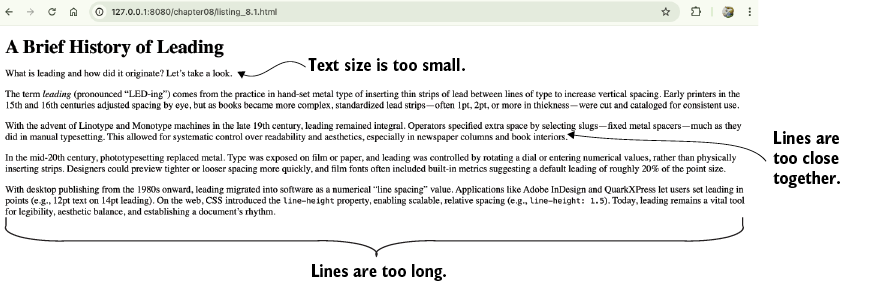
Your job is to make this typographically inept post into something harmonious and readable.
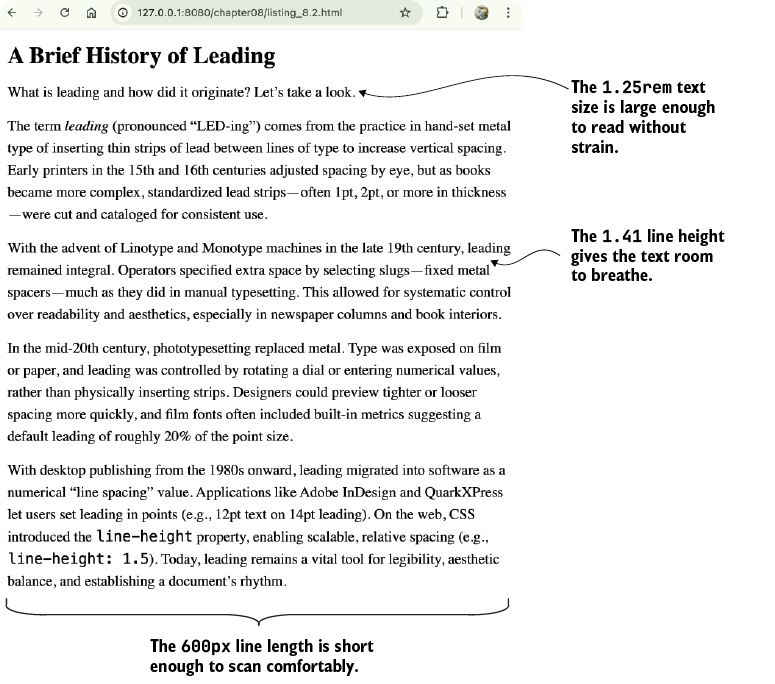
A much more readable and harmonious page, all thanks to math
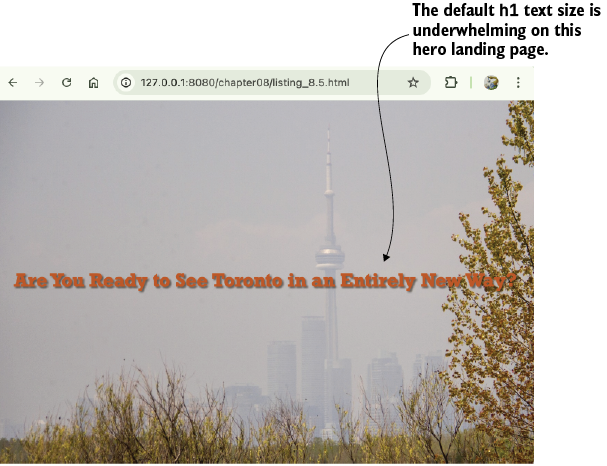
This hero page needs text that fills the screen much like the image does.
The clamp() function scales the text down to fit this phone display.

The clamp() function scales the text up to fit this laptop display.

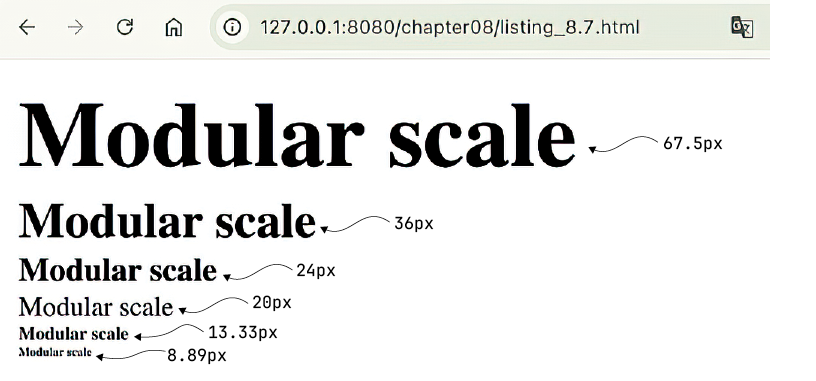
A modular scale based on the ratio 1.5
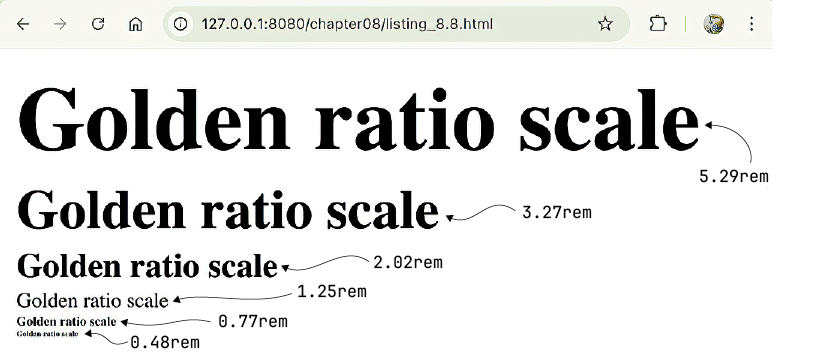
A modular scale based on the golden ratio
Summary
- The typographic trinity consists of font size, line height, and line length, each of which depends mathematically on the others to achieve readable and balanced text.
- A typographically unbalanced page is one that uses a body text font size that’s too small (particularly the browser default of
16px), a line height that’s too small (particularly the browser default of 1.2), and a line length that’s too long (particularly the default element width of100%of the parent width in a wide browser window). - For readable text, shoot for body text set to at least
1.25rem(usually20px), line height around1.4or1.5, and line lengths of45to75characters. - Line height should scale inversely with the font size and line length should scale with the font size.
- Both font size and line length should scale inversely with the line height.
- Both font size and line height should scale with the line length.
- Use CSS fluid units for responsive text. Viewport-relative units (
vw,vh) and functions such ascalc()andclamp()enable text that scales smoothly across screen sizes without media queries. In particular, usingclamp(min,preferred,max)can constrain font sizes to maintain legibility. - A modular scale is a great way to bring harmony to page font sizes. Choose a ratio (e.g.,
1.25,1.5, or1.618) and derive all text sizes from it. This produces font sizes that feel related and balanced. - CSS custom properties simplify modular scale math. You can store base sizes and ratios in variables and use
calc()to compute each modular scale step. This makes it easy to adjust one value (e.g., the ratio or the base font size) and have all related sizes update automatically.
FAQ
What are the three key typographic properties that most affect readability on the web?
The chapter identifies font size, line height, and line length as the “typographic trinity.” Getting these three into balance is essential for readable web text.Why is the browser’s default body text size often considered too small?
Most browsers default body text to 16px, which is often too small for comfortable reading on desktop screens. The chapter recommends at least 1.25rem, or 20px if the default root size is 16px.What line-height range is recommended for readable body text?
The chapter suggests a line height of about 1.4 to 1.5 for body text. This gives lines enough vertical breathing room to improve readability.What is the ideal line length for body text?
For readability, line lengths should generally be no shorter than about 45 characters and no longer than about 75 characters. A common CSS approach is to use max-width with the ch unit.How do you scale line height when you already know the font size you want to use?
You can use the formulaELH = BLH - (EFS - BFS) / LHF, where the line height decreases as font size increases. In CSS, this is often implemented with custom properties and calc().How do you scale line length when you already know the font size you want to use?
Use the formulaEW = BW + (EFS - BFS) * WF. This makes the line length grow as the font size increases, helping preserve readability.How do you calculate a fluid font size with clamp()?
First choose a minimum and maximum font size, then calculate a viewport-based preferred value using linear interpolation. A common pattern isfont-size: clamp(min, preferred, max), such as clamp(1rem, 0.5rem + 2vw, 2rem).
 Math for Web Design ebook for free
