5 Flexbox math
Flexbox layout is presented as a mathematical system rather than a mysterious one, and the chapter explains how browsers decide the starting size of each flex item before any expansion or contraction happens. That starting point, called the flex base size, comes from flex-basis when it is explicitly set, from width when flex-basis is auto, or from the item’s intrinsic content size when neither is specified. Understanding this initial sizing is essential because it determines how much total space the items claim and whether the container has room left over or needs items to shrink.
Once the base sizes are known, the browser uses flex factors to distribute free space. In an underflow situation, flex-grow spreads unused space among items according to their grow values, and the chapter shows how different combinations of grow factors produce proportional results. In an overflow situation, flex-shrink reduces items using a weighted calculation that considers both the shrink factor and the item’s own base size, which is why larger items often shrink more in absolute terms. The chapter also explains the shorthand flex property and notes that it sets all three flex-related values together, sometimes with implicit defaults.
The final part of the chapter adds min and max constraints to the process, showing how min-width and max-width act as hard limits after the browser’s flex math runs. If a proposed size violates a constraint, the browser adjusts the other items again so the container still fits while respecting those boundaries. The chapter closes by reinforcing practical uses of these rules, such as keeping navigation buttons usable, emphasizing a pricing card, or preventing items from becoming too small or too large. Overall, it equips readers to predict and control Flexbox behavior with more confidence.
How the browser determines the flex base size
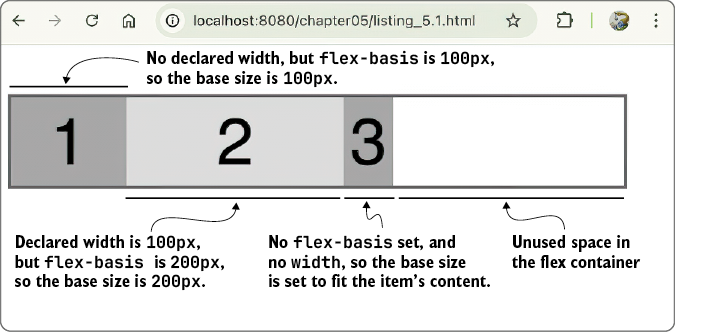
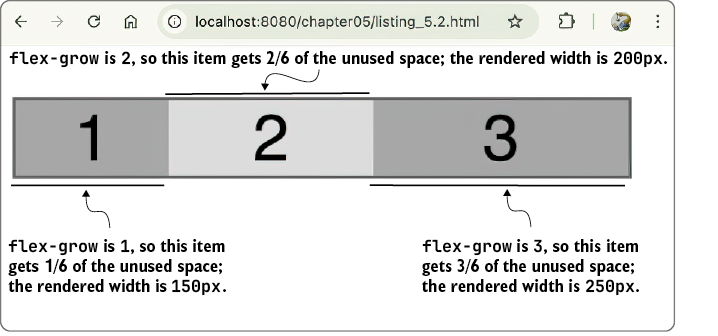
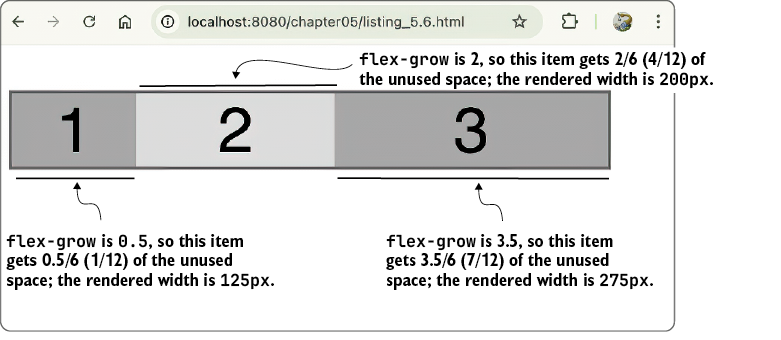
How flex-grow works. Notice that there’s no longer any unused space in the container.
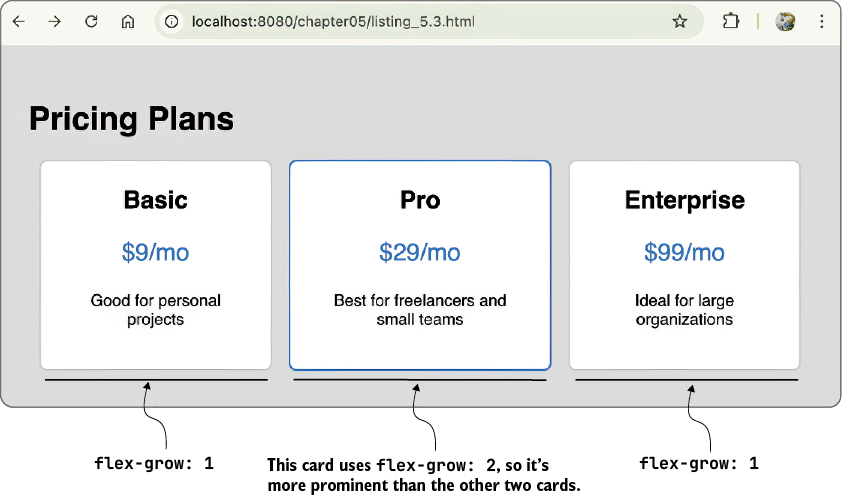
Using flex-grow to make a card more prominent
How flex-shrink works. Notice that there’s no longer any unused space in the container.
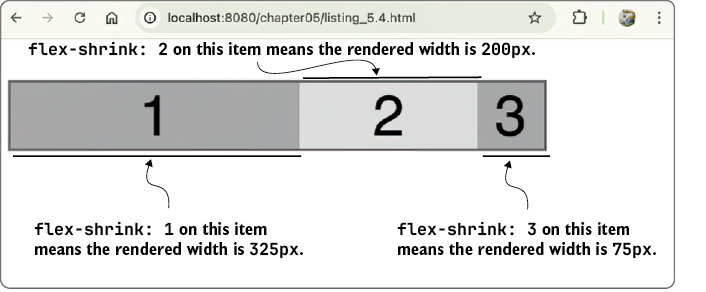
A flex-shrink example
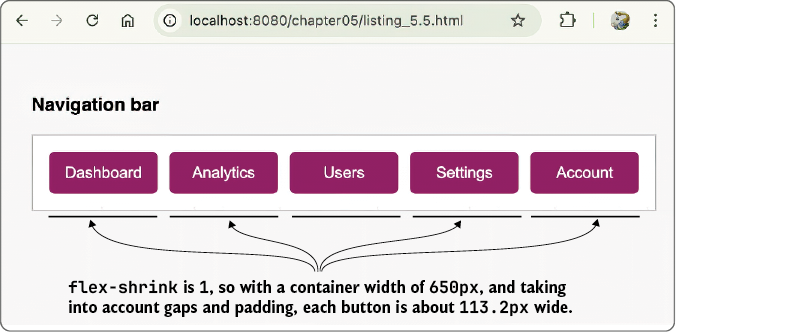
Item 1 has a flex-grow value of 0.5.
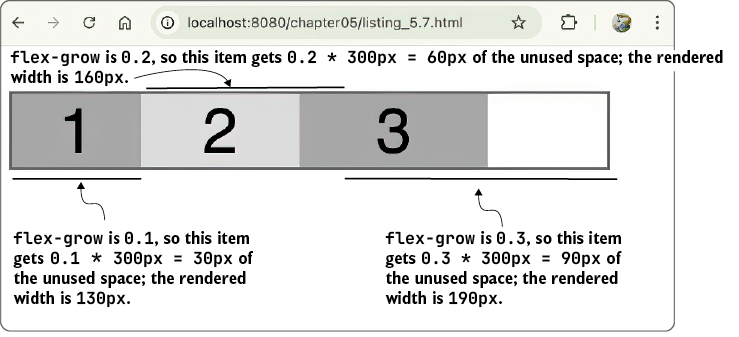
The total of the flex-grow factors is less than 1.
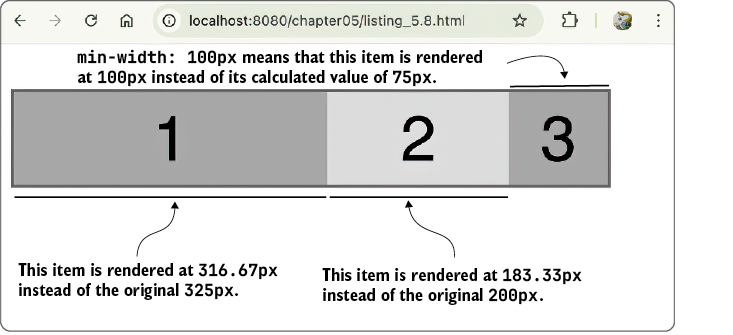
Setting min-width: 100px ensures that no item is rendered with a width smaller than that constraint.
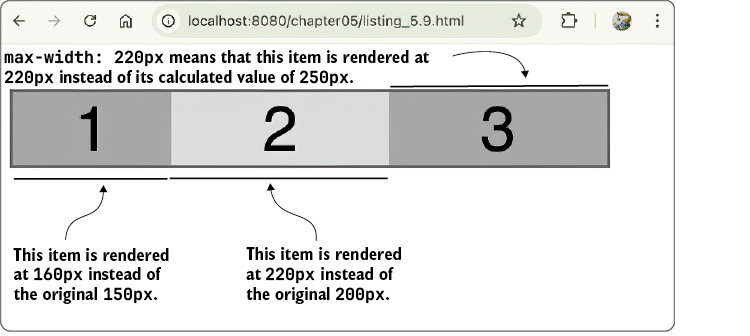
Setting max-width: 220px ensures that no item is rendered with a width greater than that constraint.
Summary
- The flex base size is the starting point for all flex calculations and is determined by
flex-basis, or, if that’sauto, bywidthor the item’s intrinsic size. - When a flex container has extra space (underflow), the browser distributes it using each item’s
flex-growvalue as a proportion of the total grow factors. - When a container doesn’t have enough space (overflow), the browser reduces each item’s size using a weighted formula based on the item’s width and
flex-shrinkvalue. - The
flexshorthand property sets all three flex properties (flex-grow,flex-shrink, andflex-basis) at once and can override individual settings if not used carefully. - When all
flex-growvalues are between 0 and 1 and their sum is less than 1, the browser interprets them as absolute percentages of the free space rather than relative ratios. - Min/max constraints (such as
min-widthandmax-widthfor a horizontal main axis) act as hard limits during grow/shrink calculations, forcing the browser to redistribute space when an item hits its bounds.
FAQ
What is the flex base size in Flexbox?
The flex base size is the starting size the browser assigns to a flex item before it decides whether the item should grow or shrink. For a horizontal main axis, this means width; for a vertical main axis, it means height.How does the browser choose a flex item’s base size when flex-basis is a specific value?
Ifflex-basis is set to a specific length, percentage, or keyword like content, max-content, min-content, or fit-content, the browser uses that value directly as the flex base size.What happens when flex-basis is set to auto?
Whenflex-basis: auto, the browser looks for a width value in a horizontal flex container. If width is set, it uses that value. If width is not set, it uses the item’s intrinsic content size.If both width and flex-basis are set, which one wins?
flex-basis wins if it is set to a specific value. In that case, it overrides the declared width and becomes the flex base size.What are the two main flex factors in Flexbox?
The two flex factors areflex-grow and flex-shrink. They determine how items distribute extra space or reduce size when the container has too much or too little room.How does flex-grow distribute unused space?
The browser adds up all initial item sizes, subtracts that from the container width, then divides the leftover space among items based on theirflex-grow values. Larger grow values receive a larger share of the extra space.Why does flex-shrink use a weighted calculation?
flex-shrink uses a weighted shrink factor because shrinking depends on both the item’s flex-shrink value and its base size. The browser multiplies the two to decide how much each item should shrink.What is the shorthand syntax for the flex property?
The shorthand syntax isflex: flex-grow flex-shrink flex-basis;. For example, flex: 0 0 auto; means no growth, no shrinking, and an automatic base size.What do min-width and max-width do in Flexbox sizing?
min-width prevents an item from shrinking below a minimum size, while max-width prevents it from growing beyond a maximum size. These act as hard limits after the flex math is calculated.Why might a flex item still shrink even if you set flex-shrink: 0?
A later shorthand likeflex: 1 can override the separate flex-shrink setting. Also, other layout constraints or styles may affect the final size, so it is best to check the full flex declaration.
 Math for Web Design ebook for free
