JavaScript math is central to frontend work, from layout and animation to user input and data handling, but the language’s numeric behavior can be surprising. This chapter builds a practical foundation for working with expressions, operators, and values so code stays accurate and predictable. It emphasizes that many bugs come not from bad ideas, but from misunderstanding how JavaScript evaluates math behind the scenes.
The chapter first explains how to form expressions and use arithmetic, comparison, logical, and assignment operators, with special attention to operator precedence and the role of parentheses. It also highlights common pitfalls such as post-increment behavior, loose versus strict equality, truthy and falsy values, and the difference between defaulting with || and preserving valid falsy values with ??. Throughout, it encourages clearer, safer patterns that avoid coercion surprises and make intent easier to read.
It then turns to JavaScript’s number system, showing that most values are stored as 64-bit floating-point numbers, which leads to safe integer limits, precision loss, special values like NaN and Infinity, and the need for explicit conversion in mixed-type calculations. To handle larger integers, it introduces BigInt, while noting its limitations in math methods, JSON, and UI contexts. The later sections cover true modulo logic for wrapping values, rounding techniques for display and layout, and generating random numbers for visual effects and repeatable behavior, giving readers practical tools for writing robust math-heavy web code.
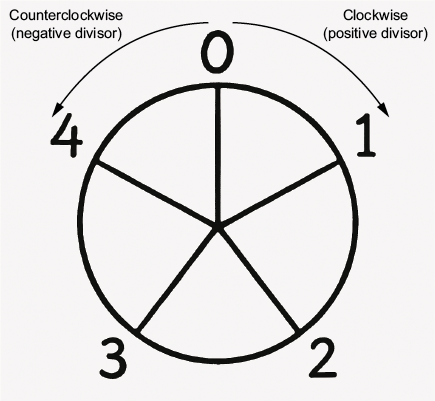
Modulo logic is like moving around a circle.
Summary
- Operators follow standard precedence rules.
- Use parentheses to make calculations clearer and avoid bugs in layout or animation math.
- Use strict equality (===) to avoid unexpected type coercion in comparisons.
- JavaScript uses a single
numbertype for both integers and floating-point values. - Decimal math is imprecise due to JavaScript’s internal binary representations. That’s why
0.1 + 0.2 !== 0.3. - The BigInt data type enables you to work with integers beyond JavaScript’s safe number range.
- JavaScript’s
%operator returns a remainder with the same sign as the dividend. - Use
Math.round(),Math.floor(), andMath.ceil()to round values up, down, or to the nearest whole number. - For formatted display, use
.toFixed()to control decimal places. Math.random()returns a pseudo-random float in the range [0, 1).
FAQ
```htmlWhat is a JavaScript expression, and what are operands and operators?
A JavaScript expression is a combination of operands and operators that returns a value. Operands are the input values, such as numbers, variables, or function results. Operators are the symbols that tell JavaScript what action to perform on those operands.What is the difference between post-increment and pre-increment in JavaScript?
With post-increment, likex++, JavaScript uses the current value first and then increments it. With pre-increment, like ++x, JavaScript increments the value first and then uses it. This difference matters when the operator appears inside an assignment.Why should I usually use === instead of ==?
=== checks both value and type, so it does not perform type coercion. == can convert values before comparing them, which can lead to unexpected results. In most cases, strict equality is safer and more predictable.What is the difference between || and ?? for default values?
|| returns the right-hand value when the left-hand value is falsy, so it treats 0, false, and "" as missing. ?? only falls back when the left-hand value is null or undefined, which is better when falsy values are valid.Why does 0.1 + 0.2 === 0.3 return false in JavaScript?
JavaScript stores regular numbers as floating-point values, and many decimal fractions cannot be represented exactly in binary. Because of that, 0.1 + 0.2 becomes a tiny bit larger than 0.3, so the comparison returns false.What is the safe integer range in JavaScript?
The safe integer range is fromNumber.MIN_SAFE_INTEGER to Number.MAX_SAFE_INTEGER, which is roughly -9007199254740991 to 9007199254740991. Outside that range, JavaScript numbers may lose precision.When should I use BigInt instead of Number?
Use BigInt when you need to work with integers larger than the safe integer range and precision matters. BigInt is ideal for very large IDs, timestamps, cryptography, and similar cases, but it should not be mixed directly with regular numbers in arithmetic expressions.Why is -1 % 5 equal to -1 in JavaScript?
JavaScript’s % operator is a remainder operator, not true mathematical modulo. It keeps the sign of the dividend, so negative values stay negative. For wrapping logic, you should use a true modulo helper instead.What is the difference between Math.round(), Math.floor(), Math.ceil(), and Math.trunc()?
Math.round() rounds to the nearest whole number, Math.floor() rounds down, Math.ceil() rounds up, and Math.trunc() removes the fractional part. They behave differently, especially for negative numbers.What range does Math.random() return, and how do I make a random integer in a range?
Math.random() returns a pseudo-random number in the range [0, 1). To generate an integer in a range, you typically multiply by the size of the range, apply Math.floor(), and then add the minimum value.
 Math for Web Design ebook for free
