14 Canvas-based math and drawing
This chapter shows how canvas drawing lets math drive visuals that are difficult to build with ordinary DOM elements. Because a canvas is just a pixel grid, you use JavaScript and geometry to turn data into shapes, place labels, and make charts feel readable and responsive. The examples emphasize that canvas work depends on translating abstract values into positions, angles, sizes, and colors with precision.
A major theme is data-driven visualization with interaction. The chapter explains how to build a pie chart by converting each data value into a slice angle based on its share of the total, and how to position labels using trigonometry. It then moves to interactive bar charts, where rectangles are drawn from scaled data values and hit detection is done by comparing pointer coordinates to bar boundaries. For donut charts, hit detection becomes more advanced: the pointer’s distance from the center determines whether it is inside the ring, and its angle identifies which slice is being hovered.
The chapter also explores motion and simulation on the canvas. It uses particle systems to create a balloon drop, where gravity, velocity, and wall collisions produce natural bouncing behavior, and a star field that simulates depth through parallax by tying speed, size, and opacity to each star’s depth value. Finally, it builds a confetti celebration effect using random velocities, rotation, drag, and gravity to create a short-lived but lively animation. Across all of these examples, the central idea is that simple mathematical rules can create rich, interactive, and believable visuals.
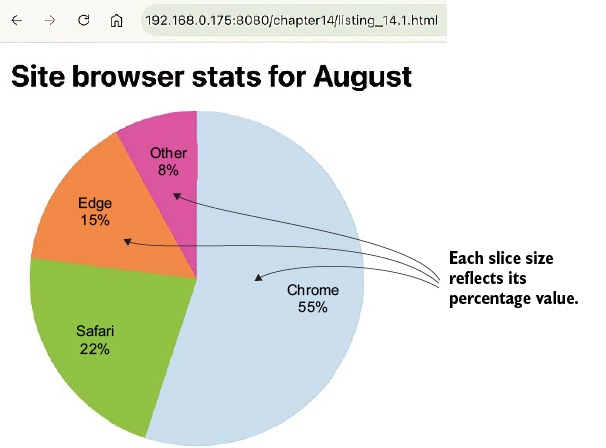
A canvas-based pie chart of browser usage data. The relative size of each slice reflects the slice’s portion of the entire pie.
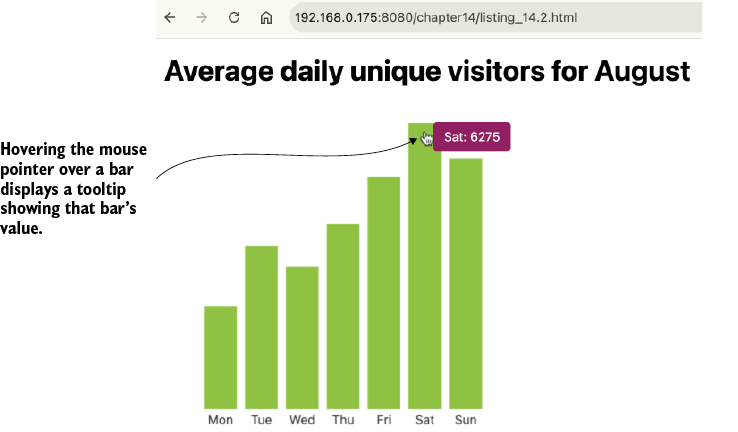
An interactive, canvas-based bar chart of average daily unique visitors. When the user hovers their pointer over a bar, a tooltip displays the bar‘s value.
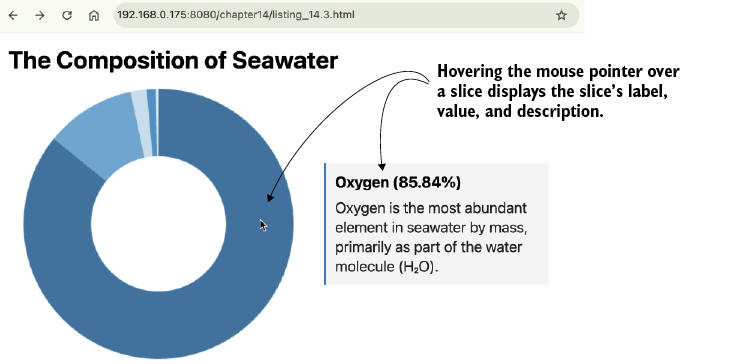
An interactive, canvas-based donut chart of the composition of seawater. When the user hovers their pointer over a slice, a text element displays information about the data that underlies the slice.
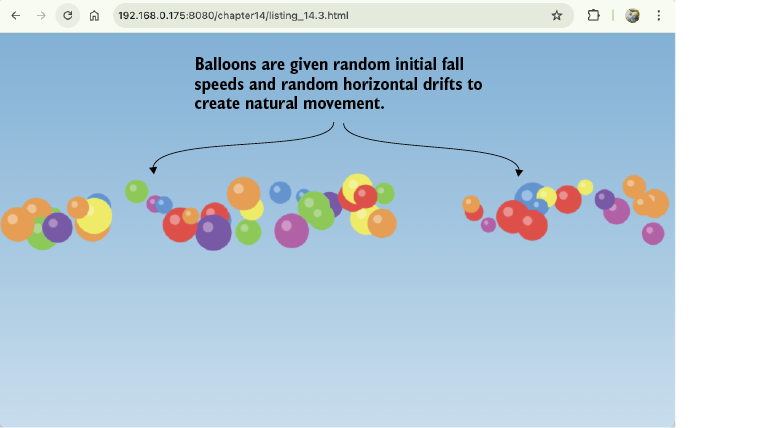
A simulation of a simple particle system. Each balloon is given a small, random horizontal drift velocity and a random vertical fall velocity to simulate how balloons would fall naturally.
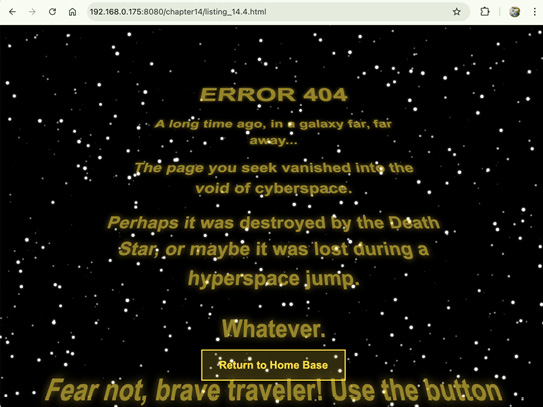
A custom 404 page with an animated star field background. Creating stars with different velocities, sizes, and opacities provides the illusion of depth.
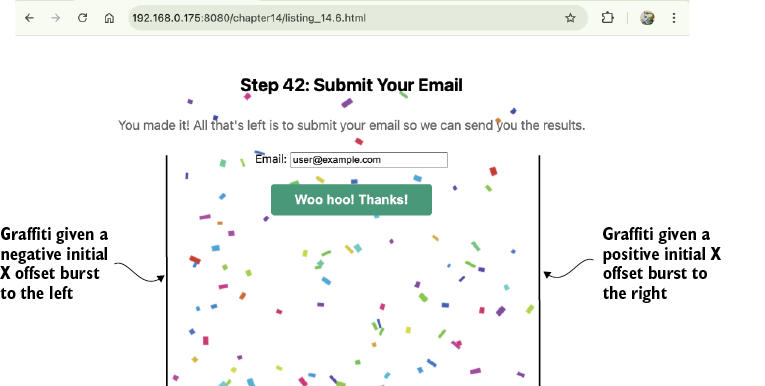
A celebratory shower of confetti appears upon completion of the task. Each piece of confetti is a canvas rectangle given an initial random velocity, height, width, rotation, and color.
Summary
- The
canvaselement lets you apply your math skills directly, giving you pixel-level control over custom UI and animations. - You can visualize data by mapping numerical values to geometric properties such as angles (for pie charts or donut charts) or dimensions (for bar charts).
- Hit detection is the process of using coordinate math to determine whether a user’s pointer is interacting with a shape you’ve drawn on the canvas.
- Hit detection on rectangles involves a simple boundary check, while detection on circular or arc-based shapes requires trigonometry (
atan2) and the Pythagorean theorem. - You can create natural-looking motion by applying physics concepts such as gravity, velocity, and boundary detection to objects on the canvas.
- Frame-based physics simulations update velocity using acceleration each frame (
v += a) and then update position using velocity (p += v), which produces realistic motion that follows physical laws. - The parallax effect in particle systems is achieved by making particle depth inversely proportional to its apparent speed, size, and opacity.
FAQ
What is the main idea behind using the canvas element for data-driven graphics?
The canvas is a blank pixel grid where you draw with JavaScript and math instead of DOM structure and CSS. That makes it useful for translating data into shapes, positions, and colors with precise control.How do you convert data values into pie chart slices on a canvas?
First, add all the data values to get the total. Then compute each slice angle with(item.value / total) * 2 * Math.PI, so each slice is proportional to its share of the whole.Why does the pie chart start at -Math.PI / 2 instead of 0?
Starting at -Math.PI / 2 places the first slice at the 12 o’clock position, which is more familiar and easier to read than starting at the 3 o’clock position.How are labels positioned inside pie chart slices?
The label is placed at the middle angle of the slice, then converted tox and y using trigonometry: cos() for x and sin() for y, usually at a percentage of the radius.What is hit detection in a canvas chart?
Hit detection is the math used to determine whether the pointer is over a drawn object, such as a bar or a slice, based on coordinates and shape boundaries.How do you detect whether the pointer is over a bar in an interactive bar chart?
Check whether the pointer’sx and y values fall within the bar’s rectangle: between the left and right edges, and between the top and bottom edges.Why does the bar chart store bar boundaries in an array?
The boundaries are stored so the code can compare pointer coordinates against each bar during hit detection and show the correct tooltip when a bar is hovered.Why is donut chart hit detection more complex than bar chart hit detection?
A donut chart has curved boundaries, so you need polar coordinates instead of simple rectangle checks. The code must test both distance from the center and angle around the center.Why is Math.atan2() used for donut chart hit detection?
Math.atan2() calculates the pointer’s angle relative to the chart center, which lets the code determine which donut slice the pointer is over.How does the star field effect create the illusion of depth?
Each star is given a depth valuez. Stars with smaller z values move faster, appear larger, and look more opaque, while farther stars move more slowly and appear dimmer and smaller.
 Math for Web Design ebook for free
