11 Using Bézier curves for smooth animation
The chapter explains that Bézier curves are the mathematical basis for the smooth, natural motion users associate with polished web interfaces. Rather than moving at a constant, mechanical pace, animations can accelerate and decelerate in ways that resemble real-world motion. The key idea is that a curve is shaped by control points and a parameter that moves from start to finish, producing continuous transitions without sharp corners or abrupt changes.
It distinguishes quadratic and cubic Bézier curves, emphasizing that cubic curves are the standard in CSS because their two control points give separate influence over the beginning and ending behavior of an animation. In CSS, the cubic-bezier() function defines these curves with fixed endpoints at (0,0) and (1,1), while the inner control points determine how the motion feels. The chapter shows how different values can create gentle easing, quick starts, slow finishes, anticipation, or overshoot effects.
The practical focus is on using these curves as timing functions for real interface interactions such as toggles, menus, dialogs, tooltips, and transitions in or out of view. Built-in keywords like linear, ease, ease-in, ease-out, and ease-in-out are presented as convenient presets, each tied to a specific motion style. The chapter closes by showing how to customize curves to match the purpose of an animation, whether the goal is to feel welcoming, responsive, discreet, or lively.
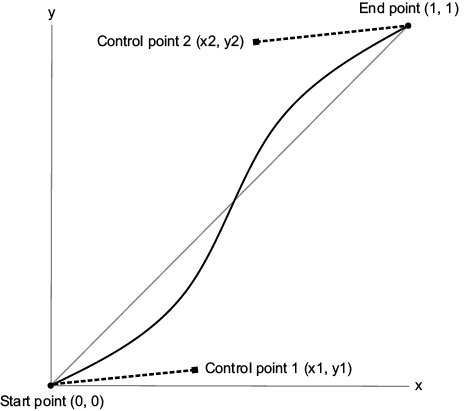
A cubic Bézier curve has two control points.
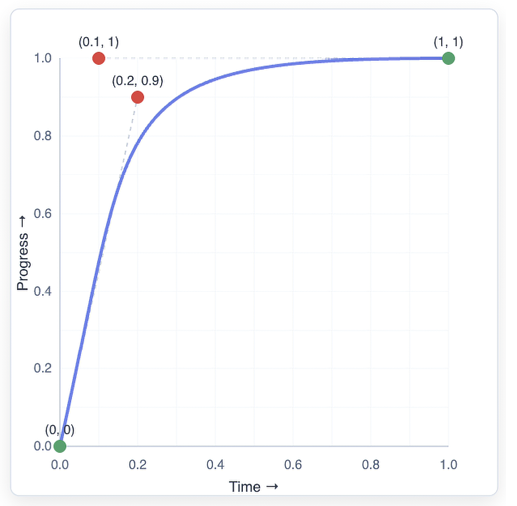
The cubic Bézier curve defined by cubic-bezier(0.2, 0.9, 0.1, 1.0)
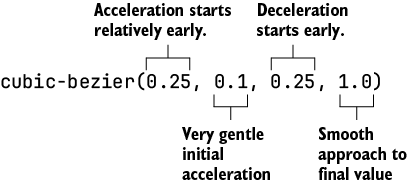
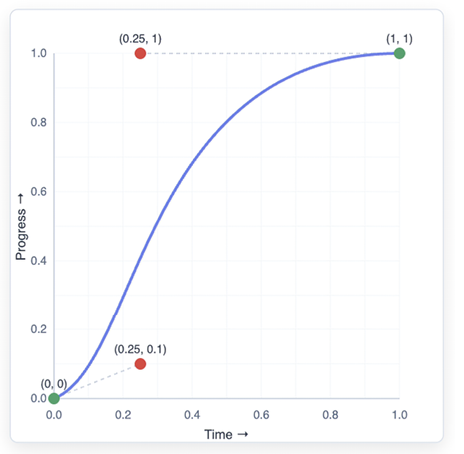
The cubic Bézier curve defined by cubic-bezier(0.25, 0.1, 0.25, 1.0)
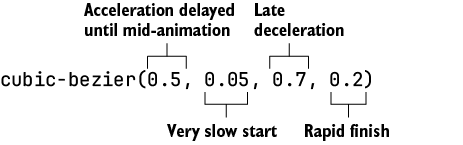
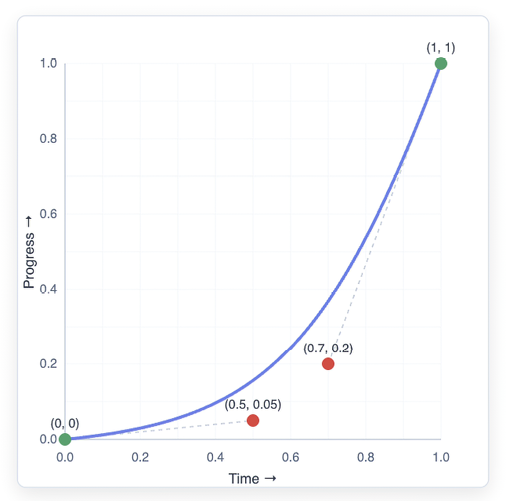
The cubic Bézier curve defined by cubic-bezier(0.5, 0.05, 0.7, 0.2)
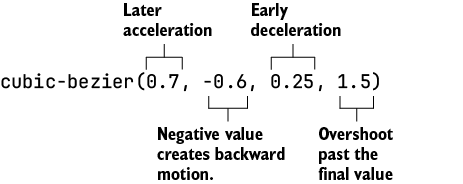
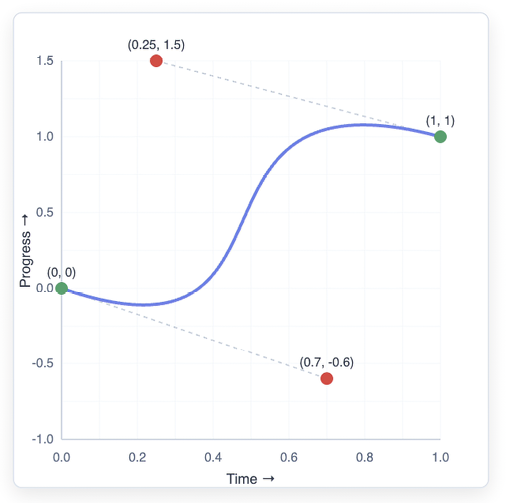
The cubic Bézier curve defined by cubic-bezier(0.7, -0.6, 0.25, 1.5)
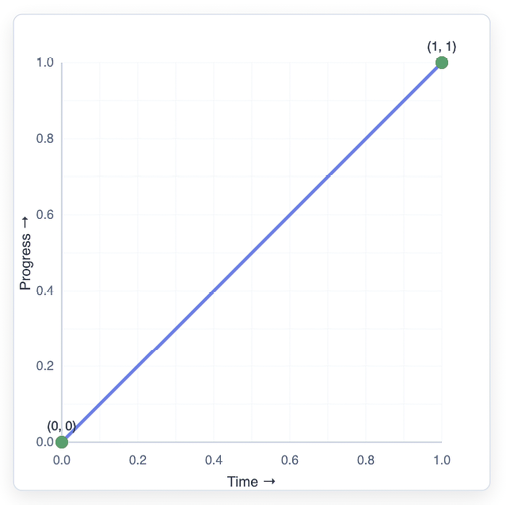
The cubic Bézier curve defined by the linear keyword or cubic -bezier(0, 0, 1, 1)
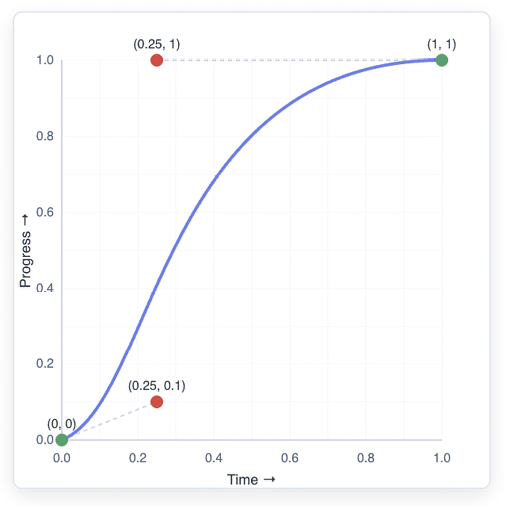
The cubic Bézier curve defined by the ease keyword or cubic -bezier(0.25, 0.1, 0.25, 1)
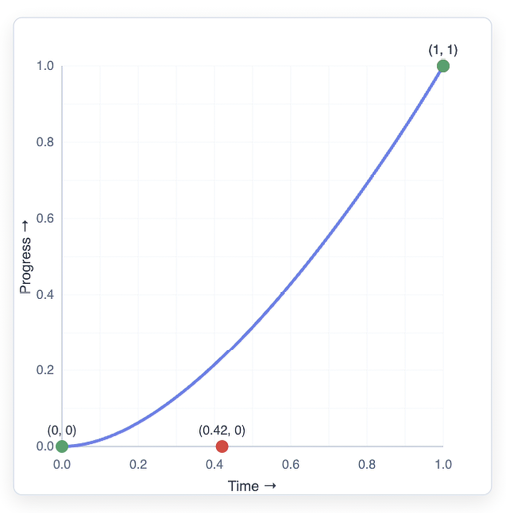
The cubic Bézier curve defined by the ease-in keyword or cubic -bezier(0.42, 0, 1, 1)
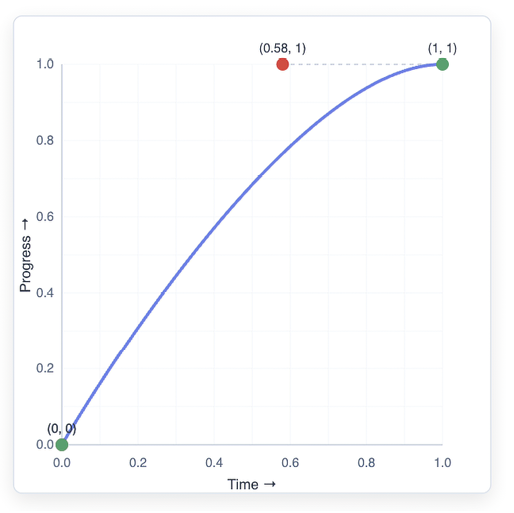
The cubic Bézier curve defined by the ease-out keyword or cubic -bezier(0, 0, 0.58, 1)
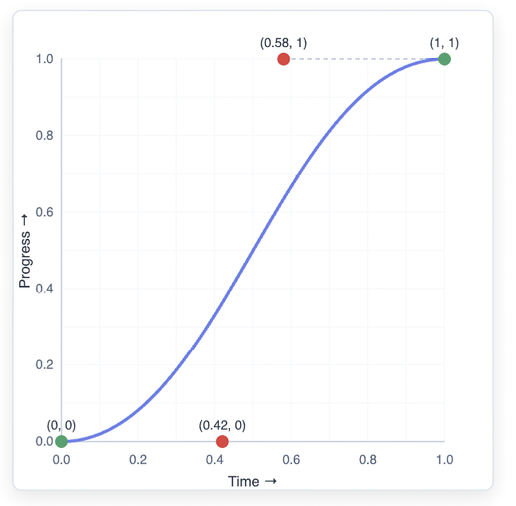
The cubic Bézier curve defined by the ease-in-out keyword or cubic-bezier(0.42, 0, 0.58, 1)
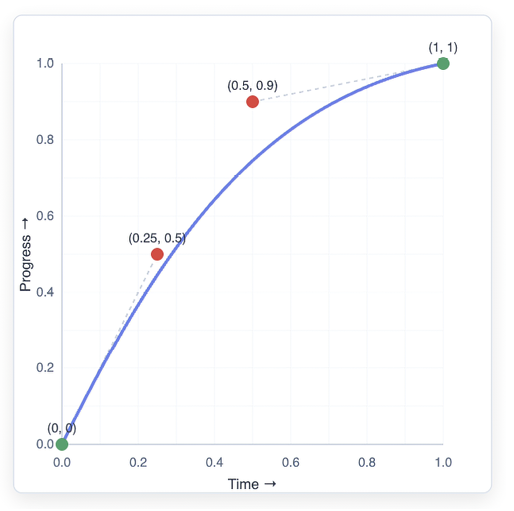
The cubic Bézier curve defined by cubic-bezier(0.25, 0.5, 0.5, 0.9)
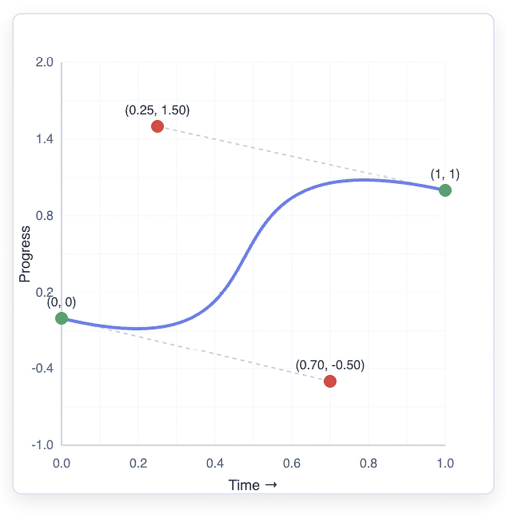
The cubic Bézier curve defined by cubic-bezier(0.7, -0.5, 0.25, 1.5)
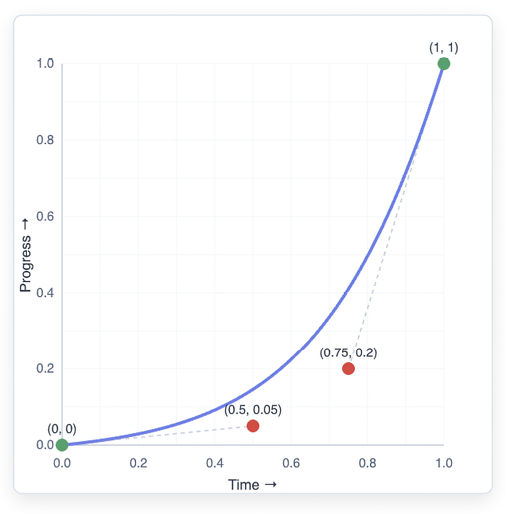
The cubic Bézier curve defined by cubic-bezier(0.5, 0.05, 0.75, 0.2)
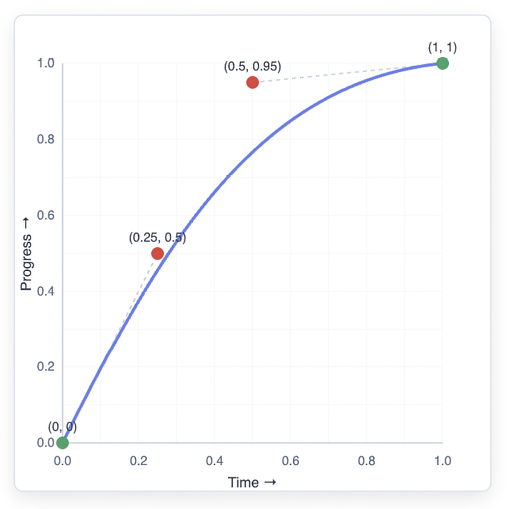
The cubic Bézier curve defined by cubic-bezier(0.25, 0.5, 0.5, 0.95)
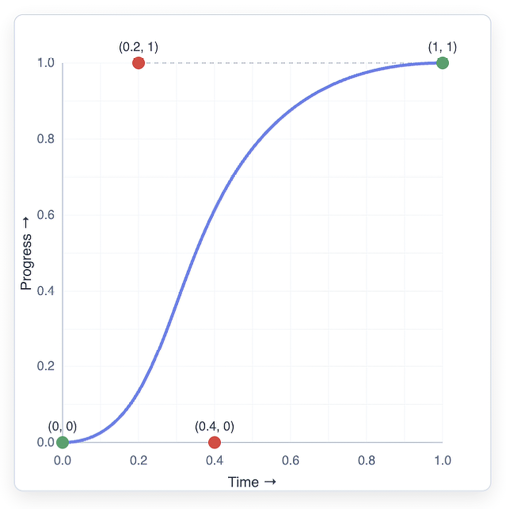
The cubic Bézier curve defined by cubic-bezier(0.4, 0.0, 0.2, 1)
Summary
- A Bézier curve is a mathematically defined curve generated from a set of control points acting like magnets that pull the curve into a particular shape.
- A quadratic Bézier curve has one control point, while a cubic Bézier curve has two control points.
- With two control points, a cubic Bézier curve lets you control the shape of the curve at both the beginning (using the first control point) and the end (using the second), so CSS animations use these curves almost exclusively.
- The animation segment will be fast where the Bézier curve has a steep slope and slow where it has a shallow slope.
- The first control point (x1,
- The second control point (x2
,y2) influences the end of the animation, where x2 controls when the deceleration begins and y2 controls the final deceleration. - y1 and y2 generally stay within [0, 1], but are allowed to wander out of that range to create anticipation (y -values below 0) or overshoot (y -values above 1).
- An easing function is a mathematical curve that defines how an animation progresses over time.
- CSS offers the following five predefined easing functions based on cubic Bézier curves:
linear,ease,ease-in,ease-out, andease-in-out.
FAQ
What is a Bézier curve, and why is it useful in web animation?
A Bézier curve is a mathematical curve used to create smooth, flowing motion between points. In web animation, it helps make transitions feel natural instead of mechanical or abrupt.
How does the parameter t work in a Bézier curve?
The parameter t ranges from 0 to 1. It represents the curve’s progress from start to end, with t = 0 at the beginning and t = 1 at the end.
What is the difference between quadratic and cubic Bézier curves?
Quadratic Bézier curves use three points: a start point, one control point, and an end point. Cubic Bézier curves use four points: a start point, two control points, and an end point, giving much greater control over animation timing.
Why are cubic Bézier curves preferred for CSS animations?
CSS uses cubic Bézier curves because they let you independently control the beginning and ending behavior of an animation, making it easier to create natural acceleration and deceleration.
What does a cubic Bézier curve do in a CSS timing function?
In CSS, a cubic Bézier curve acts as a timing function that controls how an animated property progresses over time, shaping the animation’s speed and feel.
What do the four values in cubic-bezier(x1, y1, x2, y2) represent?
x1 and y1 define the first control point, and x2 and y2 define the second control point. The endpoints are fixed at (0, 0) and (1, 1).
What is the difference between ease-in, ease-out, and ease-in-out?
ease-in starts slowly and speeds up, ease-out starts quickly and slows down, and ease-in-out combines both for a balanced S-shaped curve.
Can Bézier control point values go outside the 0-to-1 range?
Yes. In CSS, x1 and x2 must stay between 0 and 1, but y1 and y2 can go below 0 or above 1 to create anticipation or overshoot effects.
How can Bézier curves make animations feel more natural?
They mimic real-world motion by adding acceleration, deceleration, overshoot, and gentle settling, instead of moving at a constant rate like linear motion.
What kind of curve should be used for entrance, exit, and interactive feedback animations?
Entrance animations usually benefit from moderate acceleration and gentle deceleration, exit animations often use a quick start with a soft finish, and interactive feedback animations typically need a fast response and short duration.

 Math for Web Design ebook for free
