10 Vectors and geometry in UI design
Modern web interfaces are built on more than HTML, CSS, and JavaScript syntax; they are powered by geometry. This chapter explains how points, vectors, lines, and bounding boxes help browsers position, rotate, scale, and animate elements. In a browser’s coordinate system, the top-left corner is the origin, and vectors describe movement as both direction and distance, making them a natural way to think about UI motion and layout.
A major focus is measuring and aligning DOM elements with getBoundingClientRect(), which returns an element’s position and size in viewport coordinates. With that data, you can compute center points, place tooltips and overlays precisely, and build interactive effects that respond to mouse position. The chapter also shows how geometric calculations such as distance, angle, and bounding-box limits make hover effects, parallax scrolling, and constrained dragging feel smooth and intentional.
The later examples show how vector arithmetic becomes a practical tool in JavaScript for UI behavior. A reusable vector class makes it easy to add, subtract, scale, normalize, and convert vectors into CSS transforms, enabling patterns like a follower element tracking the mouse or a dot animating toward a click point. The chapter closes by extending these ideas into CSS geometry, using clip-path to create custom shapes and offset-path to animate elements along motion paths, while emphasizing that these visual techniques should still respect accessibility and reduced-motion preferences.
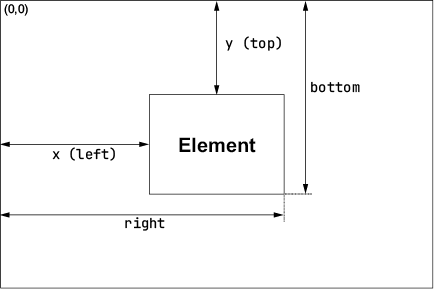
The return values of getBoundingClientRect()
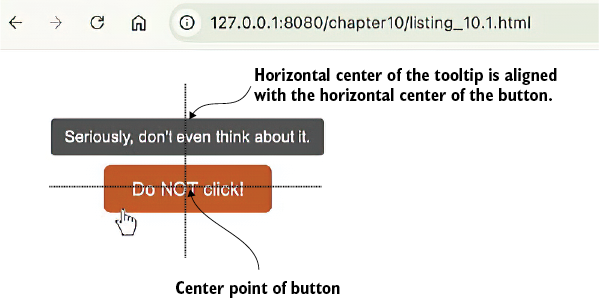
A button with a perfectly centered tooltip
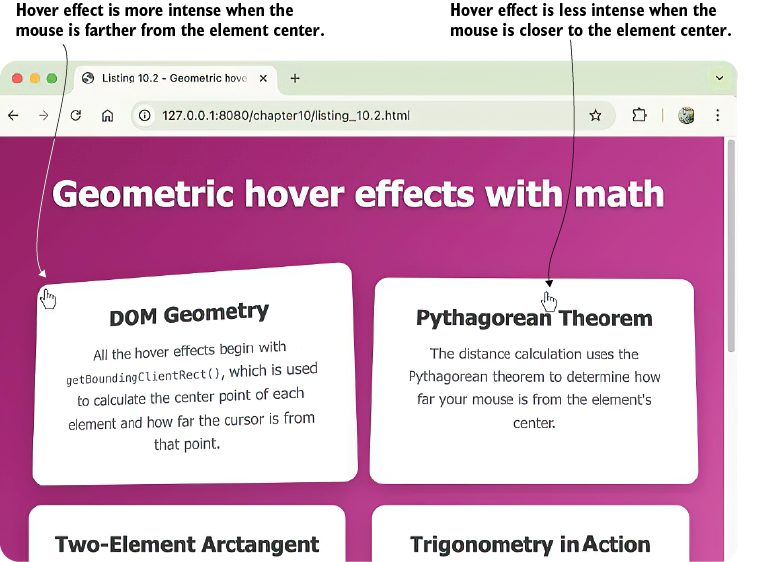
The farther the mouse from the center of the element, the more intense the hover effect
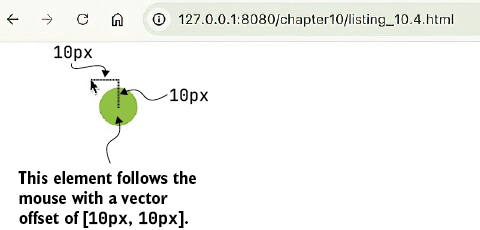
The dot follows the mouse with an offset of [10px, 10px].
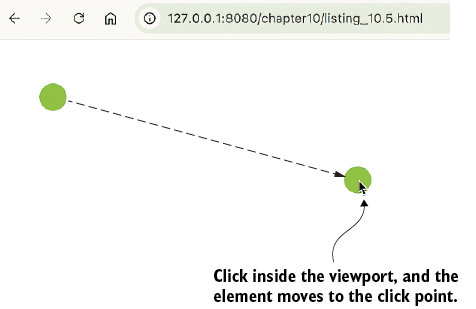
Click inside the viewport, and the chaser dot animates to the click point.
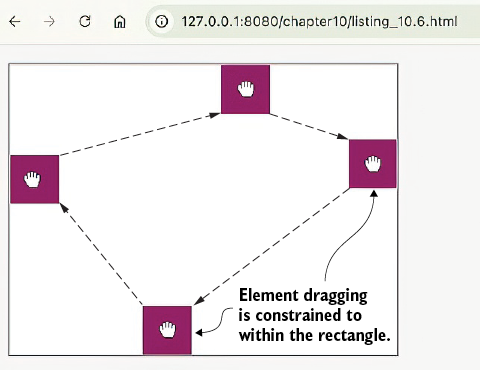
You can drag the square anywhere within, but not outside of, the rectangular area.
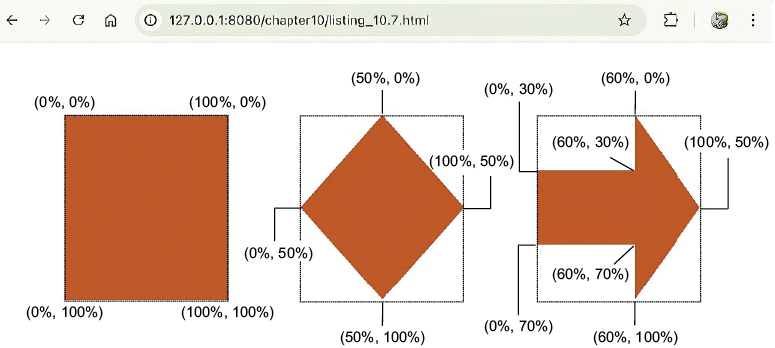
Using clip-path to create a diamond shape and an arrow shape
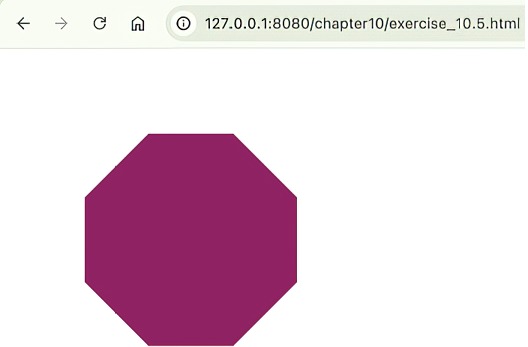
The clip-path value in exercise 10.5 produces an octagon.
Summary
- The browser uses a coordinate system with the origin (0, 0) at the top-left corner of a container (or the viewport). A point’s x-coordinate increases to the right, and its y-coordinate increases downward.
- A vector in 2D is a pair of numbers [x, y] that represent a direction (as an angle) and distance (also known as the magnitude).
- For a vector [x, y], its magnitude is given by the Pythagorean formula:
magnitude =. - An element’s bounding box is a rectangle that encloses an element and is described by its top-left corner (x, y) and its width and height. In JavaScript, the
getBoundingClientRect()method gives you an element’s bounding box in terms of x, y, width, height (or equivalently, left, top, right, bottom). - Given a variable
rectthat holds an element’s bounding box object as returned bygetBoundingClientRect(), the center of the element (centerX,centerY) is given bycenterX = (rect.left + rect.right) / 2andcenterY = (rect.top + rect.bottom) / 2. - Vector operations in JavaScript, such as addition, multiplication, and finding magnitude, correspond to CSS translations that you can use to move and animate elements and apply geometric constraints.
- Use the
clip-pathproperty to define a shape for an element such that only the part of the element inside that shape is visible. - In CSS, use the
offset-pathproperty to define the path along which you want an element to move, such as a circle, or by following the element’s border. - To animate an element along an offset path, manipulate the
offset-distanceproperty.
FAQ
What are points and coordinates in UI design?
Points represent single locations in 2D space, usually written as(x, y). In web design, the origin is typically the top-left corner, with x increasing to the right and y increasing downward.How is a vector different from a point?
A point shows where something is, while a vector shows how something moves. A vector has both magnitude and direction, and in 2D it is often written as[x, y].How do you calculate the magnitude of a vector?
Use the Pythagorean formula:magnitude = sqrt(x² + y²). For example, the vector [3, 4] has magnitude 5.How do you find a vector’s direction?
Direction is expressed as an angle. In JavaScript, you can useMath.atan2(y, x) to get the angle of a vector, and in CSS the equivalent is atan2(y, x).What does getBoundingClientRect() return?
It returns a DOMRect object describing an element’s position and size in the viewport. Common properties include x, y, left, top, right, bottom, width, and height.How do you calculate the center of an element with JavaScript?
You can use either(left + right) / 2 and (top + bottom) / 2, or left + width / 2 and top + height / 2.How can vectors help align one UI element over another?
By treating positions as vectors, you can compare bounding boxes and compute offsets. For example, to center a tooltip over a button, calculate the button’s center and subtract half the tooltip’s width and height from that point.Why is vector normalization useful in animations?
Normalization turns a vector into a unit vector with magnitude1 while preserving direction. This is useful for making movement consistent, such as moving an element toward a target at a fixed speed regardless of distance.How does parallax scrolling use geometry?
Parallax scrolling moves layers at different speeds based on scroll position. A common formula isparallaxOffset = scrollTop * (1 - depth), where smaller depth values make layers move faster.What is the difference between clip-path and offset-path?
clip-path defines the visible shape of an element by hiding everything outside the shape. offset-path defines the path an element follows during motion animation, with offset-distance controlling progress along that path.
 Math for Web Design ebook for free
