3 Building applications on Kubernetes
This chapter lays the foundation for building reliable, scalable ML applications by connecting four core capabilities: containerization for consistent packaging, orchestration for resilient operations, automation for safe and repeatable releases, and monitoring for visibility and alerting. It frames these tools—Docker, Kubernetes, CI/CD, and Prometheus/Grafana—as platform primitives that aren’t ML-specific but are essential to running ML systems at scale across on‑prem and cloud environments. Throughout, a simple FastAPI service serves as a running example to demonstrate the journey from local code to production‑grade deployment.
The chapter walks through Kubernetes from first principles to production constructs. It explains how Pods encapsulate containers; ReplicaSets maintain a desired number of Pods; and Deployments add rolling updates and rollbacks. Networking is made practical with Services: ClusterIP for in‑cluster communication, NodePort for node‑level external access, and LoadBalancer for cloud‑managed ingress. It introduces kubectl basics, Namespaces for multi‑team isolation, and configuration patterns with ConfigMaps and Secrets. To package and reuse application manifests, Helm charts combine templatized Kubernetes objects with configurable values, enabling consistent, parameterized installs for complete applications.
To eliminate fragile manual steps, the chapter applies CI/CD and GitOps. GitLab CI runs tests, builds and tags Docker images, and updates Helm chart values, while Argo CD continuously reconciles live clusters to the desired state in Git, ensuring a single source of truth and safe rollbacks. Finally, it establishes application observability by exposing a metrics endpoint, letting Prometheus scrape time‑series data and Grafana visualize key indicators like request counts and latency, with alerting support via Prometheus components. Combined, these practices deliver a production‑ready path to deploy, scale, and operate ML services with consistency, speed, and confidence.
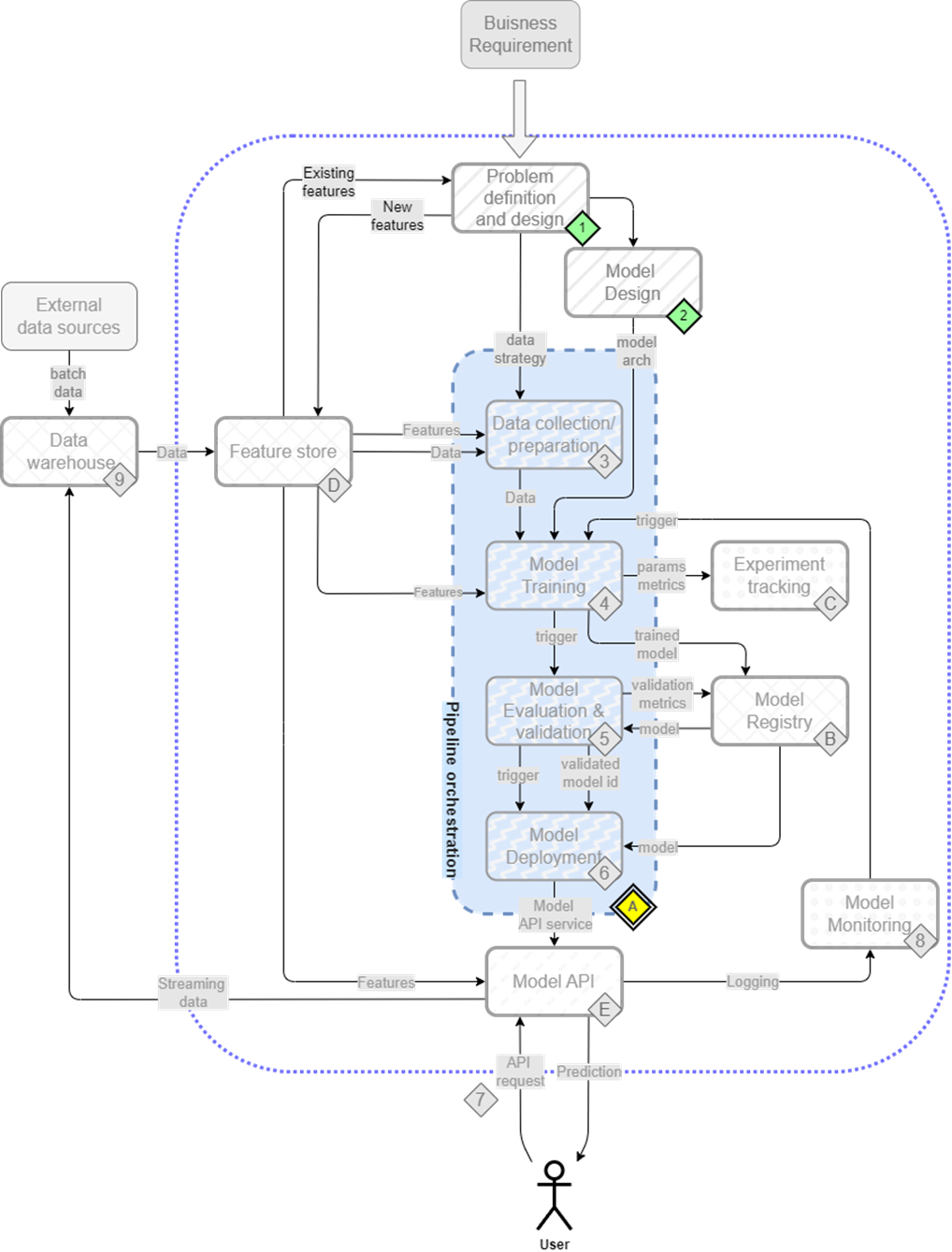
The mental map now shifts focus to the foundation of the ML platform, primarily Kubernetes, along with key practices like CI/CD and monitoring, which are essential for deploying and maintaining ML systems.
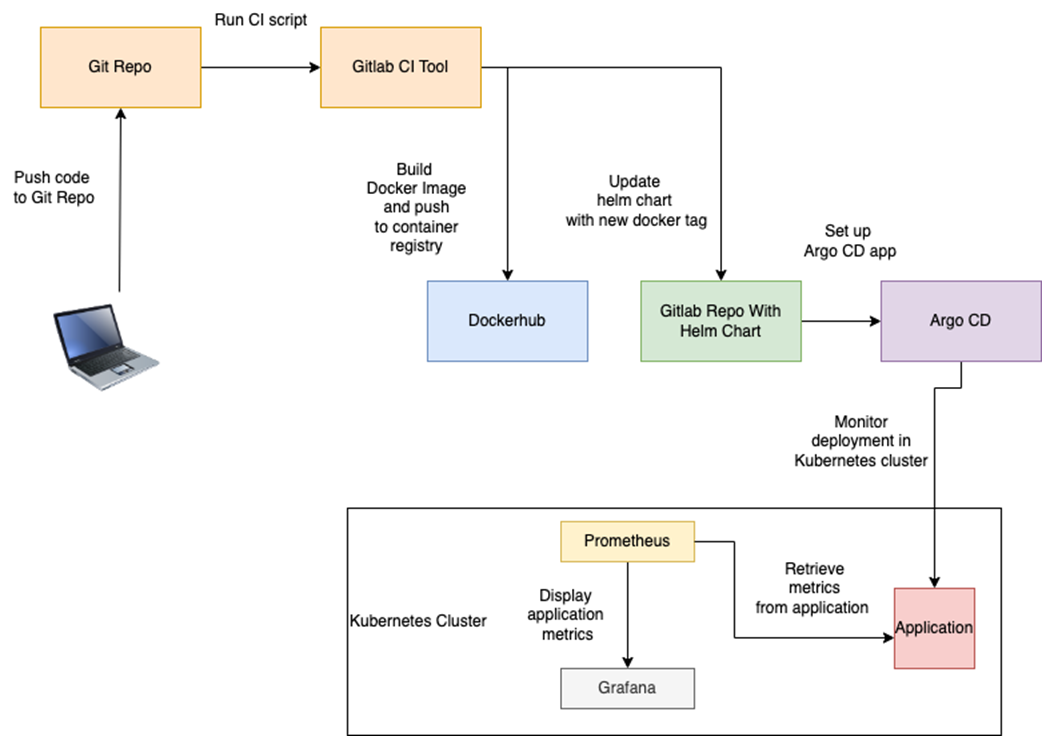
Deploying an application in Kubernetes with CI/CD and monitoring
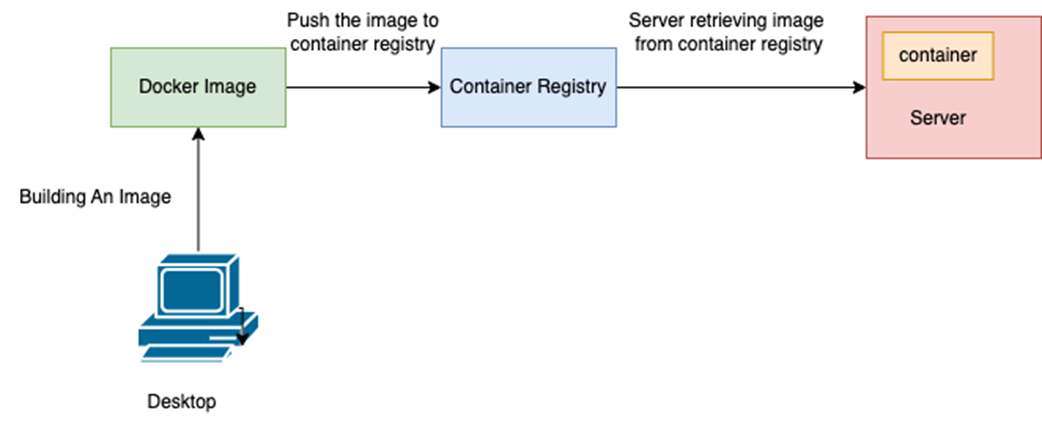
Process of building the docker image from the local desktop and pushing it to the container registry, from where a server retrieves the image and runs it as a container.
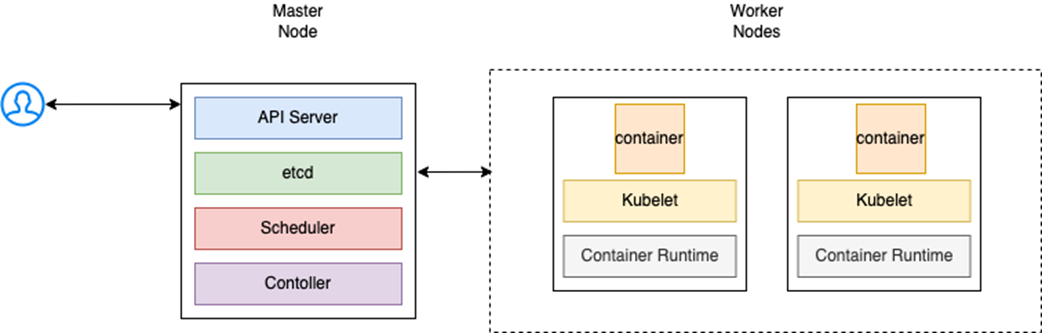
User interacts with the API server in the master node to pass a command, the master node in turn communicates with the worker nodes to execute it. All of this is achieved by the components installed on the node.
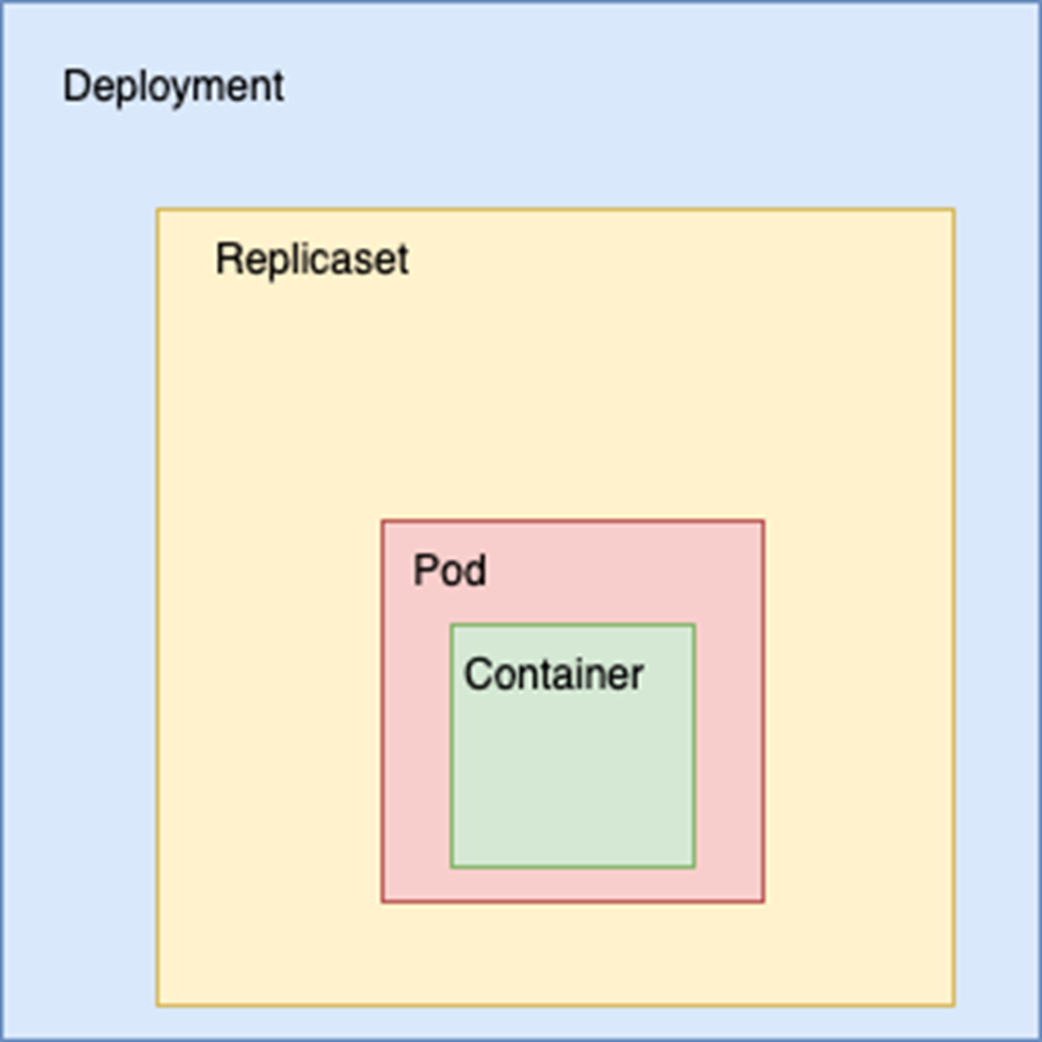
When we create a Deployment, it creates a ReplicaSet, which, in turn, manages the creation and scaling of Pods based on a specified Pod template. The Pod holds the application container.
User interacts with service 1 to access the front-end application. The front-end application talks to the back-end application via service 2. Services here act as an abstraction.

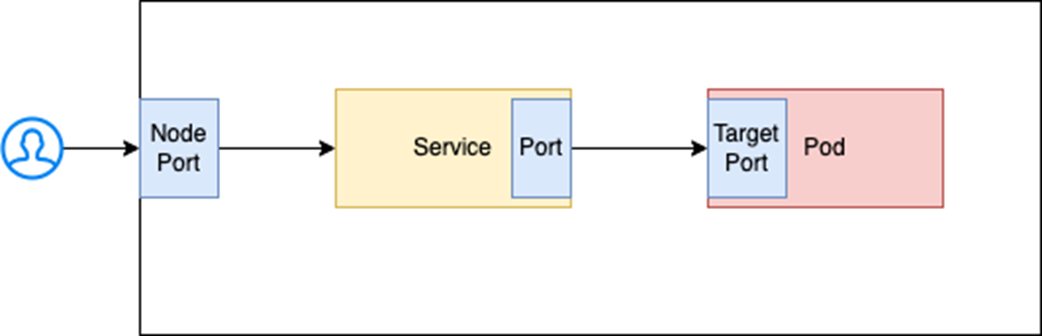
User queries the node port which speaks to the service port. The service port queries the target port in a pod.
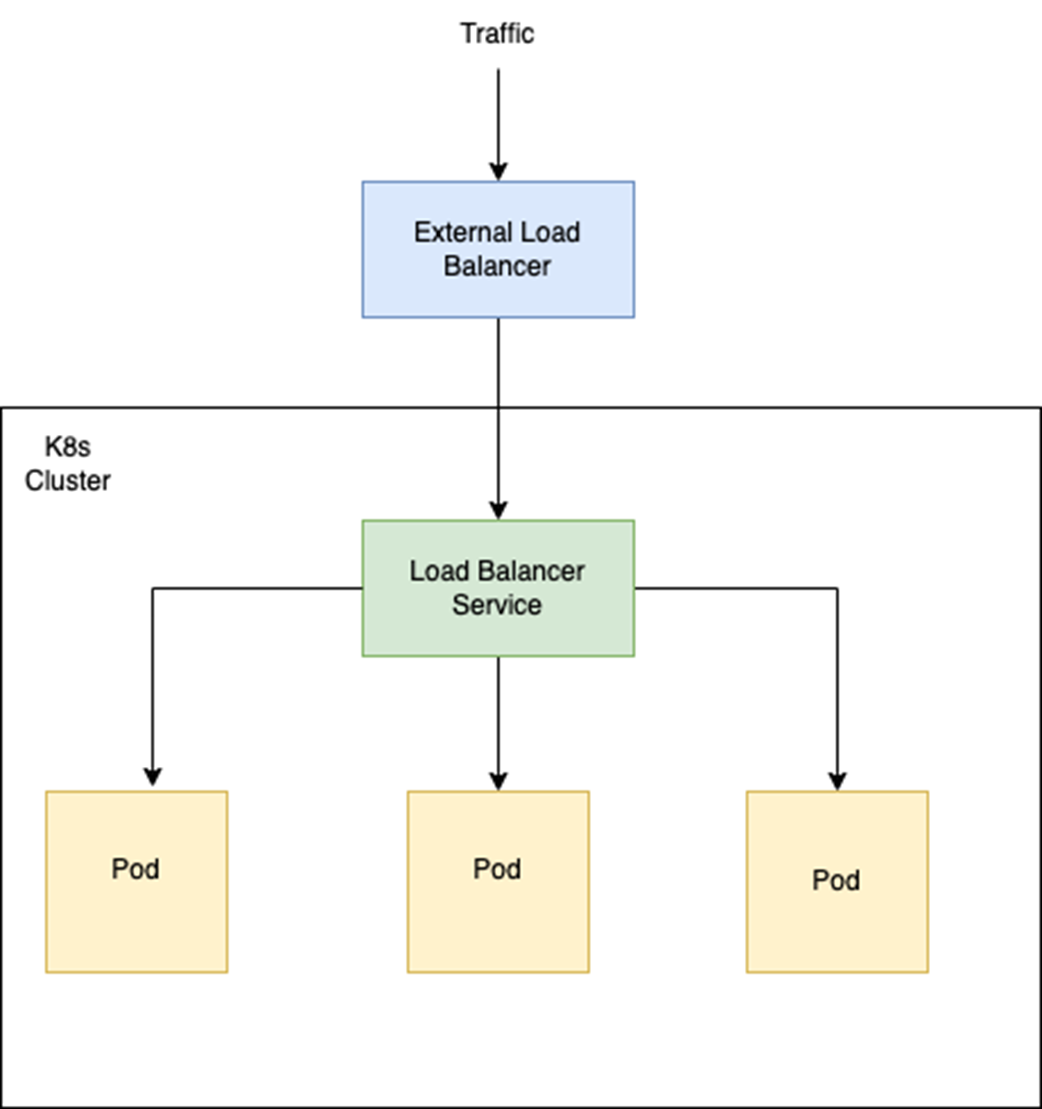
External load balancer routing traffic via load balancer service to pods.
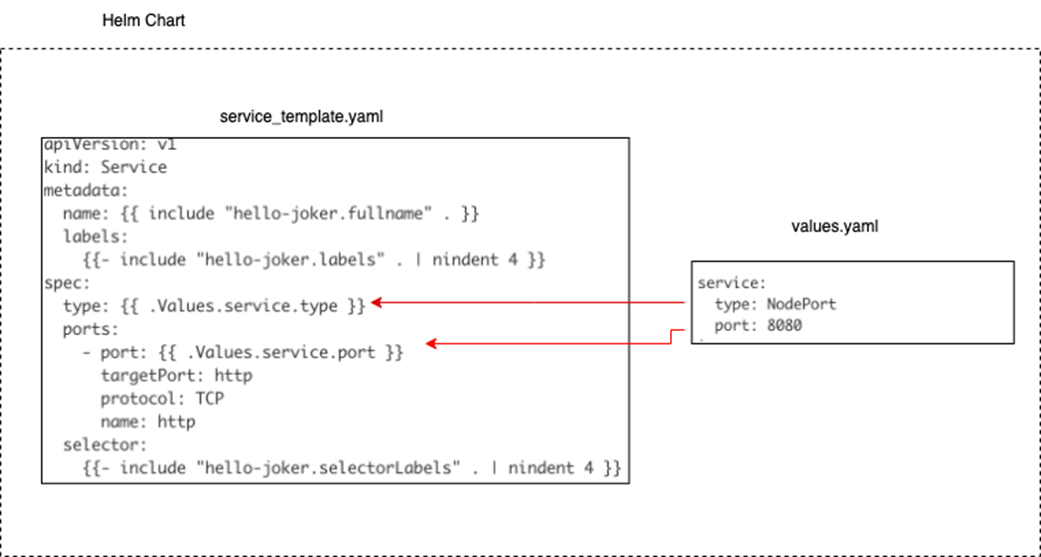
service_template.yaml defines the Kubernetes service, the type of service and port is obtained from values.yaml. The template and values form the core of a Helm chart.
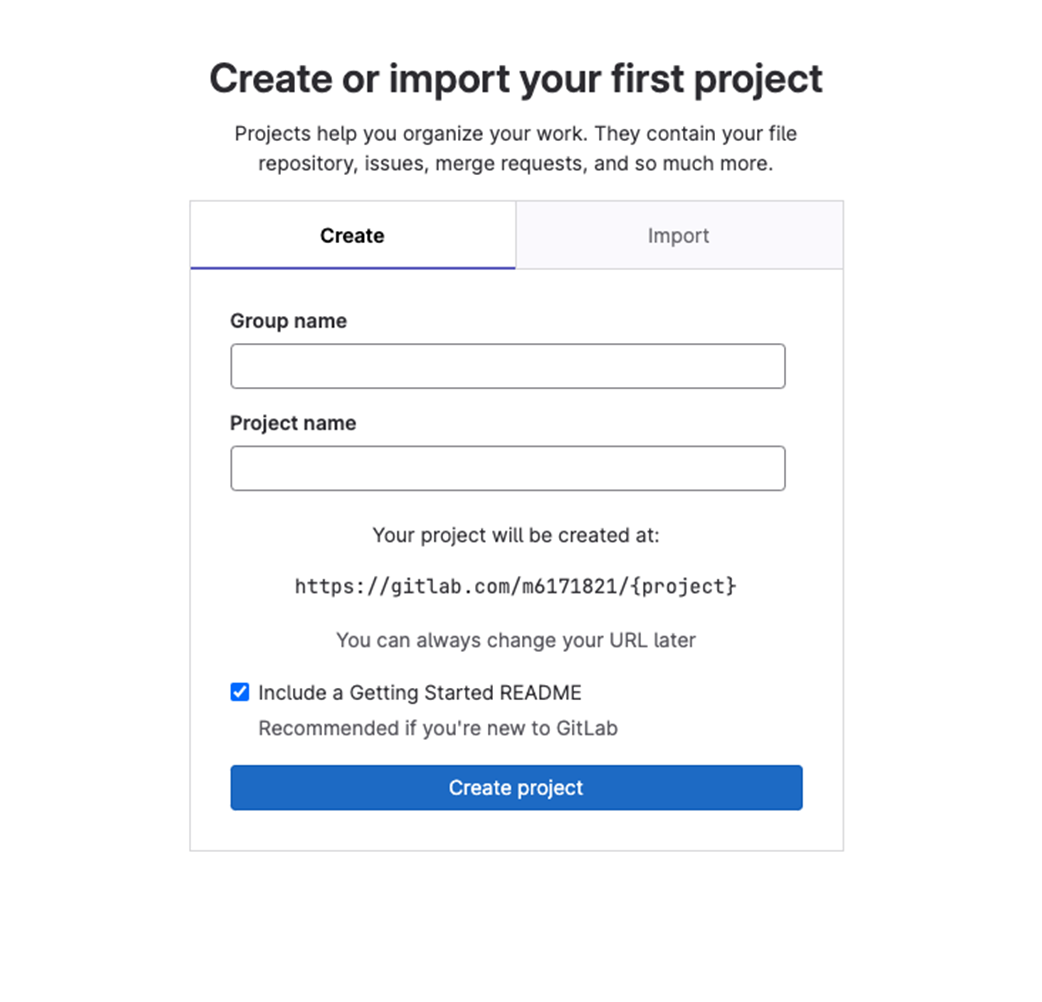
Create a Project In Gitlab by specifying a project and group name
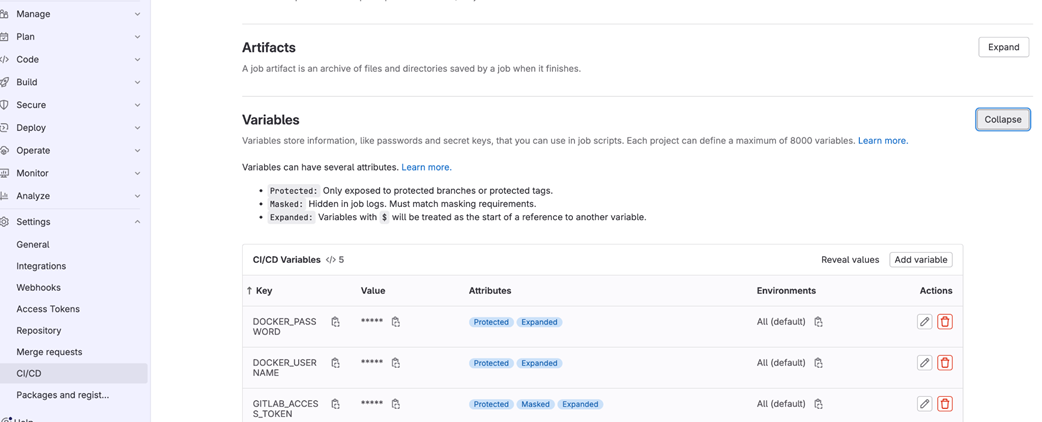
Creating Gitlab CI variables by accessing Project Settings > CI/CD and clicking on variables
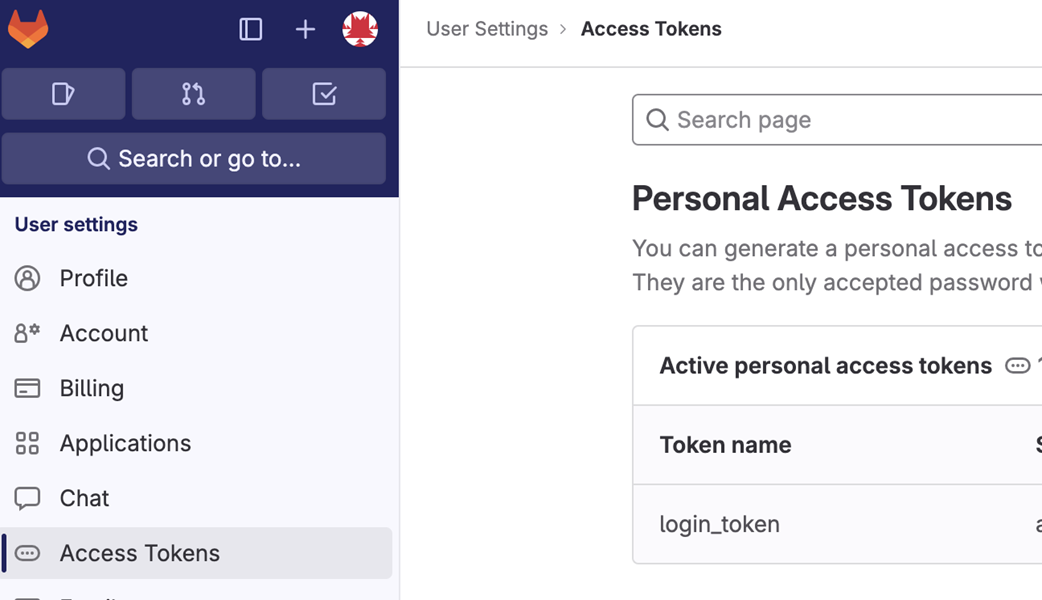
Click on the user profile pic to access user settings. Then proceed to access token > Add new token to create access token.
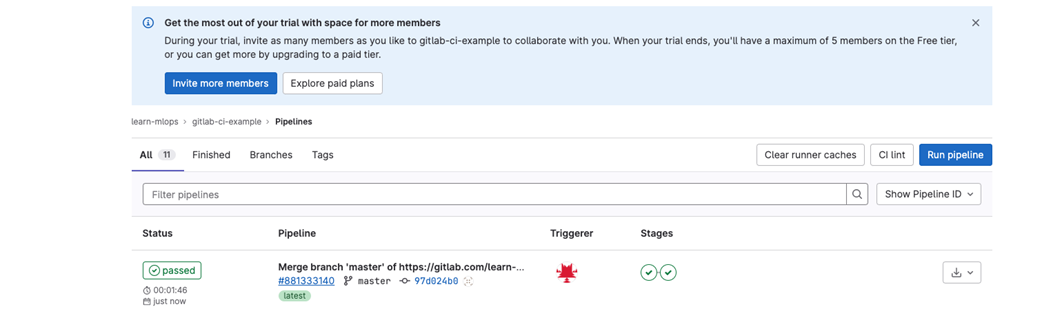
Running Gitlab CI pipeline by clicking on run pipeline and monitoring pipeline status in the UI
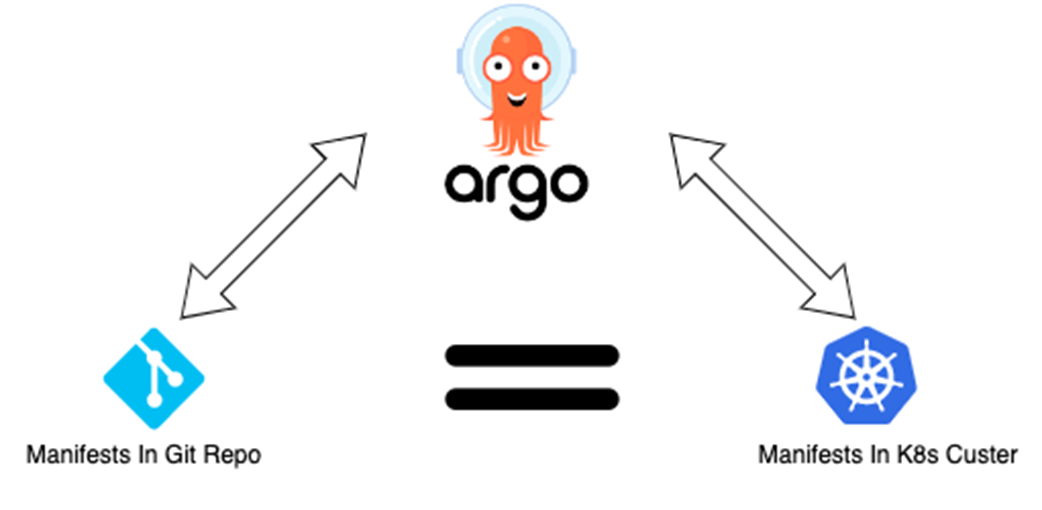
Argo CD ensures that the manifests in Git and the ones deployed in K8s match.
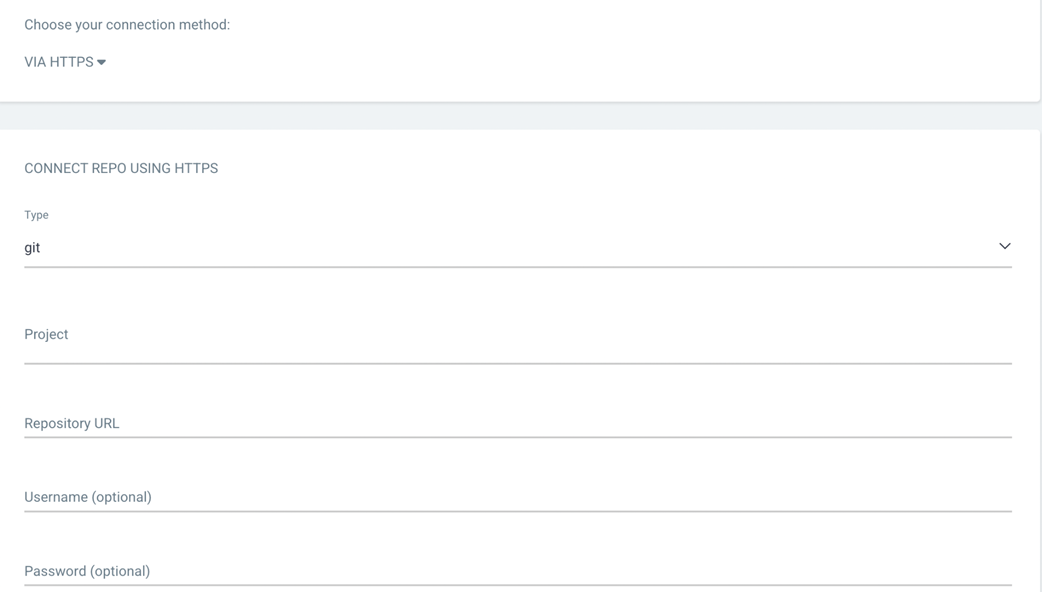
Setting up Git repo in Argo by using https authentication.
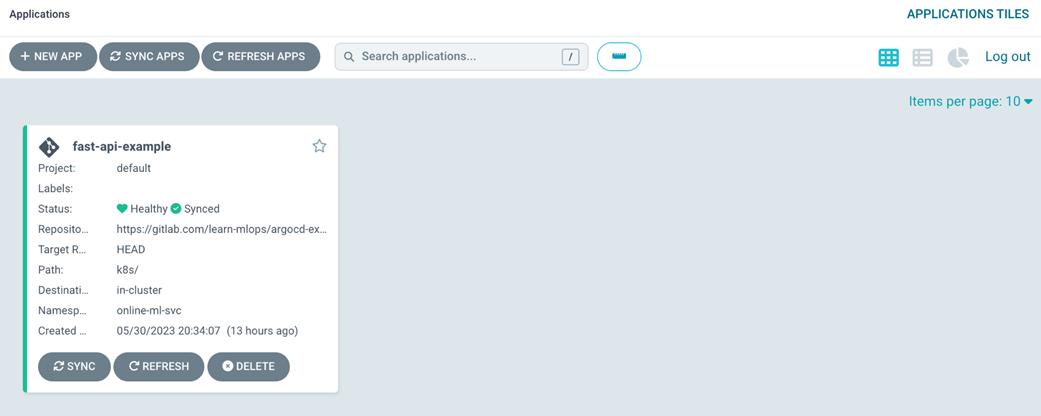
Joker application which has synced in Argo CD. We can see the status is healthy and synced.
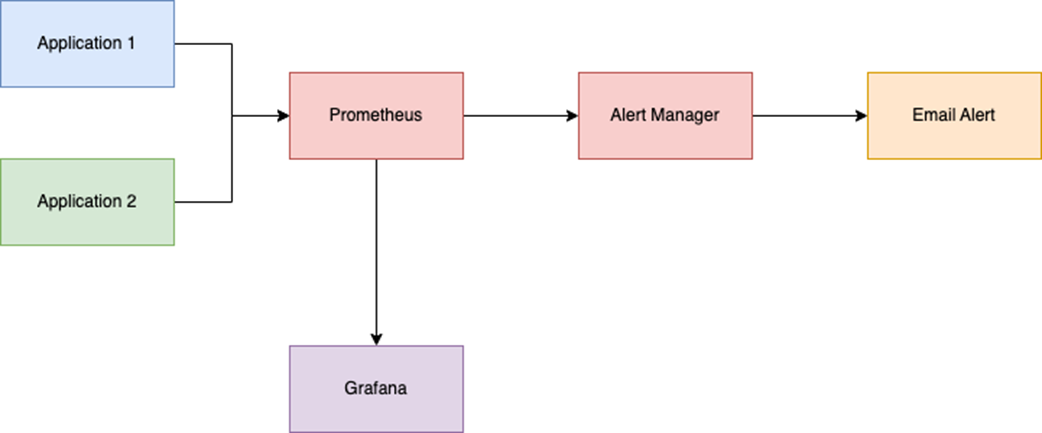
Application 1 and Application 2 are exposing an endpoint for metrics. Prometheus is scraping those metrics. These metrics are visualized by Grafana. Alertmanager uses those metrics to check if any alerts need to be triggered to a channel, in this case, its an Email.
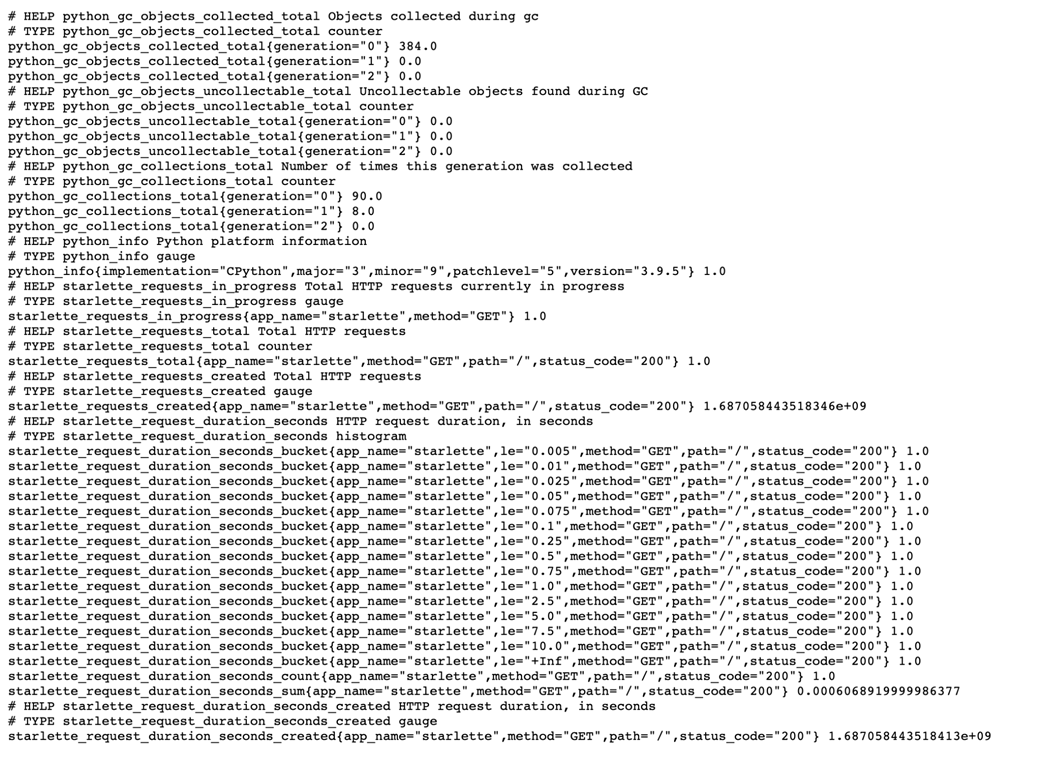
Prometheus Metrics available at /metrics endpoint
Prometheus targets

Writing Prometheus Query in the Prometheus UI. It will return the metrics values based on the query. An easy way to check if the metrics are being scraped and if the values are as expected.

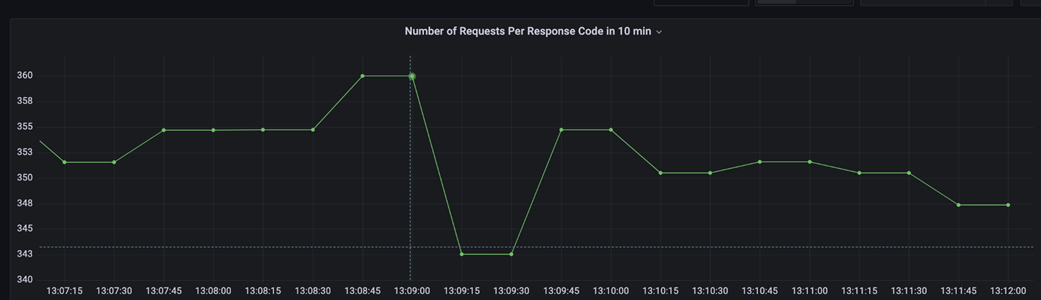
Time series chart in Grafana which shows the number of requests seen in the last ten minutes. Only one line is seen here as there was only one HTTP status code for all responses.
Summary
- Having a working knowledge of some DevOps tooling that deals with automation, deployment, and monitoring is important while working on an ML Platform.
- Docker can be used to containerize applications which can then be deployed in any environment.
- Kubernetes acts as a container orchestrator which helps to manage containers in a production.
- Automating container builds and deployments using CI/CD tooling reduces manual errors, accelerates development cycles, and ensures that changes are consistently tested and deployed.
- Monitoring applications helps in maintaining the reliability and performance of our applications deployed in production.
- Tools serve as a means to an end. The effectiveness of tools depends on how well they are selected, integrated, and used to support the larger aims and aspirations of the organizations.
FAQ
What problems does containerization solve, and how does Docker help for ML applications?
Containerization packages your app and all its dependencies into a portable image so it behaves the same across dev, test, and prod. For ML apps with complex stacks (e.g., Python + native libs like OpenCV, TensorFlow), Docker ensures consistent environments, reproducible builds, fast startup, and isolation, enabling reliable deployment on any host or orchestrator.What’s the difference between Pods, ReplicaSets, and Deployments in Kubernetes?
- Pod: Smallest deployable unit; runs one or more tightly coupled containers.- ReplicaSet: Ensures a specified number of identical Pods are running; auto-replaces failed Pods.
- Deployment: Higher-level controller that manages ReplicaSets and provides rolling updates and rollbacks for zero/low-downtime releases.
How do I build and run a simple FastAPI app with Docker?
- Write a Dockerfile using a Python base image, copy requirements.txt and app code, install deps, and set an ENTRYPOINT (e.g., uvicorn).- Build: docker build -t hello-joker:v1 .
- Run locally: docker run -it -p 8081:8083 hello-joker:v1 and curl http://localhost:8081 to test. Push images to a registry (e.g., Docker Hub) for Kubernetes to pull.
How can I deploy a container to Kubernetes and test it quickly?
- Create a Pod or (preferably) a Deployment manifest referencing your image and containerPort.- Apply it: kubectl apply -f deployment.yaml.
- For local testing without exposing a Service: kubectl port-forward pod/
When should I use ClusterIP, NodePort, or LoadBalancer Services?
- ClusterIP: Default; exposes a Service only inside the cluster (for service-to-service communication).- NodePort: Exposes on each node’s IP at a static port (30000–32767); simple external access for dev/test or bare-metal.
- LoadBalancer: Provisions a cloud load balancer and public IP; best for production external access and built-in traffic distribution.
What are Namespaces, ConfigMaps, and Secrets, and how do I use them?
- Namespaces: Logical partitions in a cluster to isolate resources per team/app/env; specify metadata.namespace in manifests or use -n with kubectl.- ConfigMaps: Non-sensitive config (key–value or files); mount or inject via env vars using valueFrom.configMapKeyRef.
- Secrets: Sensitive data (base64-encoded); use valueFrom.secretKeyRef. Prefer external secret managers for encryption-at-rest and rotation.
How does Helm simplify Kubernetes application management?
Helm packages related Kubernetes manifests into a chart with templates and a values.yaml for customization (image tags, replicaCount, service type/ports, resources). You can install/upgrade/rollback entire apps consistently with one command (helm install/upgrade), version them, and share or reuse charts from repositories like Artifact Hub.How do GitLab CI and Argo CD work together for GitOps-style delivery?
- GitLab CI (CI): On each commit, run tests, build and push the Docker image (tagged, e.g., by short commit SHA), and update the Helm chart’s image tag in values.yaml.- Argo CD (CD): Watches the Git repo (chart path) and syncs it to the cluster. It enforces Git as the source of truth, performs rollouts, detects drift, and can auto-sync or require manual sync.
How do I add Prometheus/Grafana monitoring to my FastAPI service?
- Add an exporter/middleware (e.g., starlette_exporter) to expose /metrics and register it with Prometheus via Pod annotations (prometheus.io/scrape: "true", path, port).- Install Prometheus and Grafana via Helm; set Prometheus as a Grafana data source.
- Query common metrics (e.g., starlette_requests_total, latency histograms) with PromQL and build dashboards/alerts in Grafana.

 Machine Learning Platform Engineering ebook for free
