21 Making decisions in queries
This chapter explains how to make SQL queries and stored procedures respond to conditions so they produce clearer, more reliable results. It introduces conditional functions for handling NULLs, expressions for branching logic, and procedural decision structures to control whether statements run at all. The common thread is evaluating Boolean conditions to shape outputs, avoid surprises in reports, and provide useful feedback, while favoring portable solutions across database systems.
In queries, COALESCE returns the first non-null among multiple expressions and is recommended for cross-RDBMS compatibility; IFNULL (or ISNULL/NVL) is similar but limited and vendor-specific. Examples include concatenating names when a middle name is NULL and converting NULL aggregates (such as SUM over LEFT JOINs) to zero for reporting. The CASE expression expands decision-making: “simple” CASE compares one expression to discrete values, while “searched” CASE evaluates true/false conditions (like ranges). CASE can appear in SELECT, WHERE, HAVING, and ORDER BY, and the chapter emphasizes thinking in terms of Boolean expressions.
For procedural control flow, the chapter builds a stored procedure (AddPromotion) that conditionally inserts rows based on supplied parameters. It demonstrates IF…THEN to guard inserts when required values exist, ELSE to return explanatory messages when they do not, and ELSEIF chains to cover multiple missing-parameter scenarios; when several actions must occur, statements are grouped with BEGIN and END. A lab consolidates these skills: composing derived columns with CASE, understanding why testing equality to NULL in a simple CASE fails, and enhancing the procedure to skip inserts when a promotion code already exists—practical patterns for defensive, transparent decision-making.
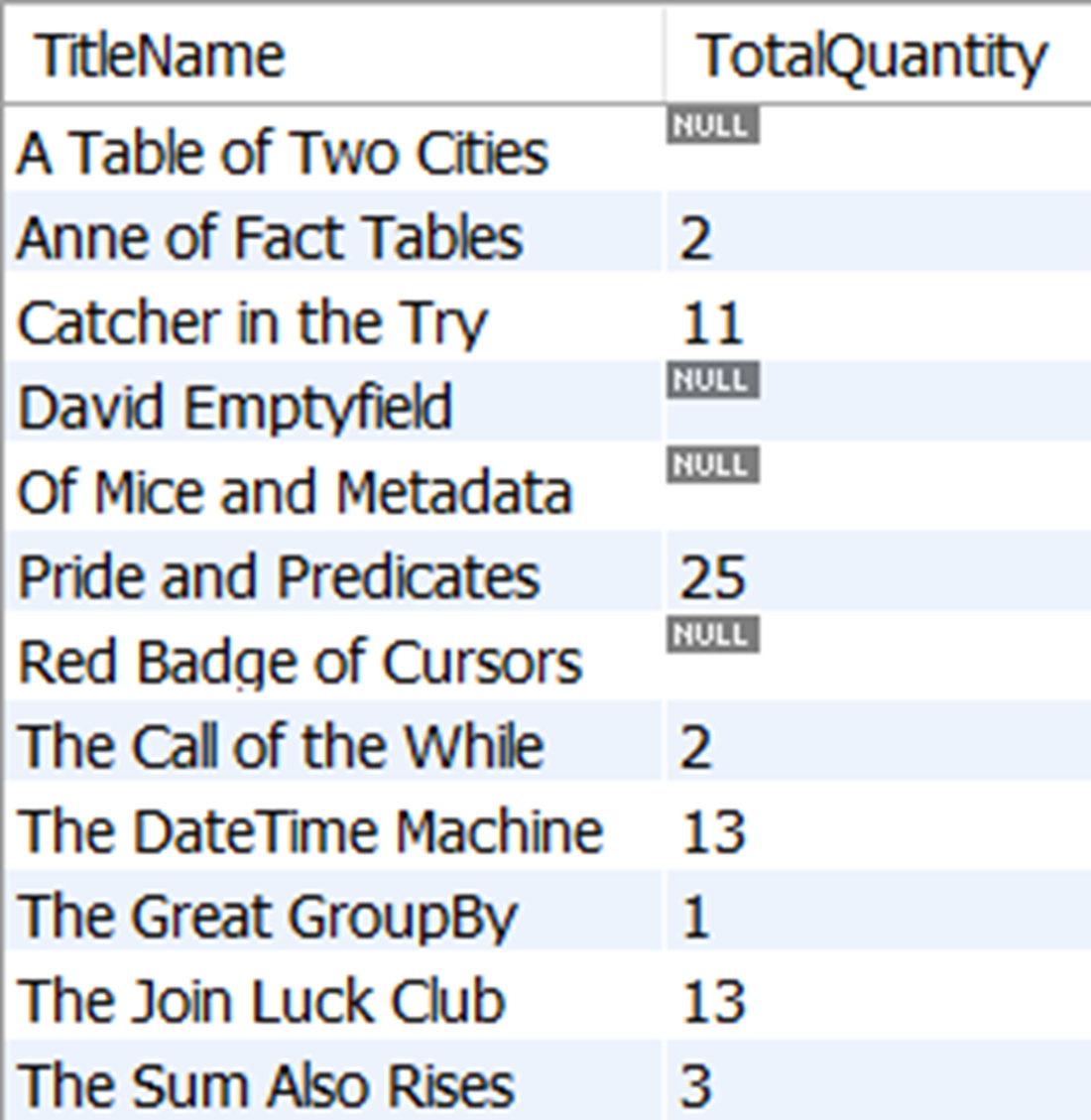
The TitleName and the total quantity of TitleName included in orders. TitleName values that have not been included in orders will be represented by NULL.
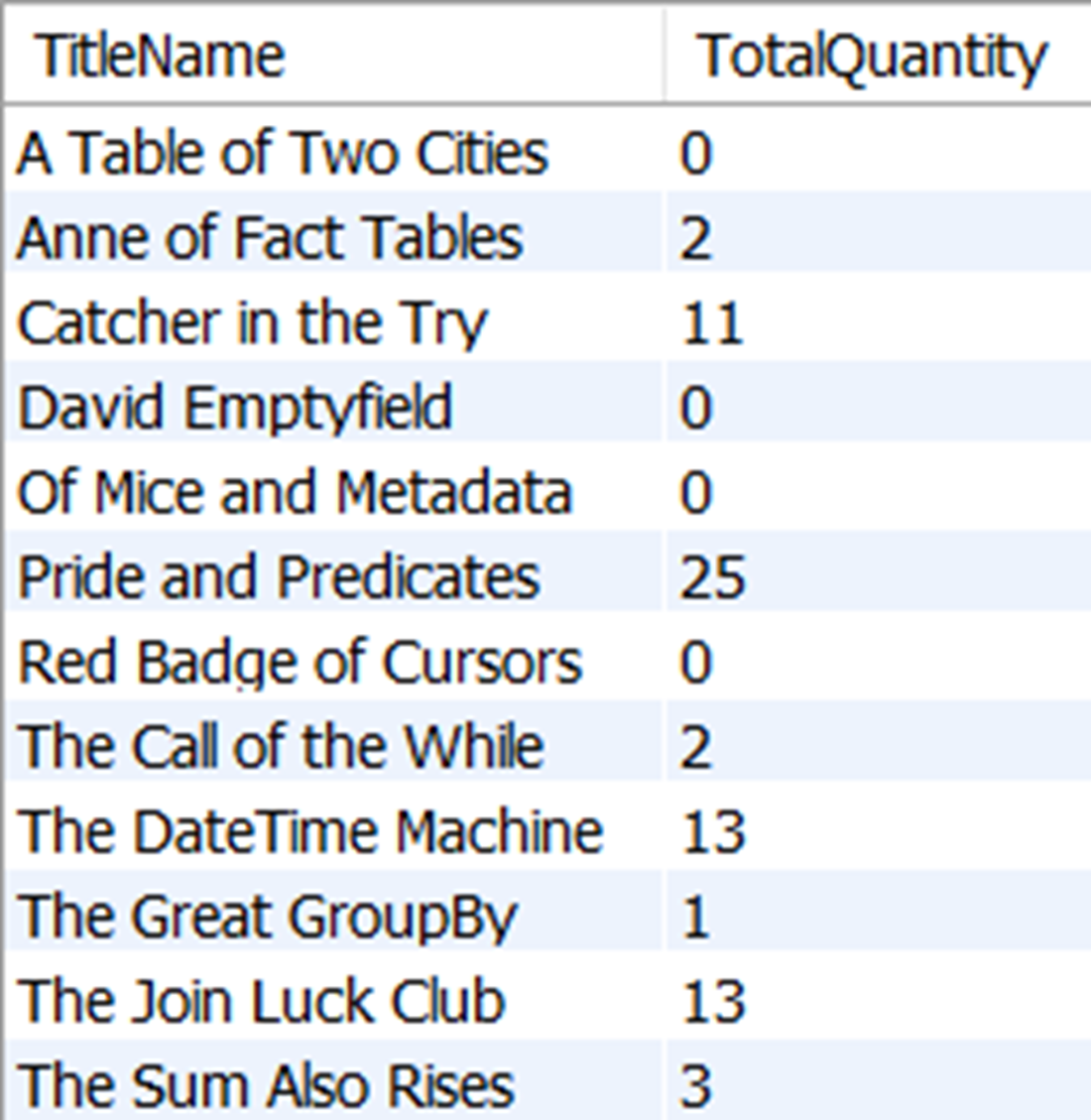
The TitleName and the total quantity of TitleName included in orders. TitleName values that have not been included in orders will be represented by a value of 0 instead of NULL, due to our use of the IFNULL function.
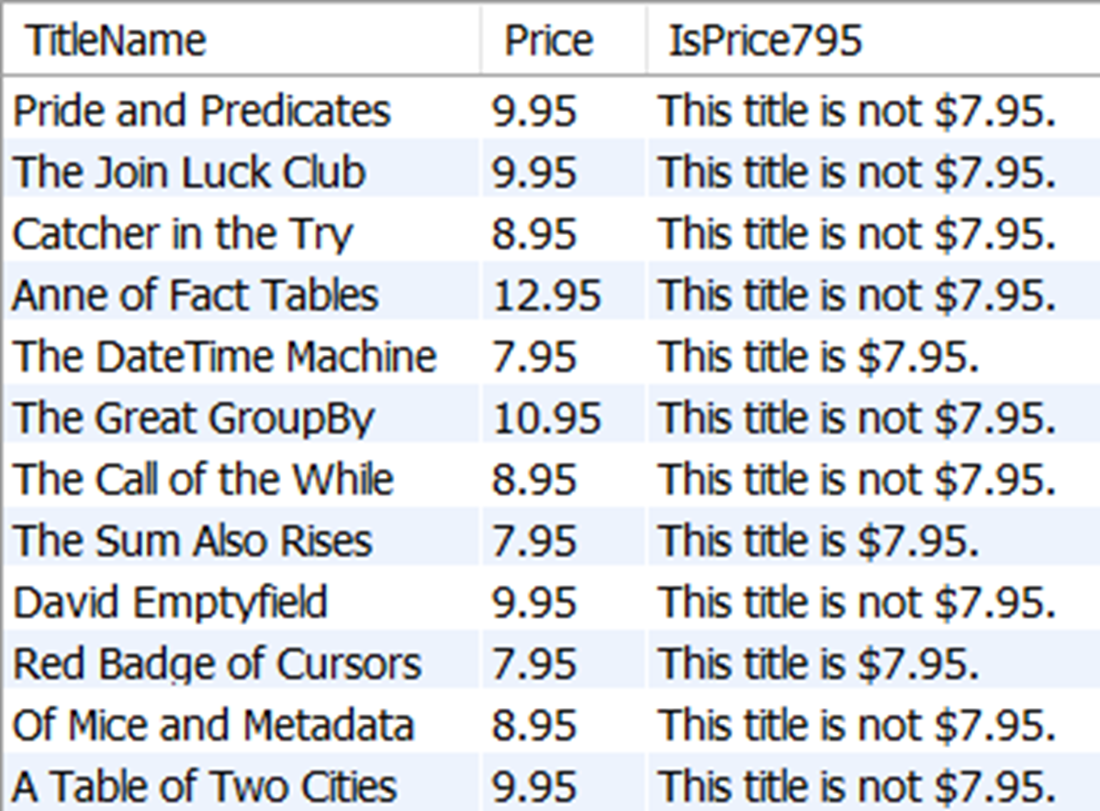
The TitleName and the Price for all titles, as well as a column that is aliased as IsPrice795. The values in column IsPrice795 are the results of an evaluation of the price using a CASE expression.
The TitleName and the Price for all titles, as well as a column that is aliased as IsPriceAround8Dollars. The values in column IsPriceAround8Dollars are the results of an evaluation of the expression ROUND(Price, 0) using a CASE expression.
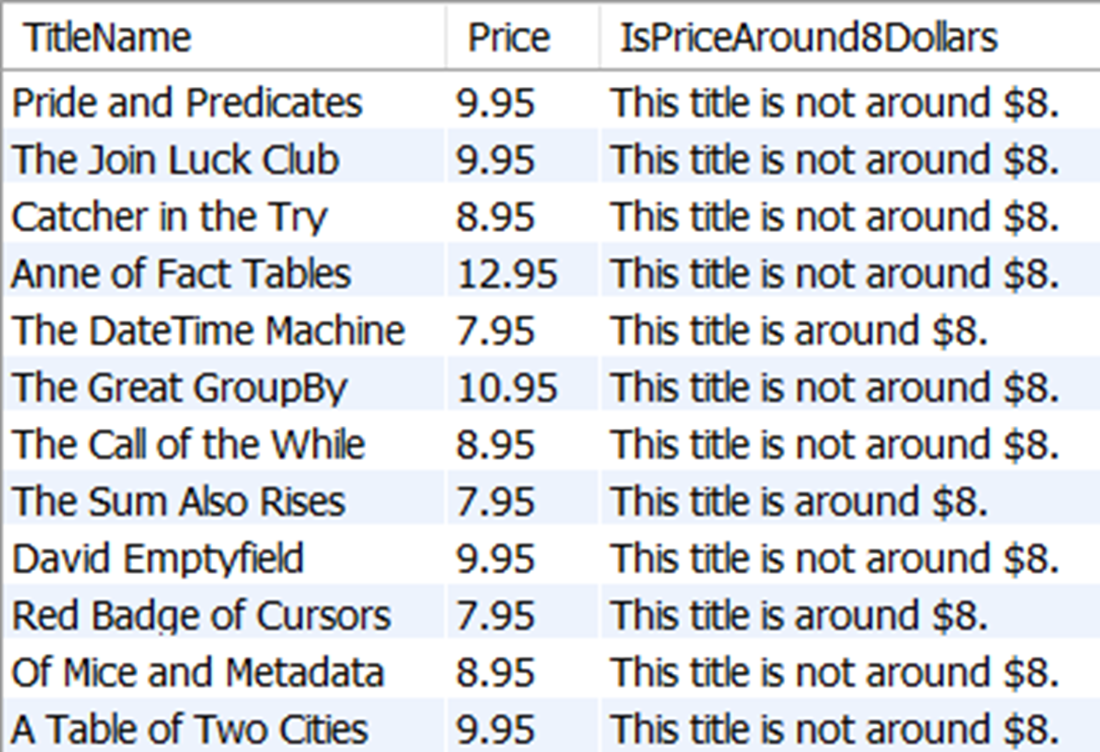
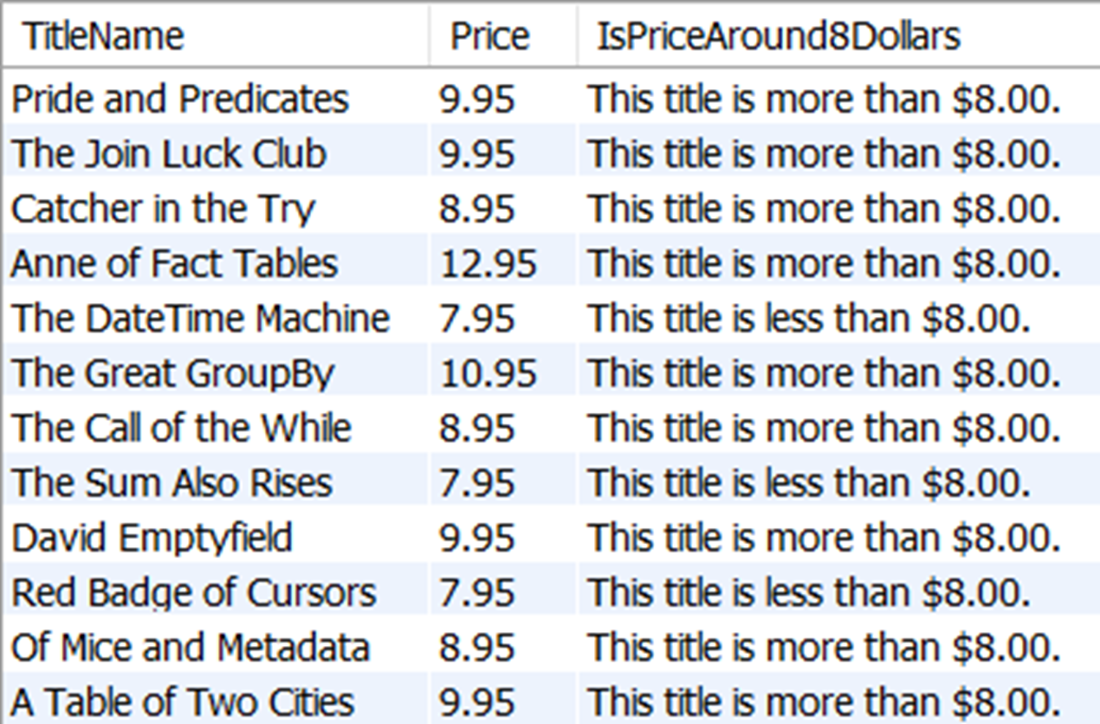
The TitleName and the price for all titles, as well as a column that is aliased as IsPriceAround8Dollars. The values in column IsPriceAround8Dollars are the results of a searched CASE expression evaluating if the price value is less than, equal to, or more than $8.00.
The results of selecting any rows from the promotion table where the PromotionID is 14, which is the row we just inserted with the AddPromotion stored procedure.

The output from the ELSE statement we added to AddPromotion, which provides a helpful message for why an insert was skipped.

Lab answers
- You can use the LEFT function mentioned in chapter 14 to help with this. Your query might look something like this:
- We cannot evaluate for equality with NULL, because NULL can never equal NULL. To work as intended, the CASE statement would need to evaluate an expression this:
- We might add this logic using an additional ELSEIF statement like this:
This is a little more advanced than the examples we covered but can do more than check for a NULL value in a Boolean expression. As this example shows, we can even use EXISTS and NOT EXISTS to evaluate entire queries like this.
FAQ
What does COALESCE do, and why is it useful?
COALESCE evaluates expressions from left to right and returns the first non-NULL value it finds. It’s ideal for handling NULLs in concatenation, calculations, and aggregates. Example:CONCAT(FirstName, ' ', COALESCE(MiddleName, ''), ' ', LastName) ensures a missing middle name doesn’t produce NULL for the whole string.How is IFNULL different from COALESCE, and what are the cross-database equivalents?
IFNULL takes exactly two arguments: if the first is NULL, it returns the second. COALESCE accepts two or more arguments and is standardized and widely supported. Equivalents: SQL Server usesISNULL, Oracle uses NVL. For portability, prefer COALESCE.Why does SUM sometimes return NULL with LEFT JOINs, and how can I show 0 instead?
When no matching rows exist on the right side of a LEFT JOIN, expressions likeSUM(oi.Quantity) can be NULL. Wrap the aggregate with a NULL handler: COALESCE(SUM(oi.Quantity), 0) (or IFNULL(..., 0)) to display 0 instead of NULL.What’s the difference between a simple CASE and a searched CASE?
- Simple CASE compares a single expression to specific values:CASE Price WHEN 7.95 THEN '...' ELSE '...' END. It’s an equality match.
- Searched CASE evaluates Boolean conditions: CASE WHEN Price < 8 THEN '...' WHEN Price = 8 THEN '...' ELSE '...' END. Use it for ranges and complex logic.Why doesn’t “CASE MiddleName WHEN NULL THEN '' ELSE MiddleName END” replace NULLs?
Simple CASE uses equality comparisons, andNULL never equals anything (even NULL). Use a searched CASE or COALESCE instead: CASE WHEN MiddleName IS NULL THEN '' ELSE MiddleName END or simply COALESCE(MiddleName, '').Where in a query can I use a CASE expression?
CASE can be used in SELECT, WHERE, HAVING, and ORDER BY clauses. This lets you conditionally compute values, filter rows, control grouping filters, and customize sort order based on logic.How do IF and THEN work in stored procedures?
IF evaluates a Boolean condition; if it’s true, the following statement(s) after THEN execute. If false, they are skipped. Example: IF _PromotionCode IS NOT NULL THEN INSERT ...; END IF;.How do ELSE and ELSEIF extend IF logic, and are there dialect differences?
ELSEIF (MySQL) or ELSE IF (SQL Server) adds additional conditions if earlier ones fail. ELSE provides a final fallback action. Structure: IF ... THEN ... ELSEIF ... THEN ... ELSE ... END IF;.When do I need BEGIN and END blocks in control flow?
UseBEGIN ... END to group multiple statements inside an IF/ELSE branch (or elsewhere in stored programs). Example: ELSE BEGIN INSERT ...; SELECT 'INSERT successful.' AS Message; END;.How can I prevent an INSERT if PromotionCode is missing or already exists?
- Check for required inputs:IF _PromotionCode IS NULL THEN SELECT 'No PromotionCode, INSERT skipped.' AS Message;
- Skip duplicates with an existence test: ELSEIF EXISTS (SELECT 1 FROM promotion WHERE PromotionCode = _PromotionCode) THEN SELECT 'Duplicate PromotionCode, INSERT skipped.' AS Message;
- Otherwise insert: ELSE BEGIN INSERT ...; SELECT 'INSERT successful.' AS Message; END;.
 Learn SQL in a Month of Lunches ebook for free
