This chapter broadens the toolkit for designing reliable and fast SQL databases by adding more constraint types and introducing indexes. Constraints safeguard data integrity by enforcing rules at the column or table level, and they can be defined when creating tables or added later. You can declare constraints inline with a column or after all columns; the latter makes it easier to assign meaningful names, which is especially recommended for primary and foreign keys. Alongside integrity, the chapter explains how indexes organize data for performance, highlighting their role in speeding up common queries.
Through a practical “shipment” example, the chapter applies several constraint types together. NOT NULL requires values for essential columns; DEFAULT supplies a value when one isn’t provided (for example, using a current date/time function, noting that exact functions vary by RDBMS); UNIQUE prevents duplicate values and may still allow NULLs depending on the platform; and CHECK restricts values to valid ranges or sets (such as cost ranges or enumerated codes). The text also shows that columns can have multiple constraints at once and stresses syntax nuances across systems. Finally, it introduces automatically generated keys (like AUTO_INCREMENT in MySQL) to produce distinct primary key values without explicitly supplying them on inserts—behaving much like a built-in default mechanism.
The chapter then turns to indexes, explaining clustered and non-clustered types. A clustered index defines the physical row order—typically on a table’s primary key—and there can be only one per table; some systems create it automatically when you define a primary key. Non-clustered indexes are separate objects used to accelerate lookups on frequently searched columns, and a table can have many of them, though each additional index adds overhead to inserts, updates, and deletes. The discussion notes that some RDBMSs automatically create non-clustered indexes for UNIQUE and foreign key constraints (as MySQL often does), while others do not, and it encourages thoughtful, consistent naming and careful selection of indexed columns to balance read performance with write costs.
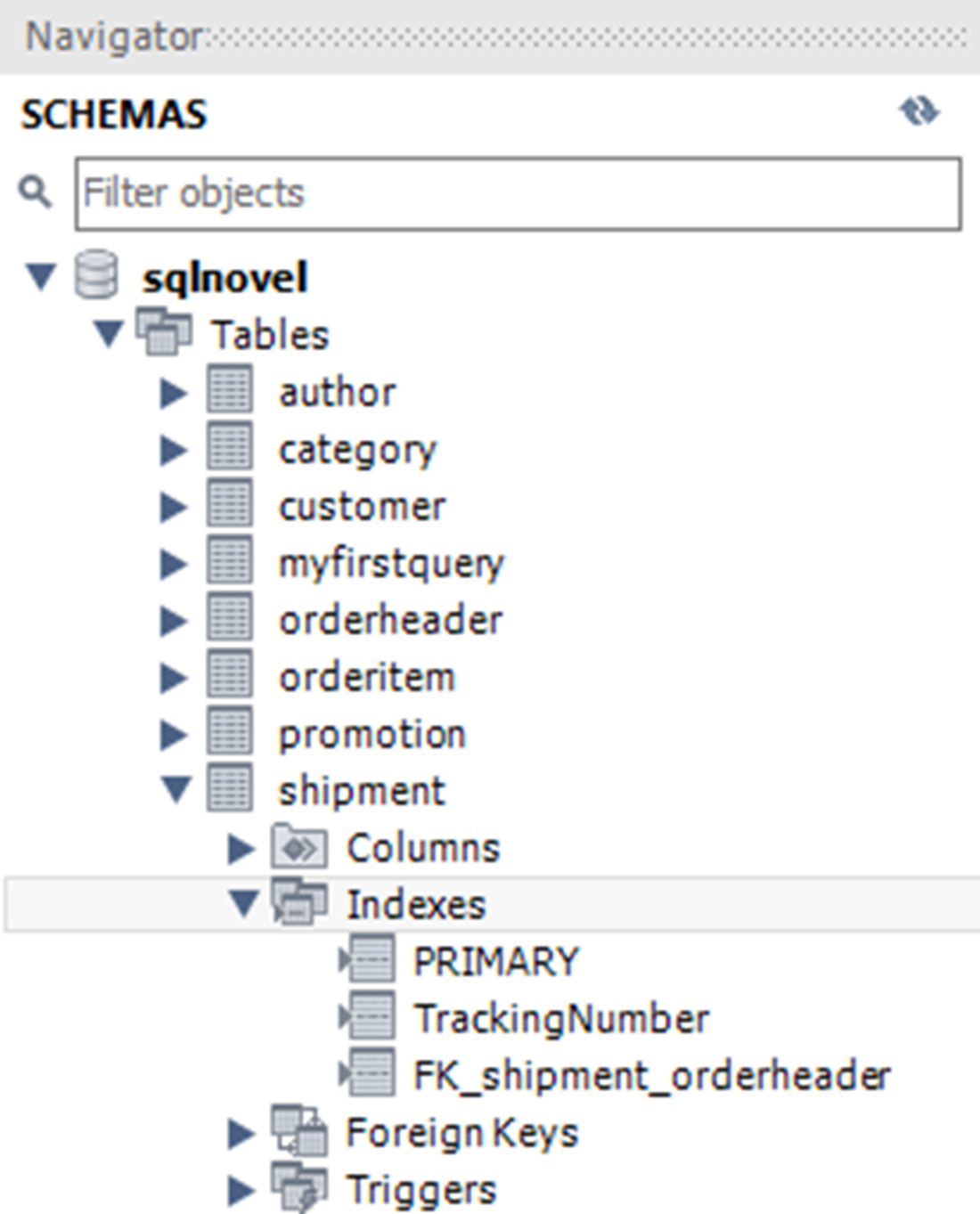
The three indexes of the shipment table in the sqlnovel database, as seen in the MySQL Workbench
Information about the PRIMARY index on the shipment table, as seen in the MySQL Workbench
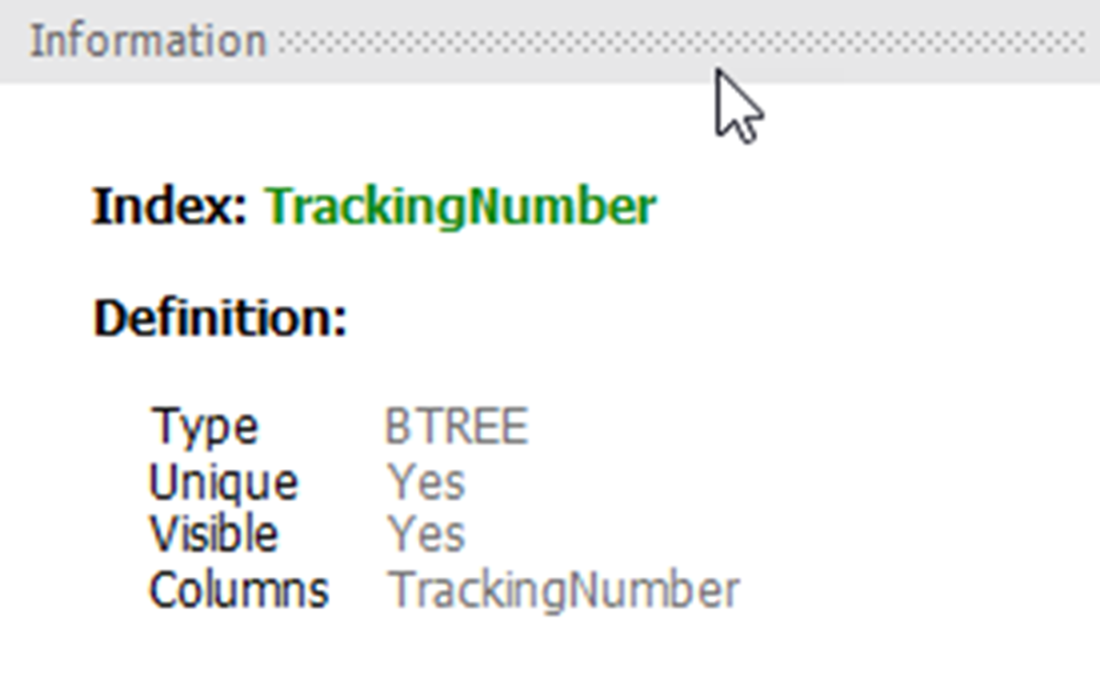
Information about the TrackingNumber index on the shipment table, as seen in the MySQL Workbench
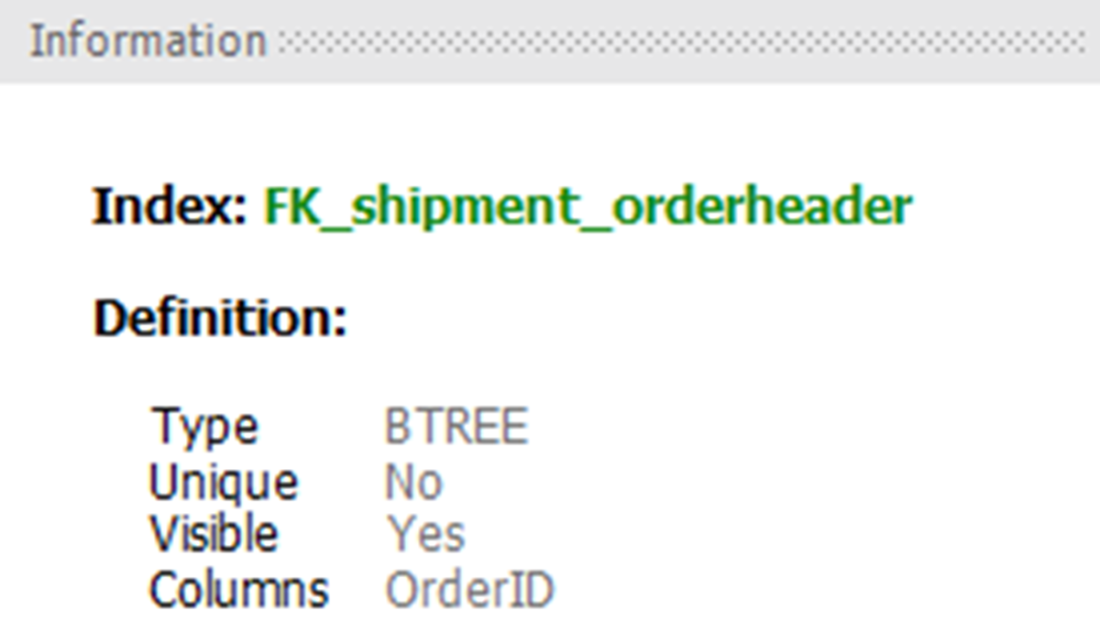
Information about the FK_shipment_ordeheader index on the shipment table, as seen in the MySQL Workbench
Lab answers
We do not need to specify a value for ShipmentID since it is an AUTO_INCREMENT column, and we do need to specify a value for ShipmentDate since it has a default constraint. Therefore, our SQL should look something like this:
Because we have values for every OrderID in orderheader but we do not have values for every OrderID in shipment, we will need to use a LEFT OUTER JOIN, like this:
If we were to use an INNER JOIN instead, our result set would only include orders that have a value contained in the OrderID column in both tables.
There are a few different ways we could write this, including ShipmentCost >= 0.00 AND ShipmentCost <= 999.99.
The SQL used in our report would look something like this:
To support this query, we would create a non-clustered index on the ShipmentDate column:
This non-clustered index would help keep us from having to read the entire table just to determine the total for what would be a fraction of the orders shipped on any given day.
FAQ
What constraints are introduced in this chapter, and why are they important?NOT NULL, DEFAULT, UNIQUE, and CHECK constraints are introduced. They enforce data integrity by preventing invalid or inconsistent values from entering a table, complementing primary and foreign keys you learned earlier.How can I create constraints: at the column level or after column definitions? Does naming differ?You can add constraints when creating a table (column-level or table-level) or later with ALTER TABLE. Column-level syntax is concise but typically auto-generates a constraint name. Table-level syntax lets you explicitly name constraints, which is recommended for primary and foreign keys.What does a NOT NULL constraint do, and when should I use it?NOT NULL requires every row to have a value for the column. Use it for columns that should always be present (for example, IDs, required attributes, timestamps). Without a value, an insert fails; some systems may report “doesn’t have a default value.”How do DEFAULT constraints work, and can I use functions as defaults?A DEFAULT supplies a value when an INSERT omits the column. The default must be a literal constant, though many RDBMSs allow certain date/time functions (for example, CURRENT_DATE() in MySQL, GETDATE() in SQL Server, SYSDATE in Oracle, date('now') in SQLite). Pair DEFAULT with NOT NULL if you want to disallow explicit NULL inserts.How is a UNIQUE constraint different from a PRIMARY KEY? What about NULLs?Unlike PRIMARY KEY (only one per table), you can have multiple UNIQUE constraints. PRIMARY KEY columns cannot be NULL. UNIQUE columns may allow NULLs depending on the RDBMS (MySQL allows multiple NULLs; SQL Server/Oracle typically allow one). In practice, UNIQUE columns are rarely nullable.What does a CHECK constraint do, and can it use multiple columns?CHECK validates values against an expression (for example, ShipmentMethod IN ('P','E') or ShipmentCost BETWEEN 0.00 AND 999.99). It can reference multiple columns; when you validate multiple columns together, define the CHECK at the table (constraint) level.Can a column have multiple constraints? Any syntax tips?Yes. You can combine, for example, NOT NULL with DEFAULT or CHECK on the same column. List them after the data type without placing a comma between constraints on that column (commas separate columns, not constraints).How do automatically incrementing primary key values work?In MySQL, declare AUTO_INCREMENT on an integer key to have the system generate sequential values when you omit the column in INSERTs. It behaves like an automatic default, ensuring uniqueness and non-nullability. Other RDBMSs provide similar features via different syntax (for example, identity columns or sequences).What is a clustered index, and how is it created?A clustered index defines the physical order of rows on disk. A table can have only one clustered index, typically on the primary key. In MySQL, it’s created automatically when you define a primary key. Some systems (for example, SQL Server, DB2) let you explicitly create or change the clustered index; others (for example, MySQL, PostgreSQL) do not.What is a non-clustered index, when should I add one, and what are the trade-offs?Non-clustered indexes are separate objects that speed up searches and joins by providing alternate orderings of data. You can create many of them, but each additional index slows INSERT/UPDATE/DELETE operations and consumes storage. In MySQL, UNIQUE and foreign key constraints often create indexes automatically; otherwise, create them with CREATE INDEX. Favor indexing columns frequently used in filters and joins (for example, TrackingNumber, OrderID), and use a clear naming convention (for example, IX_table_column).
pro $24.99 per month
access to all Manning books, MEAPs, liveVideos, liveProjects, and audiobooks!


 Learn SQL in a Month of Lunches ebook for free
