16 Inserting data
This chapter shifts focus from reading data with SELECT to adding data with INSERT, emphasizing that inserts create whole new rows in existing tables. It introduces the core INSERT ... VALUES pattern, explains how SQL’s syntax mirrors plain language, and highlights the importance of matching column order, data types, and value count to maintain integrity. Throughout, the chapter positions inserting as part of data manipulation, setting the stage for later topics like updating and deleting.
You learn to insert single or multiple rows by grouping each row’s values in parentheses and separating them with commas. Best practices include explicitly listing target columns to improve readability, avoid errors when schemas change, and accommodate constraints. The chapter shows how to insert “partial rows” when columns allow NULLs or when default constraints (such as identity/autonumber keys) populate values automatically—while warning that omitting the column list or misordering values can lead to failures or, worse, inaccurate data.
Beyond VALUES, the chapter demonstrates INSERT ... SELECT to populate rows from query results, including using subqueries to fetch related keys while ensuring the select list’s order and types match the destination columns. It also covers using variables to make repeatable, parameterized inserts. Together, these patterns equip you to add data safely and flexibly while honoring constraints and relationships across tables.
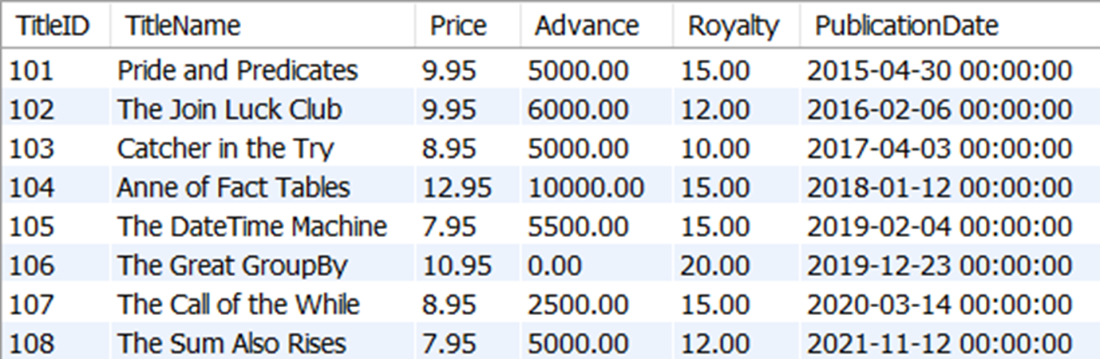
The results of all rows and columns in the title table
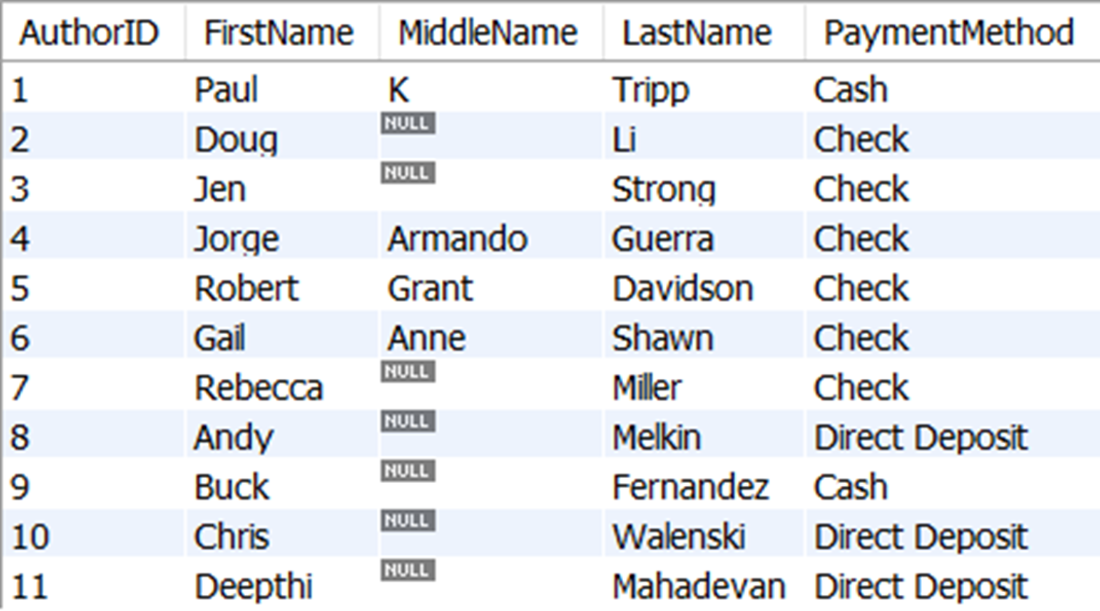
The results of all rows and columns in the author table
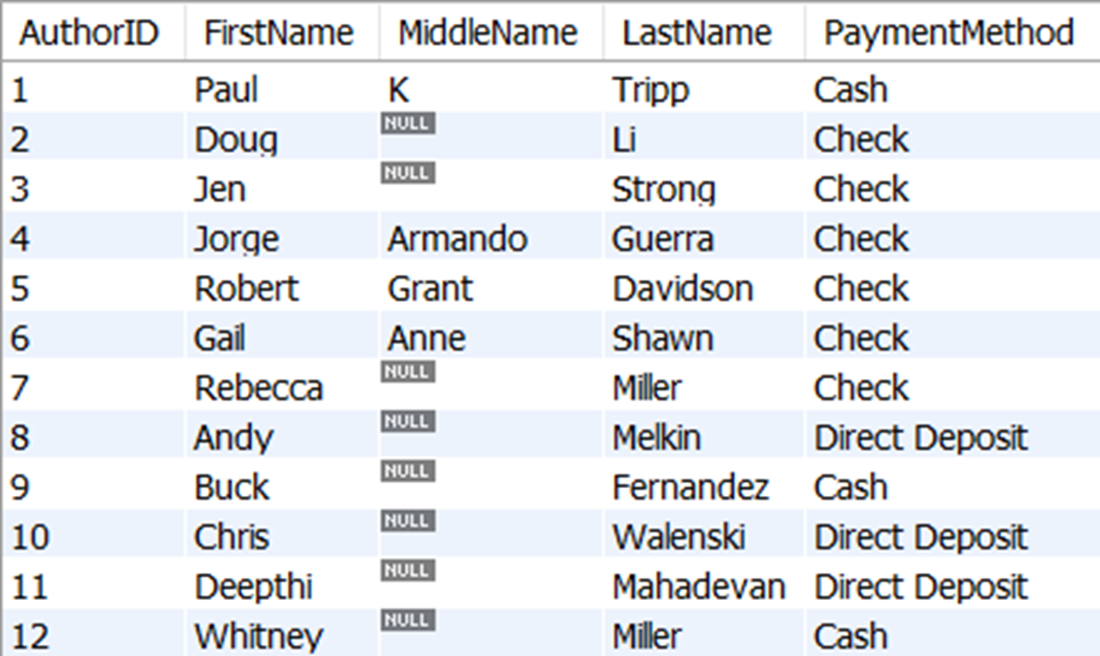
The results of all rows and columns in the author table, including the new row where AuthorID is 12, which has a value of NULL for MiddleName
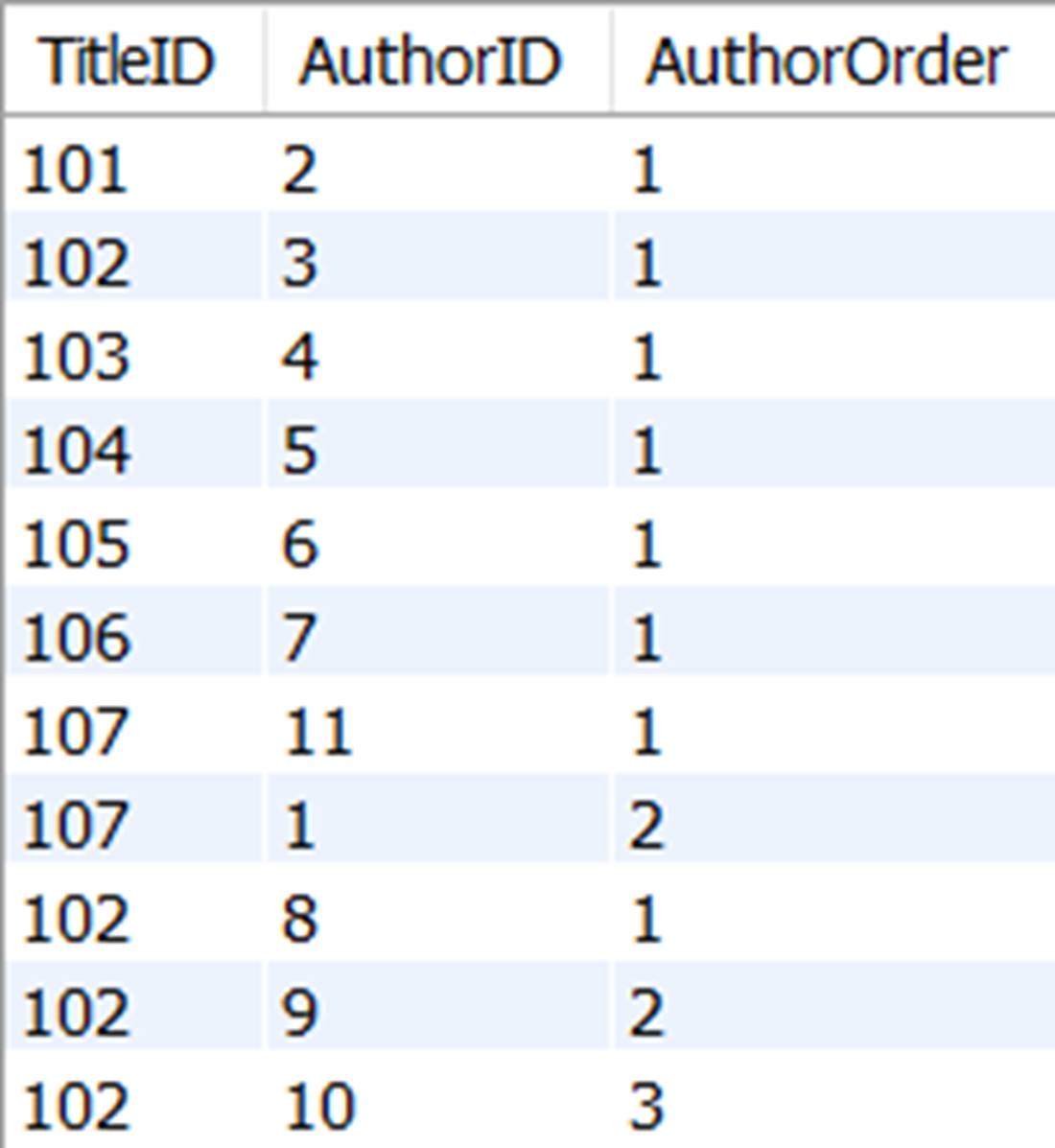
The results of all rows and columns in the titleauthor table
Lab answers
- Yes. The column names, whether they are noted in the aliases in the SELECT clause or not, do not need to match the column names in the table where the data is being inserted. What matters is that we have the same number of columns with matching data types.
- No. Execution of this query will error that the column count doesn’t match, since the author table has four columns and this query is attempting to insert values for three values. This is one reason you should always specify the columns in the table where the data is being inserted.
- Your code should look something like this.
- Although you could specify all the values being inserted for the new row with literal values, you could also copy the existing values where the CustomerID = 20 for all values except CustomerID and FirstName, like this:
FAQ
What is the basic syntax to insert a single new row with specific values?
Use INSERT INTO with an explicit column list followed by VALUES in the same order.
INSERT INTO title (
  TitleID, TitleName, Price, Advance, Royalty, PublicationDate
)
VALUES (
  109, 'David Emptyfield', 9.95, 0.00, 10.00, '2022-01-16'
);
Do the columns listed in INSERT INTO need to be in the same order as the table?
No. You can list columns in any order, but the VALUES must match that order and data types. For readability, it’s usually best to follow the table’s column order unless there’s a strong reason (for example, alphabetizing a very wide table).
How do I insert multiple rows in one statement?
Provide multiple parenthesized value sets separated by commas.
INSERT INTO title (
  TitleID, TitleName, Price, Advance, Royalty, PublicationDate
)
VALUES
  (110, 'Red Badge of Cursors', 7.95, 0.00, 15.00, '2022-03-29'),
  (111, 'Of Mice and Metadata', 8.95, 0.00, 12.00, '2022-05-17');
Practically, the limit is determined by your database’s capacity and tooling, not SQL syntax.
Can I omit some columns when inserting a row?
Yes, if either of these is true:
- The omitted columns allow NULL, in which case they default to NULL.
- The omitted columns have default constraints (for example, auto-increment/identity), in which case the database fills them automatically.
List only the columns you’re providing values for; the rest will get their default or NULL.
Why is it risky to omit the column list in an INSERT statement?
Because:
- Order dependence: values must match every column in the table in exact order and count.
- Schema changes: adding a column will break the statement.
- Defaults/constraints: identity or defaulted columns may reject supplied values.
- Data integrity: a misordered value can silently insert wrong data.
Best practice: always specify the column list.
How can I insert rows using a SELECT instead of VALUES?
Use INSERT INTO (columns) SELECT ... where the SELECT produces columns in matching order and compatible data types.
INSERT INTO titleauthor (TitleID, AuthorID, AuthorOrder)
SELECT
  (SELECT TitleID FROM title
   WHERE TitleName = 'David Emptyfield'),
  (SELECT AuthorID FROM author
   WHERE FirstName = 'Whitney' AND LastName = 'Miller'),
  1;
Do SELECT column aliases have to match target column names in INSERT ... SELECT?
No. INSERT ... SELECT matches by position, not alias/name. Aliases help readability, but data types and order must be compatible.
Is the INTO keyword optional in INSERT statements?
In some RDBMSs, yes; in others, no. For portability and clarity, include INTO: INSERT INTO table ...
What if I try to supply a value for an identity/auto-increment column?
Typically the database will prevent it (unless special settings are enabled). Omit identity/defaulted columns from the column list and let the database generate their values.
How can variables make INSERT statements reusable?
Declare or set variables, then reference them in VALUES or in an INSERT ... SELECT. This makes reruns easy by changing only variable values.
SET
  @TitleID = 112,
  @TitleName = 'A Table of Two Cities',
  @Price = 9.95,
  @Advance = 0.00,
  @Royalty = 15.00,
  @PublicationDate = '2022-08-07';

INSERT INTO title (
  TitleID, TitleName, Price, Advance, Royalty, PublicationDate
)
VALUES (
  @TitleID, @TitleName, @Price, @Advance, @Royalty, @PublicationDate
);

 Learn SQL in a Month of Lunches ebook for free
