12 Aggregating data
This chapter eases spreadsheet users into SQL by showing how familiar “spreadsheet math” translates to database queries. It introduces SQL functions that summarize data across rows—especially the aggregate functions SUM, COUNT, MIN, MAX, and AVG. You learn core habits such as putting target columns or expressions in parentheses, using aliases to give meaningful names to computed outputs, and understanding how aggregates handle nulls (they generally ignore them). While SUM and AVG are for numeric data, MIN and MAX can also work with dates and text, returning the earliest/latest values based on sort rules; AVG may return precise decimals that you can format later.
Beyond whole-table totals, the chapter shows how to analyze data by subgroup using GROUP BY. You can compute expressions inside aggregates (for example, SUM(Quantity * ItemPrice)), then group by keys like OrderID to get one result per group. It stresses the rule that every selected column must either be aggregated or appear in the GROUP BY list, and it clarifies clause placement: WHERE filters rows before grouping, GROUP BY forms the groups, and ORDER BY sorts the final results. GROUP BY includes nulls as their own group, so you can account for “no value” cases. To filter aggregated results (such as “only promotion codes used at least three times”), you use HAVING, not WHERE; some systems allow aggregate aliases in HAVING, but portability cautions apply.
The chapter also explains logical query processing—the order in which the database evaluates clauses (FROM, WHERE, SELECT, GROUP BY, HAVING, ORDER BY)—and how that affects when table and column aliases are usable. Finally, it demystifies DISTINCT: it removes duplicate rows but effectively performs a grouping step, which can add work on large datasets; prefer GROUP BY when you need explicit aggregates, and don’t use DISTINCT to hide duplicates caused by incorrect joins. Hands-on exercises reinforce these concepts by exploring data-type compatibility with functions, diagnosing why aliases can’t appear in WHERE, counting rows, finding date ranges, and combining subqueries with GROUP BY to compute per-order metrics.
The quantity of all orders is shown in a column with no alias. The default column name is the calculation.

There are 50 rows in the orderheader table with a value for OrderID, which is all the rows in the table.

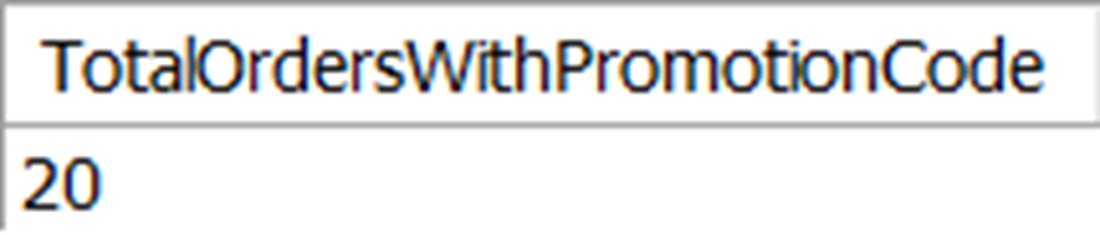
There are only 20 rows in the orderheader table that have a value for PromotionID.
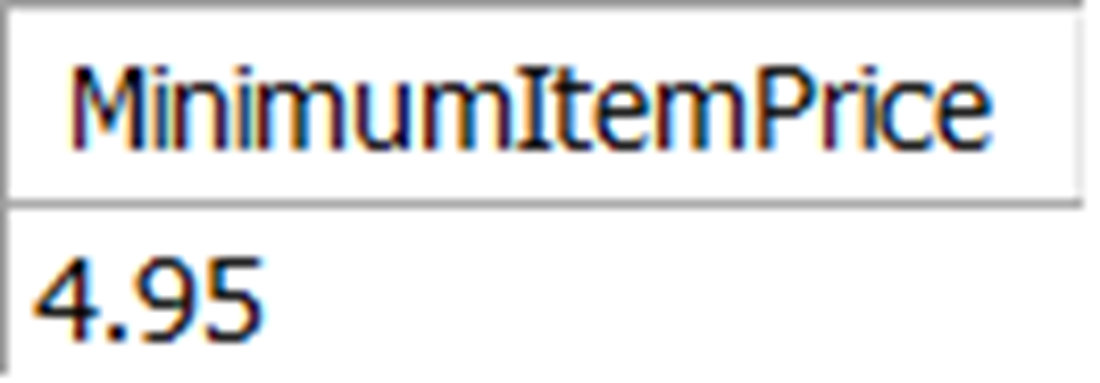
The minimum price of any item in the orderitem table is $4.95.
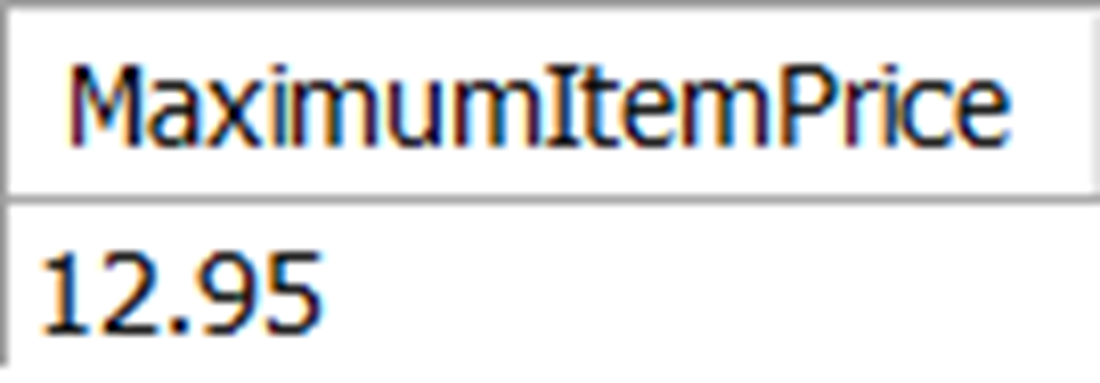
The maximum price of any item in the orderitem table is $12.95.
The average price of all titles in the title table

The total value of all orders in the orderitem table is $573.50.

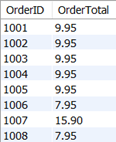
These are 8 of the 50 rows returned showing the Order Total for all orders.
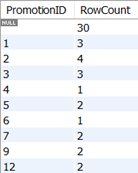
These are the count of all PromotionID values in the orderheader table. This includes null values since GROUP BY does not exclude nulls.
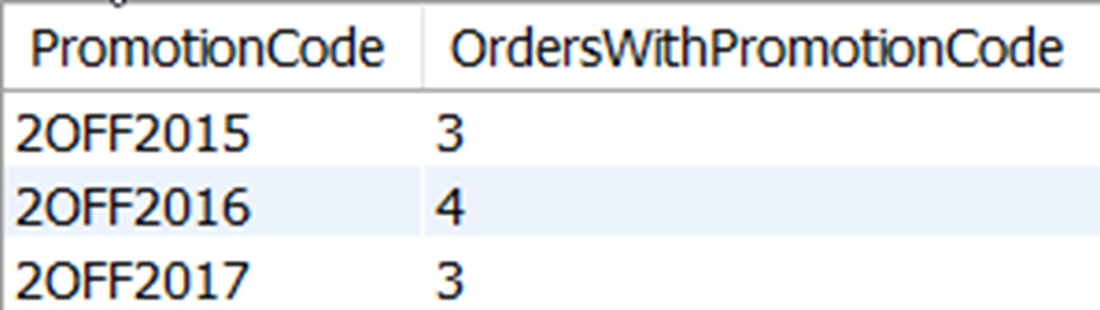
The only promotion codes that have been used at least three times
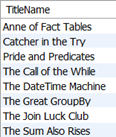
The distinct title names that have been included in orders in the orderitem table
Lab answers
- You may have missed it earlier in the book, but it was noted how date and time values are actually stored as numeric values that your RDBMS can interpret as dates and times. Although it’s practically useless to us, the value you see here is the RDBMS trying to make sense of using a SUM of date values.
- The query will fail because a column alias is used in the WHERE clause, and the logical query processing order is to evaluate the WHERE clause before the SELECT clause. Because of this, the RDBMS doesn’t know what “PromoCode” is when evaluating the WHERE clause, since the alias is determined later in the query in the SELECT clause.
- To count the number of rows in a table, you can use COUNT(*)
- To select the minimum and maximum publication dates, you can use the MIN and MAX functions:
- There are a few different ways you can do this, but the first is to group the total value of all orders as we did in section 12.2.1 and then select an average value of all those order totals, like this:
FAQ
What are aggregate functions in SQL and when should I use them?
Aggregate functions compute a single result from multiple rows. Common ones are SUM, COUNT, MIN, MAX, and AVG. They’re ideal for totals, counts, minimum/maximum values, and averages. By default, most aggregates ignore NULL values (COUNT(*) is the exception).How does SUM work and what should I watch out for?
SUM adds up non-null numeric values in a column or expression. Use parentheses: SUM(Price). It applies only to numeric data. Give the result a clear alias for readability, for example:SELECT SUM(Quantity) AS TotalQuantity
FROM orderitem;What’s the difference between COUNT(column) and COUNT(*)?
COUNT(column) counts non-null values in that column. COUNT(*) counts all rows, regardless of NULLs in any column. Example:-- Counts rows with a non-null PromotionID
SELECT COUNT(PromotionID) FROM orderheader;
-- Counts all rows in the table
SELECT COUNT(*) FROM orderheader;Can MIN and MAX be used on text or dates?
Yes. For dates, MIN returns the earliest and MAX the latest. For text, they return the first/last value as if sorted ascending. Beware collation rules (case and special characters can affect ordering).Why does AVG return many decimal places, and how can I format it?
AVG computes a precise average, often with more decimal places than you want. You can format/round the result with functions like ROUND (syntax varies by RDBMS). Example:SELECT ROUND(AVG(Price), 2) AS AveragePrice
FROM title;How do I aggregate per category using GROUP BY?
GROUP BY splits rows into groups, then aggregates per group. Every selected column must be either aggregated or listed in GROUP BY. Example (order total per order):SELECT OrderID, SUM(Quantity * ItemPrice) AS OrderTotal
FROM orderitem
GROUP BY OrderID
ORDER BY OrderID;How do NULLs behave with GROUP BY and aggregates?
GROUP BY forms a group for NULL values (so NULL appears as its own group). Within each group, aggregates still ignore NULLs (except COUNT(*)). For example, grouping by PromotionID will include one row for PromotionID = NULL with its row count.When should I use HAVING instead of WHERE?
Use WHERE to filter rows before grouping; use HAVING to filter aggregated groups. Aggregates (like COUNT or SUM) can’t appear in WHERE. Example: list promotion codes used at least 3 times:SELECT p.PromotionCode, COUNT(*) AS Uses
FROM orderheader oh
JOIN promotion p ON p.PromotionID = oh.PromotionID
GROUP BY p.PromotionCode
HAVING COUNT(*) >= 3;
 Learn SQL in a Month of Lunches ebook for free
