Overview

10 Combining queries with set operators

This chapter expands from single SELECT queries to composing queries that combine multiple result sets into one using set operators. It explains the shared syntax pattern and lays out key rules: each SELECT must project the same number of columns in the same order with compatible data types; the column names used for the final result come from the first SELECT; and any ORDER BY can appear only once at the end and can reference only columns included in the combined projection. These operators let you evaluate separate conditions or even unrelated tables side by side when joins aren’t appropriate.

UNION merges results while removing duplicate rows, making it useful for consolidating lists (for example, pulling names from customer and author) and for reconciling disparate filters. UNION ALL returns all rows, including duplicates, which can mirror the behavior of OR conditions across multiple predicates or sources. The chapter discusses practical patterns such as adding a literal column to indicate a row’s origin, the need to sort only by selected columns after a set operator, and performance trade-offs: UNION often costs more due to de-duplication, while UNION ALL may be faster but can return larger result sets. It also cautions against mixing UNION and UNION ALL within the same expression, as results can be surprising or unsupported.

Beyond UNION, the chapter shows how to emulate a FULL OUTER JOIN in systems without native support (such as MySQL) by combining a LEFT JOIN and a RIGHT JOIN with UNION ALL and filtering one side on NULL to avoid duplicate matches. It introduces INTERSECT (common rows across queries) and EXCEPT (rows in the first query absent in the second), both of which remove duplicates and can include NULLs that align with their set semantics; MySQL supports them starting in 8.0.31, and Oracle uses MINUS in place of EXCEPT. Together, these operators provide flexible ways to combine, compare, and contrast result sets when joins alone aren’t sufficient, especially when you need to control duplicates and include or exclude NULLs intentionally.

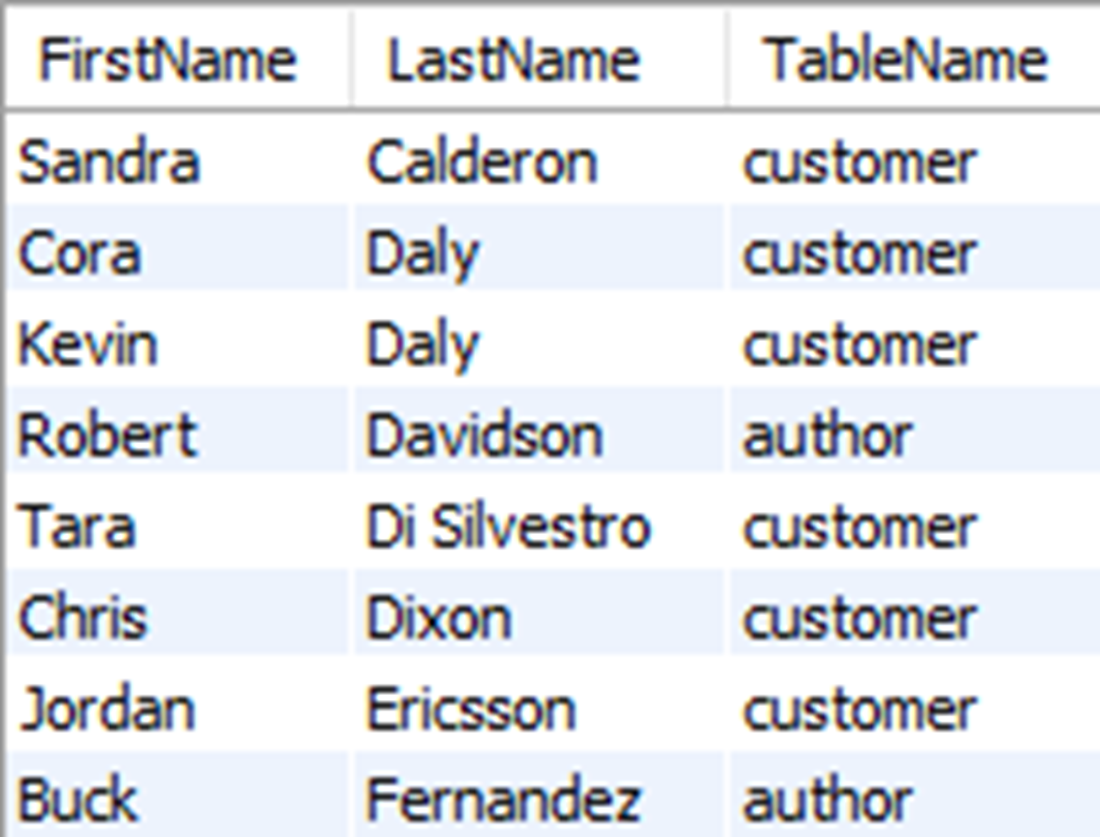
A portion (8 of the 31 rows) of the results of first and last names from the customer and author tables

shows a portion (8 of the 31 rows) of the results of first and last names from the customer and author tables, as well as a third column indicating the table where the rows are from.
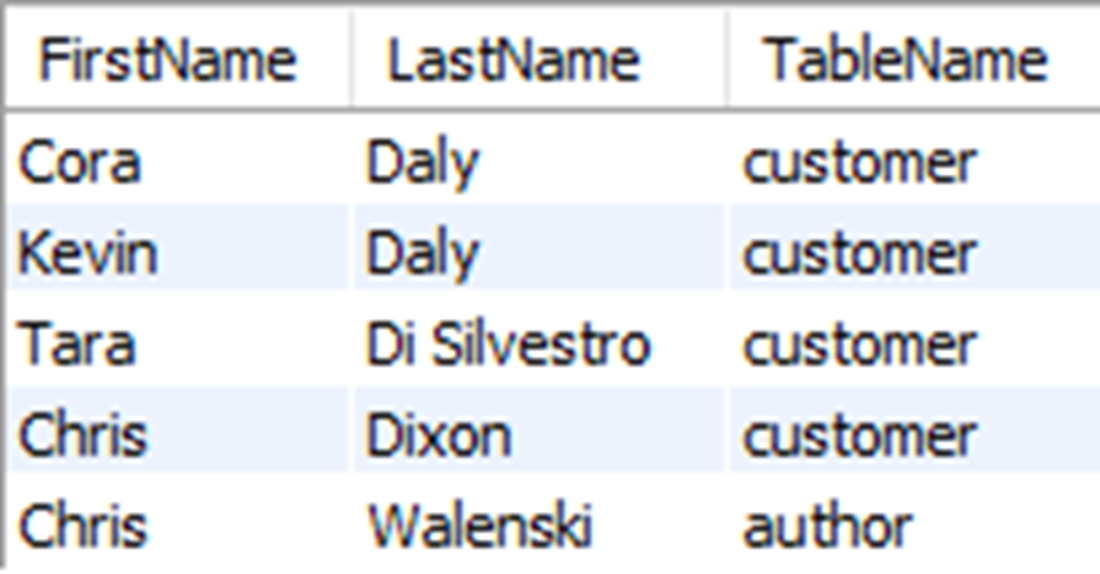
The results for the full names of customers whose last name starts with D and authors whose last name starts with C, ordered by last name and first name
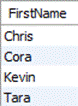
shows the results of first names from the customer table whose last names start with D, combined with a UNION with the results of first names from the author table whose first names start with C. The two rows for “Chris” are represented with a single row since UNION has removed the duplicate from the result set.
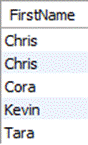
shows the results of first names from the customer table whose last names start with D, combined with a UNION ALL with the results of first names from the author table whose first names start with C.
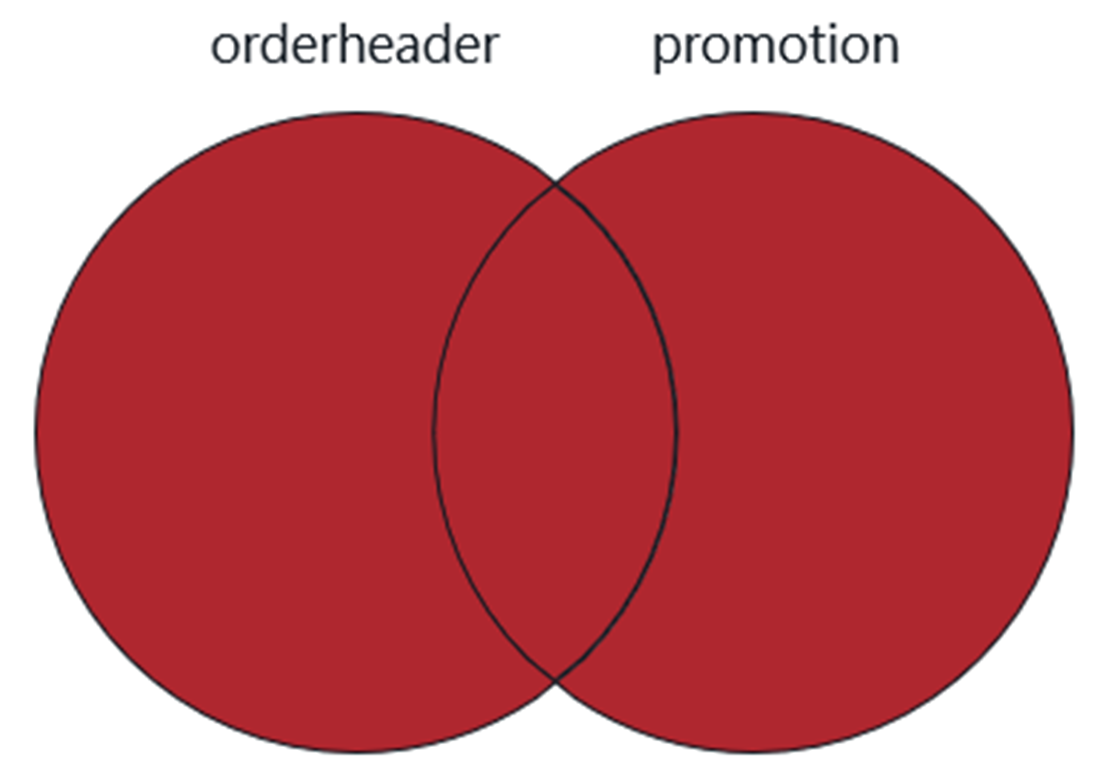
A Venn diagram of the values included in a query of the orderheader table with a full outer join of the promotion table
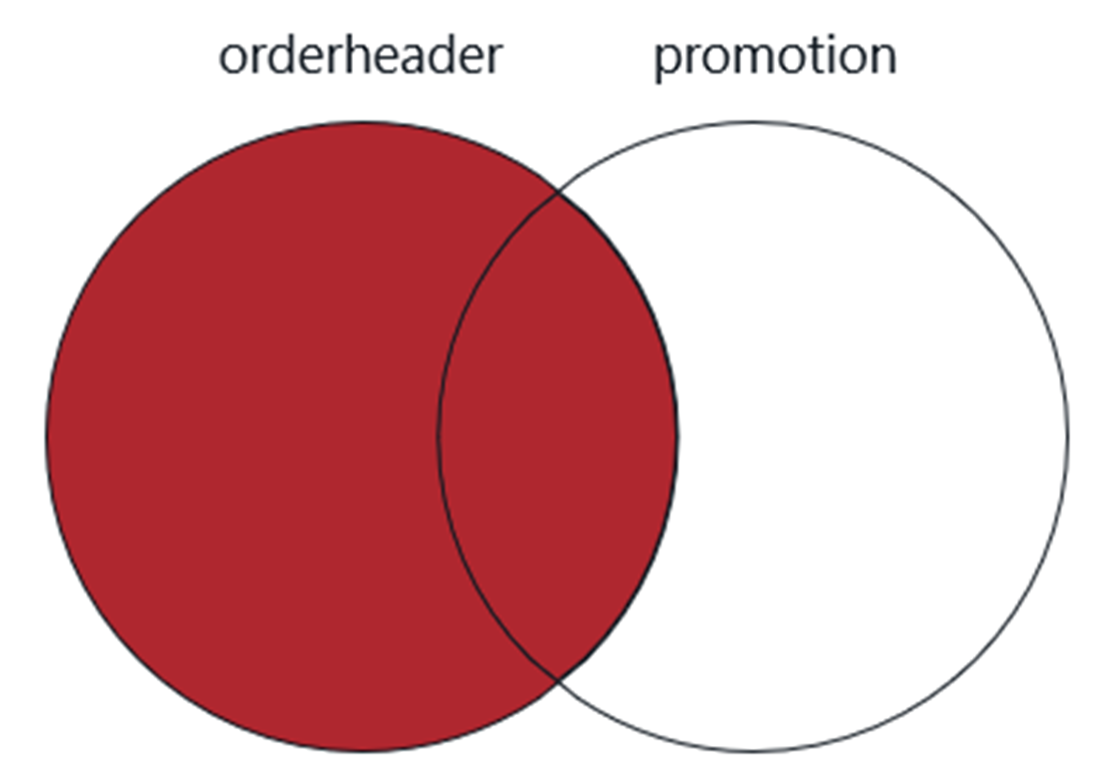
A Venn diagram of the values included in a query of the orderheader table with a left outer join of the promotion table
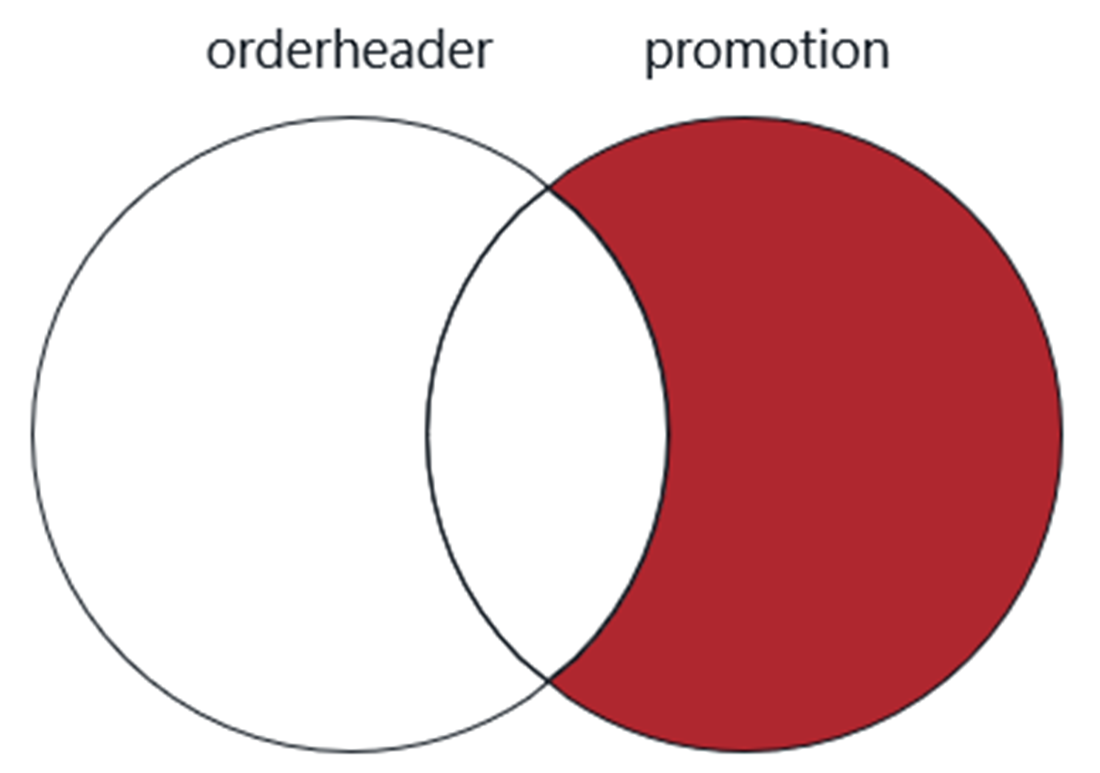
A Venn diagram of the values included only in a query of the promotion table, with a right outer join of the orderheader table
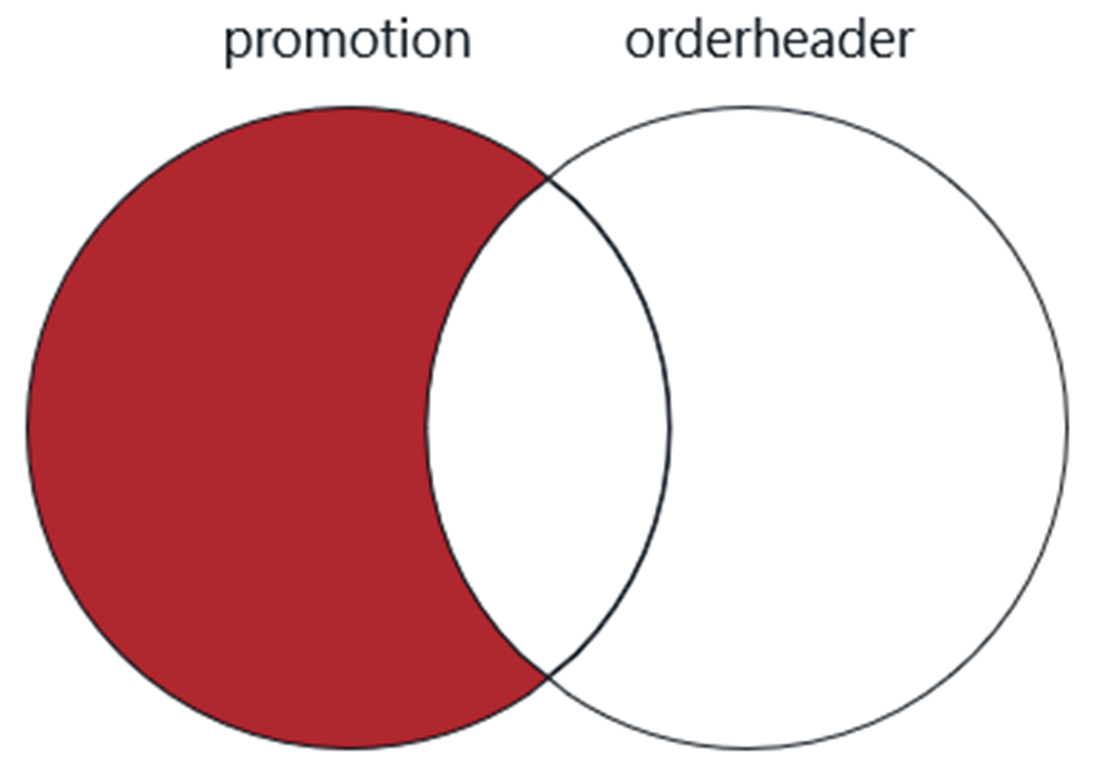
A Venn diagram of the values included only in a query of the promotion table, with a left outer join of the orderheader table
Lab answers

  1. Since there is no column name supplied for the last column in the first SELECT statement, the literal value “customer” is used for the final column name in the result set.
  2. The results will not be the same. The first query using OR for filtering will return two rows—one for each match. The second query with the UNION will return only one row because UNION removes duplicates from the results.
  3. The first query returns three rows, while the second query returns one. At first glance, this may seem confusing since the second query simply reverses the order of the SELECT statements.
  4. The answer lies in precedence, which indicates the order in which the SELECT statements are presented. The first UNION or UNION ALL is applied first, and then the second one is applied next. Remember, UNION eliminates duplicates, and UNION ALL does not.
    In the first query, the first two SELECT statements each return one row with the value “Daly”, and since the UNION eliminates duplicates, the result is one row—so far. But the third SELECT statement returns two rows, which when evaluated with a UNION ALL, creates a result set of three rows—one row from the first two SELECT statements and two rows from the last SELECT statement.
    In the second query, we combine the first SELECT statement, which returns two rows, with the second SELECT statement, which returns one row, and we do this with a UNION ALL. If we only executed this part of the query, we would get three rows returned. But we then combine another SELECT statement that returns one row with a UNION, which will then remove all the duplicates from our result set. This is why the second query returns only one row.
    If this seems more than a little confusing, don’t worry. As long as you avoid combining UNION and UNION ALL in the same query, you’ll never have to worry about this headache.

FAQ

What are SQL set operators and when should I use them?Set operators let you combine or compare the results of two or more SELECT statements into a single result set. They’re useful when: - You need results that come from different tables without a join key - Different filtering conditions are easier to express as separate SELECTs - You want to include or compare NULLs across separate result sets Common operators: UNION, UNION ALL, INTERSECT, and EXCEPT.
What rules must be followed when using set operators?- Each SELECT must return the same number of columns - Corresponding columns must be of compatible data types - Column order (ordinal position) must match across SELECTs - Column names in the final result come from the first SELECT only - ORDER BY can appear only once, after the final SELECT, and may reference only columns in the final SELECT list
What’s the difference between UNION and UNION ALL?- UNION combines result sets and removes duplicate rows - UNION ALL combines result sets and keeps all rows, including duplicates Performance note: UNION is often slower because it must de-duplicate; UNION ALL can be faster but may return more data. In some large, duplicate-heavy scenarios, UNION’s smaller output can reduce network transfer.
Where can I put ORDER BY in a statement that uses set operators, and what can I sort by?- ORDER BY must be placed after the last SELECT in the combined query - You can sort only by columns present in the final SELECT list - If you remove a column from the SELECT, you cannot ORDER BY it
How are column names chosen in a UNION/UNION ALL result set?The column names in the final result come from the first SELECT only. Aliases (or names) in later SELECTs are ignored. If the first SELECT includes a literal without an alias, the RDBMS will use a system-determined name (often the literal text itself in MySQL). Give the alias in the first SELECT if you want to control the final column name.
How can I tell which table a row came from after a UNION?Add a literal “source” column to each SELECT and (optionally) alias it in the first SELECT. Example: SELECT FirstName, LastName, 'customer' AS Source FROM customer UNION SELECT FirstName, LastName, 'author' FROM author;
Are UNION ALL and OR conditions equivalent? Which should I use?They can return the same results in some cases. For example, two SELECTs combined with UNION ALL can be equivalent to a single SELECT with an OR. Depending on data and the optimizer, one may be faster than the other. It’s useful to try both approaches if performance is a concern.
How do I emulate a FULL OUTER JOIN in MySQL?Use LEFT JOIN plus RIGHT JOIN with UNION ALL, excluding the overlapping matches from one side to avoid duplicates. Pattern: - First SELECT: LEFT JOIN - Second SELECT: RIGHT JOIN ... WHERE left_table.key IS NULL - Combine them with UNION ALL
How do INTERSECT and EXCEPT compare to JOINs, especially with NULLs and duplicates?- INTERSECT returns rows common to both result sets (like INNER JOIN) but removes duplicates and can include matching NULLs - EXCEPT returns rows in the first result set that aren’t in the second (like an anti-join) but removes duplicates and can include NULLs that appear only in the first set Note: JOINs can return duplicates and never match NULL = NULL.
Are INTERSECT and EXCEPT supported everywhere? What about Oracle?MySQL supports INTERSECT and EXCEPT starting with version 8.0.31; earlier versions do not. Oracle doesn’t support EXCEPT but provides MINUS, which is functionally equivalent to EXCEPT.

pro $24.99 per month

  • access to all Manning books, MEAPs, liveVideos, liveProjects, and audiobooks!
  • choose one free eBook per month to keep
  • exclusive 50% discount on all purchases
  • renews monthly, pause or cancel renewal anytime

lite $19.99 per month

  • access to all Manning books, including MEAPs!

team

5, 10 or 20 seats+ for your team - learn more


choose your plan

team

monthly
annual
$49.99
$499.99
only $41.67 per month
  • five seats for your team
  • access to all Manning books, MEAPs, liveVideos, liveProjects, and audiobooks!
  • choose another free product every time you renew
  • choose twelve free products per year
  • exclusive 50% discount on all purchases
  • renews monthly, pause or cancel renewal anytime
  • renews annually, pause or cancel renewal anytime
  • Learn SQL in a Month of Lunches ebook for free

choose your plan

team

monthly
annual
$49.99
$499.99
only $41.67 per month
  • five seats for your team
  • access to all Manning books, MEAPs, liveVideos, liveProjects, and audiobooks!
  • choose another free product every time you renew
  • choose twelve free products per year
  • exclusive 50% discount on all purchases
  • renews monthly, pause or cancel renewal anytime
  • renews annually, pause or cancel renewal anytime
  • Learn SQL in a Month of Lunches ebook for free
choose your plan

team

monthly
annual
$49.99
$499.99
only $41.67 per month
  • five seats for your team
  • access to all Manning books, MEAPs, liveVideos, liveProjects, and audiobooks!
  • choose another free product every time you renew
  • choose twelve free products per year
  • exclusive 50% discount on all purchases
  • renews monthly, pause or cancel renewal anytime
  • renews annually, pause or cancel renewal anytime
  • Learn SQL in a Month of Lunches ebook for free