This chapter explains how to design PowerShell tools that reliably detect, react to, and record problems. It distinguishes between non-terminating errors (PowerShell’s default “keep going” behavior) and terminating exceptions (which you can actually handle). You learn about the built-in $Error collection, the per-command -ErrorVariable sink (with + to append), and how $ErrorActionPreference and the per-command -ErrorAction setting control behavior. The key takeaway is that you can only handle issues your code can catch—so when you anticipate problems, make the command throw a terminating exception, typically by using -ErrorAction Stop, and then handle it.
The chapter cautions against two common anti-patterns: globally suppressing errors (for example, setting $ErrorActionPreference = 'SilentlyContinue') and indiscriminately hiding errors on commands where the failures matter (such as permission problems). Instead, prefer per-command control with -ErrorAction, capture details with -ErrorVariable, and wrap risky operations in Try/Catch to log, warn, or recover. For multi-target operations (like creating sessions on several computers), decide whether to iterate with foreach or pass an array, and choose between continuing while recording failures or stopping immediately. The chapter also covers handling operations that lack -ErrorAction by temporarily setting $ErrorActionPreference = 'Stop' inside a Try, using multiple typed Catch blocks plus Finally, and notes that Trap is deprecated.
Two scenarios drive exception handling: running unattended (where you trap and log any failure for later diagnostics) and handling expected, specific problems in real time (such as unreachable hosts or protocol mismatches), possibly retrying with alternatives or logging failures for review. The practical guidance emphasizes designing for clarity and debuggability—don’t hide useful errors, make deliberate choices about continuing vs. stopping, and provide informative warnings or logs. Key reminders include: $Error holds session errors; -ErrorVariable stores command-level errors; Try/Catch works when exceptions are thrown (often via -ErrorAction Stop); and cross-platform scripts should lean on PowerShell 7 built-ins and environment indicators like $IsWindows, $IsLinux, and $IsMacOS.
Lab Answers
FAQ
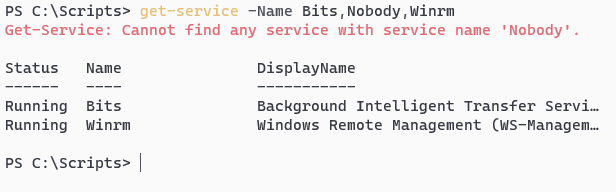
What’s the difference between a PowerShell error and an exception?Errors are often non-terminating: PowerShell reports the problem but keeps going. Exceptions are terminating: execution stops unless handled. To catch problems in try/catch, ensure the command throws a terminating exception (for example, add -ErrorAction Stop).How do I view recent errors in my session?Use the automatic variable $Error, an array of error records with the most recent at $Error[0]. Note: if you invoked a command with -ErrorAction Ignore, that command’s errors won’t be added to $Error.How can I capture errors from a single command without stopping the script?Use the common parameter -ErrorVariable to collect errors, and prefix with + to append across calls. Example: New-PSSession -ComputerName SRV01 -ErrorVariable +ev. In the parameter value, don’t include the $ (PowerShell adds it).When should I use -ErrorAction versus $ErrorActionPreference?Prefer -ErrorAction per command (fine-grained control). $ErrorActionPreference affects non-terminating errors globally in the current scope; reserve it for special cases (for example, unattended scripts that must log all failures). Avoid globally setting SilentlyContinue, which can hide problems.What do the common -ErrorAction values do?- Continue (default): show the error and continue. - SilentlyContinue: hide the message and continue. - Stop: stop and throw a terminating exception. - Inquire: prompt for what to do. - Break: enter the debugger on error. - Ignore: suppresses the error and continues (per-command only; not valid for $ErrorActionPreference). - Suspend: for workflows only; not valid as a preference.Why isn’t my try/catch running when a command fails?Because the failure is a non-terminating error. Add -ErrorAction Stop to the command (or temporarily set $ErrorActionPreference = 'Stop') so that a terminating exception is thrown and the catch block runs.How do I handle operations that don’t support -ErrorAction (like some .NET method calls)?Wrap the call in try/catch. Most .NET methods throw terminating exceptions naturally. If needed as a last resort, temporarily set $ErrorActionPreference = 'Stop' inside the try and reset it afterward (ideally in a finally block).What’s a good approach to handling errors when connecting to multiple computers?Two patterns: 1) Loop per target and use -ErrorAction Stop inside try/catch so failures are handled per-host and the loop continues. 2) Call the command with an array of targets and use -ErrorVariable +ev to collect failures for logging while allowing successes to proceed. Choose based on whether partial success is acceptable.Can I handle different exceptions differently?Yes. Provide multiple typed catch blocks, from most specific to least specific, and optionally a final catch for anything else. A finally block runs regardless of success or failure, useful for cleanup.Should I use Trap for error handling?Trap exists for backward compatibility and is deprecated for new code. Prefer structured try/catch (and finally) for clearer, more maintainable error handling.
pro $24.99 per month
access to all Manning books, MEAPs, liveVideos, liveProjects, and audiobooks!

 Learn PowerShell in a Month of Lunches, Fourth Edition ebook for free
