This chapter introduces the core looping and control-flow tools you use to repeat actions in PowerShell. It emphasizes how to iterate over collections, process objects via the pipeline, and apply conditions to control when loops start, continue, or stop. Along the way, it highlights practical trade-offs that affect performance and reliability, preparing you to choose the right loop for the job and to reason about runtime, ordering, and safety.
The chapter distinguishes Foreach (iterating over an in-memory collection) from Foreach-Object (processing items as they arrive on the pipeline) and explains how the pipeline’s current object variable ($_) works. It notes that both run sequentially by default and shows concise aliases (such as %), while recommending full cmdlet names for clarity. A major addition is the -Parallel parameter for Foreach-Object in PowerShell 7, which can dramatically reduce wall-clock time by running script blocks concurrently. Important caveats include non-guaranteed output order, the default throttle limit of 5 (tunable with -ThrottleLimit), and the overhead of creating additional runspaces, which can hurt performance for resource-intensive tasks.
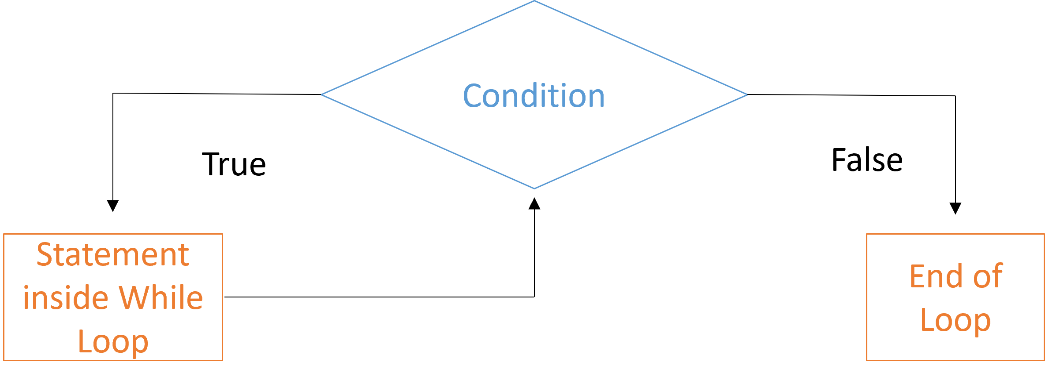
Beyond collection loops, the chapter covers While and Do While for condition-driven repetition. While executes only while a Boolean condition remains true, and can combine logical operators like -and and -or; care is needed to avoid infinite loops. Do While guarantees at least one iteration before evaluating the condition, useful when you must perform an action once and then decide whether to continue. Short, focused examples demonstrate these patterns, and practice exercises reinforce the concepts by having you process file names and monitor a running process in a loop.
Lab Answers
1)
2)
FAQ
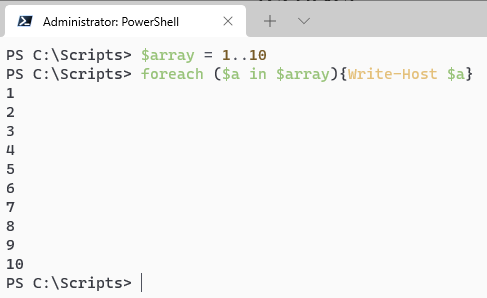
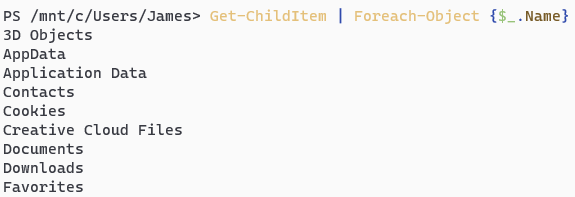
What’s the difference between Foreach and ForEach-Object?Foreach is a language keyword that iterates over an in-memory collection (for example, foreach ($x in $array) { ... }). ForEach-Object is a cmdlet that processes items coming through the pipeline (for example, Get-ChildItem | ForEach-Object { ... }). Foreach is great for arrays/collections you already have; ForEach-Object is ideal for streaming pipeline input and supports -Parallel.When should I use Foreach vs. ForEach-Object?Use Foreach when you have a collection stored in a variable and want straightforward, in-memory iteration. Use ForEach-Object when you’re working in a pipeline or need features like -Parallel. In general, Foreach is simple and fast for arrays; ForEach-Object is more flexible for streaming data.How do I reference the current pipeline item inside ForEach-Object?Use the automatic variable $_, which represents the current object being processed. For example, to output the Name property: $_.Name. The % symbol is an alias for ForEach-Object, but using the full cmdlet name is clearer.What does ForEach-Object -Parallel do?-Parallel runs the script block concurrently across multiple pipeline items using separate runspaces, allowing many items to be processed at the same time instead of one-by-one. This can significantly reduce runtime for suitable workloads, but incurs overhead and uses more system resources.What is the default concurrency, and how do I change it?The default concurrency (ThrottleLimit) for -Parallel is 5. You can change it with the -ThrottleLimit parameter (for example, -ThrottleLimit 10). Higher values aren’t always faster—tune based on workload and available CPU, memory, and I/O capacity.Does -Parallel preserve the order of output?No. When using -Parallel, results may arrive out of order because items complete at different times. If you need ordered results, process sequentially or include an index and sort after processing.How can I verify performance gains from -Parallel?Use Measure-Command to time candidate approaches. Expect sequential runs to add up per-item durations, while parallel runs approach the longest per-item duration per batch (bounded by ThrottleLimit). Always test with realistic data.What’s the basic syntax and behavior of a While loop?While (condition) { commands } executes the commands as long as condition evaluates to $true. Ensure the loop body changes state (for example, increments a counter) so the condition eventually becomes $false and the loop ends.How do I stop an infinite or runaway loop?Press Ctrl+C in the console to break execution. To avoid runaway loops, add safeguards such as counters, timeouts, or conditional Break/Return statements, and make sure your loop condition can eventually become $false.How does Do-While differ from While, and when should I use it?Do { commands } While (condition) runs the commands at least once, then checks the condition to decide whether to repeat. Use Do-While when you need one guaranteed iteration before testing the condition (for example, prompting and then validating).
pro $24.99 per month
access to all Manning books, MEAPs, liveVideos, liveProjects, and audiobooks!



 Learn PowerShell in a Month of Lunches, Fourth Edition ebook for free
