13 Remote control: one-to-one, and one-to-many
PowerShell remoting provides a shell-wide, protocol-agnostic way to run commands on remote systems, enabling you to execute cmdlets that may not even be installed on your local machine. On Windows, remoting uses WS-MAN via the WinRM service; on macOS and Linux, it uses SSH, and PowerShell registers as a subsystem so PSRP traffic is routed correctly. Administrators typically enable remoting on the computers that receive commands, often enterprise-wide, and should account for prerequisites such as PowerShell version, authentication and trust, listeners, firewall rules, and network profiles. When commands run remotely, results are serialized to XML and deserialized back into objects on the client, which means you receive read-only snapshots rather than live, method-capable objects.
For one-to-one remoting, you establish an interactive session to a single host using Enter-PSSession, choosing -HostName for SSH or -ComputerName for WinRM. The prompt changes to indicate the remote context, commands run under the supplied credentials, and you exit with Exit-PSSession; if you close the window, the session ends automatically. Profile scripts on the remote machine do not load in these sessions, and you should avoid “second hop” chaining unless you understand the implications and have configured credential delegation appropriately. While in a 1:1 session, you’re effectively typing on the remote console, so objects are live and actions like stopping processes behave as expected on that remote system.
For one-to-many remoting, Invoke-ScriptBlock sends the contents of a script block to multiple computers in parallel, with a configurable throttle limit and the convenience of sourcing host lists from files. Careful punctuation and nesting of braces matter: place as much filtering and action logic inside the remote script block as possible so that each target does its own work, minimizing network traffic and avoiding issues with deserialized, methodless objects. This approach is crucial when performing actions (for example, retrieving and then stopping a process) that must occur on the remote machines. Common pitfalls include mixing local processing with remote results, misunderstanding serialization limits, and environment or policy settings that block listeners or firewall exceptions; persistent sessions and deeper endpoint configuration can further streamline repeat operations.
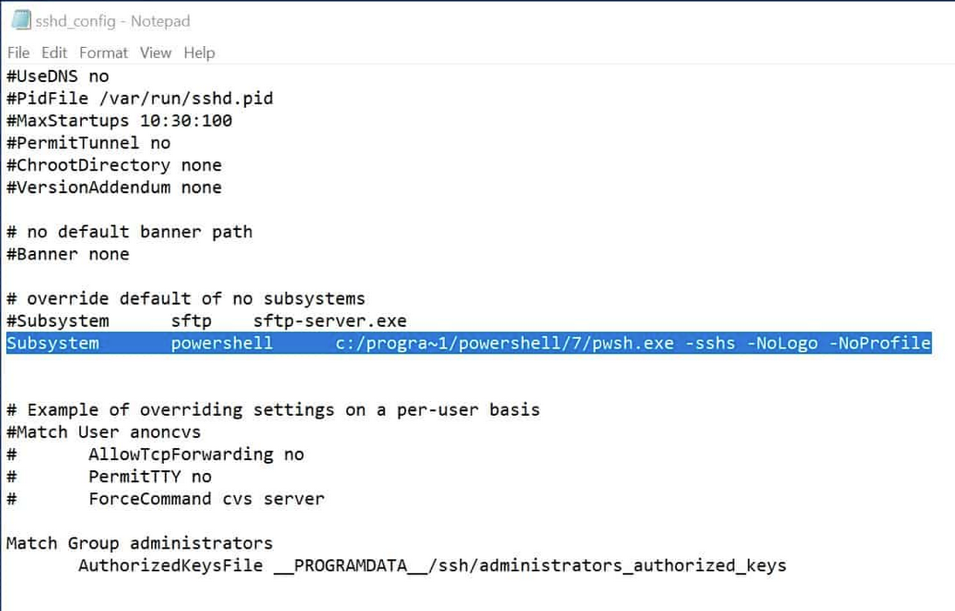
The relationship between SSHD, and PowerShell
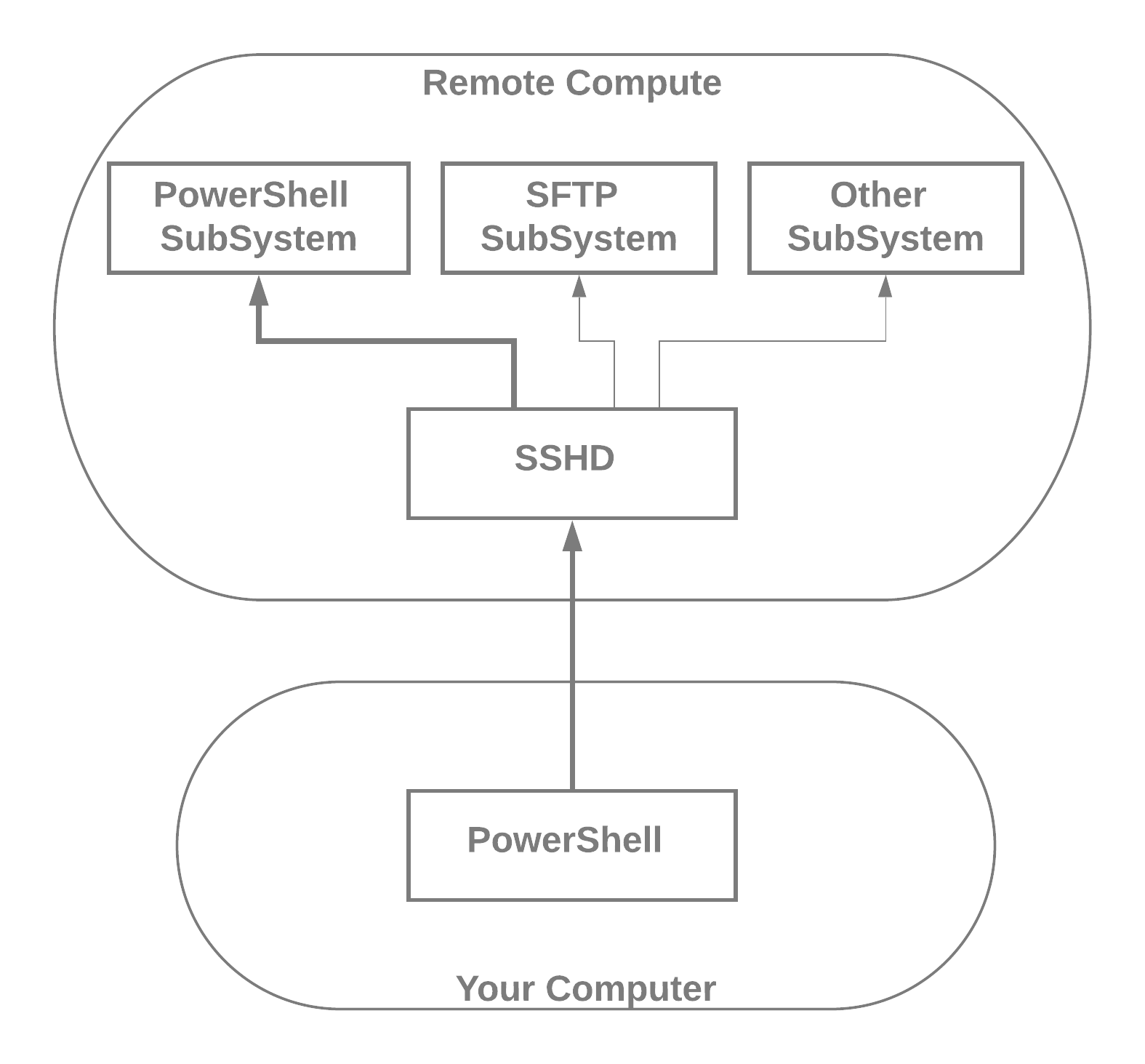
The relationship between WinRM, WS-MAN, endpoints, and PowerShell
Lab answers
Enter-PSSession Server01
The nano process will launch, but there won’t be any interactive process either locally or remotely. In fact, run this way, the prompt won’t return until the nano process ends—although an alternative command to launch it is Start-Process nano.
The Notepad process will launch, but there won’t be any interactive process either locally or remotely. In fact, run this way, the prompt won’t return until the Notepad process ends—although an alternative command to launch it is Start-Process Notepad.
Invoke-ScriptBlock –scriptblock {Get-Process } -HostName Server01,Server02 -UserName yourUser| Format-Wide -Column 4Invoke-ScriptBlock -scriptblock {get-process | sort VM -Descending | Select-first 10} –HostName Server01,Server02 -UserNInvoke-ScriptBlock -scriptblock {Get-ChildItem ~/* | Sort-Object -Property LastWriteTime -Descending | Select-Object -First 10} -HostName (Get-Content computers.txt) -UserName yourUserInvoke-ScriptBlock –scriptblock $ -Server01,Server02 -UserName yourUser

 Learn PowerShell in a Month of Lunches, Fourth Edition ebook for free
