9 Concurrent maze solver
This chapter builds a concurrent maze solver in Go that reads a PNG RGBA maze, finds a path from a colored entrance to a colored treasure, and outputs a solved image (and optionally an animated GIF). It frames maze solving as a perfect fit for Go’s concurrency model: at each intersection, the program explores all branches in parallel with goroutines while communicating over channels. The maze is encoded as pixel colors (walls, paths, entrance, treasure), and the solution is later painted back onto the image. Along the way, the chapter reinforces core Go skills: image I/O, basic image manipulation, channel-based coordination, and lightweight data structures.
The core design centers on a Solver that encapsulates the image, a color palette, and channels that orchestrate exploration. After scanning to locate the entrance, exploration proceeds via an explore function that advances along paths, publishes alternative branches to a pathsToExplore channel, and records the route as a linked list of image.Point nodes. A listener routine spins new explorers from incoming branches. Early deadlocks and race risks are addressed by introducing a buffered “seed” write, a sync.WaitGroup to await all workers, and a quit channel broadcast (closed when treasure is found) combined with select to immediately halt spawning and exploration. A mutex guards the single-writer update of the discovered solution to prevent data races.
Image handling uses image.RGBA for fast pixel access and a defined palette for consistent color comparisons. Once the treasure path is known, the solver backtracks through the linked list to paint the solution onto the PNG. To visualize progress, a second channel streams explored pixels to a dedicated goroutine that periodically snapshots the maze into paletted frames, scaling with golang.org/x/image/draw, and builds a compact GIF animation with controlled frame cadence and a longer final frame highlighting the solution. The chapter also shows how to avoid revisiting pixels (and cope with looped mazes) by marking explored cells, and it rounds out the project with focused tests for file loading, exploration branching, and end-to-end behavior.
Example of a small maze with a treasure (exit) on the edge
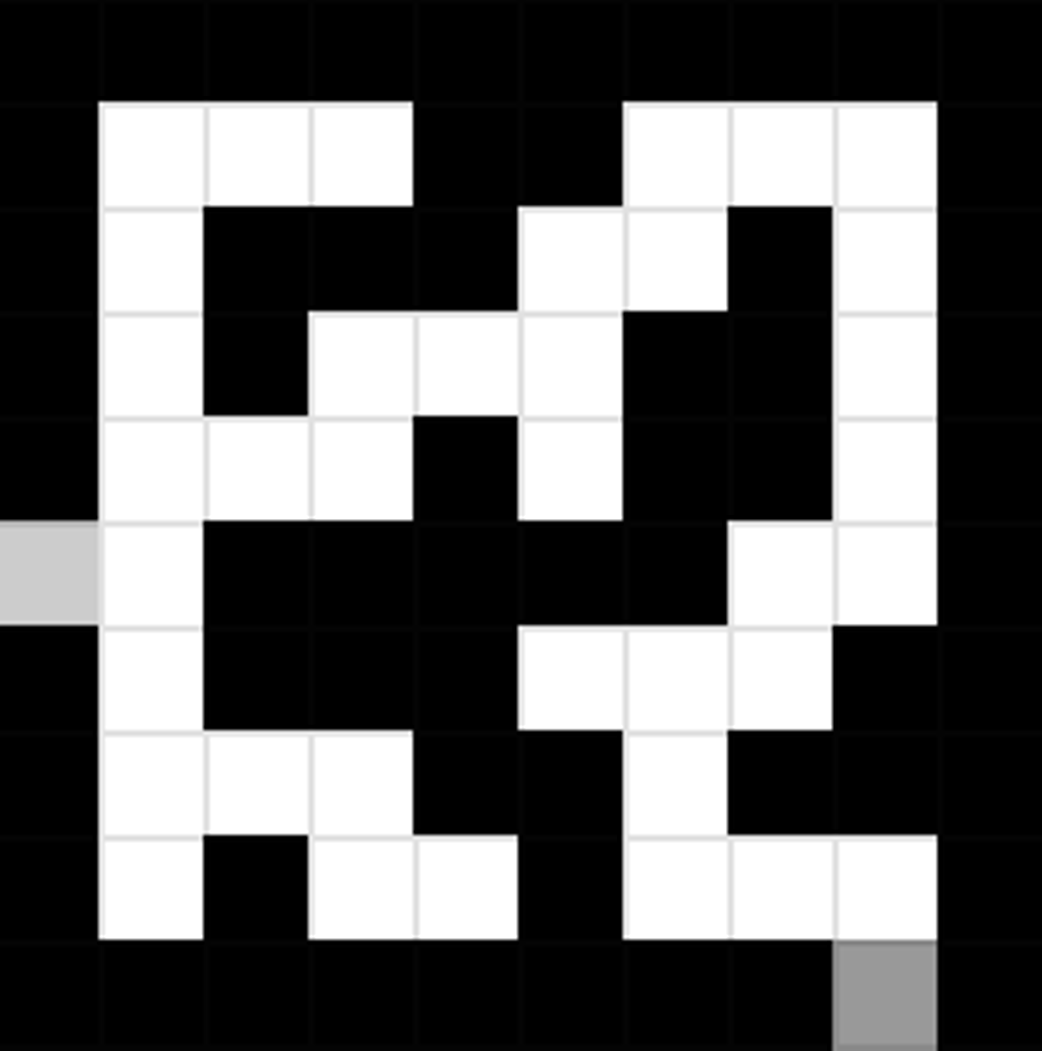
Example of a maze with a treasure inside
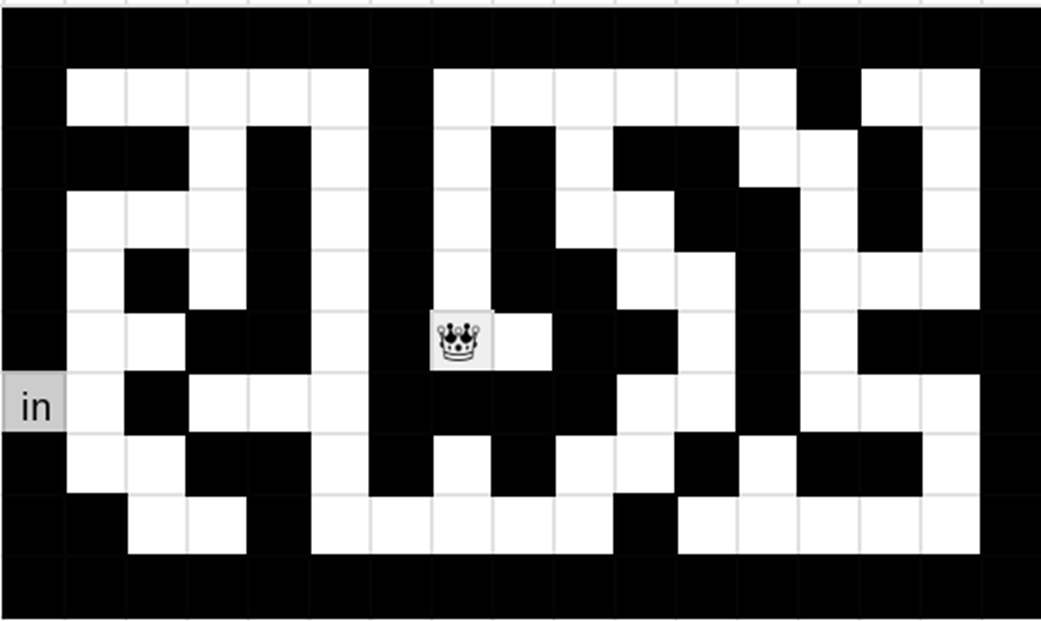
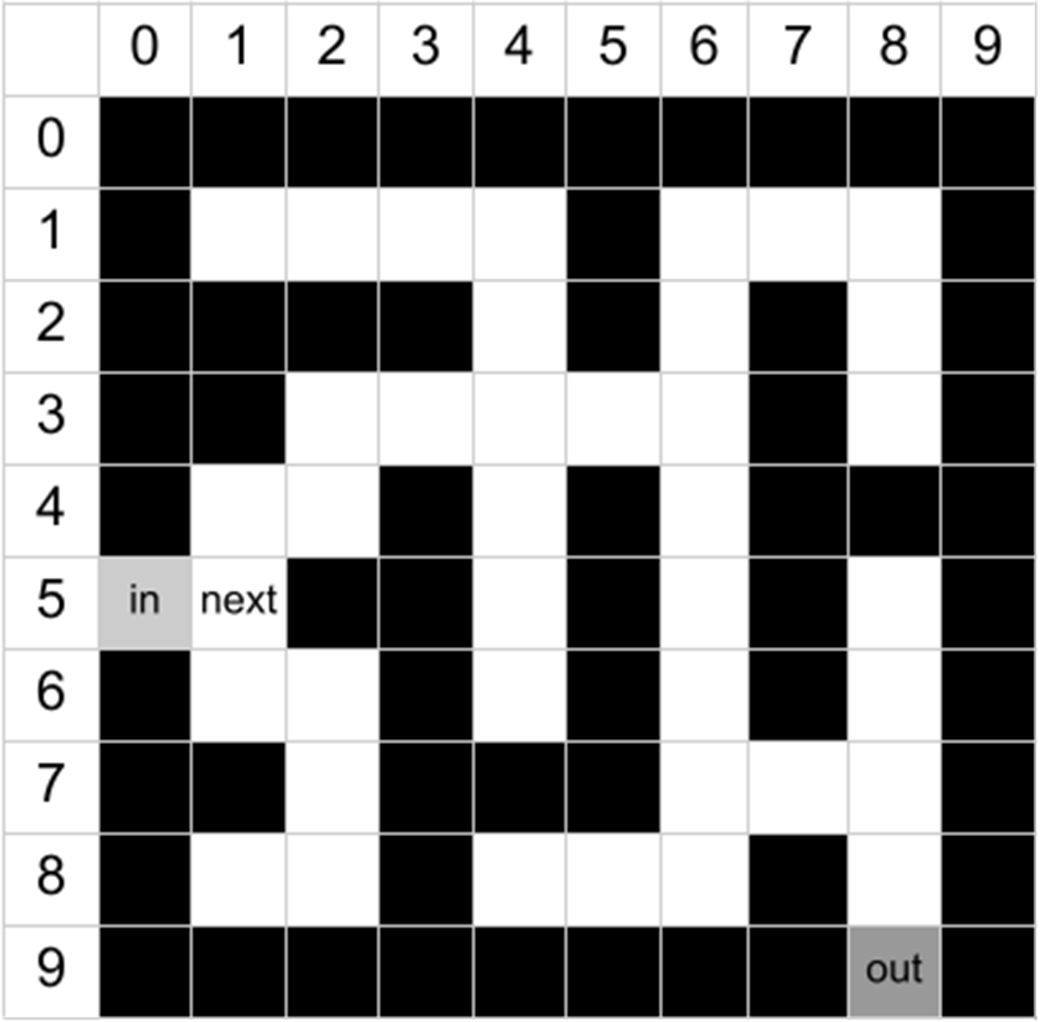
Maze with entrance and next pixel
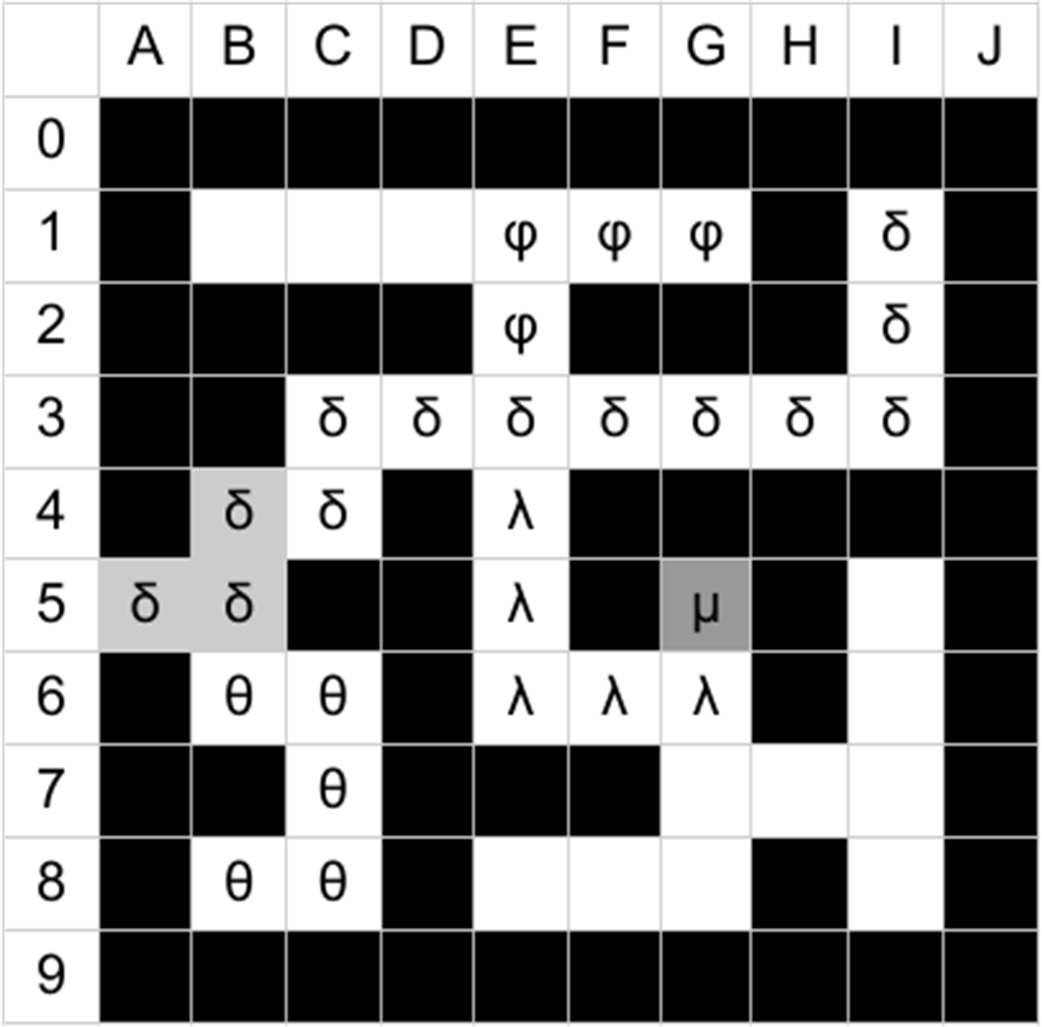
exploration by different goroutines
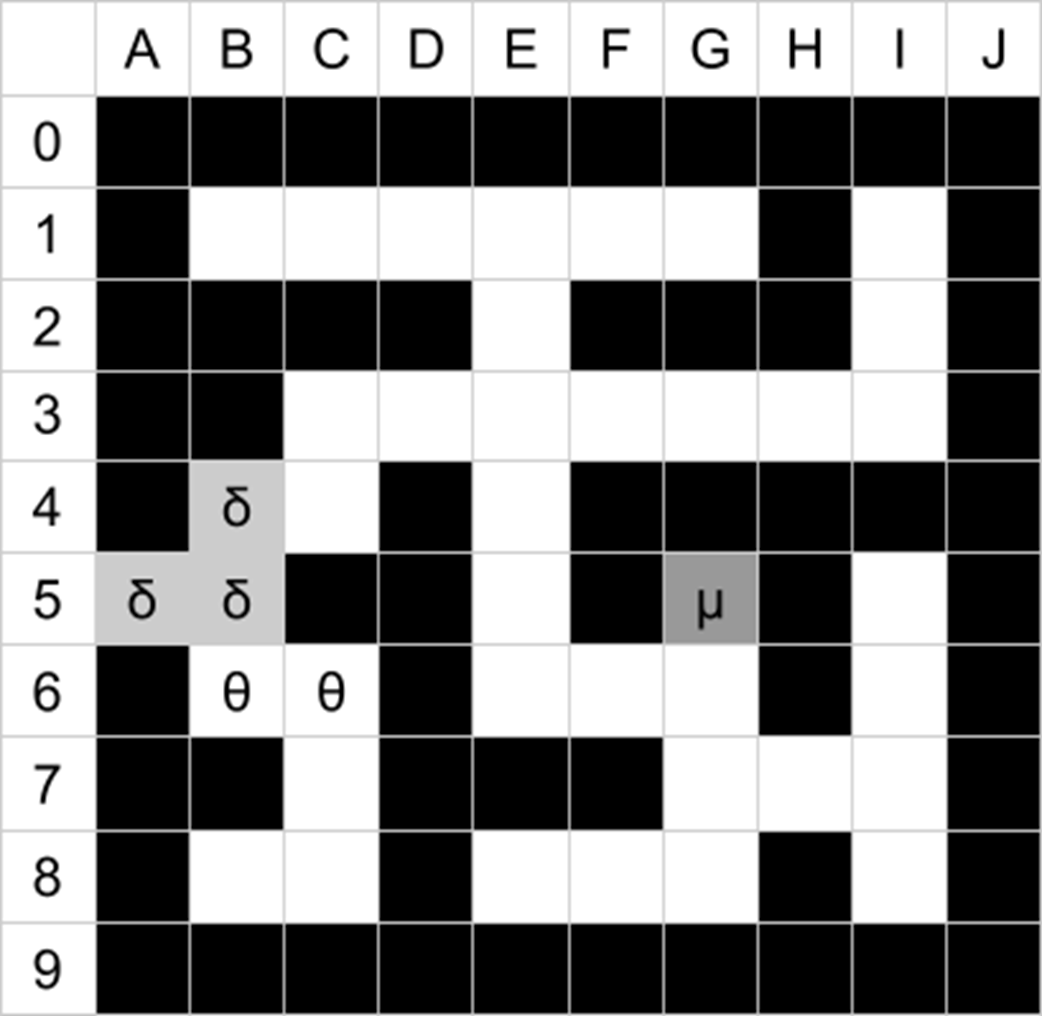
Exploration representing a possible sequence of events
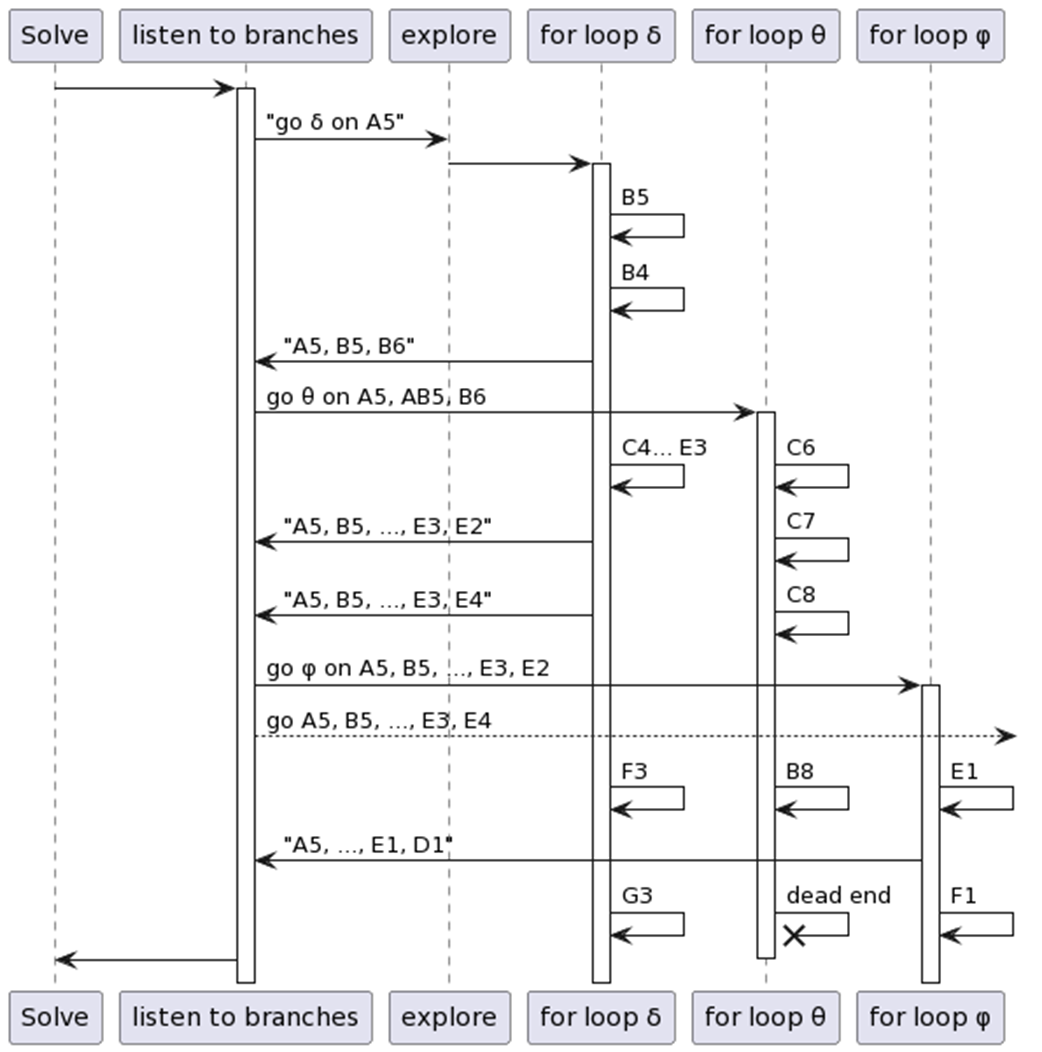
The sequence of events in Solve
A few cases of mazes

Example of a resolved maze 50px-wide

Example of a maze with a pillar

Example of a maze solved with the explored pixels coloured

Summary
- In computer science, the main type of two-dimensional images are raster images and vector images. Vector images are used in fonts and logos, in infographics, or in icons. Vector images are very scalable - you can zoom in and not see any artefacts.
- The other half of the images we use are raster images - two-dimensional grids of pixels. Each pixel of an image has a colour which can be expressed in the RGBA colour model (but it might be encoded in another colour model, such as the YCbCr, for JPEG images). The value of the colour can be used to encore either a physical information, such as the amount of light of red, green, and blue frequencies that is emitted by an object (as in the picture of a flower), any numerical information, such as the density of population, or finally a palette can be used to represent areas of same category, such as in a map, where each country has its own colour.
- The image/png package is used to Decode a file into an image.Image. This Image will frequently be type asserted to a RGBA or NRGBA. To encode an image, use the Encode function from the package you wish to encode your image - available options are gif, jpeg, and png. Other formats require third-party libraries.
- Images usually have their pixel at position (0, 0) in the upper-left. However, some images might have (0, 0) in any other corner. It all depends on the image format and the image’s metadata. Use what the image package returns to iterate over the pixels of an image.
- You can access a pixel’s value in an image.Image with the .At() method. This returns a color.Color() that you have to convert to color.RGBA. When using an image.RGBA, you can use RGBAAt() instead, which will return a color.RGBA that can then be compared to known values.
- In order to write a pixel to an image.RGBA, use the Set(x, y, rgba) method.
- When scanning a whole image, use two nested loops, the outermost one iterating over the rows, and the innermost one iterating over the columns. This is beneficial, performance-wise, for all “scanline” formats.
- When you can’t have global constants, it’s slightly cleaner to have a function that returns configuration values rather than using global variables. Avoid exposing global variables for safety reasons: other pieces of code might change them.
- Writing to an unbuffered channel that isn’t read from is blocking. Either write to it in a goroutine, or use a buffered channel, whose size should be the maximum number of elements that will be written there before the reading starts.
- When starting goroutines in loops, make sure your loop variables are protected. The loop variables can be the messages you read from a channel, the keys or values of a map you iterate through, or the elements of a slice.
- There are three common ways of protecting iterators of a for-loop when a goroutine is launched inside the loop:
- you can either use a version of Go that guarantees that (currently, it’s considered for Go 1.22)
- you can shadow the loop variable with another one in your loop (usually, we give the new variable the same name as the loop variable)
- finally you can launch your goroutine with an anonymous function that takes the loop variable as a parameter.
- The select keyword allows a piece of code to listen to several channels. Whenever a message is published in any of the channels, the code written in the case statement will be executed.
- If several case statements in a select are eligible, Go will pick a random one.
- It is common to have one of the case statements of a select be a return condition. This is especially true in servers, where the processing of an input request should be ended as soon as the request is cancelled.
- The for-select “infinite loop of listening” pattern is very common. Usually, one of the cases of the select block will contain the condition to exit the loop.

 Learn Go with Pocket-Sized Projects ebook for free
