12 Go for other architectures
This chapter explores how to take Go beyond your local machine by targeting constrained environments such as web browsers and microcontrollers. It introduces two complementary paths: compiling Go to WebAssembly (WASM) to run in the browser with near‑native performance, and using TinyGo to produce very small binaries for embedded and IoT devices. Along the way, it explains cross‑compilation basics, trade‑offs in resource‑limited contexts, and the differing runtime expectations when your code executes inside a browser or on a tiny board.
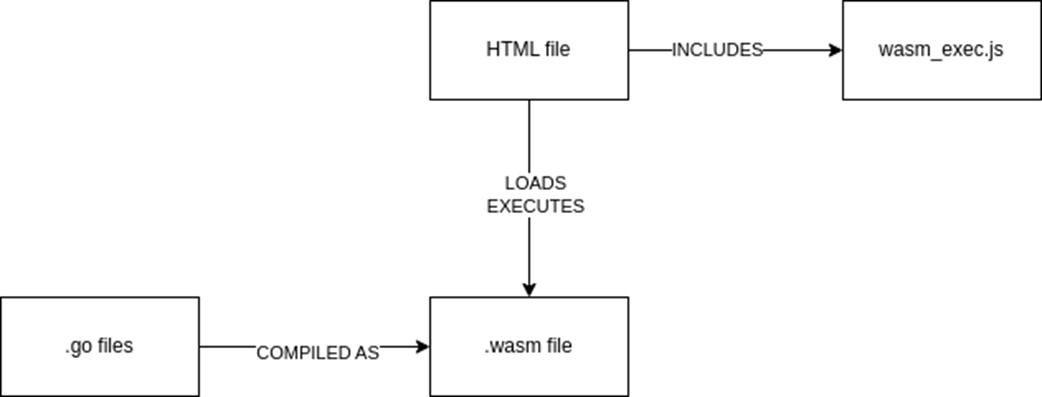
On the web side, the chapter walks through compiling a simple Go program to WASM, wiring it to the browser using the standard JavaScript support file, and loading it from an HTML page. It highlights practical concerns—stdout goes to the browser console, CORS issues are avoided by serving over HTTP, and shipping a .wasm artifact has security implications. You then build a small multiplication quiz to learn how to manipulate the DOM from Go with the syscall/js package, register Go functions callable from JavaScript, keep the program alive to handle events, and organize assets using a lightweight file server and embedded resources. The result is a clear pattern for integrating Go, JavaScript, and HTML to create interactive browser apps compiled to WASM.
On the embedded side, the chapter introduces TinyGo, a Go compiler tailored for small executables that trades some language and standard library features for size and portability. You learn how TinyGo leverages LLVM and alternative implementations of packages like runtime and reflect, how board targets and build tags select the right hardware definitions, and how the machine package exposes pins and peripherals. Through hands‑on examples—blinking an onboard LED, implementing traffic lights with external LEDs, and adding a pedestrian button with appropriate input modes—you practice configuring pins, structuring state, and using goroutines judiciously. It closes with debugging options (prints, debuggers, probes) and a simple “flash” workflow to deploy your TinyGo program to real hardware.
From Go code to WASM executed by JavaScript
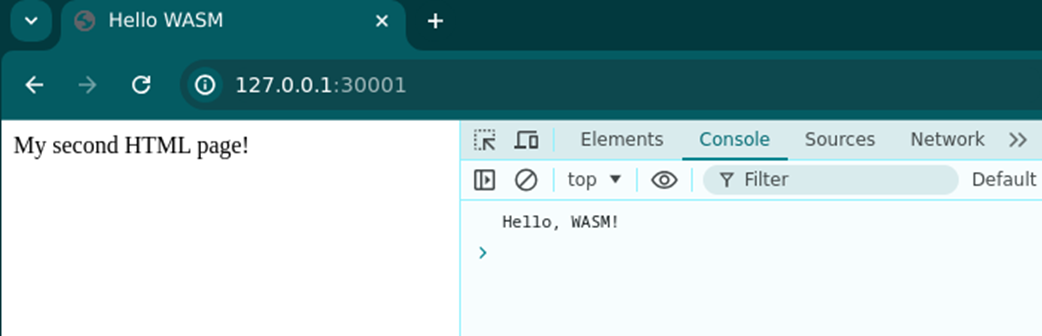
The Console page what the WASM sends to stdout
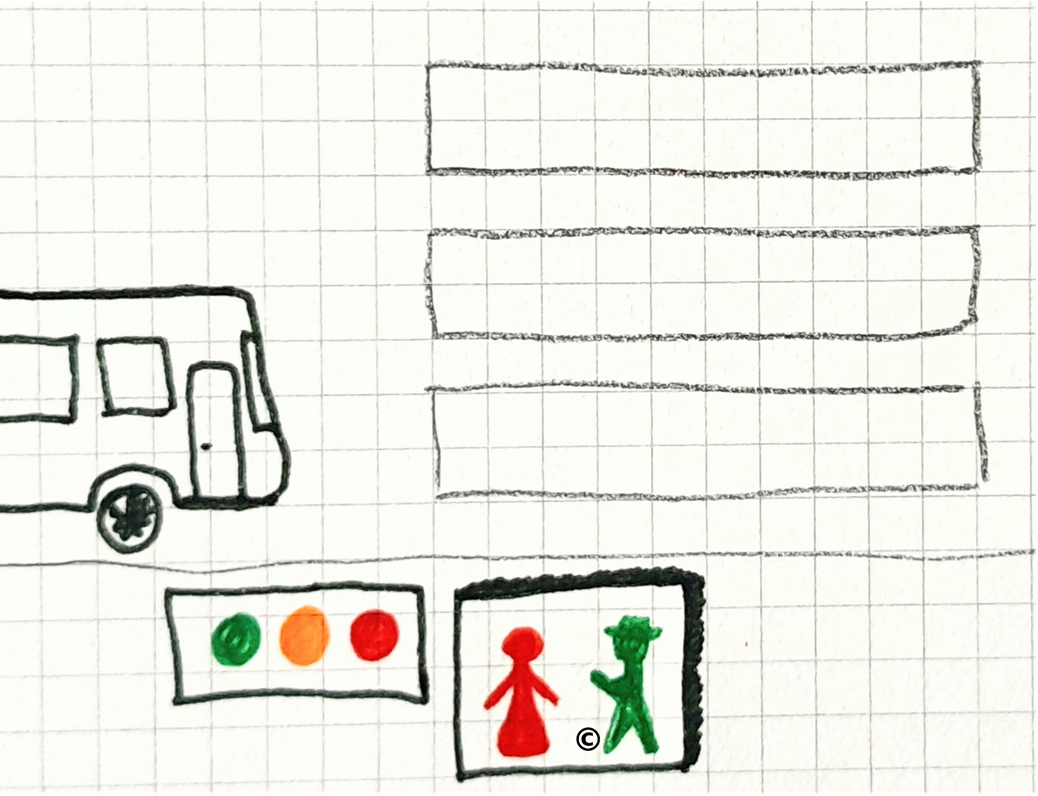
Traffic lights for cars and pedestrians, consisting of 3 possible lights (red, amber, green) for cars, and two (red, green) for pedestrians. A similar implementation is on the other side of the road. [1]
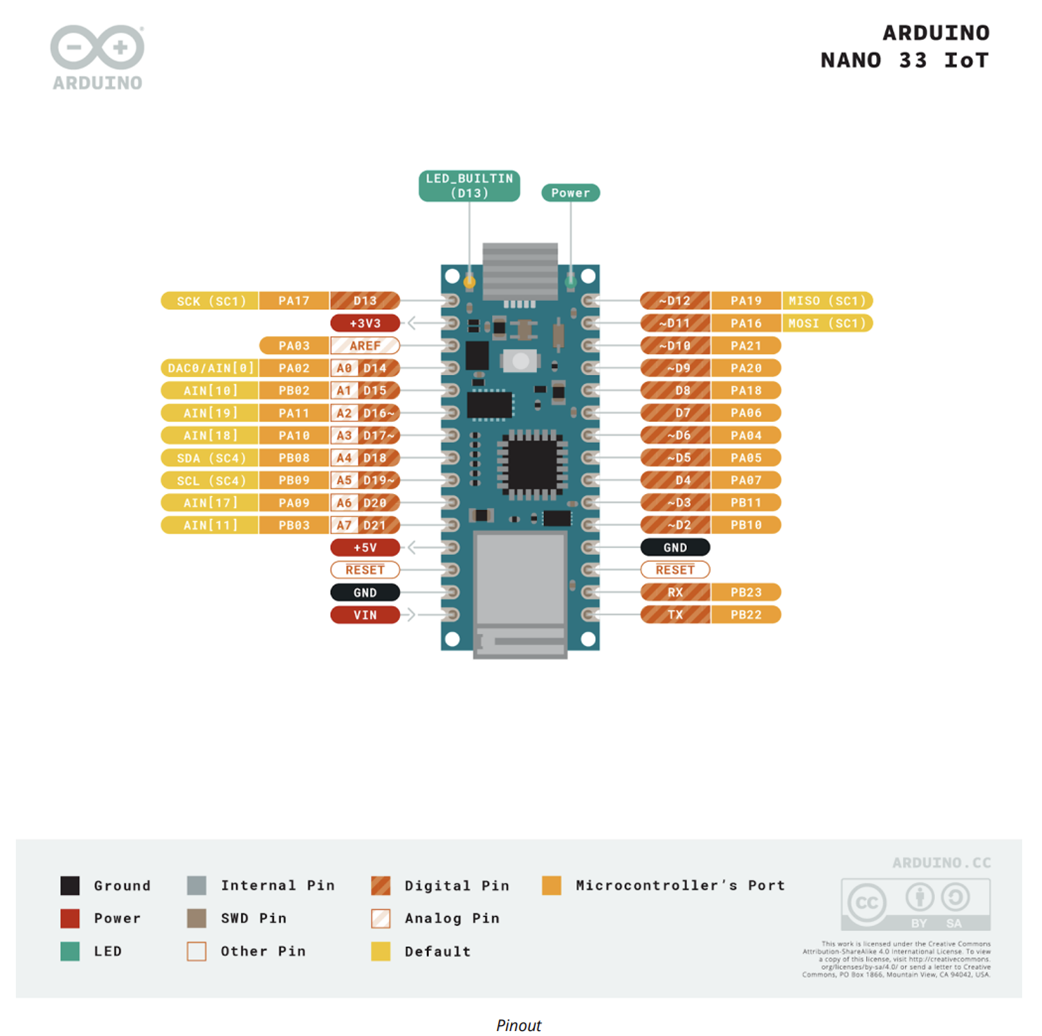
Schema of the Arduino Nano 33 IoT’s Pinouts extracted from the datasheet[2]
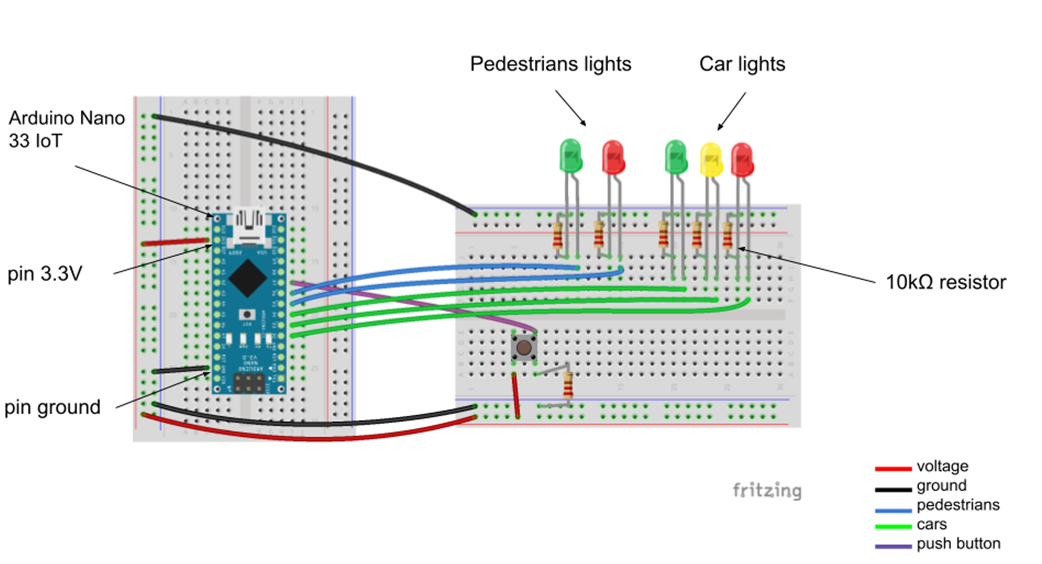
Electrical schema of the traffic lights for cars and pedestrians
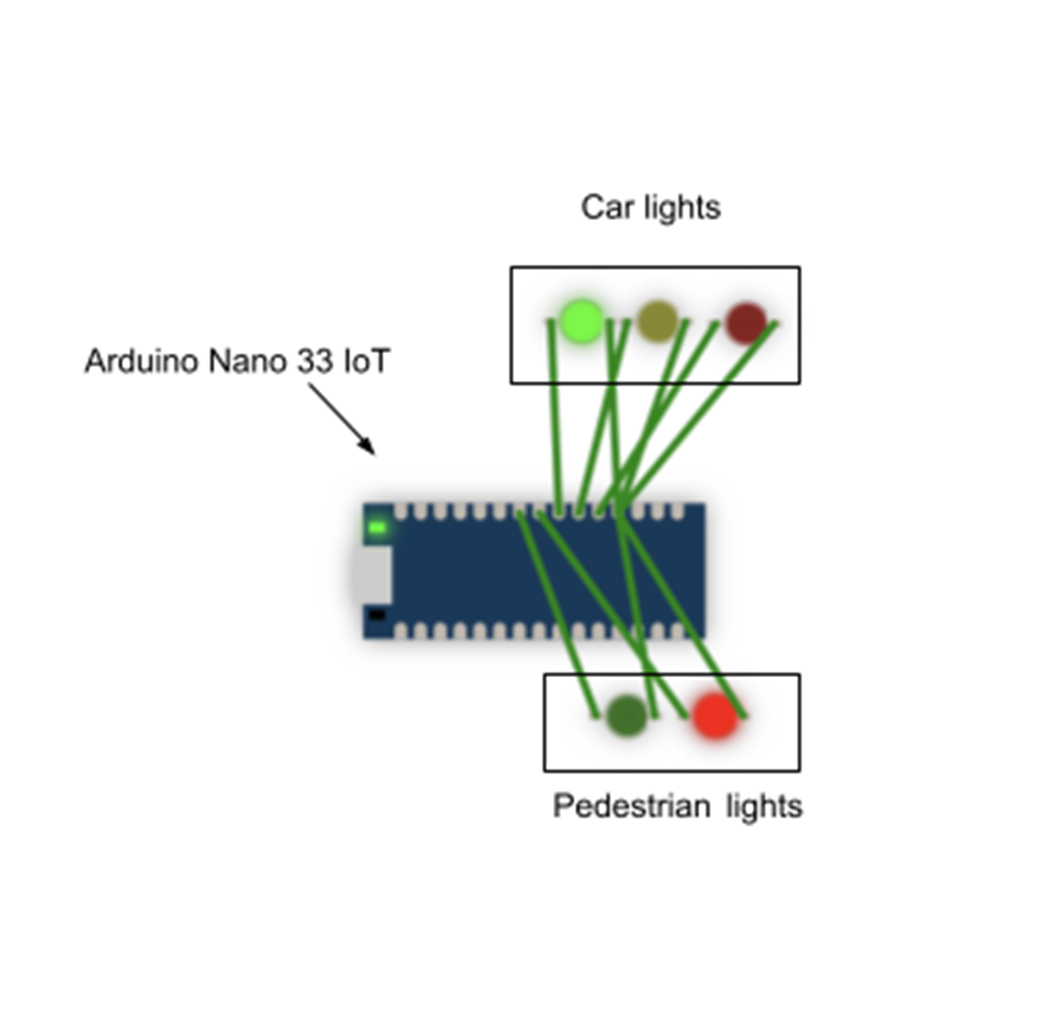
Electrical schema from TinyGo playground using an Arduino Nano 33 IoT.
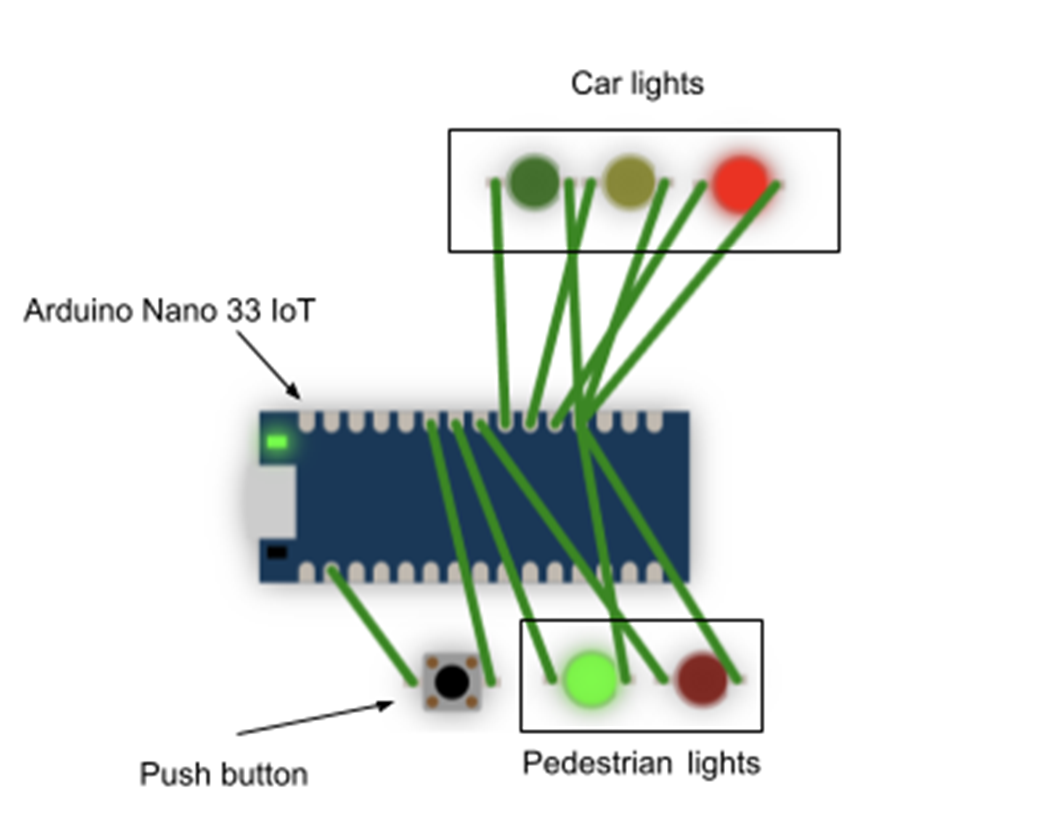
Electrical schema from TinyGo playground with the push button
Summary
- WASM is assembly for web: compiled code that can run in a browser.
- Go can compile code to a webassembly executable.
- Load the WebAssembly executable in an HTML page using the JavaScript
- Register Go functions for JavaScript using the js package.
- Use the js package to interact with the DOM.
- TinyGo is a Go compiler that produces small executables. It is source-compatible with Go, allowing you to write Go code and compile it with TinyGo without making changes to the code.
- TinyGo has a specific library called machine which exposes pins mappings for the supported microcontrollers.
- TinyGo has fewer standard libraries implemented than Go and some are quite different in their behaviour (runtime, reflect).
- LEDs are a binary output, and should be connected to GPIO pins. Usually, “digital” pins serve this purpose, rather than “analog” pins (used for input).
- Input should be connected to a digital pin if it’s binary (on/off, 0/1), and to an analogue pin if it measures a “continuous” data like a temperature sensor.
- Always refer to the datasheet of a component before plugging it.
- You have several methods to debug with TinyGo but it provides its own debugger based on GDB (Gnu Debugger).
- Build tags, or build constraints, are comments that are written at the beginning of a file. They have to follow the syntax of //go:build {tag}
- A build tag can require the absence of a tag, by negating it: //go:build !windows
- Several build tags can be used at the same time - in this case, we use boolean operators to specify which tags should be present or absent: //go:build (darwin || dragonfly || freebsd || (linux && !android) || netbsd || openbsd) && cgo
- To compile or run a program using the build tags, the command line should include these values in the -tags parameter: go build -tags=amd64 main.go
- Linking flags can be passed while building or running. They can help reduce the size of the generated executable: go build -ldflags "-w -s" main.go. Using them comes at the expense of losing some debug information in case something goes terribly wrong.
FAQ
What is WebAssembly (WASM) and why use it with Go?
WASM is a low-level, language-agnostic bytecode that runs in a browser (or other runtimes) at near-native speed. With Go, you compile your code to WASM and run it inside a JavaScript host, gaining performance and portability while writing in Go instead of JavaScript.How do I compile and run a minimal Go program as WASM in the browser?
Compile withGOOS=js GOARCH=wasm go build -o main.wasm, copy wasm_exec.js from your GOROOT (misc/wasm or lib/wasm), then load both in an index.html. Use JavaScript to create new Go() and WebAssembly.instantiateStreaming(fetch("main.wasm"), go.importObject), then go.run(...). Note: fmt.Println writes to the browser console, not the page.Why do I get CORS errors when opening the HTML file directly, and how do I avoid them?
Loading.wasm via file:// often triggers CORS in many browsers. Serve files over HTTP instead (for example, a tiny Go server using http.FileServer, optionally with //go:embed). Access via http://127.0.0.1:PORT to avoid browser and firewall issues.How can my Go (WASM) code interact with the HTML page (DOM)?
Usesyscall/js. Example: doc := js.Global().Get("document"), then doc.Call("getElementById","operand1").Set("innerHTML", value). To expose callbacks, register them with js.Global().Set("generate", js.FuncOf(fn)), and keep your program alive (e.g., <-make(chan struct{})) so functions remain callable.What are best practices for exposing Go functions to JavaScript?
- Prefer namespacing over polluting the global scope (e.g., create an object and attach methods to it). - Ensure function signatures matchjs.FuncOf(func(this js.Value, args []js.Value) any). - Release functions you no longer need with .Release() to avoid leaks. - Don’t embed secrets: WASM modules are downloadable and inspectable by users.How do I read user input and provide feedback from Go in a WASM app?
You can read DOM values directly (e.g.,document.getElementById("providedAnswer").value via syscall/js) or pass values as arguments from JS to your registered Go function. Parse with strconv.Atoi, handle errors (e.g., show alert), and update the DOM (e.g., clear the input by setting its value to "").What is TinyGo and how does it differ from the standard Go toolchain?
TinyGo is a Go compiler optimized for small targets (microcontrollers, WASM). It’s largely source-compatible but ships a smaller standard library, uses LLVM for aggressive size optimizations, and has a lighter runtime/GC. Some features (e.g., parts of networking/crypto/reflect) are limited or differ from standard Go.How do I access hardware pins and blink an LED with TinyGo?
Use themachine package. Configure a pin as output (e.g., machine.LED.Configure(machine.PinConfig{Mode: machine.PinOutput})) and toggle with High()/Low(), adding delays with time.Sleep. Test in the TinyGo Playground or flash real hardware.What are build tags and TinyGo targets, and why do they matter?
Build tags (//go:build ...) select files per platform/board. TinyGo “targets” (e.g., --target=arduino-nano33) automatically supply the right build tags and flashing commands based on a board’s JSON descriptor, so you don’t have to pass multiple tags manually.How do I handle inputs (buttons) and coordinate traffic lights on a microcontroller?
Configure outputs (LEDs) withPinOutput and inputs (buttons) with appropriate modes (e.g., PinInputPullup/PinInputPulldown). Poll the button (or use interrupts where supported) and signal your main loop via a channel to switch states. Be mindful of memory—goroutines add overhead on devices with very limited RAM.
 Learn Go with Pocket-Sized Projects ebook for free
