10 Habits Tracker using gRPC
This chapter builds a small but complete habits-tracking backend in Go and uses it to illustrate gRPC in practice. Starting from the motivation to counterbalance screen time with healthier routines, it defines clear functional goals—create, list, tick, and query status of habits—and simple technical constraints—gRPC with Protocol Buffers, local execution, and an in-memory data store. The approach is API-first: design Protobuf messages and service methods, generate Go code, and evolve the service iteratively while emphasizing maintainability, version-compatibility, and clarity.
You learn to declare Protobuf entities and services, generate Go types and stubs with protoc and its Go plugins, and wire a gRPC server that registers the generated interface. The implementation adopts clean boundaries: Protobuf DTOs are kept out of the business domain, which defines its own types, validation, and typed errors that the API layer converts into gRPC status codes. An in-memory repository provides quick persistence via dependency injection, and the chapter demonstrates thorough testing: unit tests (including mocks generated with a tool), manual checks with a command-line client, and end-to-end integration tests that spin up the real server and use a real client.
Advanced concerns focus on correctness, resilience, and extensibility. The code incorporates context for deadlines and cancellation, adds deterministic outputs for predictable testing, and expands the API beyond creation and listing to support ticking habits and retrieving weekly status. Ticks are stored per ISO week for precise aggregation, requests can carry timestamps, and corner cases like “not found” map to precise gRPC error codes. By the end, you have a well-structured, testable Go service that showcases gRPC fundamentals, disciplined layering, and practical patterns you can reuse and extend.
Architectural diagram with domain and connectors
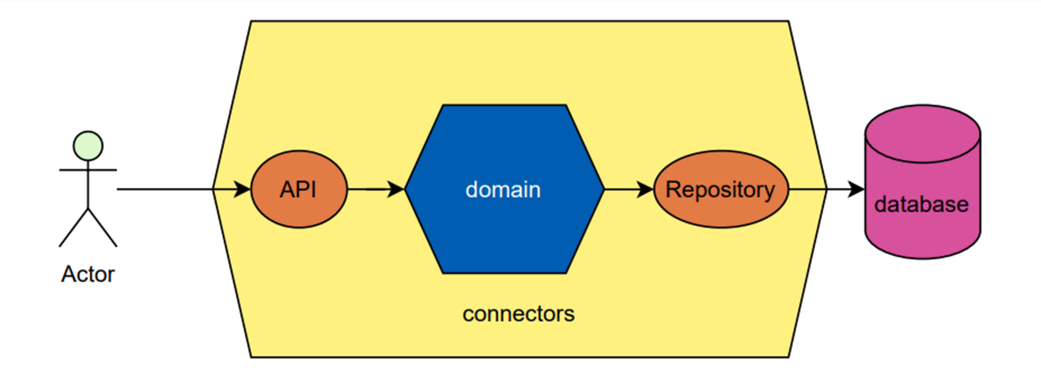
Summary
- The go generate command is a Go tool that gives the possibility to generate programs from the source code. The compiler will scan comments with the specific syntax //go:generate and will execute the following commands.
- gRPC, standing for Google Remote Procedure Call, is a framework to connect services, devices, applications and more. It is a powerful and efficient framework for transporting light-weight messages in Protobuf format.
- Protobuf, short for Protocol Buffers, provides serialisation for structured data while guaranteeing high performance. It comes with its own syntax composed of Protocol Buffer messages and services written in .proto files.
- Protobuf messages are language-neutral, thanks to the Protobuf compiler (protoc), you can generate interfaces and structures in many programming languages (Go, Java, C++ and more).
- gRPC clients and servers communications are standardised thanks to status codes defined by the RPC API. A status is composed of an integer code and a string message. While designing the API, you should pick the most appropriate return code for your use case and you can always refer to the documentation (https://grpc.github.io/grpc/core/md_doc_statuscodes.html).
- grpcurl is an open-source CLI tool that enables you to communicate with gRPC servers easily. It is basically like curl but for gRPC. Human-friendly, it allows you to define JSON requests instead of unreadable bytes. It is very handy when you need to test services manually.
- Declare small interfaces close to their use. It comes in handy when testing to mock your dependencies instead of counting on hardcoded behaviours.
- Dependency injection is a technique to give all the needed objects to a function instead of creating or building them internally. Note that it comes in very handy to mock the dependencies when testing the function.
- While testing, there are different ways of simulating dependency behaviours, mock tools are handy for describing expected results. The main well-known mock tools are mockgen coming with Go, mockify and minimock, which we used during the chapter.
- context is a standard library which provides the Context type and its associated methods to carry information along requests and responses. For example, when a user sends a request, you can store its identity in the context and retrieve it later in the chain of functions. It is safe to use methods like WithCancel or WithDeadline across multiple goroutines.
- A program should create only one context and provide it to its functions. Most of the time, the context will be coming from an external caller. Creating children for a context is perfectly fine and encouraged.
- Always pass a context.Context as the first parameter of a function, even if you are not using it (you can use the blank identifier in this rare case).
- A context will be necessary any time we make a remote call across the network, whichever protocol or framework is being used. Setting a deadline for the remote call is a good safety net - otherwise, your application calls might be hanging forever.
- To check if a context has expired, try reading from <- ctx.Done(). This will return something when the context is no longer usable. To know why a context is over, check its error with ctx.Err(), or, better, with context.Cause(ctx).
- Don’t use a context.Context as a key-value storage inside an application.
- Mocking functions that use a context is sometimes tricky, especially if the function being tested creates a context of its own. To solve this, many libraries offering mocks expose a variable that can be used as a wildcard for the context.
- Generated mocks are programmed to behave as specified. If they receive a call for a precise set of parameters, they will return the specified values. However, it is sometimes necessary to override this default behaviour of always returning something, especially when testing the behaviour when a deadline is reached.
- Using testing.Short() allows us to know if the -short flag was passed on the go test command line. Long or expensive tests should be skipped altogether when this flag is set, by using t.Skip().
- Dealing with “current time” is tricky: asking “what time is it ?” at the same time would provide different results based on the time zone of the person being asked. As a result, we recommend checking for “current time” on the server side, rather than expecting the client to provide that value.
FAQ
What does the Habits Tracker gRPC service do in this chapter?
The service lets users create habits, list all habits, tick a habit when it’s done, and fetch a habit’s weekly status. Functional requirements include Create/Delete, List, Tick, and Get status; technical choices include using gRPC with Protocol Buffers, running locally, and starting with an in-memory repository.Why define dedicated Request/Response messages for each RPC, even when they seem empty?
Using per-endpoint Request and Response messages preserves backward and forward compatibility. Adding fields later (for example, a user token or returned ID) won’t break existing clients, while direct signatures like CreateHabit(Habit) would.How should I declare the Protobuf files and field numbers?
Start with proto3, set a package, and specify go_package for Go code generation. Each message field must have a unique, stable number (never reuse or reorder them). Example: syntax "proto3"; package "habits"; option go_package "learngo-pockets/habits/api"; then define messages like Habit with numbered fields.How do I generate Go and gRPC code from .proto files?
Install protoc plus the Go plugins (protoc-gen-go and protoc-gen-go-grpc). Then compile with include paths, language outputs, and source-relative paths, for example:protoc -I=api/proto/ \ --go_out=api/ --go_opt=paths=source_relative \ --go-grpc_out=api/ --go-grpc_opt=paths=source_relative \ api/proto/*.protoThis produces types (pb.go) and service stubs (grpc.pb.go) in api/.
Why do I need to embed UnimplementedHabitsServer in my server type?
The generated gRPC code enforces forward compatibility: adding methods later shouldn’t break existing servers. Embedding api.UnimplementedHabitsServer satisfies hidden interface requirements. Alternatively, you can set --go-grpc_opt=require_unimplemented_servers=false, but embedding is recommended.Should I reuse generated Protobuf types in my domain/business code?
No. Keep transport DTOs (generated Protobuf types) separate from domain models so the domain stays protocol-agnostic. Map request DTOs to domain entities, run domain logic, then map back to response DTOs. This simplifies evolution (adding JSON, other protocols) and testing.How do I handle errors and map them to gRPC status codes?
Return status errors from the API layer using google.golang.org/grpc/status and codes. For validation failures, have the domain return a typed error (e.g., InvalidInputError) and map it to codes.InvalidArgument. Use codes.Internal for unexpected errors. Always return either nil or a status error.How do I run the server and test endpoints manually with grpcurl?
Start the server, then use grpcurl with the service proto and import path. Format: {package}.{service}/{method}. Example:grpcurl \
-import-path api/proto/ -proto service.proto \
-plaintext -d '{"name":"clean the kitchen"}' \
localhost:28710 habits.Habits/CreateHabit
Avoid enabling server reflection in production; pass the .proto files to grpcurl instead.
 Learn Go with Pocket-Sized Projects ebook for free
