2 Deep Learning with PyTorch
This chapter provides a practical refresher on deep learning with PyTorch, focusing on the core pieces you’ll use throughout generative AI projects. It revisits essential concepts—loss functions, activation functions, optimizers, and learning rates—while grounding them in hands-on workflows for classification problems. A central theme is turning diverse raw data into model-ready tensors and using validation to decide when to stop training, all in service of building reliable foundations for later generative models.
The chapter starts by making you fluent with PyTorch tensors: creating them from Python lists or NumPy arrays, choosing data types, and generating common tensors of zeros or ones. It emphasizes shapes, indexing, slicing, reshaping, concatenation, and device placement, along with key tensor math (mean, median, min/max with dimension control). A running example using presidential heights illustrates dtype trade-offs, unit conversion, shape manipulation, and aggregation—reinforcing how correctness in data representation and operations directly impacts model training and evaluation.
With the basics in place, the chapter guides you through an end-to-end image classification project using Fashion MNIST. You preprocess images with Torchvision transforms (converting to tensors and normalizing), batch data with DataLoader, and build dense neural networks via nn.Sequential. For binary classification (t-shirt vs. ankle boot), you use ReLU in hidden layers, a sigmoid output, binary cross-entropy loss, and the Adam optimizer with a 0.001 learning rate, converting probabilities to labels with a 0.5 threshold and achieving around 88% accuracy. For multi-category classification, you expand to 10 outputs with softmax and cross-entropy loss, introduce a validation split and early stopping (patience-based) to curb overfitting, and evaluate predictions via argmax, reaching roughly 76% test accuracy. Collectively, these steps establish a repeatable PyTorch workflow that prepares you for building generative models in subsequent chapters.
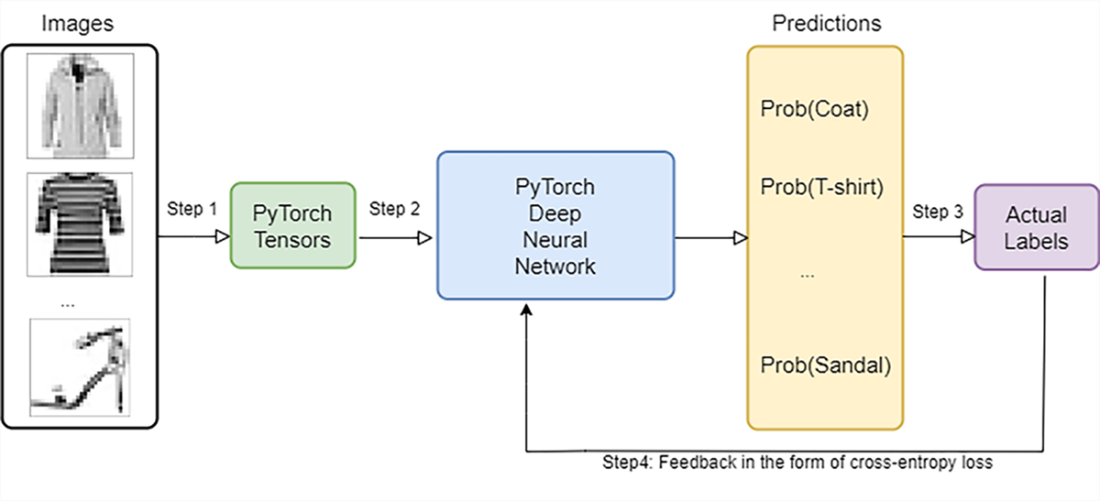
A diagram of steps involved in training a deep learning model.
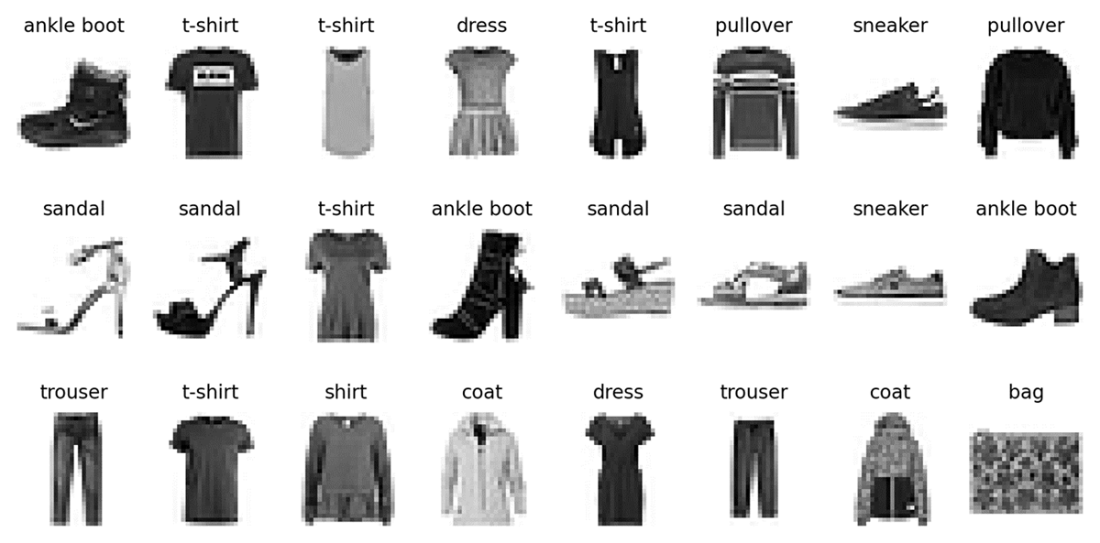
Grayscale images of clothes items in the Fashion MNIST dataset.
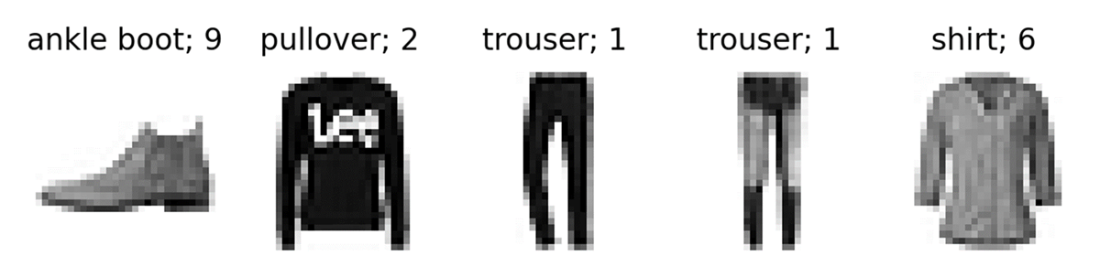
The first five clothing items in the test dataset and their respective labels. Each clothing item has a text label and a numerical label between 0 and 9.
Summary
- In PyTorch, we use tensors to hold various forms of input data so we can feed them to deep learning models.
- You can index and slice PyTorch tensors, reshape them, and conduct mathematical operations on them.
- Deep learning is a type of machine learning method that uses deep artificial neural networks to learn the relation between input and output data.
- Activation functions decide whether a neuron should be turned on or not based on the weighted sum. They introduce nonlinearity to the output of a neuron.
- Loss functions measure how well a machine learning model performs. The training of a model involves adjusting parameters to minimize the loss function.
- Binary classification is a machine learning model to classify observations into one of two categories.
- Multi-category classification is a machine learning model to classify observations into one of multiple categories.
FAQ
What are PyTorch tensors, and how are they different from NumPy arrays?
Tensors are multidimensional arrays used by PyTorch to represent data and model parameters. Unlike NumPy arrays, tensors: - Can run on GPUs for accelerated computation - Integrate with PyTorch’s autograd to track gradients for backpropagation - Carry an explicit dtype and device (CPU/GPU), which you can set and move betweenHow do I create a tensor with a specific data type (dtype), and when should I use float32 vs float64?
You can set dtype either by: - Calling constructors liketorch.IntTensor([...]), or
- Using torch.tensor([...], dtype=torch.int32)
The default is float32. Use float32 for speed and typical deep learning training; use float64 when you need higher numerical precision and can afford extra compute.
How do I create tensors filled with zeros or ones, and control their shape?
Use: -torch.zeros(d0, d1, ...) for zeros
- torch.ones(d0, d1, ...) for ones
The arguments define the tensor’s shape, e.g., torch.zeros(2, 3) creates a 2×3 tensor; torch.ones(1, 4, 5) creates a 1×4×5 tensor.
How do I index and slice tensors (including negative indices and multi-dimensional indexing)?
- Single index:x[2] gets the 3rd element; x[-2] counts from the end.
- Slicing: x[-5:] gets the last 5 elements.
- Multi-dim: use one index per dimension, e.g., x[1, -2] for row 2, column second-from-last.
How do I inspect and change tensor shapes, and why is reshaping important?
- Inspect withx.shape
- Change with x.reshape(new_dims)
- Concatenate with torch.cat([a, b], dim=...)
Reshaping is needed to match layer expectations (e.g., flatten 28×28 images to 784 for dense layers).
Which basic tensor math operations are useful, and how does the dim argument work?
Common ops: -torch.mean(x, dim=...), torch.median, torch.sum, torch.max, torch.min
- For max/min with dim=..., PyTorch returns both values and indices along that dimension.
- dim specifies which axis to reduce; results are aggregated along that axis.
How should I preprocess images with Torchvision for deep learning?
Usetorchvision.transforms:
- T.ToTensor() converts images to float tensors in [0, 1]
- T.Normalize([0.5], [0.5]) scales values to [-1, 1] for 1-channel grayscale
- Chain with T.Compose([...])
Normalize inputs for more stable and faster training.
What is a DataLoader, and why do we batch and shuffle data?
torch.utils.data.DataLoader creates iterable batches:
- Batching (batch_size) improves efficiency and stabilizes gradient estimates
- Shuffling mixes labels and reduces correlation in the input order, improving training stability and generalization
How do binary and multi-class classification models differ in PyTorch (architecture, activation, and loss)?
- Output units: binary uses 1; multi-class uses 10 (for Fashion-MNIST) - Output activation: binary usesSigmoid; multi-class uses Softmax(dim=1)
- Loss: binary uses nn.BCELoss(); multi-class uses nn.CrossEntropyLoss()
- Predictions: binary threshold at 0.5 (e.g., torch.where(p>0.5,1,0)); multi-class pick torch.argmax over class probabilities.
How do I structure a PyTorch training loop and decide when to stop training?
Typical loop: - Forward pass:preds = model(x)
- Compute loss: loss = loss_fn(preds, y)
- Zero grads: optimizer.zero_grad()
- Backprop: loss.backward()
- Update: optimizer.step()
Use a validation set each epoch; implement early stopping (e.g., a patience counter) to stop when validation loss stops improving. Set device to GPU if available with device = "cuda" if torch.cuda.is_available() else "cpu", and optionally fix randomness via torch.manual_seed(...) for reproducibility.
 Learn Generative AI with PyTorch ebook for free
