Overview

9 Adding observability with containerized monitoring

Modern containerized applications can scale and self-heal, but they still require human oversight through robust monitoring and alerting. This chapter explains how observability provides the needed insight into application behavior and performance, emphasizing a standard, container-friendly approach using Prometheus for metrics collection and Grafana for visualization. Because both tools run in containers and work across platforms, teams can achieve consistent, environment-agnostic visibility from development through production, even tapping into Docker Engine metrics to understand infrastructure health.

The chapter outlines a practical path to instrumenting applications: expose a metrics endpoint per container and have Prometheus scrape them on a schedule. It distinguishes three complementary layers of telemetry—infra-level (for Docker and the host), runtime-level (language/runtime specifics such as JVM memory or Go goroutines), and application-level (custom counters and gauges that reflect operations or business events). Prometheus’s pull model, service discovery, and metric labels make it well suited to dynamic, scaled workloads; simple PromQL queries (filtering, summing, grouping) let you analyze per-container data or aggregate it system-wide without complex configuration.

With metrics in Prometheus, Grafana turns queries into clear, actionable dashboards aligned to the “golden signals” of latency, traffic, errors, and saturation. The chapter demonstrates assembling panels that track usage, resource consumption, and error trends, focusing on patterns and anomalies over raw values. It also shows how to package Prometheus and Grafana with predefined configuration and dashboards into Docker images, making observability portable and repeatable. The result is a layered, production-ready monitoring model centered on Prometheus, with concise dashboards that surface the right signals to detect issues early and guide effective responses.

Running Prometheus in a container to monitor other containers and Docker itself
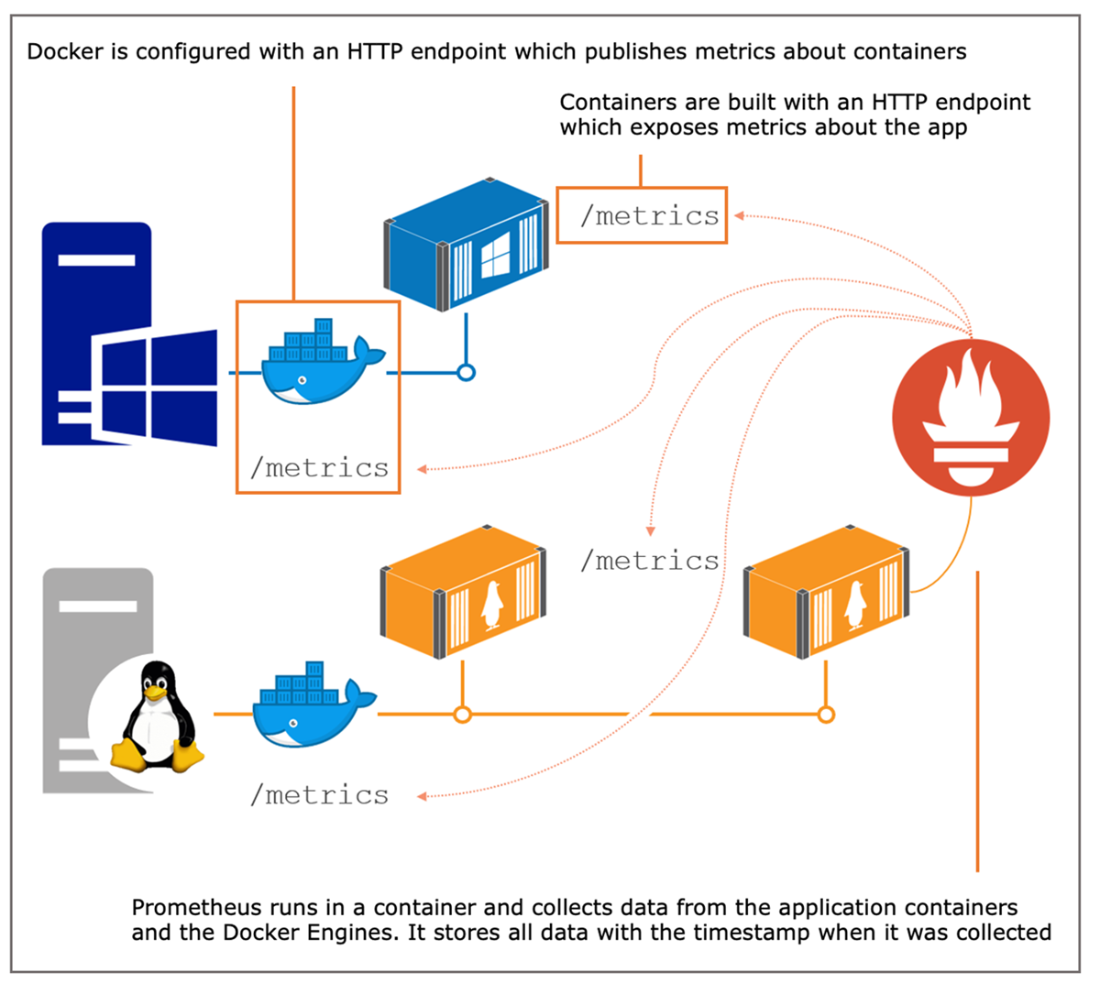
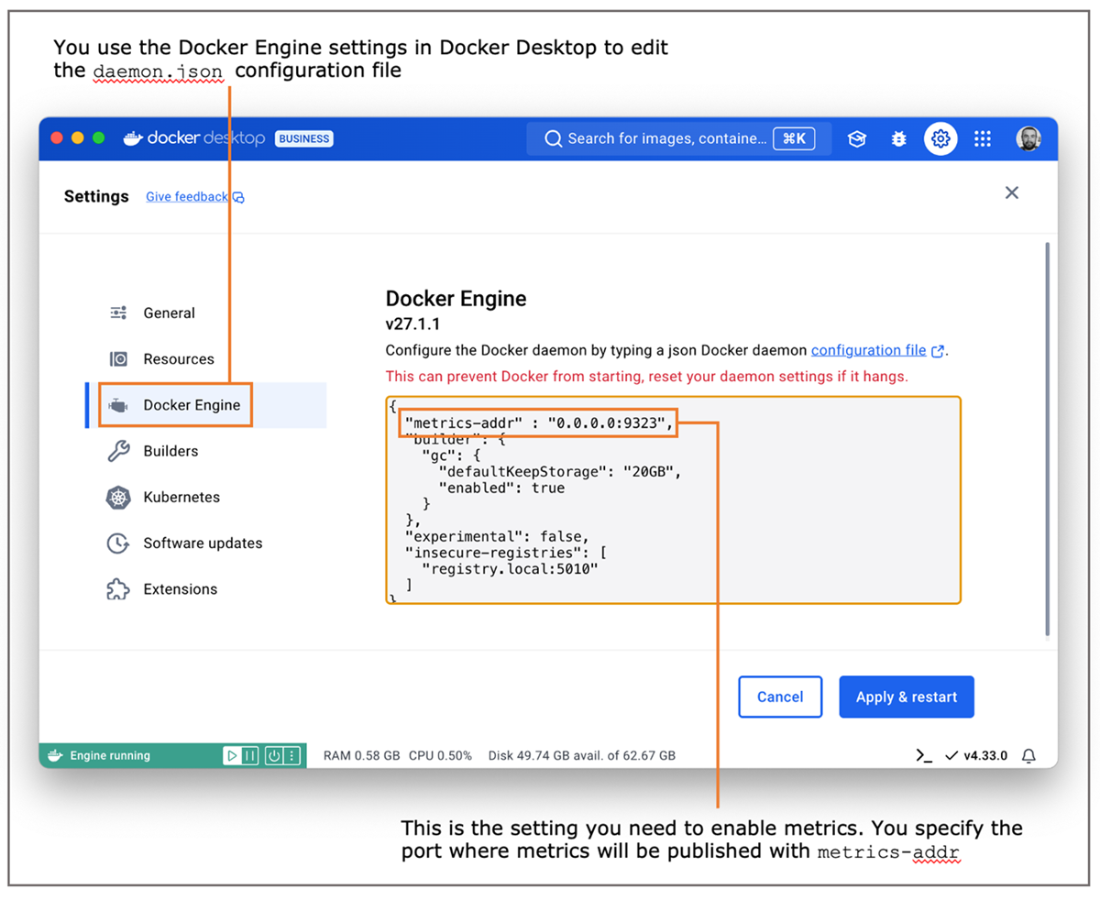
Configuring the Docker Engine to export metrics in Prometheus format
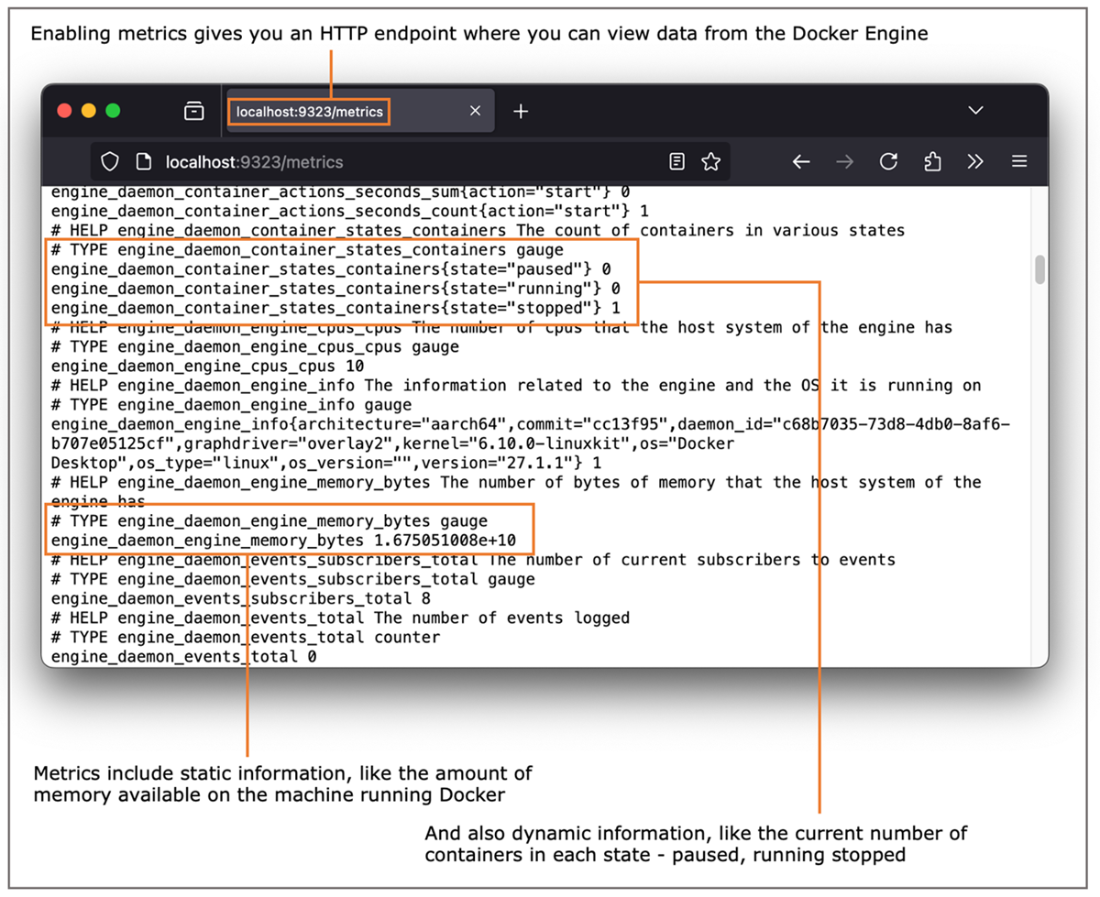
Sample metrics captured by Docker and exposed through the HTTP API
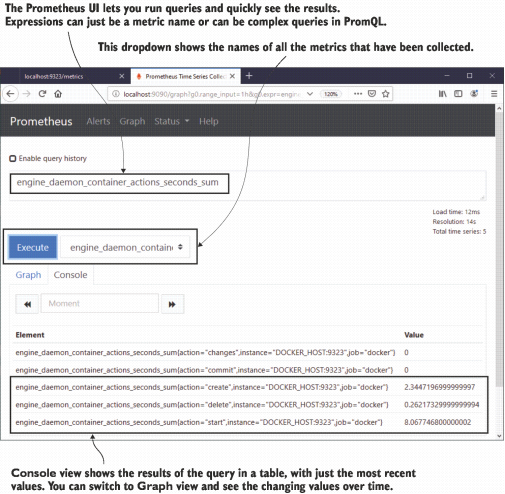
Prometheus has a simple web UI that you can use to find metrics and run queries.
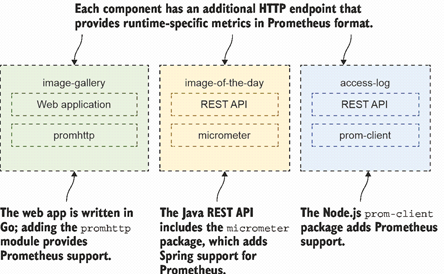
Prometheus client libraries in your apps make the metrics endpoints available in the container.
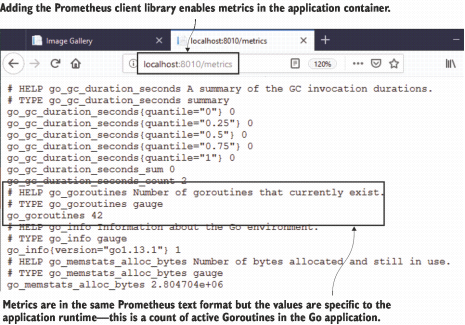
Prometheus metrics about the Go runtime from the image gallery web container
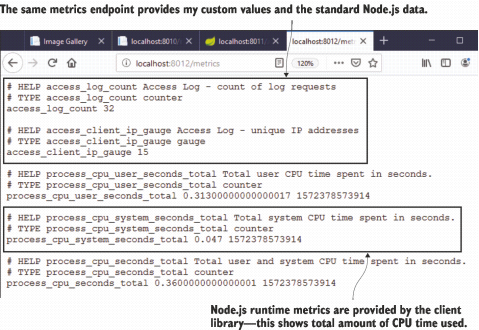
A metrics endpoint that includes custom data as well as Node.js runtime data
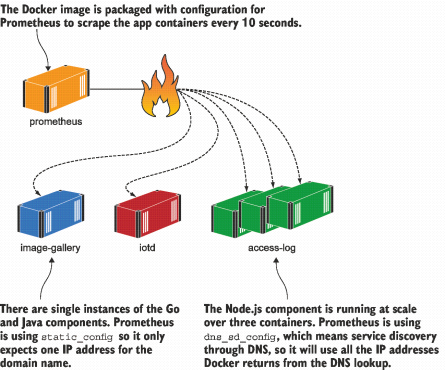
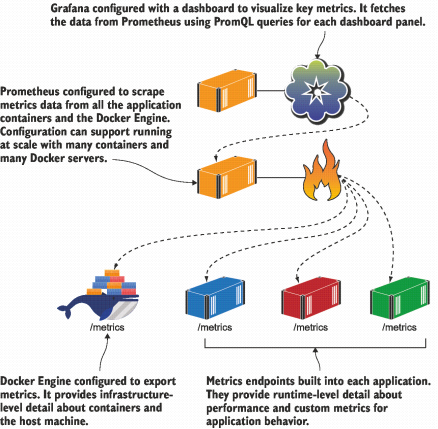
Prometheus running in a container, configured to scrape metrics from app containers
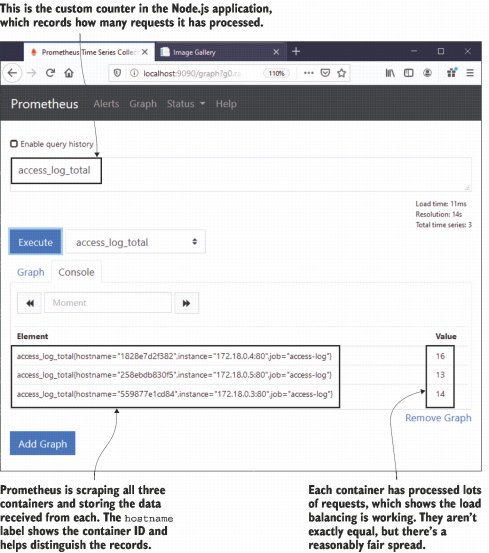
Processing metrics can be used to verify that requests are being load-balanced.
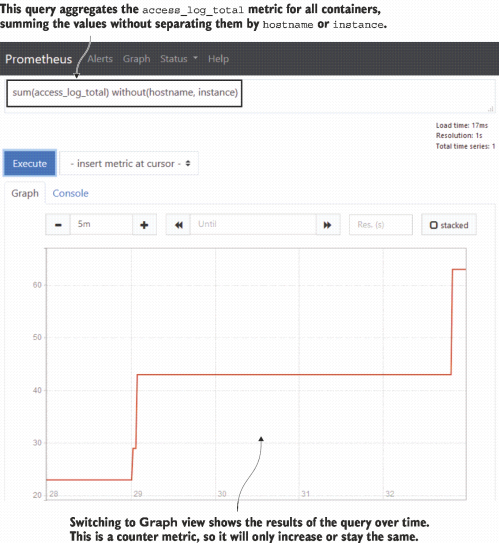
Aggregating a metric to sum values from all containers and showing a graph of results
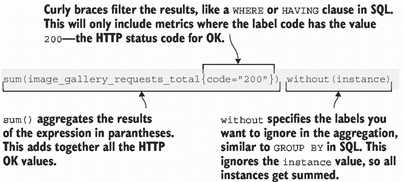
A simple Prometheus query. You don’t need to learn much more PromQL than this.
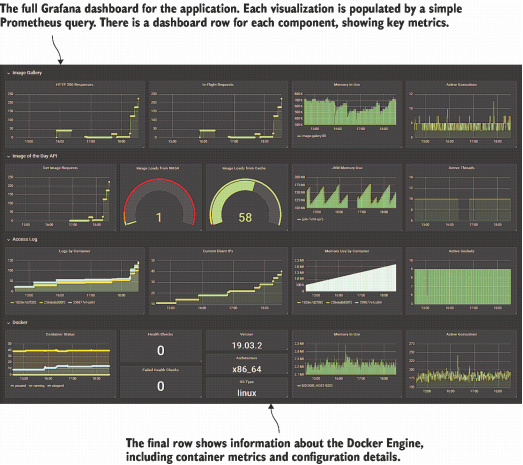
The Grafana dashboard for the application. Looks fancy, but it’s actually pretty simple to build.
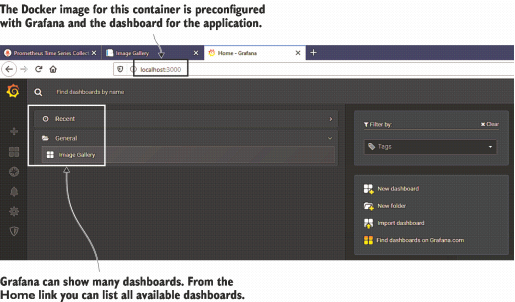
Navigating dashboards in Grafana—recently used folders are shown here
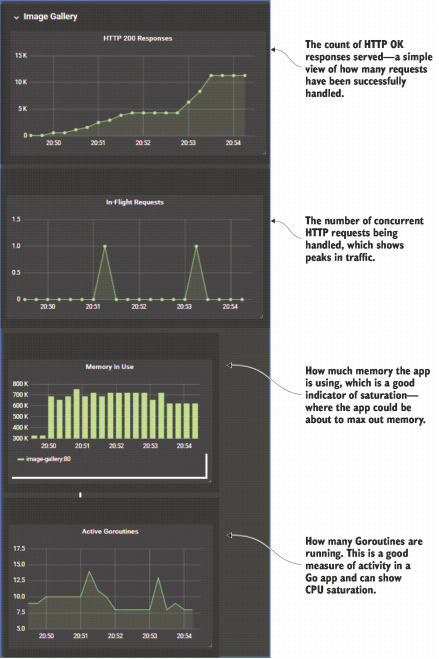
A closer look at the application dashboard and how visualizations relate to the golden signals
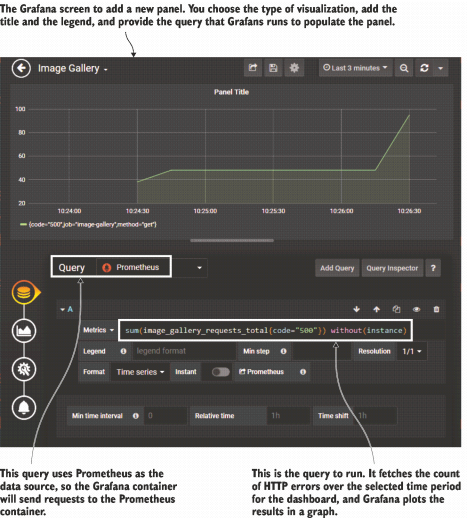
Adding a new panel to the Grafana dashboard to show HTTP errors
The architecture of monitoring in a containerized application—Prometheus is at the center.
Lab

This chapter added monitoring to the image gallery app, and this lab asks you to do the same to the to-do list app. You don’t need to dive into source code—I’ve already built a new version of the application image that contains Prometheus metrics. Run a container from diamol/ch09-todo-list, browse to the app, and add some items, and you’ll see the metrics available at the /metrics URL. For the lab, you want to get that app to the same position we have for the image gallery:

  • Write a Docker Compose file that you can use to run the app, which also starts a Prometheus container and a Grafana container.
  • The Prometheus container should already be configured to scrape metrics from the to-do list app.
  • The Grafana container should be configured with a dashboard to show three key metrics from the app: number of tasks created, total number of HTTP requests processed, and number of HTTP requests currently being processed.

This sounds like a ton of work, but really it’s not—the exercises in this chapter cover all the details. It’s a good lab to work through because it will give you experience working with metrics for a new application.

As always, you’ll find my solution on GitHub, together with a graphic of my final dashboard: https://github.com/sixeyed/diamol/blob/master/ch09/lab/README.md.


FAQ

What problem does observability solve in containerized applications?It gives you real-time insight into what your apps are doing and how well they’re performing, so you can detect issues early, pinpoint root causes, and act before users are impacted. Auto-scaling and health checks help, but you still need ongoing monitoring and alerting to run reliably in production.
Which tools form the monitoring stack introduced in this chapter?Prometheus collects metrics exposed by your containers and the Docker Engine, stores them with timestamps, and lets you query with PromQL. Grafana visualizes those queries in dashboards. Both are open source, cross‑platform, and run as containers alongside your apps.
How do I enable Docker Engine metrics for Prometheus to scrape?Edit the Docker Engine config and set "metrics-addr": "0.0.0.0:9323" in daemon.json (Linux: /etc/docker/daemon.json; Windows Server: C:\ProgramData\docker\config\daemon.json) or via Docker Desktop settings. Restart Docker, then browse to http://localhost:9323/metrics to verify.
How does Prometheus find and collect metrics from containers?Prometheus uses a pull model (“scraping”). You configure targets per job. In Docker Compose, use service names with static_configs for single instances or dns_sd_configs for services with multiple replicas. Prometheus queries each target on a schedule (for example, every 10s).
What types of metrics should I expose from my containers?- Infrastructure metrics from Docker (container counts, engine resources) - Runtime metrics from language runtimes (e.g., Go goroutines, JVM memory) - Application/business metrics you define (e.g., HTTP response counts, latency, signups). Use these to spot anomalies and correlate behavior across layers.
What are Prometheus counters, gauges, and labels?- Counter: numeric value that only increases (e.g., total requests) - Gauge: numeric value that goes up or down (e.g., in‑flight requests) - Labels: key/value dimensions (e.g., code="200", hostname="") that let you filter and aggregate (sum, rate) across containers and attributes.
How can a Prometheus container read metrics from the Docker host?Expose Docker Engine metrics on port 9323 and pass the host’s IP to the Prometheus container (e.g., as DOCKER_HOST). The provided image (diamol/prometheus:2e) uses that variable to scrape http://$DOCKER_HOST:9323/metrics.
How do I check if load balancing works when I scale a service?Scale the service (e.g., access-log) to multiple replicas. Inspect a per-request counter like access_log_total in the Prometheus UI; you should see one time series per container (distinguished by labels such as hostname). Compare counts to gauge distribution, or aggregate with sum() to see totals.
How do I build a useful Grafana dashboard from Prometheus data?- Add Prometheus as a data source (or use a preprovisioned Grafana image) - Create panels per “golden signal” using simple PromQL (filter + sum) - Examples: sum(image_gallery_requests_total{code="200"}) without(instance); sum(access_log_total) without(hostname,instance); go_goroutines{job="image-gallery"}.
What are the “golden signals,” and how do they guide dashboard design?The golden signals are latency, traffic, errors, and saturation. Design panels to show: - Traffic: request counts (e.g., HTTP 200s) - Errors: HTTP 5xx counts - Latency: request duration or external call timings - Saturation: resources in use (memory, goroutines, in‑flight requests)

pro $24.99 per month

  • access to all Manning books, MEAPs, liveVideos, liveProjects, and audiobooks!
  • choose one free eBook per month to keep
  • exclusive 50% discount on all purchases
  • renews monthly, pause or cancel renewal anytime

lite $19.99 per month

  • access to all Manning books, including MEAPs!

team

5, 10 or 20 seats+ for your team - learn more


choose your plan

team

monthly
annual
$49.99
$499.99
only $41.67 per month
  • five seats for your team
  • access to all Manning books, MEAPs, liveVideos, liveProjects, and audiobooks!
  • choose another free product every time you renew
  • choose twelve free products per year
  • exclusive 50% discount on all purchases
  • renews monthly, pause or cancel renewal anytime
  • renews annually, pause or cancel renewal anytime
  • Learn Docker in a Month of Lunches, Second Edition ebook for free

choose your plan

team

monthly
annual
$49.99
$499.99
only $41.67 per month
  • five seats for your team
  • access to all Manning books, MEAPs, liveVideos, liveProjects, and audiobooks!
  • choose another free product every time you renew
  • choose twelve free products per year
  • exclusive 50% discount on all purchases
  • renews monthly, pause or cancel renewal anytime
  • renews annually, pause or cancel renewal anytime
  • Learn Docker in a Month of Lunches, Second Edition ebook for free
choose your plan

team

monthly
annual
$49.99
$499.99
only $41.67 per month
  • five seats for your team
  • access to all Manning books, MEAPs, liveVideos, liveProjects, and audiobooks!
  • choose another free product every time you renew
  • choose twelve free products per year
  • exclusive 50% discount on all purchases
  • renews monthly, pause or cancel renewal anytime
  • renews annually, pause or cancel renewal anytime
  • Learn Docker in a Month of Lunches, Second Edition ebook for free