Overview

7 Running multi-container apps with Docker Compose

Modern applications are rarely single processes; they’re composed of multiple components that must be packaged, connected, and configured consistently. Docker Compose solves this by providing a simple YAML format to declare the desired state of a multi-container app (services, networks, volumes, and secrets) and a command-line tool that realizes that state by creating the required Docker resources. Instead of stringing together fragile docker run commands, you capture images, ports, and network membership in one file that lives alongside your code, making app setup repeatable and self-documenting across machines and environments.

With Compose, you define each component as a service and can express dependencies, publish ports, and plug services into shared networks. Bringing an app up or down is a single command, and Compose aggregates logs and supports detached mode so containers run in the background. You can scale stateless services with a flag, and manage the application as a whole while still using the Docker CLI for individual containers. Importantly, Compose is a client-side tool: it applies what’s in the YAML to one Docker host but doesn’t continuously reconcile state. Runtime changes not recorded in the file (like an ad hoc scale-up) are lost when you recreate the app, and Compose won’t restart failed containers unless you run it again.

Compose also handles how containers talk and how they’re configured. Docker’s virtual networks and built-in DNS let services discover each other by name, and when a service is scaled, DNS returns multiple IPs to provide simple load distribution; changing containers get new IPs, but names stay stable. Configuration is externalized through environment variables and secrets, letting the same image run differently per environment—for example, switching a web app from an embedded SQLite store to a Postgres service by declaring both services, publishing their ports, and injecting connection details as a secret. The result is a consistent, portable workflow ideal for development, testing, and straightforward production deployments, while recognizing that high availability and continuous reconciliation are responsibilities of full orchestration platforms, not Compose.

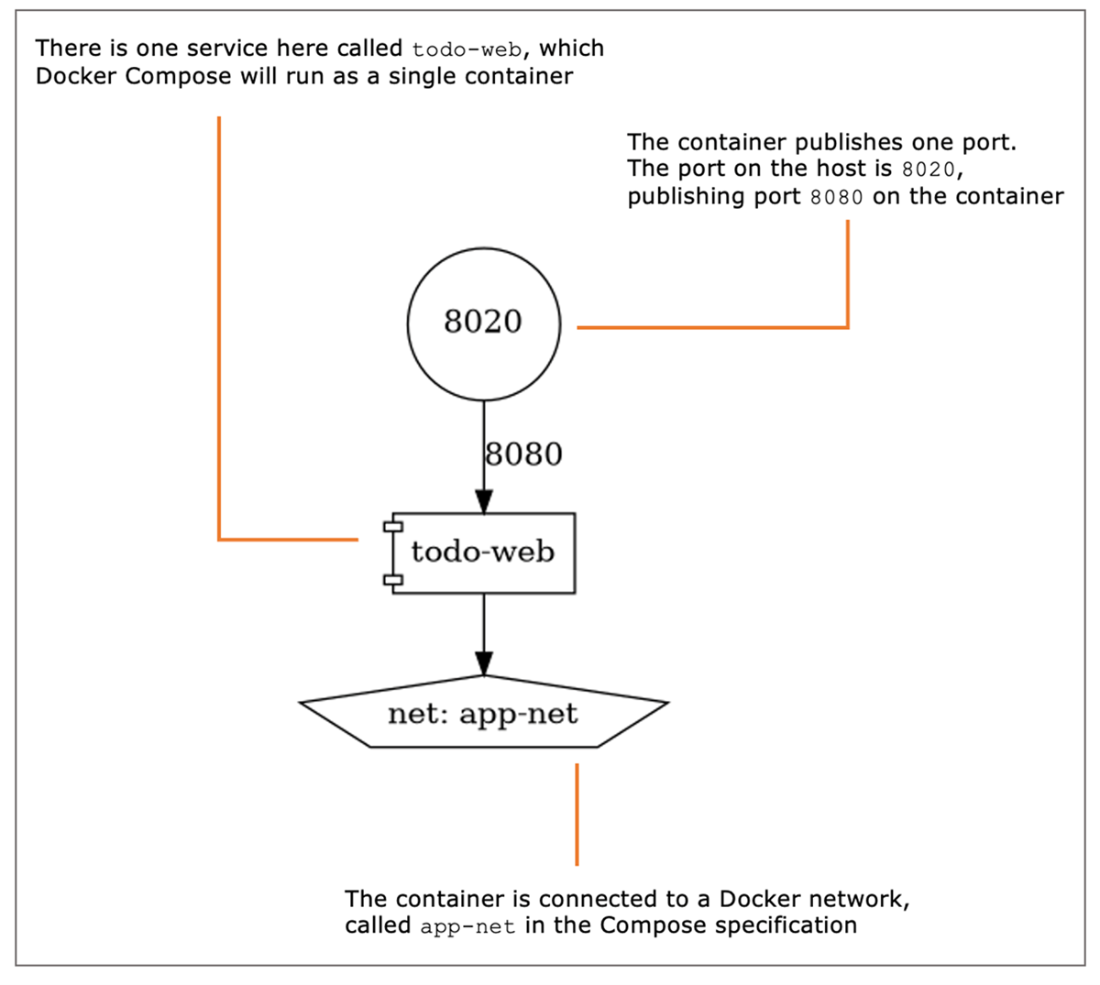
The architecture of a simple Compose application with one service and one network
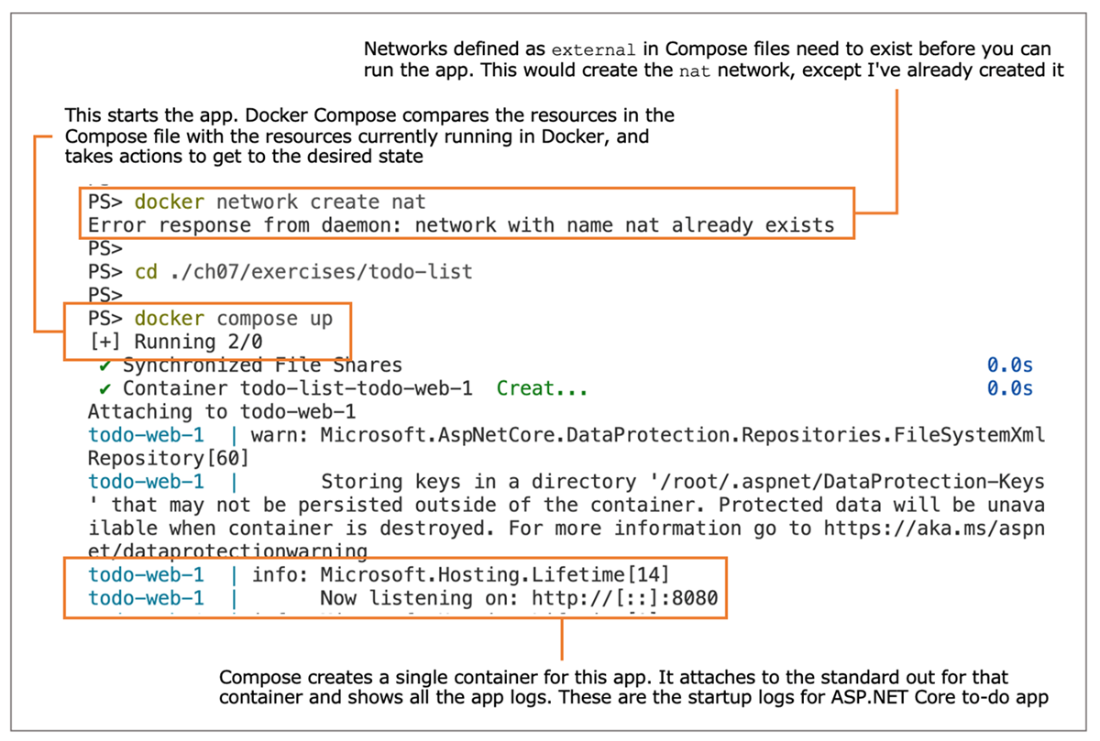
Starting an app using Docker Compose, which creates Docker resources
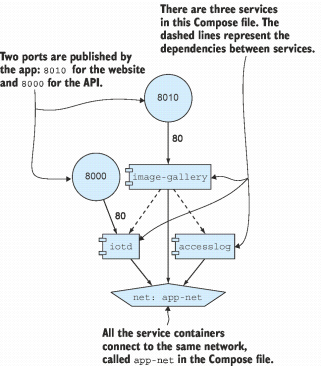
A more complex Compose file that specifies three services connected to the same network
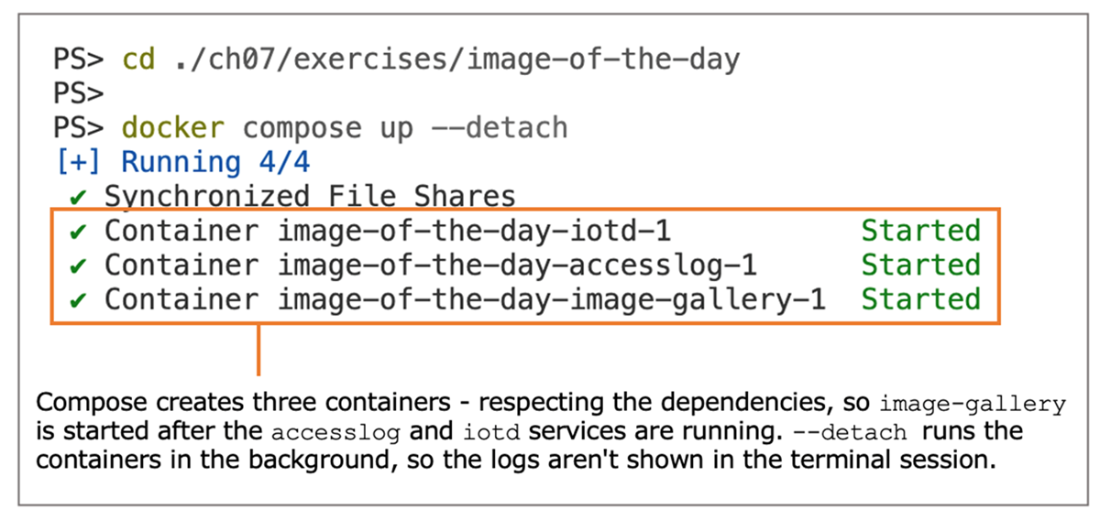
Starting a multi-container app with dependencies specified using Docker Compose
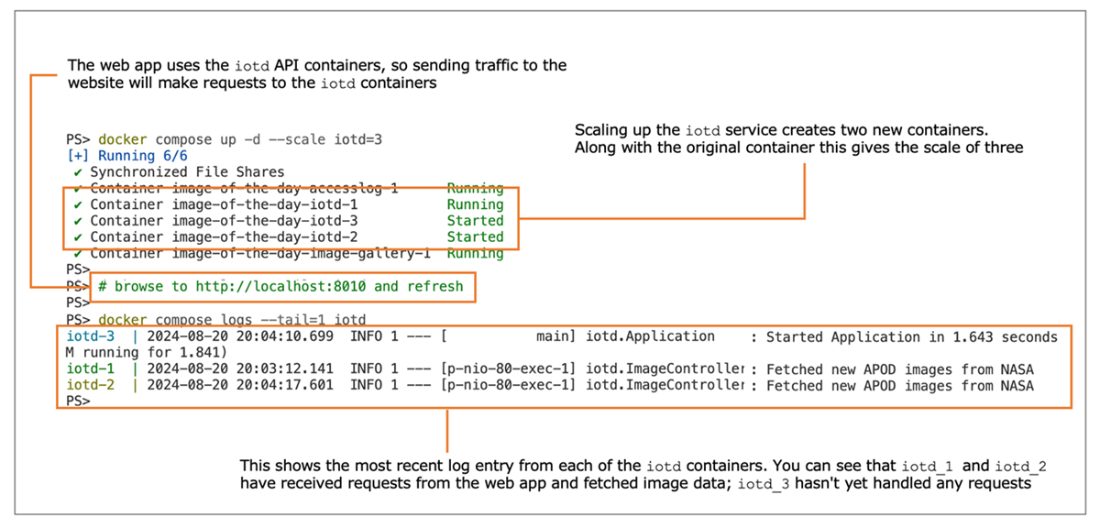
Scaling up an application component and checking its logs with Docker Compose
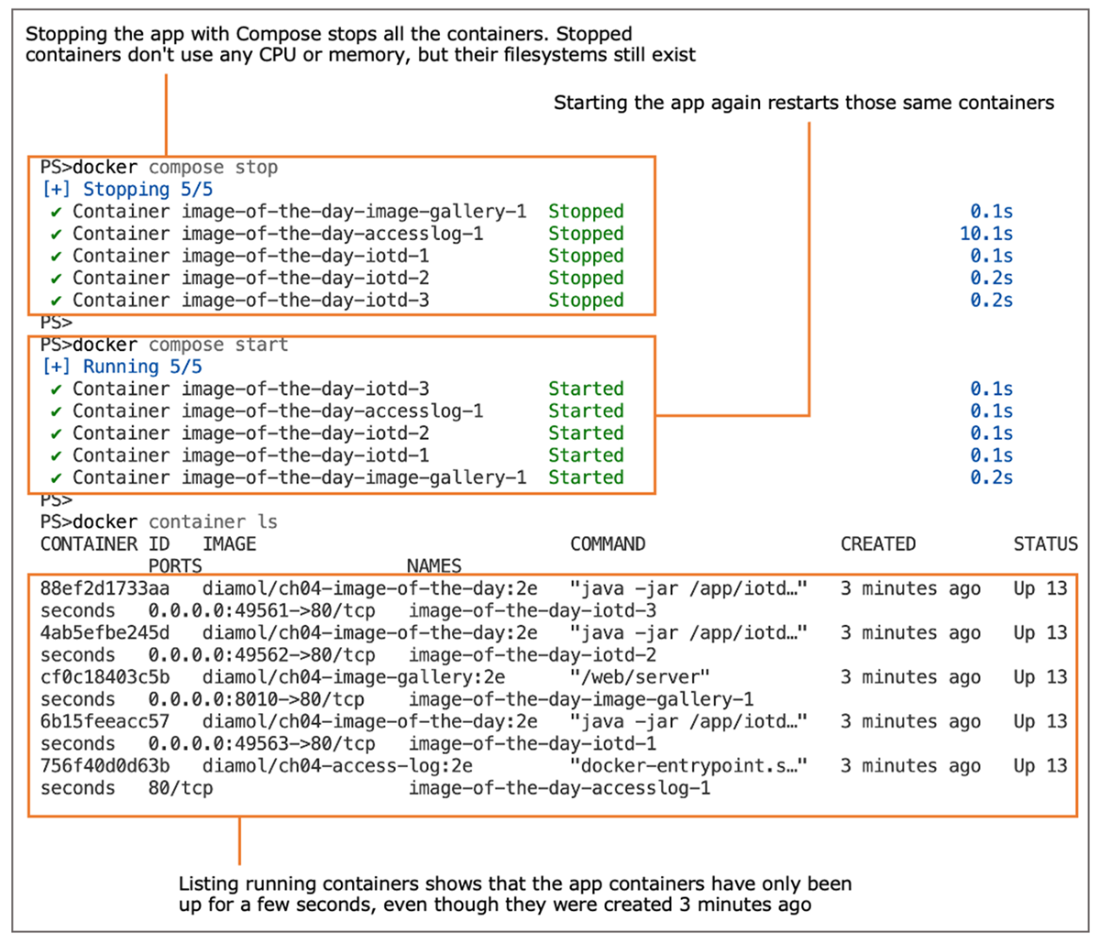
Stopping and starting multi-container apps with Docker Compose
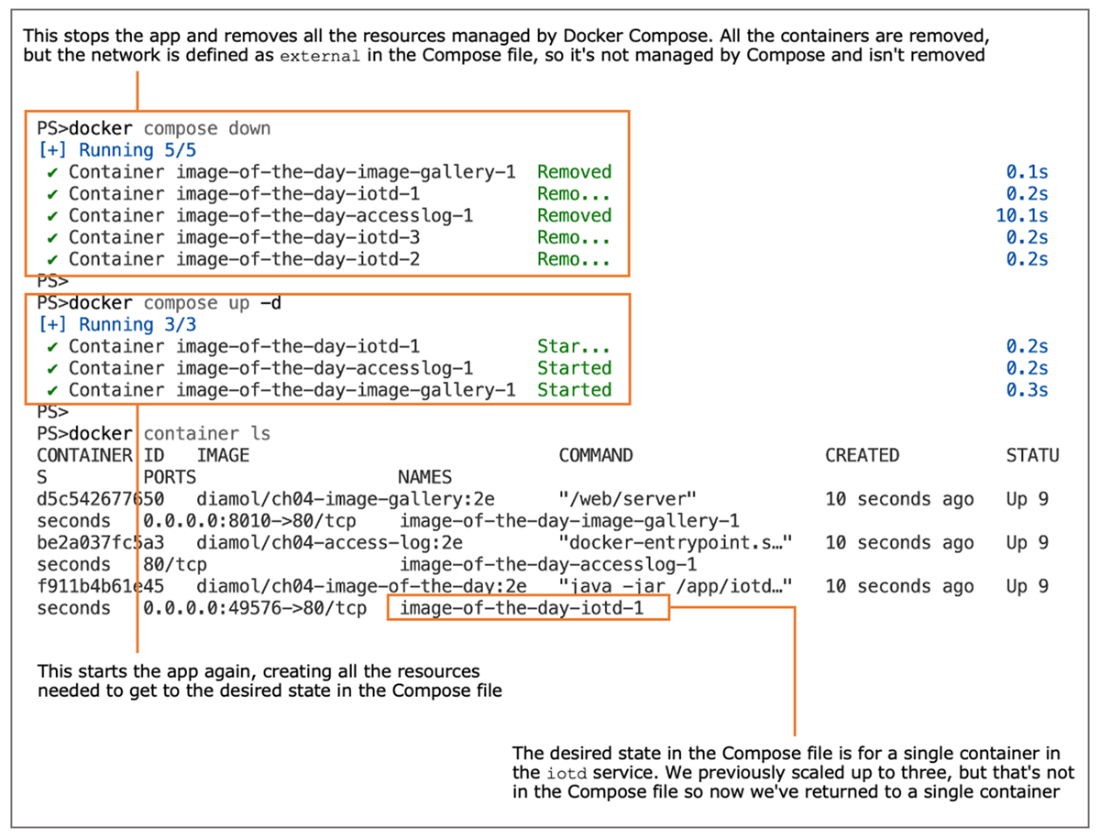
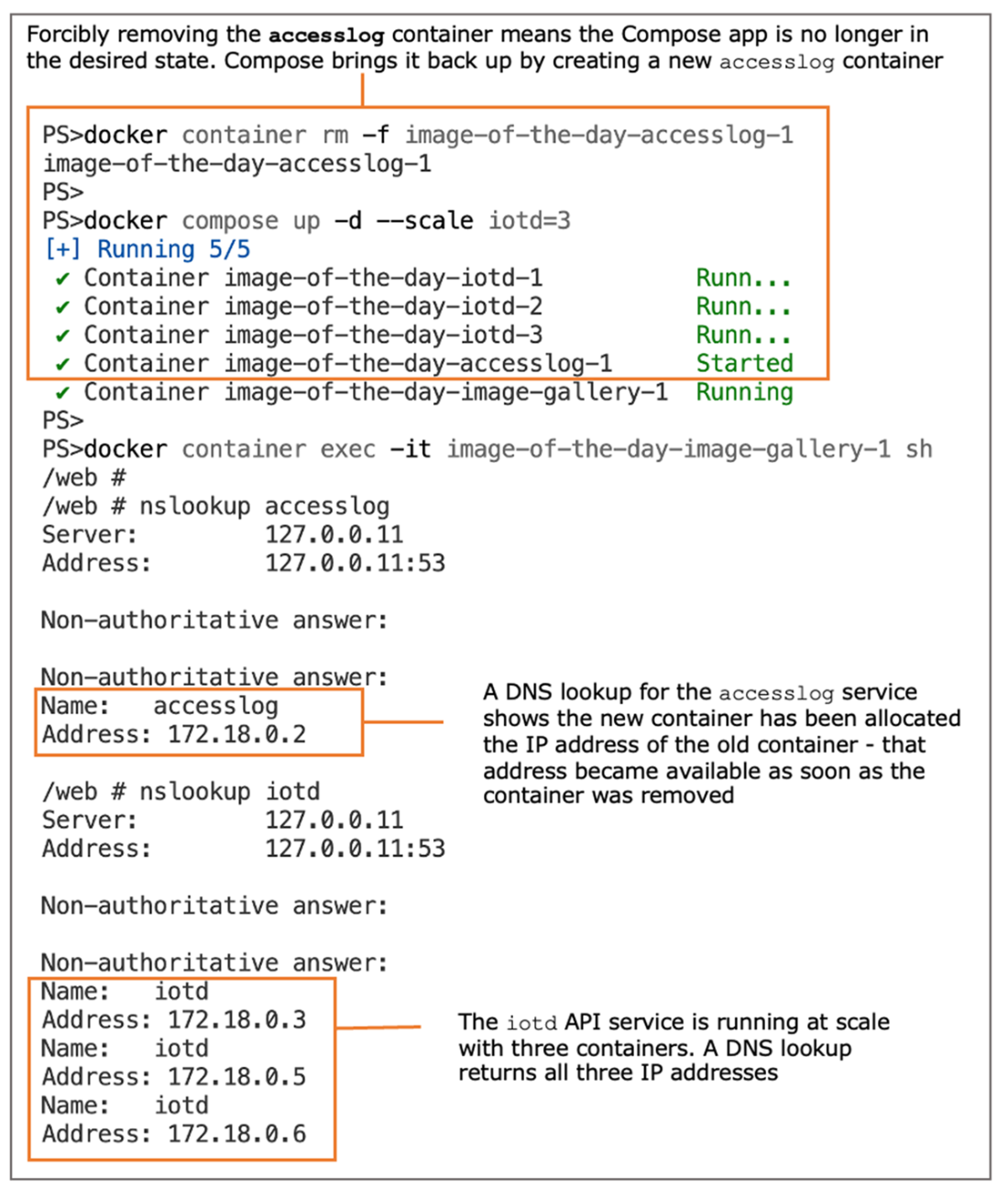
Removing and re-creating an app resets it to the state in the Docker Compose file.
Scaling a service with Docker Compose and performing DNS lookups
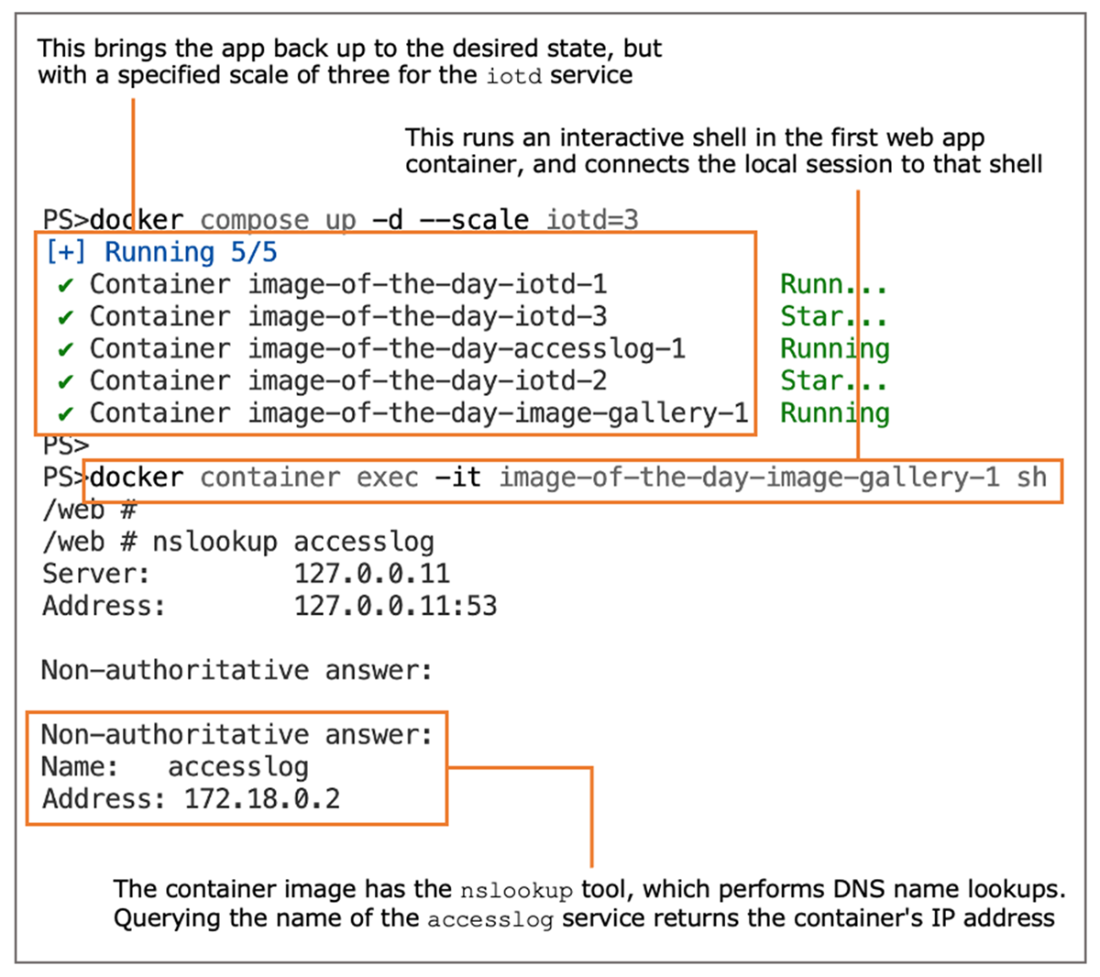
Services scale with multiple containers—every container’s IP address is returned in a lookup.
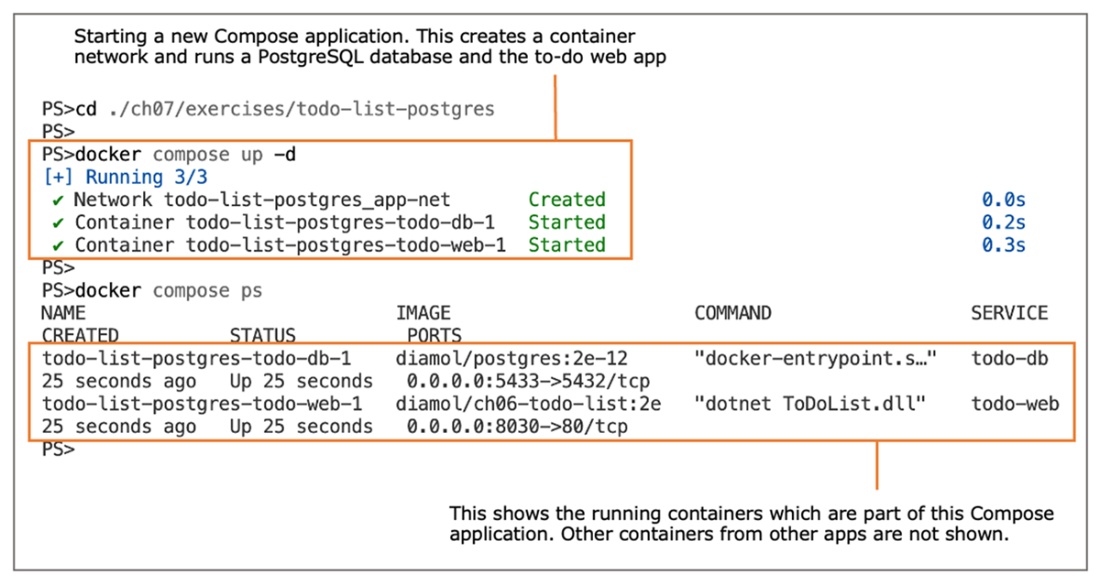
Running a new application with Docker Compose and listing its containers
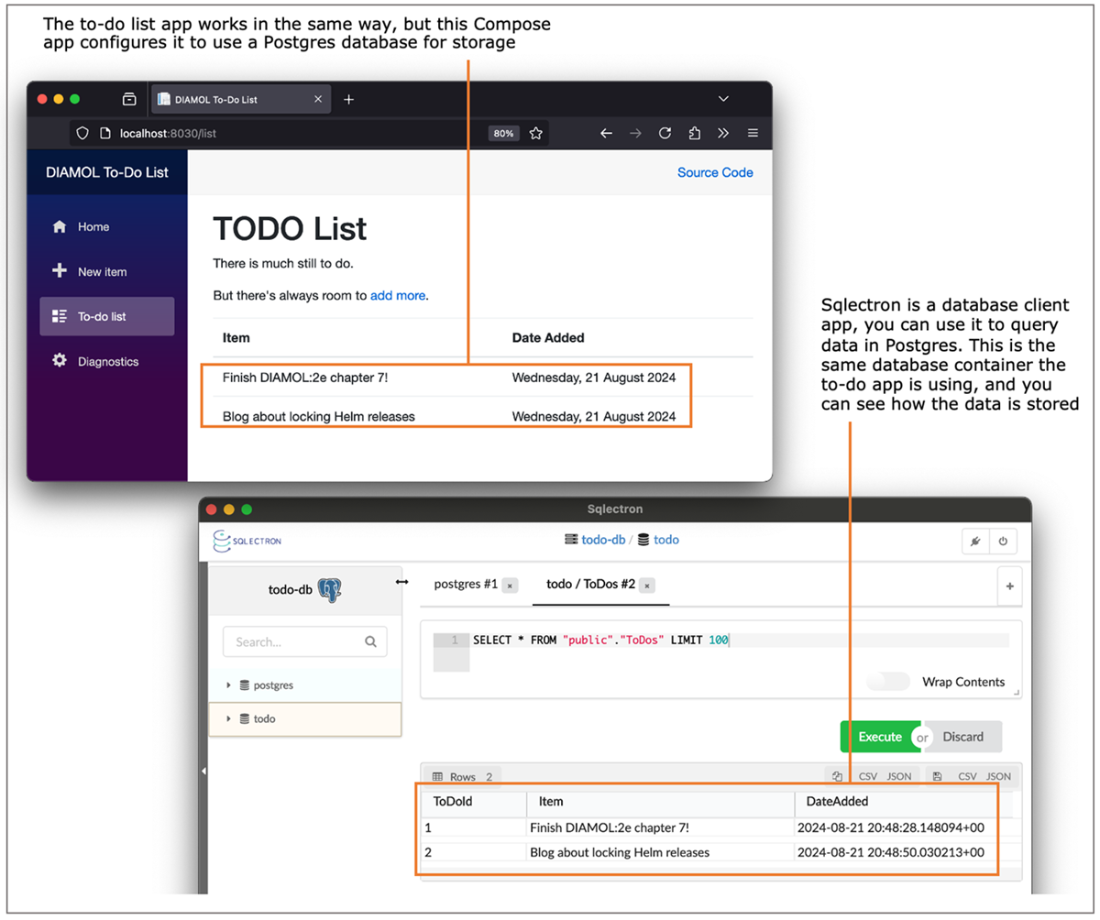
Running the to-do app in containers with a Postgres database and querying the data
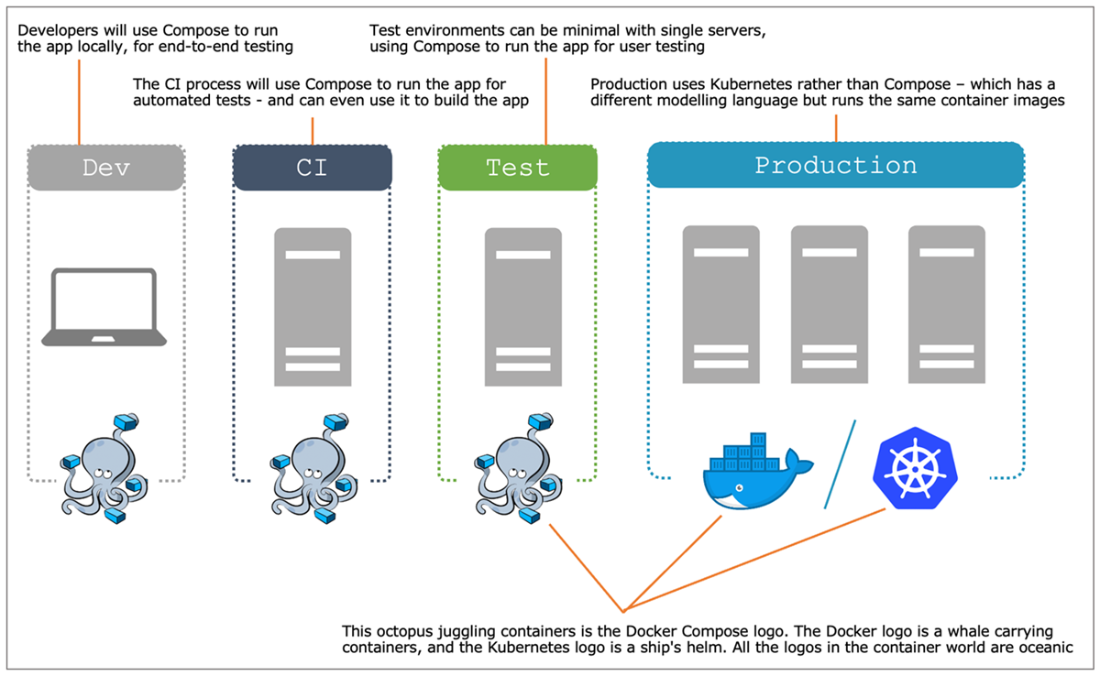
Where you use Docker Compose in the application lifecycle from development to production
Lab

Docker Compose has some useful features that add reliability to running your app. In this lab, I’d like you to create a Compose definition to run the to-do web app more reliably in a test environment so that:

  • The application containers will restart if the machine reboots, or if the Docker engine restarts.
  • The database container will use a bind mount to store files, so you can bring the app down and up again but retain your data.
  • The web application should listen on standard port 80 for test.

Just one hint for this one:

My sample solution is on the book’s GitHub repository, as always. Hopefully, this one isn’t too complex, so you won’t need it: https://github.com/sixeyed/diamol/blob/2e/ch07/lab/README.md.

FAQ

What is Docker Compose and why would I use it?Docker Compose is both a YAML file format and a CLI tool that defines the desired state of a multi-container application. You describe services, networks, volumes, and other runtime options in one file, and Compose creates the necessary Docker resources and runs them so your app comes up consistently.
What are the main sections in a Compose file?The key top-level sections are: services (the app’s components), networks (virtual networks services join), and optionally volumes and secrets. YAML indentation is significant, and service properties closely mirror docker container run options.
How do I start, stop, and remove a Compose application?From the folder containing docker-compose.yml: start with docker compose up (add --detach to run in background); stop with docker compose stop; start again with docker compose start; remove all app resources with docker compose down. Use docker compose ps to list containers in the app and docker compose logs to view aggregated logs.
How do service definitions map to docker run options?Common fields include image (the image to run), ports (published ports, e.g., "8010:80" for host:container or "80" to publish container port to a random host port), networks (networks to join), environment (env vars), and depends_on (start order). The service name becomes both the container name and its DNS name on the network.
How does depends_on affect startup?depends_on expresses start order between services. Compose starts dependencies first (for example, accesslog and iotd before image-gallery), helping avoid brittle manual sequencing when launching multi-container apps.
How do I scale a service with Compose?Use docker compose up -d --scale SERVICE=NUMBER (for example, --scale iotd=3). Compose creates additional containers for that service and Docker’s built-in DNS will return multiple IPs for the service name. Note: scale set via the CLI isn’t stored in the YAML; docker compose down followed by up reverts to the file’s original scale.
How do containers discover and talk to each other?Containers on the same Docker network communicate via standard networking and Docker’s built-in DNS. A container can reach another by using the service (container) name. For scaled services, DNS returns multiple IPs and rotates their order to provide simple load distribution.
What is an external network in Compose, and when should I use it?An external network tells Compose to use an existing Docker network and not create one (external: true). For example, mapping app-net to the preexisting nat network is common on Windows Server containers. On Linux, Compose can also create and manage networks when they aren’t external.
How do I provide configuration and secrets to services?Use environment to set environment variables inside containers, and secrets to mount sensitive values as files. On a single Docker host, Compose can load a secret from a local file and surface it at a target path in the container, letting you model production-like secret usage.
What are Compose’s limitations and where does it fit?Compose is a client-side tool for a single Docker host; it doesn’t continuously maintain desired state like an orchestrator. If containers fail or are removed, Compose won’t replace them until you run docker compose up again. It’s excellent for development, testing, and simple production scenarios, and as a stepping stone before moving to a cluster platform.

pro $24.99 per month

  • access to all Manning books, MEAPs, liveVideos, liveProjects, and audiobooks!
  • choose one free eBook per month to keep
  • exclusive 50% discount on all purchases
  • renews monthly, pause or cancel renewal anytime

lite $19.99 per month

  • access to all Manning books, including MEAPs!

team

5, 10 or 20 seats+ for your team - learn more


choose your plan

team

monthly
annual
$49.99
$499.99
only $41.67 per month
  • five seats for your team
  • access to all Manning books, MEAPs, liveVideos, liveProjects, and audiobooks!
  • choose another free product every time you renew
  • choose twelve free products per year
  • exclusive 50% discount on all purchases
  • renews monthly, pause or cancel renewal anytime
  • renews annually, pause or cancel renewal anytime
  • Learn Docker in a Month of Lunches, Second Edition ebook for free

choose your plan

team

monthly
annual
$49.99
$499.99
only $41.67 per month
  • five seats for your team
  • access to all Manning books, MEAPs, liveVideos, liveProjects, and audiobooks!
  • choose another free product every time you renew
  • choose twelve free products per year
  • exclusive 50% discount on all purchases
  • renews monthly, pause or cancel renewal anytime
  • renews annually, pause or cancel renewal anytime
  • Learn Docker in a Month of Lunches, Second Edition ebook for free
choose your plan

team

monthly
annual
$49.99
$499.99
only $41.67 per month
  • five seats for your team
  • access to all Manning books, MEAPs, liveVideos, liveProjects, and audiobooks!
  • choose another free product every time you renew
  • choose twelve free products per year
  • exclusive 50% discount on all purchases
  • renews monthly, pause or cancel renewal anytime
  • renews annually, pause or cancel renewal anytime
  • Learn Docker in a Month of Lunches, Second Edition ebook for free