4 Packaging applications from source code into Docker images
This chapter explains how to package applications from source code into Docker images using Dockerfiles, emphasizing that Dockerfiles can run commands during the build and capture their filesystem changes in image layers. It introduces multi-stage builds, where each stage can use a different base image and toolset, and artifacts are selectively copied forward so only what’s needed ends up in the final image. By baking toolchains into images, teams can replace traditional build servers with reproducible, containerized builds that eliminate environment drift and simplify onboarding.
Through practical walkthroughs, the chapter shows how the pattern adapts to different ecosystems. A Java application uses a builder stage with Maven to fetch dependencies and produce a JAR, then a runtime stage with only the Java runtime copies in the tested artifact. A Node.js service uses a builder stage to download dependencies with npm, then assembles a final image that contains the Node.js runtime, node_modules, and source code. A Go web app compiles to a native binary in a builder image with Go tools and ships a minimal final image containing only the binary and static assets. The examples are connected via a Docker network to form a small distributed application, demonstrating consistent build-and-run workflows across stacks.
The key takeaways are standardization, performance, and lean delivery. Building inside containers ensures consistent tool versions across machines and CI systems, with Docker as the only prerequisite. Each stage benefits from its own layer cache, so well-structured Dockerfiles achieve fast, incremental builds. Multi-stage techniques keep final images small and secure by excluding build tools and copying in only the necessary artifacts, reducing attack surface and startup time while keeping pipelines as simple as a docker image build command.
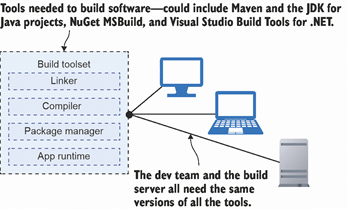
Everyone needs the same set of tools to build a software project.
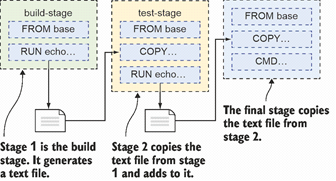
Executing a multi-stage Dockerfile
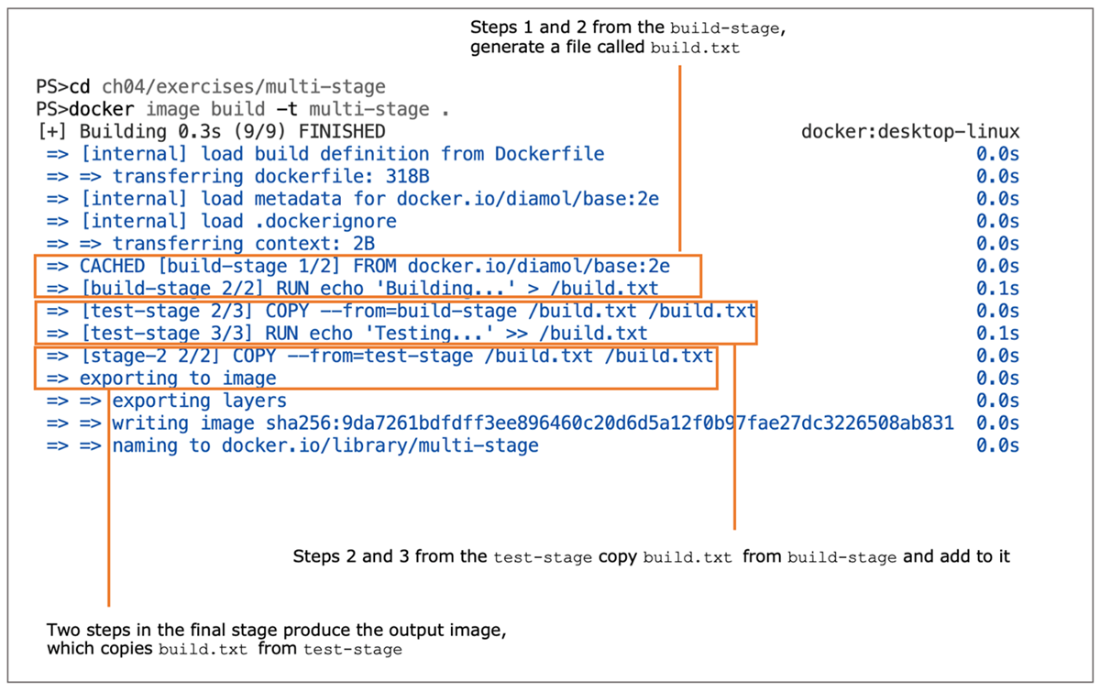
Building a multi-stage Dockerfile
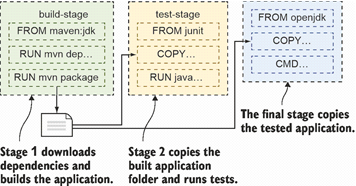
A multi-stage build for a Java application
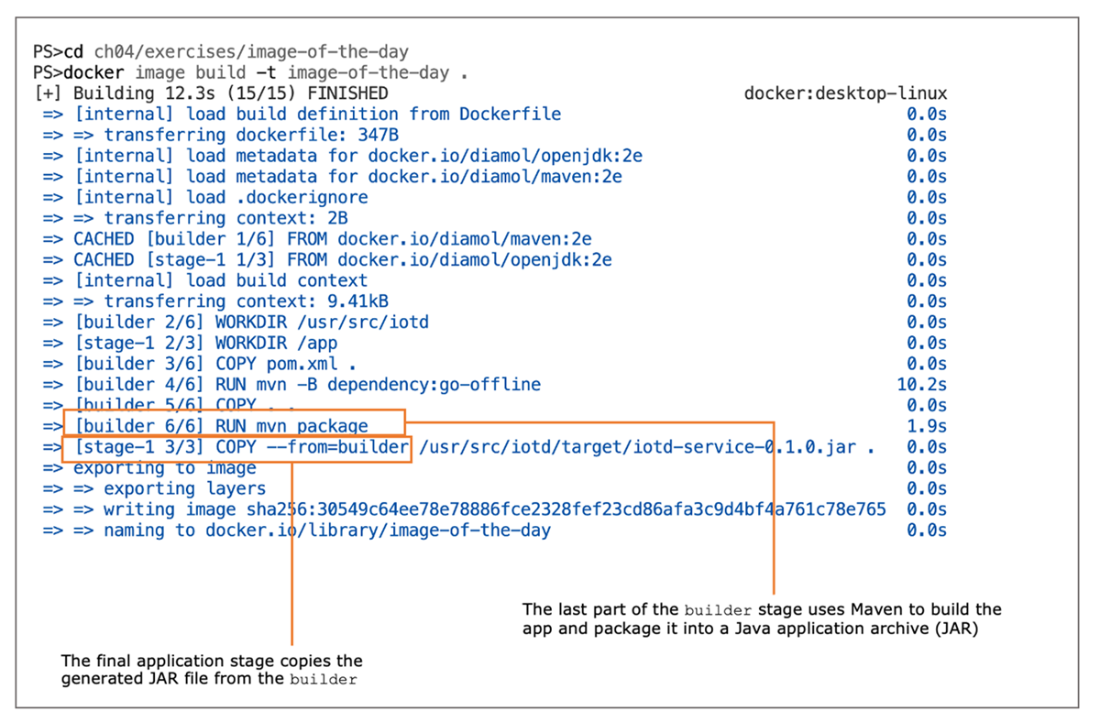
Output from running a Maven build in Docker
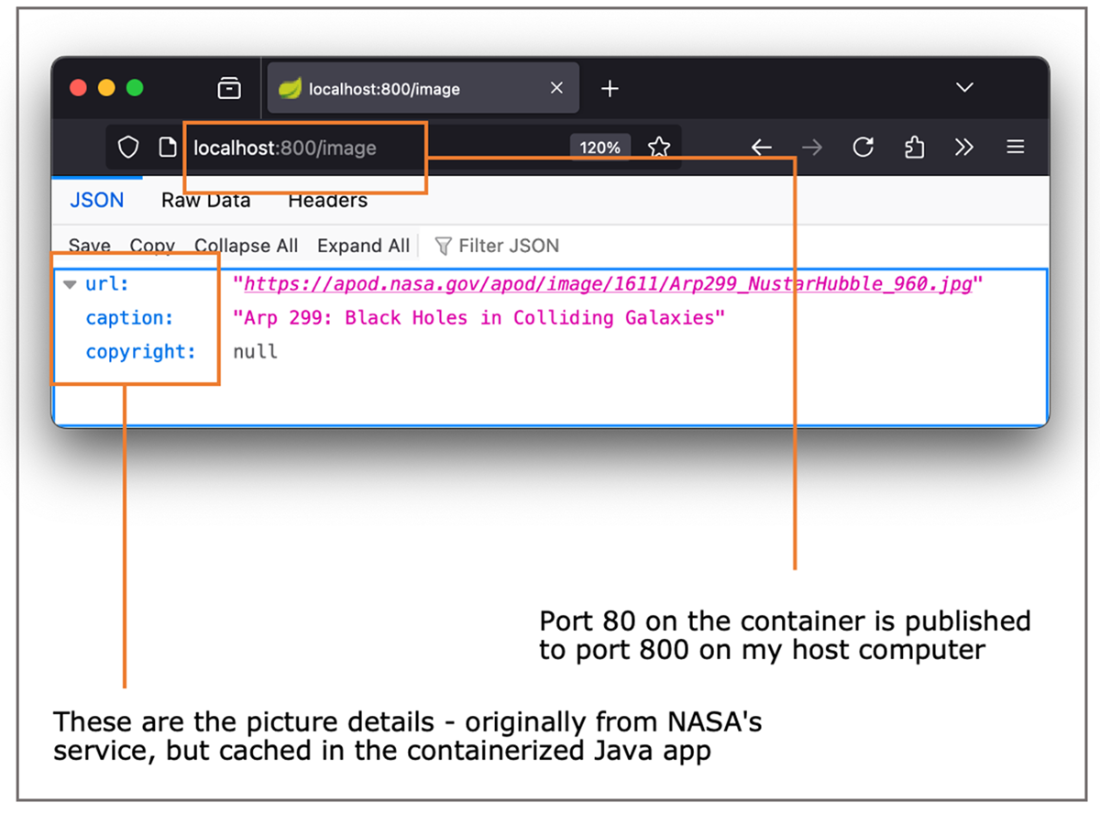
The cached details from NASA in my application container
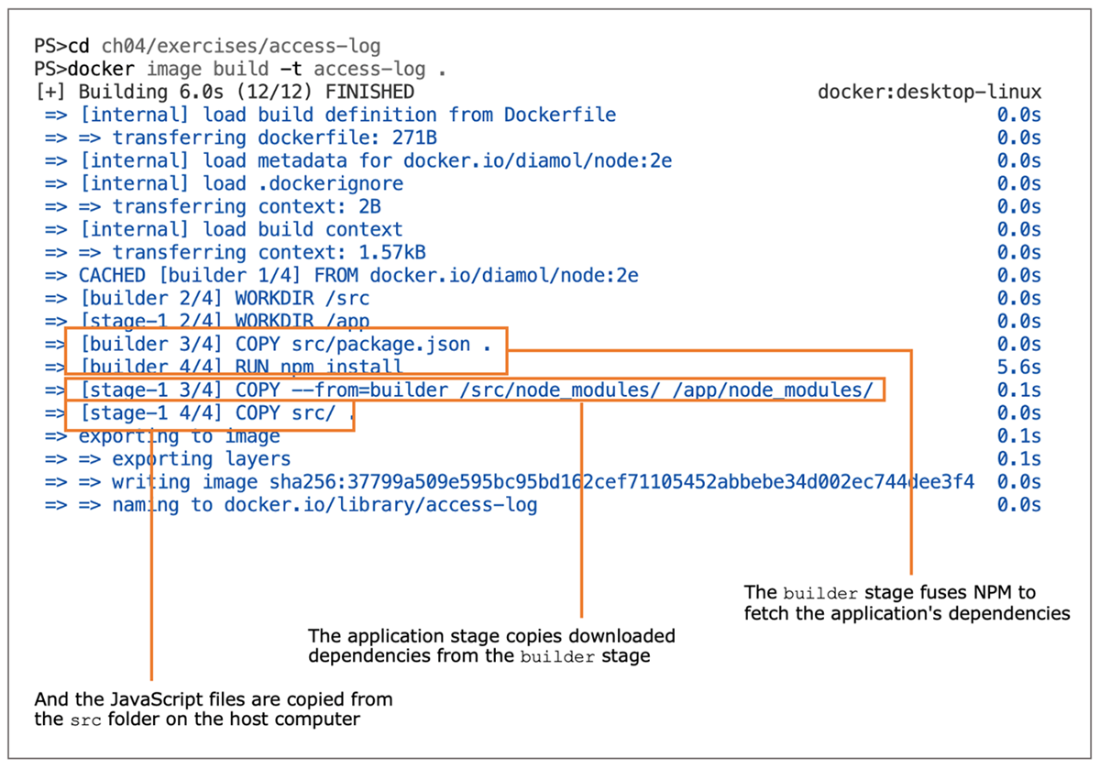
Building a multi-stage Dockerfile for a Node.js application
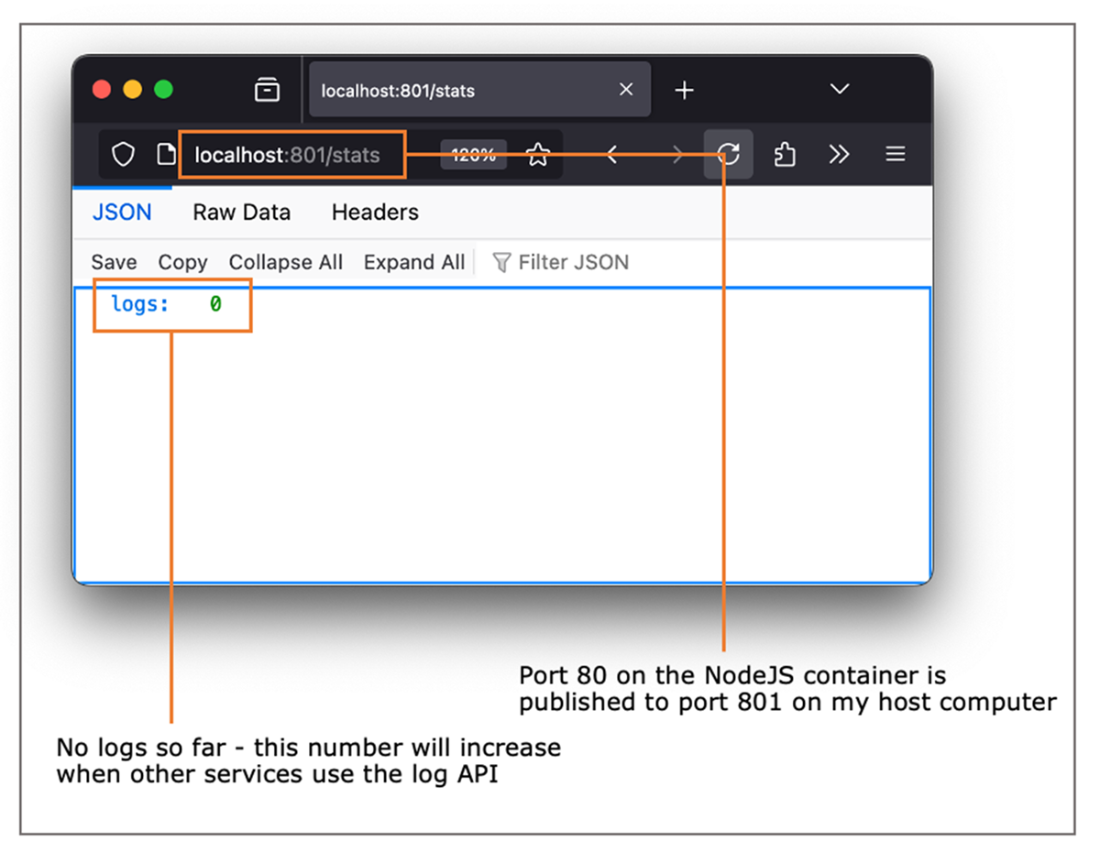
Running the Node.js API in a container
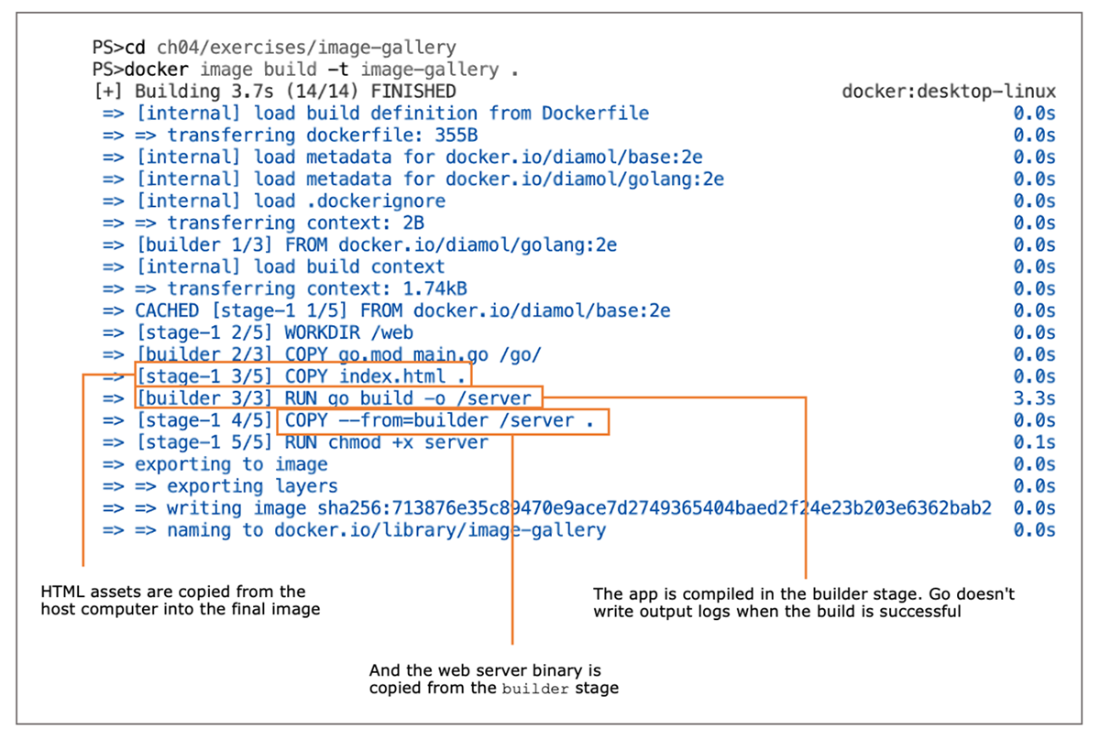
Building a Go application in a multi-stage Dockerfile
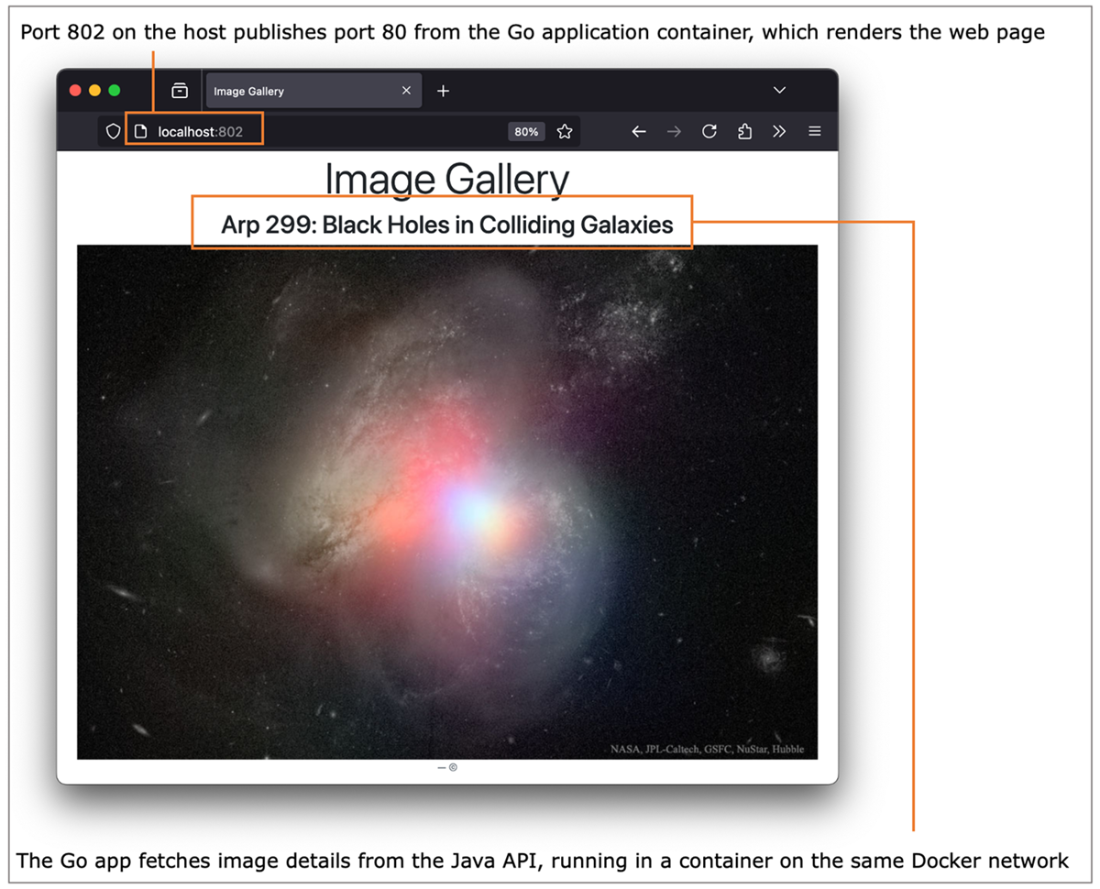
The Go web application, showing data fetched from the Java API
Lab
Lab time! You’re going to put into practice what you’ve learned about multi-stage builds and optimizing Dockerfiles. In the source code for the book, you’ll find a folder at ch04/lab which is your starting point. It’s a simple Go web server application, which already has a Dockerfile, so you can build and run it in Docker. But the Dockerfile is in dire need of optimizing, and that is your job.
There are specific goals for this lab:
- Start by building an image using the existing Dockerfile and then optimize the Dockerfile to produce a new image.
- The current image is over 300 MB on Linux and 5.2 GB on Windows. Your optimized image should be under 25 MB on Linux or 500 MB on Windows.
- If you change the HTML content with the current Dockerfile, the Go application is compiled again.
- Your optimized Dockerfile should not result in a Go build if you only change the HTML.
As always, there’s a sample solution on the book’s GitHub repository. But this is one lab you should try to find time to do, because optimizing Dockerfiles is a valuable skill you’ll use in every project. If you need it, though, my solution is here: https://github.com/sixeyed/diamol/blob/master/ch04/lab/Dockerfile.optimized.
No hints this time, although I would say this sample app looks very similar to one you’ve already built in this chapter.
FAQ
What is a multi-stage Dockerfile and why use it?
It’s a Dockerfile with multiple FROM instructions, each starting a separate stage (optionally named with AS). Stages are isolated, you can use different base images and tools in each, and only the final stage’s filesystem becomes the resulting image. This lets you build and test with heavy toolchains, then ship a minimal runtime image containing only what you explicitly copy from earlier stages.How does the RUN instruction work during a build?
RUN executes a command inside a temporary container for that layer. Any filesystem changes are captured in the image layer. The command must exist in the current stage’s base image. If a RUN command fails, the build fails.How do I share files between stages in a multi-stage build?
Use COPY with the --from flag to pull artifacts from a previous stage, for example:COPY --from=builder /app/target/app.jar /app/. Only files you explicitly copy make it into the final image.Can Dockerfiles replace traditional build servers?
Yes. You package your toolchain once in images and build inside containers. This standardizes versions, reduces setup for new team members, eliminates build server drift, and makes builds portable—any machine with Docker can build your app.How does caching work with multi-stage builds, and how can I optimize it?
Each stage has its own cache. Docker matches each instruction against prior layers; if a change breaks the cache, only that stage’s remaining steps re-run. Optimize by ordering steps so dependency manifests are copied first (for example, pom.xml or package.json), run dependency restore (mvn dependency:go-offline or npm install), then copy the rest of the source. This keeps expensive dependency steps cached when only code changes.What’s the difference between a builder image and a runtime image?
Builder images include compilers and build tools (Maven, npm, Go toolchain). Runtime images include only what’s needed to run the app (JRE or Node, or a minimal base plus a compiled binary). Tools are not present in the final image, which reduces size, attack surface, and startup time.How do I package a Java (Maven) application?
- Stage 1 (builder): basediamol/maven:2e, set WORKDIR, COPY pom.xml, RUN mvn -B dependency:go-offline, COPY the rest of the source, RUN mvn package to produce a JAR. - Stage 2 (runtime): base diamol/openjdk:2e, set WORKDIR, COPY the JAR from builder, EXPOSE the app port, and set ENTRYPOINT to java -jar with the JAR path.How do I package a Node.js application?
- Stage 1 (builder): basediamol/node:2e, set WORKDIR, COPY package.json, RUN npm install to download dependencies. - Stage 2 (runtime): base diamol/node:2e, EXPOSE the HTTP port, set CMD (for example, node server.js), set WORKDIR, COPY node_modules from builder and the app’s source code from the host. Node apps are interpreted, so you ship the source plus dependencies.How do I package a Go application into a very small image?
- Stage 1 (builder): basediamol/golang:2e, COPY go.mod and source, RUN go build to produce a native binary. - Stage 2 (runtime): base diamol/base:2e (minimal), set any ENV values, set CMD to the binary, COPY the binary from builder (and any static assets), and ensure it’s executable (for example, RUN chmod +x). The result is a much smaller runtime image.How do containers in this chapter communicate with each other?
Create a Docker network (for example,docker network create nat) and run containers with --network nat. Containers on the same user-defined network can reach each other by container name. Publish host ports (with -p) for browser access, and use environment variables for service URLs when needed.
 Learn Docker in a Month of Lunches, Second Edition ebook for free
