Overview

20 Controlling HTTP traffic to containers with a reverse proxy

This chapter explains why a reverse proxy is essential when running many containerized applications behind the standard HTTP and HTTPS ports (80 and 443). In Docker, only one container can bind to a given port on the host, so a reverse proxy becomes the single gateway that receives all external requests and forwards them to the correct internal containers. Placing the proxy in front centralizes routing, simplifies scaling and updates, improves security by keeping app containers internal-only, and lets teams use the same setup across development, test, and production. The chapter demonstrates these ideas using two popular proxies that run in containers: Nginx and Traefik.

With Nginx, the chapter shows host-based routing (using the Host header) and path-based routing to publish multiple apps from one domain or many domains. Nginx also adds infrastructure capabilities: it performs load balancing across multiple upstream containers, terminates SSL centrally (including redirects from HTTP to HTTPS and certificate management), and can cache responses to boost performance and reduce upstream load. Caching can also be tuned to serve stale content during upstream failures to improve perceived reliability. The trade-off is operational: Nginx relies on per-site configuration files and reloads on change, and although powerful and fast, it is container-agnostic and discovers backends via DNS/IP rather than integrating with Docker metadata.

Traefik, by contrast, is container-aware and builds its configuration dynamically by watching the Docker API. You attach routing rules through container labels, and Traefik composes entrypoints, routers, services, and middlewares to match requests by host and path, rewrite paths, and forward traffic to the right containers without manual reloads. It supports SSL termination with automatic certificate handling and makes features like sticky sessions straightforward via cookies; the main limitation is the lack of a built-in cache. The chapter concludes with three key patterns a reverse proxy enables: hosting many domains on the same ports, exposing microservices behind a single domain with path-based routing, and gradually extracting features from a legacy monolith into new services while keeping a unified external interface.

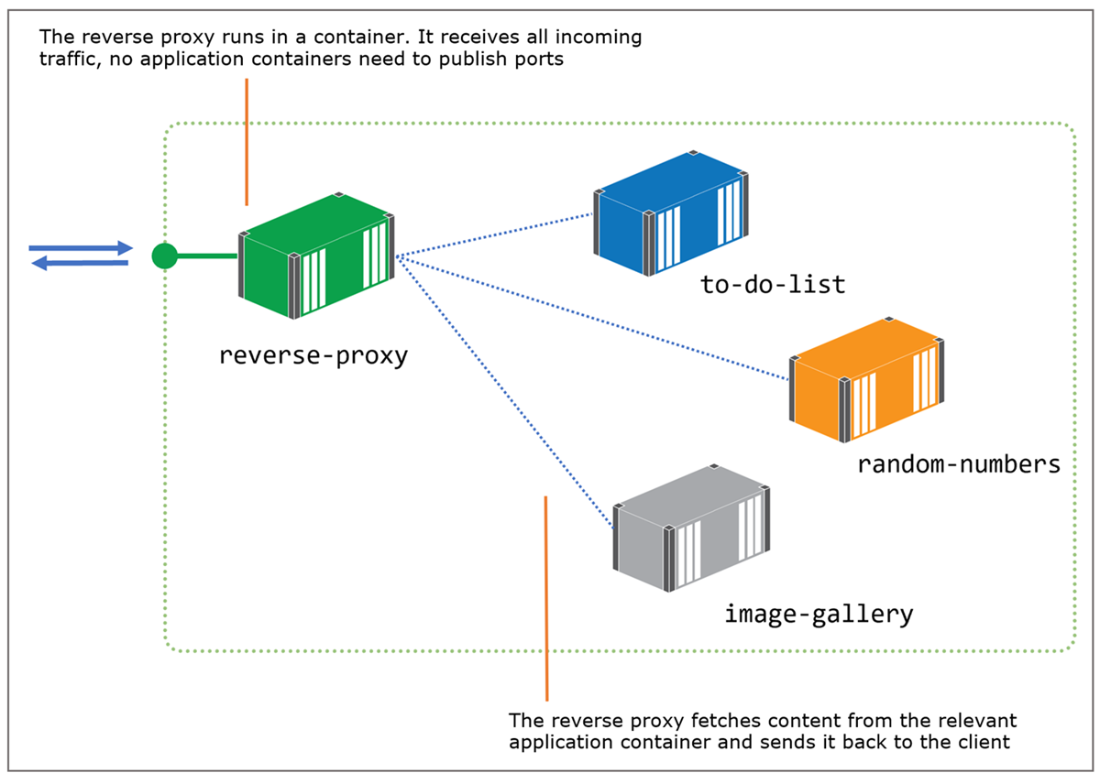
A reverse proxy is the gateway to your apps; application containers are not publicly available.
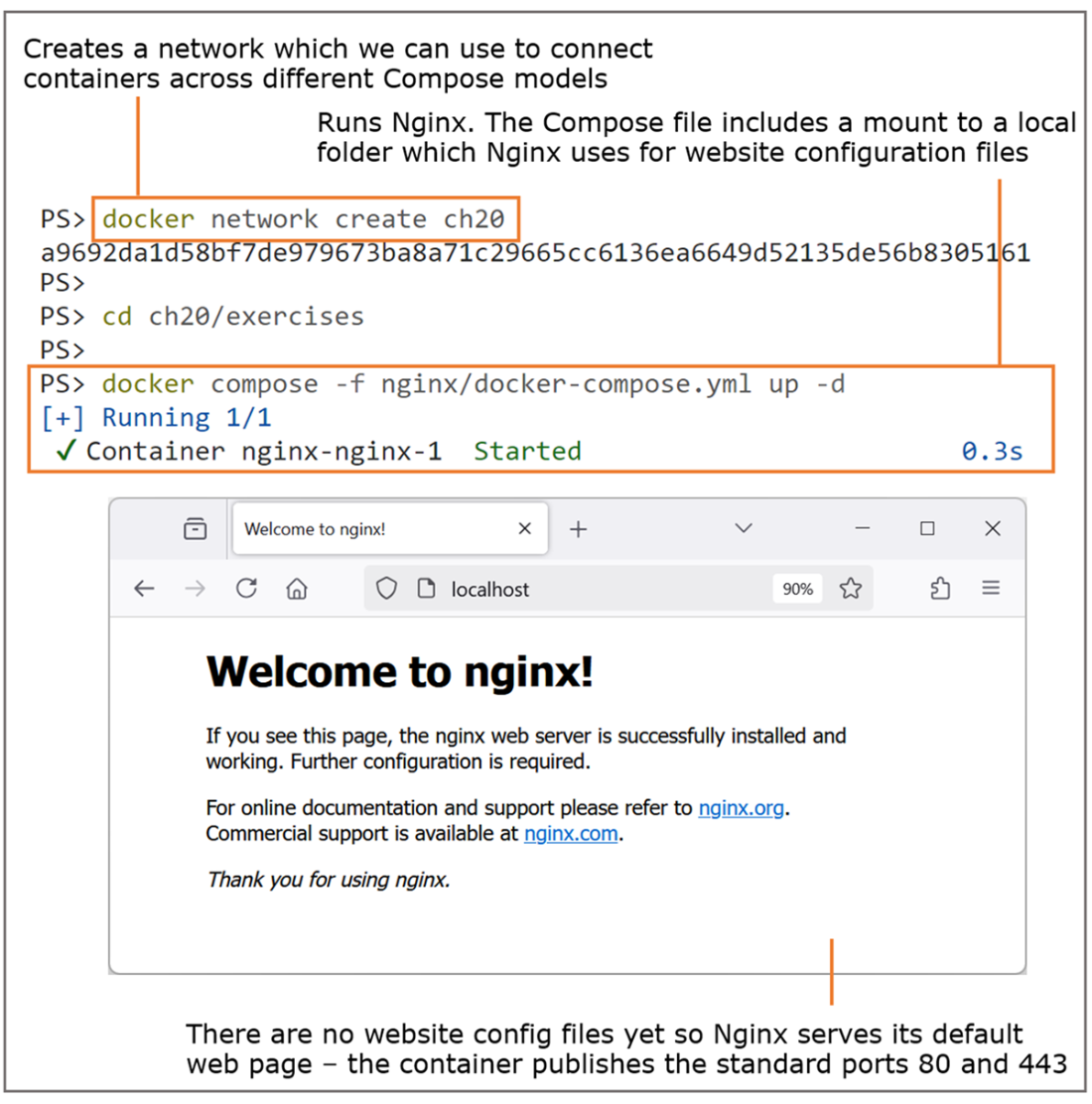
Nginx is an HTTP server—it can serve static content and run as a reverse proxy.
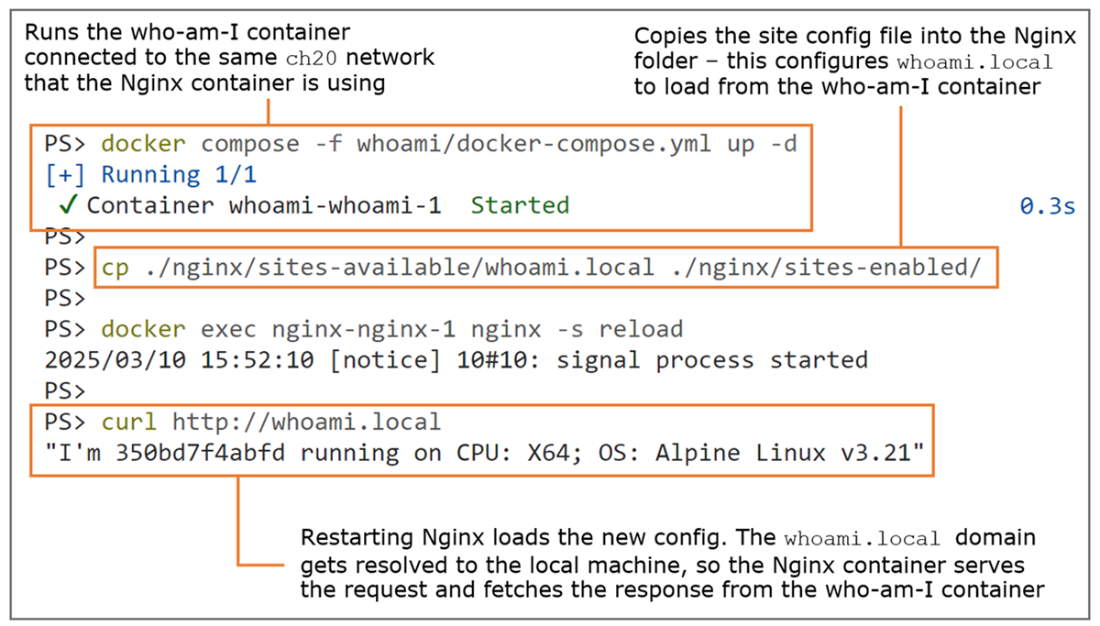
The reverse proxy in action, loading content from an application container behind the scenes
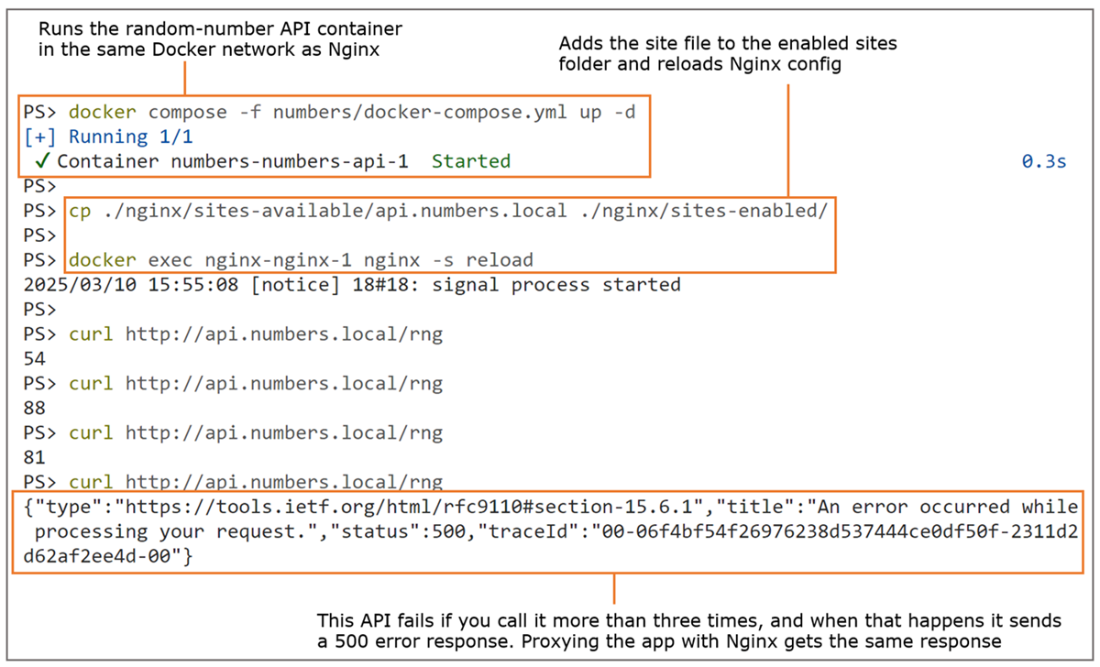
In a simple proxy configuration, Nginx sends the response from the app—even if it’s a failure.
Nginx takes care of load-balancing so you can run app containers at scale.
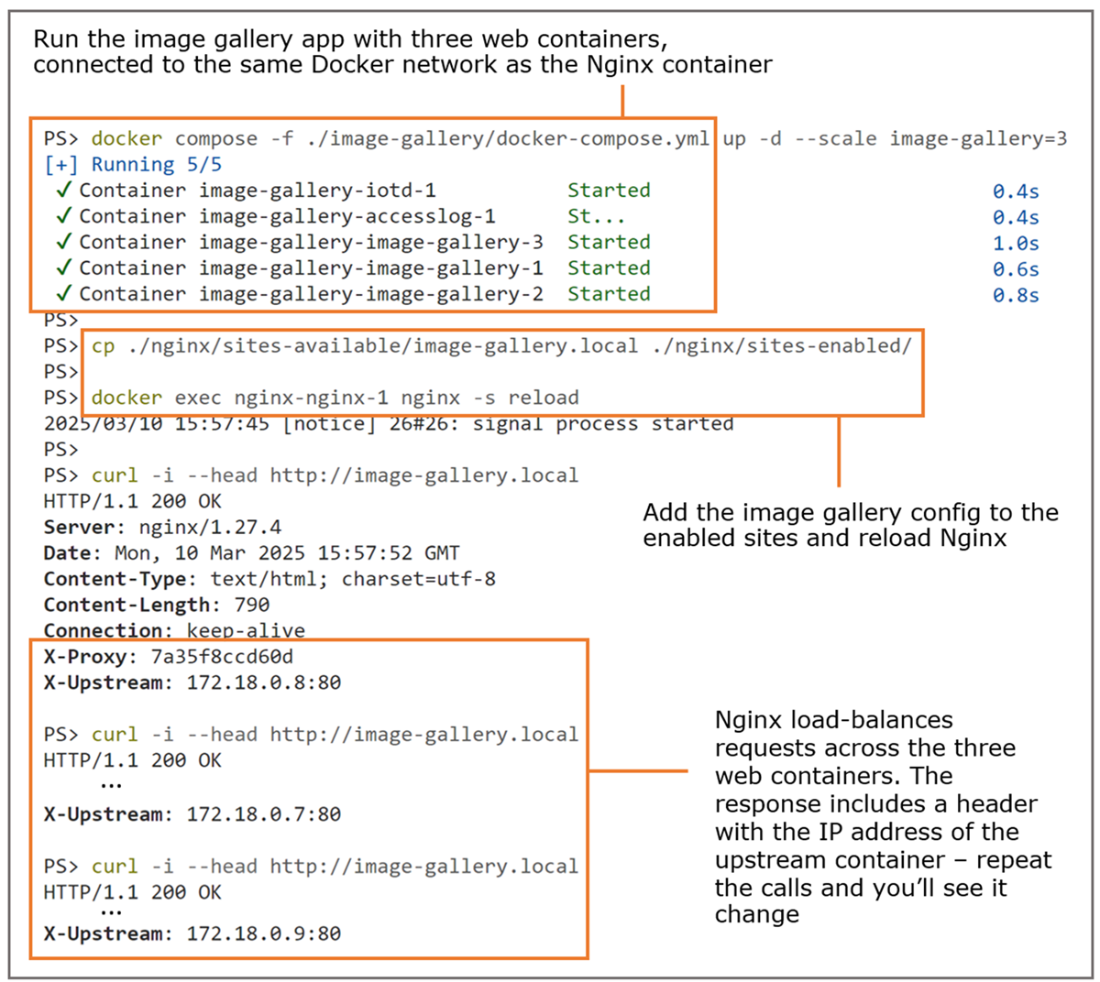
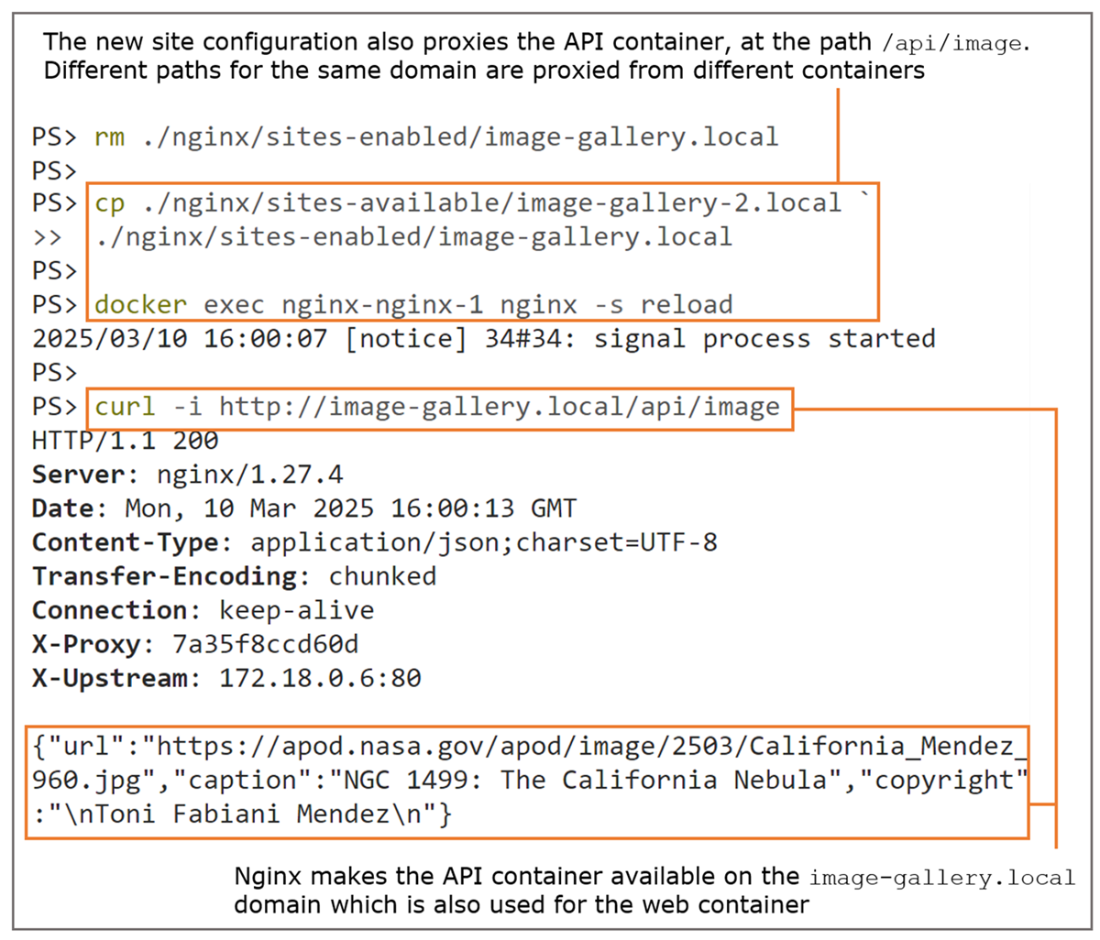
Nginx can route requests to different containers, based on the domain name or request path.
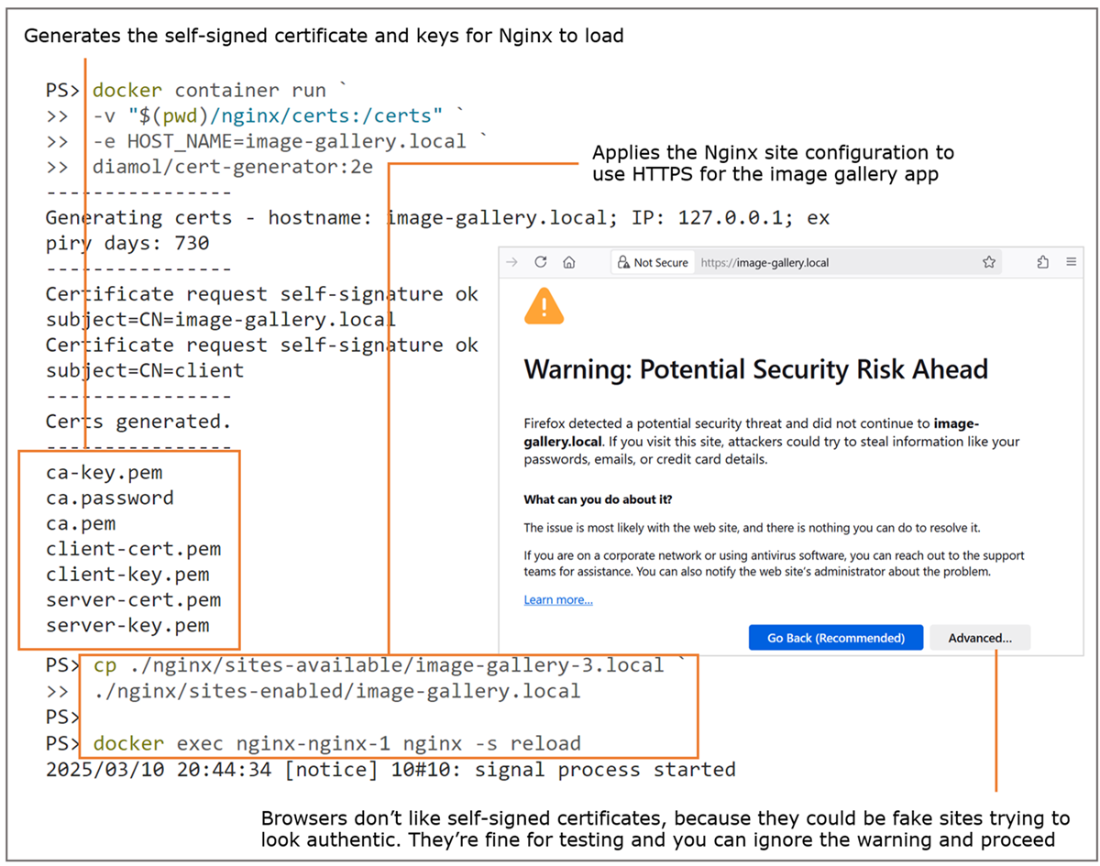
Nginx redirects HTTP requests to HTTPS and serves them with an SSL certificate.
Using Nginx as a caching proxy reduces the workload for application containers.
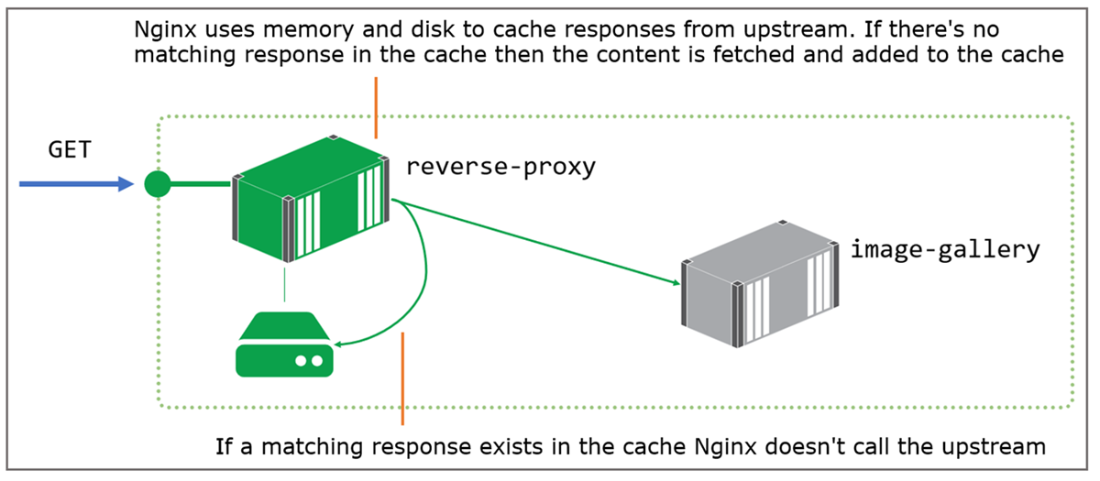
If the proxy has the response in its cache, it sends it without using the upstream.
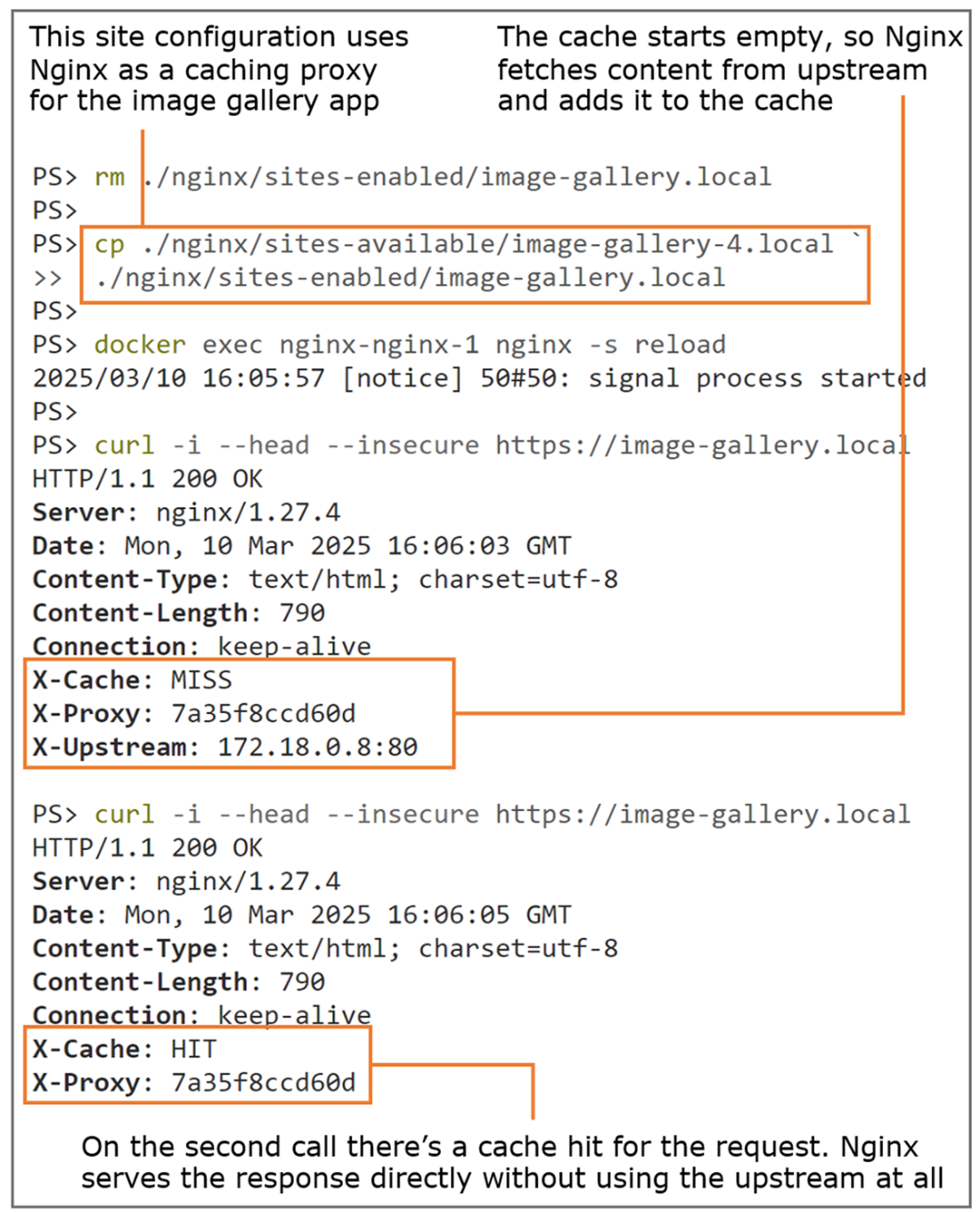
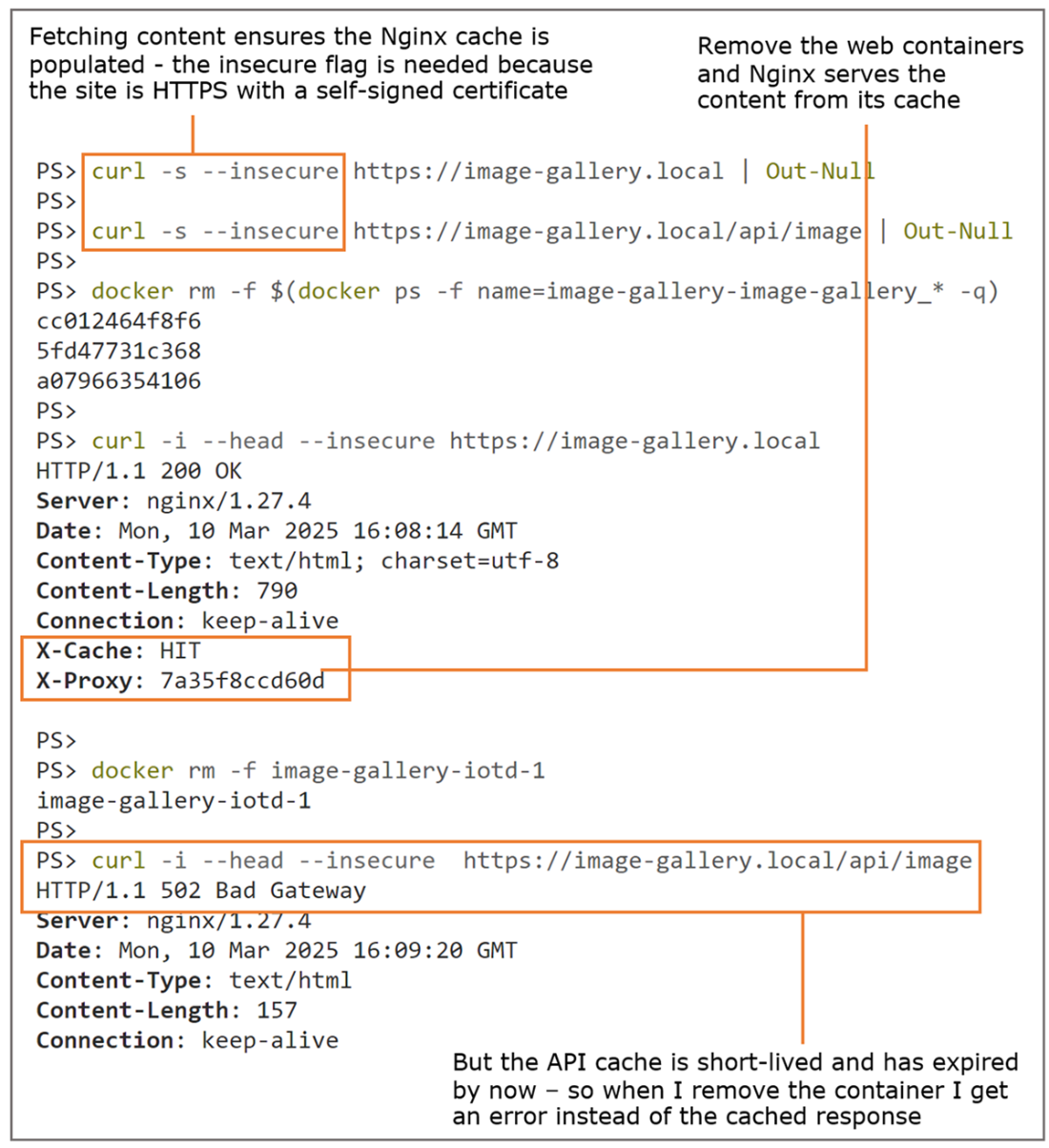
Nginx caching can be fine-tuned to keep content fresh or to add reliability to your app.
The Traefik dashboard shows you the configuration for all the apps being proxied.
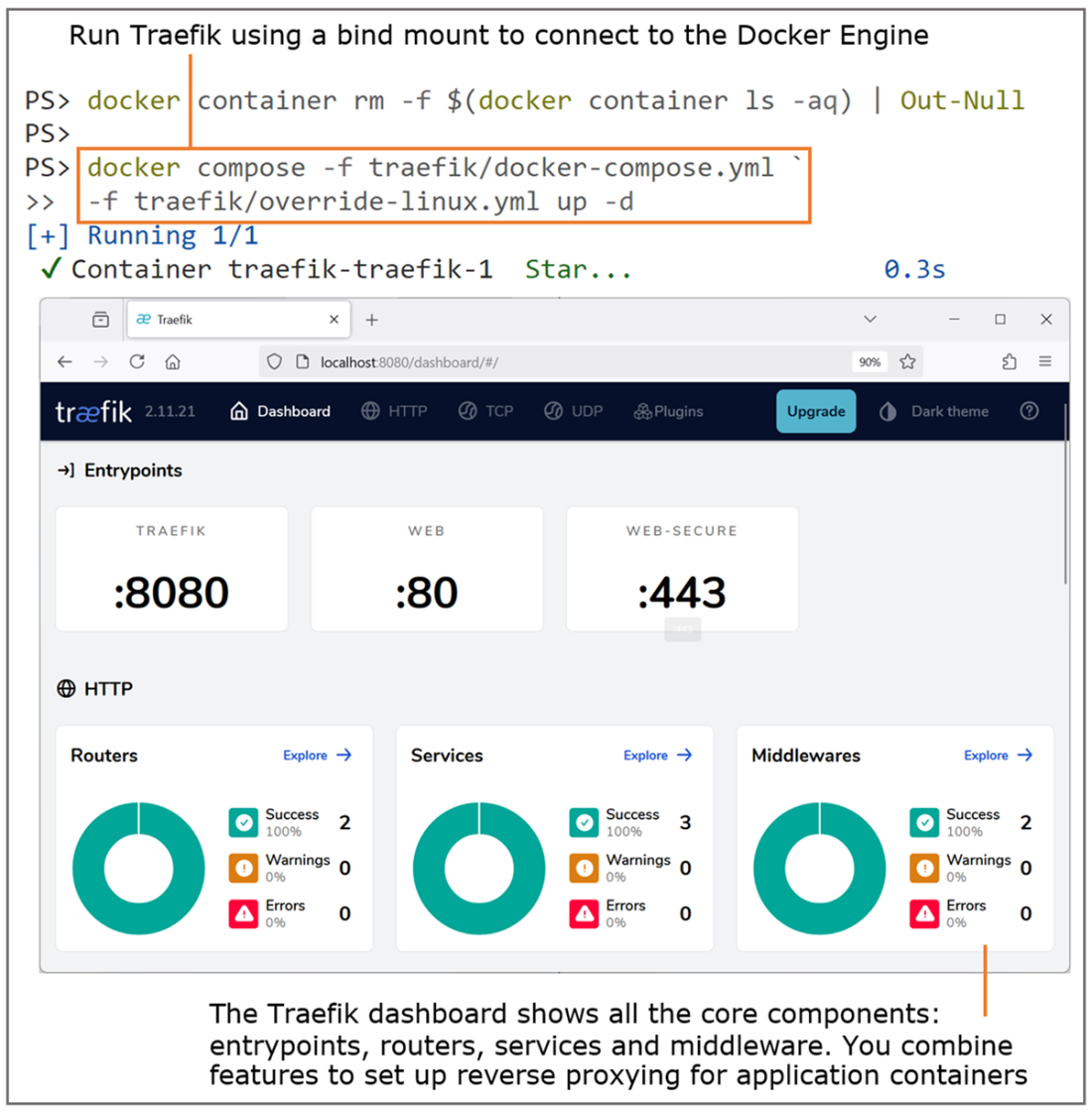
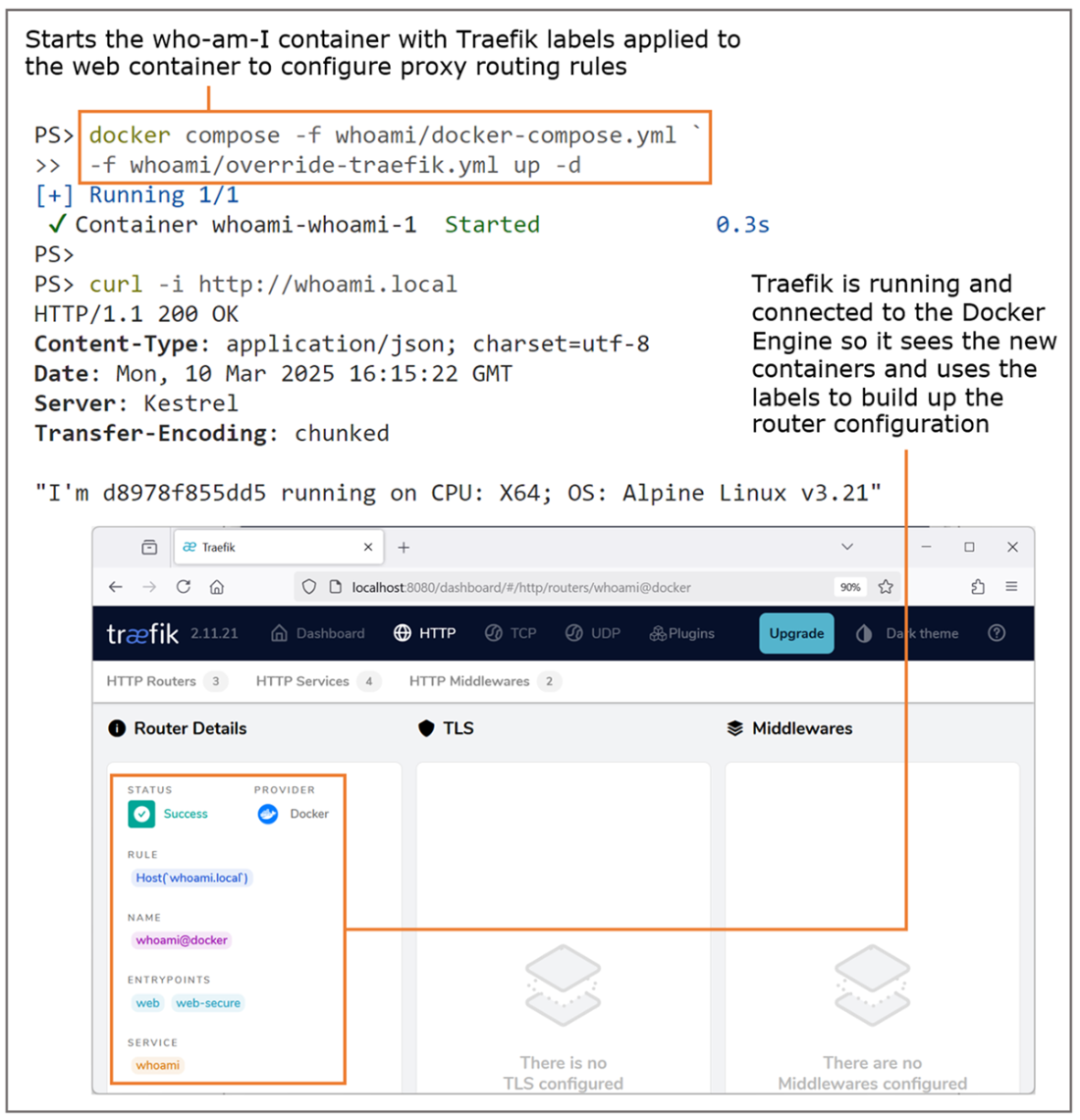
Traefik uses the Docker API to find containers and labels, using them to build configuration.
Routing rules let you present a multi-container app at a single domain.
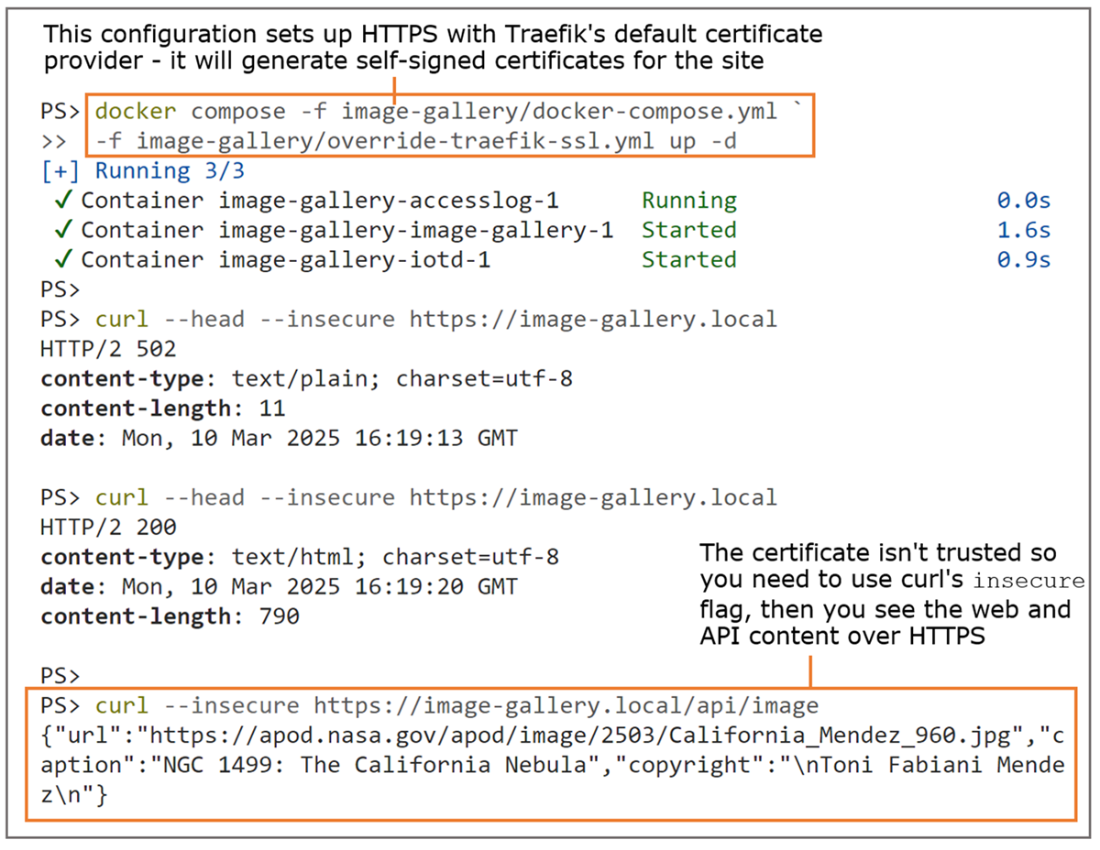
Using Traefik for HTTPS—it can generate certificates or fetch them from third-party providers.
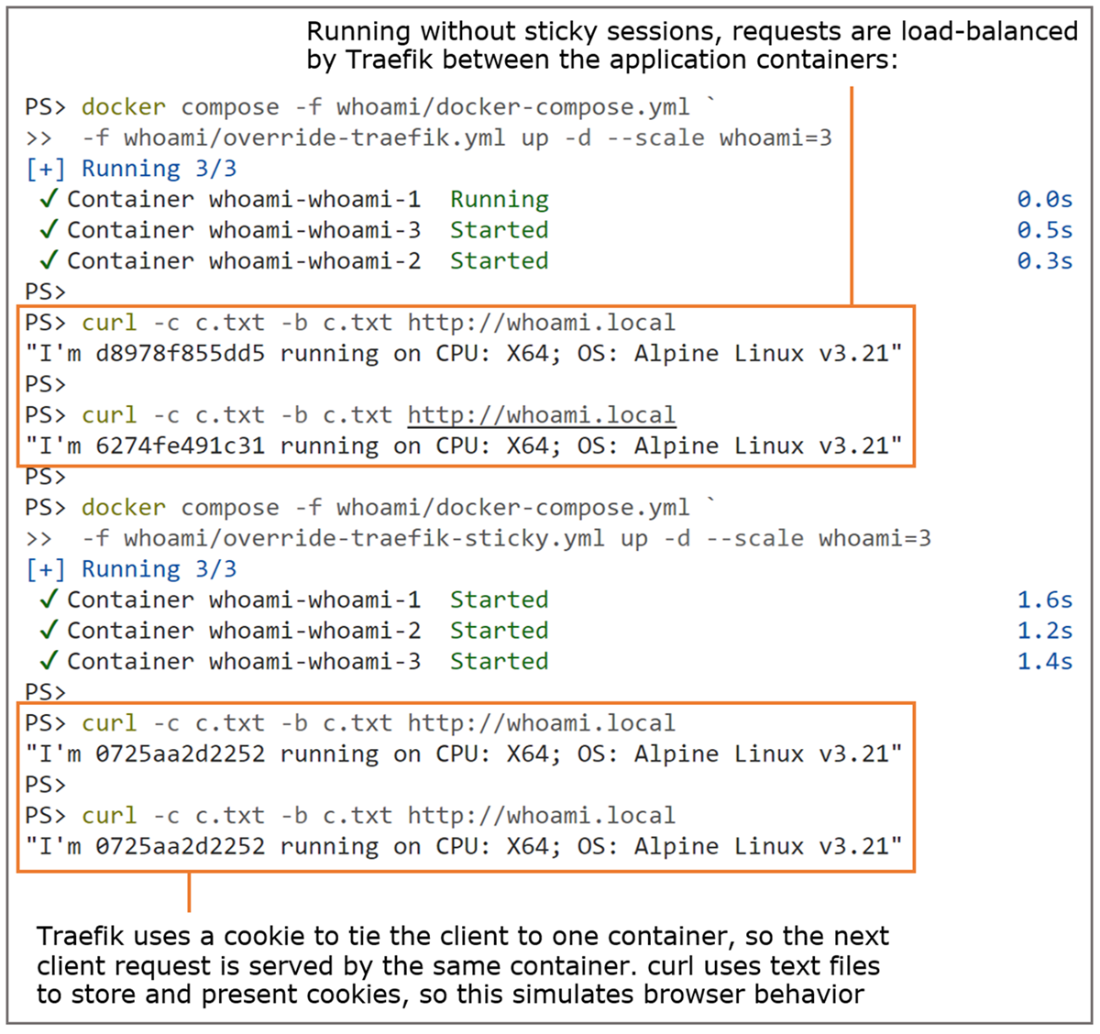
Enabling sticky sessions in Traefik—it uses cookies to send the client to the same container.
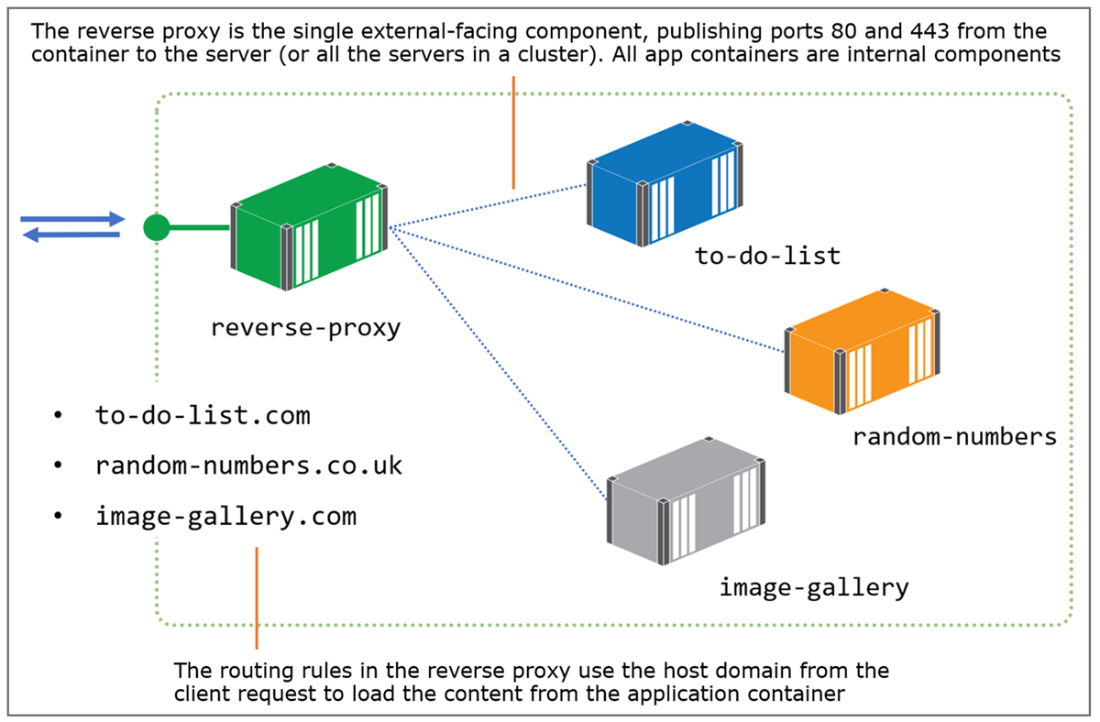
Using a reverse proxy to host many applications with different domain names in one cluster.
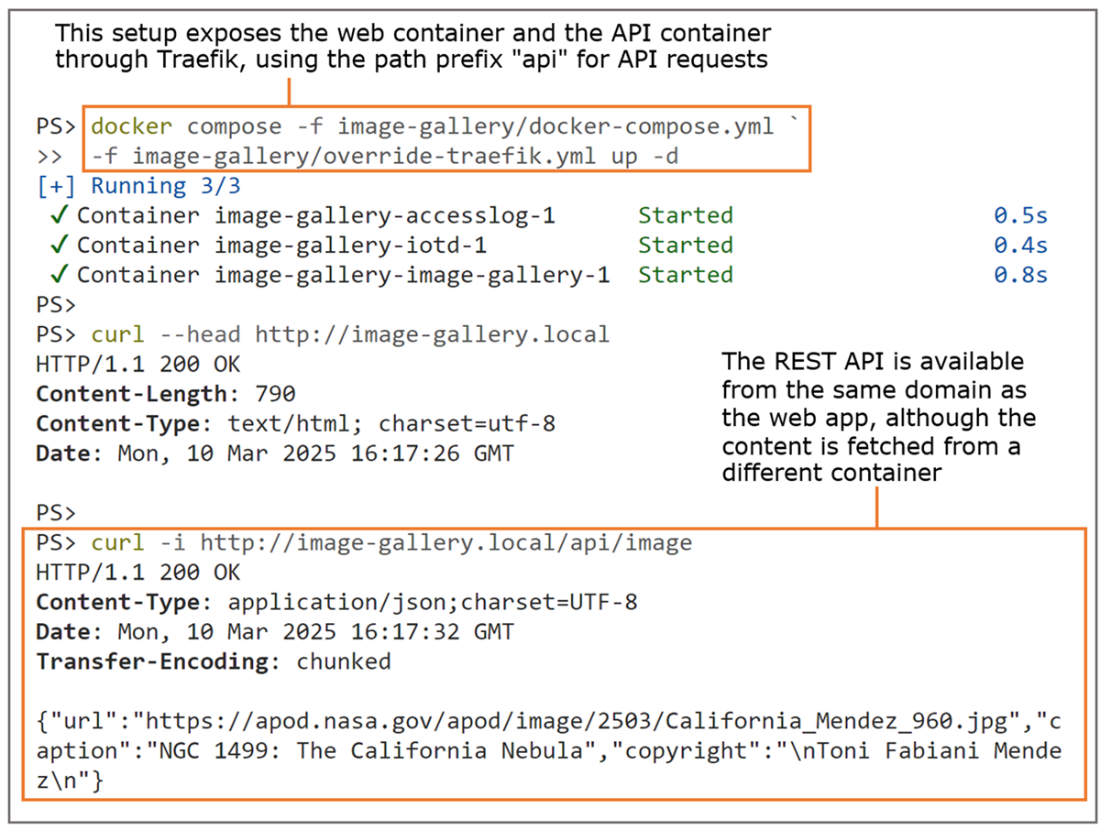
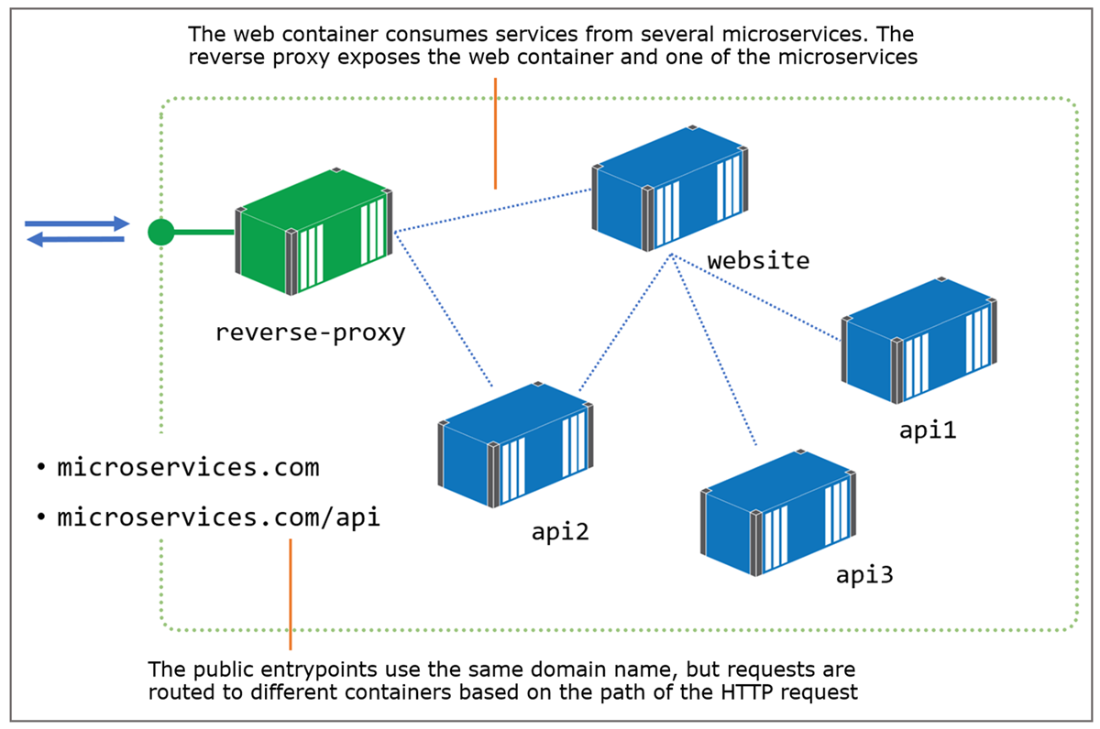
Microservices exposed by the reverse proxy are part of the same application domain.
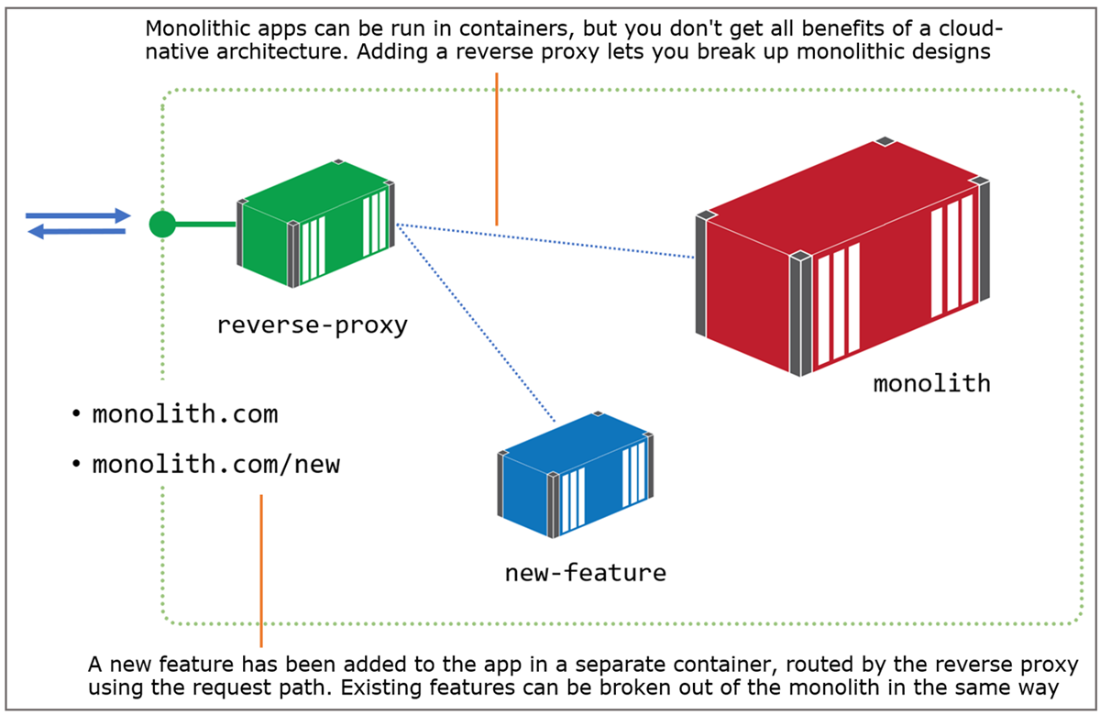
The reverse proxy hides the monolithic architecture so it can be broken into smaller services.
Lab

We’ve got a whole new app for this lab—one that will clearly show the power of a caching reverse proxy. It’s a simple website that calculates pi to a specified number of decimal places. In the lab folder for this chapter, you can run the app with Docker Compose and browse to http://localhost:8031/?dp=50000 to see what pi looks like to 50,000 decimal places. Refresh the browser and you’ll see it takes just as long to compute the same response. Your job is to run the app behind a reverse proxy:

  • The app should be available at the domain pi.local on the standard HTTP port.
  • The proxy should cache responses so that when users repeat the same request, the response is served from the cache and is much faster than from the app.
  • The proxy should add resilience, so if you kill the app container, any cached responses are still available from the proxy.

My solution is up on GitHub, and you’ll find there are huge time savings from caching proxies with compute-intensive work like this: https://github.com/sixeyed/diamol/ blob/2e/ch20/lab/README.md.


FAQ

What is a reverse proxy and why is it important for containerized apps?A reverse proxy is a gateway that receives all incoming HTTP(S) requests and forwards them to the appropriate application container. In Docker, only the proxy publishes ports; app containers stay internal, which simplifies scaling, updates, and security. It also lets many apps share the standard ports 80/443.
How can multiple apps share ports 80 and 443 on one host or cluster?The proxy routes by request metadata, typically the Host header (for example, whoami.local or image-gallery.local). It inspects the incoming request, matches the host (and optionally the path), and forwards the request to the right container.
What’s the minimal Nginx configuration to proxy a containerized web app?Define a server block with the site’s domain (server_name) and a location that forwards to the app’s internal DNS name and port (proxy_pass). Nginx fetches content over the Docker network using the container/service name.
Can Nginx load-balance across multiple containers of the same service?Yes. When Nginx reads its config, it resolves upstreams and builds a routing list. If multiple containers are available for the same service name, Nginx will distribute requests across them, letting you scale the app without changing application code.
How do I route traffic by URL path to expose microservices under one domain?Use path-based routing. For example, keep the web UI at / and send /api/... to a separate API container. The proxy makes the app look like a single site while different paths are served by different services.
How should I handle HTTPS and certificates with a reverse proxy?Terminate SSL/TLS at the proxy. Configure the proxy to redirect HTTP to HTTPS and load a certificate/key pair for the site. Use self-signed certs for non-production and a CA (such as Let’s Encrypt) for production. Centralizing TLS at the proxy avoids managing certs inside each app.
What performance and resilience benefits does Nginx caching provide?Nginx can cache responses in memory/disk to serve repeat requests faster and reduce load on app containers. You can set different cache lifetimes per path and even serve stale cache on upstream errors to keep parts of the site available during failures.
How is Traefik different from Nginx for container environments?Traefik is container-aware and builds its routing dynamically from Docker labels, so you don’t maintain per-site config files or reload the proxy. It has a dashboard, supports routers/services/middlewares, and integrates with certificate providers. As of v2.11 it does not provide a response cache.
How do I configure Traefik routing, including path prefix handling?Add labels to your app containers. Define a router rule (for example, Host(`image-gallery.local`) or a PathPrefix), attach a middleware (such as a prefix-stripper), and link the router to a service that points to the container’s internal port. Traefik discovers this at runtime—no proxy reloads needed.
What are sticky sessions and when would I use them?Sticky sessions keep a client bound to the same container instance, useful for legacy or stateful apps that can’t share session state. In Traefik you enable stickiness on the service; it sets a cookie identifying the chosen container. Note that if that container disappears, the proxy will route to another instance and the user’s session may reset.

pro $24.99 per month

  • access to all Manning books, MEAPs, liveVideos, liveProjects, and audiobooks!
  • choose one free eBook per month to keep
  • exclusive 50% discount on all purchases
  • renews monthly, pause or cancel renewal anytime

lite $19.99 per month

  • access to all Manning books, including MEAPs!

team

5, 10 or 20 seats+ for your team - learn more


choose your plan

team

monthly
annual
$49.99
$499.99
only $41.67 per month
  • five seats for your team
  • access to all Manning books, MEAPs, liveVideos, liveProjects, and audiobooks!
  • choose another free product every time you renew
  • choose twelve free products per year
  • exclusive 50% discount on all purchases
  • renews monthly, pause or cancel renewal anytime
  • renews annually, pause or cancel renewal anytime
  • Learn Docker in a Month of Lunches, Second Edition ebook for free

choose your plan

team

monthly
annual
$49.99
$499.99
only $41.67 per month
  • five seats for your team
  • access to all Manning books, MEAPs, liveVideos, liveProjects, and audiobooks!
  • choose another free product every time you renew
  • choose twelve free products per year
  • exclusive 50% discount on all purchases
  • renews monthly, pause or cancel renewal anytime
  • renews annually, pause or cancel renewal anytime
  • Learn Docker in a Month of Lunches, Second Edition ebook for free
choose your plan

team

monthly
annual
$49.99
$499.99
only $41.67 per month
  • five seats for your team
  • access to all Manning books, MEAPs, liveVideos, liveProjects, and audiobooks!
  • choose another free product every time you renew
  • choose twelve free products per year
  • exclusive 50% discount on all purchases
  • renews monthly, pause or cancel renewal anytime
  • renews annually, pause or cancel renewal anytime
  • Learn Docker in a Month of Lunches, Second Edition ebook for free