18 Application configuration management in containers
Modern containerized applications should load configuration from their runtime environment, combining defaults baked into the image with files mounted at runtime and final overrides from environment variables. This chapter promotes a multi-tiered model—release-level settings in the image, environment-level overrides from the platform, and feature-level toggles via env vars—with environment variables taking precedence. The goal is to deploy the same image through all stages up to production while injecting environment-specific values, supported by clear collaboration between development and operations and, when used, secure and minimal diagnostics like a config API.
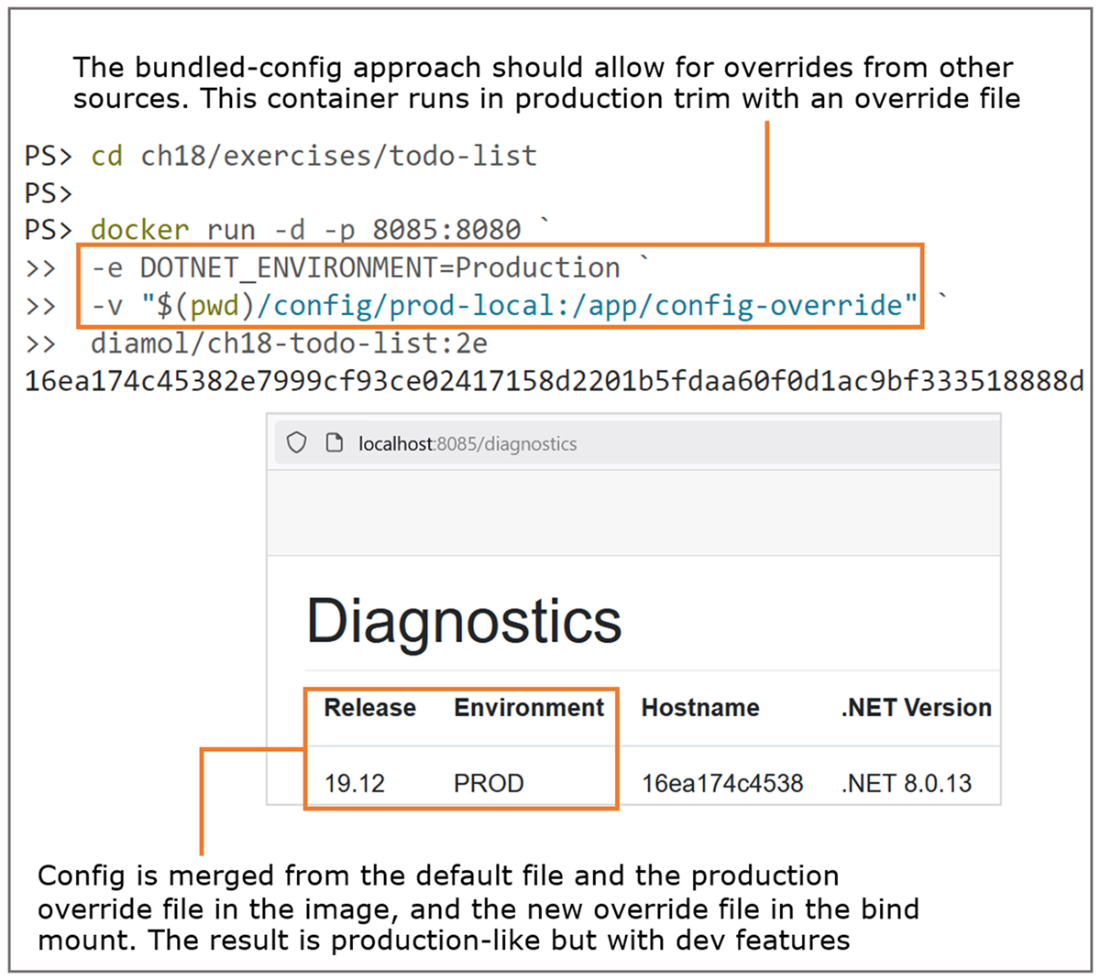
The chapter walks through concrete patterns across stacks. In Node.js, a library such as node-config reads a default config directory in the image plus a configurable override directory (from a bind mount, ConfigMap, or Secret), with env vars overriding file values. In .NET, images can package appsettings.json plus per-environment files, selecting the active environment with an environment variable, while still supporting extra override files and env vars—balanced against the risk of embedding sensitive details in images. In Go, Viper loads defaults (often TOML), merges an environment-specific override directory, and applies env var overrides (commonly with a prefix convention). The specifics differ by platform, but the high-level pattern remains consistent.
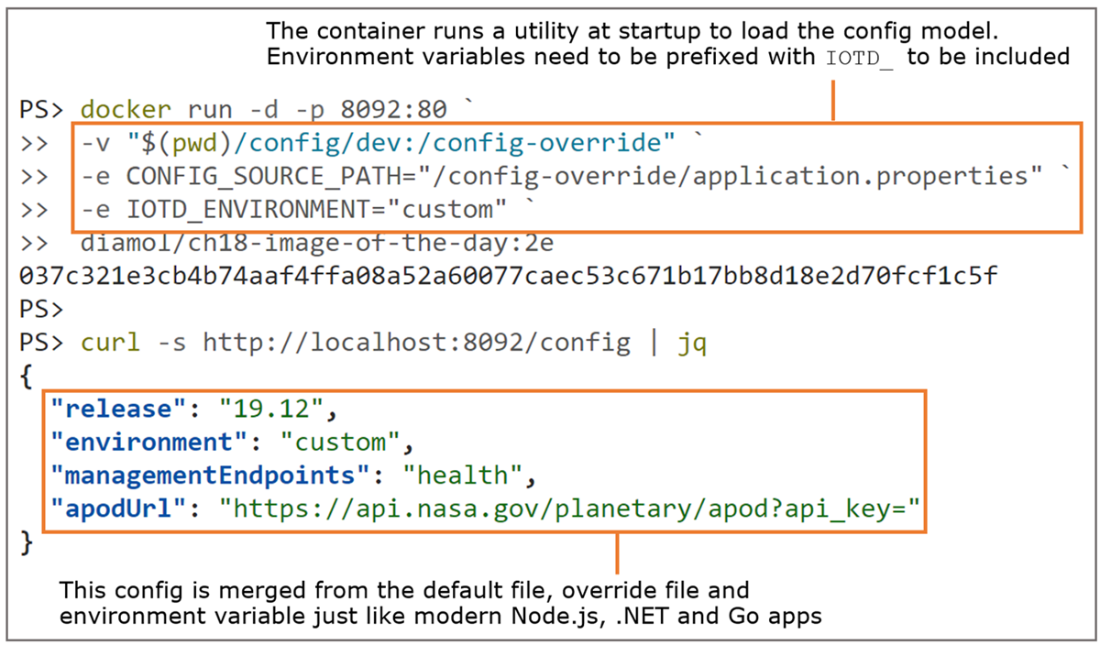
For legacy or rigid apps that can’t natively merge config, the image can include a startup utility that reads an override file and environment variables, merges them, and writes the final config in the format and location the app expects—preserving a consistent user experience at the cost of some startup complexity, mitigated by health checks. Documenting these behaviors in the application model (for example, with Docker Compose using environment variables and mounted secrets/config files) reduces confusion and codifies the expected inputs. The payoff is a single-image CI/CD flow, fast operational toggles for troubleshooting or risk mitigation, reproducible prod-like setups for developers, and portability across container platforms and other runtimes that share file and env-based configuration mechanisms.
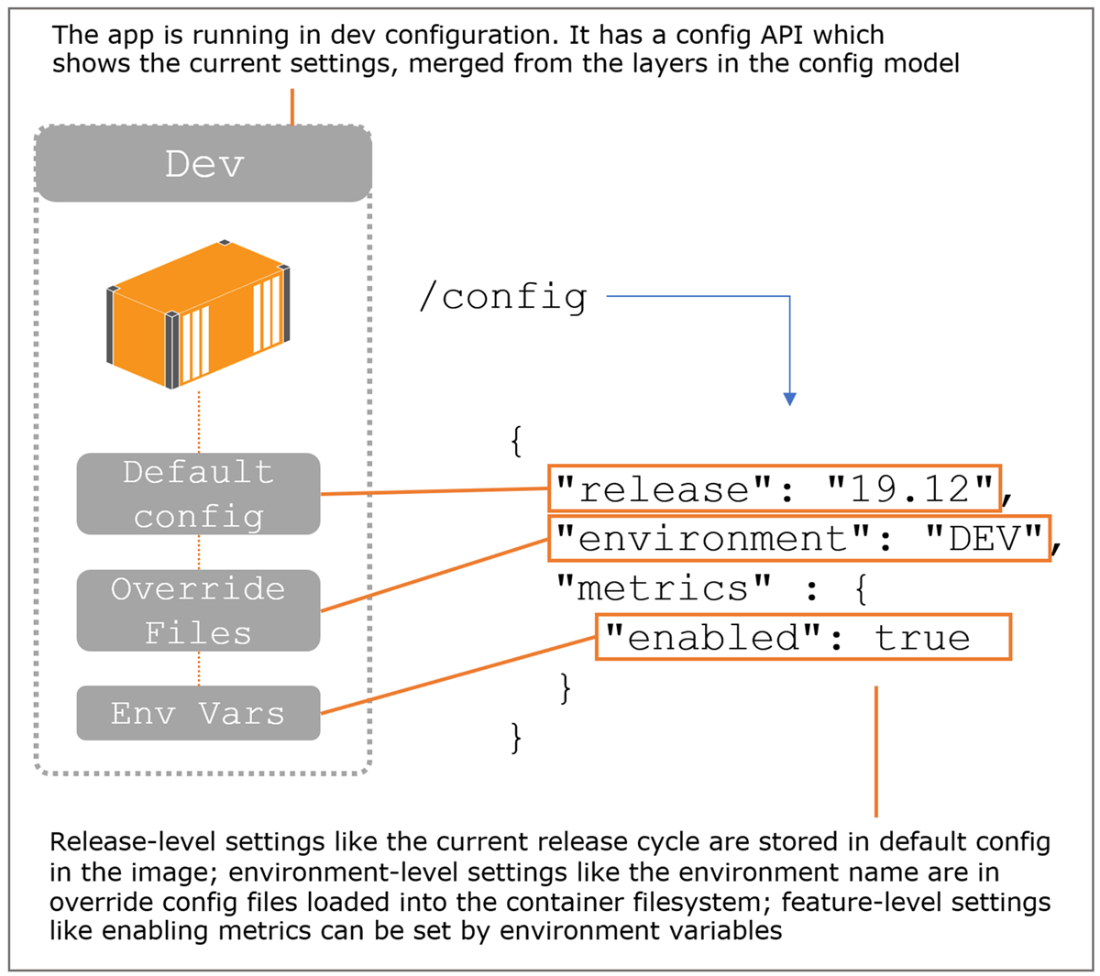
A config hierarchy with settings from the image, filesystem, and environment variables
It’s straightforward to merge config files using volumes, config objects, or secrets.
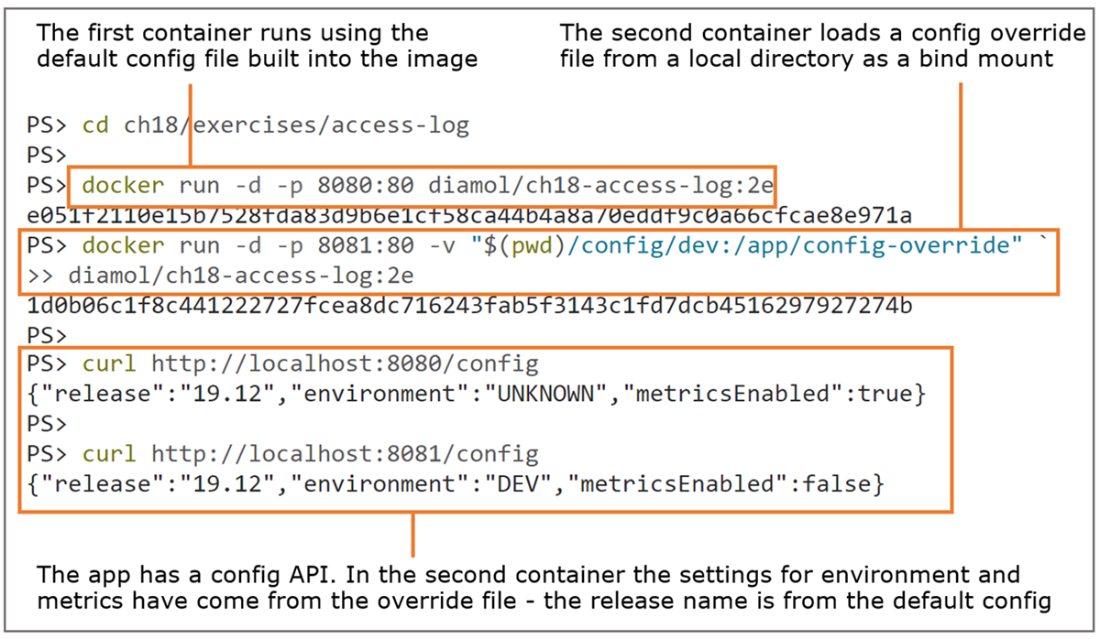
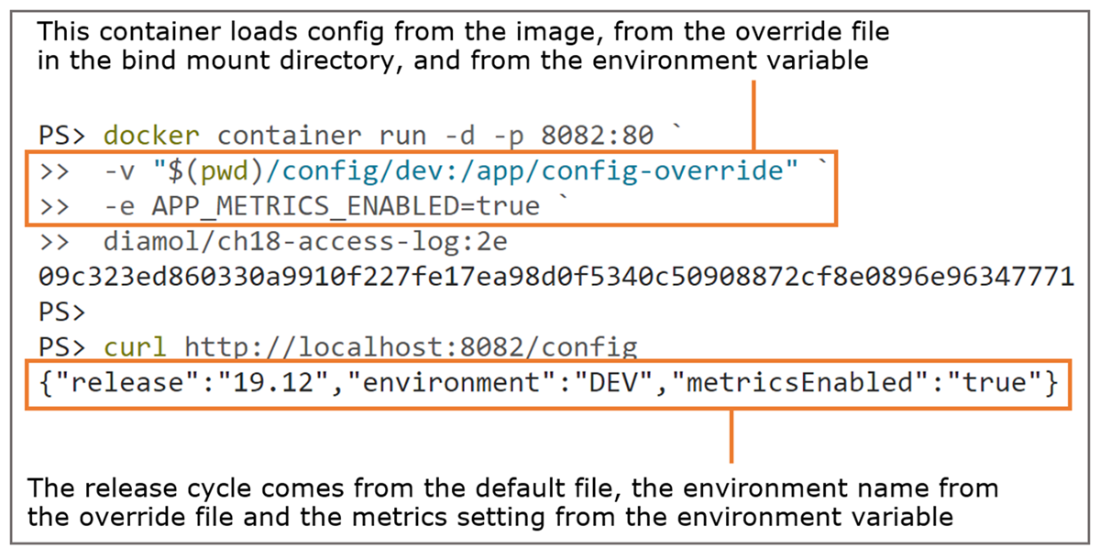
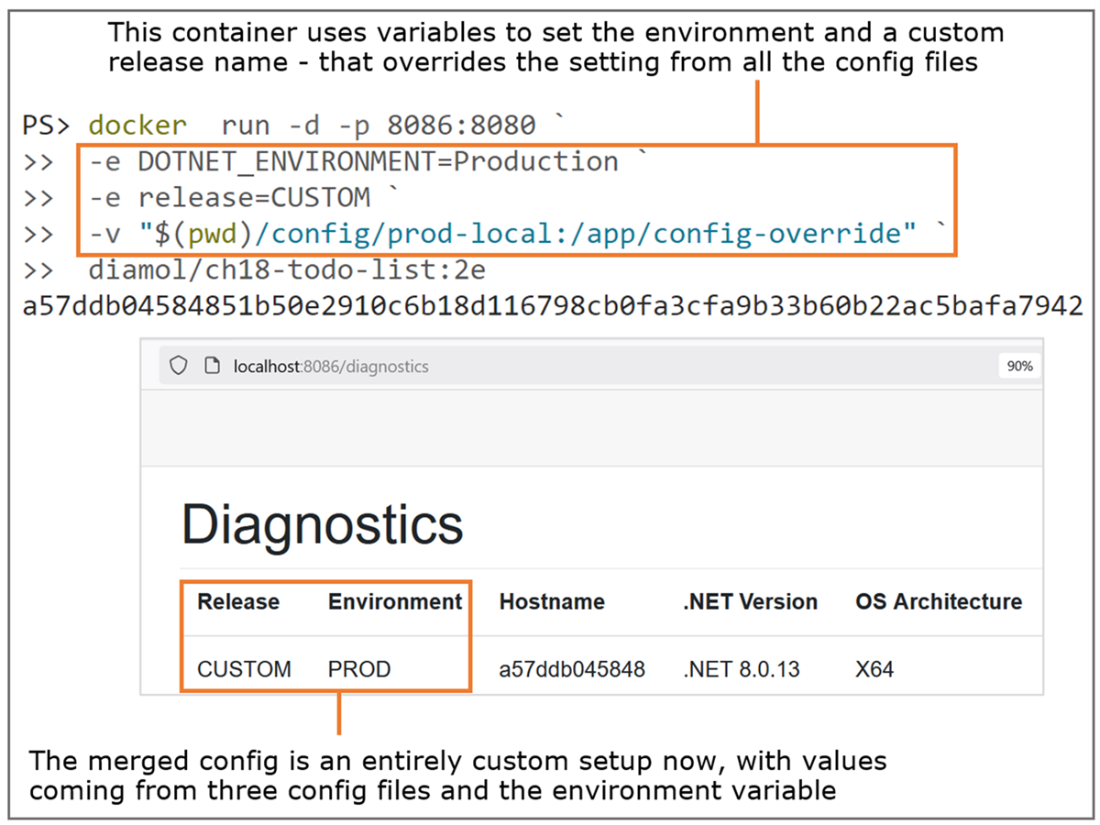
Merging config from environment variables makes it easy to change specific features.
Packaging every environment’s config file in the image makes it easy to switch environments.
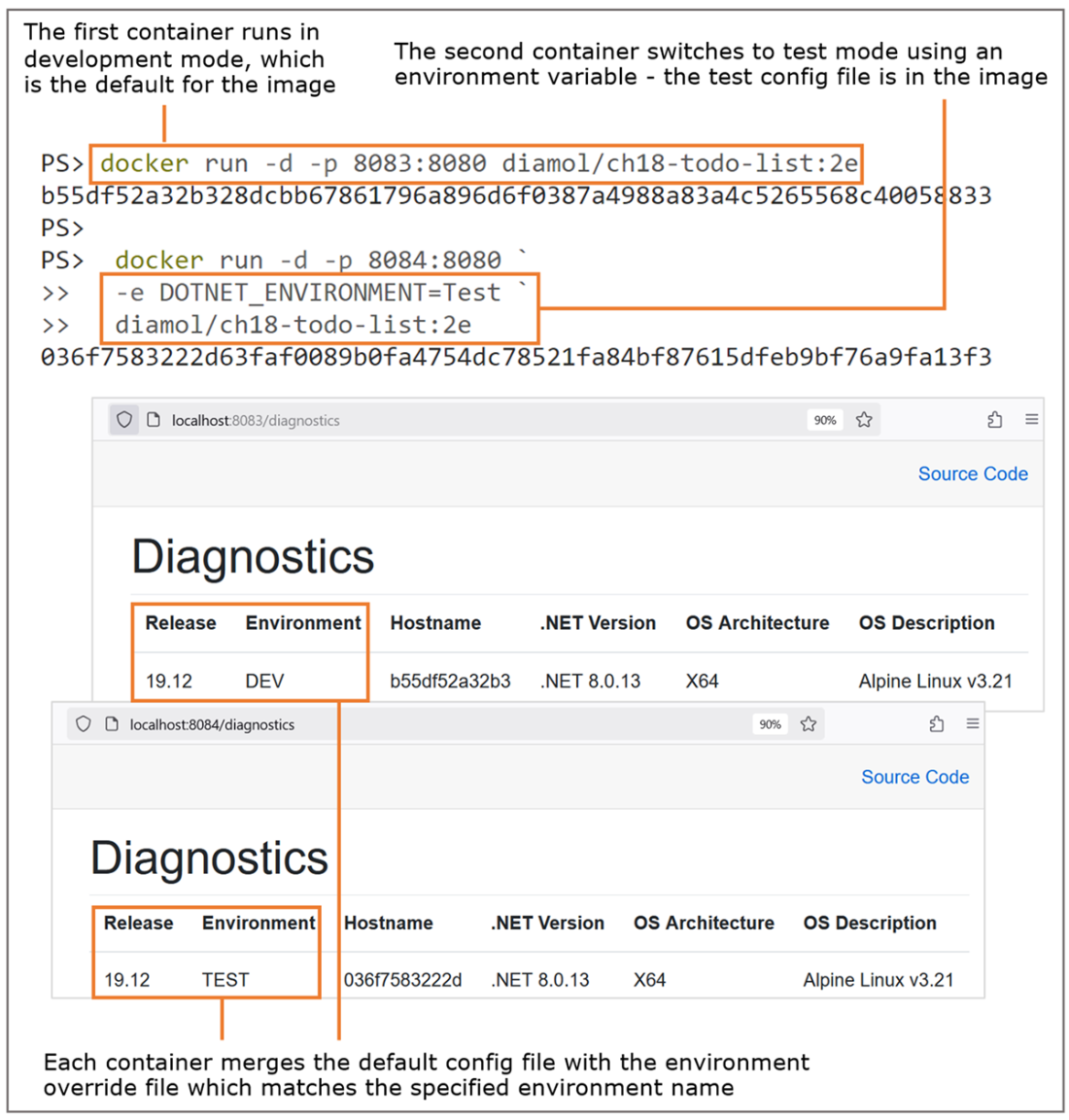
Selecting an environment to run in should still support config overrides from additional files.
The config hierarchy overrides values from any of the config files with environment variables.
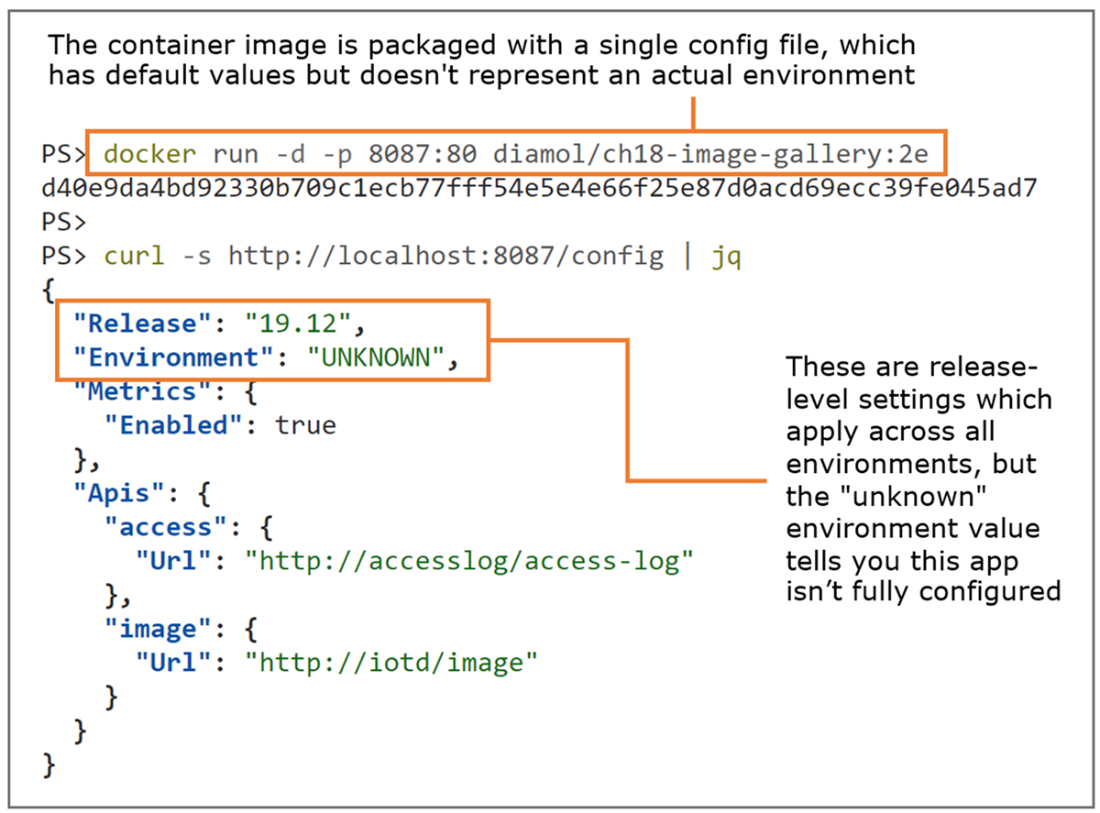
You can package your app with default settings that work but aren’t a complete environment.
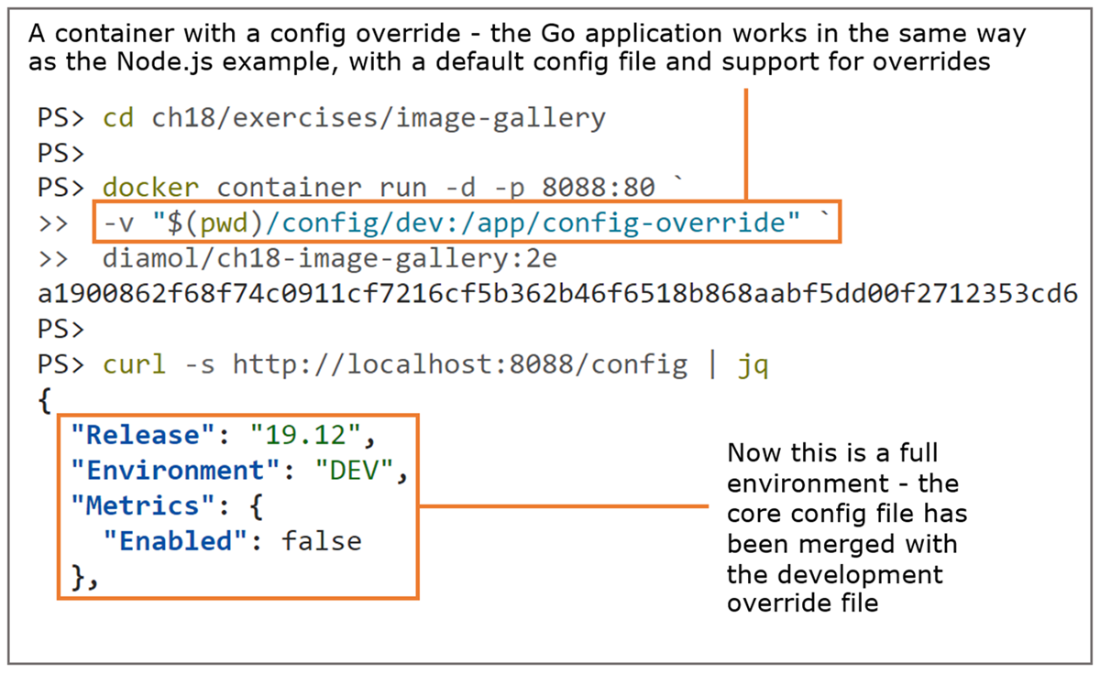
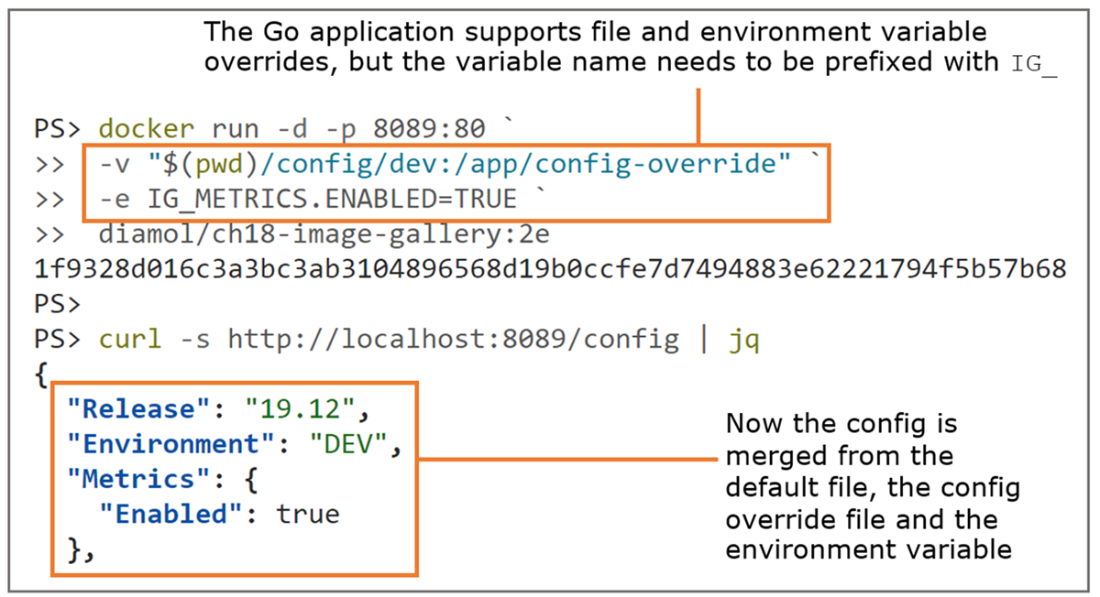
The Go Viper module merges config files in the same way as the node-config package.
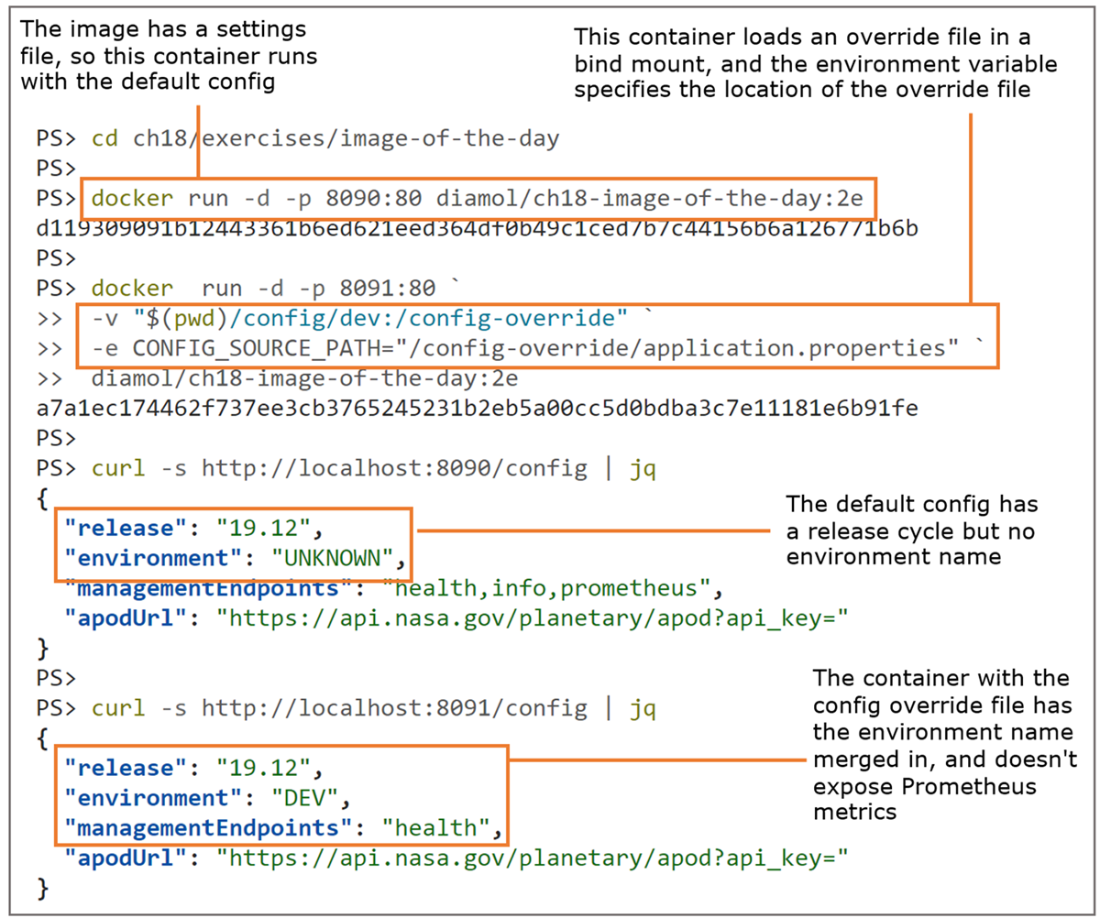
All the sample apps support environment variables for config, but with small variations.
This app has a utility to bootstrap the config model, but the user experience is the same.
Environment variables make the config model for this old app behave like new apps.
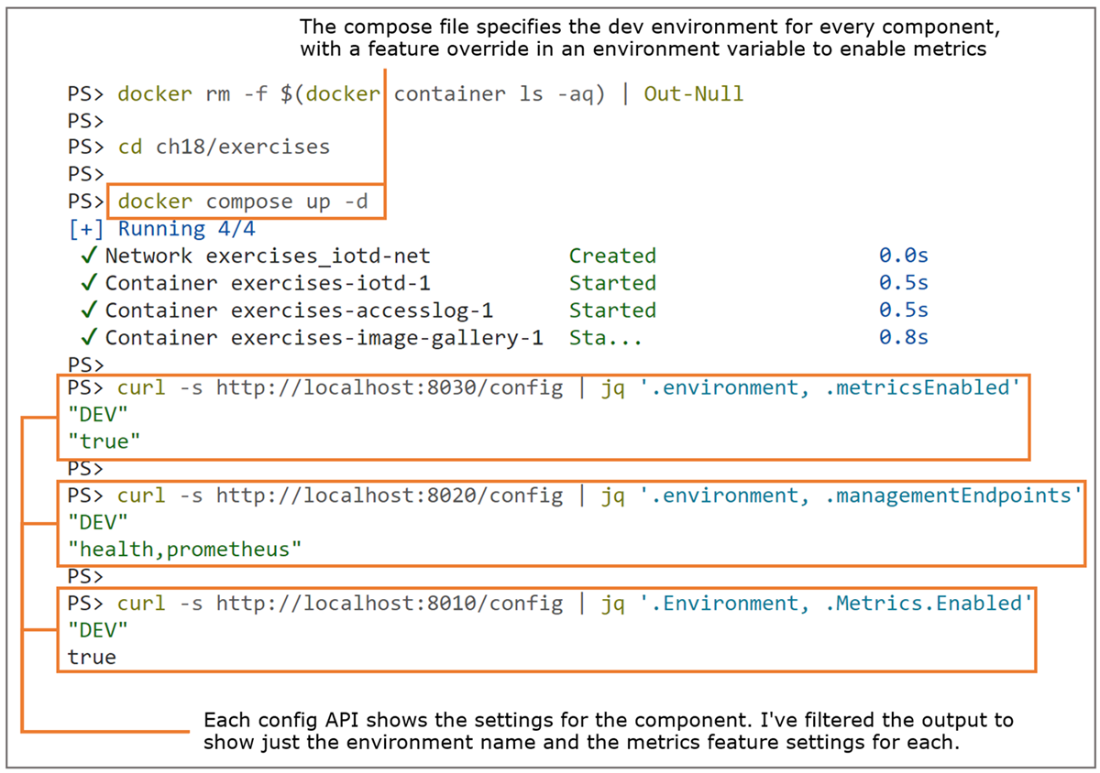
Docker Compose can document app config settings and start the app with that configuration.
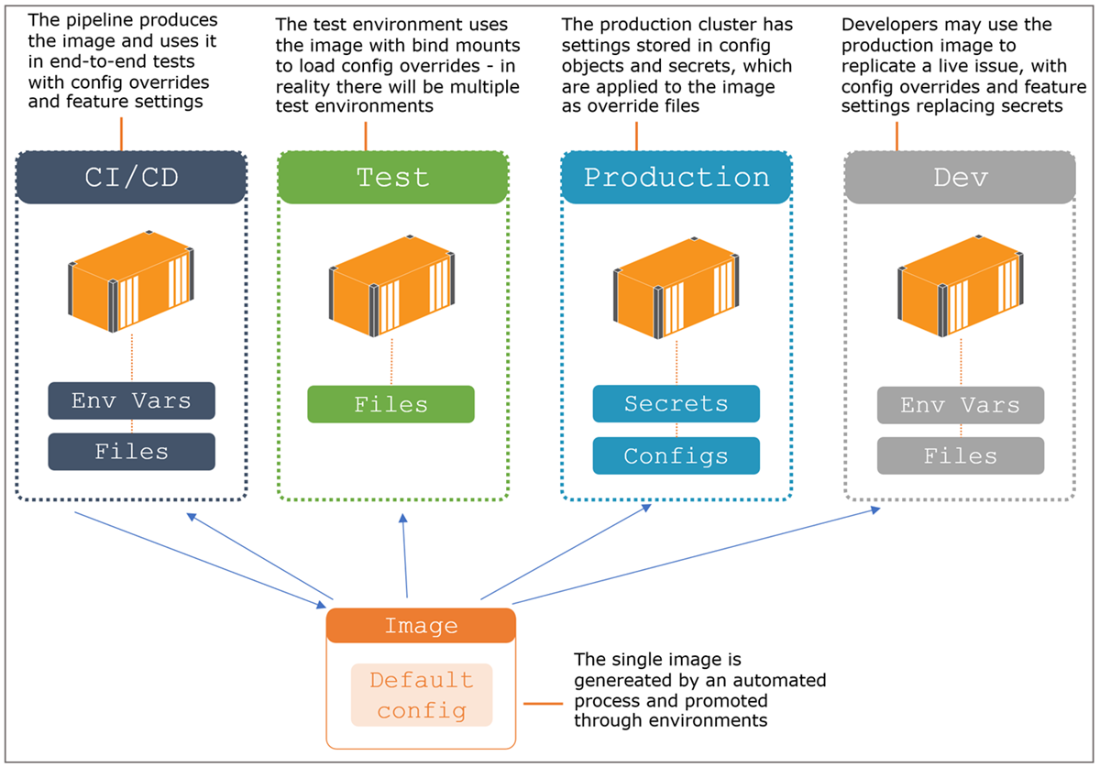
The CI/CD pipeline produces one image, and you use the config model to change behavior.
Lab
It can be tricky to dig into the configuration model for a new app and work out how to set override files and configure feature overrides, so you’re going to get some practice in this lab. You’ll be using the same image gallery app—in the lab folder for this chapter, there’s a Docker Compose file with the app components specified but with no configuration. Your job is to set up every component to
- Use volumes to load configuration override files.
- Load the configuration overrides for the test environment.
- Override the release cycle to be “25.03” instead of “19.12”.
This should be fairly straightforward but it will be useful to spend some time tweaking app config without making any changes to the apps. When you run the app with docker compose up, you should be able to browse to http://localhost:8010 and the app should work. And you should be able to browse to all three config APIs and see that the release name is 25.01 and the environment is TEST.
My solution is in the same folder in the docker-compose-solution.yml file, or you can check it on GitHub here: https://github.com/sixeyed/diamol/blob/2e/ch18/lab/README.md.
FAQ
What is a multi-tiered configuration model for containerized apps?
It separates settings into three layers that are merged at runtime:
- Release-level: defaults baked into the image (same for all environments in a release).
- Environment-level: settings supplied per environment (dev, test, prod) via files.
- Feature-level: switches that control behavior (often toggled with environment variables).
Typical precedence: image defaults < environment file overrides < environment variables.
How do I structure config files and overrides inside containers?
Package sane defaults in the image (for example, a config folder) and let the app optionally read overrides from a known path (for example, config-override).
At runtime, mount a directory from the platform (bind mount, Docker/Compose Secret, or Kubernetes ConfigMap/Secret) to that override path. Ensure filenames and paths match what the app expects.
Merging rule: defaults from image are overridden by files in the override path, which are finally overridden by environment variables.
What are the recommended sources for providing configuration at runtime?
- Local development: bind mounts to supply an override directory.
- Container platforms: ConfigMap/Secret (Kubernetes) or secrets/config files (Docker/Compose) mapped to the override path.
- Environment variables for fine-grained, last-mile overrides.
Note: Directory targets are more portable than single-file mounts (Windows containers don’t support single-file volume mounts).
How do environment-variable overrides differ across Node.js, .NET, and Go examples?
- Node.js (node-config): requires a JSON mapping file that maps environment variable names to config keys (env vars take precedence).
- .NET: uses JSON property paths as environment variable names (e.g.,
release=CUSTOM) and theDOTNET_ENVIRONMENTvariable selects the environment file. - Go (Viper): recommends a prefix to avoid clashes (e.g.,
IG_) and dot-notation for nested keys (e.g.,IG_METRICS.ENABLED=TRUE).
Should I package every environment’s config file inside the image?
You can (e.g., appsettings.json plus appsettings.{Environment}.json in .NET) for easy switching via an environment variable like DOTNET_ENVIRONMENT.
Pros: simple runtime switch, no external mount required for non-secret settings.
Cons: security risk if you bake sensitive or revealing info into images; you’ll still need overrides and env vars for secrets and last-mile changes.
What are the security best practices for a configuration diagnostics API?
- Never return secrets or sensitive fields; be selective about what you expose.
- Protect the endpoint with authentication/authorization.
- Make it a feature flag (enable/disable via config) so it’s off by default in production.
How can I apply the same configuration approach to legacy apps that don’t support it?
Add a startup utility or script in the image that:
- Reads an override file from a known path (e.g., via
CONFIG_SOURCE_PATH). - Reads environment variable overrides (optionally with a prefix).
- Merges them (env vars win) and writes the result into the app’s expected config file/location.
Be aware this adds startup time and potential failure points; use health checks to mitigate.
How does Docker Compose help document and apply configuration?
Compose files can declare environment variables and mount secrets/config files to the correct in-container paths, serving as living documentation for how each service is configured.
You can standardize patterns (e.g., enabling metrics across services) while accommodating per-app quirks in env var names and file formats.
How does a flexible config model support “build once, run anywhere” CI/CD?
CI builds a single image with release-level defaults. Promotion through environments is achieved by injecting environment-specific files and feature-level environment variables at deploy time.
This lets you quickly mitigate issues (e.g., disable a feature or change logging level) and reproduce production-like setups locally by reusing the same image with different config inputs.
What common pitfalls and tips should I keep in mind?
- Match exact file and directory names the app expects; wrong paths cause silent fallbacks.
- Don’t embed secrets in images; supply them via secrets mechanisms and env vars.
- Adopt clear env var conventions (prefixes, casing, dot-notation) per stack.
- Remember containers are ephemeral: changing env vars means recreating containers.
- Prefer human-readable config formats (e.g., TOML in Go) for easier diffing and debugging.

 Learn Docker in a Month of Lunches, Second Edition ebook for free
