17 Optimizing your Docker images for size, speed, and security
After containerizing apps and setting up CI/CD, you still need to optimize Docker images for size, speed, and security. This chapter explains how image layers work and why each instruction matters: once data enters a layer, deleting it in a later layer only hides it and doesn’t reduce the overall size. Practical steps include auditing what’s copied into images, preferring precise COPY instructions, and using a .dockerignore file to shrink build context and resulting image layers. Regular housekeeping (checking disk usage and pruning unused layers) helps prevent storage creep across development and test environments.
Choosing the right base image is both a security and performance decision. Smaller, purpose-built bases (for example, runtime-only variants or slim distributions) reduce attack surface and transfer time, whereas full SDK images can enable unintended code execution if an attacker gains a foothold. The chapter advocates curating “golden images” for consistency and control, and integrating automated security scanning into pipelines to track vulnerabilities in base layers, application dependencies, and deployment artifacts. It also covers pragmatic hardening measures—running as a non-root user, using read-only filesystems—while recognizing that some applications may require exceptions and thorough end-to-end testing.
To minimize layer size and speed up builds, the chapter shows how to install packages without recommendations, clean caches in the same RUN instruction, and extract only the files you need when working with archives. Multi-stage Dockerfiles make these optimizations easier and more readable, while preserving a fast, debuggable workflow. Ordering instructions by change frequency maximizes cache hits; pinning versions ensures reproducible builds and controlled updates. Finally, the chapter notes that splitting very large data across multiple layers can improve parallel pulls, emphasizing that effective optimization balances image size, build and transfer speed, and security—and should be guided by continuous measurement and iteration.
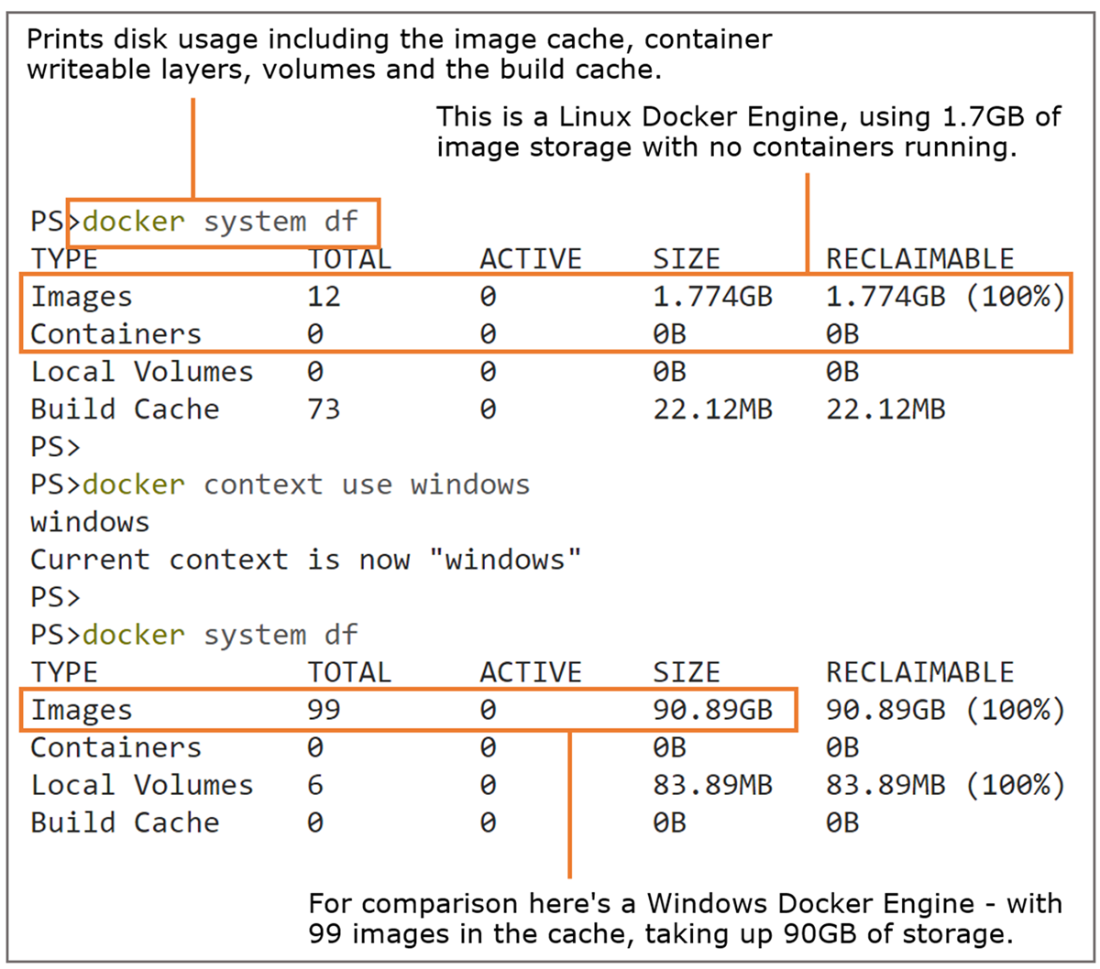
It’s easy to see your disk swallowed up by Docker images you’re not even using.
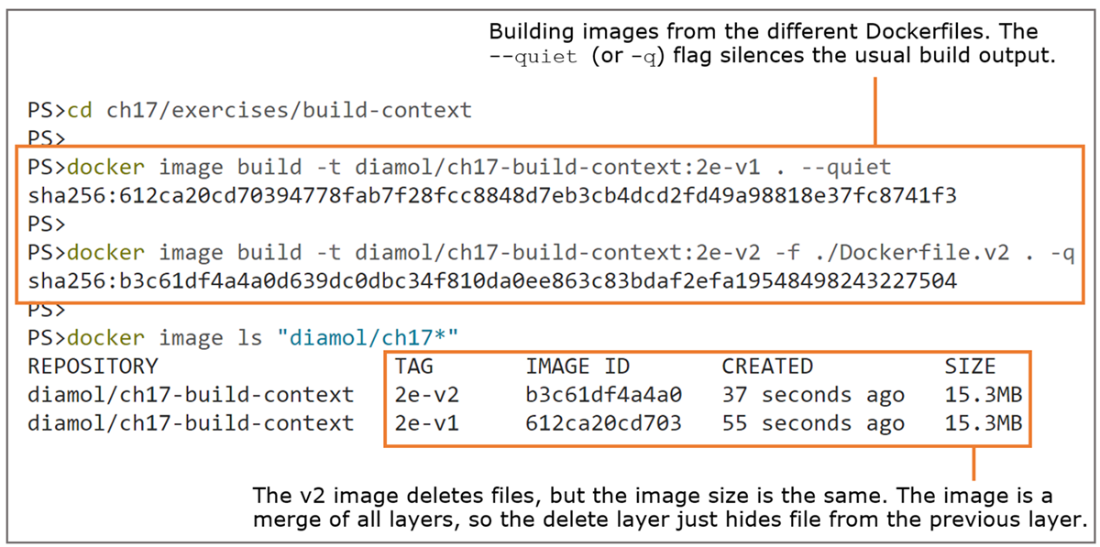
Surprise! Deleting files doesn’t reduce the image size if the delete is in its own layer.
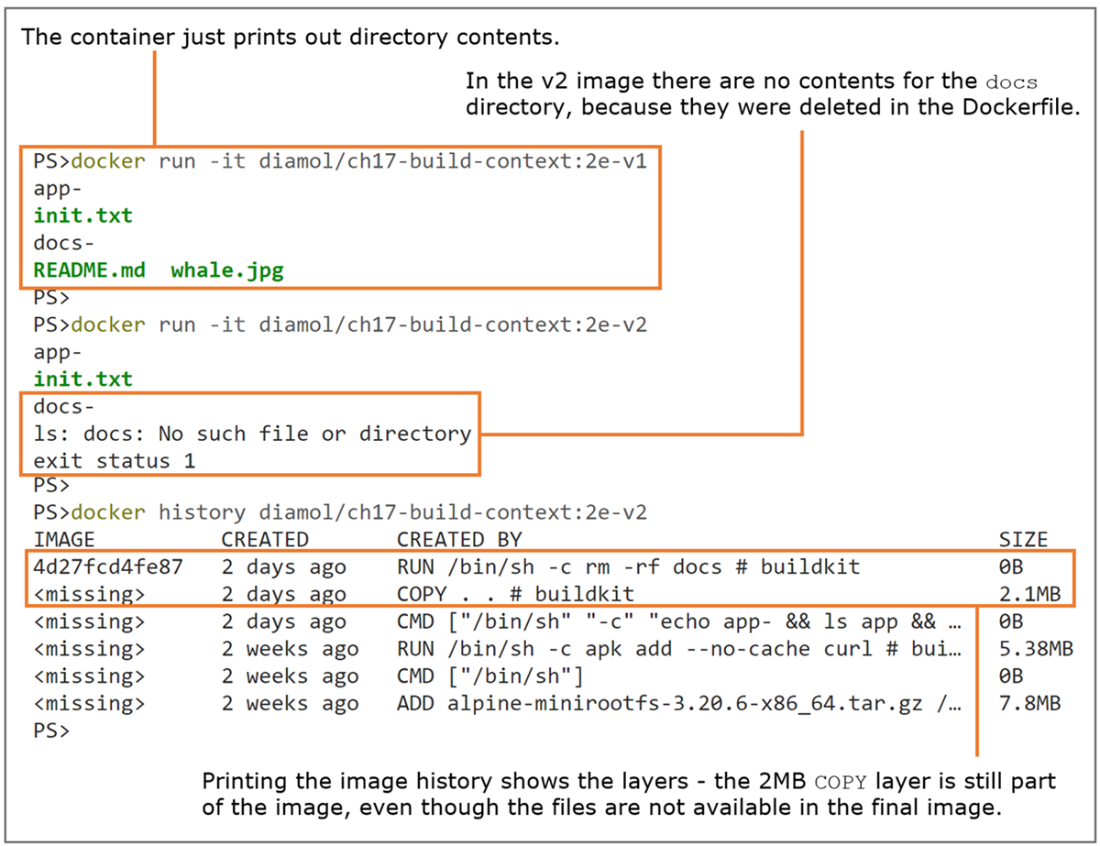
The merged filesystem hides deleted files, but the layers are still part of the image.
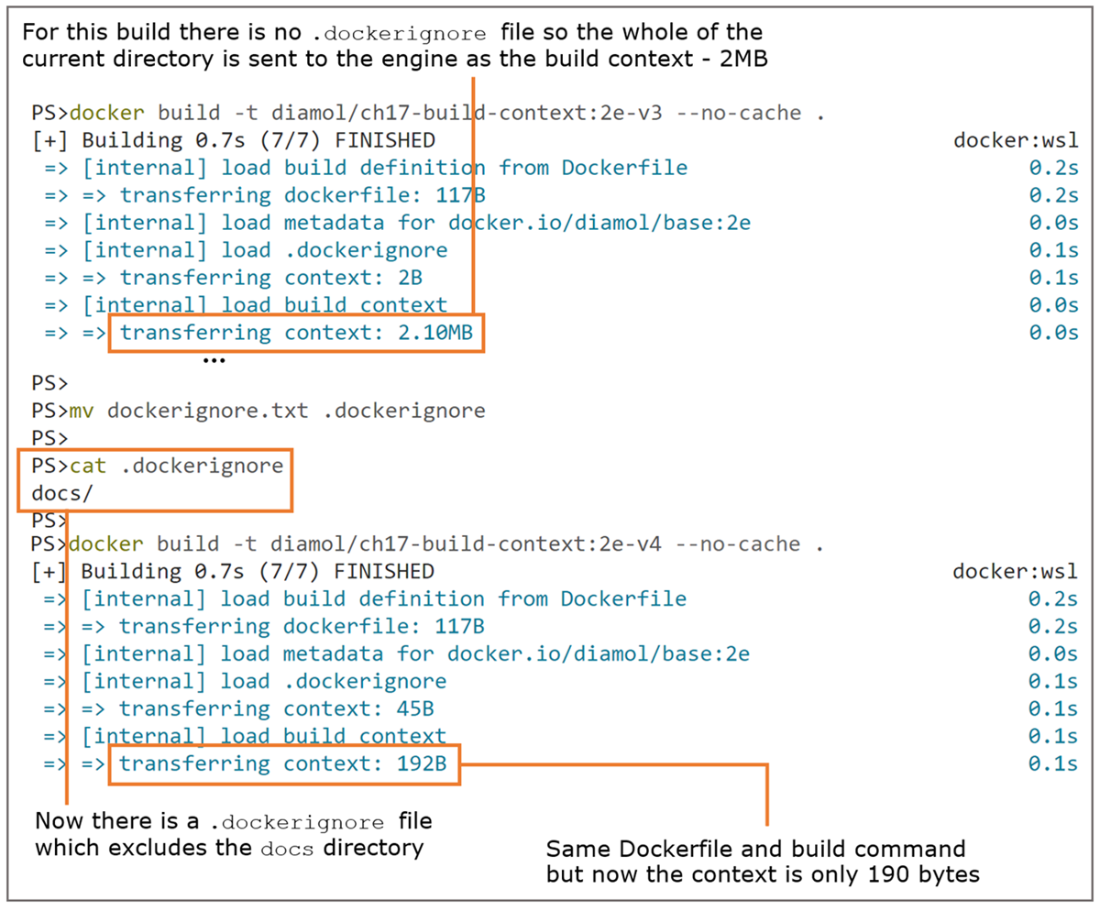
Using a .dockerignore file reduces the size of the build context and the time to send it.
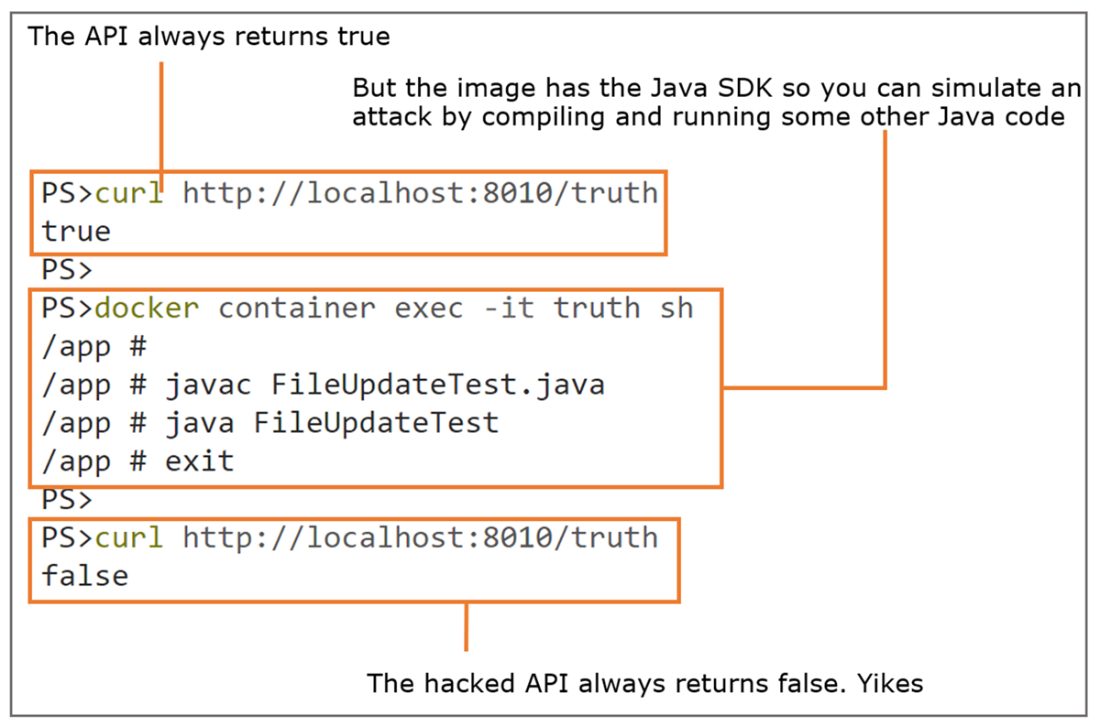
Having the SDK in your app image leaves you open to arbitrary code execution attacks.
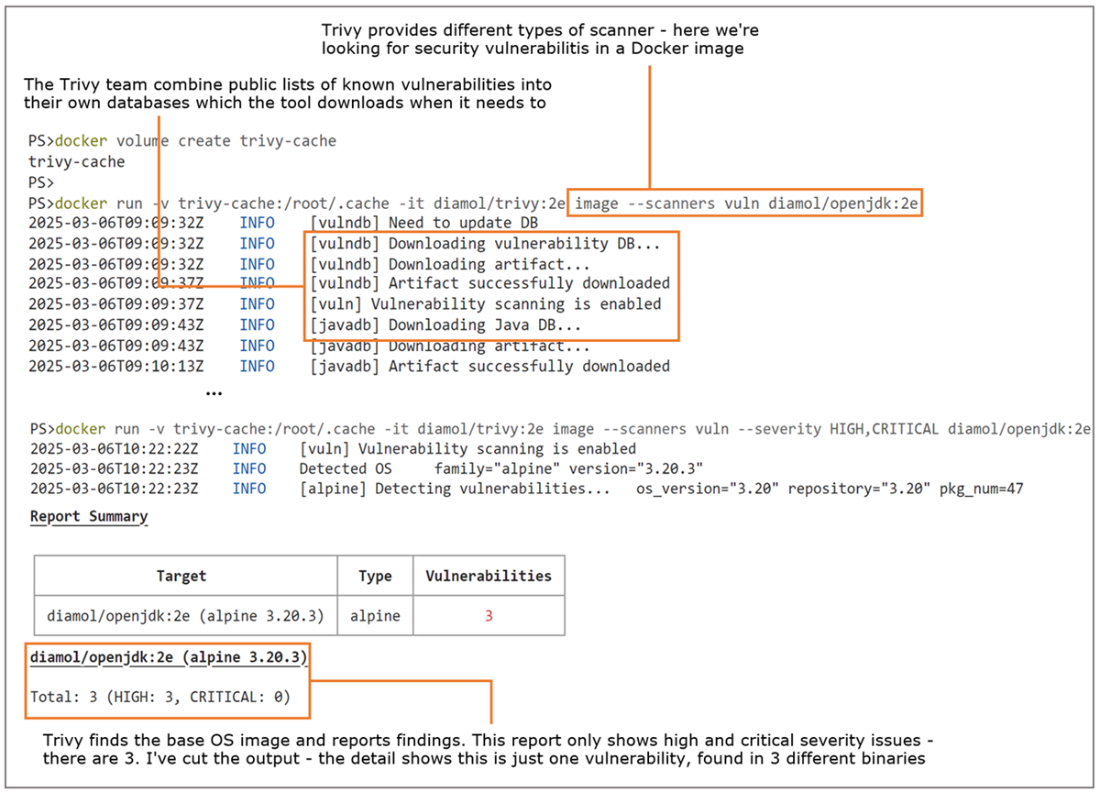
Using Trivy to analyze Docker images for known security vulnerabilities.
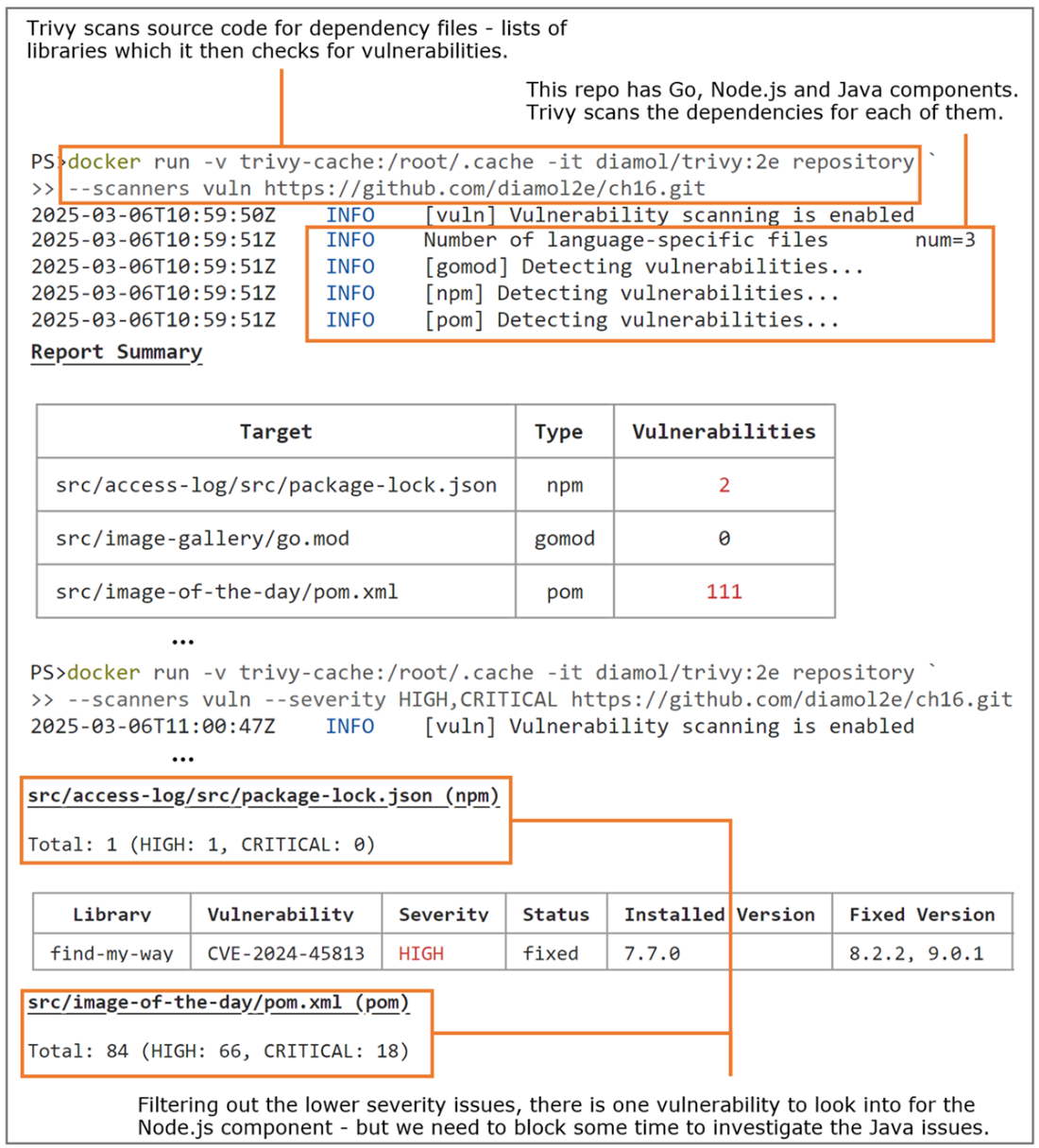
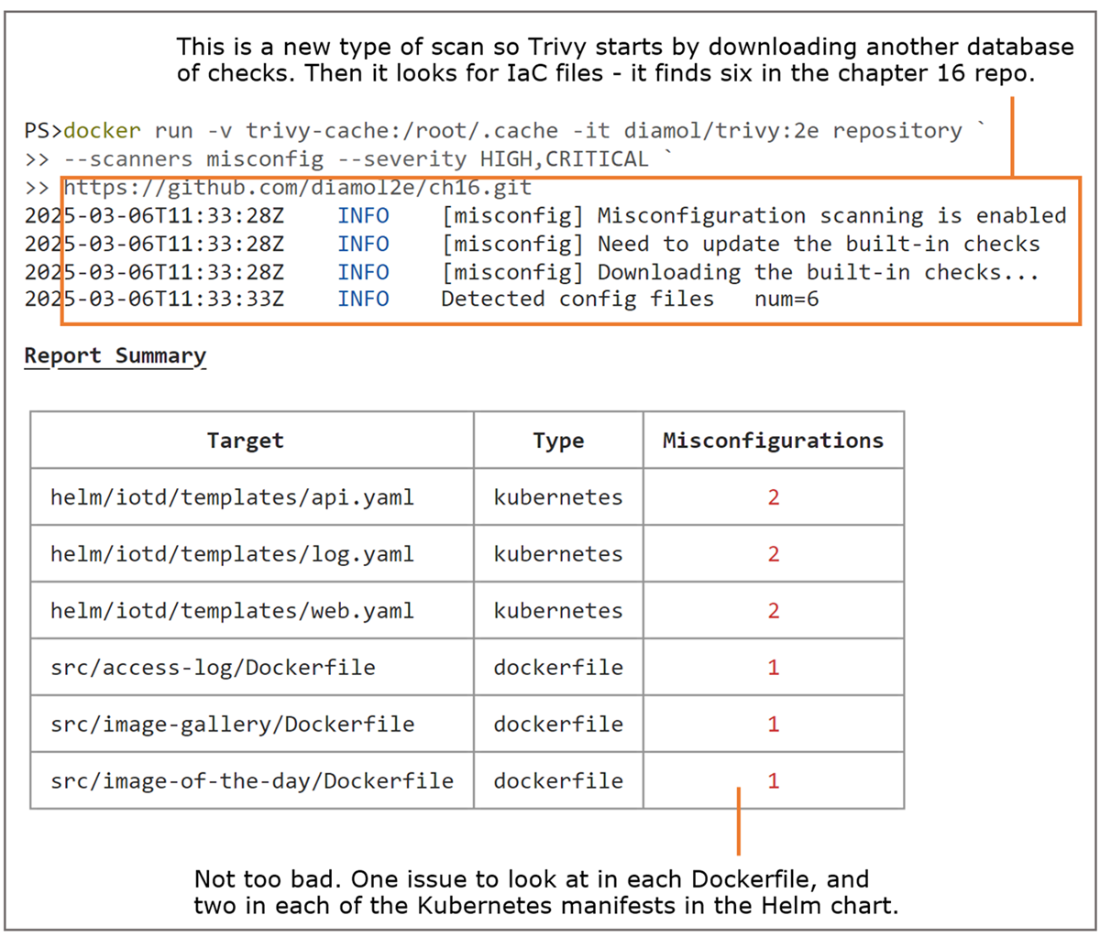
Scanning for misconfigured Dockerfiles and Kubernetes manifests with Trivy.
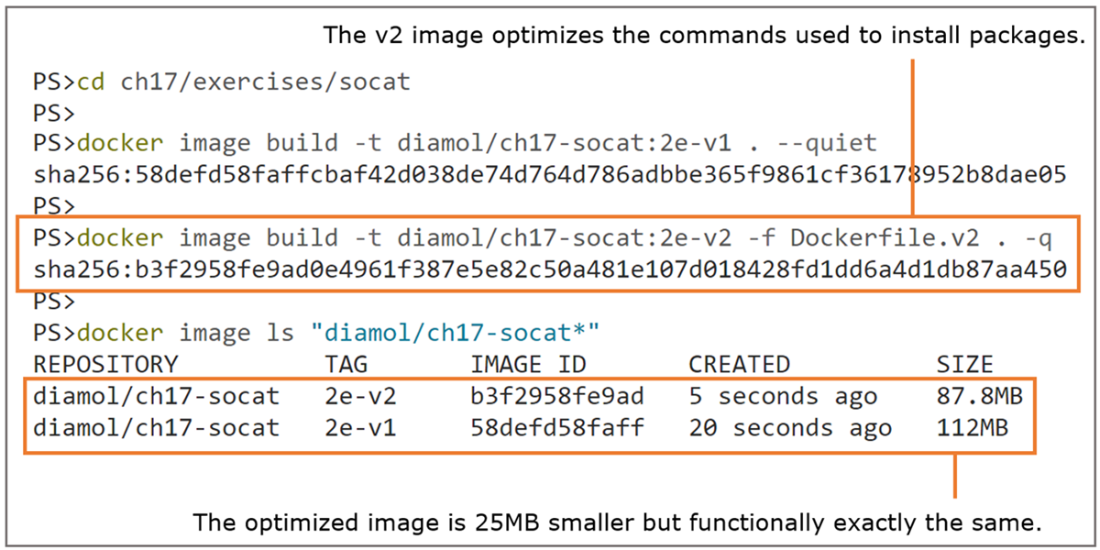
Optimizing software installs reduces the image size in this exercise by 20%.
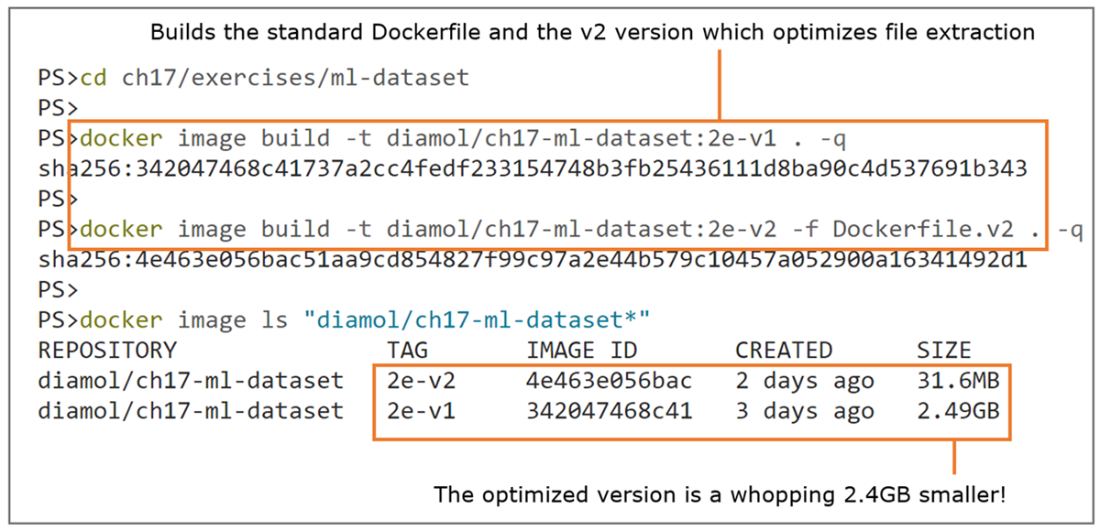
Paying close attention to how you work with files can save huge amounts of disk space.
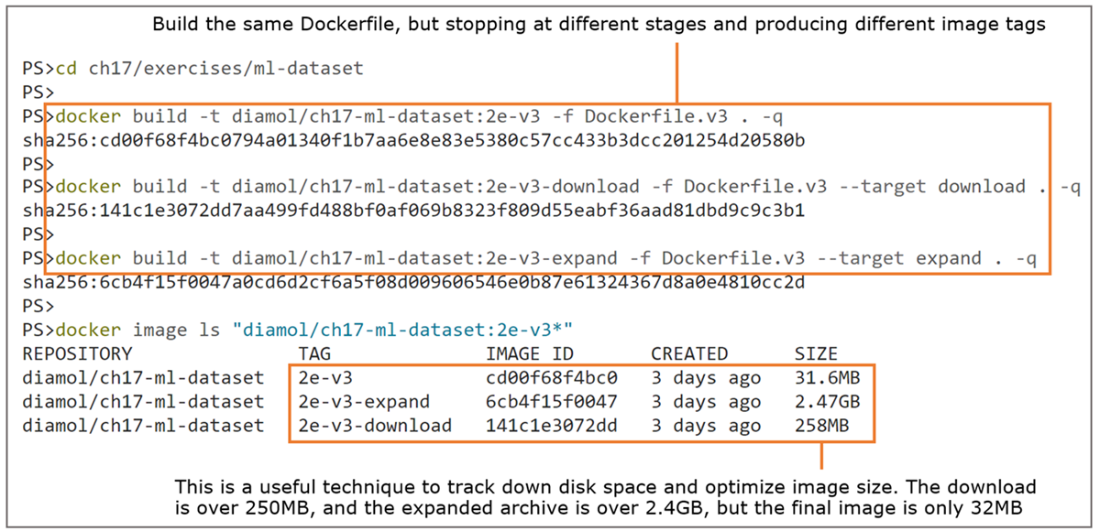
Building multi-stage Dockerfiles to specific stages lets you debug contents and check sizes.
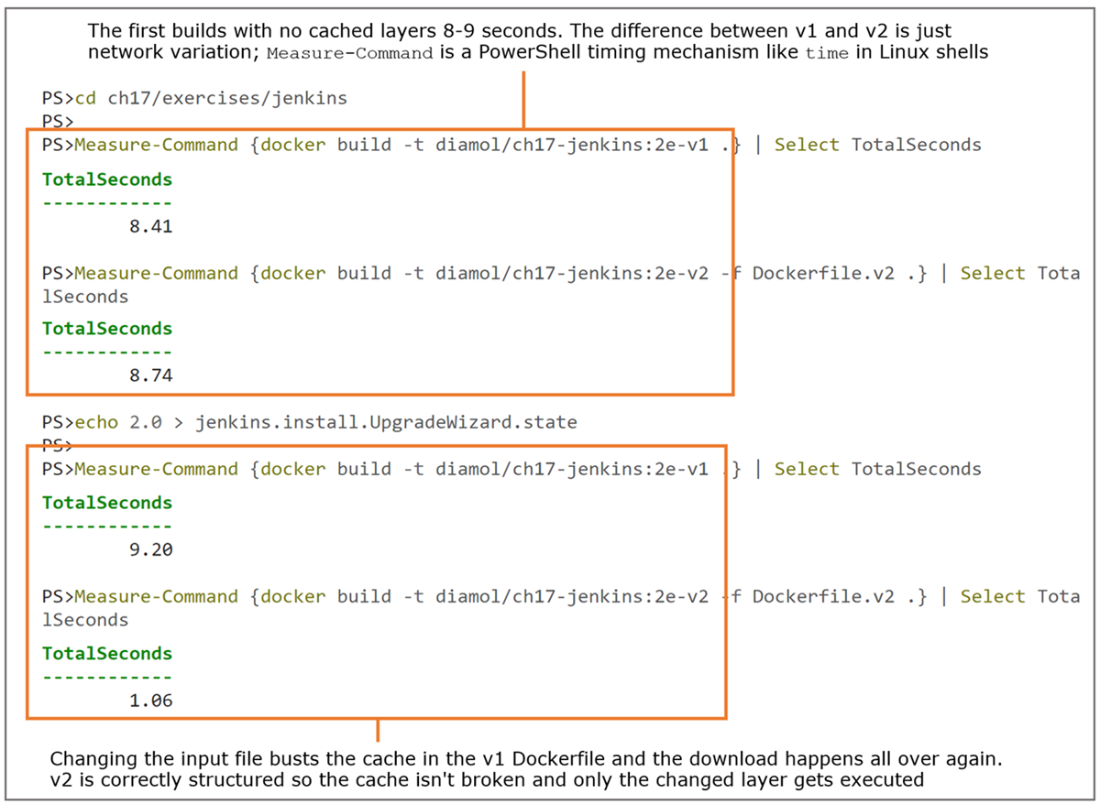
Ordering your Dockerfile instructions correctly can mean huge savings in build time.
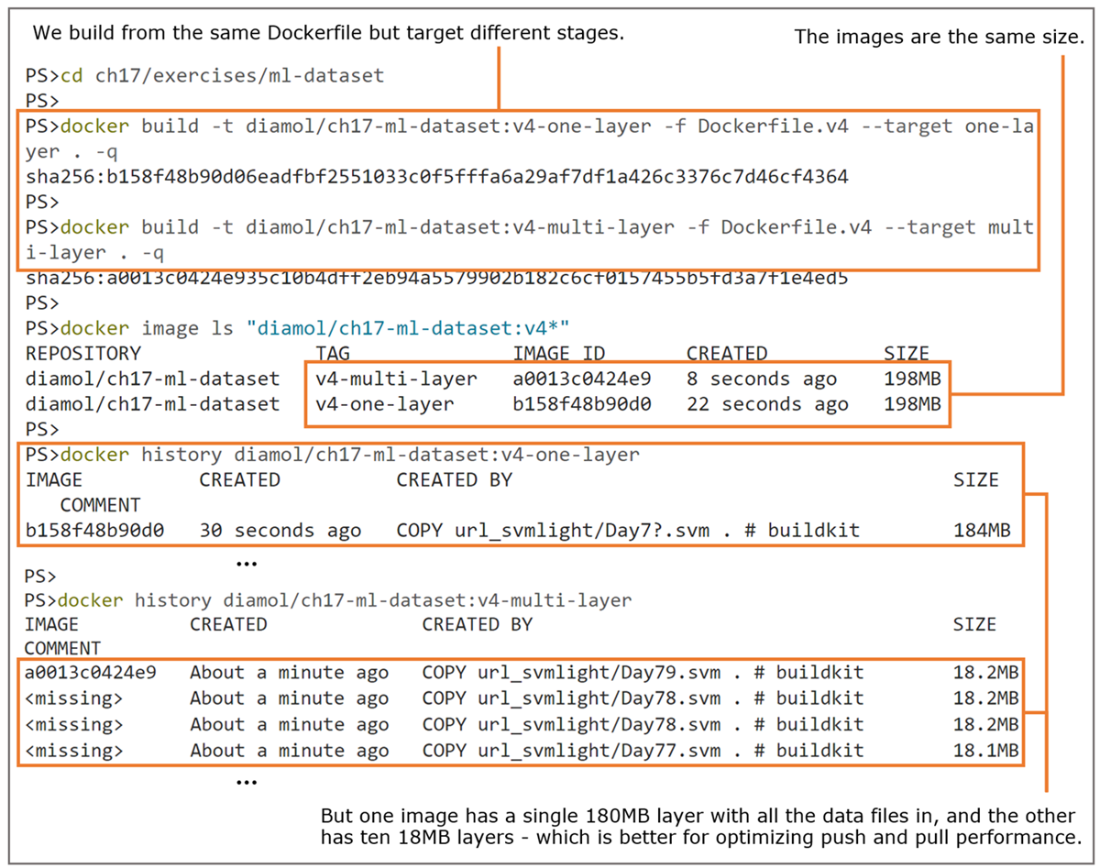
Splitting data files across many layers can make big performance gains.
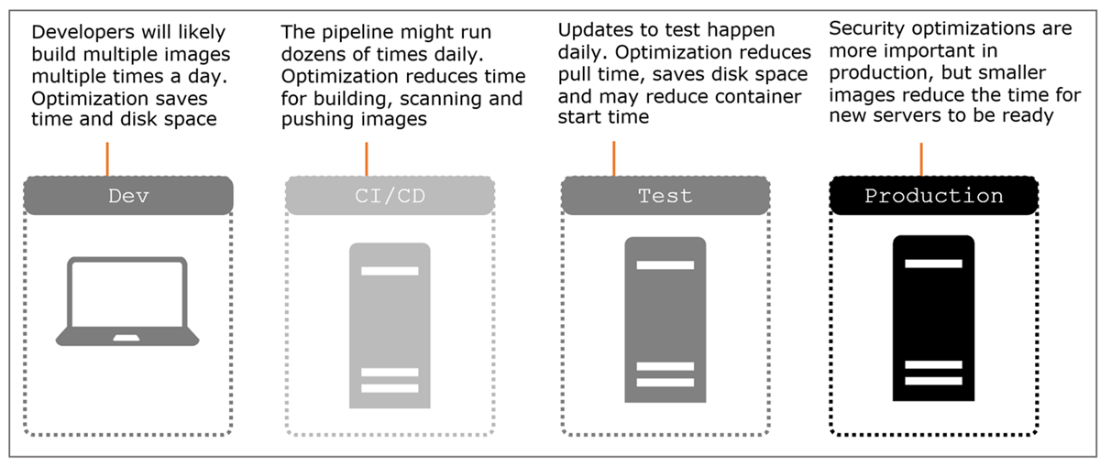
Optimizing your Docker images has beneficial impacts across the life cycle of your projects.
Lab
Now it’s time to put your optimization skills to the test. Your goal is to optimize an image that installs the Docker command line. There are Linux and Windows examples in the lab folder for this chapter; the Dockerfiles work right now but they produce unnecessarily large images. Your goals are to
- Optimize the filesystem so that the image is under 50 MB for Linux containers, or under 330 MB for Windows containers.
- Make use of the image layer cache so that repeat builds of your image take less than a second.
- Produce an image that writes the Docker CLI version correctly from docker run -it <image> docker version (the command will give you an error for the server because it’s not connected to a Docker Engine, but the CLI version should print correctly).
You shouldn’t need any hints, but you’ll need to think creatively when you look at the original Dockerfiles. You might not get there by optimizing the existing instructions; it might be better to work backward from the goals for the image.
My optimized files are in the same lab folder—you can also check them on GitHub: https://github.com/sixeyed/diamol/blob/2e/ch17/lab/README.md.
You have the knowledge—now go optimize!
FAQ
Why should I optimize Docker images if Docker already optimizes layers?
Optimizing improves build speed, pull/push times, reduces disk usage, and tightens security. Docker shares layers but doesn’t automatically remove old ones, so unused layers accumulate. Measure and clean up with commands likedocker system df and docker system prune, and follow build best practices to avoid bloat in the first place.Why doesn’t deleting files in a later RUN step reduce my image size?
Each Dockerfile instruction creates an immutable layer. Files added in one layer remain in the image even if “deleted” in a later layer—they’re just masked by the union filesystem. To truly shrink images, avoid adding unnecessary files in the first place (use preciseCOPY and .dockerignore), and inspect with docker history to see real layer sizes.How do I reduce the build context and avoid copying junk into my image?
- Use targetedCOPY (for example, COPY ./app ./app instead of COPY . .).- Add a
.dockerignore to exclude docs, build output, .git, etc. This shrinks the context sent to the engine and prevents accidental inclusion of unnecessary files, speeding both builds and pulls.Which base images should I choose for size and security?
Prefer minimal, runtime-only bases (for example, Debian Slim or Alpine for Linux; Nano Server for Windows). Avoid full SDK images in production unless required. Test your app on smaller variants by changing theFROM tag—many apps run fine and you’ll gain smaller, safer images.Why is including SDKs/build tools in runtime images risky?
SDKs and utilities expand the attack surface. If an attacker gains execution in the container, build tools let them compile and run arbitrary code. Use multi-stage builds: compile in a builder stage, then copy only the necessary runtime artifacts into a slim final image. Note: interpreted stacks (Node.js, Python) may need tooling at runtime.What are “golden images” and how do they help?
Golden images are curated base images your org maintains (for example, a minimal Java runtime on a vetted OS). They centralize updates, let you control patch cadence, and integrate scanners (like Trivy) in their pipeline. Application images then inherit a secure, consistent baseline and can be rebuilt automatically when the golden image updates.How do I use Trivy to strengthen image and repo security?
- Scan images:trivy image --scanners vuln IMAGE and fail builds on HIGH/CRITICAL.- Use a cache volume for faster scans.
- Maintain a
.trivyignore for accepted risks (documented and reviewed).- Scan source repos and manifests:
trivy repository --scanners vuln|misconfig URL. Be pragmatic: fix what you can, and validate changes with end-to-end tests.How can I minimize layer count and layer size when installing packages or downloading data?
- Combine related steps into oneRUN and clean up in the same layer.- For APT:
apt-get update && apt-get install -y --no-install-recommends ... && rm -rf /var/lib/apt/lists/*.- For archives: download, extract only what you need, and delete the archive in one
RUN. Extracting a single file from a tarball avoids expanding gigabytes you’ll later “delete.”When should I use multi-stage builds, and how do they help?
Use them for all but the simplest images. Separate build, expand, test, and runtime stages. OnlyCOPY what you need into the final stage, yielding small, clean images. They’re easier to debug (--target to build a stage) and each stage keeps its own cache, speeding rebuilds.How do I speed up builds and pulls even more?
- Order Dockerfile instructions by change frequency: put rarely changing steps first; frequently changing ones (binaries, config) last to maximize cache hits.- Pin versions to control updates and caching (use explicit versions or
ARG).- For very large data, consider splitting across multiple layers so pulls can download in parallel instead of a single huge layer.

 Learn Docker in a Month of Lunches, Second Edition ebook for free
