Overview

16 CI/CD in the cloud with Docker and GitHub Actions

This chapter presents a practical, portable approach to building a fast CI/CD pipeline powered by Docker and orchestrated with GitHub Actions. The emphasis is on repeatability, speed, and the ability to migrate between providers with minimal rework. Multi-stage Dockerfiles handle compilation and unit tests, Docker Compose models the application for integration checks, and GitHub Actions provides Linux and Windows runners for multi-platform builds. Most logic lives in scripts (PowerShell) rather than provider-specific actions, so the same steps can run locally for quick feedback and in the cloud for automation.

The pipeline starts with a fail-fast Continuous Integration stage: multi-stage Docker builds compile components and run unit tests in a dedicated test stage, and a simple workflow executes the same script used locally. Successful builds proceed to package images and push them to a staging repository in GitHub Container Registry, using layered Compose files and environment variables to centralize image naming, tagging, and labeling with build metadata. Staging runs on Linux first and then Windows, conserving time when failures occur. End-to-end smoke tests use Compose to bring up the full app, verify basic behavior, and tear it down, supporting both local debugging and cloud execution with the same scripts.

With confidence established, the pipeline promotes exact, tested images from staging to a release repository by retagging (not rebuilding), preserving reproducibility. The final step simulates production deployment by creating an ephemeral Kubernetes cluster on the runner and applying a Helm chart, validating the model and images together. Workflows chain from source changes through build, package, test, release, and deploy, with Linux and Windows stages running appropriately in parallel. Key guidance underpins the design: do as much as possible in Docker, keep everything else in portable scripts, support both developer and operations workflows, and minimize provider-specific features—yielding a robust, reproducible CI/CD pipeline that is easy to extend and migrate.

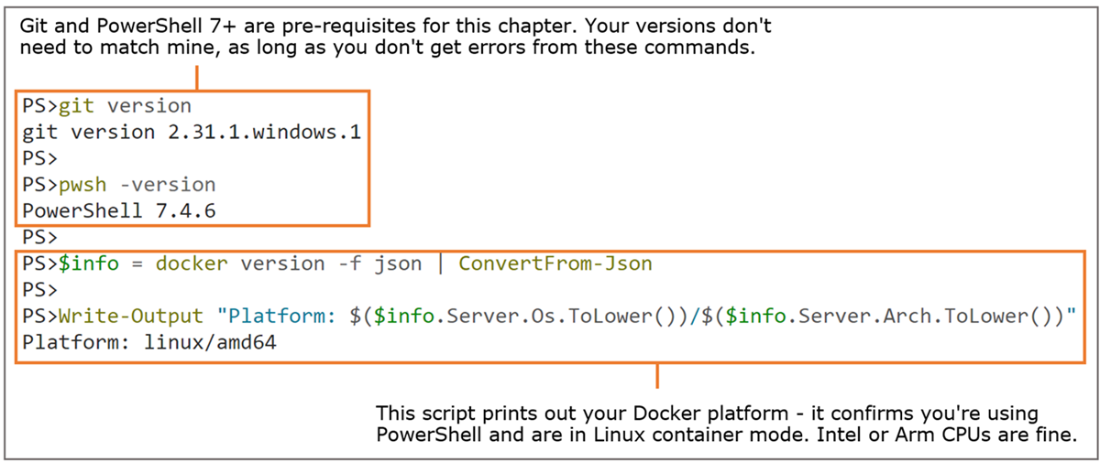
Verifying you have all the tools you need for this chapter
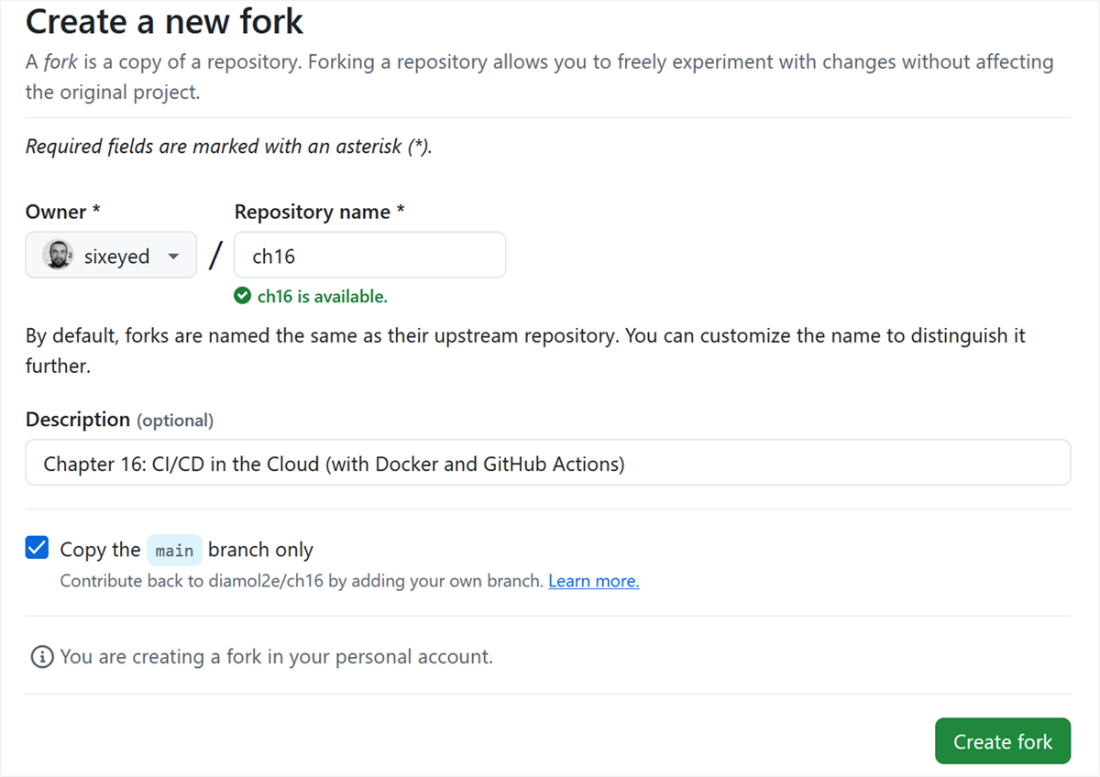
Forking the repo for the chapter creates a copy in your own GitHub account.
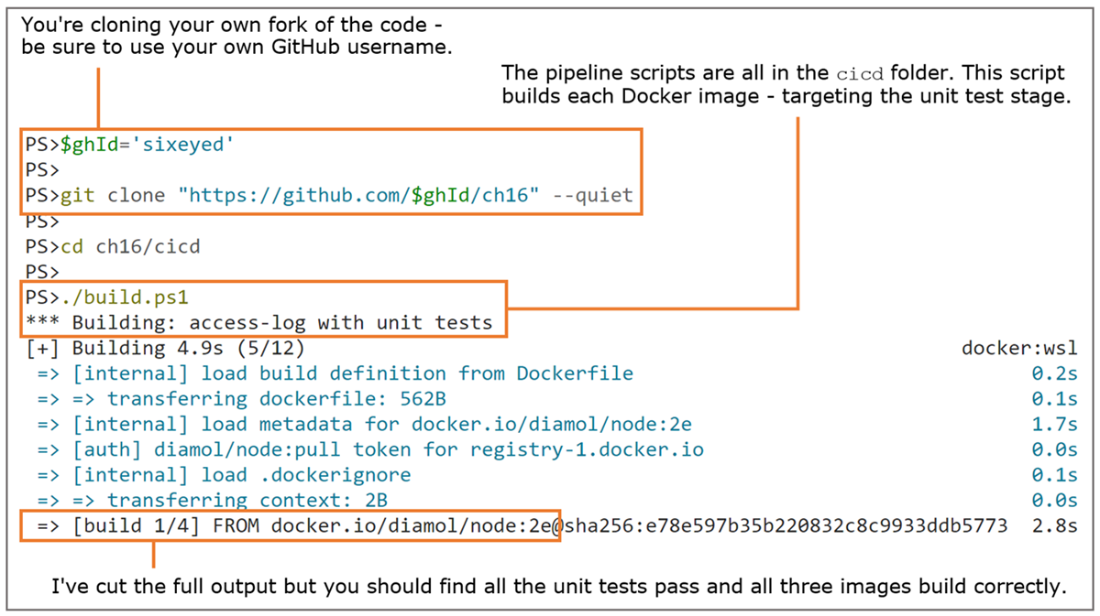
Scripting Docker images builds which include compiling code and running unit tests
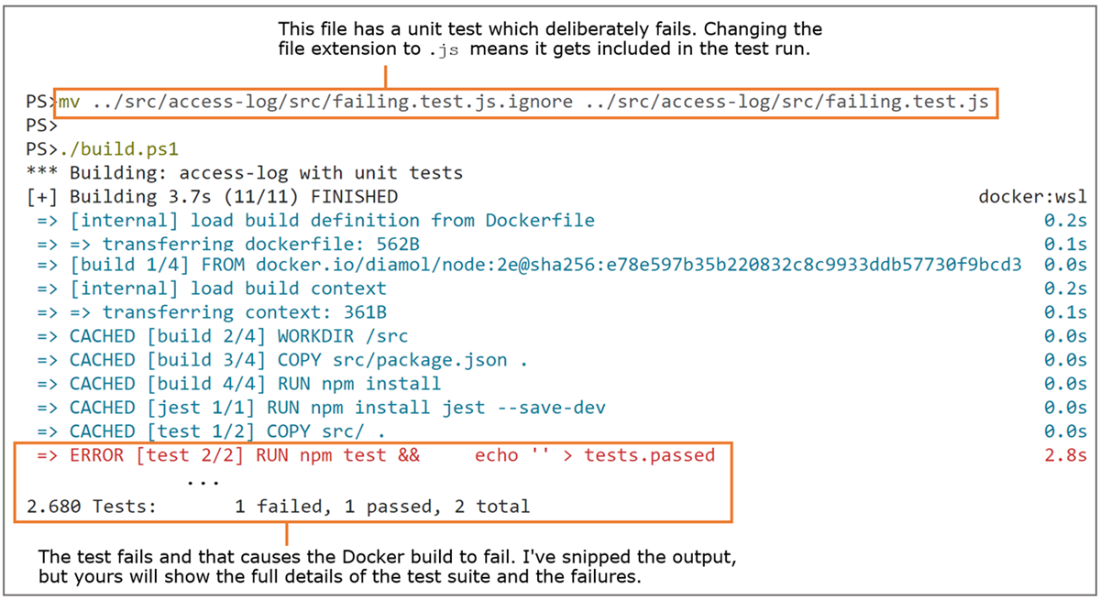
Proving the build script fails if there's a failing unit test in the source code
Triggering a build in GitHub which uses logic in the PowerShell script
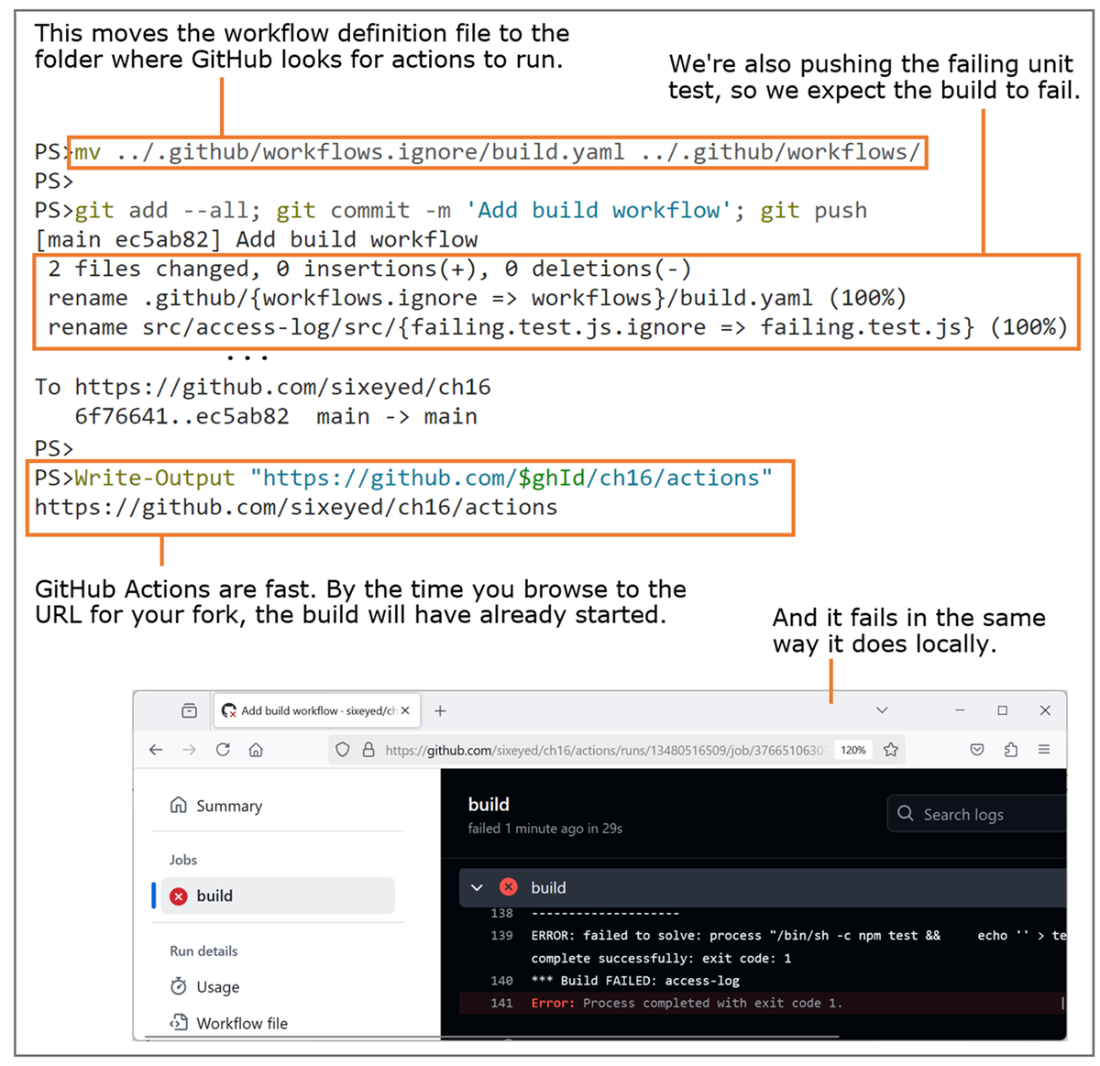
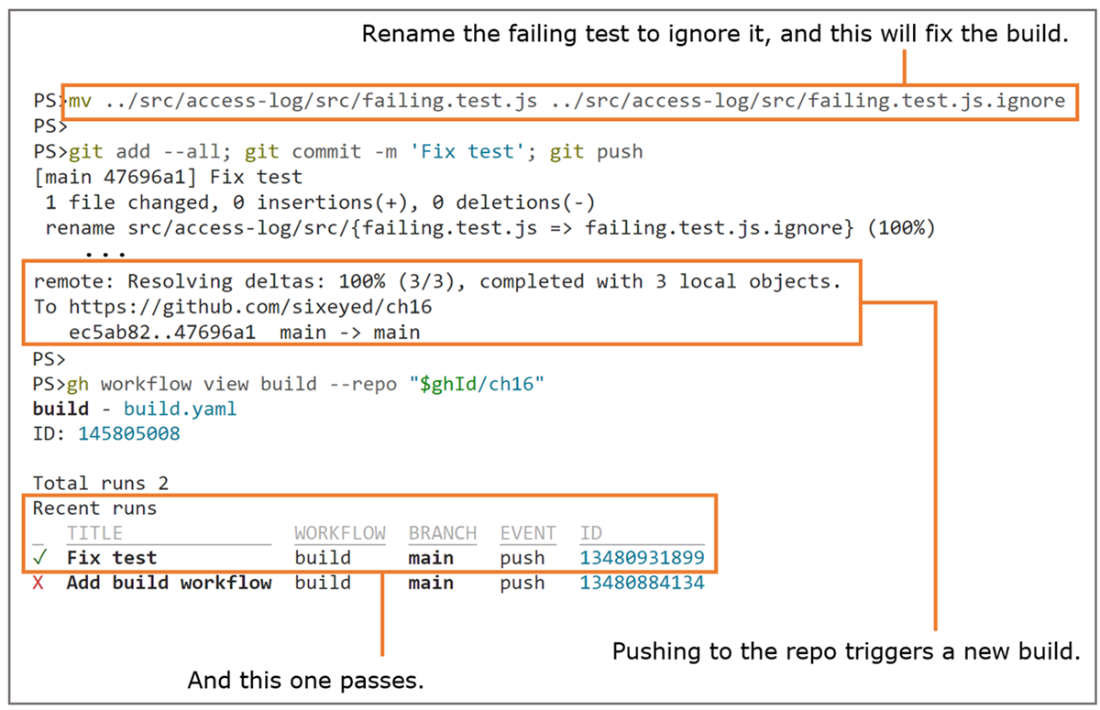
Triggering a GitHub action by pushing changes and fixing the build
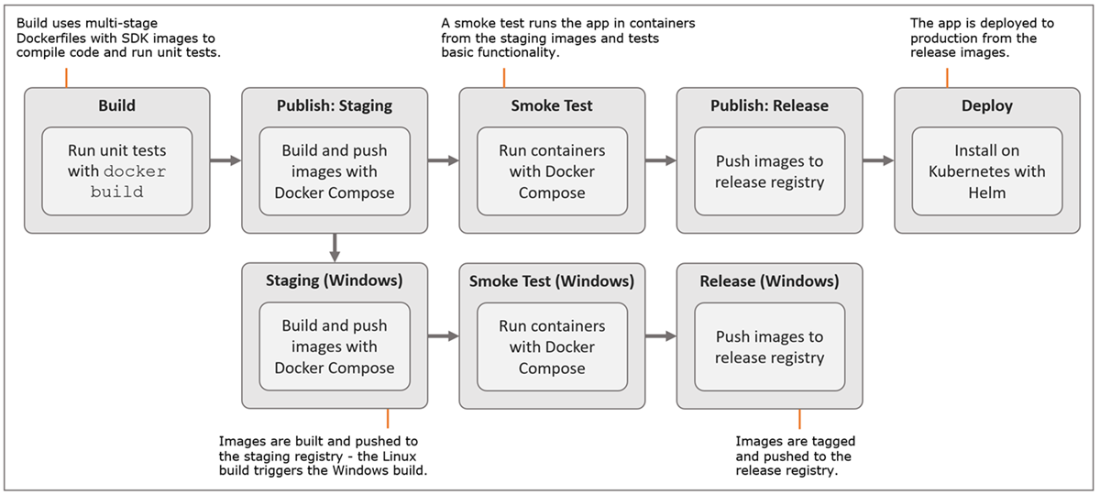
The full multi-platform CI/CD pipeline we will build out in this chapter
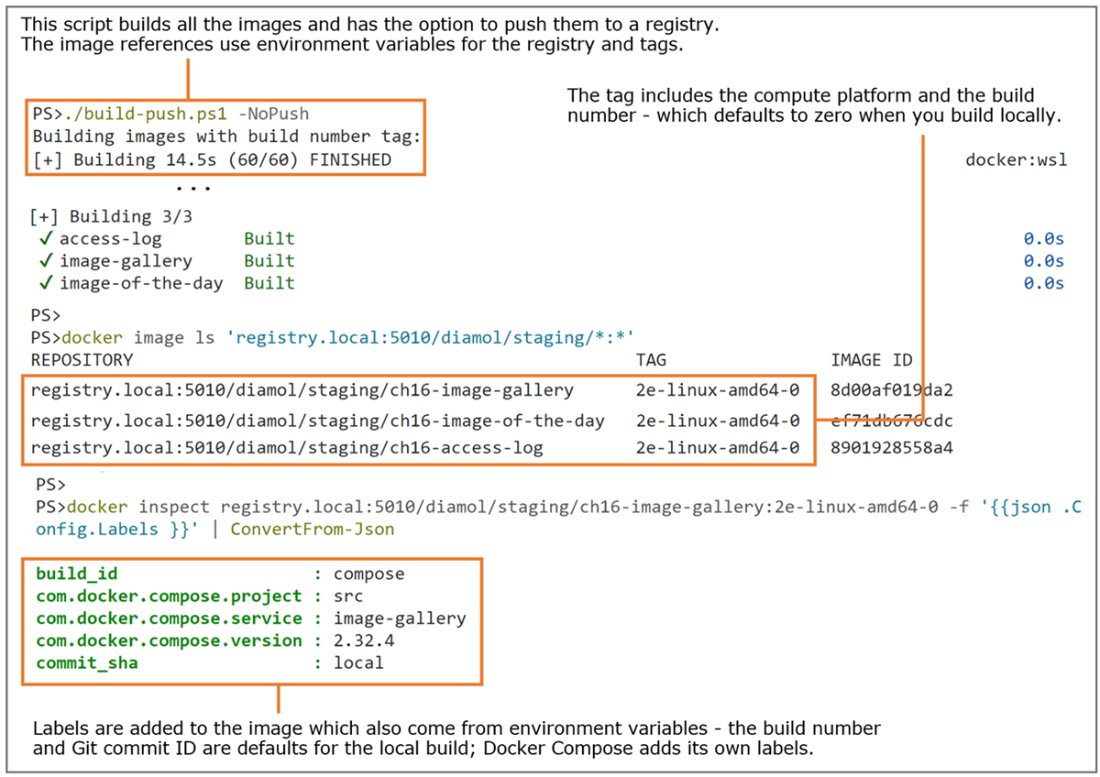
The next build stage is a script that builds and tags image for a staging repository.
Pushing the workflow files triggers the Linux action run.
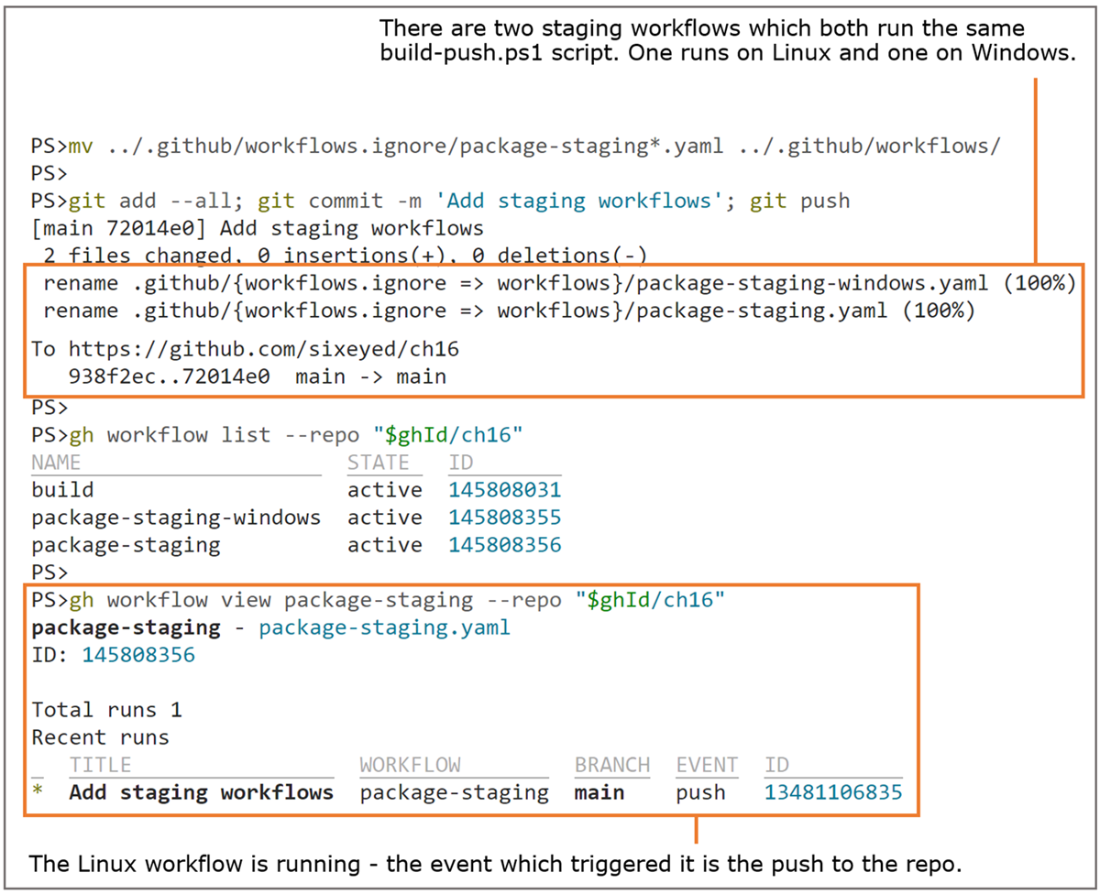
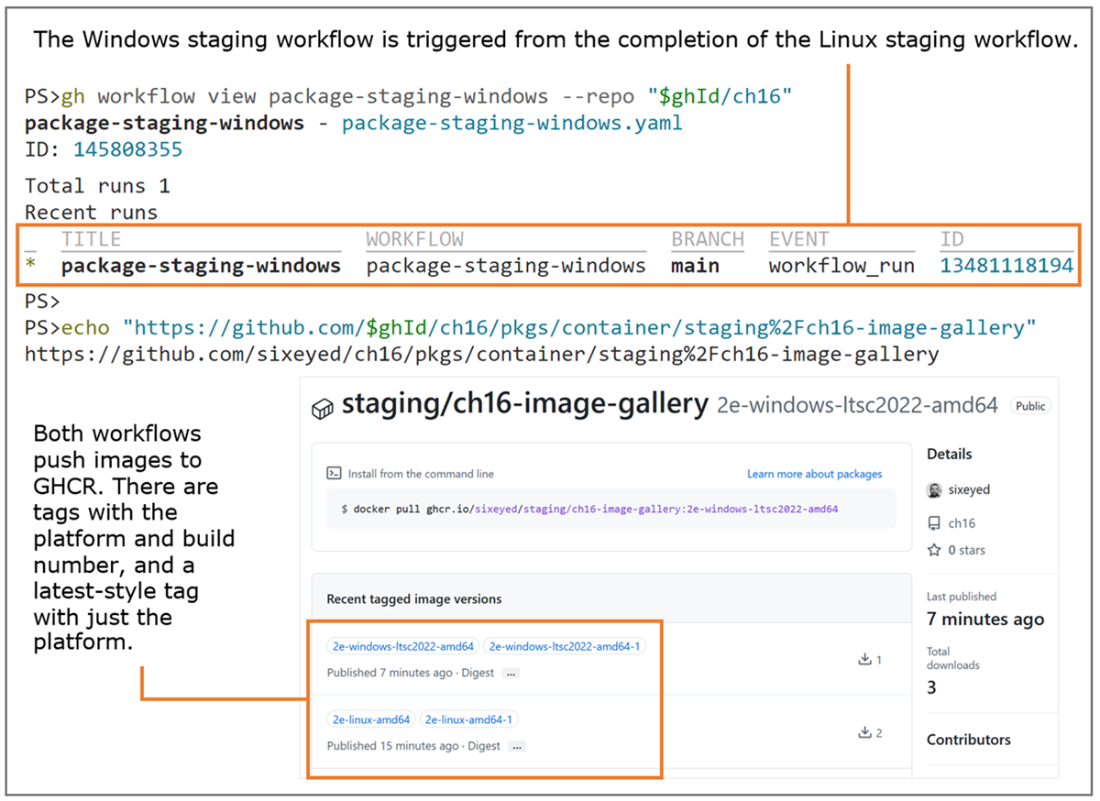
GitHub Actions gives you a multi-platform build farm in the cloud—for free.
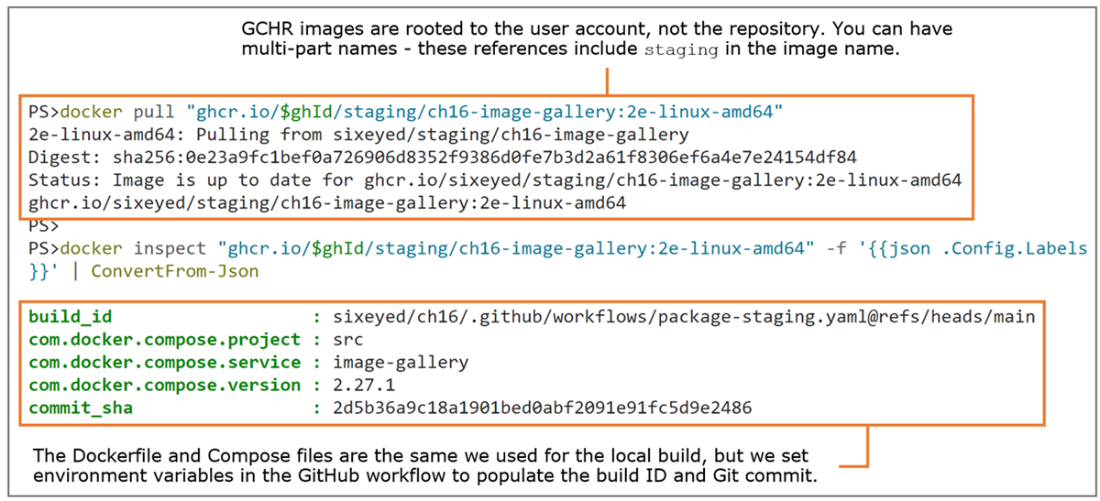
Pulling a workflow-built image from GitHub Container Registry
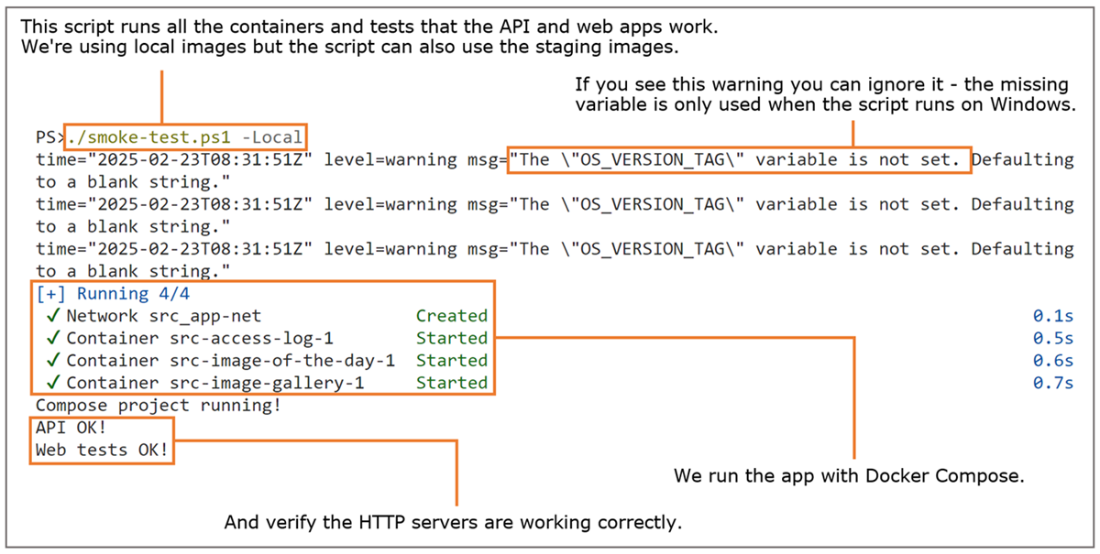
Running smoke tests to prove the application starts and runs
Running smoke tests on Linux and Windows in GitHub
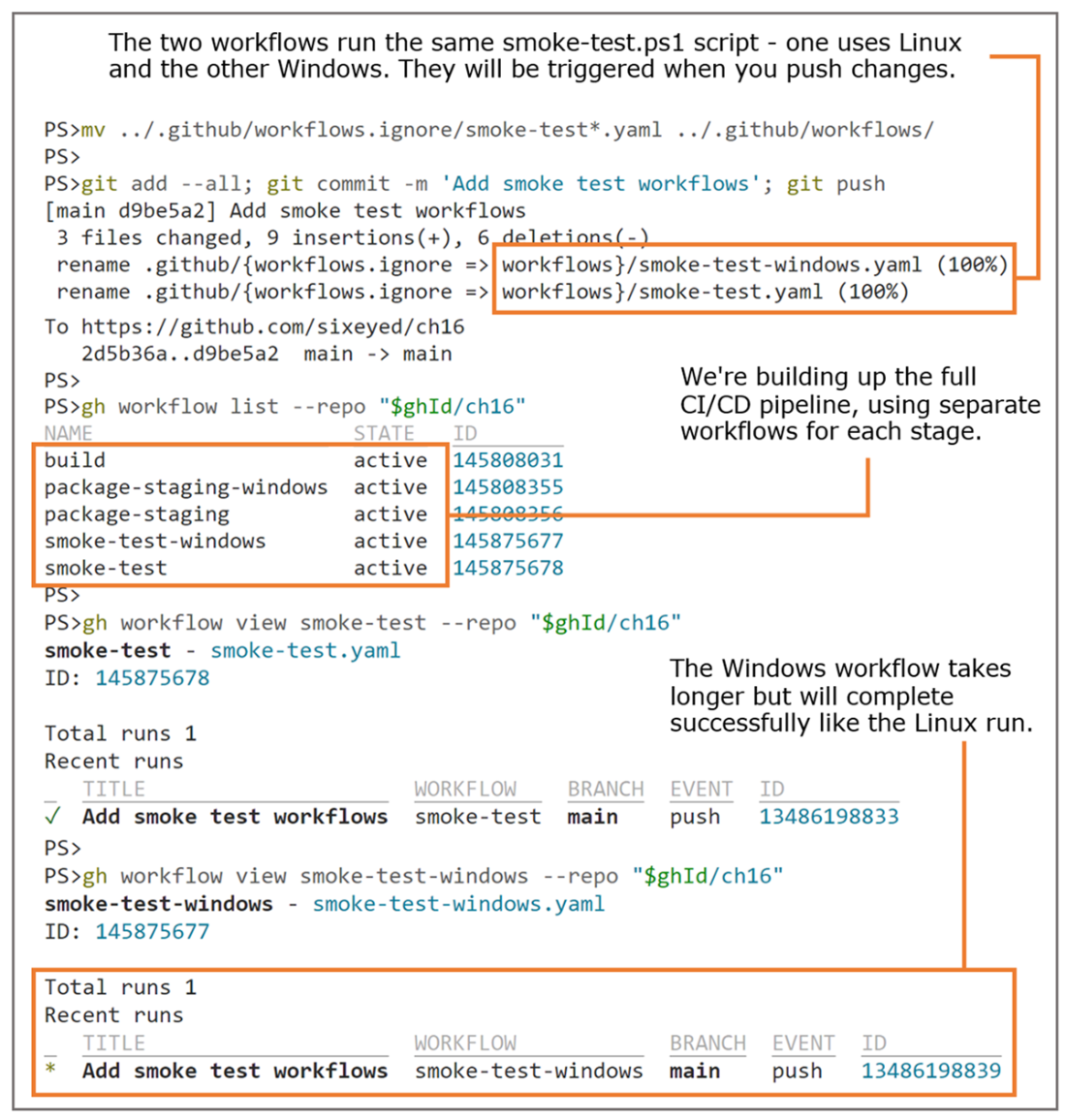
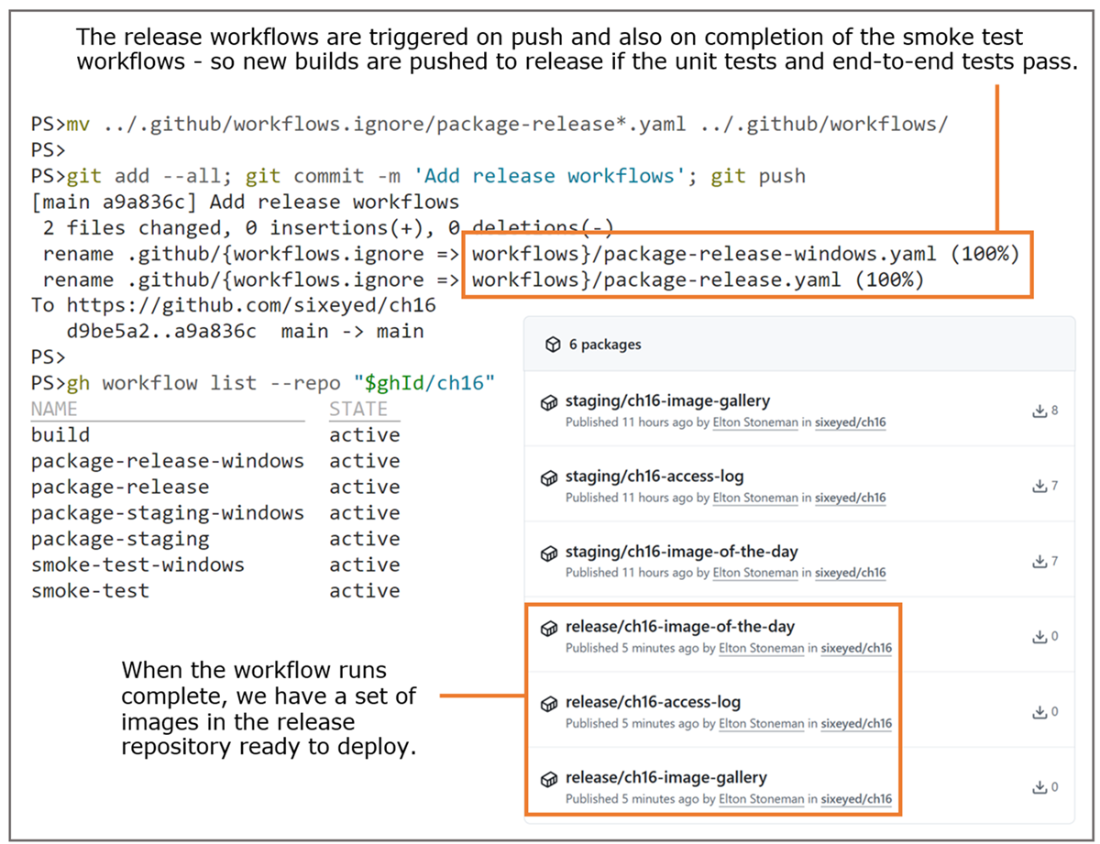
Tagging the staging images and pushing them to the release repository
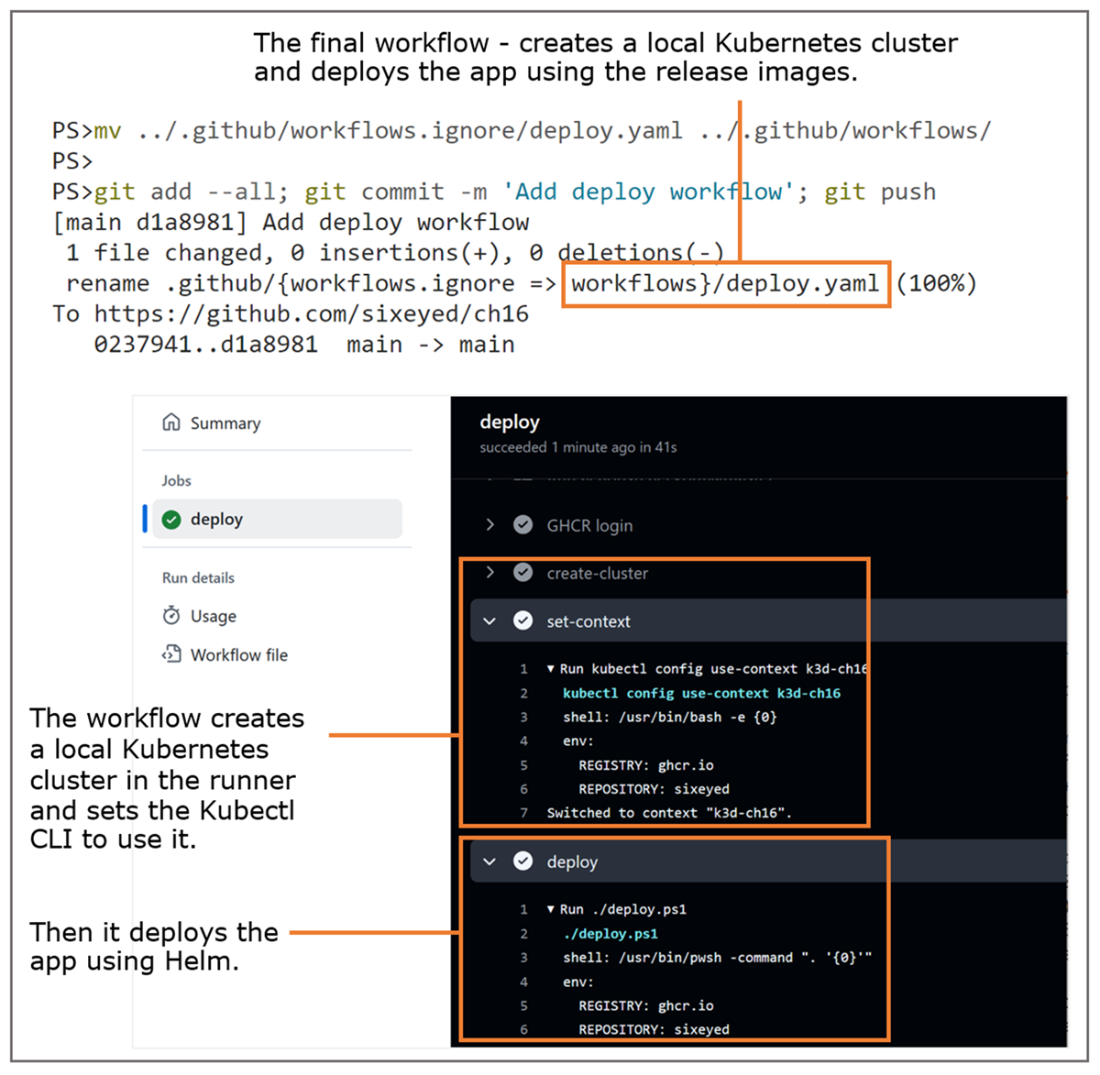
Simulating a production deployment by deploying to a local Kubernetes cluster
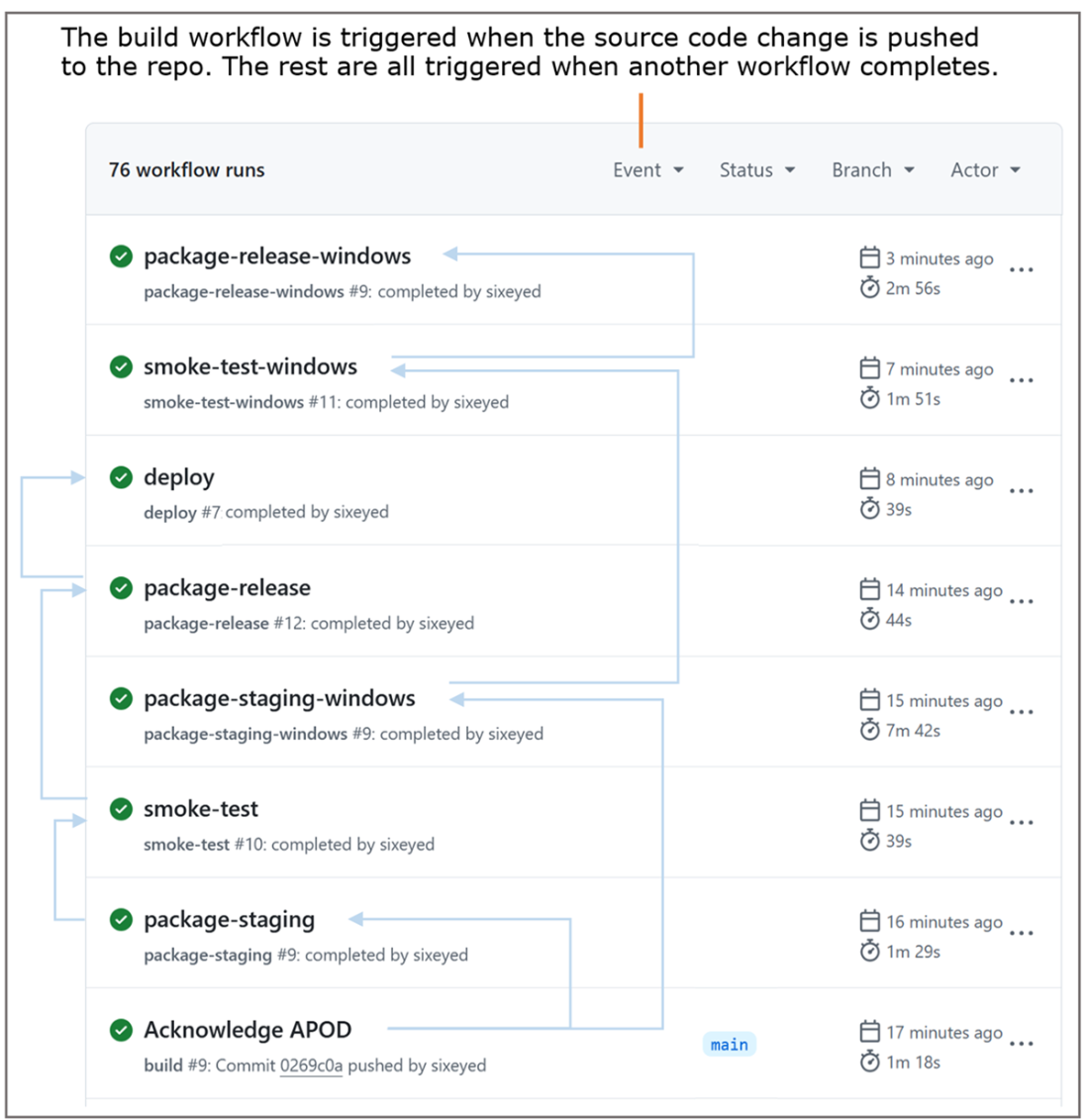
The full CI/CD pipeline, triggered from a change to the source code.
Lab

One thing missing from this super-duper CI/CD pipeline is that we build images for different platforms, but we don't publish them as a set of multi-platform images. You can push manifest lists to GHCR, so this lab gets you to do that final step:

  • Write a script which creates and pushes a manifest list for each of the three components in this chapter's app.
  • Each manifest list should contain Linux and Windows variants for the Intel (AMD64) CPU architecture.
  • Your script should follow the same approach as the others, using Compose files as the source of image references.
  • When you've tested your script locally, write a GitHub Actions workflow to run the script.

My solution is in the lab folder of the ch16 repo. The documentation is in the README file, which even has pictures to prove that the solution works: https://github.com/diamol2e/ch16/blob/main/lab/README.md.

FAQ

What pipeline do we build in this chapter, at a high level?The pipeline builds, tests, packages, and deploys a multi-component app using Docker and GitHub Actions. Stages: 1) build and unit tests (fast fail), 2) package and push images to a public staging repo in GitHub Container Registry (Linux first, then Windows), 3) smoke tests with Docker Compose (Linux and Windows), 4) promote tested images to a release repo (retag, no rebuild), 5) simulate production by deploying the Helm chart to a temporary Kubernetes cluster (k3d) in the workflow.
Why put most logic in scripts (PowerShell) instead of many marketplace actions?Keeping logic in scripts makes the build portable, debuggable, and runnable locally. GitHub-specific actions and YAML features tie you to GitHub. By scripting the core tasks (Docker builds, Compose, tagging, Helm), you can move to other CI/CD providers by mainly changing YAML wrappers, not the core logic.
How are unit tests integrated into Docker builds so failures break the pipeline?Each component’s Dockerfile uses multi-stage builds: a build stage compiles code; a test stage runs unit tests and writes a “tests passed” marker file; the final stage copies that file so the test stage becomes a dependency. Workflows (and local scripts) target the test stage first, exiting on the first failure to provide fast feedback.
How do I run the same build locally and in GitHub Actions?All core steps are Docker-based and scripted. Locally, you run scripts like build.ps1 and build-push.ps1 (with flags like -NoPush to skip registry operations). In GitHub Actions, simple workflows check out the repo and run those scripts with shell: pwsh on ubuntu-latest or windows-latest runners. The same commands behave the same in both places.
What’s the purpose of staging vs. release image repositories in GHCR?Staging holds newly built images that have passed unit tests but not yet end-to-end validation. After smoke tests pass, the pipeline promotes the exact tested images to release by retagging and pushing—no rebuilds—to ensure the same artifacts reach production. Public GHCR is free for public packages; private repos require auth via docker login with a GitHub token.
How are image names and labels generated and kept consistent?Docker Compose files are layered: a base compose file, a build overlay (context and build args), and a tagging overlay (full registry/repo/tag). Environment variables (for example REGISTRY, REPOSITORY, BUILD_NUMBER, COMMIT_SHA, platform tags) feed those files. Labels like build ID and commit SHA are set during build, giving traceability back to workflows and source.
How does the pipeline handle multi-platform builds (Linux and Windows)?Separate workflows run the same scripts on different runners: Linux first, then Windows. Windows builds typically take longer (bigger base images, runner startup), so the Windows workflow is triggered only after Linux succeeds to fail fast and save time. Both publish to GHCR under platform-specific tags.
What do the smoke tests cover, and can I run them locally?Smoke tests start the full app with Docker Compose, perform basic HTTP checks to confirm components start and respond, then tear down. Locally, run smoke-test.ps1 -Local to use your local images; in CI, the script pulls staging images. This supports both dev workflows (testing local changes) and CI validation.
How is Kubernetes deployment tested in GitHub Actions?The workflow uses a community action to spin up a temporary k3d Kubernetes cluster on the runner, then deploys the Helm chart with image values pointing to the release repo. Kubectl and Helm are preinstalled on runners. This simulates production deployment without needing a persistent cluster.
What practices make this pipeline portable and maintainable?- Do as much as possible in Docker (build, test, run). - Put coordination in scripts, not provider-specific steps. - Support both dev and ops workflows (flags like -NoPush, -Local). - Minimize proprietary features so migrating between CI/CD services mostly means changing YAML, not your build logic.

pro $24.99 per month

  • access to all Manning books, MEAPs, liveVideos, liveProjects, and audiobooks!
  • choose one free eBook per month to keep
  • exclusive 50% discount on all purchases
  • renews monthly, pause or cancel renewal anytime

lite $19.99 per month

  • access to all Manning books, including MEAPs!

team

5, 10 or 20 seats+ for your team - learn more


choose your plan

team

monthly
annual
$49.99
$499.99
only $41.67 per month
  • five seats for your team
  • access to all Manning books, MEAPs, liveVideos, liveProjects, and audiobooks!
  • choose another free product every time you renew
  • choose twelve free products per year
  • exclusive 50% discount on all purchases
  • renews monthly, pause or cancel renewal anytime
  • renews annually, pause or cancel renewal anytime
  • Learn Docker in a Month of Lunches, Second Edition ebook for free

choose your plan

team

monthly
annual
$49.99
$499.99
only $41.67 per month
  • five seats for your team
  • access to all Manning books, MEAPs, liveVideos, liveProjects, and audiobooks!
  • choose another free product every time you renew
  • choose twelve free products per year
  • exclusive 50% discount on all purchases
  • renews monthly, pause or cancel renewal anytime
  • renews annually, pause or cancel renewal anytime
  • Learn Docker in a Month of Lunches, Second Edition ebook for free
choose your plan

team

monthly
annual
$49.99
$499.99
only $41.67 per month
  • five seats for your team
  • access to all Manning books, MEAPs, liveVideos, liveProjects, and audiobooks!
  • choose another free product every time you renew
  • choose twelve free products per year
  • exclusive 50% discount on all purchases
  • renews monthly, pause or cancel renewal anytime
  • renews annually, pause or cancel renewal anytime
  • Learn Docker in a Month of Lunches, Second Edition ebook for free