Overview

14 Containers in the cloud with Microsoft Azure and Google Cloud

This chapter moves from running containers locally to delivering on Docker’s “anywhere” promise with managed container services in the cloud. It explains where these simplified platforms fit compared to full Kubernetes: they’re ideal for straightforward applications with modest scaling and operational needs, offering a developer-like deployment flow without provisioning or managing infrastructure. A central theme is using cloud-hosted private registries close to runtime for secure, fast image pulls, and adopting practical practices around cost awareness, right-sizing compute, and automating ephemeral test environments.

On Azure, the chapter shows how Azure Container Instances (ACI) provide a fast, low-friction way to run single containers with public DNS, logs, and configurable resources—great for CI-driven test environments and quick experiments, with performance tied directly to requested CPU and memory. It then introduces Azure Container Registry (ACR) for private images, covering authentication, imports from public registries, cloud-based image builds with ACR tasks, and multi-arch support. Azure Container Apps (ACA) adds orchestration features—HTTPS ingress, revisions and traffic split, autoscale/scale-to-zero, environment-level domains, secrets, and internal-only routing—and can deploy directly from Docker Compose specs or source, illustrating how to fix typical cross-service communication with updated environment variables, ingress, and secrets. The message: most day-to-day work can be as simple as cloud builds and a few deploy commands, with the flexibility to scale up complexity as needed.

Google Cloud Run provides a similarly streamlined experience with some key differences: images must come from Artifact Registry (no direct pulls from public registries), and workloads are modeled as either jobs (background/finite work) or services (HTTP endpoints) with revisions, ingress, autoscaling, and scale-to-zero. The chapter demonstrates pushing images to Artifact Registry, running a job, and deploying a web service, while noting current constraints such as Linux/Intel-only and no Compose support. It closes with guidance on choosing platforms—considering OS/architecture support (including Windows/Arm), in-cloud builders and CI/CD integration, Compose parity, observability and configuration (including secrets), identity-based service integration, ease of use versus feature depth, and the growth path to more capable platforms—emphasizing that Docker packaging keeps applications portable across clouds and services.

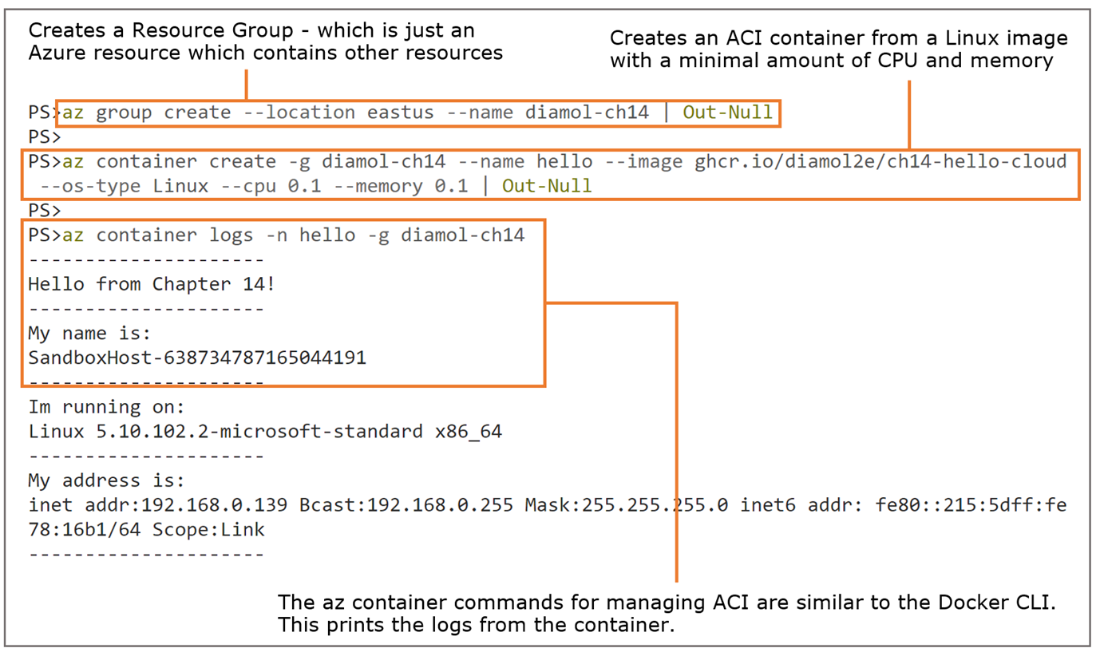
Running a simple container with Azure Container Instances
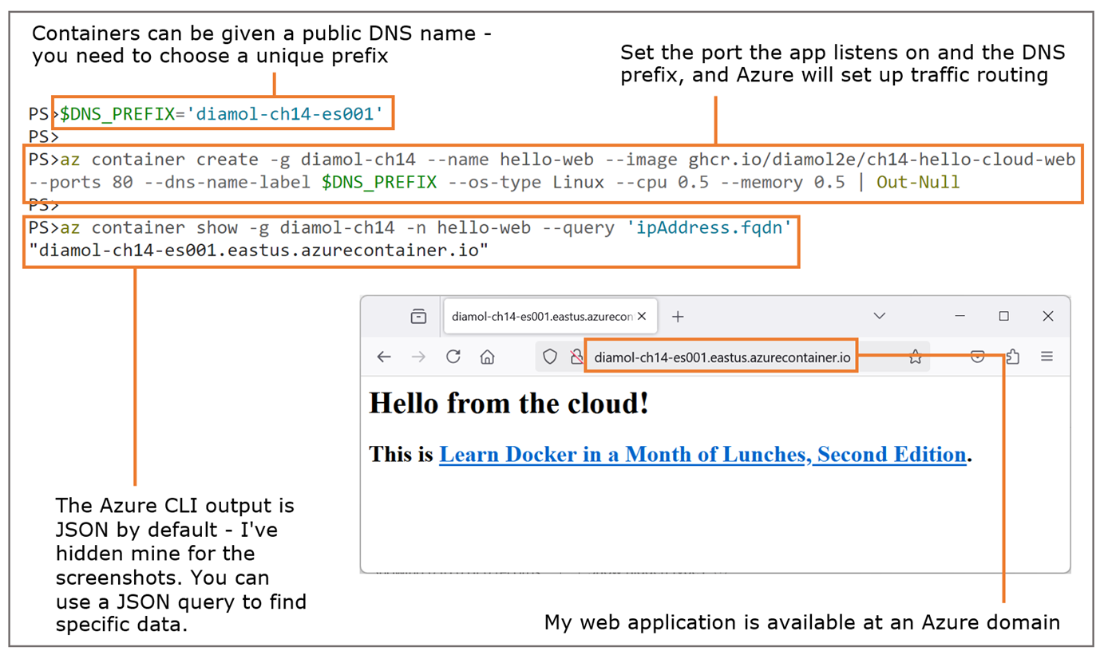
Publishing a web container with a public DNS name with ACI
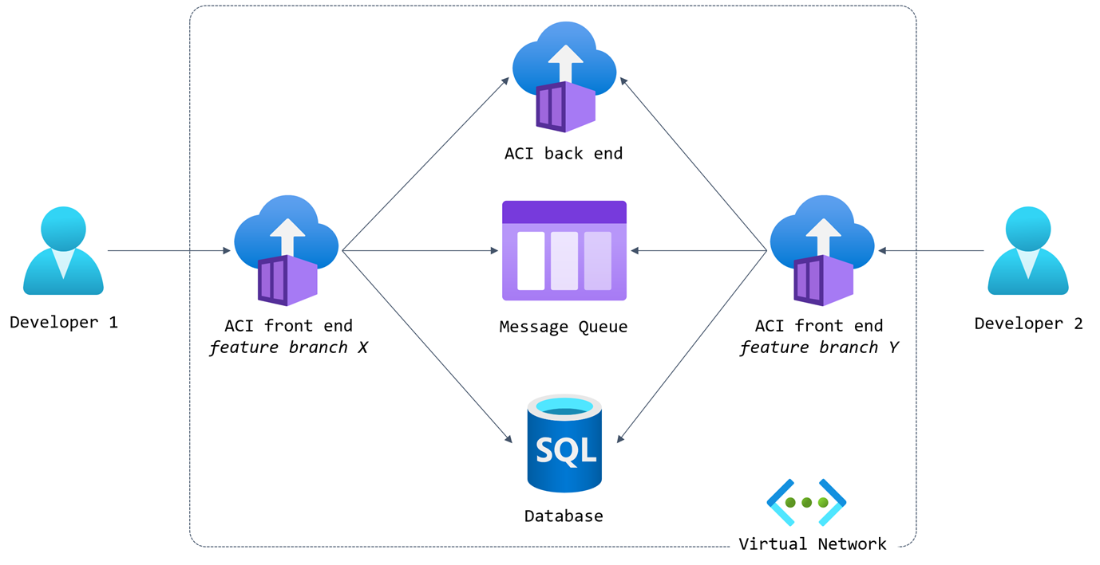
Hosting multiple test environments with shared services and ACI containers
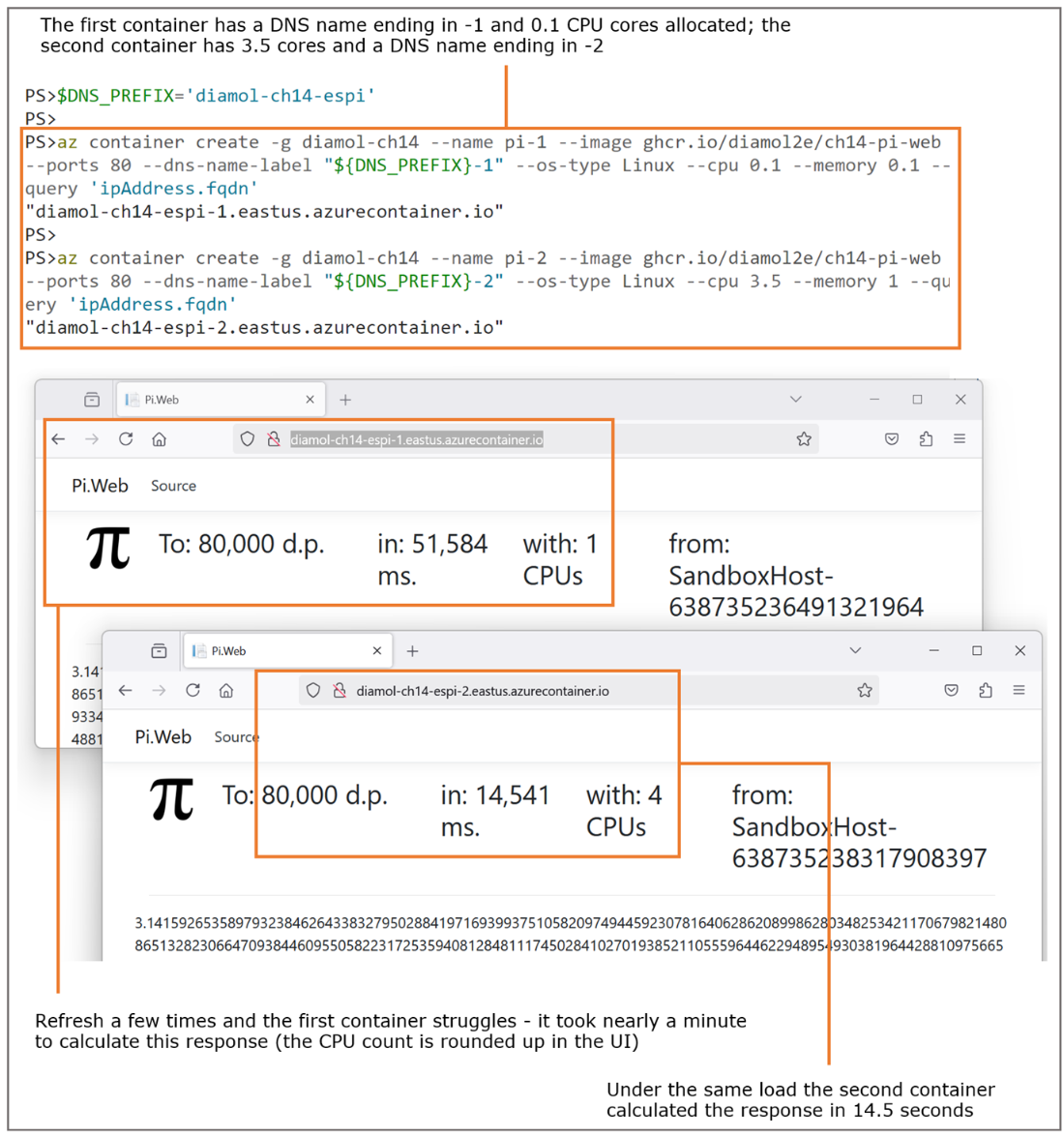
Compute size in ACI directly affects application performance—and your Azure bill.
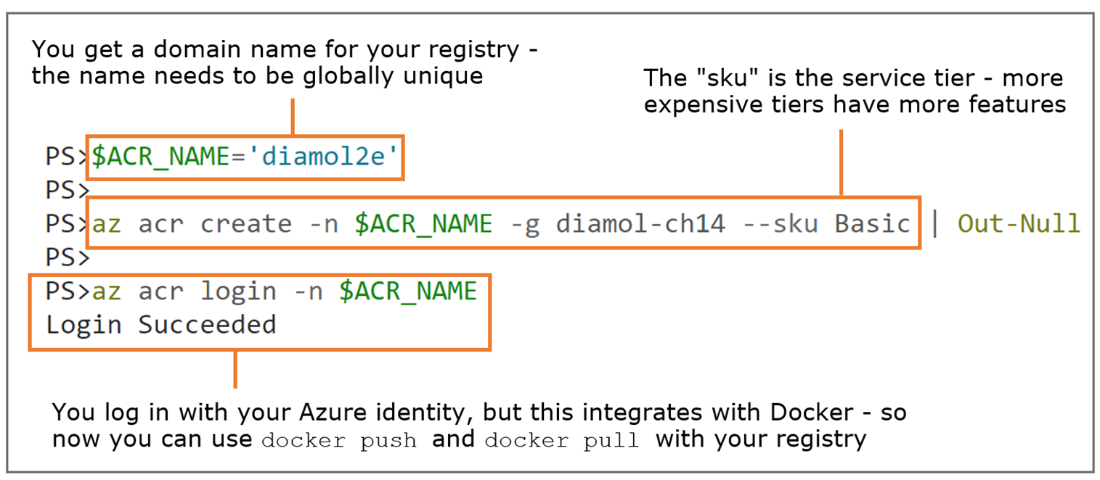
Creating and authenticating to ACR using the Azure command line
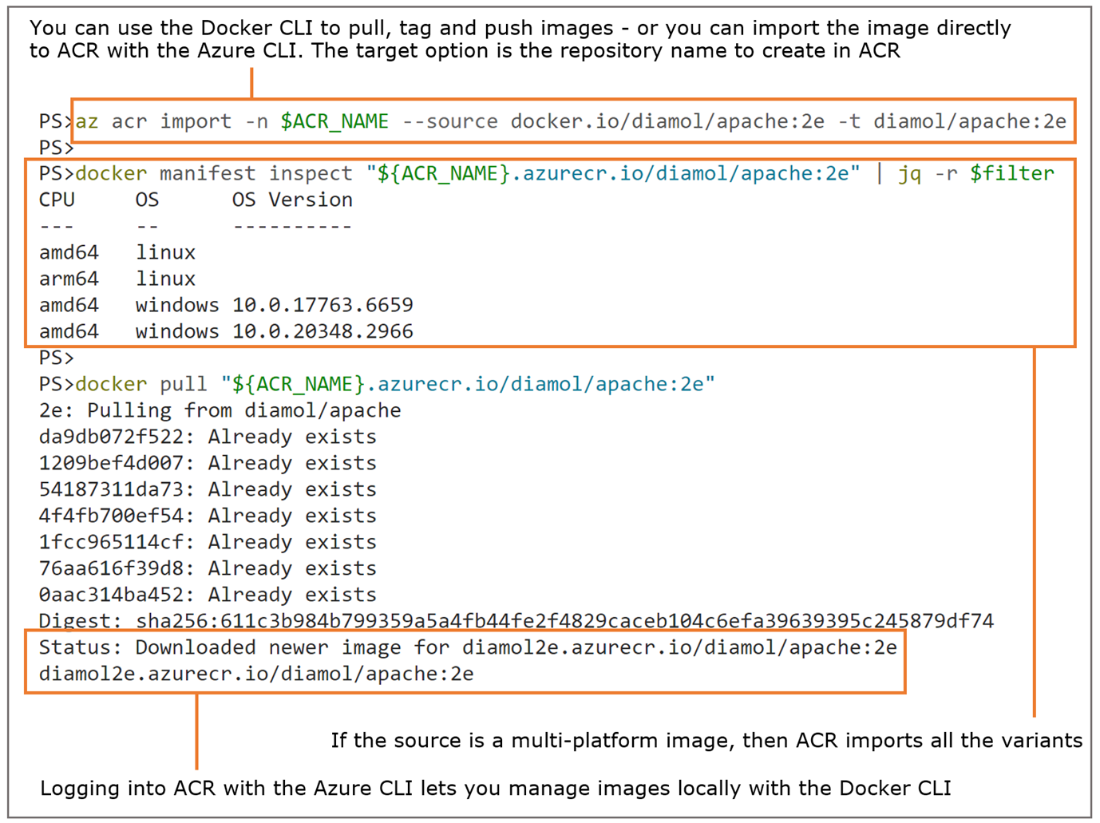
Loading an image from Docker Hub into ACR using the Azure command line
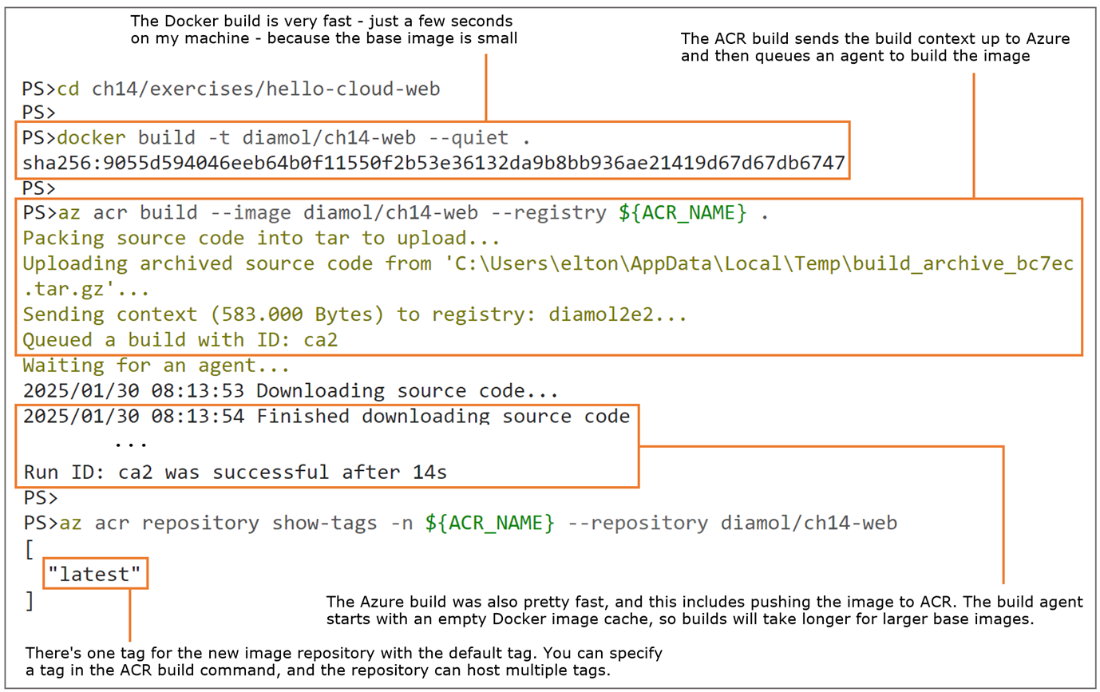
Using an ACR task to build and push an image in Azure from a local source folder
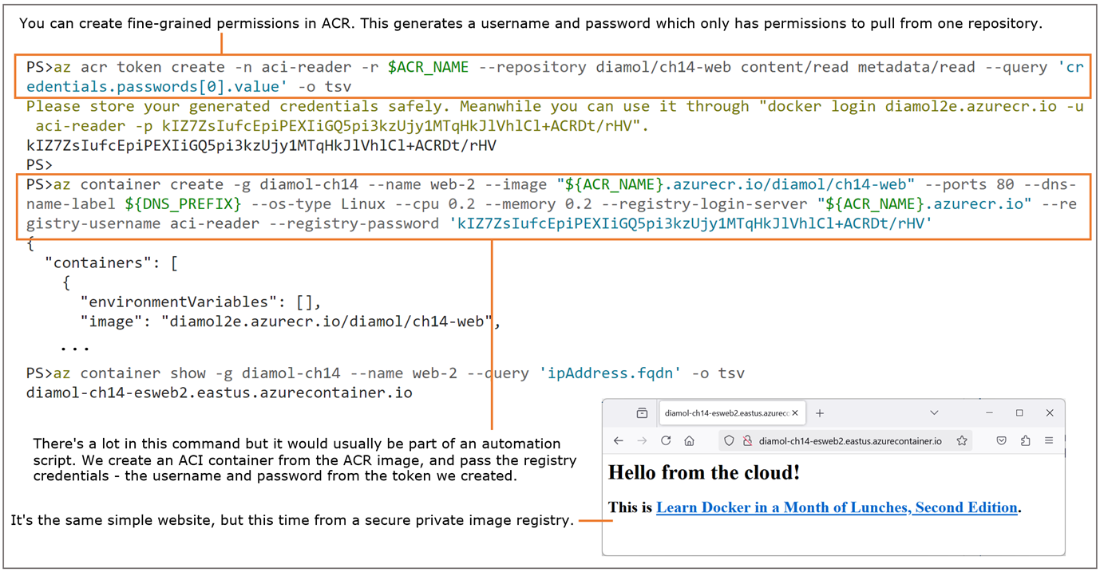
Running a container in ACI from a secure image we built in ACR
Running a distributed application modeled in Compose using Azure Container Apps
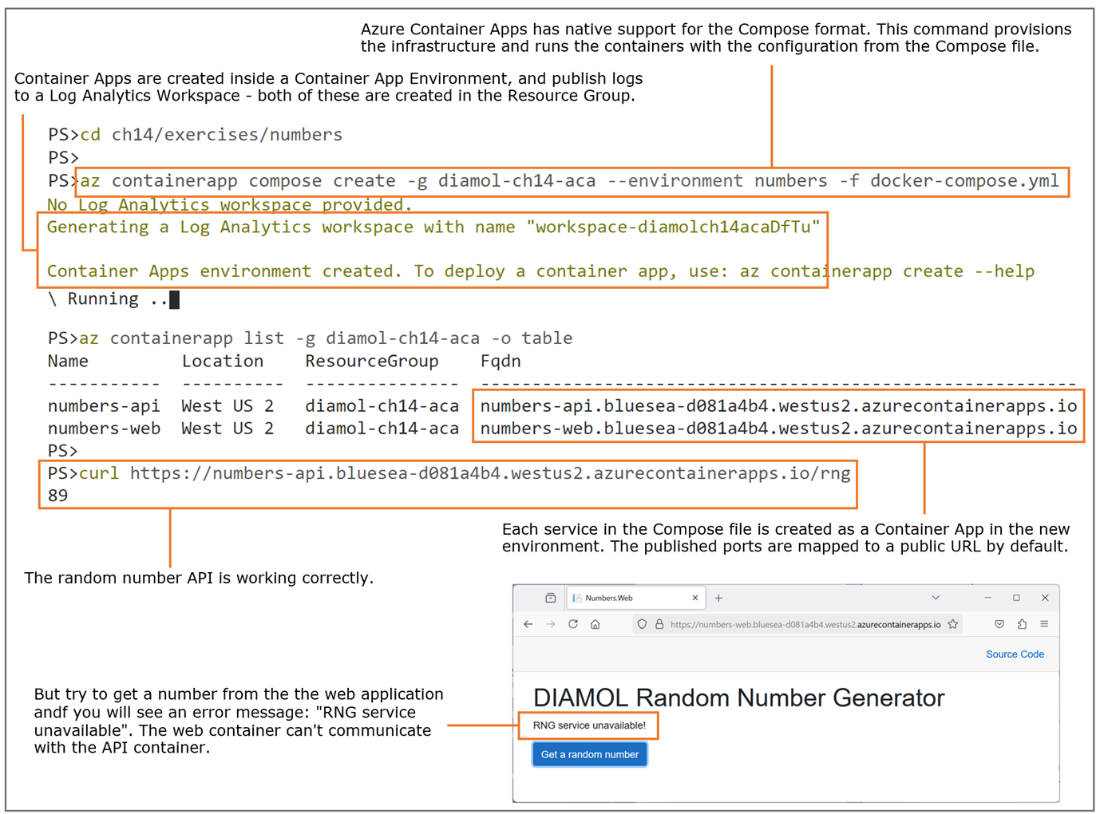
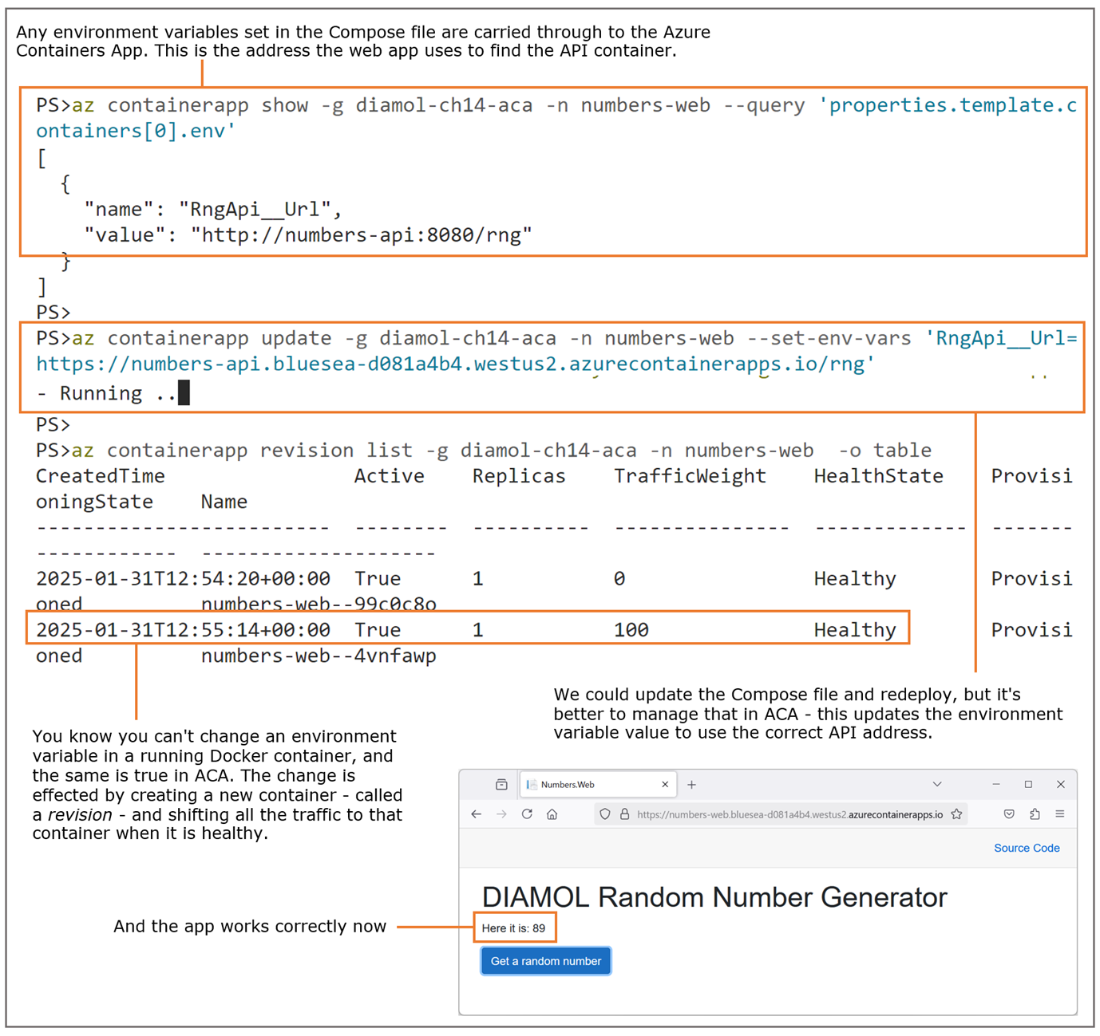
Updating app configuration settings in ACA to enable communication between containers
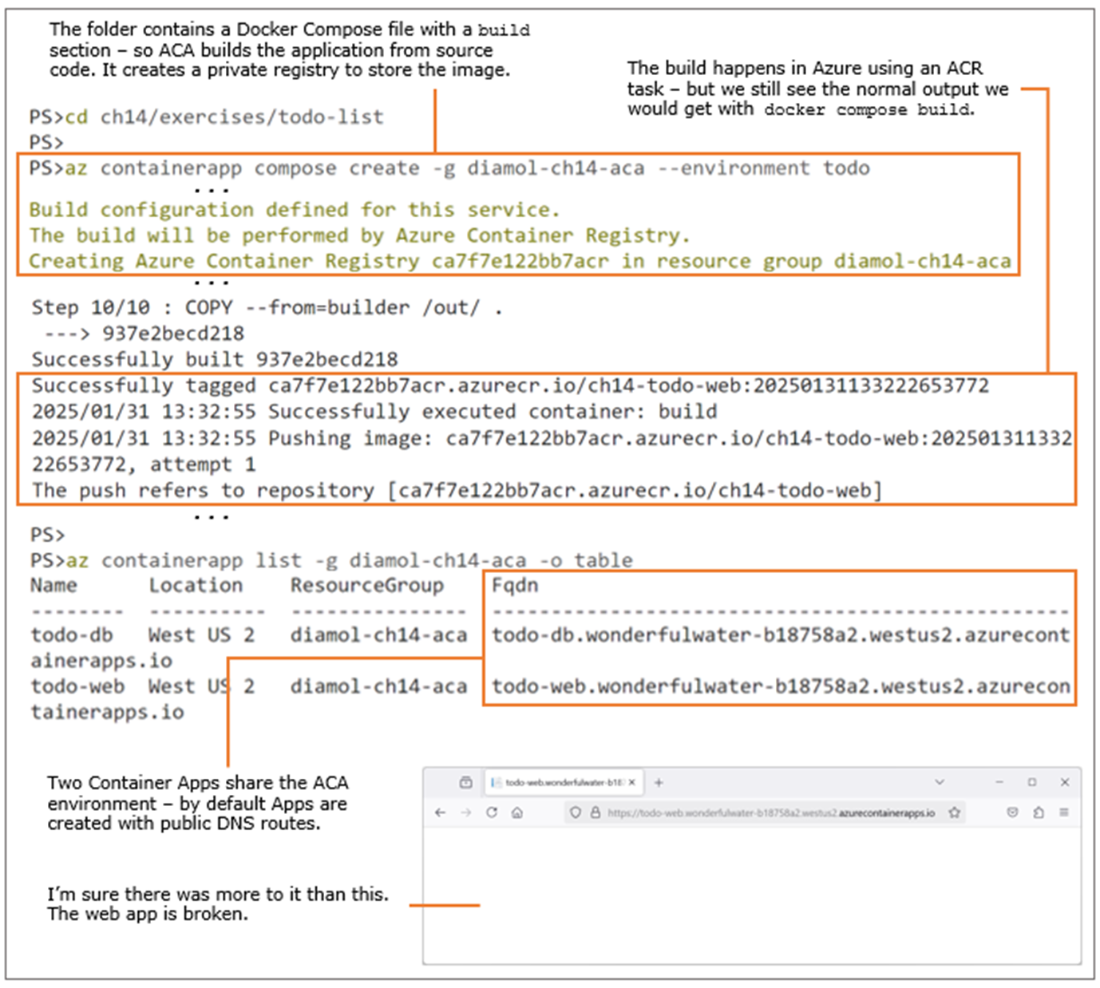
Building and deploying to Azure Container Apps from source code
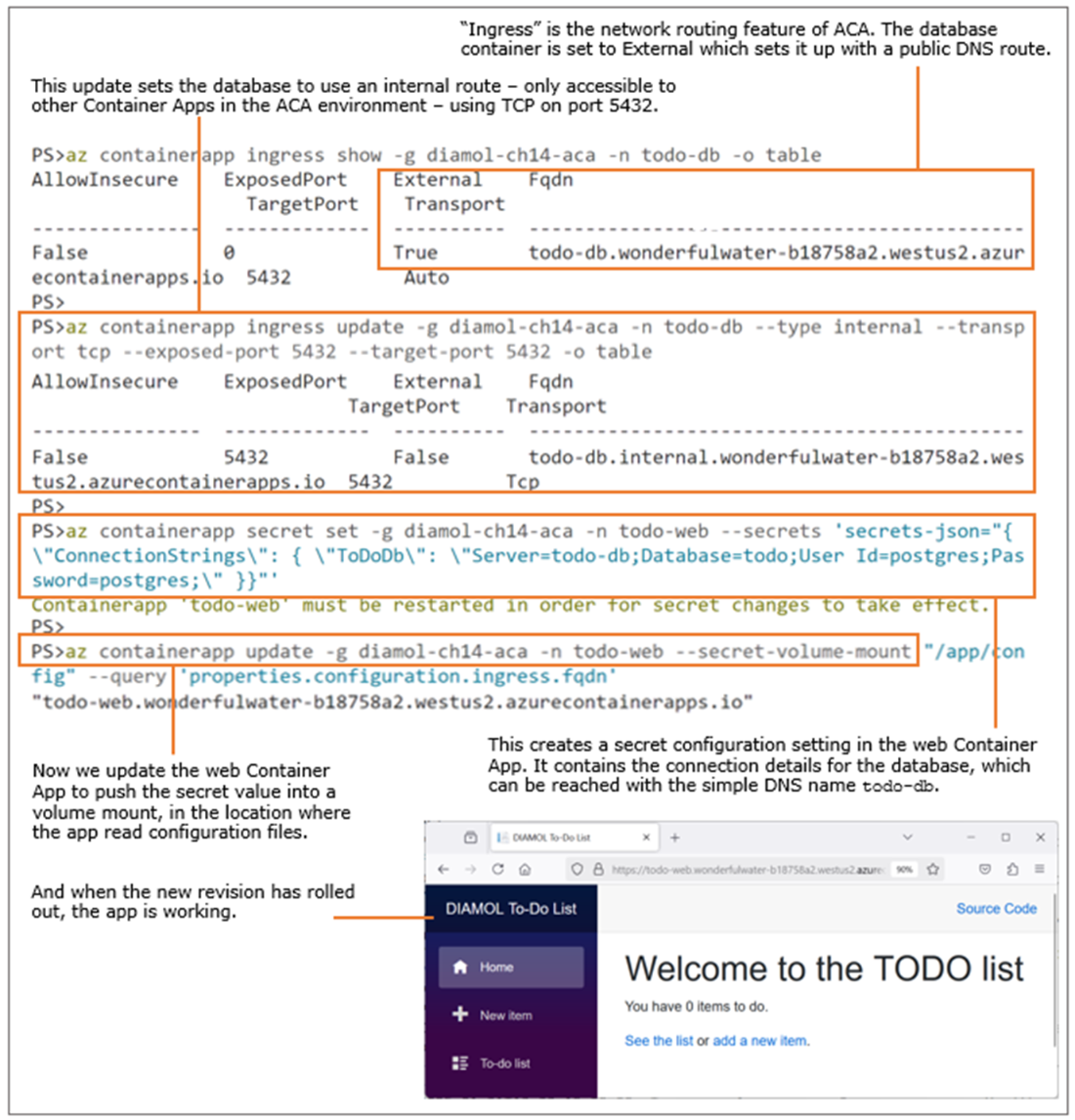
Fixing app communication with ingress and secret updates
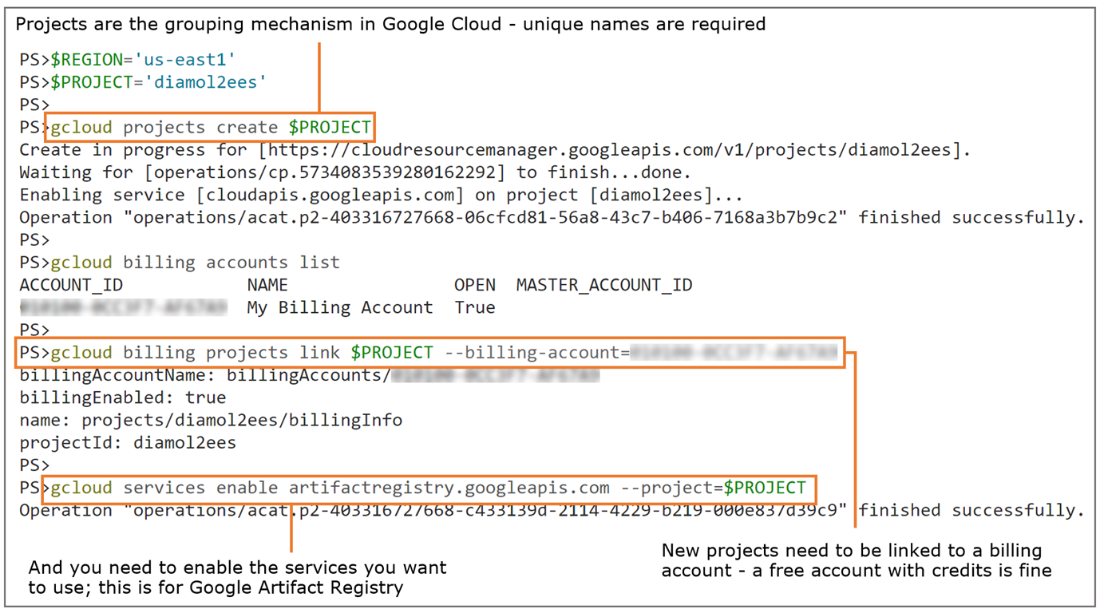
Creating and configuring a new project in Google Cloud
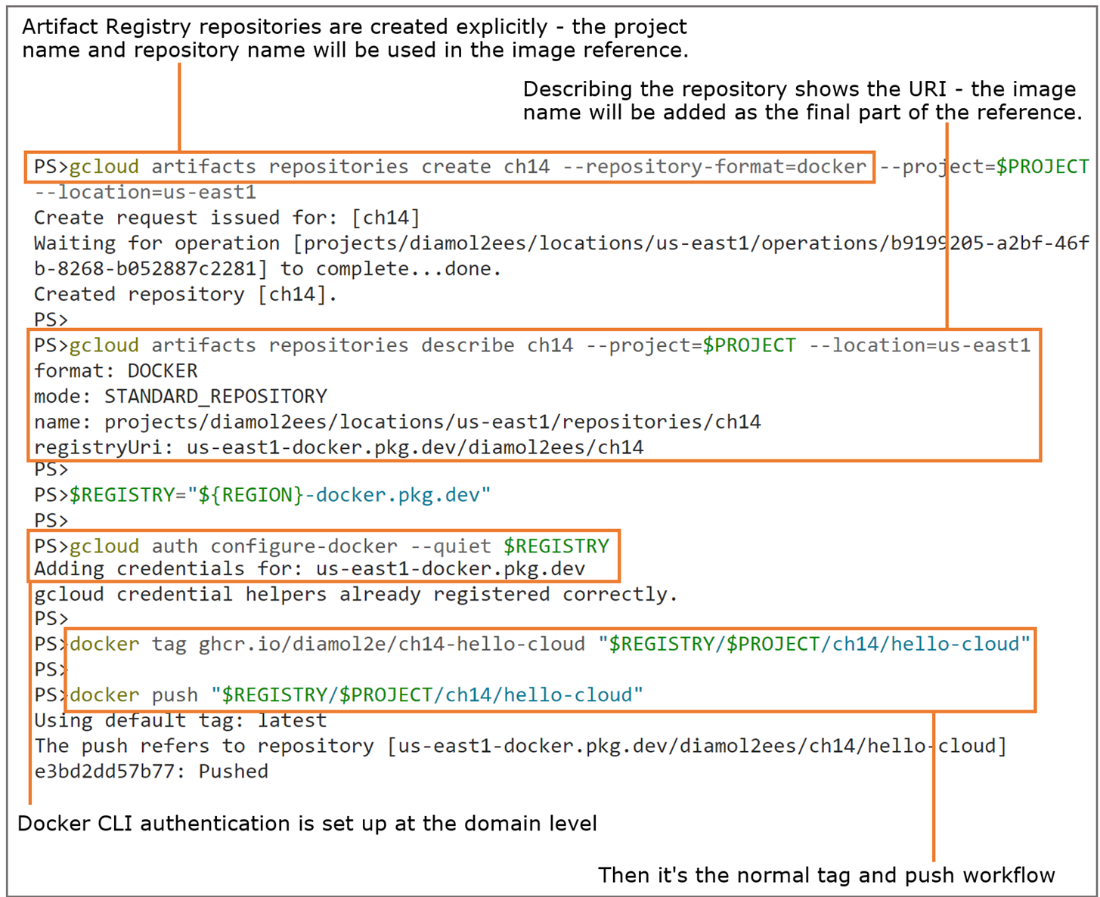
Creating a repository in Artifact Registry and pushing a local image
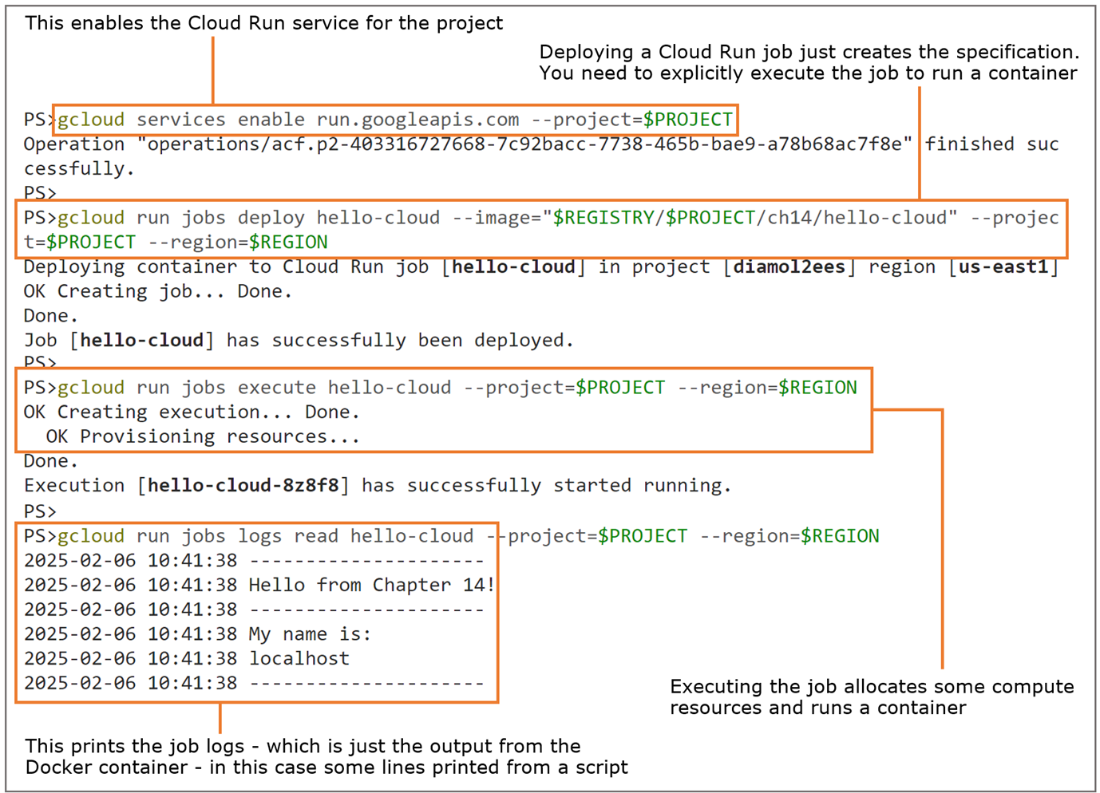
Running a container as a Google Cloud Run job
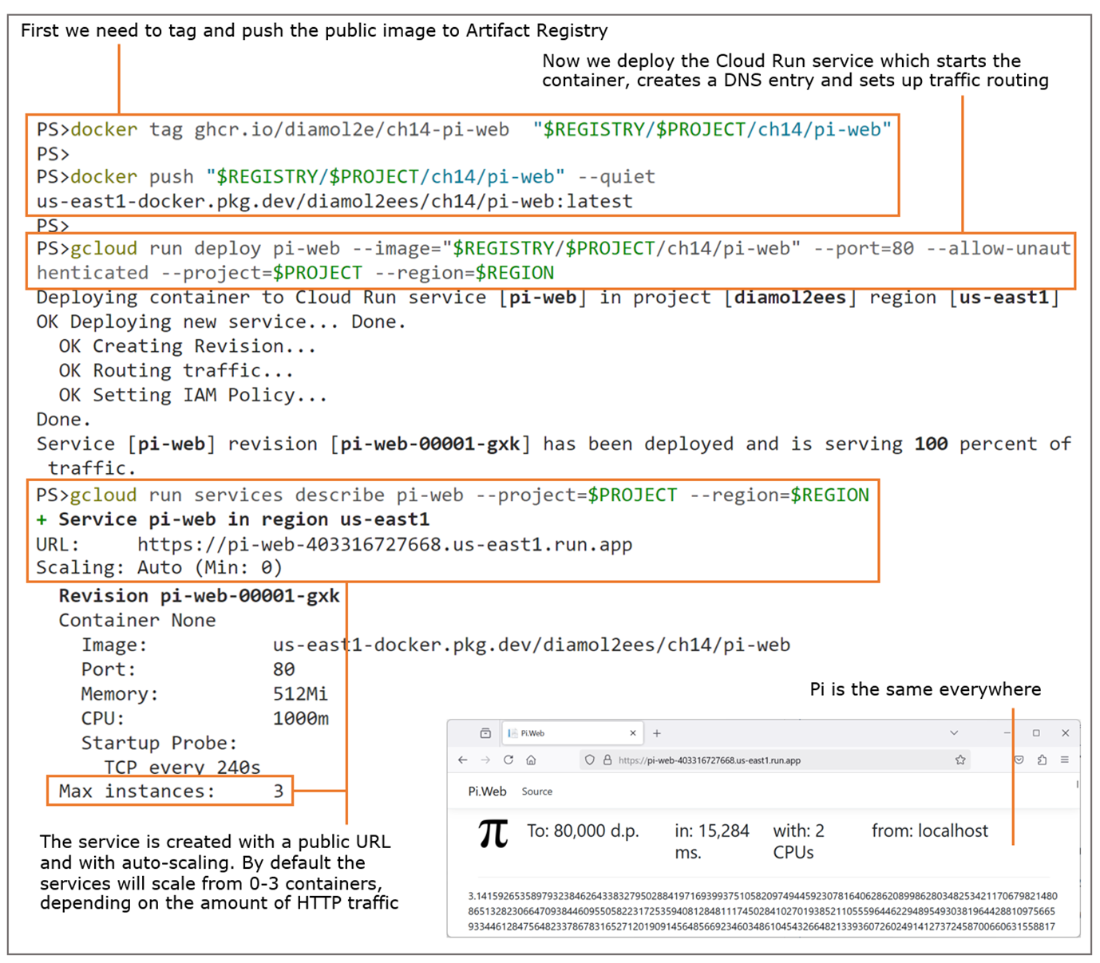
Deploying a web app container in a Cloud Run service
Lab

You probably have some credits remaining in your Google Cloud account, and this lab will help use them up. The goal is to cover one of the features we didn't get to and build the pi web application from source using a builder in Google Cloud. Here are some tips to get you started:

  • You'll want to create a new project so you can isolate this piece of work.
  • The project will need to have billing and services enabled.
  • In the new project, you'll need an Artifact Registry.
  • The command help for gcloud builds will be useful.
  • The source code and Dockerfile is in ch14/exercises/pi-web.
  • Try deploying the app with more CPU, and not whether it’s faster than the previous deployment.

As always, the solution is in the lab folder, documented in the README file: https://github.com/sixeyed/diamol/blob/2e/ch14/lab/README.md.

FAQ

What are managed container services, and why use them instead of running Docker on VMs?They are cloud platforms that run your containers without you provisioning or managing VMs, Docker, networking, or storage. You point them at an image, pass configuration, and they handle reliability and scaling. They’re ideal for simple apps, test environments, and migrations where you want speed and low ops overhead.
When should I use Azure Container Instances (ACI), Azure Container Apps (ACA), or AKS?Use ACI for the simplest, often single-container workloads or ephemeral test environments. Use ACA for typical multi-container apps you can model with Docker Compose, with features like revisions, HTTPS ingress, autoscale, and secrets. Use AKS (Kubernetes) when you need full platform flexibility and complex orchestration.
How do I expose an ACI container publicly, and does ACI provide TLS?Publish ports and set a globally unique DNS label when creating the container. ACI will route a public DNS name to your container. ACI does not provide TLS/SSL out of the box—public exposure is plain HTTP unless you add additional components to terminate TLS.
Why use a private registry like Azure Container Registry (ACR) or Google Artifact Registry instead of Docker Hub?Private registries keep your images close to your runtime for faster pulls, secure access with cloud IAM, and offer features like scanning and automated builds. They help protect IP and reduce supply chain risk compared to pulling directly from public registries.
What are common ways to get images into ACR and deploy them securely to ACI?You can import existing images (from Docker Hub or other registries), build in the cloud with ACR Tasks, or push from your local Docker build. For ACI, authenticate using registry credentials or (preferably) cloud-identity integrations, then reference your private image in the create command.
How does Docker Compose support work with Azure Container Apps?ACA can deploy directly from a Compose file, provisioning supporting resources for you. Not everything maps 1:1 (e.g., explicit Docker networks), and you often need to update service URLs (env vars) to use the ACA-generated HTTPS endpoints. Updates create new revisions and can be rolled out safely.
How do I keep internal components private and manage secrets in ACA?Use internal ingress for private services (e.g., databases) and configure the transport/ports (TCP). Store sensitive values as ACA secrets and expose them to containers via environment variables or mounted files, avoiding hardcoded credentials in images or Compose files.
What are the key differences with Google Cloud Run compared to Azure’s services?Cloud Run requires images in Google Artifact Registry (no direct pulls from public registries). It has two modes: jobs (background/one-off) and services (HTTP endpoints). It supports revisions, traffic splitting, and scale-to-zero. At the time described, it supports Linux on Intel and has no native Compose support.
How do compute choices affect cost and performance in these services?You pay for the CPU and memory reserved while containers run. More compute yields better performance (e.g., CPU-bound tasks like calculating Pi) but costs more. Right-size resources, shut down unused environments, and automate image and resource cleanup to manage spend.
How should I choose a cloud container platform for an app?Evaluate platform/architecture support (Linux/Windows/Arm), build and CI/CD integration, Compose compatibility, observability and secret management, identity-based access to cloud services, ease of use vs. features, and the growth path if you outgrow a simpler service.

pro $24.99 per month

  • access to all Manning books, MEAPs, liveVideos, liveProjects, and audiobooks!
  • choose one free eBook per month to keep
  • exclusive 50% discount on all purchases
  • renews monthly, pause or cancel renewal anytime

lite $19.99 per month

  • access to all Manning books, including MEAPs!

team

5, 10 or 20 seats+ for your team - learn more


choose your plan

team

monthly
annual
$49.99
$499.99
only $41.67 per month
  • five seats for your team
  • access to all Manning books, MEAPs, liveVideos, liveProjects, and audiobooks!
  • choose another free product every time you renew
  • choose twelve free products per year
  • exclusive 50% discount on all purchases
  • renews monthly, pause or cancel renewal anytime
  • renews annually, pause or cancel renewal anytime
  • Learn Docker in a Month of Lunches, Second Edition ebook for free

choose your plan

team

monthly
annual
$49.99
$499.99
only $41.67 per month
  • five seats for your team
  • access to all Manning books, MEAPs, liveVideos, liveProjects, and audiobooks!
  • choose another free product every time you renew
  • choose twelve free products per year
  • exclusive 50% discount on all purchases
  • renews monthly, pause or cancel renewal anytime
  • renews annually, pause or cancel renewal anytime
  • Learn Docker in a Month of Lunches, Second Edition ebook for free
choose your plan

team

monthly
annual
$49.99
$499.99
only $41.67 per month
  • five seats for your team
  • access to all Manning books, MEAPs, liveVideos, liveProjects, and audiobooks!
  • choose another free product every time you renew
  • choose twelve free products per year
  • exclusive 50% discount on all purchases
  • renews monthly, pause or cancel renewal anytime
  • renews annually, pause or cancel renewal anytime
  • Learn Docker in a Month of Lunches, Second Edition ebook for free