Overview

12 Running containers on different platforms

Modern container workloads must account for two major axes of variation: CPU architecture (primarily Intel/AMD and Arm) and operating system (Linux and Windows). Because binaries and container images are platform-specific, an image that runs on one combination may fail on another. Docker’s answer is multi-platform images: a single image name published with multiple platform variants, so users pull the correct one automatically for their machine. Interest in this capability has surged with the rise of Apple Silicon and cost-efficient Arm instances in the cloud. While Docker Desktop can emulate other CPUs to build and run images cross-architecture, emulation is slower and not always instruction-accurate, so it’s best treated as a convenience for development rather than a production build strategy.

There are two main ways to produce multi-platform artifacts. The simplest is a single, multi-stage Dockerfile that compiles from source and relies on multi-platform base images, yielding different variants when built on different platforms. When base images or requirements differ by platform, you can maintain multiple Dockerfiles tailored to each OS/CPU, trading extra maintenance for precise control. It’s critical to keep commands platform-appropriate: the engine only pulls images that match its OS/architecture, and mixing OS-specific commands in startup paths can produce runtime failures. To publish a true multi-platform image, you push each variant and then create a manifest list that groups them under one tag; registries store platform metadata so Docker can deliver the right variant transparently.

For scalable, repeatable builds, you can use native build farms or Docker Buildx. Buildx extends docker build with a high-performance engine that fans out work to multiple builder nodes (defined via contexts), builds variants concurrently, and pushes both images and the multi-platform manifest in one command. Today it’s strongest for Linux CPU variants (Windows containers aren’t supported), but it dramatically simplifies multi-arch pipelines. Regardless of tooling, follow best practices to future-proof your images: base on multi-platform images, avoid OS-specific commands in RUN/CMD, and keep startup logic portable. Even if you don’t need multiple platforms now, these habits make it easy to add Arm, Windows, or additional architectures later and to leverage CI/CD services or cloud VMs to build and ship accurate, performant multi-platform images.

Using emulation in Docker Desktop to build images for different platforms
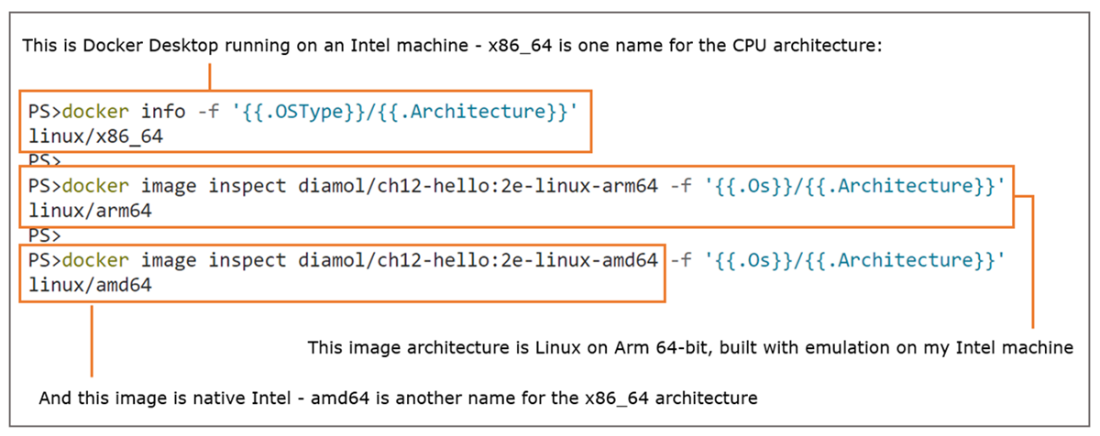
You can’t pull an image from a registry if there’s no variant to match your OS and CPU.
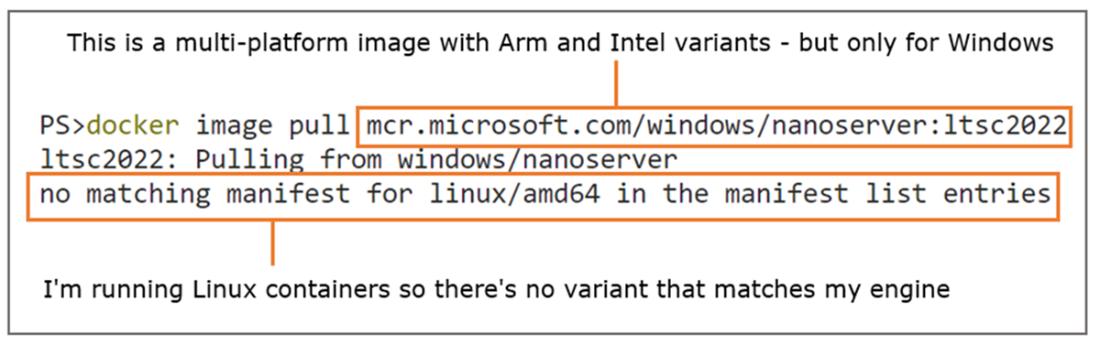
Use a multi-stage Dockerfile based on multi-platform images to build multiple image variants
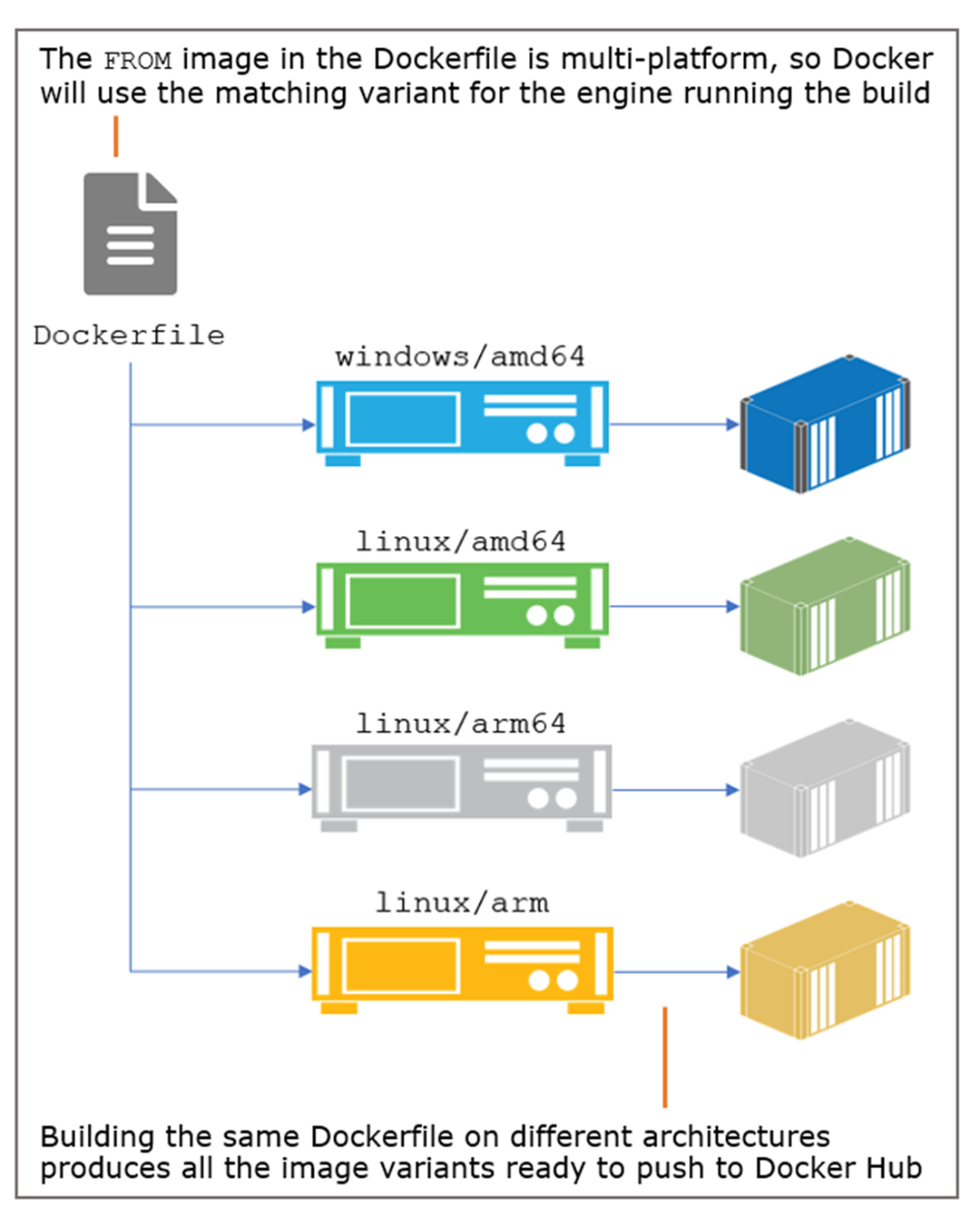
You can also build image variants using Dockerfiles tailored for each platform.
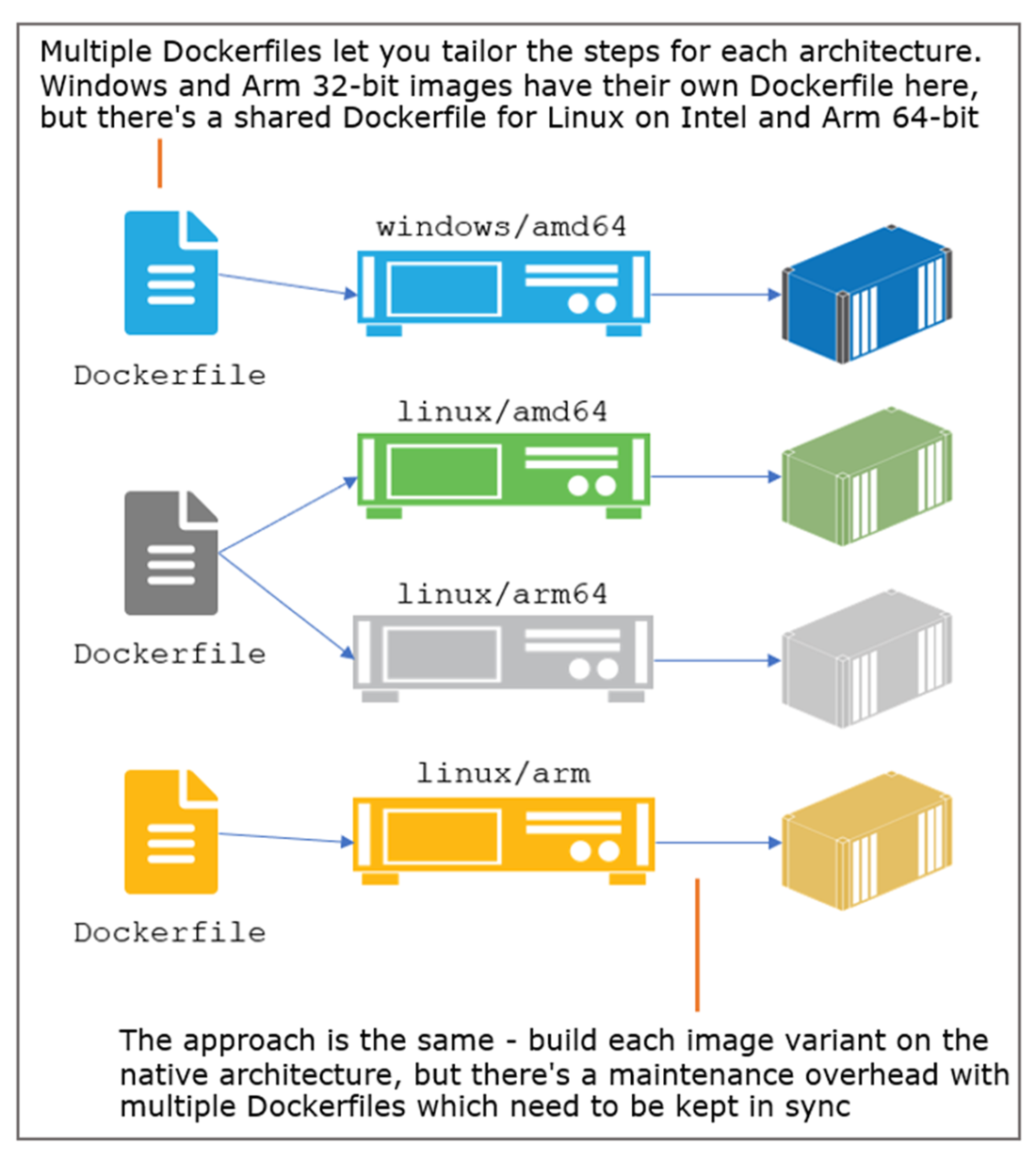
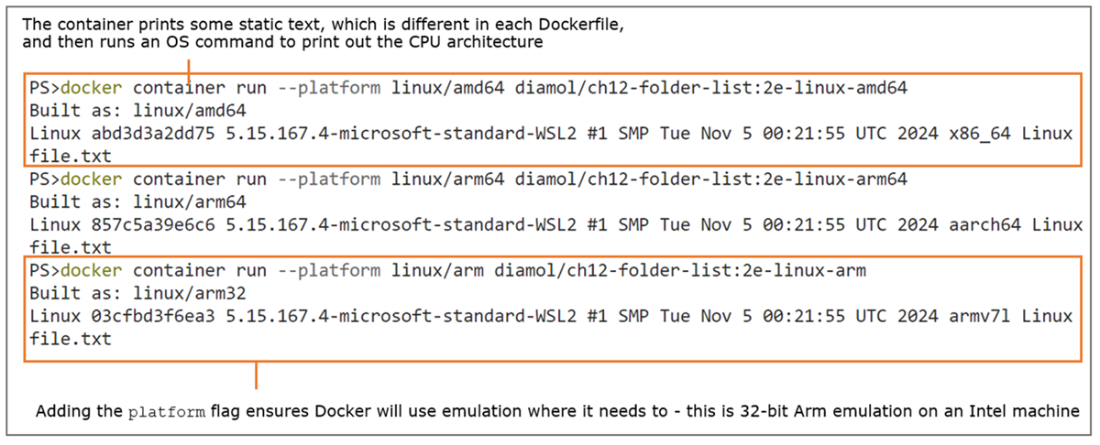
Images built for a specific platform can be run using emulation in Docker Desktop.
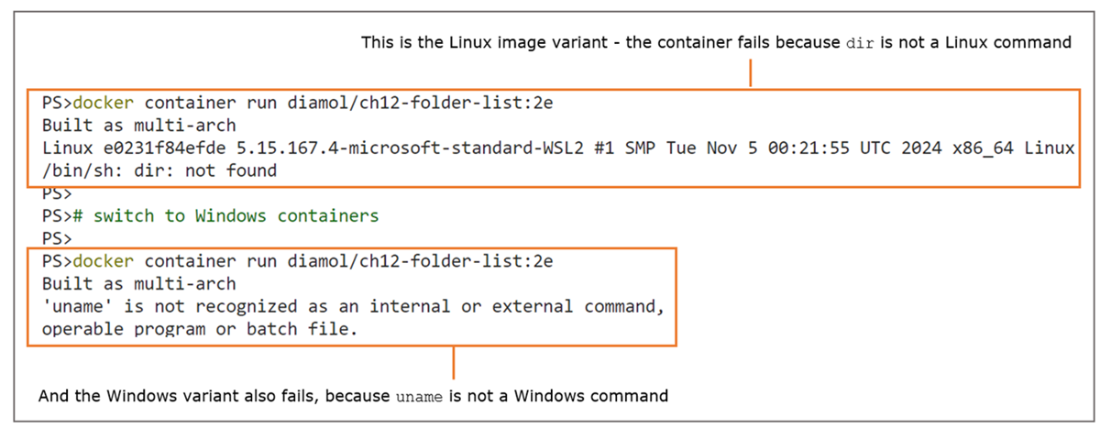
It’s easy to build a multi-platform image that fails at runtime on some (or all) platforms.
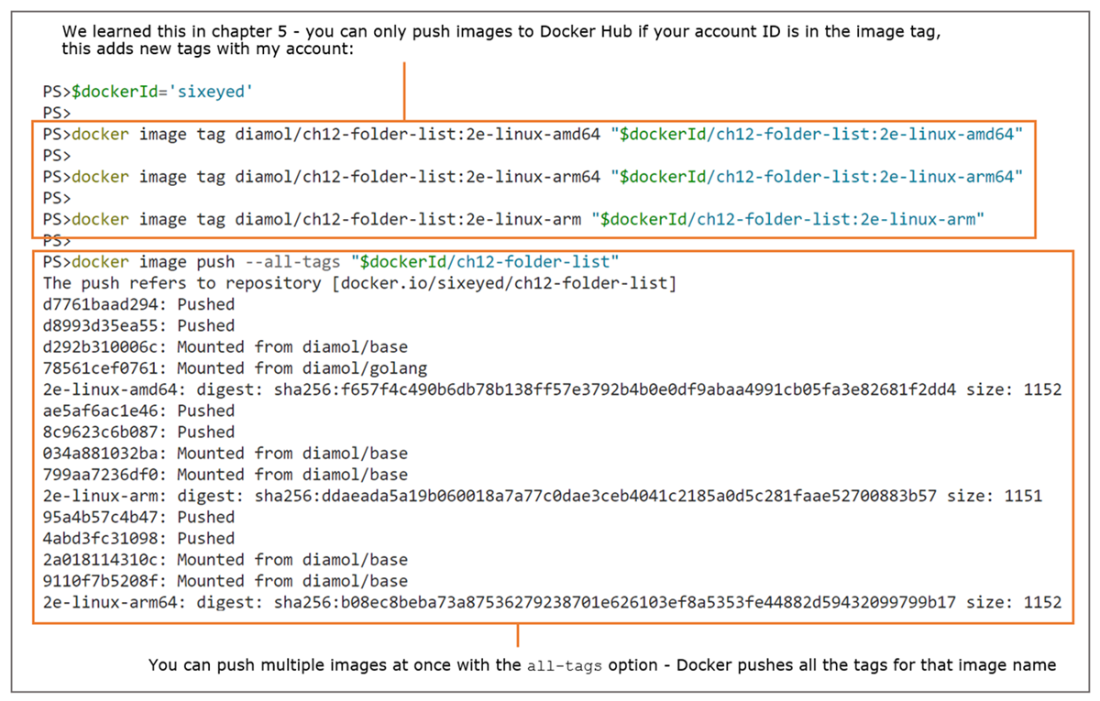
Pushing all the image variants is the first stage in publishing a multi-platform image.
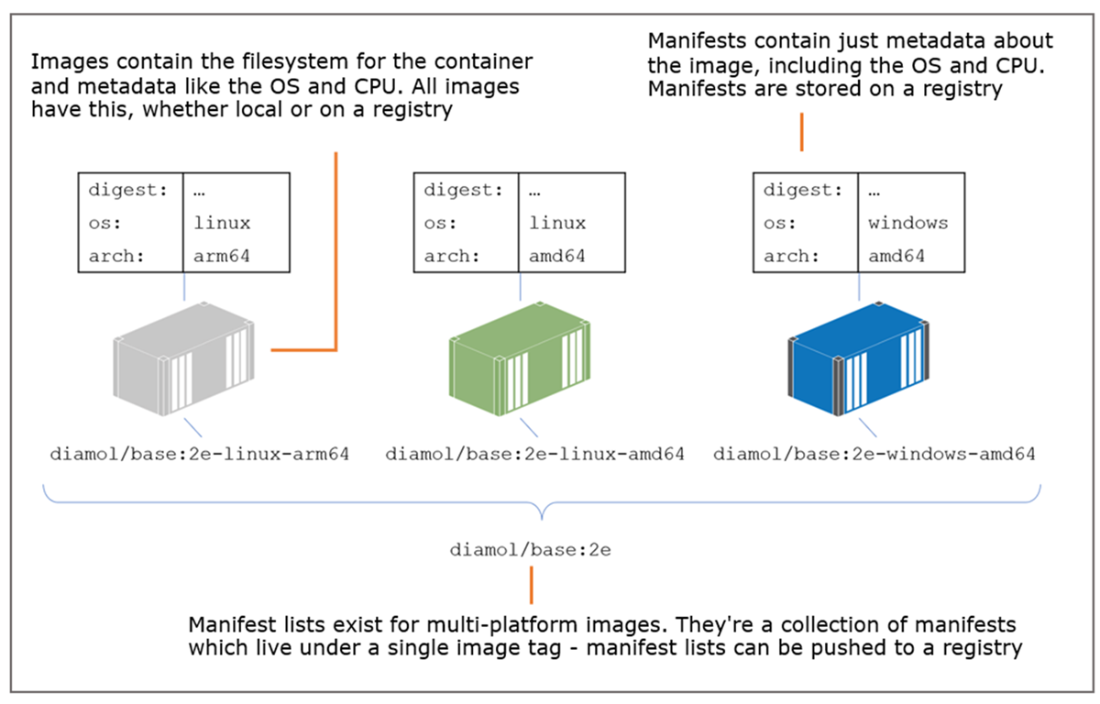
Multi-platform images have a manifest list, which contains the manifest for each platform variant.
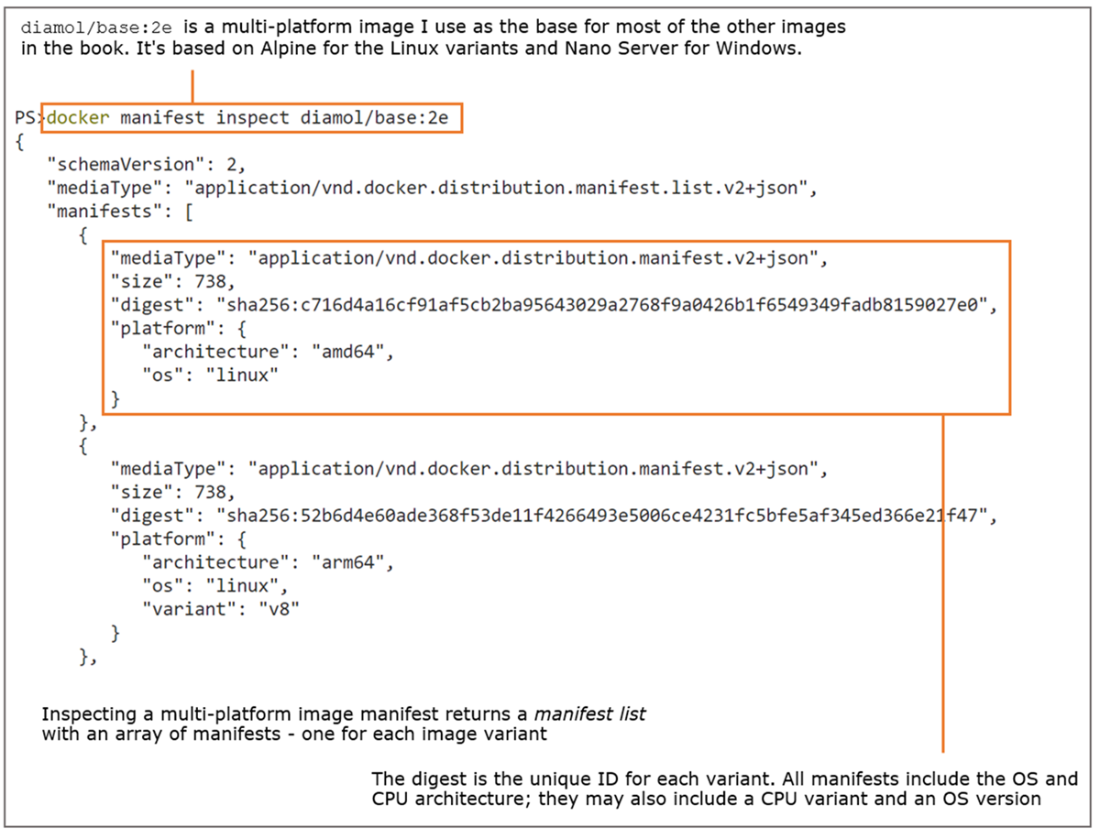
Manifests and manifest lists exist on a Docker registry and contain metadata about images.
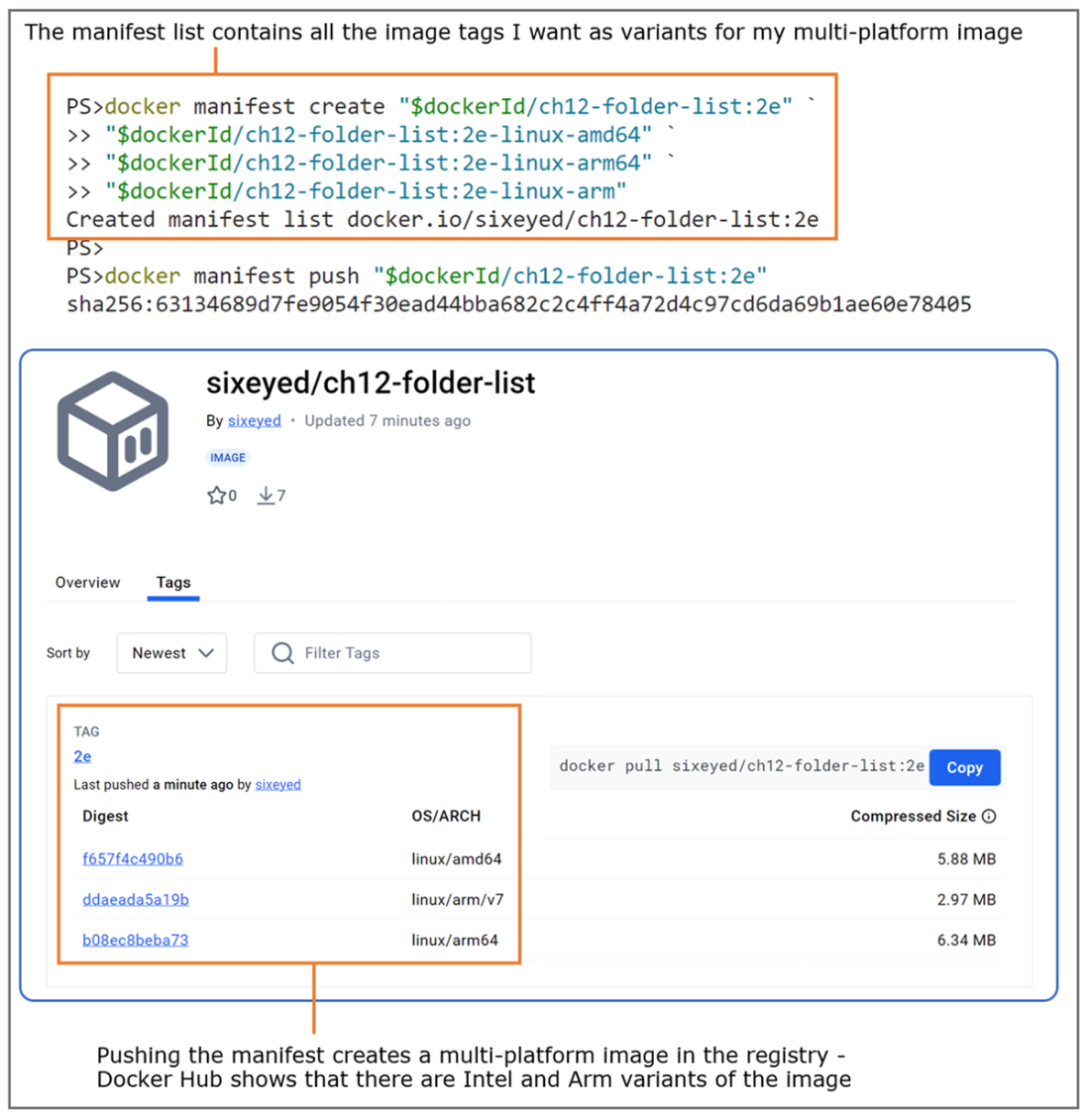
A multi-platform image has a single tag but many variants. Docker Hub shows all the variants.
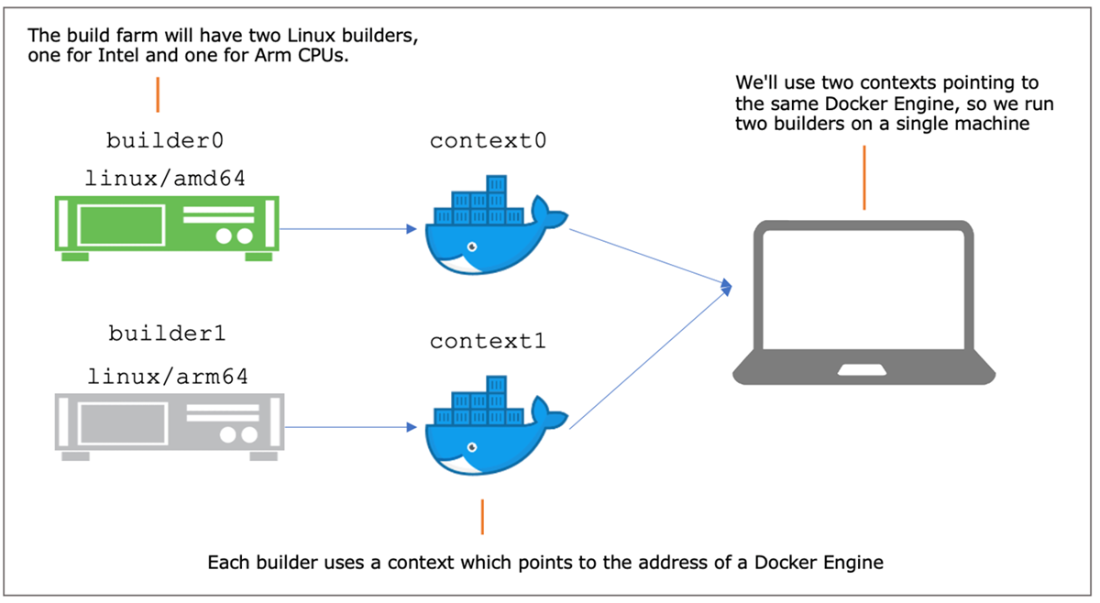
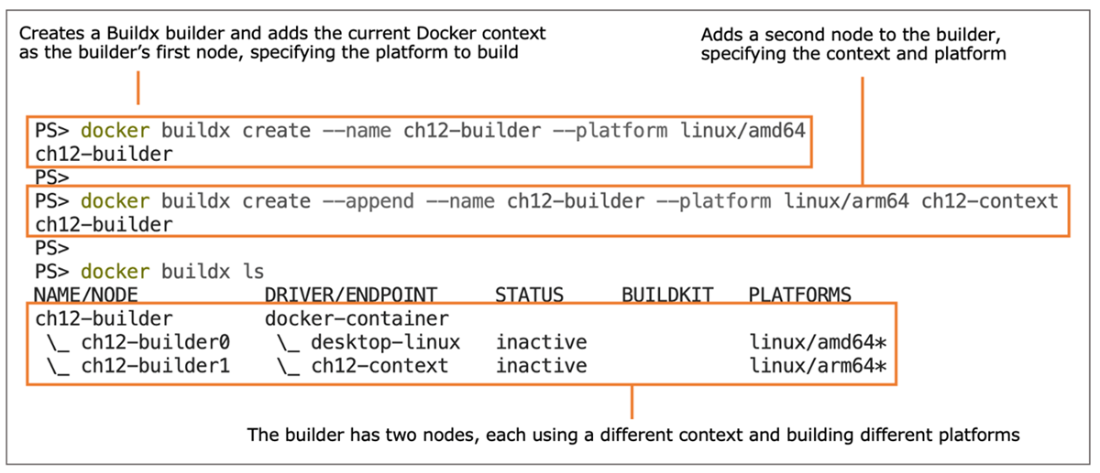
You can use two addresses for a single Docker Engine to host two Buildx builders
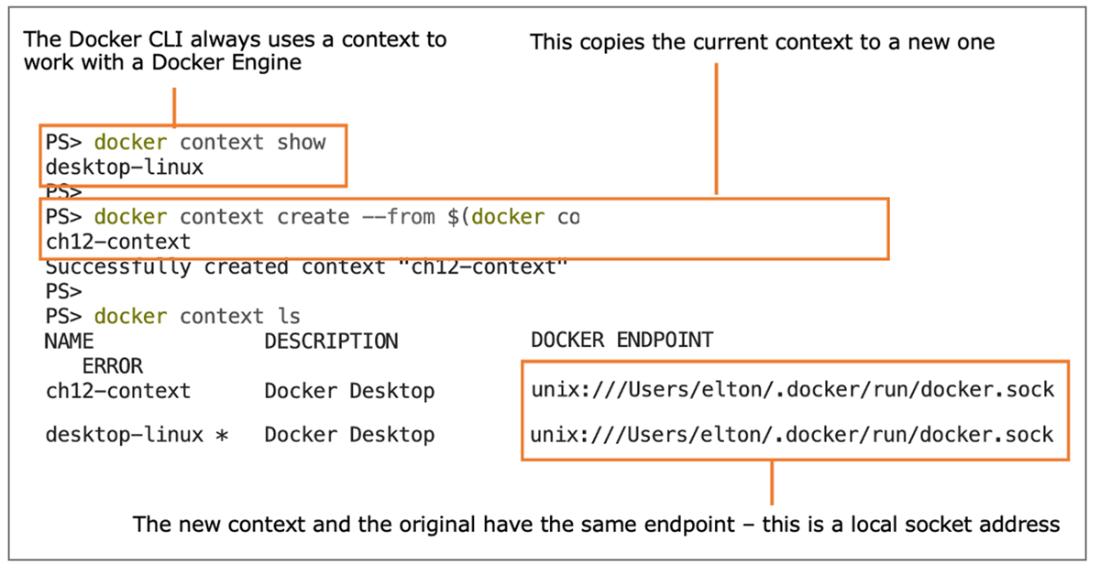
Buildx uses contexts to talk to builders—it doesn’t mind if different contexts use the same address.
We’ve created a fake build farm with just a few commands—a real build farm is just as easy
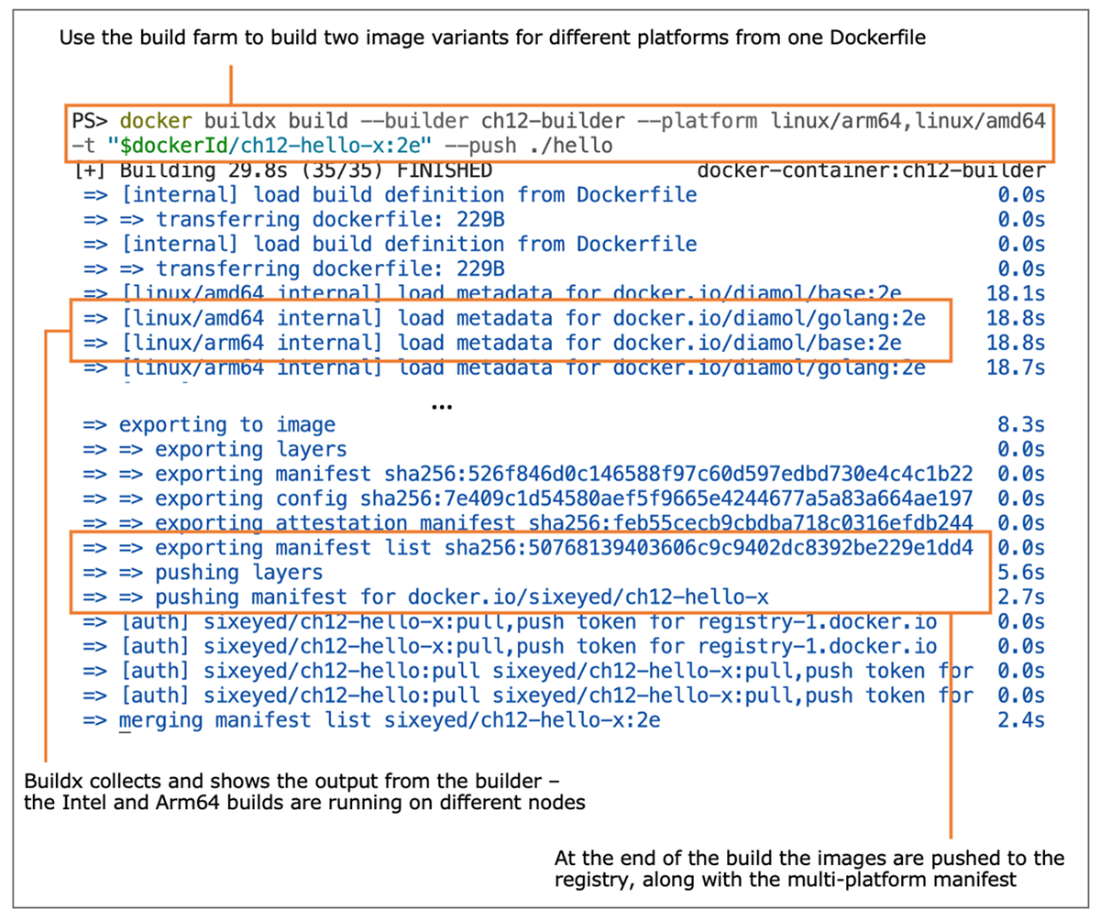
Using the builder—each node builds one platform, and Buildx pushes the multi-platform manifest.
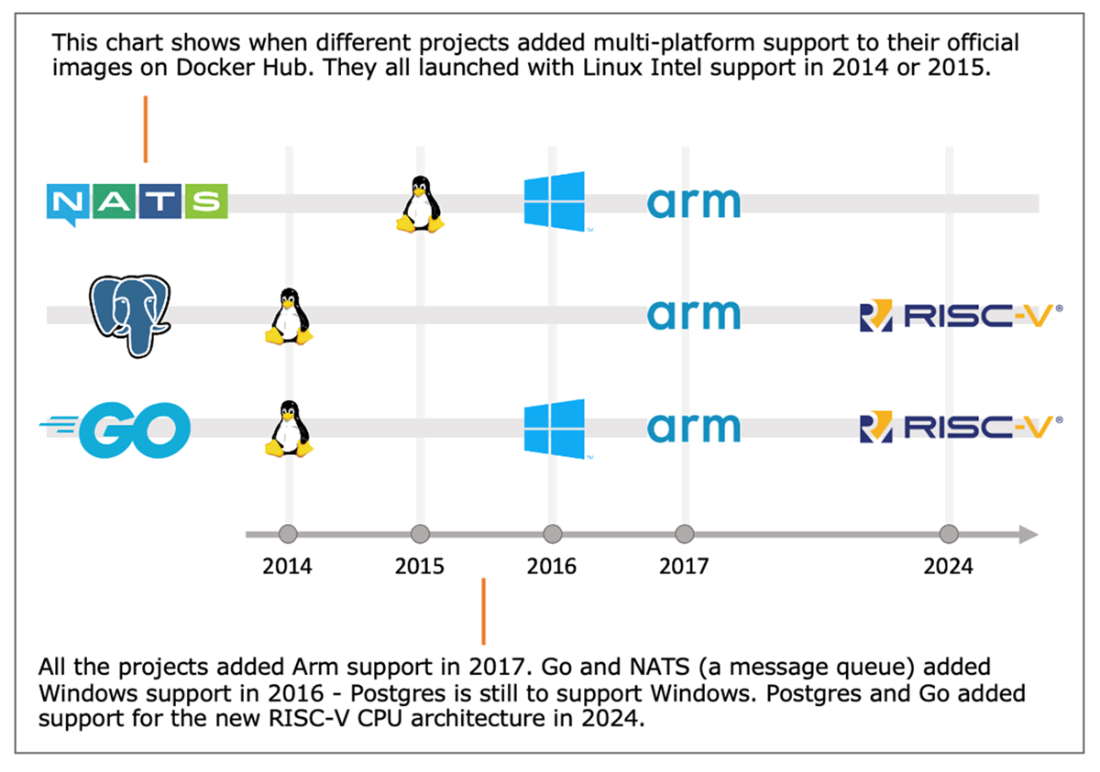
Projects typically launch with Linux Intel support and add variants as they become popular.
Lab

This chapter’s lab asks you to fix up a Dockerfile so that it can be used to produce multi-platform images. It’s the sort of thing you may come across if you have a Dockerfile that didn’t follow my best-practice suggestions. This Dockerfile is based on an image for a specific architecture, and it uses OS commands that are not portable. I’d like you to fix the Dockerfile in the lab folder for this chapter so that it can build an image targeted for Linux on Intel or Arm, and Windows on Intel. There are lots of ways to solve this; these are just a couple of hints for you:

  • Some Dockerfile instructions are cross-platform, whereas equivalent OS commands in a RUN instruction may not be.
  • Some Windows commands are the same as Linux, and in the golden base image for the book, there are some aliases to make other Linux commands work in Windows.

You’ll find my approach in the Dockerfile.solution file on GitHub for this chapter: https://github.com/sixeyed/diamol/blob/2e/ch12/lab/README.md.

FAQ

Why do I need to support multiple platforms for my Docker images?Developers and deployments increasingly run across Intel/AMD (amd64) and Arm (arm64/arm) CPUs on both Linux and Windows. Without multi-platform support, images that work on one machine (for example, an Intel laptop) will fail on another (for example, an Arm-based Mac or cheaper Arm cloud VMs). Multi-platform images ensure the same app runs consistently across CPUs and OSes.
What is a multi-platform image and how does it work?A multi-platform image is a single image name published with multiple variants (one per platform). When you run it, Docker uses the image’s manifest list to pull the matching variant for your Engine’s OS and CPU. Same name, different variant under the hood, same behavior for the user.
How can I build images for non-native architectures on my machine?Use Docker’s emulation (QEMU). Docker Desktop ships with it; on Linux install tonistiigi/binfmt. Specify the target with --platform, for example: docker build -t myorg/app:linux-arm64 --platform linux/arm64 . Docker can also run such images with emulation for testing.
Why can’t I pull or run some images on my Docker Engine?Docker matches your Engine’s OS/CPU to the image’s manifest. If there’s no matching variant (e.g., pulling a Windows image on a Linux Engine), the pull fails. Pulling a Linux image for the wrong CPU may succeed but containers fail at runtime with errors like “exec format error.” Always use matching variants or multi-platform images.
What are my options for producing image variants?Two main approaches: 1) One multi-stage Dockerfile built on different machines (or with --platform) using base images that already support all required architectures. 2) Multiple Dockerfiles tailored per platform (different FROM images and commands). The first reduces maintenance; the second gives per-platform control when bases or commands differ.
How do I group platform-specific images under one tag?Push each variant to your registry, then create a manifest list that points one tag to all variants: docker manifest create myorg/app:2e myorg/app:2e-linux-amd64 myorg/app:2e-linux-arm64 ... and push it with docker manifest push myorg/app:2e. Docker will then serve the right variant for each platform.
Which architectures matter most and what are their aliases?Common combos: Linux/Windows on amd64 (aka x86_64, x64); Linux on arm64 (aka aarch64, armv8); Linux on arm (32-bit: arm32v7, armv7, armhf). Apple Silicon is arm64; many cloud providers offer Arm VMs; Raspberry Pi spans arm and arm64 generations.
What pitfalls should I avoid when trying to build for multiple platforms?Don’t mix OS-specific commands in a single Dockerfile unless they are guarded per platform; Windows and Linux have different shells and utilities. RUN failures show at build time, but CMD isn’t validated until runtime, so mixed or invalid commands can produce images that build fine but always crash when run.
When should I use emulation versus a build farm?Emulation is convenient for local or occasional cross-architecture builds and tests, but it is slower and not perfectly faithful. For fast, accurate, repeatable multi-platform releases, use a build farm or CI/CD agents with native architectures, push each variant, then publish a manifest.
What is Docker Buildx and how does it help with multi-platform builds?Buildx is an enhanced build engine that can distribute builds across multiple builder nodes (via Docker contexts) and, in one command, build all variants, push them, and publish the multi-platform manifest. It’s ideal for Linux CPU variants. Limitations: no Windows containers support and it builds from a single Dockerfile.

pro $24.99 per month

  • access to all Manning books, MEAPs, liveVideos, liveProjects, and audiobooks!
  • choose one free eBook per month to keep
  • exclusive 50% discount on all purchases
  • renews monthly, pause or cancel renewal anytime

lite $19.99 per month

  • access to all Manning books, including MEAPs!

team

5, 10 or 20 seats+ for your team - learn more


choose your plan

team

monthly
annual
$49.99
$499.99
only $41.67 per month
  • five seats for your team
  • access to all Manning books, MEAPs, liveVideos, liveProjects, and audiobooks!
  • choose another free product every time you renew
  • choose twelve free products per year
  • exclusive 50% discount on all purchases
  • renews monthly, pause or cancel renewal anytime
  • renews annually, pause or cancel renewal anytime
  • Learn Docker in a Month of Lunches, Second Edition ebook for free

choose your plan

team

monthly
annual
$49.99
$499.99
only $41.67 per month
  • five seats for your team
  • access to all Manning books, MEAPs, liveVideos, liveProjects, and audiobooks!
  • choose another free product every time you renew
  • choose twelve free products per year
  • exclusive 50% discount on all purchases
  • renews monthly, pause or cancel renewal anytime
  • renews annually, pause or cancel renewal anytime
  • Learn Docker in a Month of Lunches, Second Edition ebook for free
choose your plan

team

monthly
annual
$49.99
$499.99
only $41.67 per month
  • five seats for your team
  • access to all Manning books, MEAPs, liveVideos, liveProjects, and audiobooks!
  • choose another free product every time you renew
  • choose twelve free products per year
  • exclusive 50% discount on all purchases
  • renews monthly, pause or cancel renewal anytime
  • renews annually, pause or cancel renewal anytime
  • Learn Docker in a Month of Lunches, Second Edition ebook for free