Overview

11 Building and testing applications with Docker and Docker Compose

Docker streamlines modern application delivery by turning builds, tests, and packaging into repeatable, scriptable steps that run the same way everywhere. With Dockerfiles and Docker Compose, teams define how components are built and how services fit together, making command-line workflows ideal for automation and continuous integration. In a containerized CI pipeline, each stage runs inside containers, producing Docker images as the standard artifact, while a minimal set of shared infrastructure—source control, a registry, and an automation server—ties the process together using managed services or self-hosted options.

The chapter demonstrates how to stand up a complete build system in containers, using a lightweight Git server, a private registry, and Jenkins preconfigured to orchestrate Docker and Docker Compose. Jenkins talks to the host’s Docker Engine via the Docker API, letting it start containers for every stage of the pipeline. Build details are captured in Compose files that separate core service definitions from build-time settings, with environment variables driving image names for local and CI contexts. Dockerfiles use ARG and LABEL to record build metadata (such as build number and tag), creating an audit trail from running containers back to the exact build and source. Defaults in both Compose and Dockerfiles ensure the same definitions work locally and in CI without extra dependencies beyond Docker.

The CI job itself remains simple and portable: scripted steps invoke Docker Compose to verify prerequisites, build images (pulling fresh bases), run tests—ranging from unit checks to end-to-end flows with Compose—and push only successful images to the registry. Because stages are sequential, failed builds never publish artifacts, keeping the registry limited to viable release candidates and preserving detailed logs for traceability. The same pattern runs on any service (Jenkins, GitHub Actions, GitLab, Azure DevOps), and can be extended with production-grade safeguards like image vulnerability scanning and digital signing to enforce a secure software supply chain across all technology stacks.

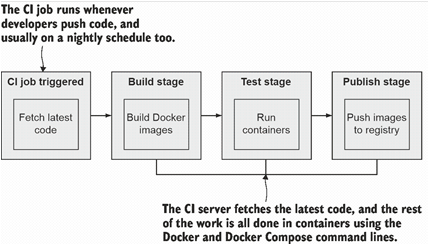
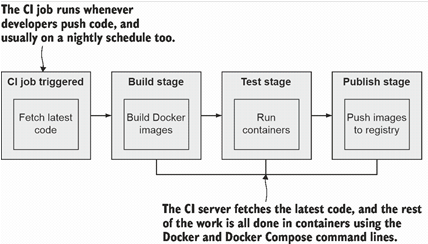
The basic steps of a CI pipeline to build, test, and publish apps—all executed with Docker.
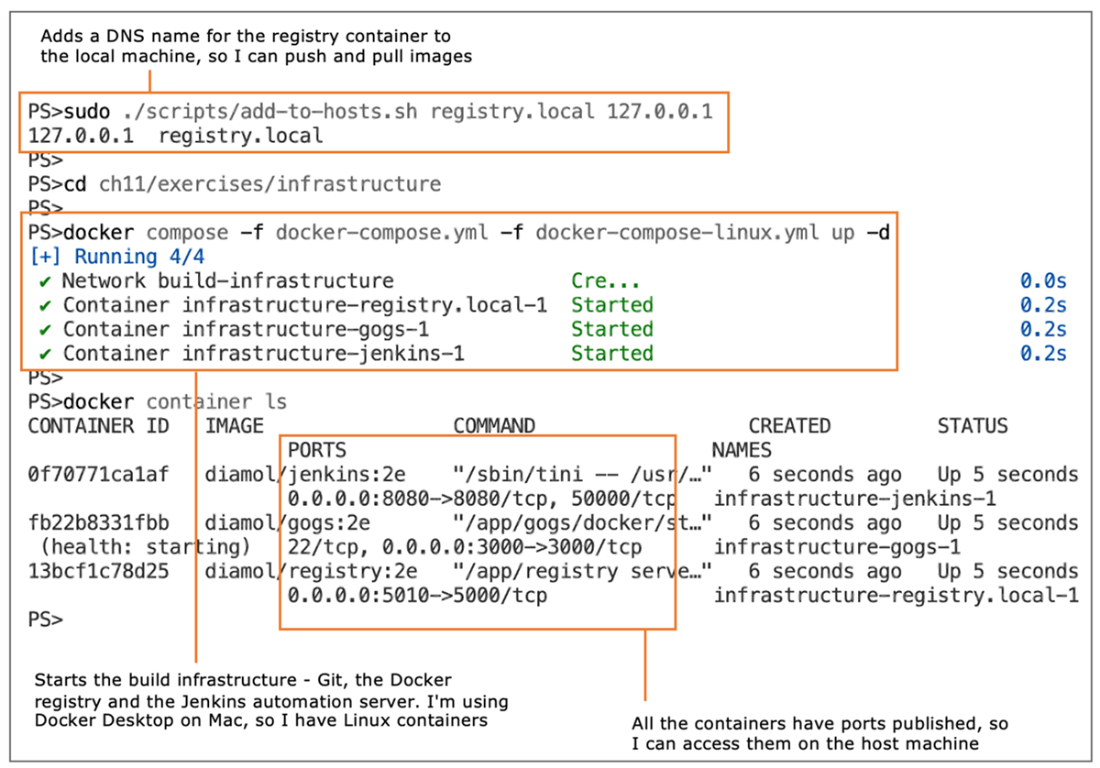
Running your whole build infrastructure in containers with one command
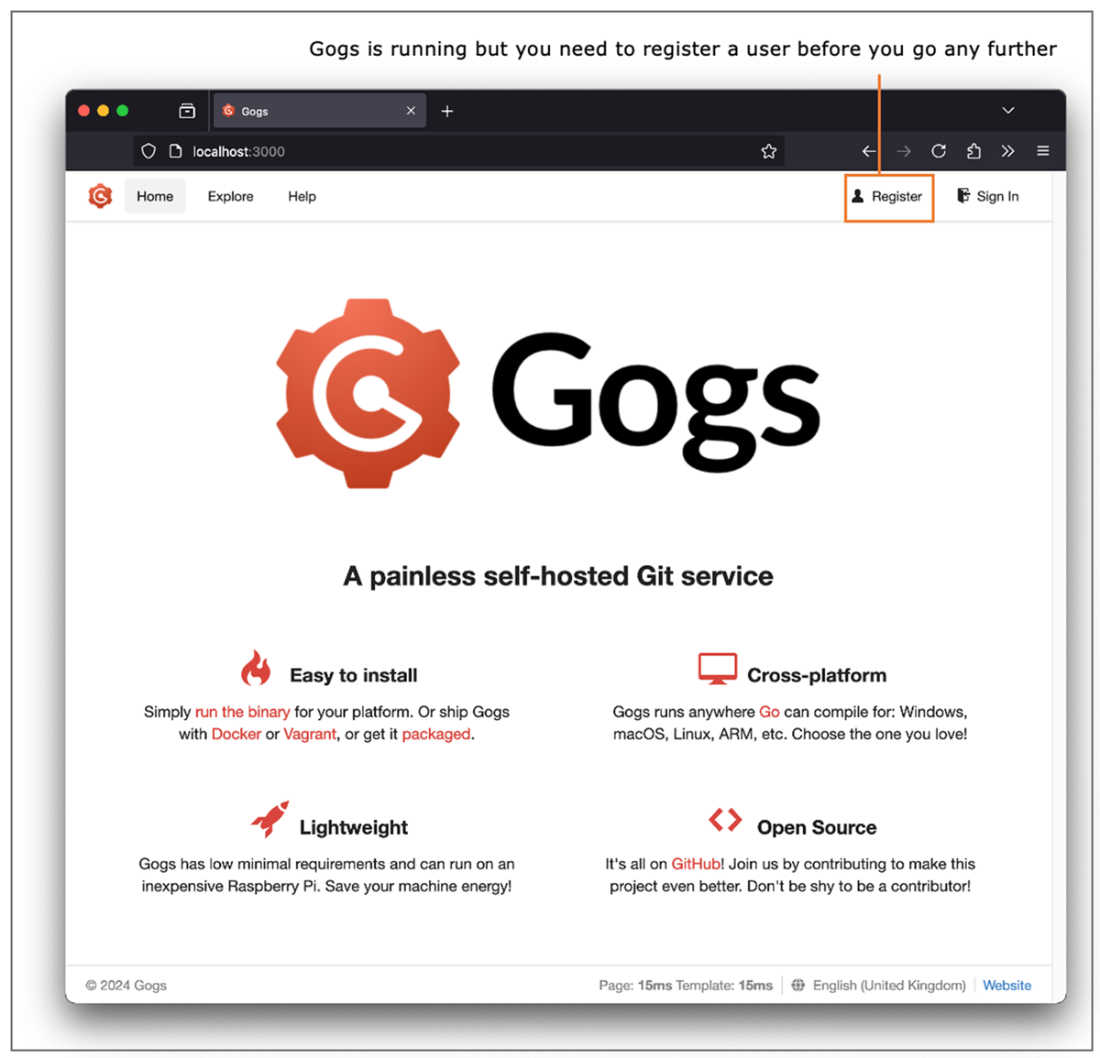
Running Gogs in a container. It’s an open source Git server that needs some manual setup.
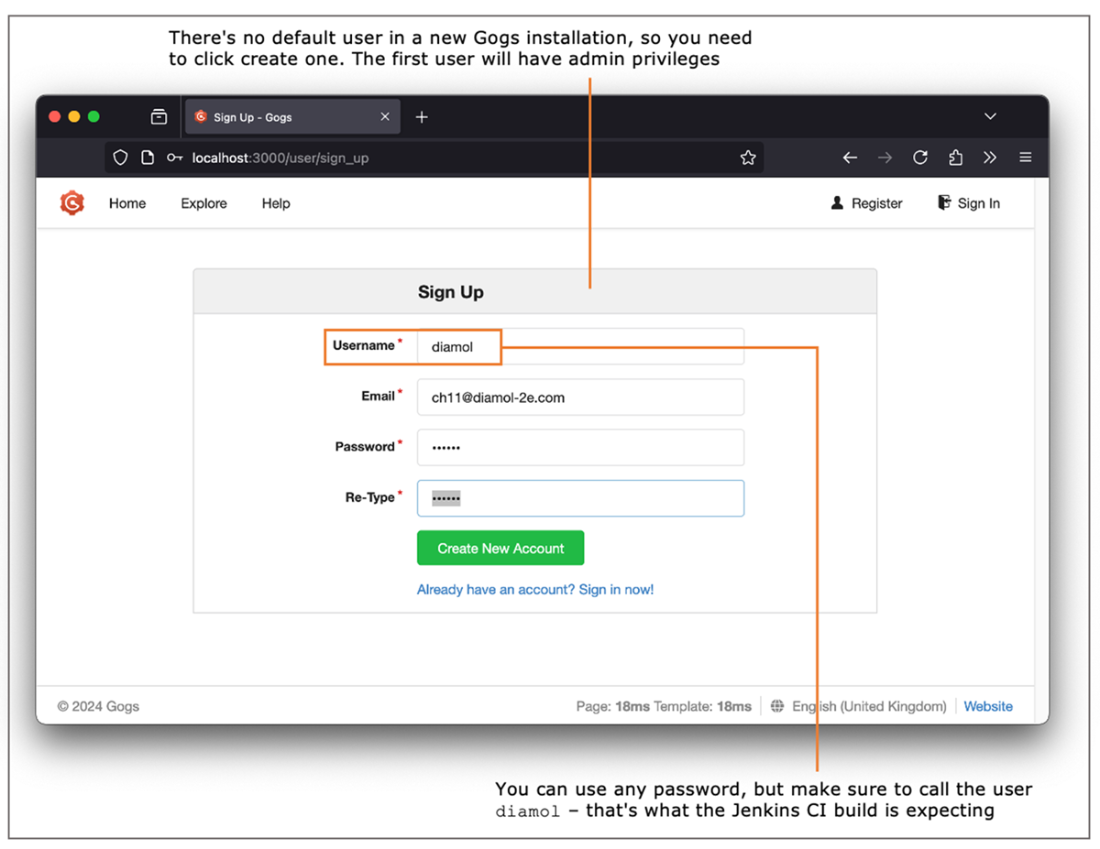
Creating a new user in Gogs that you can use to push source code to the server
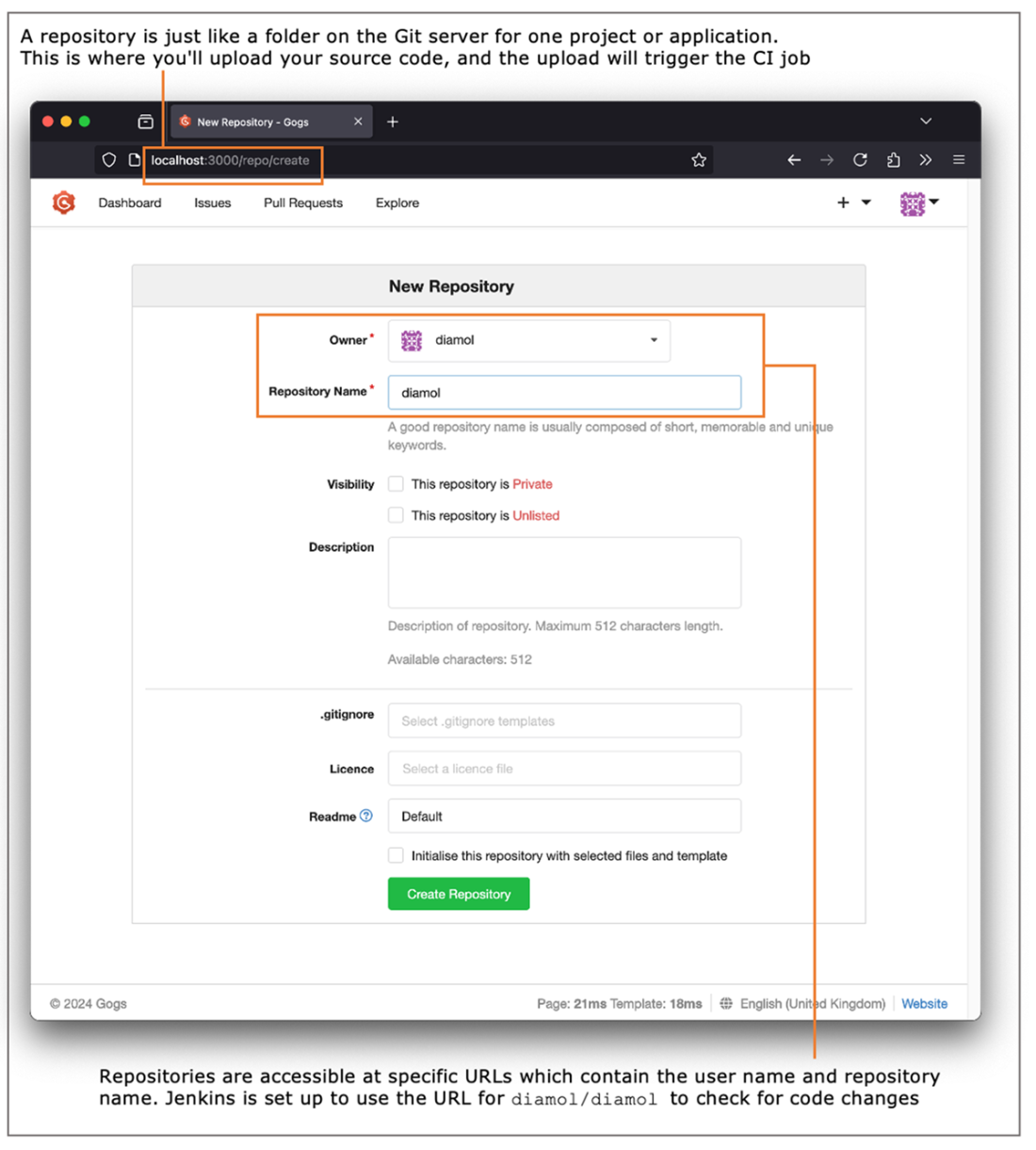
Creating a Git repository in Gogs where you can upload the source code for your apps
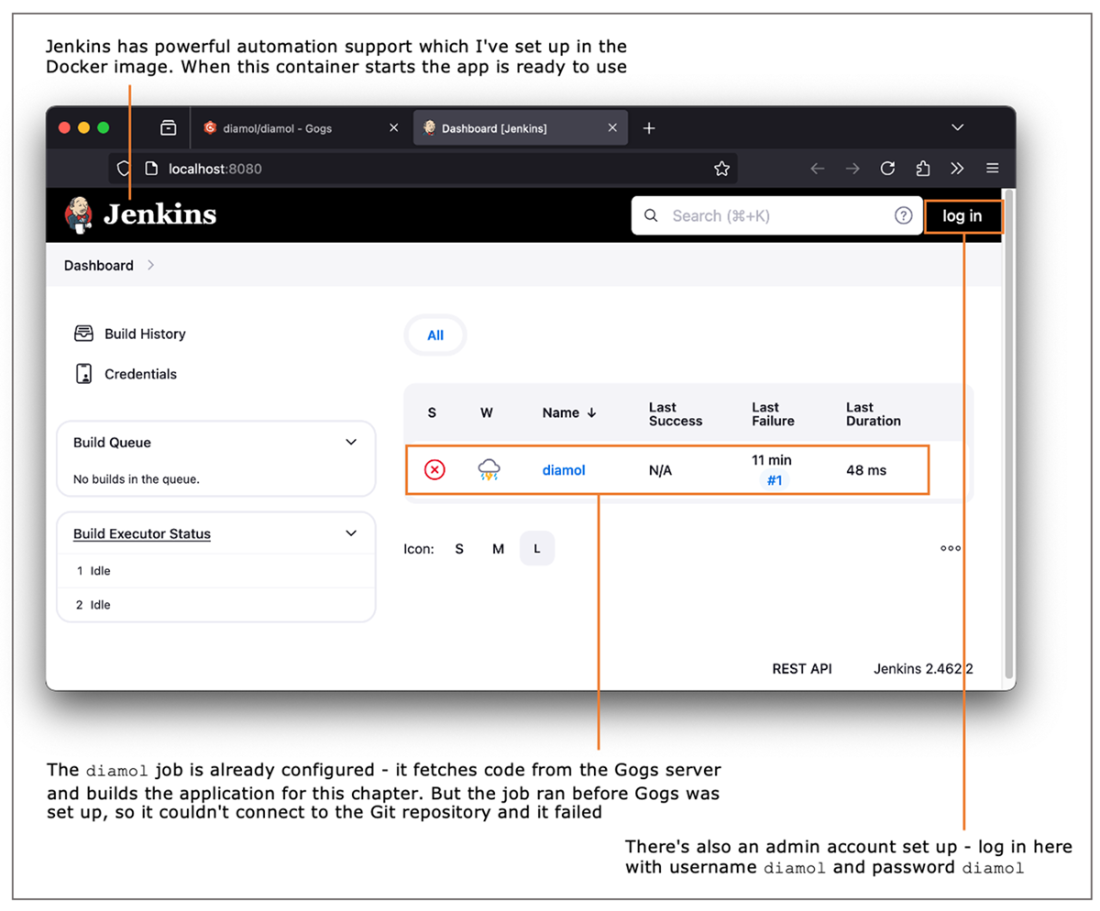
Running Jenkins in a container—it is fully configured with a user and CI job already set up.
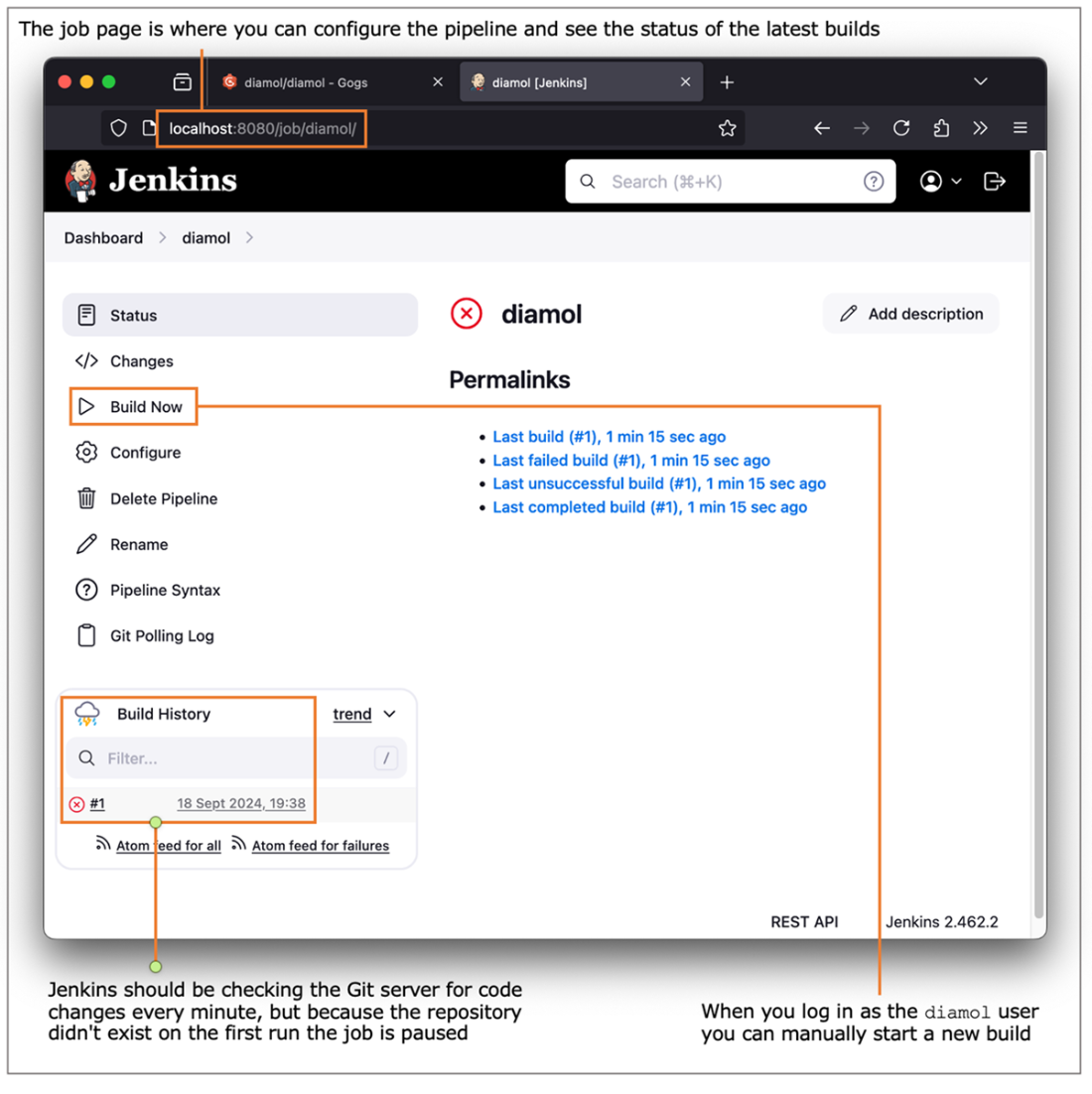
The Jenkins job page shows the current status of the job and lets you manually start a build.
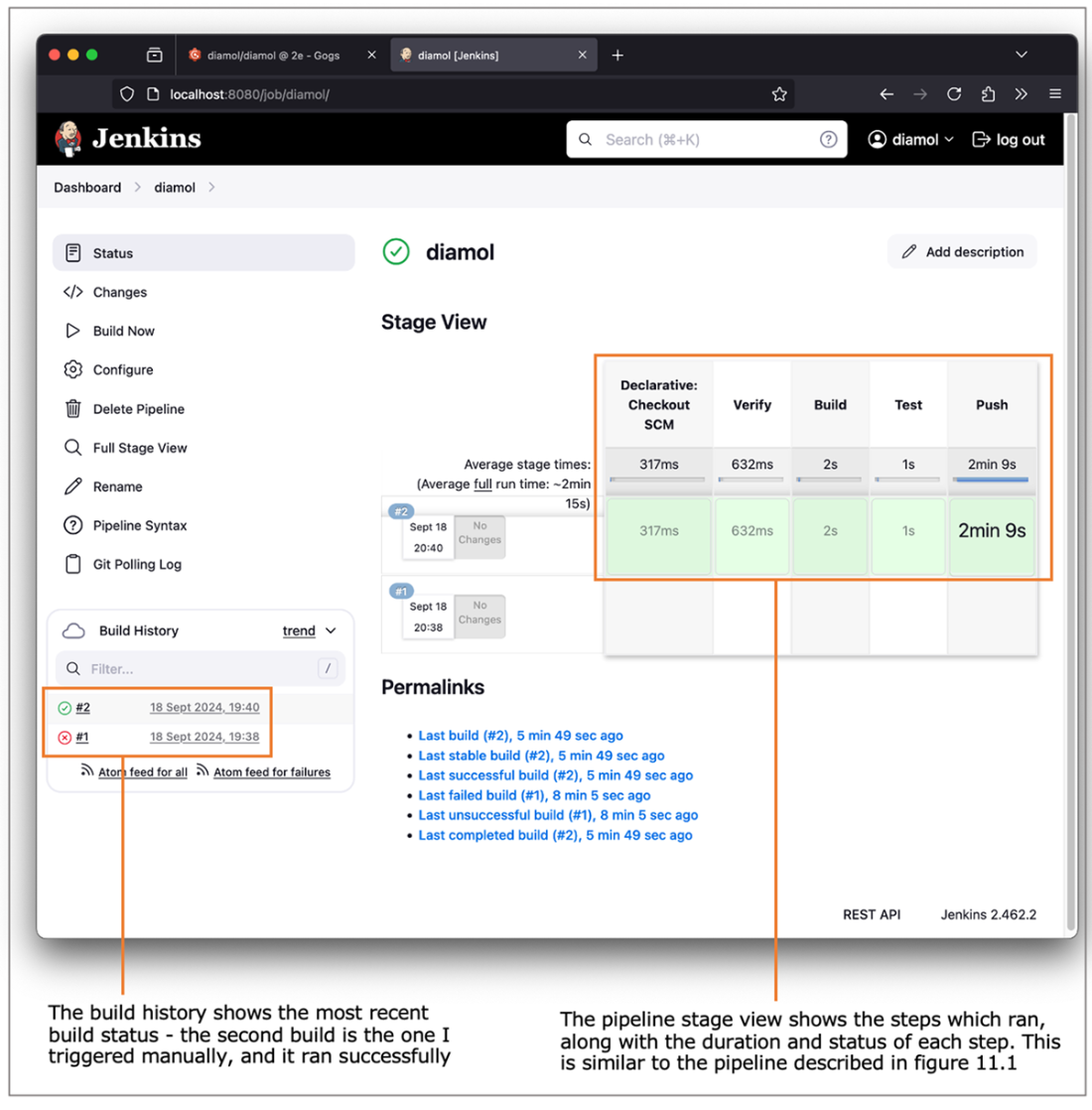
The job page in Jenkins shows the status of the most recent builds, and the pipeline steps.
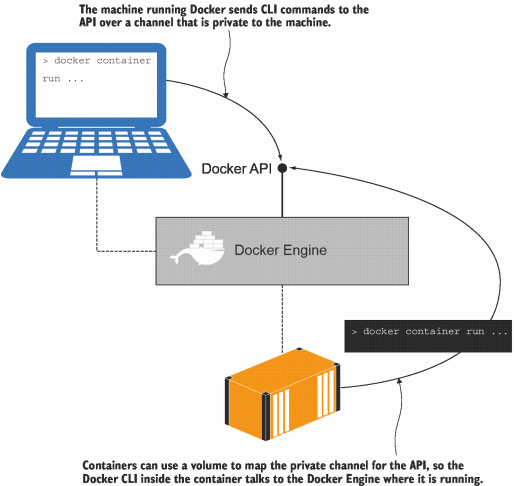
Running containers with a volume to bind the private channel for the Docker API
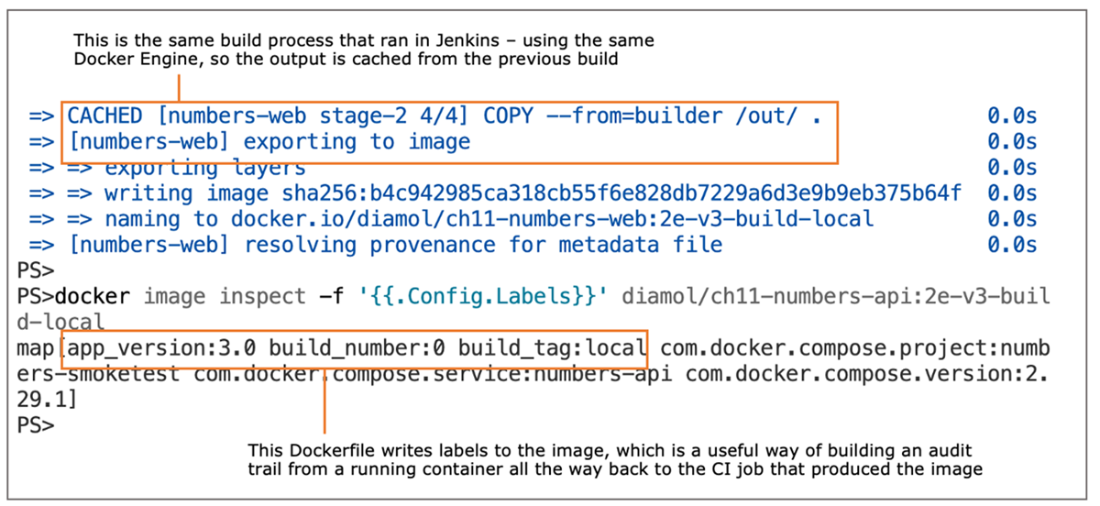
Building images with Docker Compose and checking the image labels
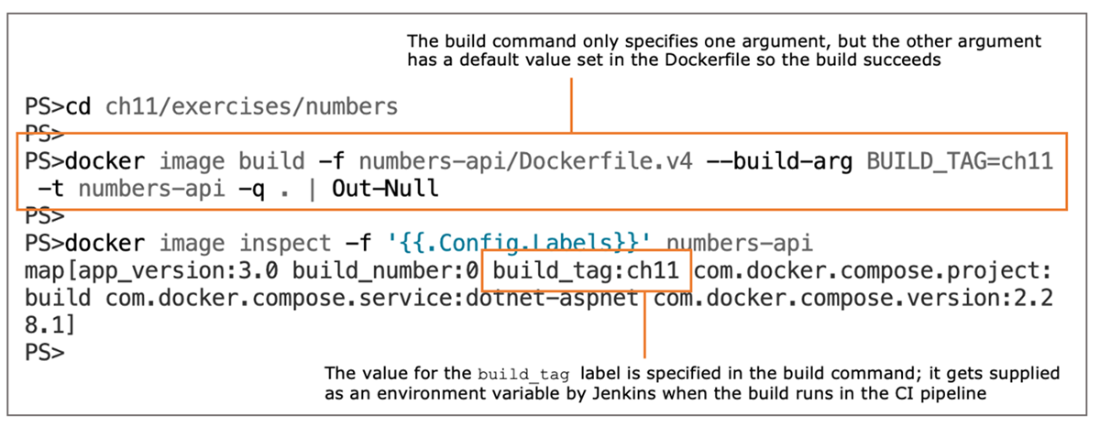
Including default values for build arguments supports the developer build workflow.
Viewing the output from the pipeline build in Jenkins shows the usual Docker logs.
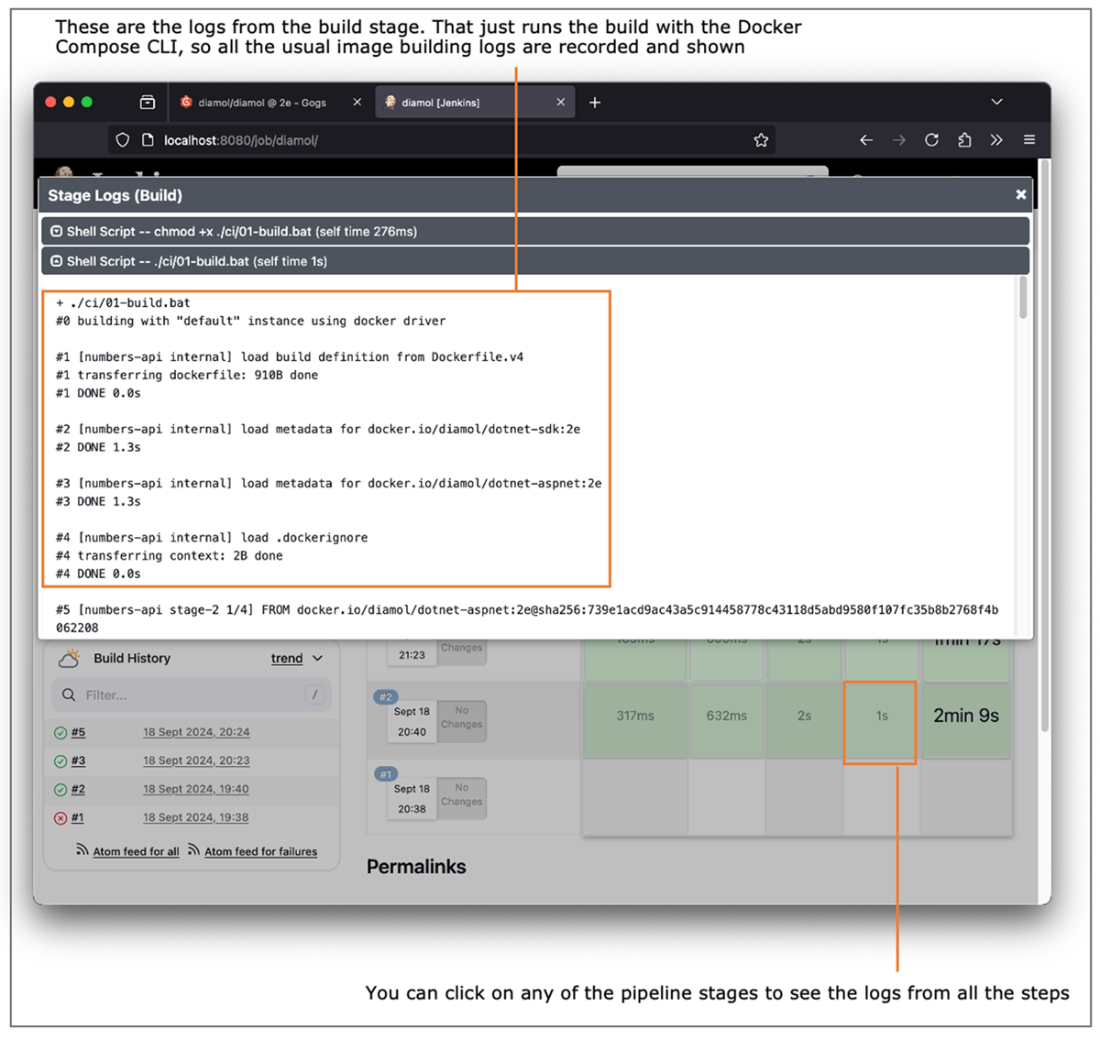
Sending web requests to the registry API to query the images stored in the container
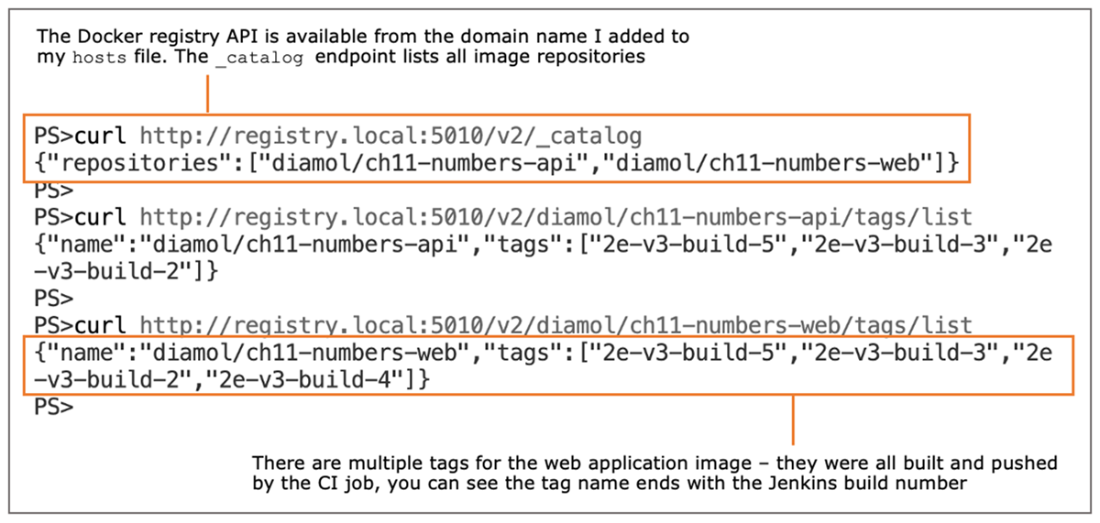
A production-grade CI pipeline that adds stages with security gates
Lab

Lab time! You’re going to build your own CI pipeline—but don’t run scared. We’ll use the ideas and exercises from this chapter, but the pipeline stages will be much simpler.

In the lab folder for this chapter, you’ll find a copy of the source code for the to-do app from chapter 6. The build for that app is almost ready to go—the Jenkinsfile is there, the CI scripts are there, and the core Docker Compose file is there. There are just a couple of things for you to do:

  • Write an override file called docker-compose-build.yml with the build settings.
  • Create a Jenkins job to run the pipeline.
  • Push your changes to Gogs in the diamol repository.

Just three tasks, but don’t be disheartened if your first few builds fail and you need to check the logs and tweak some things. No one in history has ever written a Jenkins job that passed on the first run, so here are a few hints:

  • Your Compose override will be similar to the one in the exercises—specifying the context and a build argument for the build number label.
  • In the Jenkins UI, you click New Item to create a job, and you can copy from the existing diamol job.
  • The new job setup will be the same except for the path to the Jenkinsfile—you’ll need to specify the lab folder instead of the exercises folder.

If you’re not getting far with this, you’ll find more information in the read-me file in the lab folder, complete with screenshots for the Jenkins steps and sample build configuration for the Docker Compose file: https://github.com/sixeyed/diamol/blob/2e/ch11/lab/README.md.

FAQ

How does Docker simplify a CI pipeline across different tech stacks?Docker standardizes CI by running every step in containers and producing Docker images as the single artifact. The CI server doesn’t need language runtimes or SDKs installed—builds, tests, and packaging all happen inside containers via Docker and Docker Compose.
What minimum infrastructure do I need for Dockerized CI, and can it run locally?You need three components: a source code system (e.g., Gogs), a Docker registry to store images, and an automation server (e.g., Jenkins). All three can run as containers with Docker Compose, so you can stand up a complete build system locally (for example: Gogs on port 3000, Jenkins on 8080, registry on 5010).
How can a Jenkins container talk to the host’s Docker Engine?Mount the Docker API into the Jenkins container. On Linux, bind-mount /var/run/docker.sock; on Windows, mount the \\.\pipe\docker_engine named pipe. The Docker CLI inside Jenkins then targets the host Engine. This grants broad control over Docker, so only use it with trusted images and restrictive permissions.
How do I capture build settings with Docker Compose?Use an override file (for example, docker-compose-build.yml) that specifies build context, Dockerfile path, and build args. You can define reusable args with a YAML anchor (x-args) and merge them into multiple services, keeping build configuration DRY and consistent.
What are ARG and LABEL used for in Dockerfiles during CI?ARG passes build-time values (such as BUILD_NUMBER and BUILD_TAG). LABEL embeds metadata into the image (for example, app version and build details). Together they create an audit trail that ties a running container back to the CI job and source code that produced it.
How do I make the same build work locally and in CI without installing SDKs?Use multi-stage Dockerfiles and Docker Compose. Builds run entirely in containers, so developers don’t need language-specific tooling installed. The same scripts that CI runs (for example, docker compose build --pull) can be executed locally for identical results.
What stages does the example Jenkins pipeline include, and what do they do?Verify checks Docker/Compose availability and versions; Build uses Docker Compose to build images; Test starts the app with Compose (and could run end-to-end tests); Push uploads successfully built images to the registry. Stages are sequential—failures stop the pipeline and prevent pushes.
How do environment variables like REGISTRY and BUILD_NUMBER flow into image tags?Compose image references use variables with defaults (for example, ${REGISTRY:-docker.io} and ${BUILD_NUMBER:-local}). Locally, defaults produce tags like ...:build-local. In CI, the pipeline sets REGISTRY and BUILD_NUMBER so images are tagged for the local registry with the actual build number.
How can I push images to a local registry and verify what’s stored?After a successful build and test, use docker compose push to upload images. You can query the registry’s API to inspect contents: GET /v2/_catalog to list repositories and GET /v2//tags/list to see tags (for example, http://registry.local:5010/v2/diamol/ch11-numbers-api/tags/list).
What production-grade steps can I add to a Docker-based CI pipeline?Add security scanning to fail builds with known vulnerabilities and digitally sign images to assert provenance. This “secure software supply chain” approach lets production environments only run signed images that passed all checks.

pro $24.99 per month

  • access to all Manning books, MEAPs, liveVideos, liveProjects, and audiobooks!
  • choose one free eBook per month to keep
  • exclusive 50% discount on all purchases
  • renews monthly, pause or cancel renewal anytime

lite $19.99 per month

  • access to all Manning books, including MEAPs!

team

5, 10 or 20 seats+ for your team - learn more


choose your plan

team

monthly
annual
$49.99
$499.99
only $41.67 per month
  • five seats for your team
  • access to all Manning books, MEAPs, liveVideos, liveProjects, and audiobooks!
  • choose another free product every time you renew
  • choose twelve free products per year
  • exclusive 50% discount on all purchases
  • renews monthly, pause or cancel renewal anytime
  • renews annually, pause or cancel renewal anytime
  • Learn Docker in a Month of Lunches, Second Edition ebook for free

choose your plan

team

monthly
annual
$49.99
$499.99
only $41.67 per month
  • five seats for your team
  • access to all Manning books, MEAPs, liveVideos, liveProjects, and audiobooks!
  • choose another free product every time you renew
  • choose twelve free products per year
  • exclusive 50% discount on all purchases
  • renews monthly, pause or cancel renewal anytime
  • renews annually, pause or cancel renewal anytime
  • Learn Docker in a Month of Lunches, Second Edition ebook for free
choose your plan

team

monthly
annual
$49.99
$499.99
only $41.67 per month
  • five seats for your team
  • access to all Manning books, MEAPs, liveVideos, liveProjects, and audiobooks!
  • choose another free product every time you renew
  • choose twelve free products per year
  • exclusive 50% discount on all purchases
  • renews monthly, pause or cancel renewal anytime
  • renews annually, pause or cancel renewal anytime
  • Learn Docker in a Month of Lunches, Second Edition ebook for free