New DBAs often inherit incomplete inventories of SQL Servers, making it easy for unmanaged, unpatched, and unbacked-up instances to slip through the cracks. This chapter focuses on closing that gap by systematically discovering undocumented or rogue SQL Server components across a network. It introduces a single, security-researcher–authored PowerShell command, Find-DbaInstance, designed to reveal most SQL Server engines and related services so you can progress from discovery to inventory and ultimately centralized, standardized management.
Find-DbaInstance operates in two phases—Discovery (building a target list) and Scan (probing targets)—and supports multiple approaches to widen coverage and increase confidence. Discovery can come from explicit host lists, SQL Browser enumeration, Active Directory SPNs, or IP ranges, while scans can use DNS resolution, ping, WMI/CIM service checks, UDP 1434 Browser responses, TCP port probes, SPN lookups, and optional SQL connections. Results carry a confidence rating so you can filter noise, and the tool can find not only the Database Engine but also components like Reporting, Integration, and Analysis Services. Because scans can be invasive, time-consuming, and dependent on firewalls, ports, and permissions, the chapter stresses obtaining explicit authorization, tuning scope (for example, narrowing IP ranges), and scheduling periodic scans rather than using the command as a daily inventory source.
The chapter also shows how to work with the richer result set behind the default output—expanding properties such as service details, DNS resolution, connectivity, and timestamps to drive follow-up actions. It explains trade-offs among scan types (for thoroughness versus login noise), how to filter by minimum confidence, and platform support differences that affect which scans can run from Windows, macOS, or Linux. With discovery complete, the next step is to inventory and centralize the estate for long-term administration; the core idea is to use the same high-efficacy techniques employed by attackers to ensure defenders find every instance first.
Figure 6.1. General progression of inheriting a SQL estate
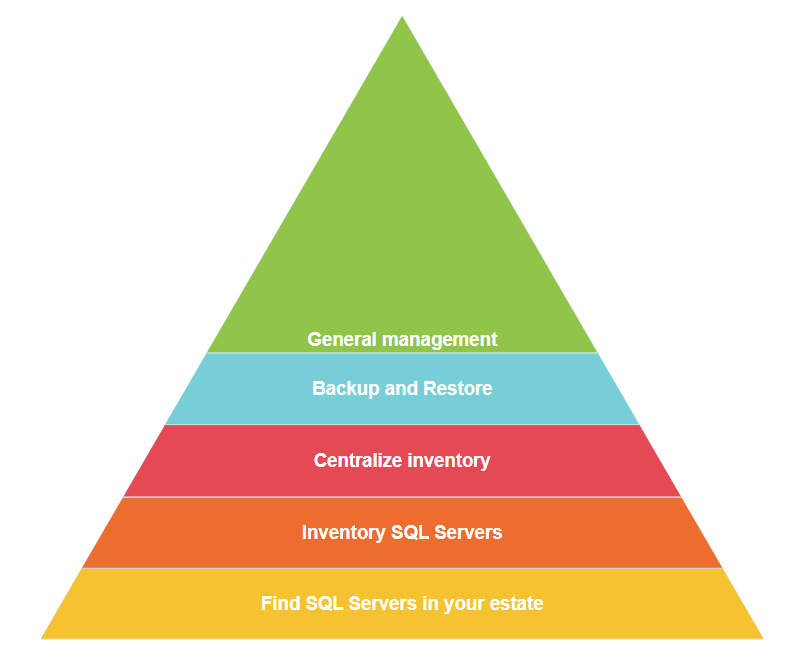
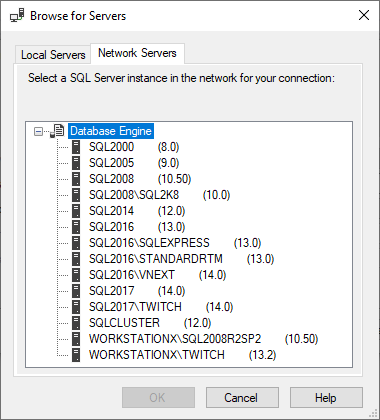
Figure 6.2. Discovery through data source enumeration
Hands-on Lab
Let’s practice what you just read in this chapter. See if you can complete the following tasks:
- Find SQL Servers in your domain with computers with SQL in the name
- Find only Reporting Services
- Find a SQL Server on a non-default port (so not 1433)
Remember you can find answers at dbatools.io/answers. And now that you’ve found your instances, it’s time to inventory your SQL Server estate.
FAQ
What is Find-DbaInstance and when should I use it?
Find-DbaInstance (from dbatools) discovers undocumented or rogue SQL Server instances across your network using multiple techniques. Use it as a one-time or scheduled discovery tool—not as your daily inventory source—because it performs deep, potentially time-consuming probes. For ongoing checks, schedule scans via Task Scheduler or SQL Agent.What’s the difference between DiscoveryType and ScanType?
DiscoveryType builds the list of computers to probe (for example, ComputerName, DataSourceEnumeration, Domain, IPRange). ScanType defines how each target is probed (for example, Default, All, Browser, DNSResolve, Ping, SPN, SqlConnect, SqlService, TCPPort). Default runs all scans except SqlConnect to avoid failed logins; All includes every scan, including SqlConnect.How does SQL Browser-based discovery work and why might it miss servers?
The Browser approach uses SQL Server Browser (UDP 1434) to enumerate instances. Requirements: the SQL Browser service is running, UDP 1434 is allowed through firewalls, and the instance isn’t hidden. Results carry Medium confidence because no SQL connection is made and network conditions vary. Some orgs (e.g., DISA STIG-compliant) disable SQL Browser, so this method may return fewer instances. You can see the underlying .NET call with[System.Data.Sql.SqlDataSourceEnumerator]::Instance.GetDataSources().How do I find SQL Servers in Active Directory?
Use-DiscoveryType Domain. This queries AD for SQL Service SPNs and then confirms via Windows service checks. It’s helpful but not 100% (SPNs may be missing due to policy/permissions). To query other domains, supply -DomainController and -Credential. Note that Credential is a Windows account for the hosts, not a SQL login.How can I scan network ranges efficiently?
Use-DiscoveryType IPRange. By default, it derives ranges from your NICs; this may be large and slow. For manageable scans, provide -IpAddress with a single IP or CIDR (e.g., 172.20.0.1/24). Expect offline/unresolvable hosts to add 3–30 seconds each depending on ScanType. Consider breaking scans into smaller ranges and scheduling them.What do confidence levels mean, and how do I filter results?
Confidence reflects how certain the tool is that an instance exists: High (SQL connection established or SQL service found), Medium (SQL Browser reply or TCP connection plus SPN), Low (only TCP or only SPN), None (computer found, no SQL traces). Filter with-MinimumConfidence (e.g., -MinimumConfidence High) to see only the most reliable results.Which ports and permissions are required for accurate results?
- Browser: UDP 1434 (and TCP 138 as listed), no auth needed - DNSResolve: UDP/TCP 53, no auth - Ping: ICMP, no auth - SPN/Domain: standard AD ports; if AD works, you’re set - SqlConnect: TCP 1433 (or instance port), SQL or Windows auth - SqlService (WMI/CIM): TCP 135, Windows auth Ensure firewalls allow the needed protocols/ports and that your account has Windows rights for service scans and appropriate creds for SqlConnect.What OS limitations affect Find-DbaInstance?
On Windows, all ScanTypes are supported. On Mac/Linux, Browser, SqlConnect, and SqlService are unsupported; Domain/SPN and TCPPort are supported. “Unsupported” applies to both client and host: a scan type that’s unsupported on Mac/Linux won’t work from a non-Windows client and cannot discover a non-Windows host with that method.How can I avoid failed login alerts or reduce intrusive scans?
Use-ScanType Default (excludes SqlConnect) or explicitly choose non-intrusive scans (e.g., Browser, TCPPort, SPN, Ping). If you do use SqlConnect, provide valid credentials with -SqlCredential. Coordinate with security teams before running intrusive or broad scans.How do I work with detailed results after discovery?
The command returns a concise view by default; useSelect * to see all properties. Expand complex fields with Select -ExpandProperty, for example:
- DnsResolution: hostnames/IPs
- Services: SQL Engine/Agent/SSRS details (state, start mode, service account)
Find-DbaInstance targets actual installed instances (not stray binaries from partial uninstalls) and can surface ports, connectivity, SPNs, and component presence for next-step inventorying.
 Learn dbatools in a Month of Lunches ebook for free
