This chapter closes by showing how to tailor dbatools to your environment and how to investigate what happens under the hood. It introduces a flexible configuration system—think module-wide preferences such as datetime formats, connection timeouts, PSRemoting requirements, and log retention—and a robust logging framework designed to make troubleshooting both ongoing runs and post-mortem analysis straightforward.
You manage settings with commands that discover, filter, read, change, persist, and reset configurations. Use Get-DbatoolsConfig to list current options, which are grouped into modules and expose a FullName, Value, and Description; narrow results with -Module or target a single item by FullName. When you only need a value, Get-DbatoolsConfigValue returns it directly and supports -Fallback and -NotNull. Change settings with Set-DbatoolsConfig (session-scoped) and make them permanent with Register-DbatoolsConfig; revert to defaults using Reset-DbatoolsConfig. To move preferences between systems or share a curated subset, export and import them via Export-DbatoolsConfig and Import-DbatoolsConfig.
The logging system captures messages and errors to structured files and can be explored without manual parsing. Locate the log folder via Get-DbatoolsConfigValue and query entries with Get-DbatoolsLog—for example, retrieve the last error, only errors, or the last N entries. For advanced scripting, most commands support -EnableException so you can work with full exceptions in try/catch blocks while everything is still recorded. Logging behavior and retention are configurable through the logging module (for example, enabling logs, maximum file size, and maximum log age), giving you enterprise-style visibility tuned to your organization’s policies.
Figure 28.1. Small excerpt of existing dbatools' configurations
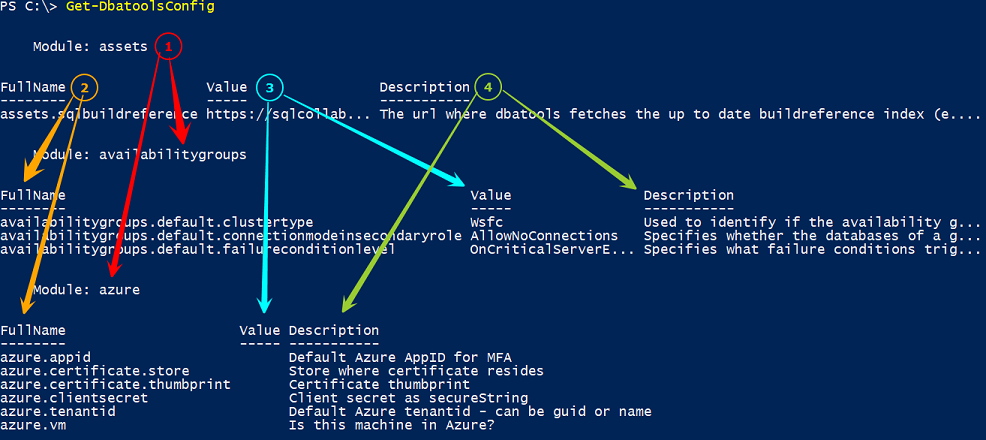
Figure 28.2. Checking the list of modules
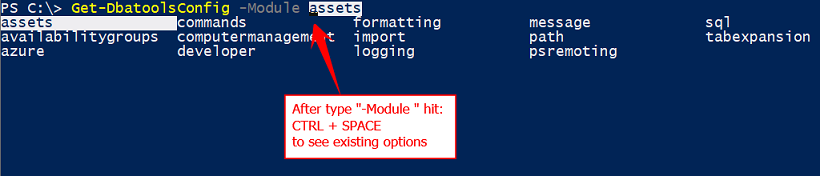
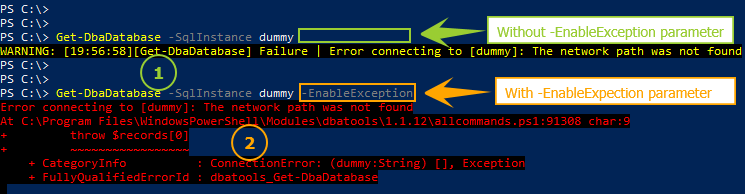
Figure 28.3. dbatools' logging - EnableException parameter
Hands-on Lab
Try the following tasks
- Confirm the actual value for the "batch separator" configuration
- Export/Import dbatools configurations related with the formatting module
- Get the 5 five most recent error messages logged by dbatools
FAQ
How do I list all available dbatools configuration settings?
UseGet-DbatoolsConfig to display every setting along with its current value and description. You can narrow results with -Module (tab/CTRL+SPACE helps discover module names).How can I find the specific setting that controls log retention?
UseGet-DbatoolsConfig -Module Logging and check the Description field to identify the right setting. The retention setting is logging.maxlogfileage. You can view details with Get-DbatoolsConfig -FullName logging.maxlogfileage.How do I retrieve just the value of a configuration for use in scripts?
UseGet-DbatoolsConfigValue -FullName <name> (for example, sql.connection.timeout). Consider -Fallback to supply a default and -NotNull to throw if the value is missing.How do I change a configuration value (e.g., increase SQL connection timeout)?
RunSet-DbatoolsConfig -FullName sql.connection.timeout -Value 30. This updates the value for the current session. Use Register-DbatoolsConfig to persist the change across sessions.Do configuration changes persist across PowerShell sessions?
Not by default.Set-DbatoolsConfig only affects the current session. Use Register-DbatoolsConfig to save changes, or export/import them between machines with the Export/Import commands.How do I reset a setting (or all settings) back to defaults?
Reset one value withReset-DbatoolsConfig -FullName <name>, or reset everything with Get-DbatoolsConfig | Reset-DbatoolsConfig.How can I export my configuration and import it on another device?
Export withExport-DbatoolsConfig -OutPath <file.json>. Import with Import-DbatoolsConfig -Path <file.json>. Both support filtering by name/module if you don’t want everything.Where are dbatools logs stored and how do I find the log folder?
Retrieve the path withGet-DbatoolsConfigValue -FullName path.dbatoolslogpath. The folder contains message logs (e.g., .log) and error logs (e.g., .xml).How do I view recent errors and other logged activity?
UseGet-DbatoolsLog. For errors, use -Errors, -LastError, or combine with -Last (e.g., Get-DbatoolsLog -Errors -Last 5) to see the most recent items.What’s the difference between warnings and exceptions, and how does it affect logging?
By default, dbatools surfaces errors as user-friendly warnings; add-EnableException to get full PowerShell exceptions (useful for try/catch). Regardless of how they’re surfaced, events are written to the dbatools log and viewable with Get-DbatoolsLog. You can tune behavior with Logging module configs like logging.errorlogenabled, logging.messagelogenabled, and logging.maxlogfileage.
 Learn dbatools in a Month of Lunches ebook for free
