dbatools currently offers limited but growing cloud support, with most capabilities focused on Microsoft Azure because that’s where the team has the most access. If you run SQL Server on virtual machines across major clouds, it behaves much like on-premises. Platform services such as Azure SQL Database, Azure SQL Managed Instance, and Amazon RDS differ from classic SQL Server and require specialized handling, so the team plans deeper Azure support, likely through a new module that streamlines working with Az.Sql. This chapter explains what already works in Azure and how to use the core features effectively today.
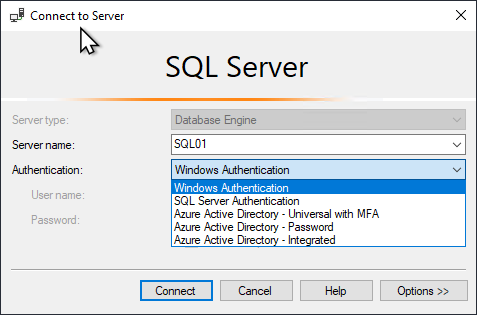
Azure SQL Database and Managed Instance support a wide range of authentication options, including SQL Authentication, Active Directory, and several Azure AD modes with multifactor authentication. This flexibility enables secure, automated scenarios such as Azure Functions and CI/CD pipelines using managed identities. The chapter recommends creating and reusing a single connection object to avoid repeated authentication and speed execution. In addition to Azure AD Password and Integrated sign-ins, service principals with access tokens are supported for noninteractive automation; dbatools can generate tokens natively or work with tokens obtained via Az.Accounts. The methods are equivalent in outcome—choose the one that best fits your workflow.
While a formal compatibility index is forthcoming, many dbatools commands already work well in Azure tools and pipelines. Commonly used examples include data movement and management commands such as Copy-DbaDbTableData, Import-DbaCsv, Invoke-DbaQuery, Publish-DbaDacPackage, Set-DbaLogin, and Write-DbaDataTable, with additional capabilities available on Managed Instance (for example, Copy-DbaDatabase and Copy-DbaCredential). A typical pattern is to authenticate (Azure AD or access token), establish a single reusable connection, then run the desired commands—such as importing a CSV into an automatically created table and verifying the results with a query. Looking ahead, an interactive MFA experience is planned to make Azure connections even easier.
Figure 27.1. SQL Server Management Studio’s Connect to Server dialog box showing different ways to connect
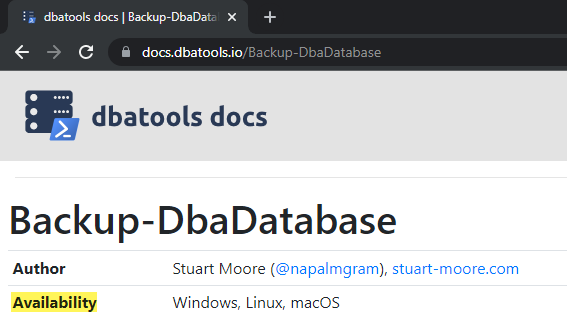
Figure 27.2. Once we create the list, Azure support signifiers will likely show up around here
Hands-on Lab
Try a number of commands against Azure SQL Database and let us know which ones work for you at dbatools.io/issues
FAQ
Which cloud providers does dbatools currently support?As of this chapter, dbatools has limited cloud support focused primarily on Microsoft Azure. The team is open to community contributions for other providers.Can I manage SQL Server on cloud virtual machines with dbatools?Yes. If SQL Server runs on a VM in Azure, AWS, GCP, or other clouds, it generally behaves like on-premises and works with dbatools much the same way.Do Azure SQL Database and Azure SQL Managed Instance behave like on-prem SQL Server?Not entirely. Managed services (Azure SQL Database/MI, AWS RDS, etc.) differ from on-prem and require specialized handling in PowerShell; some features and commands may vary.What authentication options can I use to connect to Azure SQL with dbatools?Azure supports SQL Auth, Windows/AD, Azure AD Password, Azure AD Integrated, and Azure AD Universal with MFA. These enable secure use in automation (managed identities, Azure Functions, CI/CD). See: Get-Help Connect-DbaInstance -Examples.How do I connect with Azure AD Password using dbatools?Provide the server name, database, and an AAD credential to Connect-DbaInstance, for example: SqlInstance=myserver.database.windows.net; Database=mydb; SqlCredential=me@mydomain.onmicrosoft.com.Why reuse a $server object when connecting to Azure?Creating and reusing a $server object avoids repeated authentication handshakes and speeds up subsequent commands. This is especially helpful in Azure and containers.How do I authenticate with a service principal and access token?Create an AAD app (service principal), then use New-DbaAzAccessToken (e.g., Type=RenewableServicePrincipal, Tenant, Credential=AppId/Secret) and pass the AccessToken to Connect-DbaInstance.Can I use Az.Accounts and Get-AzAccessToken with dbatools?Yes. Sign in with Connect-AzAccount, get a token for https://database.windows.net using Get-AzAccessToken, then pass that AccessToken to Connect-DbaInstance. There’s no inherent advantage vs New-DbaAzAccessToken—use what fits your workflow.Which dbatools commands commonly work in Azure?Frequently used commands include: Copy-DbaDbTableData, Import-DbaCsv, Invoke-DbaDbDataMasking, Invoke-DbaQuery, Publish-DbaDacPackage, Set-DbaLogin, Write-DbaDataTable (Azure SQL and MI). Copy-DbaCredential and Copy-DbaDatabase are commonly used on Managed Instance.What future Azure enhancements are planned for dbatools?Planned items include deeper Azure SQL Database support (likely via a new module that simplifies Az.Sql usage), an MFA-friendly interactive login window, and a published, documented list of Azure-supported commands.
pro $24.99 per month
access to all Manning books, MEAPs, liveVideos, liveProjects, and audiobooks!

 Learn dbatools in a Month of Lunches ebook for free
