Data professionals have long relied on bespoke daily, weekly, and monthly checklists—manual or homegrown scripts—to validate SQL Server environments, often duplicating effort and missing a shared standard. The community answered this by creating dbachecks, an open-source, crowdsourced testing framework built by the dbatools team. Powered by dbatools for discovery and Pester for testing, dbachecks provides a common, extensible set of verifications that validate a SQL Server estate against best practices, and it’s easily installed from the PowerShell Gallery alongside its dependencies.
Using dbachecks is straightforward: run checks with Invoke-DbcCheck (for example, LastFullBackup or the broader LastBackup set), and discover the library of 100+ tests with Get-DbcCheck. Results are Pester-style pass/fail with useful context, and you can focus on issues by showing only failures. The framework is highly configurable: default thresholds (like full backups within 1 day) can be adjusted to match organizational policies via Set-DbcConfig (for example, policy.backup.fullmaxdays, policy.backup.diffmaxhours, policy.backup.logmaxminutes), and available options for each check are discoverable through Get-DbcCheck. Settings persist on the machine, enabling repeatable, policy-aligned validation across instances.
Beyond on-demand verification, dbachecks supports operationalizing results over time. You can convert and persist outcomes to a SQL Server database with Convert-DbcResult and Write-DbcTable, optionally labeling runs for easy analysis. With data stored, Start-DbcPowerBi opens a provided Power BI dashboard that reads from your database, enabling trend tracking, estate-wide visibility, and proactive decision-making for capacity, compliance, and reliability. Together, these capabilities turn routine checks into measurable, auditable health signals for the entire SQL Server estate.
Figure 26.1. dbachecks results are stored in our database.
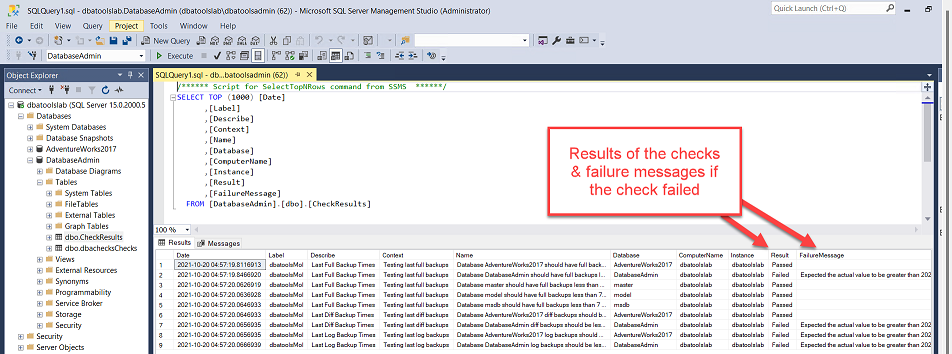
Figure 26.2. Configure PowerBI to connect to the database where check results are stored.
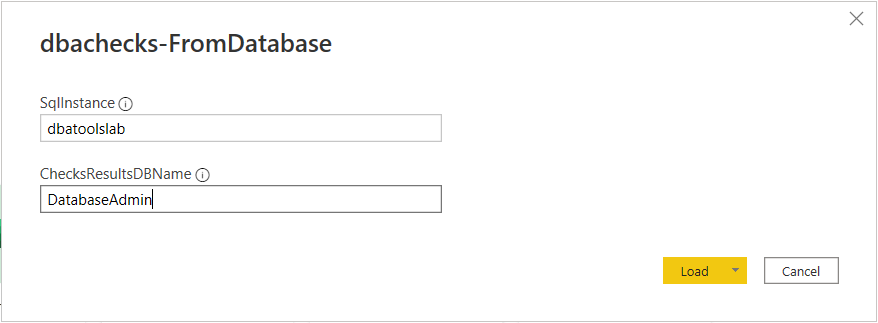
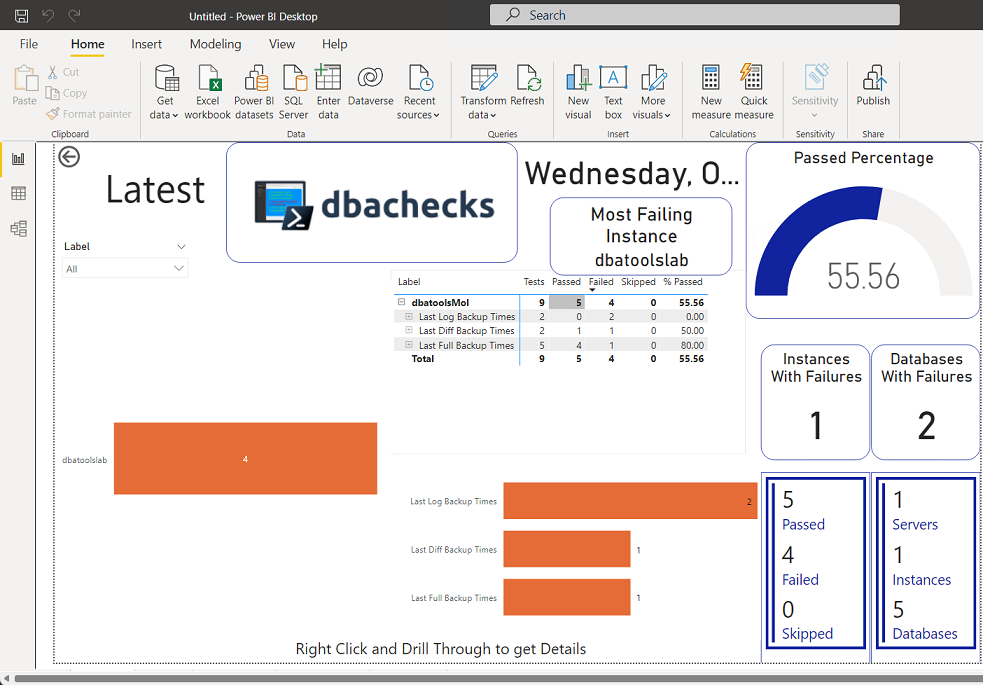
Figure 26.3. PowerBI dbachecks dashboard gives us a good view of our estate.
Hands-on Lab
Try the following tasks
- Check the documentation. We have lots of blog posts from our contributors and users showing how to use it.
- Install dbachecks
- Run a check to validate if your MaxMemory setting is configured correctly
- Explore all configurations and existing checks
FAQ
What is dbachecks and how does it relate to dbatools?
dbachecks is a community-built PowerShell module (created by the dbatools team) that uses dbatools to gather SQL Server information and Pester to validate it against best practices and your policies. It’s effectively an extension of dbatools focused on automated checks.How do I install dbachecks and its dependencies?
RunInstall-Module dbachecks -Scope CurrentUser. This installs dbachecks plus its dependencies (dbatools and PSFramework). Windows includes a compatible Pester, but see the next question if you need to install it.Which Pester version should I use with dbachecks?
Use Pester 4.10.1 or below if you install it yourself:Install-Module Pester -RequiredVersion 4.10.1 -Scope CurrentUser.How do I run my first backup check?
UseInvoke-DbcCheck with a target instance and the check tag: Invoke-DbcCheck -SqlInstance <server> -Check LastFullBackup. This verifies each database has had a full backup within the configured threshold (default: 1 day).How do I run multiple checks or a whole set of related checks?
- Multiple specific checks:Invoke-DbcCheck -SqlInstance <server> -Check LastGoodCheckDb, MaxMemory- Related set by tag:
-Check LastBackup runs the full, diff, and log backup checks.Add
-Show Fails to only display failures.How can I list all available checks and see their metadata?
- List checks:Get-DbcCheck | Select Group, UniqueTag, Description- Metadata for a check:
Get-DbcCheck -Tag LastFullBackup | Format-ListThe
Config property shows tunable settings; split it for readability: (Get-DbcCheck -Tag LastFullBackup).Config.Split(' ').How do I customize backup thresholds and behavior?
UseSet-DbcConfig to change policies, for example:- Full backups:
Set-DbcConfig -Name policy.backup.fullmaxdays -Value 7- Differential:
policy.backup.diffmaxhours- Log:
policy.backup.logmaxminutesOther useful options include
policy.backup.newdbgraceperiod, skip.backup.readonly, and skip.backup.secondaries.Where are dbachecks configuration values stored and do they persist?
They are stored in the Windows registry on the machine where you set them, so you don’t need to reconfigure them each run.How can I store dbachecks results in a SQL Server database for trending?
Pipe results through the converter and writer:Invoke-DbcCheck -SqlInstance <server> -Check LastBackup -Passthru | Convert-DbcResult -Label MyRun | Write-DbcTable -SqlInstance <server> -Database <db>-Passthru returns results to the pipeline; -Label helps identify runs.How do I visualize results with Power BI?
RunStart-DbcPowerBi -FromDatabase, then provide your SqlInstance and ChecksResultDBName. You’ll need Microsoft Power BI Desktop installed. Load the data to see dashboards and trends.
 Learn dbatools in a Month of Lunches ebook for free
