When SQL Server performance is dragged down by I/O bottlenecks, data compression is a practical way to reduce reads and writes without upgrading hardware. The feature has existed since SQL Server 2008, and its availability broadened significantly with SQL Server 2016 SP1, making it accessible across all editions and in Azure SQL Database and Managed Instance. SQL Server offers three compression families: rowstore (the focus for OLTP workloads), columnstore (best for analytics and data warehousing), and backup compression (which shrinks backup size and often speeds backup/restore by cutting I/O).
Rowstore compression comes in two levels. Row compression changes on-page storage so fixed-length data uses only the bytes it needs, delivering space savings with minimal CPU overhead. Page compression builds on that by removing repeated patterns through prefix and dictionary techniques, yielding greater space reductions at a higher CPU cost. The payoff is fewer pages on disk and in memory, which typically improves overall performance because most SQL Server bottlenecks are I/O, not CPU. Good candidates include objects with many fixed-length columns, lots of repeated values, and scan-heavy, relatively static workloads. Compression can be applied to heaps, clustered and nonclustered indexes, and even per-partition, though it’s not supported for memory-optimized tables or sparse columns, and rows must remain under the 8060-byte limit.
dbatools streamlines the entire lifecycle: inventory, evaluate, and apply. Get-DbaDbCompression reports current settings and sizes; Test-DbaDbCompression combines sp_estimate_data_compression_savings with index usage statistics to recommend the right level per object (noting that DMVs reset on instance restart); and Set-DbaDbCompression applies those recommendations across selected tables, databases, or multiple servers. You can also force a specific level (Row, Page, or None), remove compression, and control maintenance impact with options like maximum run time and minimum expected savings. The recommended workflow is to test, review, then feed the results into the set command—capturing substantial space savings and I/O gains while managing CPU trade-offs responsibly.
Figure 25.1. The same data uses few pages as you change from no compression, to row, and then to page compression

Figure 25.2. Manage compression using the GUI in SSMS
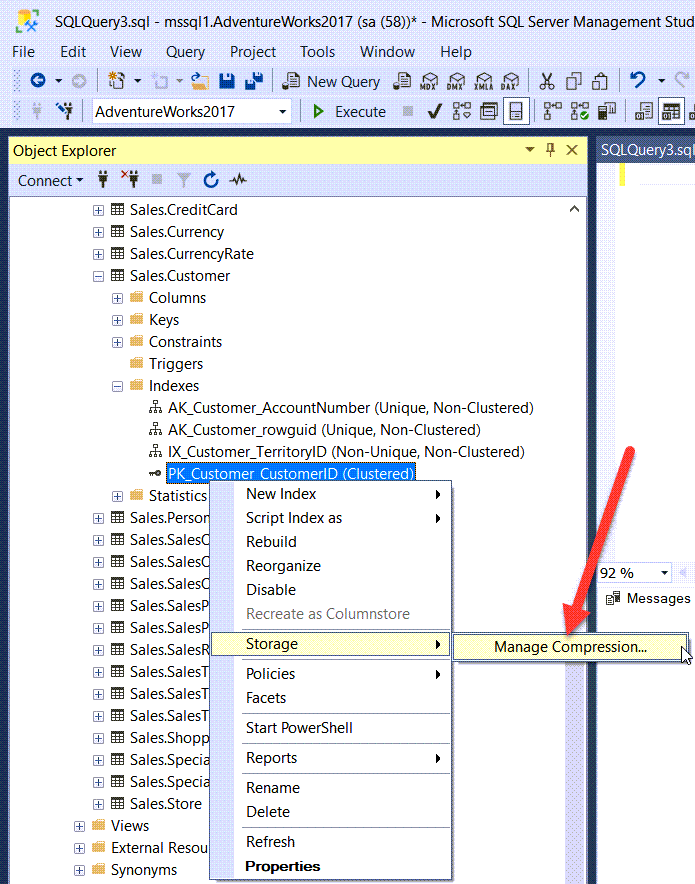
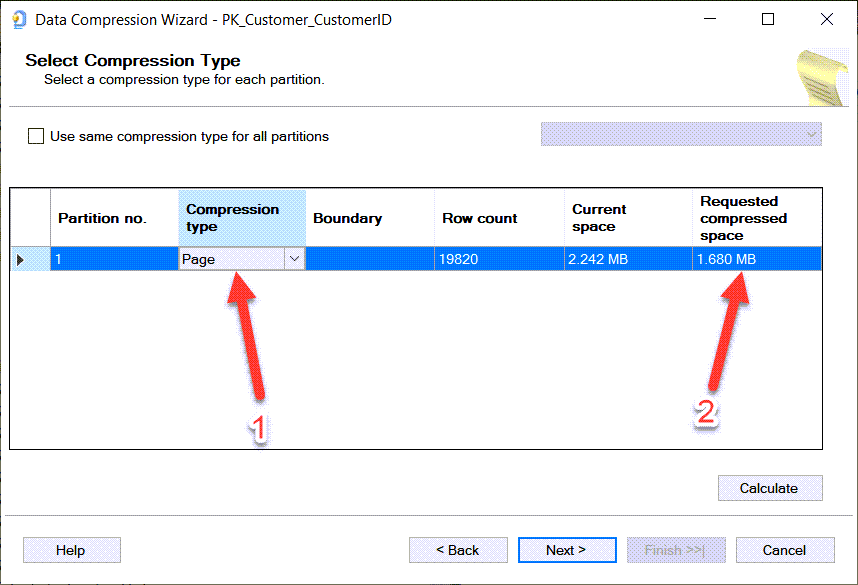
Figure 25.3. Setting compression level using the GUI in SSMS
Hands-on Lab
- Collect and store the current compression levels of your database using
Get-DbaDbCompression
- Review the compression suggestions from
Test-DbaDbCompression, remember if your lab hasn’t had much activity the workload information will be limited.
- Compress a single table with page compression using the
-Tableparameter ofSet-DbaDbCompression
- Apply the recommended compression suggestion to your entire database with
Set-DbaDbCompression
- Rerun
Get-DbaDbCompressionand compare your results to step 1, review your space savings and compression changes.
FAQ
What types of compression does SQL Server support, and which one does this chapter focus on?
SQL Server supports three compression types: - Rowstore data compression (ROW and PAGE) for OLTP-style tables and indexes — the focus of this chapter - Columnstore compression (and columnstore archive) for data warehousing scenarios - Backup compression for reducing backup size and I/O Rowstore data compression is available in all editions starting with SQL Server 2016 SP1 and is also supported in Azure SQL Database and Azure SQL Managed Instance.How do ROW and PAGE compression work, in simple terms?
- ROW compression stores fixed-length data types more efficiently by using only the bytes required per value (for example, a bigint value of 1 can take 1 byte instead of 8).- PAGE compression builds on ROW compression and adds prefix and dictionary compression, storing repeated patterns once per page and replacing duplicates with pointers. This typically yields greater space savings than ROW compression.
Why use data compression, and what trade-offs should I expect?
Benefits: - Fewer pages on disk and in memory - Less I/O for scans and reads - Often improves performance on I/O-bound workloads Trade-offs: - Additional CPU to compress/decompress, especially with PAGE compression - Always test in your environment to ensure CPU overhead doesn’t outweigh I/O gainsWhat can I compress, and what are the limitations?
What you can compress: - Heaps, clustered indexes, nonclustered indexes - Individual partitions (use different levels per partition based on activity) Limitations: - Memory-optimized tables and tables with sparse columns cannot be compressed - The 8060-byte max row size still applies; if compression metadata would exceed the limit, compression is not allowedHow do I see what’s currently compressed and how much space objects use?
Use dbatools: - Inventory compression:Get-DbaDbCompression -SqlInstance mssql1 -Database AdventureWorks- Exclude databases:
Get-DbaDbCompression -SqlInstance mssql1 -ExcludeDatabase TestDatabase- Summarize by compression level (PowerShell example): pipe to
Group-Object DataCompression and aggregate sizes to get counts and total size per level.How do I decide what to compress?
UseTest-DbaDbCompression, which wraps Microsoft’s guidance:
- It calls sp_estimate_data_compression_savings to estimate ROW vs PAGE savings
- It factors in workload via index usage stats (scan/update patterns) to balance I/O benefit vs CPU cost
- Example: Test-DbaDbCompression -SqlInstance mssql1 -Database AdventureWorks
Note: Index usage DMVs reset on SQL Server restart. Check uptime with Get-DbaUptime -SqlInstance mssql1 to ensure stats cover a representative workload.How do I apply the recommended compression with dbatools (and can I avoid re-calculating)?
Typical workflow: - Evaluate and store recommendations:$rec = Test-DbaDbCompression -SqlInstance mssql1 -Database AdventureWorks- Apply them:
Set-DbaDbCompression -SqlInstance mssql1 -InputObject $rec (avoids re-running estimates)
Alternative without dbatools:
- T-SQL: ALTER INDEX ... REBUILD WITH (DATA_COMPRESSION = ROW|PAGE)- SSMS: right-click index > Storage > Manage Compression
How do I force a specific level or target specific objects, and how do I remove compression?
- Force a level for an entire database:Set-DbaDbCompression -SqlInstance mssql1 -Database AdventureWorks -CompressionType PAGE- Target a single table:
Set-DbaDbCompression -SqlInstance mssql1 -Database AdventureWorks -Table Employee -CompressionType ROW- Remove compression: set
-CompressionType NONE- By default,
-CompressionType Recommended uses the Tiger Team algorithm from Test-DbaDbCompression.How can I control maintenance window length and only compress when savings are worthwhile?
- Limit run time:-MaxRunTime 60 (minutes). The current rebuild won’t be canceled mid-operation, so total time may slightly exceed the limit.- Require a minimum estimated savings:
-PercentCompression 25 (only compress if the object is estimated to save at least 25%).Example:
Set-DbaDbCompression -SqlInstance mssql1 -Database AdventureWorks -MaxRunTime 60 -PercentCompression 25How does backup compression fit in, and how can I enable it with dbatools?
Backup compression reduces backup size and I/O and can speed up backups: - Per-backup:Backup-DbaDatabase -SqlInstance mssql1 -Database AdventureWorks -CompressBackup- Instance default (sp_configure):
Get-DbaSpConfigure -SqlInstance mssql1 -Name DefaultBackupCompressionSet-DbaSpConfigure -SqlInstance mssql1 -Name DefaultBackupCompression -Value 1
 Learn dbatools in a Month of Lunches ebook for free
